Frequently Asked Questions

Phishing Prevention Technologies & Methods

What are the most effective technical methods to prevent phishing attacks?

The most effective technical methods to prevent phishing attacks include pre-filtering emails using advanced heuristics and machine learning, applying external sender tags to alert users, scanning attachments for malware, and enabling easy reporting of suspicious emails. These layers work together to reduce the risk of successful phishing attempts by filtering out malicious content before it reaches employees and empowering staff to report threats quickly. (Source: Original Webpage)

How does pre-filtering help defend against phishing emails?

Pre-filtering acts as the first line of defense by ensuring only legitimate emails reach the inbox. Solutions like Microsoft's Exchange Online Protection (EOP) use advanced heuristics and machine learning to identify and remove malicious phishing content, minimizing exposure to obvious scams and reducing inbox clutter. (Source: Original Webpage)

What technologies are used in phishing email detection?

Technologies used in phishing email detection include Bayesian filtering, machine learning algorithms (such as TensorFlow), heuristic analysis, and DNS-based blacklists. These methods analyze email content, sender reputation, and structure to identify and block phishing attempts. (Source: Original Webpage)

How do external sender tags help prevent phishing?

External sender tags provide a visual cue in the inbox, alerting users when an email originates from outside the organization. This encourages employees to be more cautious, check sender addresses, and verify unusual requests, reducing the likelihood of falling for phishing scams. (Source: Original Webpage)

What is the role of attachment scanning in phishing prevention?

Attachment scanning checks email attachments for malware or threats before allowing recipients to access them. This helps prevent the delivery of malicious payloads via infected documents, with solutions like Microsoft's EOP using continuously updated threat intelligence feeds for detection. (Source: Original Webpage)

What are the limitations of attachment scanning for phishing emails?

Attachment scanning can sometimes produce false positives, flagging legitimate files as threats. It may also miss zero-day exploits (new malware variants) and can slow down email delivery due to resource-intensive scanning. (Source: Original Webpage)

How can employees easily report phishing attempts?

Employees can report phishing attempts using visible 'report phishing' buttons within their email client or by forwarding suspicious emails to a dedicated security team address. This streamlines the process and ensures quick action by security teams. (Source: Original Webpage)

What steps should be taken when reporting a phishing email?

When reporting a phishing email, employees should: 1) Identify suspicion, 2) Click 'Report Phishing' or forward the email to security, 3) Optionally describe what seemed suspicious, 4) Delete the email to prevent accidental interaction. (Source: Original Webpage)

How do alert channels support phishing prevention?

Alert channels, such as dedicated email addresses, online portals, and integrations with incident management systems, enable employees to report phishing attempts 24/7. These channels ensure prompt response and coordination by security teams. (Source: Original Webpage)

What is the importance of collaboration between employees and security teams in phishing prevention?

Collaboration between employees and security teams is crucial for effective phishing prevention. Employees act as human sensors, reporting suspicious emails, while security teams analyze and respond to threats. This teamwork maximizes the effectiveness of both technological and human defenses. (Source: Original Webpage)

How can organizations reduce the risk of successful phishing attempts?

Organizations can reduce the risk of successful phishing attempts by combining advanced inbox tools (pre-filtering, tagging, scanning, reporting) with a strong culture of cybersecurity awareness and ongoing employee training. (Source: Original Webpage)

What future trends are emerging in phishing prevention technology?

Future trends in phishing prevention include AI-driven solutions that adapt to new malware types more quickly and cloud-based scanning that offloads resource burdens from individual machines. However, attackers are also leveraging AI to create more sophisticated phishing emails. (Source: Original Webpage)

How does Cymulate help organizations minimize phishing success rates?

Cymulate empowers organizations to fortify their defenses through continuous assessment and validation of their security posture, including simulating phishing attacks and validating the effectiveness of technical controls and employee awareness. (Source: Original Webpage)

What is the role of machine learning in phishing detection?

Machine learning algorithms analyze historical data and email attributes to recognize phishing attempts, adapting to new attack patterns and improving detection accuracy over time. (Source: Original Webpage)

How do DNS-based blacklists contribute to phishing prevention?

DNS-based blacklists are real-time databases that block emails from known spam or malicious domains, preventing phishing emails from reaching users' inboxes. (Source: Original Webpage)

Why is it important to have dedicated reporting channels for phishing?

Dedicated reporting channels, such as specific email addresses or integrated incident management systems, ensure that phishing reports are promptly received and acted upon by security teams, reducing response time and limiting potential damage. (Source: Original Webpage)

How can organizations balance technology and human awareness in phishing prevention?

Organizations should combine advanced technical defenses with ongoing employee training and clear reporting procedures, ensuring that both technology and human vigilance work together to detect and stop phishing attacks. (Source: Original Webpage)

What is the impact of AI on both phishing attacks and defenses?

AI is used to enhance both phishing attacks (making them more personalized and convincing) and defenses (improving detection and response). Organizations must stay ahead by adopting AI-driven security solutions. (Source: Original Webpage)

Cymulate Platform Features & Capabilities

What features does Cymulate offer for phishing prevention and security validation?

Cymulate offers continuous threat validation, automated attack simulations, exposure analytics, and integration with security controls. The platform includes a library of over 100,000 attack actions, including phishing simulations, to test and improve organizational defenses. (Source: Knowledge Base)

How does Cymulate's phishing simulation work?

Cymulate's phishing simulation allows organizations to test employee awareness and technical controls by sending simulated phishing emails and tracking user responses. This helps identify vulnerable users and areas for targeted training. (Source: Knowledge Base)

What integrations does Cymulate support for security validation?

Cymulate integrates with a wide range of security technologies, including Akamai Guardicore, AWS GuardDuty, BlackBerry Cylance OPTICS, Carbon Black EDR, Check Point CloudGuard, Cisco Secure Endpoint, CrowdStrike Falcon, Wiz, and SentinelOne. For a full list, visit the Partnerships and Integrations page. (Source: Knowledge Base)

How easy is it to implement Cymulate?

Cymulate is designed for quick and easy implementation, operating in agentless mode with no need for additional hardware or complex configurations. Customers can start running simulations almost immediately after deployment. (Source: Knowledge Base)

What feedback have customers given about Cymulate's ease of use?

Customers consistently praise Cymulate for its intuitive interface and ease of use. Testimonials highlight the platform's user-friendly dashboard, quick implementation, and accessible support. (Source: Knowledge Base)

What are the key benefits of using Cymulate for phishing and exposure management?

Cymulate delivers measurable improvements such as up to 52% reduction in critical exposures, 60% increase in team efficiency, and 81% reduction in cyber risk within four months. It automates processes, provides actionable insights, and consolidates multiple tools into one platform. (Source: Knowledge Base)

How does Cymulate's platform support continuous threat validation?

Cymulate runs 24/7 automated attack simulations, including phishing, to validate security defenses in real-time and ensure organizations stay ahead of emerging threats. (Source: Knowledge Base)

What is Cymulate's pricing model?

Cymulate operates on a subscription-based pricing model tailored to each organization's requirements, considering the chosen package, number of assets, and scenarios. For a detailed quote, organizations can schedule a demo with Cymulate's team. (Source: Knowledge Base)

What security and compliance certifications does Cymulate hold?

Cymulate holds several key certifications, including SOC2 Type II, ISO 27001:2013, ISO 27701, ISO 27017, and CSA STAR Level 1, demonstrating adherence to industry-leading security and privacy standards. (Source: Knowledge Base)

How does Cymulate ensure data security and privacy?

Cymulate ensures data security through encryption in transit (TLS 1.2+) and at rest (AES-256), secure AWS-hosted data centers, a tested disaster recovery plan, and compliance with GDPR. The platform also includes 2FA, RBAC, and IP address restrictions. (Source: Knowledge Base)

What types of organizations can benefit from Cymulate?

Cymulate is suitable for organizations of all sizes and industries, including finance, healthcare, retail, media, transportation, and manufacturing. It serves CISOs, SecOps teams, Red Teams, and Vulnerability Management teams. (Source: Knowledge Base)

How does Cymulate address the pain points of fragmented security tools?

Cymulate integrates exposure data and automates validation, providing a unified view of the security posture and reducing gaps caused by disconnected tools. (Source: Knowledge Base)

How does Cymulate help with resource constraints in security teams?

Cymulate automates manual processes, improves operational efficiency, and enables teams to focus on strategic initiatives rather than repetitive tasks. (Source: Knowledge Base)

How does Cymulate support continuous improvement in security posture?

Cymulate provides continuous validation, actionable insights, and regular updates to its SaaS platform, ensuring organizations can adapt to new threats and optimize their defenses over time. (Source: Knowledge Base)

Where can I find Cymulate's blog, resources, and latest research?

You can find Cymulate's blog, resource hub, and latest research at the Resource Hub, the blog, and the newsroom. (Source: Knowledge Base)

Does Cymulate provide educational resources on phishing and cybersecurity?

Yes, Cymulate offers a variety of educational resources, including a blog, webinars, e-books, and a glossary of cybersecurity terms. (Source: Knowledge Base)

How does Cymulate compare to other security validation platforms?

Cymulate stands out with its unified platform combining Breach and Attack Simulation, Continuous Automated Red Teaming, and Exposure Analytics. It offers continuous validation, ease of use, and measurable outcomes, such as significant reductions in cyber risk and increased team efficiency. (Source: Knowledge Base)

New: 2026 Gartner® Market Guide for Adversarial Exposure Validation
Learn More
Cymulate named a Customers' Choice in 2025 Gartner® Peer Insights™
Learn More
New Research: Azure Arc Privilege Escalation & Identity Takeover
Learn More
An Inside Look at the Technology Behind Cymulate
Learn More

The Best Tools and Technologies to Prevent Phishing Attacks

By: Cymulate

Last Updated: December 12, 2024

Phishing scams are becoming increasingly common and sophisticated, posing a serious threat to organizations of all sizes. With phishing attacks often specifically targeting employees through email, it's crucial that companies implement solutions to minimize the chances of a successful phishing attempt. While training employees to identify and avoid phishing is essential, technology plays a key role as well. Organizations need multilayered technological defenses at the inbox level to equip staff against even the sneakiest phishing tactics.

This post will explore some of the key technical methods organizations can leverage to enhance phishing awareness, detection, and reporting right at the inbox level, before employees even open suspicious emails. Techniques like pre-filtering dubious emails, flagging external senders, scanning attachments, and enabling simple reporting procedures can all work together to reduce the success rate of phishing campaigns. A technological helping hand is vital given how convincingly deceptive many phishing emails have become.

Pre-filtering: The First Line of Defense

Pre-filtering is your first line of defense against phishing attacks. It acts as a gatekeeper, with a goal to ensure that only legitimate emails make it to your inbox.
Solutions like Microsoft's Exchange Online Protection (EOP) can provide this type of pre-filtering by identifying and removing outright malicious phishing content using a variety of advanced heuristics and machine learning algorithms.

Technologies and Algorithms

  • Bayesian Filtering: This statistical method calculates the probability of an email being spam based on its content and the user's past behavior.
  • Machine Learning Algorithms: Solutions like TensorFlow have been adapted to recognize phishing attempts based on historical data.
  • Heuristic Analysis: This involves rule-based methods that scan the email's content, structure, and other attributes to identify phishing traits.
  • DNS-based Blacklists: These are real-time databases that block emails from known spam domains.

While this won't catch every sophisticated phishing attempt, it can weed out a lot of the low-effort scams, thereby minimizing inbox clutter and limiting employees' exposure to obvious frauds. This helps avoid an overwhelmed or desensitized workforce that could miss even well-crafted phishing content in their inbox by mistake. The more blatant phishing emails that tools can catch and remove pre-delivery, the better.

External Sender Tags: Red Flags in Your Inbox

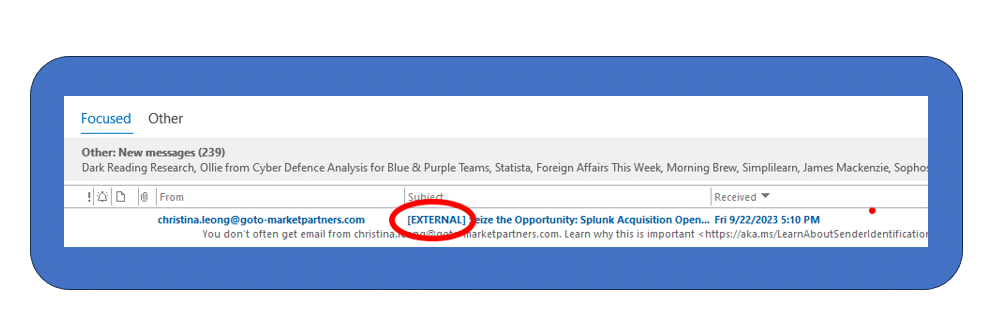
Phishing emails most often come from outside an organization, so when an email originates from outside your organization, it's crucial to spot it. External sender tags serve this purpose by providing a visual cue.
image

Email systems can be configured to automatically apply visual tags or "red flags" to messages identified as originating from an external domain or email address. Alerted to the email’s source externality, recipients should be more cautious about opening attachments or clicking links.

The key is training staff to be on high alert whenever they see the external sender indicators. They should know how to hover over hyperlinks to check destinations, scrutinize the sender address for inaccuracies, double check any unusual requests with the supposed sender directly, and overall, just pause and think carefully before acting on the message.

Attachment Scanning: Don't Open That File Just Yet

Another common phishing tactic is to send malware payloads through infected document attachments. Scanning attachments for any inherent threats or malware signatures at the inbox level to raise awareness before allowing the recipient to access the attachment can limit the phishing attempt success rate. Microsoft's EOP provides attachment scanning using continuously updated threat intelligence feeds.

If any unsafe attachments are discovered, employees can be immediately alerted through automated notifications.

  • False Positives: Sometimes, legitimate files are flagged.
  • Zero-Day Exploits: New malware variants may not be immediately recognized.
  • Resource Intensive: Scanning can slow down email delivery.

Beginning to appear on the horizon, AI-driven solutions that can adapt to new malware types more quickly and cloud-based scanning that might offload the resource burden from individual machines. The flip side of that development is the parallel AI-driven development of new malware and attack types, as well as the facilitating effect AI might have in the personalization of phishing emails.

Reporting: Make It Easy and Quick

Despite it all, some phishing emails will inevitably reach inboxes. In these cases, it is essential to enable employees to easily and quickly report suspected phishing attempts to security teams. Solutions should provide visible "report phishing" buttons right within the email interface, making it seamless to flag suspicious messages.

Step-by-Step Guide

  1. Identify Suspicion: If an email looks dubious, don't interact with it.
  2. Click 'Report Phishing': Use the built-in feature in your email client.
  3. Describe the Issue: Optionally, add details about what seemed suspicious.
  4. Forward to Security Team: If no built-in feature exists, forward the email to your organization's security email.
  5. Delete the Email: Remove it from your inbox to prevent accidental interactions.

Any awareness around proper phishing identification and reporting allows technology and staff to work hand in hand against threats.

Alert Channels: Your 24/7 Watchtower

Finally, security teams themselves need technical infrastructure that enables prompt alerts and response coordination when phishing attacks occur. Dedicated email addresses, online portals, and communication channels should exist solely for employees to report phishing attempts.

Technology and Integration examples

  1. Email Aliases: Create a specific email like "[email protected]" solely for phishing reports.
  2. Incident Management Systems: Integrate the reporting channel with tools like Jira or ServiceNow for real-time tracking.
  3. Automated Analysis: Use machine learning algorithms to prioritize reports based on severity.
  4. Alerting Mechanisms: Integrate with Slack or Microsoft Teams to alert security personnel immediately upon a report.

Actively monitor these incoming reports on a 24/7 basis so that suspicious emails can be swiftly disabled, analyzed, and blocked when verified as malicious.

Teaming together to Stop the Phish

Without strong behind-the-scenes collaboration between employees and security staff, even the most advanced inbox defense tools will be limited in their effectiveness. Dedicated communication channels allow human detection and technological defenses to work together most powerfully against sly phishing tactics.

With phishing attacks only growing in prevalence and sophistication, purely human countermeasures will inevitably fail at times. Organizations need to put technological defenses in place directly at the critical inbox level, equipping their workforce with automated aids to better recognize, report, and shut down phishing attempts before they do harm.

Phishing attacks are a persistent threat, but they're not unbeatable. By leveraging advanced inbox tools and fostering a culture of cybersecurity awareness, organizations can significantly reduce the risk of successful phishing attempts.

Cymulate Exposure Validation makes advanced security testing fast and easy. When it comes to building custom attack chains, it's all right in front of you in one place.
Mike Humbert, Cybersecurity Engineer
DARLING INGREDIENTS INC.
Learn More
Book a Demo