Frequently Asked Questions

Threat Intelligence Analysis & Malware Research

How can I run threat intelligence analysis and malware research without spending money?

You can conduct threat intelligence analysis and malware research using open-source intelligence (OSINT) and free tools. The blog post details a step-by-step approach: searching for indicators of compromise (IoCs) in VirusTotal Community, using AnyRun for sandbox analysis, and downloading malware samples from repositories like Hybrid Analysis. This method allows you to attribute ransomware actors and analyze campaigns without premium accounts. Read the full guide.

What are the main steps to finding malware samples for analysis?

The main steps include: 1) Searching for relevant hashes (e.g., mhyprot2.sys) in VirusTotal Community, 2) Exploring execution parents and dropped files, 3) Using open malware repositories like AnyRun, Malshare, Malware Bazaar, and Hybrid Analysis to download samples, and 4) Running samples in sandboxes to extract additional files and artifacts for deeper analysis.

Which free tools and repositories are recommended for malware research?

Recommended free tools and repositories include VirusTotal Community, AnyRun (free account), Malshare, Malware Bazaar, Hybrid Analysis, and Intezer Community. These platforms allow you to search for, download, and analyze malware samples, as well as attribute them to known actors.

How can I attribute a ransomware sample to a specific actor using free resources?

You can attribute ransomware samples by uploading ransom notes to ID Ransomware, which matches notes to known actors, and by analyzing the malware file in Intezer Community, which identifies code similarities to known malware families. Cross-referencing TOX-IDs and ransom note content with public blogs and OSINT sources can further aid attribution.

What are some common challenges when researching malware with free tools?

Common challenges include limited access to premium features (e.g., shorter sandbox run times), incomplete sample availability in public repositories, and occasional misattribution by automated tools. Persistence and cross-referencing multiple sources are key to overcoming these hurdles.

How can I use AnyRun to analyze malware samples?

AnyRun allows you to upload and execute malware samples in a sandbox environment. With a free account, you can increase the run time from 1 to 5 minutes, which helps capture more of the infection process and extract additional files, such as batch scripts and ransom notes.

What is the significance of the mhyprot2.sys driver in ransomware campaigns?

The mhyprot2.sys driver, originally a legitimate gaming driver, has been abused by ransomware actors to terminate security-related processes from kernel space. Its presence in a campaign can indicate advanced evasion techniques and is a key artifact for threat intelligence analysis.

How do I find missing files in a malware campaign if they are not in VirusTotal?

If files are missing in VirusTotal, you can run available samples in a sandbox like AnyRun to trigger the full infection chain and extract dropped files. Additionally, searching hashes in other repositories like Hybrid Analysis or Malshare can help locate missing components.

What is the role of ransom notes in malware attribution?

Ransom notes often contain unique identifiers, such as TOX-IDs, which can be cross-referenced with public databases and blogs to attribute the malware to specific ransomware families or actors. Tools like ID Ransomware automate this process by matching note content to known campaigns.

How can I use Intezer Community for malware attribution?

Intezer Community allows you to upload malware samples and analyzes them for code similarities to known malware families and actors. This helps in attributing new or unknown samples based on genetic code analysis, even if traditional indicators are lacking.

What are some example hashes and files from the ransomware campaign discussed in the blog?

Example files and hashes include: AVG.MSI (b6373b520a21c2e354b805d85a45a92d), AVG.exe (44961feb7fd9eeabdb67e5eeb15b9c8a), HelpPane.exe (d33dac29513dcc1027f29d5e9e901369), Svchost.exe (5143bbdf1f53248c7743f8634c0ddbc1), Logon.bat (160b427081688e677d0136a42dddc2d9), and Mhyprot2.sys (4b817d0e7714b9d43db43ae4a22a161e).

How does Cymulate help organizations stay protected against the latest malware attacks?

Cymulate enables organizations to proactively validate their defenses against the latest malware attacks by simulating real-world threats, identifying vulnerabilities, and optimizing security posture. The platform provides continuous threat validation and actionable insights to improve resilience. Book a demo to see how Cymulate can help your organization.

Where can I find more resources and guides on threat intelligence and malware research?

You can access a wide range of resources, including blog posts, whitepapers, and case studies, in the Cymulate Resource Hub. The blog also features guides on validating identity attacks, WAF rules, and more.

Who is the author of the threat intelligence analyst and malware researcher guide?

The guide is authored by Dan Lisichkin, Cymulate's threat hunter and threat intelligence researcher. Dan is a member of the Curated Intelligence community and is known for his analytical and self-taught approach to cybersecurity research. Learn more about Dan.

What is Cymulate Exposure Validation and how does it help security teams?

Cymulate Exposure Validation is a solution that makes advanced security testing fast and easy. It allows security teams to build custom attack chains and validate exposures in one place, providing actionable insights to improve defenses. Learn more.

How can I validate identity and privilege attacks in Active Directory and Entra ID?

Cymulate provides simulation capabilities for real-world identity and privilege attacks in Active Directory and Entra ID. This helps organizations test their defenses against modern threats targeting identity as the new perimeter. Read the blog post.

How does Cymulate help with validating WAF rules and remediating gaps?

Cymulate offers tools to validate Web Application Firewall (WAF) rules, identify validation gaps, and turn them into actionable defense improvements. This ensures that web applications are protected against threats like SQL injection. Read more.

How can I connect vulnerabilities to real attack scenarios using Cymulate?

Cymulate connects vulnerabilities to real attack scenarios by validating what is actually exploitable in your environment. This approach helps prioritize remediation efforts based on real-world risk. See the demo.

Where can I find Cymulate's case studies and customer success stories?

You can explore Cymulate's case studies and customer success stories by visiting the Customers page. These stories are filtered by industry and showcase real-world outcomes.

Features & Capabilities

What features does Cymulate offer for threat intelligence analysts and malware researchers?

Cymulate offers continuous threat validation, exposure analytics, attack path discovery, automated mitigation, and an extensive threat library with over 100,000 attack actions. These features help analysts and researchers validate defenses, prioritize exposures, and simulate real-world attacks. Learn more about the platform.

Does Cymulate integrate with other security tools?

Yes, Cymulate integrates with a wide range of security technologies, including Akamai Guardicore, AWS GuardDuty, BlackBerry Cylance OPTICS, Carbon Black EDR, Check Point CloudGuard, Cisco Secure Endpoint, CrowdStrike Falcon, Wiz, SentinelOne, and more. For a full list, visit the Partnerships and Integrations page.

What security and compliance certifications does Cymulate have?

Cymulate holds several key certifications, including SOC2 Type II, ISO 27001:2013, ISO 27701, ISO 27017, and CSA STAR Level 1. These certifications demonstrate Cymulate's commitment to robust security and compliance standards. Learn more.

How does Cymulate ensure data security and privacy?

Cymulate ensures data security through encryption in transit (TLS 1.2+) and at rest (AES-256), secure AWS-hosted data centers, a tested disaster recovery plan, and compliance with GDPR. The platform also features 2FA, RBAC, and IP address restrictions. Read more about security at Cymulate.

How easy is Cymulate to implement and use?

Cymulate is designed for quick and easy implementation, operating in agentless mode with no need for additional hardware or complex configurations. Customers report being able to start running simulations almost immediately, with an intuitive dashboard and accessible support. Schedule a demo to see for yourself.

What feedback have customers given about Cymulate's ease of use?

Customers consistently praise Cymulate for its intuitive interface, ease of implementation, and actionable insights. Testimonials highlight the user-friendly dashboard, excellent support, and immediate value in identifying security gaps. Read customer quotes.

Pricing & Plans

What is Cymulate's pricing model?

Cymulate uses a subscription-based pricing model tailored to each organization's needs. Pricing depends on the chosen package, number of assets, and scenarios selected. For a personalized quote, schedule a demo with the Cymulate team.

Use Cases & Benefits

Who can benefit from using Cymulate?

Cymulate is designed for CISOs, security leaders, SecOps teams, red teams, and vulnerability management teams in organizations of all sizes and industries, including finance, healthcare, retail, and more. The platform addresses the unique needs of each role with tailored solutions. Learn more about personas.

What problems does Cymulate solve for security teams?

Cymulate addresses fragmented security tools, resource constraints, unclear risk prioritization, cloud complexity, communication barriers, inadequate threat simulation, operational inefficiencies in vulnerability management, and post-breach recovery challenges. The platform provides automation, unified visibility, and actionable metrics. See case studies.

What measurable outcomes have customers achieved with Cymulate?

Customers have reported outcomes such as an 81% reduction in cyber risk (Hertz Israel, four months), a 52% reduction in critical exposures, a 60% increase in team efficiency, and a 20-point improvement in threat prevention. Read the Hertz Israel case study.

How does Cymulate differ from other security validation platforms?

Cymulate stands out with its unified platform combining BAS, CART, and exposure analytics, continuous 24/7 threat validation, AI-powered optimization, complete kill chain coverage, ease of use, and proven customer results. It is recognized as a market leader by Frost & Sullivan and a 2025 Gartner Customers' Choice. See Cymulate vs competitors.

What educational resources does Cymulate provide?

Cymulate offers a Resource Hub with whitepapers, blog posts, webinars, and a cybersecurity glossary. These resources help users stay informed about the latest threats, research, and best practices. Visit the Resource Hub.

Where can I find news, events, and blog posts from Cymulate?

Stay up-to-date with Cymulate through the blog, newsroom, and events & webinars page.

Does Cymulate have a blog post about preventing lateral movement attacks?

Yes, Cymulate has a blog post titled 'Stopping Attackers in Their Tracks' that discusses common lateral movement attacks and prevention strategies. Read the blog post.

Where can I download a guide on how CTEM breaks down threat resilience silos?

You can download the guide '5 Ways CTEM Breaks Down Threat Resilience Silos' as a PDF from this link.

Cymulate named a Customers' Choice in 2025 Gartner® Peer Insights™
Learn More
New Case Study: Credit Union Boosts Threat Prevention & Detection with Cymulate
Learn More
New Research: Cymulate Research Labs Discovers Token Validation Flaw
Learn More
An Inside Look at the Technology Behind Cymulate
Learn More

How to Run Threat Intelligence Analysis and Malware Research (Without Spending a Dime)

By: Dan Lisichkin

Last Updated: September 15, 2025

cymulate blog article

In this post, I will walk you step-by-step through techniques that will enable you to run threat intelligence analysis and research malware without spending a dime. 

Chapter Zero – Triggering My Inner Threat Intelligence Analyst and Malware Researcher Ego 

I recently saw a blog post by Trend Micro in the Curated Intelligence Discord group. The blog post describes a rather interesting ransomware incident discovered by Trend Micro, in which, yet again, a legitimate driver was utilized to terminate security-related processes from the kernel space. I was curious, so I looked into the IoC index. 

Threat Intelligence Analysis and Malware Research 1

I decided to look up the IoCs in VirusTotal, but, unfortunately, the only hash listed in the VT database (at the time of writing) was the driver mhyprot2.sys. 

As I am lucky enough to have access to a premium VTI account and was determined to provide the juicy hashes to my community, I started researching. 
Threat Intelligence Analysis and Malware Research 2

Quickly, I found more campaigns from the same ransomware actor as well as the tools and ransomware associated with the Trend Micro report. Even as I stroked my bloated ego  (after all, I had just found all those missing hashes), I remembered the days when I was starting out with malware research and begging for samples. 

And so, I decided to challenge myself to find and download all the missing samples and attempt to attribute the ransomware actor using just OSINT and free tools. 

Let’s dive in. 

Threat Intelligence Analysis and Malware Research 3

Chapter One – Finding the Malware Samples 

I first looked up the driver mhyprot2.sys hash (0466E90BF0E83B776CA8716E01D35A8A2E5F96D3) in a VirusTotal Community account and selected the relations tab (I avoided the community tab as the collections and comments were not at all helpful in this case.) 
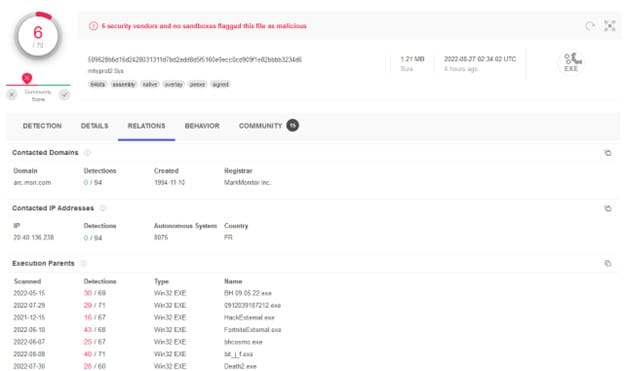
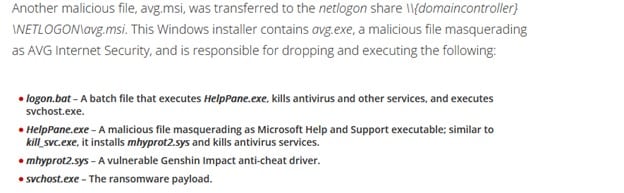
As it is a legitimate gaming driver, it has a lot of execution parents, and the drop-down list of execution parents is crazy long. However, we do have some clues to search for. From the report, we know that avg.msi and avg.exe are responsible for dropping the driver onto the disk: 
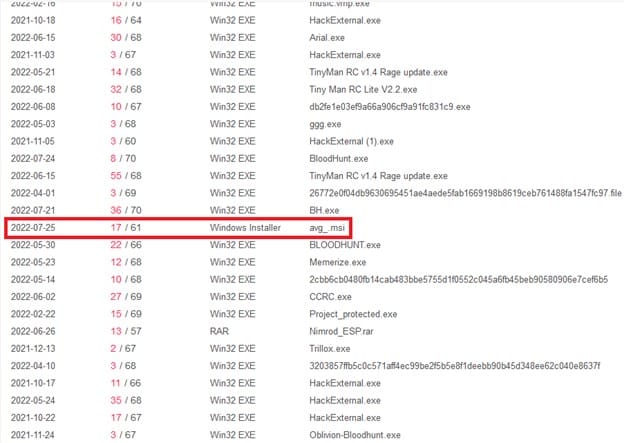
I decided to keep dropping more files within the execution parents list, and, what do you know ?! 
Threat Intelligence Analysis and Malware Research 6

Interesting ... Let's see what this hash is about. I  clicked the (MD5: b6373b520a21c2e354b805d85a45a92d ) file name and hit jackpot! 
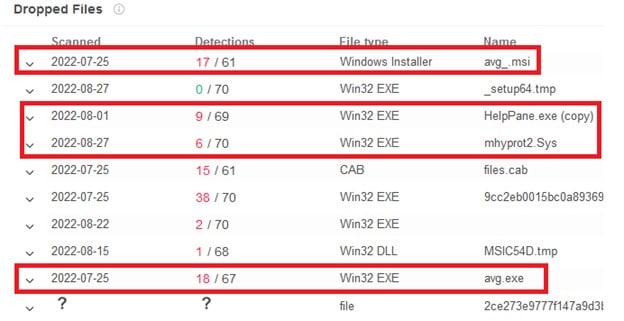
Two files were missing: the ransomware file itself, called svchost.exe, and logon.bat. The first was quite easy to find. Just by clicking the dropped files within the MSI, I found that VirusTotal displayed a misleading name for the ransomware file. Clicking on the 6th file (with the long hash name) got me transferred to the following sample (5143bbdf1f53248c7743f8634c0ddbc ). 
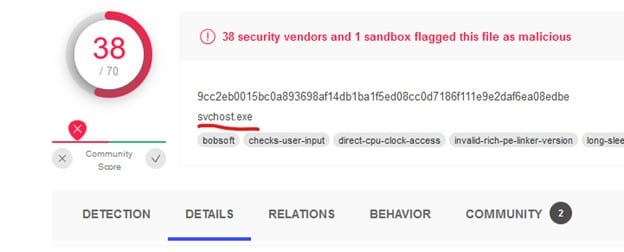
Threat Intelligence Analysis and Malware Research 8

Great! Now for the missing batch file and the ransomware note. The only way I could think of is to trigger the MSI installation on a sandbox like AnyRun. In theory, not only would I gain access to all the files, as AnyRun allows anyone who pleases to download files from their reports, but I would also gain access to the logon.bat file and the ransomware note, which could aid in attribution. 

Chapter Two – Downloading the Malware Samples 

Back in the day, I used open malware repositories or begged my researcher friends to use their VTI access and download samples for me. The latter will obviously hurt our fragile ego, so let's start looking up avg.exe and avg.msi in open malware repositories. 

I searched the hashes in AnyRun, Malshare, Malware Bazaar, and Google. Finally, I hit the jackpot with Hybrid Analysis which allows registered users to download samples!

Threat Intelligence Analysis and Malware Research 9

The next step was to download the file and trigger an execution on AnyRun, which should provide easy access to all the samples within this ransomware campaign. 

Once I got my hands on the avg.msi sample, I ran it on AnyRun. There's quite a nifty trick in AnyRun that I only discovered when I laid my hands on a premium account. It is possible to increase the machine run time by clicking the button Add Time at the top right. For a free account, it increases the run time from 1 minute to 5 minutes which changes quite a bit. 
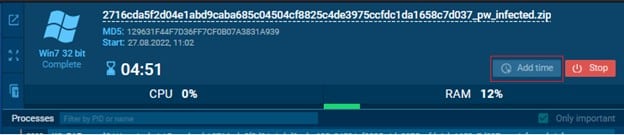
Anyway, I ran the sample, and, what do you know?! I found the entire infection process with all the missing files! 

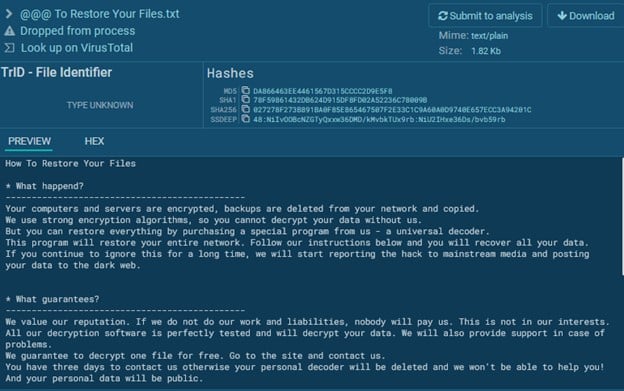
Here is logon.bat, which was missing in Virus Total. 
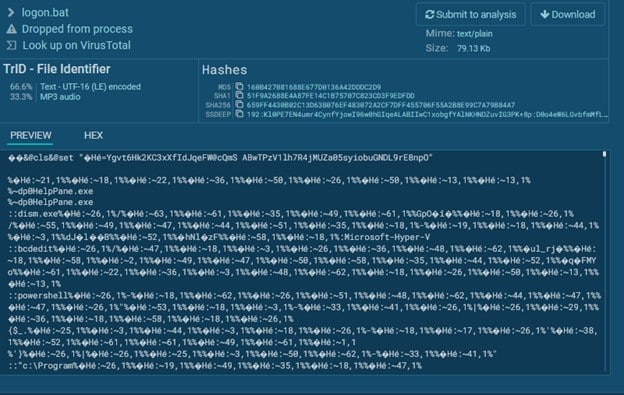
Threat Intelligence Analysis and Malware Research 11

Here is the ransomware note: 

Threat Intelligence Analysis and Malware Research 12

Chapter Three – The Malware Attribution Process 

Sadly, this chapter will be quite short.  

Spoilers! I couldn't find the actor responsible for this ransomware. 

I first tried to upload the ransomware note to ID Ransomware, which can attribute ransomware notes to ransomware actors by just uploading the ransomware note. ID Ransomware claimed that this ransomware note belonged to Nemucod. 
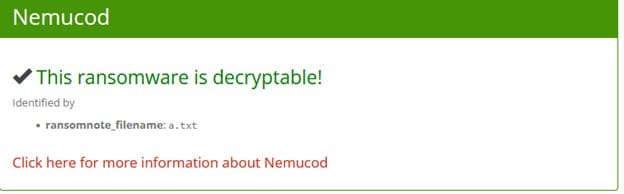
Threat Intelligence Analysis and Malware Research 13

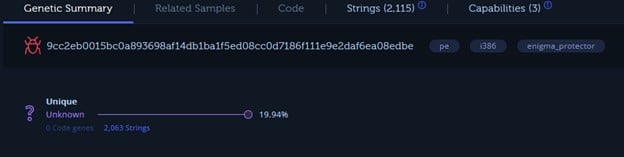
Yet, I was doubtful. So I uploaded the ransomware file svchost.exe (since, by then, it was on Anyrun, I could download it for free) to Intezer, which offers a community account version. Intezer attempts to attribute files to malware and malicious actors by code "genes."
Threat Intelligence Analysis and Malware Research

That also wasn't very helpful. Well...I did my best right? 

See you guys next time! 

Thanks to @1ZRR4H, who took a good look at the ransomware note and saw that the TOX-ID in the ransom note is the same one found in Rever Ransomware notes. A simple google search of the TOX-ID confirms it: 
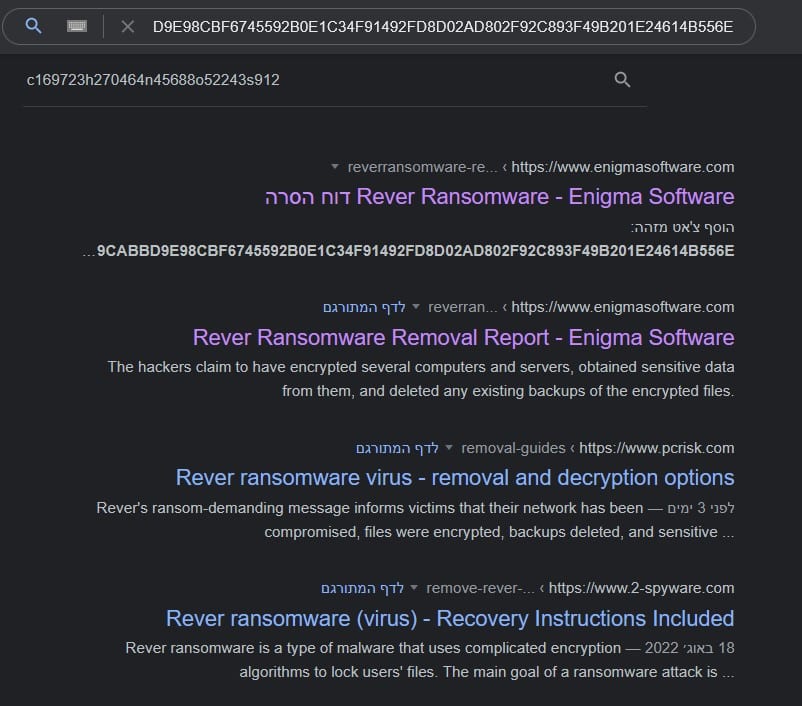
@Amigo_A_ has written about Rever ransomware. Read more about Rever Ransomware here. 

Chapter Four – IoC appendix 

AVG.MSI - b6373b520a21c2e354b805d85a45a92d 

AVG.exe - 44961feb7fd9eeabdb67e5eeb15b9c8a 

HelpPane.exe - d33dac29513dcc1027f29d5e9e901369 

Svchost.exe - 5143bbdf1f53248c7743f8634c0ddbc1 

Logon.bat - 160b427081688e677d0136a42dddc2d9 

Mhyprot2.sys - 4b817d0e7714b9d43db43ae4a22a161e 

 -------

To see how Cymulate can help your organization stay protected against the latest malware attacks, book a demo today.

Cymulate Exposure Validation makes advanced security testing fast and easy. When it comes to building custom attack chains, it's all right in front of you in one place.
Mike Humbert, Cybersecurity Engineer
DARLING INGREDIENTS INC.
Learn More
Book a Demo