

CVE-2025-64669: Uncovering Local Privilege Escalation Vulnerability in Windows Admin Center

Ilan Kalendarov, Security Research Team Lead
Ben Zamir, Security Researcher
Elad Beber, Security Researcher
Executive Summary
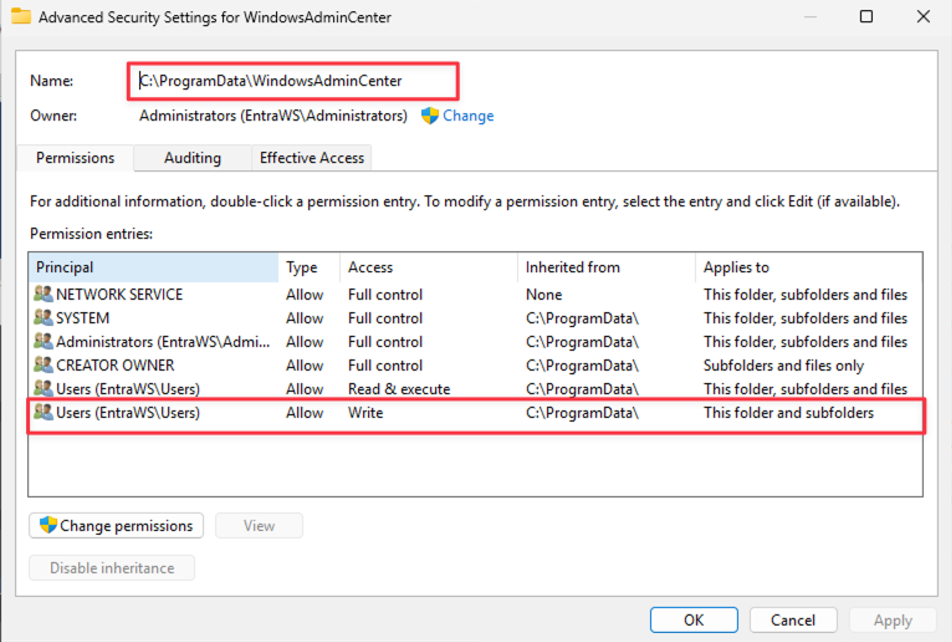
Cymulate Research Labs has uncovered a local privilege escalation vulnerability in Microsoft’s Windows Admin Center (WAC) version 2.4.2.1. The root cause lies in insecure directory permissions where the C:\ProgramData\WindowsAdminCenter folder is writable by all standard users. This affects all environments running WAC up to version 2411 and applies broadly across any organization using WAC for server or infrastructure management.
The exposure impacts the technology layer rather than specific sectors. Any deployment that relies on the WAC gateway, integrated extensions, privileged administrative workflows or Windows Server hosts where WAC is installed inherits the risk. Standard users with access to the underlying filesystem can leverage this misconfiguration to escalate privileges.
This misconfiguration allowed us to chain multiple techniques into working exploits:
- Extension Uninstall Mechanism Abuse – Hijacking the uninstall process to run signed PowerShell scripts with elevated privileges.
- Updater DLL Hijacking – Dropping a malicious DLL into the updater folder, which is then loaded automatically by a privileged WAC updater process.
Both vectors enable escalation from a low-privileged user to SYSTEM, effectively breaking the Windows security boundary. Microsoft confirmed the issue, assigned it CVE-2025-64669 and awarded us a $5,000 bounty.
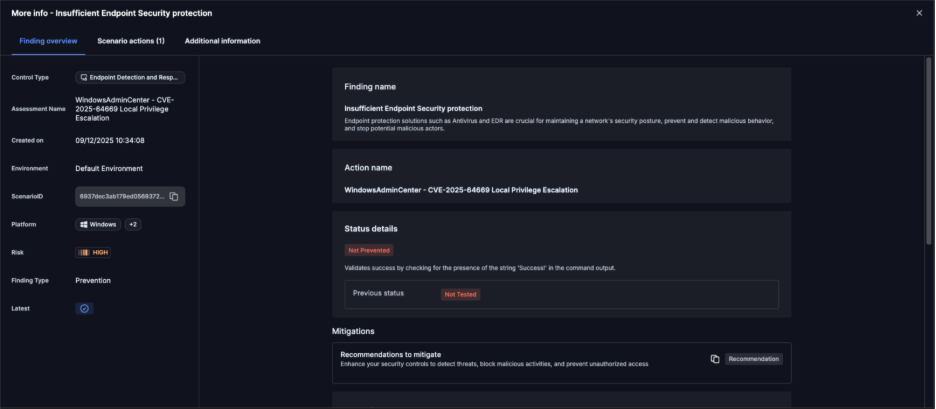
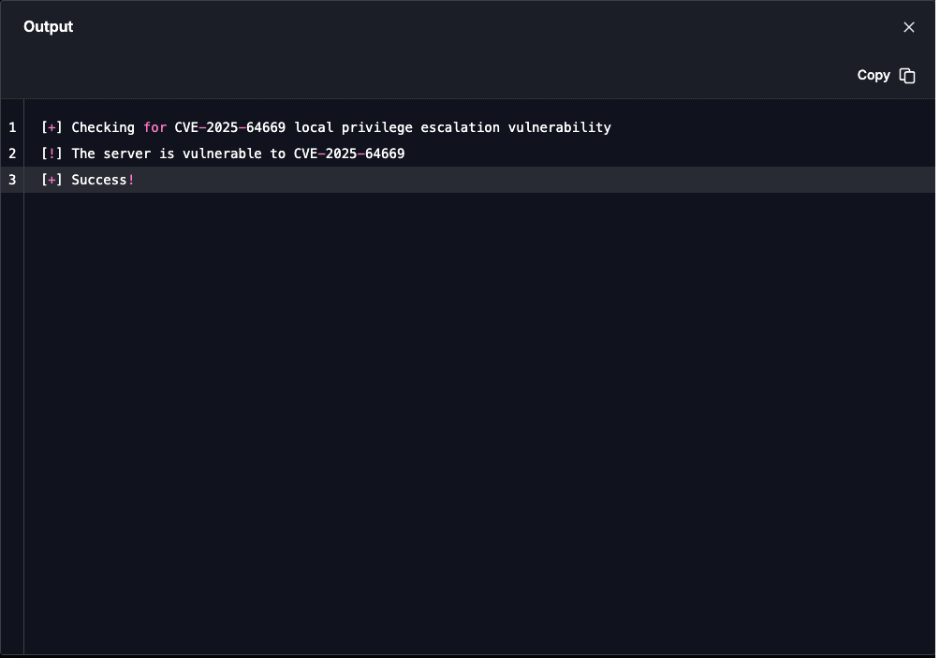
On Dec. 15, 2025, we updated Cymulate Exposure Validation with the new attack scenario WindowsAdminCenter - CVE-2025-64669 Local Privilege Escalation to test and validate threat detection in SIEM and endpoint security. Cymulate customers who wish to validate whether they are affected by this CVE can run the scenario against their Windows Admin Center gateway to assess exposure.

Background: Windows Admin Center
Windows Admin Center (WAC) is Microsoft’s web-based management tool for Windows Server and client machines. It provides a modern replacement for legacy MMC consoles and enables administrators to manage servers, clusters, hyper-converged infrastructure and Windows 10/11 endpoints from a browser.
Windows Admin Center is a widely adopted product, heavily relied upon by IT administrators around the world to manage servers and endpoints at scale. Its popularity means that any vulnerability discovered in WAC has the potential for massive impact across enterprises of all sizes. From small businesses running a handful of servers, to global enterprises managing hybrid cloud environments, WAC is positioned as a central tool.
The Cymulate Research Team knew that if we were able to find a serious security weakness in such a core piece of infrastructure, it wouldn’t just be a theoretical bug it would have real-world consequences for thousands of IT teams. This understanding motivated us to dive deep, focusing on how developers implemented sensitive actions like installation, updates and uninstallations.
Given the complexity and trust WAC commands in enterprise environments, our intuition was that even a single misstep in these areas could be leveraged to create a significant exploit opportunity.
The Finding: Writable WAC Directory
Our starting point was noticing that the folder C:\ProgramData\WindowsAdminCenter was writable by all users. At first glance this looked like a low-severity misconfiguration, because we didn’t initially realize that inside this folder there was also an executable running as a service under SYSTEM privileges. That completely changed the game. Suddenly this wasn’t just a writeable directory, it was a direct gateway into a highly privileged process.
We wanted to see if we could abuse that trust and after digging into how WAC manages updates and extensions, we confirmed several privileged processes load content straight from this folder.
This opened two distinct exploitation paths:
- Extension Uninstall Mechanism Abuse
- Updater DLL Hijacking
Exploitation Path #1 – Extension Uninstall Mechanism Abuse
We began by asking ourselves: “What kind of actions are guaranteed to run with elevated privileges but also touch user-accessible content?” Logic for Installation and uninstallation are usually a goldmine in this regard. By design, these are active actions developers expect administrators to run, and if not properly secured they can be abused.
So, we turned to dnSpy and decompiled the Windows Admin Center binaries being a .NET process (thanks Microsoft). This made reverse engineering far easier and more transparent for us. After exploring the namespaces, we quickly identified code responsible for uninstalling extensions.
The relevant section was crystal clear. It built a path to an uninstall folder, enumerated any .ps1 files there and executed them using PowerShell with the AllSigned execution policy.
string uninstallPath = Path.Join(uiDir, "uninstall");

if (Directory.Exists(uninstallPath))

{

    foreach (string script in Directory.EnumerateFiles(uninstallPath, "*.ps1"))

    {

        ProcessStartInfo psi = new ProcessStartInfo

        {

            FileName = "cmd.exe",

            Arguments = "/c PowerShell -ExecutionPolicy AllSigned -File \"" + script + "\"",

            UseShellExecute = false,

            WindowStyle = ProcessWindowStyle.Hidden

        };

        Process.Start(psi);

    }

}This code snippet shows exactly how WAC trusted whatever PowerShell scripts existed in the uninstall folder. Since the parent folder is writable by everyone, it opened a dangerous opportunity. That said, it isn’t completely trivial to just drop in a signed PowerShell payload you need to either find an existing signed script that can be abused, or craft and sign one yourself.
Signing your own script is of course a high-privileged activity, but we did this purely for demonstration purposes. While it is possible to locate various signed PowerShell scripts online that could be leveraged, for the sake of our demo we created and signed our own simple script. This script executed 'whoami' and dropped the output into C:\Users\Public, clearly showing the elevated execution context.
How we leveraged it:
- We created a custom uninstall folder under. C:\ProgramData\WindowsAdminCenter\Extensions\<ExtensionName>.
- Placed a malicious signed script inside.
- Triggered the uninstall process via WAC’s UI/API.
- Our payload ran as NETWORK SERVICE or even SYSTEM.
POC Demo:
Exploitation Path #2 – Updater DLL Hijacking
Next, we turned our focus to the updater mechanism. Updates are another active process, which usually means files are copied, verified, or loaded dynamically. Again, dnSpy was invaluable. We looked at the update component (WindowsAdminCenterUpdater.exe) and traced its DLL loading behavior.
We found that the updater explicitly loaded DLLs from path C:\ProgramData\WindowsAdminCenter\Updater
Since this folder was writable by all users, we immediately saw the classic attack surface – DLL hijacking. We went to the decompiled code to understand exactly how updates were triggered and found an API endpoint: /api/update. At first, when we tested, our DLL was indeed loaded for a split second but did not execute. Checking the Event Viewer revealed that DLL was rejected because it was unsigned there was a validation step checking signatures.
We almost gave up but then noticed something interesting. The validation process happens inside the WindowsAdminCenter process itself, and after it finishes, it calls and opens WindowsAdminCenterUpdater.exe. That gave us the idea to leverage a classic Time-of-Check Time-of-Use (TOCTOU). We wrote a simple PowerShell script that listens for WindowsAdminCenterUpdater.exe to start, then immediately copies our malicious user32.dll into the updater folder so it gets loaded without validation.
Register-WmiEvent -Query "SELECT * FROM __InstanceCreationEvent WITHIN 0.1

WHERE TargetInstance ISA 'Win32_Process' AND TargetInstance.Name = 'WindowsAdminCenterUpdater.exe'" -Action {

    Copy-Item "C:\Users\Public\user32.dll" "C:\ProgramData\WindowsAdminCenter\Updater\user32.dll" -Force

}This worked flawlessly. The DLL executed with SYSTEM privileges, and importantly, this script can be run completely as a regular user without any elevated permissions.
This showed us that the updater trusted DLLs located in its working directory instead of enforcing system paths.
Proof-of-Concept approach:
- We created a custom user32.dll that simply wrote to C:\Users\Public\test.txt for PoC purposes.
- Used a low-privileged account to monitor for updater activity via Register-WmiEvent.
- Dropped the DLL into C:\ProgramData\WindowsAdminCenter\Updater.
- Triggered an update using the /api/update endpoint.
- Our DLL executed as SYSTEM.
POC Demo:
Disclosure Timeline
- Vulnerability reported to Microsoft via MSRC on Aug. 5, 2025.
- Microsoft acknowledged that there is a security issue on Aug. 29, 2025.
- Microsoft awarded us a $5,000 bounty on Sept. 3, 2025.
- On. Nov 12, 2025, Microsoft stated that a CVE would be assigned with Important severity, and a fix would be issued in the Dec. 10 Patch Tuesday.
Validate Your Defenses Against Real Exploitation
Start testing your Windows Admin Center instances against CVE-2025-64669 using the latest Cymulate attack scenario.

More from the Cymulate Research Lab
View More Resources
Shai-Hulud 2.0: NPM Supply Chain Attack Exposes the SDLC's Weakest Link
Overview of Shai-Hulud 2.0 techniques used to compromise npm ecosystems and cloud-connected pipelines.

Simulating EtherHiding: Blockchain as a Malware
Simulate EtherHiding attacks that hide malware via blockchain payloads, exposing Web3 threats and defensive strategies.

Critical RCE in React RSC (CVE-2025-55182 & 66478)
Dive into critical React/Next.js RSC remote code exec flaws and how attackers exploit CVE-2025-55182/66478 to compromise servers.