

Across the Kill Chain: How Agents Became the Enterprise's New Front Door
Individually, they are bugs. Chained together, the vulnerabilities we found in AI agents cross the trust boundaries enterprises depend on: from untrusted content to code execution, from one user to another and from a local session to the cloud. Because an AI agent acts with its user's identity, credentials and reach, any web page, document or repository it reads can become the first link in a kill chain that ends in privileged cloud access.
Presented at SecTor 2026
This post summarizes the talk “Across the Kill Chain: AI Agents as the Enterprise Red Team's New Front Door,” presented by Ben Zamir at SecTor 2026. It ties together the findings from the Cymulate Research Labs AI agent research series and walks through the two end-to-end kill chains that Ben demonstrated on stage, together with the defender's view of how to detect and break them. Watch the full session here.
Key Takeaways for Security Leaders
- Agents inherit the user. An AI agent acts with its user's identity, credentials and reach. Compromising the agent means compromising everything the user can touch.
- Agents affect every department. Every user now works through AI agents: finance, HR, sales, support, operations and engineering alike. Our kill chains use engineering workflows as the example, but any user whose agent reads untrusted content and holds corporate credentials can be the first link.
- The payload is information. A web page, document, email, shared file or repository can carry instructions that the agent turns into trusted actions: reading, writing, executing and authenticating.
- Small bugs can become cloud compromises. We chained local, vendor-specific flaws into two complete kill chains that start with one user on a shared Windows host and end with high-privilege Azure and GCP access.
- Agent activity is hard to judge. Agents legitimately perform many actions. Detection must correlate input, endpoint and identity telemetry around the task the agent was given.
- Govern agents as identities. Least privilege, short-lived credentials, isolated execution and tool lifecycle control limit the blast radius when an agent is manipulated.
Executive Summary
Over the past year, Cymulate Research Labs investigated how agentic AI applications interact with the systems they run on. We focused on the agents that ship with the deepest access to the host today, including Claude Code, Codex CLI and the Codex App, Cursor CLI, Gemini CLI, GitHub Copilot CLI, AWS Kiro and Google Antigravity. We published the individual findings in a series of posts, grouped into recurring failure patterns: execution flow hijacking, sandbox escape, world-writable trust, cross-user inter-process communication (IPC) takeover and, new in this post, universal naming convention (UNC) credential coercion.
Each finding on its own reads like a local bug: a binary resolved from the wrong folder, a configuration directory left writable, a pipe with a permissive access control list. This post shows what happens when an attacker chains them:
- In the first scenario, a prompt-injected web page leads to code execution on a shared Windows host, a cross-user takeover of Codex CLI, theft of an OpenAI token, a backdoored Codex cloud environment and, finally, the credentials of an Azure app registration with high privileges in the tenant.
- In the second scenario, a poisoned README leads to code execution through Cursor CLI, cross-user execution through ProgramData, a weaponized repository, a Gemini CLI sandbox escape and a Google OAuth token with broad GCP access.
Both scenarios run through engineering workflows, but the same pattern applies to any team whose agents read untrusted content and hold corporate credentials.
Neither chain relies on a single critical vulnerability. Every hop abuses a legitimate feature: a file-write tool, executable search order, a hook, a sandbox start-up routine and a cloud environment setup script. That is exactly why defenders need to look at agents differently.
The second half of this post covers the defender's perspective: why agent activity is hard to judge, which input, endpoint and identity signals reveal these chains and six controls you can apply.
Introduction: Every User Now Works Through an AI Agent
AI agents are no longer a niche developer tool. Every team and every workflow is starting to run through one: finance analysts reconcile reports, HR teams process candidate documents, sales and support teams work from CRM and ticket data, operations teams run automation and engineers write and ship code. In each case the agent reads files, runs commands, calls APIs and acts inside SaaS applications on the user's behalf. That delegation is the point: the agent acts as the user, with the user's identity, credentials and network reach. It is also the problem. When an attacker manipulates the agent, they inherit everything the user has.
Not just a developer problem
It is tempting to treat agent security as a developer-tooling issue, but coding agents were simply the first to ship with deep access to the host (shells, file systems, configuration and credentials), which made them the natural place to start this research. The same building blocks now power desktop assistants, browser agents, office copilots and agentic workflows built on Model Context Protocol (MCP) servers and skills across every department.
Six ways agents connect to your environment
An agent touches its environment through far more channels than a chat window suggests: built-in tools, MCP servers, skills, hooks and project configuration, extensions and plugins and cloud sessions. Every vulnerability in this research exploits one of these six connection types, and every one of them runs with the user's full privileges.
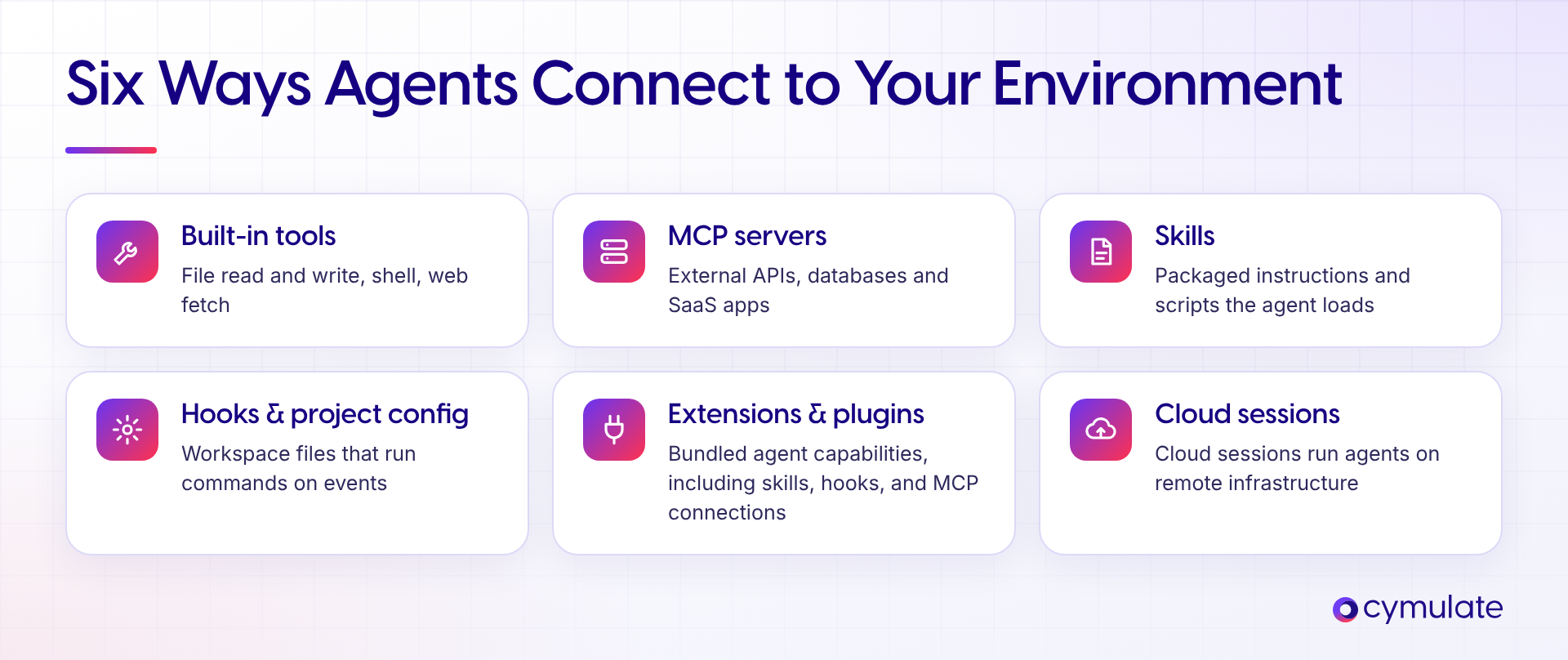
Figure 1: Six connection types between an AI agent and the environment it runs in.
When the agent becomes the actor
What separates an agent from a chatbot is that its output does not stop at text. Three shifts change the threat model:
- Delegated execution. Agents perform tasks. Tool calls, commands, file writes and remote actions happen inside the workflow, not after a human copies and pastes.
- Fewer review gates. Automation compresses the time between model output and execution. Less of what the agent generates is reviewed by a person before it takes effect.
- Inherited trust. Agents become part of the trust chain. Users and downstream systems consume agent-created files, configuration and commits as legitimate input.
The new trust boundary is the gap between the task the user gave the agent and the real-world side effects the agent produces.
The payload is information
Traditional initial access delivers a binary, a macro or an exploit. Against an agent, the delivery method is information. Anything the agent reads (a web page, a document, an email, a spreadsheet, a shared file, a source repository, an image) can carry instructions that poison its context. Because the agent can read, write, execute and authenticate, a poisoned input turns directly into a trusted action.
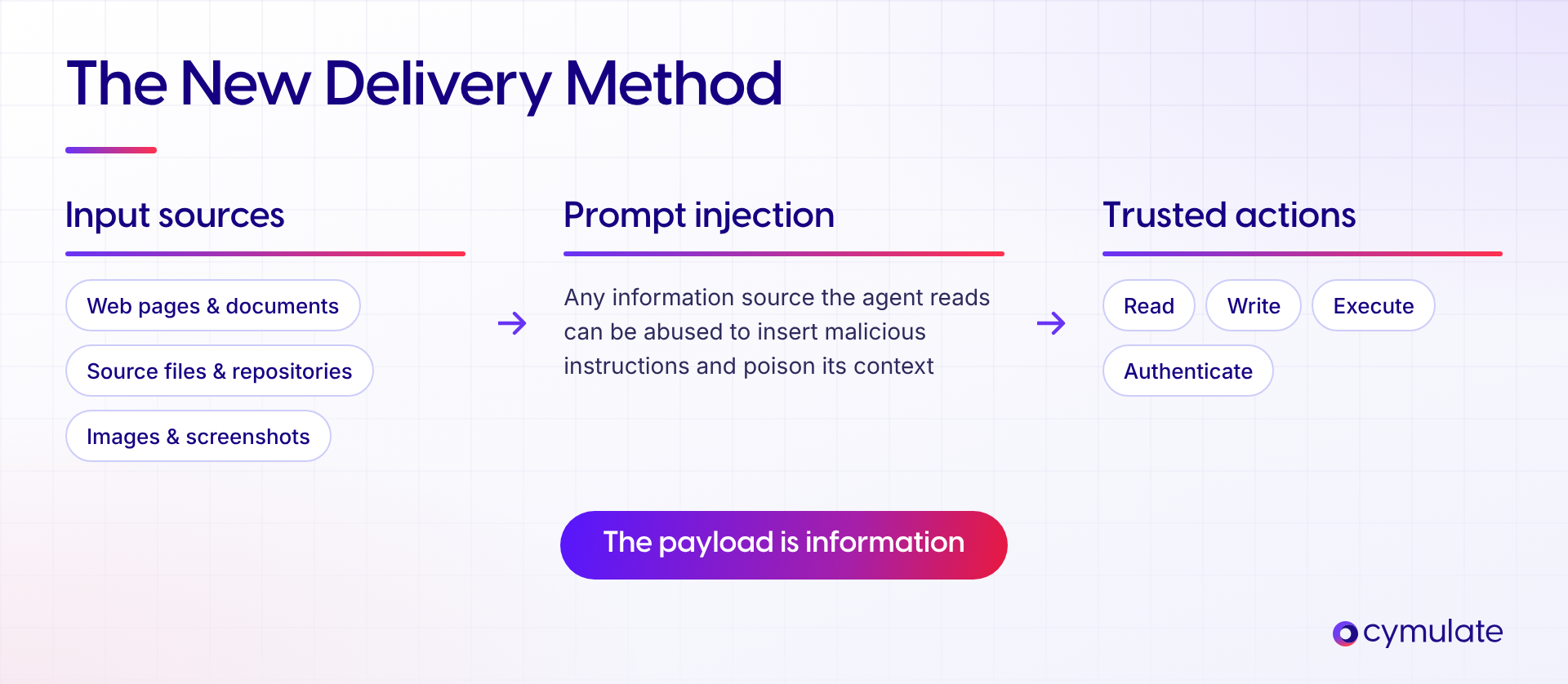
Figure 2: Any information source an agent reads can deliver instructions that become trusted actions.
Five AI Agent Vulnerability Families
We grouped our findings into five families. The same root causes recurred across vendors, which is what makes them chainable: an attacker who loses one primitive to a patch can usually find an equivalent in another tool on the same host. The tools we tested are agentic coding applications, but the root causes (trusting writable paths, resolving binaries by name, mounting credentials into a sandbox, trusting local IPC, following remote paths) are properties of how agents are built, not of who uses them. Each of the first four families has a dedicated deep dive; the table below summarizes them and links to the details.
| Family | What goes wrong | Affected tools | Deep dive |
| 1. Execution Flow Hijacking | Untrusted content leads the agent to write a binary or an execution config; the OS or IDE resolves it and the host runs it. | Cursor CLI, AWS Kiro (CVE-2026-10591), Codex CLI and App, GitHub Copilot CLI, Gemini CLI | Zero-Click RCE via Prompt Injection RCE in Codex CLI via Web Search |
| 2. Sandbox Escape | The sandbox keeps write access to host configuration, or starts by resolving host binaries from the workspace. | Claude Code (CVE-2026-25725), Gemini CLI, Codex CLI | Part 1: Sandbox Escape |
| 3. World-Writable Trust | Machine-wide configuration and dependency paths (C:\ProgramData\<vendor>, C:\node_modules) can be created by any standard user and are trusted by every user. | Claude Code (CVE-2026-35603), Cursor, Codex CLI, Gemini CLI, GitHub Copilot CLI | One Writable Folder, Every User Compromised |
| 4. Cross-User IPC Takeover | A sandbox named pipe grants full control to Everyone, so another local user can impersonate the sandbox and feed the model false output. | Codex CLI | The Pipe That Trusted Everyone |
| 5. UNC Credential Coercion | A file tool resolves an attacker-supplied UNC path and Windows authenticates to the remote host. | GitHub Copilot, Codex CLI, Antigravity | Covered below |
UNC credential coercion: The family we have not written about yet
The fifth family is the only one without a dedicated post, and it is the simplest. When an agent's file tool is asked to read or list a path, it does not distinguish a local path from a UNC path that points to a remote host. Windows resolves UNC paths by connecting to the remote share and authenticating automatically as the current user. A prompt-injected instruction to list or read a path on an attacker-controlled host is therefore enough to leak the user's NTLM authentication material. No code runs on the victim machine; the leak is the authentication itself. We observed this behavior in GitHub Copilot, Codex CLI and Google Antigravity.
From Bugs to Kill Chains: Two End-to-End AI Agent Attacks
Vendors triage each report on its own, and on its own each one often looks like low or medium severity: it needs a local foothold, a second user, or a victim who opens a specific project. Attackers do not operate on single bugs. They chain primitives until they reach something valuable, and in a modern enterprise the valuable thing is rarely the endpoint itself. It is the cloud identity, the shared data and the automation pipelines the endpoint can reach.
To show this, we built two enterprise scenarios. Both start from information an agent reads, both cross from one Windows user to another on a shared host, and both end with a privileged cloud identity. Both deliberately mix vendors: the attacker does not care which agent provides each step.
The scenarios assume a common enterprise setup: shared Windows hosts (VDI pools, terminal servers, jump boxes or build servers) used by several people, each running one or more AI agents signed in to corporate accounts that are connected to SaaS, data and cloud platforms.
We set both scenarios in engineering workflows, where today's agents have the deepest host access. Read them as templates rather than developer stories. Swap the web page or README for a vendor contract, a shared spreadsheet or an inbound email, the repository for a shared drive or SharePoint folder, and the QA pipeline for a finance or HR automation, and the pattern stays the same: untrusted information in, a trusted action out and credentials that reach well beyond the original user.
Kill chain 1: From a fetched web page to privileged Azure access
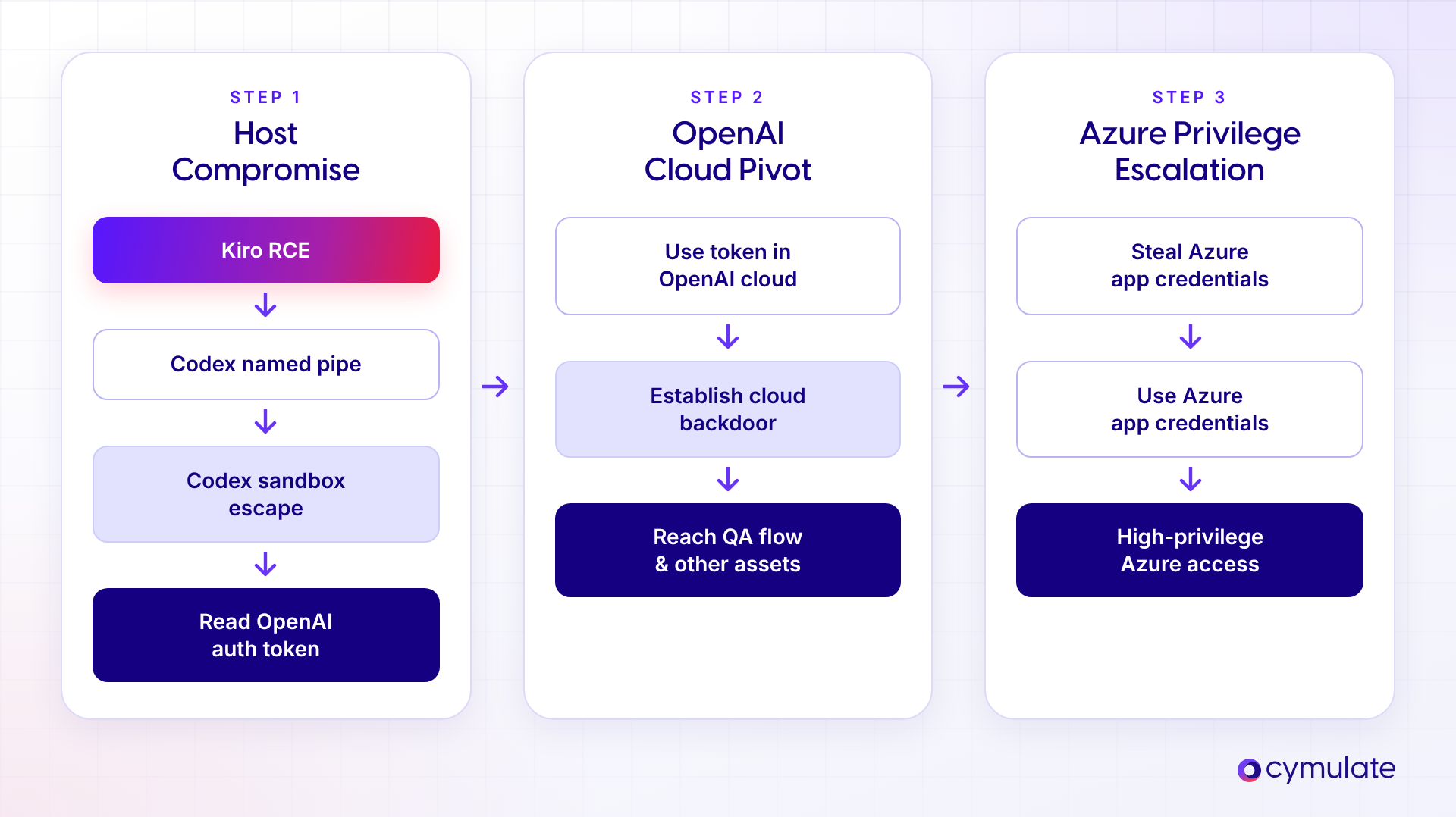
Figure 3: Kill chain 1. Host compromise through Kiro and Codex, a pivot into the OpenAI cloud and escalation into Azure.
Step 1: A fetched web page gives code execution through Kiro
The chain starts with an ordinary request. A user on the shared host asks AWS Kiro to work with content from a web page the attacker controls. Instructions hidden in that page lead the agent's file-write tool to create workspace execution configuration: a VS Code task definition that Kiro inherits and runs on the next relevant event. No approval prompt appears. The attacker now has code execution as that user. This is the configuration-poisoning class described in our zero-click RCE post, tracked as CVE-2026-10591 and since fixed by AWS.
Step 2: A pipe takeover and sandbox escape leak the OpenAI token
From that foothold, the attacker targets a second user on the same machine who works with Codex CLI. Codex's Windows sandbox communicated with its runner over a named pipe whose security descriptor granted full control to Everyone. Any local user could connect, impersonate the sandbox and return fabricated output, which the model treats as the trusted result of its own commands. By feeding the victim's agent a believable story, and combining it with the Codex configuration weaknesses from our sandbox escape research, the attacker gets the victim's OpenAI authentication token, which lives in the user's Codex configuration directory and should be out of reach for other users.
Step 3: The stolen token plants a backdoor in the cloud
The OpenAI token is not just a local secret. It is the victim's identity in the OpenAI cloud. Acting as the victim, the attacker modified the organization's shared Codex cloud environment. Two changes were enough for persistence: persistent environment instructions telling the agent to import a library from an attacker-controlled domain into the code it generates, and an environment setup script sourced from an attacker-controlled repository. Neither change touches the victim's machine, so neither is visible to endpoint tooling.
Step 4: New chats and cloud tasks run the attacker's code
From then on, the cloud environment did the attacker's work. When a user asked the agent for a routine Node.js application, the generated code imported the attacker's script. When a code review or other task ran in the environment, which was connected to the organization's GitHub and configured to run setup automatically, the attacker's setup script ran first. The compromised session had become a bridge: every chat and agent that consumed it now carried the attacker's code.
Step 5: A QA task leaks Azure app credentials and escalates into Azure
The organization used the same environment for QA automation. When the QA task executed, the setup script ran as root inside the cloud container and sent the process identity and environment variables to the attacker. Those variables held the secrets the QA workflow needed to do its job, including the client ID and secret of an Azure app registration used for QA automation. That app registration had been granted broad permissions in the Azure tenant, and authenticating as it gave the attacker high-privilege Azure access. The chain that began with one user asking an agent to read a web page ended with privileged access to the organization's cloud.
Kill chain 1 summary
| Step | What the attacker gains | Trust boundary crossed |
| 1. Kiro configuration RCE | Code execution as user A | Internet content to host execution |
| 2. Codex pipe takeover and sandbox escape | User B's OpenAI token | User A to user B; sandbox to host |
| 3. Cloud environment backdoor | Persistence in the shared Codex cloud environment | Local credential to cloud identity |
| 4. Setup script in cloud tasks | Code execution in the organization's cloud tasks | One user's session to every consumer of the environment |
| 5. QA task secrets | Azure app registration secret and high-privilege Azure access | Cloud agent to Azure tenant |
Kill chain 2: From a poisoned README to a privileged GCP identity
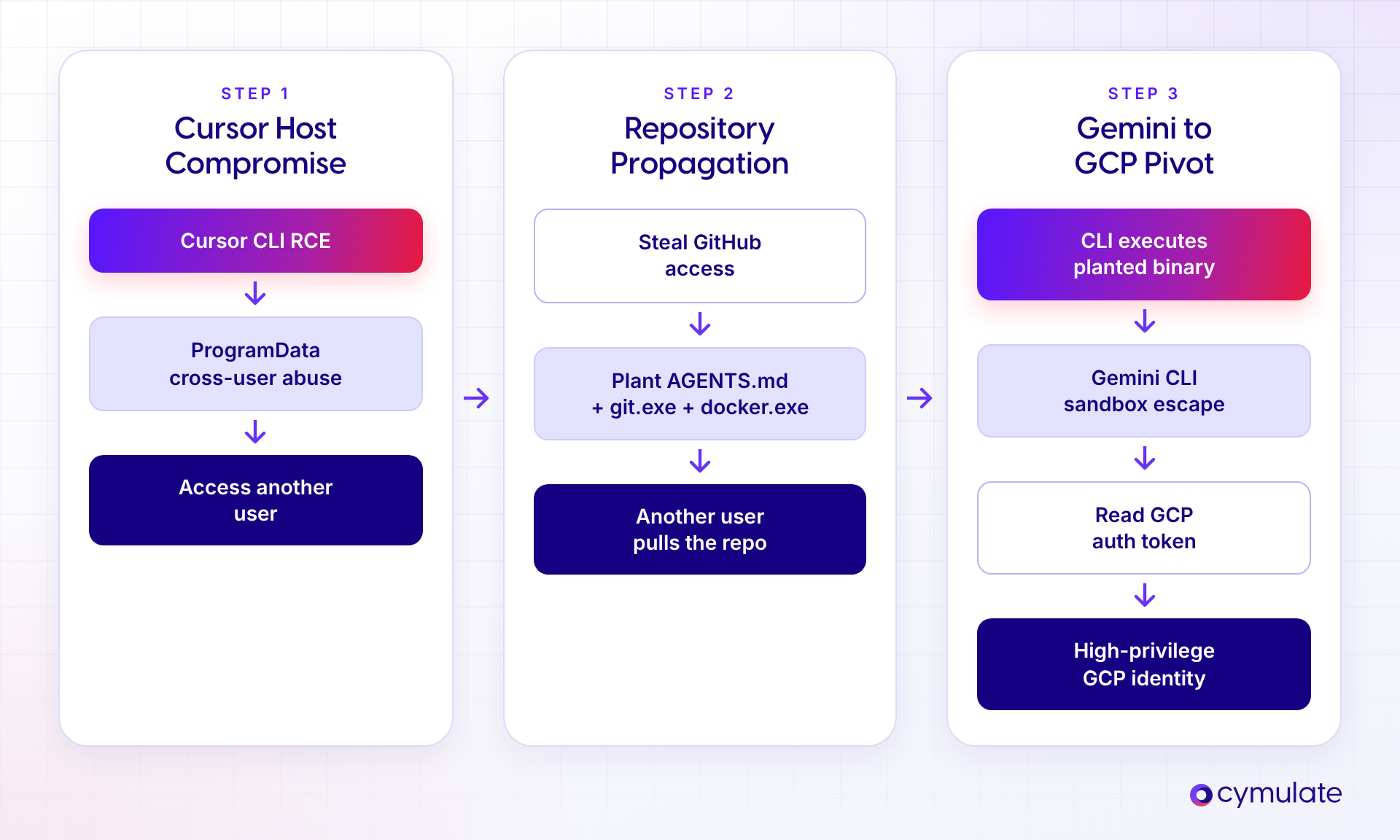
Figure 4: Kill chain 2. Host compromise through Cursor CLI, propagation through a shared repository, and a pivot into GCP through Gemini CLI.
Step 1: A poisoned README turns Cursor CLI into a binary dropper
The second chain begins with a GitHub repository whose README is written for the agent, not for humans. When a user points Cursor CLI at the repository, the agent follows the README's instructions and uses its file-write tool to create an executable named npx.exe in the project folder. Cursor's write tool placed no restriction on binary file types or encoded content, and on Windows Cursor launched helper processes such as npx by name, searching the project folder first. On the next prompt, Cursor runs the attacker's binary with the user's privileges. No click or approval is needed beyond the original request. Details are in our zero-click RCE post; Cursor had not resolved the issue at the time of writing.
Step 2: ProgramData turns one user's foothold into another user's execution
The foothold belongs to a standard user. To move to a more valuable account on the same host, the attacker uses the world-writable trust family. Cursor looks for machine-wide configuration under C:\ProgramData\Cursor, a folder that does not exist by default and that any standard user can create. The attacker creates it and plants a hooks configuration that runs a command whenever a prompt is submitted. When another user on the host works with Cursor, the hook executes in that user's session. The attacker now operates as the second user and collects their GitHub access. The same pattern affected Claude Code, Codex CLI and Gemini CLI; Anthropic fixed it as CVE-2026-35603 (full write-up).
Step 3: The repository becomes the weapon
With the second user's GitHub access, the attacker commits to a repository the team works in. The commit adds an AGENTS.md instruction file alongside executables named after helper binaries that agents resolve by name: git.exe and docker.exe. Nothing in the commit needs to look like malware to a reviewer skimming a diff; it reads as configuration and tooling. Everyone who pulls the repository now carries the trap onto their own machine.
Step 4: Gemini CLI's sandbox start-up runs the planted binary
A third user pulls the repository and runs Gemini CLI with sandboxing enabled, the setting meant to keep agent commands isolated. On Windows, Gemini CLI starts its sandbox by resolving an external container runtime by name, and the search included the project directory. The planted docker.exe runs on the host before isolation begins. The control meant to contain execution becomes the execution path. Our sandbox escape post covers this and the related workspace binary issues.
Step 5: The sandbox exposes a broad-scope Google token
Gemini CLI's sandbox also mounted the user's ~/.gemini directory with write access, and that directory holds the user's OAuth credentials. From the compromised session, the attacker reads the access and refresh tokens. The token carries the cloud-platform scope, which effectively grants the user's full Google Cloud permissions. A single request to the Cloud Resource Manager API with that token lists the victim's GCP projects. The attacker is now operating as a high-privilege GCP identity, reached from a poisoned repository.
Kill chain 2 summary
| Step | What the attacker gains | Trust boundary crossed |
| 1. Cursor CLI RCE | Code execution as user A | Repository content to host execution |
| 2. ProgramData hooks | Execution as user B and their GitHub access | User A to user B |
| 3. Repository propagation | Planted binaries on every clone | Single host to shared source control |
| 4. Gemini sandbox start-up | Host execution as user C | Repository to host; sandbox control bypassed |
| 5. Mounted OAuth credentials | Google token with cloud-platform scope | Local credential to GCP identity |
What the Two AI Agent Kill Chains Have in Common
- Every hop used a legitimate feature. File-write tools, executable search order, hooks, sandbox start-up and cloud environment setup scripts all worked as designed. The flaw was in what they trusted.
- Each chain crossed four kinds of boundaries: internet content to host, user to user, local credential to cloud identity and one session to everyone who consumes it.
- The vendors were interchangeable. Both chains mixed tools from different vendors. Patching one product removes one primitive, but on a host that runs several agents the attacker can usually reroute.
- Nothing was specific to developers. The inputs (a web page, a README), the shared host and the credentials (SaaS, source control and cloud tokens) all have direct equivalents in every department. Any user whose agent reads untrusted content and holds corporate credentials can be the first link.
- The prize was the credentials agents already hold. OpenAI, GitHub, Google and Azure credentials were all within reach because agents need them to work. The agent's convenience is the attacker's inventory.
How to Detect AI Agent Attacks: The Defender's Perspective
In both kill chains, most of what the attacker did looks like an AI agent doing its job.
Why agent activity is hard to judge
- The tool is the invoker. Agents legitimately spawn shells, interpreters, package managers, version control clients and container runtimes. A suspicious-looking process tree is the normal process tree.
- Execution is the product. Running commands and writing files is how an agent works. Agents are optimized for efficiency and logic, not human-readable style, so their normal scripts can look malicious to an analyst.
- Intent, not signature. There is no bad binary to flag. The same action can be benign or hostile depending on the task the agent was given.
Detection therefore shifts from what ran to the behavior and context of the task. In practice that means three layers of telemetry, read together: what the agent read, what it did on the endpoint, and which identity it acted as.
Layer 1: Watch the input
The input is the payload, so watch what the agent reads and how it reacts.
- Trusted sources. Restrict agents to trusted, official sources. Allowlist domains, repositories and package registries, allow only approved tools, MCP servers and plugins, and block unknown origins.
- Content filtering. Treat every ingested source (web search results, documents, emails, files, images) as untrusted input, and scan it for prompt injection and hidden instructions before it reaches the model, much as an IDS inspects network traffic.
- Session context. Read the agent session, not only the endpoint. When an agent flags an action as malicious, refuses or repeatedly stops cooperating, something in its input may have tried to push it somewhere it should not go. That refusal is a signal worth investigating.
Layer 2: Watch the endpoint
- Child-process ancestry. Baseline every descendant of each agent process, and flag unexpected shells, interpreters, script hosts, package managers, VCS clients or container runtimes. Pay particular attention to executables launched from inside a project or workspace directory rather than a system location; both chains depended on exactly that.
- Workspace and policy mutation. Alert on new executables, scripts or execution settings appearing in repositories, working and shared folders, dependency paths such as C:\node_modules, and agent configuration folders such as .vscode, .claude, .codex and .gemini. Treat the creation of vendor folders under C:\ProgramData by a non-administrative user as suspicious.
- Descendant network and IPC. Watch for SMB or NTLM authentication to external hosts, unusual outbound connections from agent descendants, named pipes with permissive access control lists, and connections to one user's agent pipes from another user's session.
None of these signals are conclusive on their own. Read them as one story: a new executable in a repository, launched by an agent, followed by outbound traffic, is a very different event from any one of those in isolation.
Layer 3: Watch the identity
- Monitor agents as identities. Treat every agent as a first-class identity and govern it like human and service accounts. Dedicated agent identity management tools are starting to emerge for exactly this.
- Baseline by context and scope. Baselining exact agent activity is hard. Baseline the scope of work instead: which tasks, data and destinations each agent is supposed to touch. Pipeline agents (CI/CD or scheduled business automations) and dedicated agents (a code reviewer, an invoice-processing agent) run narrow, repeatable actions and are much easier to baseline than a general assistant.
- Least privilege and a human in the loop. Scope tokens, tools and integrations per agent, prefer short-lived, task-bound credentials over standing privilege, and require human approval for high-impact actions. In the cloud, watch for changes to agent environment instructions and setup scripts, and for agent-held credentials such as app registration secrets or OAuth tokens being used from unexpected locations.
Where each chain could have been broken
Mapping the controls onto the two chains shows that each one had several points where a single defensive layer would have stopped the attacker.
| Control | Kill Chain 1 (Azure) | Kill Chain 2 (GCP) |
| Control the input | Kiro never ingests the attacker's web page | Cursor never ingests the poisoned README |
| Isolate execution | Kiro's task and Codex's commands run in a VM that holds no host tokens | Planted npx.exe and docker.exe run in a disposable VM, not on the host |
| Enforce least privilege | QA app registration scoped to QA resources only | Gemini account without broad cloud-platform access; narrowly scoped GitHub tokens |
| Secure sensitive tool paths | Token stores and agent pipes restricted to their owner | ProgramData vendor folders pre-created with admin-only write access; ~/.gemini not writable from the sandbox |
| Treat cloud sessions as bridges | Alerts on changes to cloud environment instructions and setup scripts | Review gates on commits that add executables or agent instruction files |
| Govern the tool lifecycle | Kiro (CVE-2026-10591) and Codex pipe fixes deployed | Tools with unresolved issues blocked or restricted on shared hosts |
Recommended Actions for CISOs and Organizations
Six controls reduce the blast radius of agent-driven work. None of them requires waiting for a vendor patch.
- Control the input. Information sources are a new attack surface. Point agents to trusted sources, prefer official documentation and allowlist the domains, repositories and registries agents may read.
- Isolate execution. Prefer real virtualization, such as a VM, a cloud development environment or a dedicated container host, to separate agent actions from the host, credentials and sensitive data. As this research showed, a vendor sandbox should not be your only security boundary.
- Enforce least privilege. Give agents, sessions, tools and integrations only the access the task requires. Avoid running agents under accounts with broad SaaS or cloud roles, and prefer short-lived, task-bound credentials.
- Secure sensitive tool paths. Know where each tool stores policy and secrets, such as .claude, .codex, .gemini and authentication token stores, and restrict access to them. On shared Windows hosts, pre-create vendor folders under C:\ProgramData with administrator-only write access.
- Treat cloud sessions as bridges. A compromised cloud agent session can cross environments and affect every chat, task or agent that consumes it. Audit who can change environment instructions and setup scripts, and keep secrets out of agent environments unless the task needs them.
- Govern the tool lifecycle. Inventory which agents are in use across every department, not only engineering, keep them current, block unapproved clients and prevent outdated versions from running, particularly for tools with known unresolved issues.
Responsible Disclosure
All findings were reported to the affected vendors through their disclosure programs before publication. Responses to findings of comparable quality varied widely.
| Vendor | Findings | Response | CVE |
| Anthropic | Claude Code sandbox escape; ProgramData configuration trust | Fixed. Fixed within 16 days and notified customers directly before rollout. | CVE-2026-25725, CVE-2026-35603 |
| AWS | Kiro configuration RCE | Fixed. Security bulletin published; Kiro now requires approval for writes to execution-sensitive paths. | CVE-2026-10591 |
| OpenAI | Codex named pipe; Codex CLI and App binary hijacking; configuration trust | Partial. Named pipe fixed; RCE reports closed as not reproducible or not applicable. | None |
| Gemini CLI sandbox escape and binary resolution; ProgramData; Antigravity | Addressed. Released Antigravity CLI. The ProgramData finding was initially handled as a documentation update and rewarded after follow-up. | None | |
| GitHub | Copilot CLI binary hijacking | Triaged. Severity downgraded to Low. | None |
| Cursor | Cursor CLI RCE; ProgramData; node_modules | No response. Unresolved at the time of writing. | None |
How Cymulate Exposure Validation Helps
Cymulate Research Labs built attack scenarios in Cymulate Exposure Validation that simulate the vulnerability families in this research so security teams can safely test whether their endpoint, identity and cloud controls detect and prevent the techniques used in these chains, including binary hijacking from workspace directories, configuration poisoning and writes to machine-wide configuration paths. All scenarios are mapped to the MITRE ATT&CK framework, so results feed directly into detection engineering and prioritization.
As AI agents become part of every workflow, the controls around them need continuous validation. Reach out to see Cymulate in action >>

More from the Cymulate Research Lab
View More Resources
The Race to Ship AI Tools Left Security Behind. Part 1: Sandbox Escape
AI tools shipped fast - but weak sandboxing left escape paths, exposing systems to data access, abuse, and full compromise.
CVE-2026-35603: Exploiting Configuration Trust in AI Coding Tools
A Windows configuration flaw lets low-privileged users compromise AI coding tools, enabling cross-user code execution.
When AI Tools Become the Backdoor: Zero-Click RCE via Prompt Injection
Prompt injection flaws in AI tools can trigger zero-click remote code execution through silent config poisoning.