Frequently Asked Questions

Product Information & Ransomware Mitigation

What is Cymulate and how does it help defend against ransomware like the new Dharma strain?

Cymulate is a cybersecurity platform that enables organizations to proactively validate their defenses, identify vulnerabilities, and optimize their security posture. For threats like the new Dharma ransomware, Cymulate simulates real-world attacks, including ransomware scenarios, to test and validate your cyber defenses across all IT environments. This helps organizations stay ahead of emerging threats by identifying exploitable gaps and providing actionable insights for mitigation. Learn more about the Cymulate platform.

How does Cymulate simulate ransomware attacks for exposure validation?

Cymulate's Exposure Validation solution includes automated real-world attack simulations, such as ransomware, to assess your organization's resilience. These simulations test your security controls, detection, and response capabilities against the latest ransomware techniques, helping you identify weaknesses before attackers exploit them. Read more about Exposure Validation.

What is the primary purpose of Cymulate's platform?

The primary purpose of Cymulate's platform is to help organizations proactively validate their cybersecurity defenses, identify vulnerabilities, and optimize their security posture. It empowers security teams to stay ahead of emerging threats and improve overall resilience through continuous threat validation, exposure prioritization, and operational efficiency. Learn more about Cymulate's mission.

How does Cymulate address specific needs related to ransomware and exposure management?

Cymulate addresses ransomware and exposure management by continuously validating security controls against real-world ransomware tactics, prioritizing exposures based on exploitability, and providing actionable remediation steps. This ensures organizations can focus on the most critical vulnerabilities and improve their resilience against ransomware attacks. Explore Exposure Prioritization.

What are the key capabilities of Cymulate's platform for ransomware defense?

Cymulate's platform offers continuous threat validation, unified Breach and Attack Simulation (BAS), automated mitigation, AI-powered optimization, complete kill chain coverage, and an extensive threat library with over 100,000 attack actions updated daily. These capabilities help organizations detect, prevent, and respond to ransomware threats effectively. See platform features.

How does Cymulate's Attack Path Discovery help prevent lateral movement by ransomware?

Cymulate's Attack Path Discovery automates testing for lateral movement, privilege escalation, and attack path risks. By identifying potential routes ransomware could use to spread within your environment, Cymulate enables you to close gaps and strengthen internal defenses. Learn about Attack Path Discovery.

Does Cymulate offer resources on preventing lateral movement attacks?

Yes, Cymulate provides a blog post titled 'Stopping Attackers in Their Tracks' that discusses common lateral movement attacks and prevention strategies. Read the blog post.

How does Cymulate's Automated Mitigation feature help with ransomware threats?

Cymulate's Automated Mitigation integrates with your security controls to push updates and block threats immediately. This rapid response capability is crucial for stopping ransomware like Dharma before it can spread or cause damage. Discover Automated Mitigation.

What is Cymulate's approach to continuous threat validation?

Cymulate provides 24/7 automated attack simulations to validate your security posture in real-time. This continuous approach ensures your defenses are always tested against the latest threats, including new ransomware strains. Learn about continuous threat validation.

How does Cymulate help organizations prioritize exposures related to ransomware?

Cymulate validates the exploitability of exposures and ranks them based on prevention and detection capabilities, business context, and threat intelligence. This helps organizations focus remediation efforts on the most critical vulnerabilities that ransomware could exploit. See Exposure Prioritization.

Use Cases & Benefits

Who can benefit from using Cymulate for ransomware defense?

Cymulate is designed for CISOs, security leaders, SecOps teams, red teams, and vulnerability management teams in organizations of all sizes and industries, including finance, healthcare, retail, media, transportation, and manufacturing. Its tailored solutions help each persona address their unique challenges in ransomware defense. See solutions for CISOs.

What business impact can organizations expect from using Cymulate?

Organizations using Cymulate can achieve up to a 52% reduction in critical exposures, a 60% increase in team efficiency, and an 81% reduction in cyber risk within four months. These outcomes are supported by customer case studies and measurable metrics. See Hertz Israel's results.

Are there case studies showing Cymulate's effectiveness against ransomware and exposure risks?

Yes, Hertz Israel reduced cyber risk by 81% in four months using Cymulate, and a credit union improved threat prevention and detection. These and other case studies demonstrate Cymulate's effectiveness in real-world scenarios. Browse case studies.

How does Cymulate help organizations with fragmented security tools?

Cymulate integrates exposure data and automates validation, providing a unified view of your security posture. This addresses the common pain point of fragmented tools and improves visibility and control. Learn more.

How does Cymulate address resource constraints in security teams?

Cymulate automates manual processes, improving efficiency and operational effectiveness for security teams that are often stretched thin. This allows teams to focus on strategic initiatives rather than repetitive tasks. See operational efficiency benefits.

How does Cymulate support communication between CISOs and stakeholders?

Cymulate delivers quantifiable metrics and actionable insights tailored to different roles, helping CISOs justify investments and communicate risks effectively to stakeholders. Learn more for CISOs.

How does Cymulate help with post-breach recovery challenges?

Cymulate enhances visibility and detection capabilities after a breach, ensuring faster recovery and improved protection. Case studies, such as a bank replacing manual processes with Cymulate, highlight these benefits. Read the case study.

How does Cymulate support vulnerability management teams?

Cymulate automates in-house validation between penetration tests and prioritizes vulnerabilities effectively, improving operational efficiency for vulnerability management teams. See Vulnerability Management solutions.

Features & Capabilities

What features does Cymulate offer for ransomware and exposure management?

Cymulate offers continuous threat validation, unified BAS and CART, exposure analytics, attack path discovery, automated mitigation, AI-powered optimization, and an extensive threat library. These features provide comprehensive coverage for ransomware and exposure management. Explore all features.

What integrations does Cymulate support?

Cymulate integrates with a wide range of security technologies, including Akamai Guardicore, AWS GuardDuty, BlackBerry Cylance OPTICS, Carbon Black EDR, Check Point CloudGuard, Cisco Secure Endpoint, CrowdStrike Falcon, Wiz, SentinelOne, and more. For a complete list, visit our Partnerships and Integrations page.

How does Cymulate use AI to optimize security?

Cymulate leverages machine learning to deliver actionable insights for prioritizing remediation efforts, optimizing security controls, and automating threat validation. This AI-powered approach helps organizations focus on high-risk vulnerabilities and stay ahead of evolving threats. Learn more about AI-powered optimization.

How often is Cymulate's threat library updated?

Cymulate's threat library is updated daily with the latest attack techniques, ensuring your organization is tested against the most current threats, including new ransomware strains. See platform details.

Is Cymulate easy to use for teams with limited resources?

Yes, Cymulate is praised for its intuitive, user-friendly interface and ease of implementation. Customers report that the platform is easy to use, requires minimal setup, and provides actionable insights with just a few clicks. See customer testimonials.

Implementation & Support

How long does it take to implement Cymulate?

Cymulate is designed for rapid deployment. Operating in agentless mode, it requires no additional hardware or complex configurations. Customers can start running simulations almost immediately after deployment. Schedule a demo.

What support options are available for Cymulate customers?

Cymulate offers comprehensive support, including email support at [email protected], real-time chat support, a knowledge base with technical articles and videos, webinars, e-books, and an AI chatbot for quick answers. Access resources.

What educational resources does Cymulate provide?

Cymulate provides a resource hub with insights, thought leadership, product information, webinars, e-books, and a cybersecurity glossary. Visit the Resource Hub.

Security & Compliance

What security and compliance certifications does Cymulate hold?

Cymulate holds SOC2 Type II, ISO 27001:2013, ISO 27701, ISO 27017, and CSA STAR Level 1 certifications, demonstrating adherence to industry-leading security and privacy standards. See all certifications.

How does Cymulate ensure data security and privacy?

Cymulate ensures data security with encryption in transit (TLS 1.2+) and at rest (AES-256), secure AWS-hosted data centers, a tested disaster recovery plan, and compliance with GDPR. The platform also features 2FA, RBAC, and IP address restrictions. Learn more about security.

How does Cymulate maintain application security?

Cymulate follows a strict Secure Development Lifecycle (SDLC), including secure code training, continuous vulnerability scanning, and annual third-party penetration tests to ensure robust application security. See application security details.

Pricing & Plans

What is Cymulate's pricing model?

Cymulate uses a subscription-based pricing model tailored to each organization's needs. Pricing depends on the chosen package, number of assets, and scenarios selected. For a detailed quote, schedule a demo.

Competition & Differentiation

How does Cymulate differ from other exposure management and ransomware simulation platforms?

Cymulate stands out with its unified platform combining BAS, CART, and exposure analytics, continuous 24/7 threat validation, AI-powered optimization, complete kill chain coverage, ease of use, and measurable outcomes (e.g., 81% reduction in cyber risk). It also offers daily threat library updates and rapid innovation with new features every two weeks. See Cymulate vs. competitors.

What advantages does Cymulate offer for different user segments?

Cymulate provides CISOs with quantifiable metrics, SecOps teams with automation and efficiency, red teams with advanced offensive testing, and vulnerability management teams with automated validation and prioritization. Solutions are tailored for each role. Explore role-based solutions.

Company & Resources

Where can I find Cymulate's blog and latest research?

You can stay updated on the latest threats, research, and company news by visiting Cymulate's blog and newsroom.

Where can I find Cymulate's resource hub and glossary?

Cymulate's Resource Hub contains insights, thought leadership, product information, and a cybersecurity glossary. Visit the Resource Hub and Glossary.

What is Cymulate's vision and mission?

Cymulate's vision is to create a collaborative environment for lasting improvements in cybersecurity. Its mission is to transform cybersecurity practices by enabling organizations to proactively validate defenses, identify vulnerabilities, and optimize security posture. Read about Cymulate's mission.

How does Cymulate ensure ongoing innovation?

Cymulate updates its SaaS platform every two weeks with new features, such as AI-powered SIEM rule mapping and advanced exposure prioritization, ensuring customers always have access to the latest capabilities. See platform updates.

New: 2026 Gartner® Market Guide for Adversarial Exposure Validation
Learn More
Cymulate named a Customers' Choice in 2025 Gartner® Peer Insights™
Learn More
New Research: Azure Arc Privilege Escalation & Identity Takeover
Learn More
An Inside Look at the Technology Behind Cymulate
Learn More

Immediate Threat Analysis – New Dharma Ransomware Strain Found in the Wild

Last Updated: September 14, 2025

Originally an offshoot of CrySiS, the Dharma ransomware family has brought forth a new variant, as part of its ongoing creation of new strains. In this blog post, we analyze the latest variant found in the wild by malware researcher Jakub Kroustek.

Key Takeaways

  • New Dharma Variant Detected: This ransomware strain, a continuation of the CrySiS offshoot, uses the unusual .nqix file extension to mark encrypted files.
  • Aggressive File Encryption & Backup Removal: It deletes Windows shadow copies, kills SQL and Outlook processes, and ensures persistence through registry and startup entries to maximize disruption.
  • Effective but Unsophisticated: While it lacks lateral movement or advanced techniques, its straightforward design is still enough to cripple systems.
  • Phishing as the Primary Entry Point: Consistent with past Dharma campaigns, the ransomware is most often delivered through deceptive phishing lures.

Dharma Ransomware Family and Its New .nqix Strain

Dharma has been operating since 2016 and the threat actors behind the ransomware continue to release new variants, the latest of which is currently not decryptable. You can keep apprised if the key to this latest variant has been uncovered at NoMoreRansomware.org.

This Dharma variant encrypts files and adds the extension, .nqix, which is completely different from the Dharma extensions seen to date; a tell-tale sign that it’s a new variant in the wild. It was also clear by the file’s signature that it’s a new Dharma strain.

The latest variant works like any other standard ransomware. As soon as the user executes the ransomware executable, the variant starts encrypting all the system’s files. All encrypted files are given the specific variant’s file extension, .nqix.

As with other run-of-the-mill ransomware, this Dharma strain removes the option to restore local system backups, called “shadow copies.” Most, if not all, ransomware variants do this, to make it impossible for victims to restore their systems without paying ransom to the threat actors behind the attack. Therefore, it is important for organizations to ensure they have offline backups, to enable resilience and business continuity in the event that they are affected by such ransomware attacks.

Like most ransomware strains, this one does not have lateral movement capabilities (unlike WannaCry), so it cannot move from one machine to another, and cannot infect additional workstations on the network.

Finally, judging from how this variant was written, it does not seem that the threat actor has a great degree of skill or sophistication. The variant is still effective, but it is rather simple, and does not seem to be written by a ‘professional.’

Dharma is usually disseminated via phishing. Not found in this specific variant, it notoriously lured users into installing the ransomware by offering to uninstall the ESET anti-virus from their system. The group’s use of a genuine, albeit old, ESET remover (opposite of installer) lent credibility to their attack. Distracted by their wish to remove the AV, users would not only remove ESET from their system, but also simultaneously execute the Dharma ransomware on their system, leading to its immediate encryption.

Basic Analysis

In this new variant, the extension it puts on encrypted files is. nqix as shown in the screenshot below.

The email address written for support is either support@qbmail[.]biz on the files that are encrypted – shown above, or reservesupport@cock[.]li on the ransomware notes – shown below:
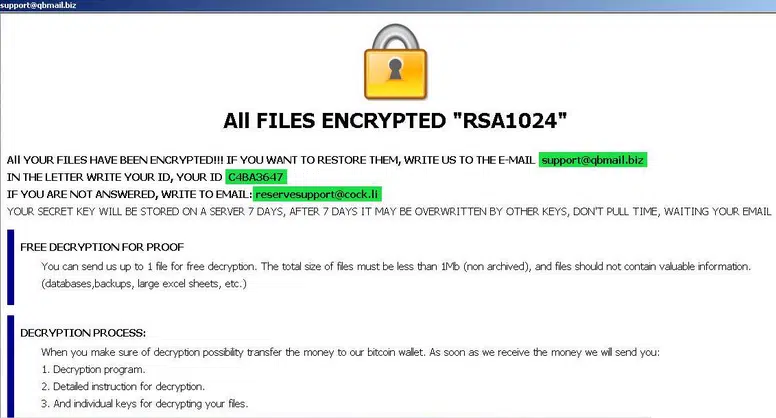
Dharma’s ransom note is shown above

  1. For persistence, this variant adds the binary payload to the registry at HKEY_LOCAL_MACHINE\SOFTWARE\Microsoft\Windows\CurrentVersion\Run. In case of failure it will add it at HKEY_CURRENT_USER\SOFTWARE\Microsoft\Windows\CurrentVersion\Run, and will create a mutex and put the binary payload in C:\Users\<user>\AppData\Roaming\Microsoft\Windows\Start Menu\Programs\Startup
  2. To make sure the encryption functions on SQL-related machines and mailboxes, it stops services and kills processes, specifically those belonging to: Firebird Guardian, SQL and Microsoft Outlook (see further details in the deeper analysis below).
  3. Dharma deletes shadow copies with "vssadmin delete shadows /all /quiet" to make sure the backup option is not available to its victims.
  4. It then starts encrypting all files on the system, after which it drops the following pop-up message on the user screen, "ALL FILES ENCRYPTED RSA1024" with a specific ID.

The Any.run sandbox analysis session can be found here: https://app.any.run/tasks/c4a560dd-b21d-44f8-a8bf-8b007a80f1e3

The following is the Any.run analysis action tree (attack story):
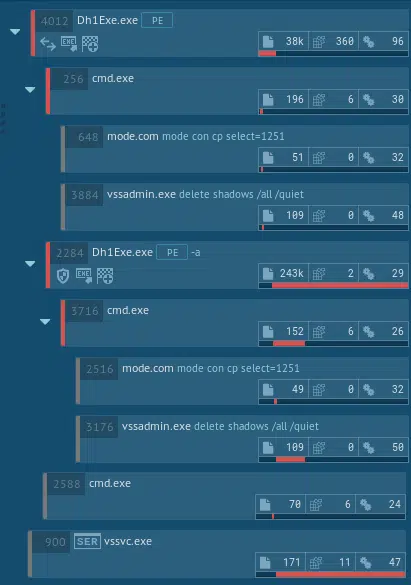
The Any.run analysis mapped the following MITRE ATT&CK™ techniques used in this ransomware:

Deep-Dive Dharma Malware Analysis

Additional characteristics:

Dharma ransomware implements its own runtime. It is not packed, but does obfuscate its imports by storing a rc4 encrypted array of dlls and import names

Execution information:

Decrypts internal structs, decrypt imports blob, load imports and zero out blob.
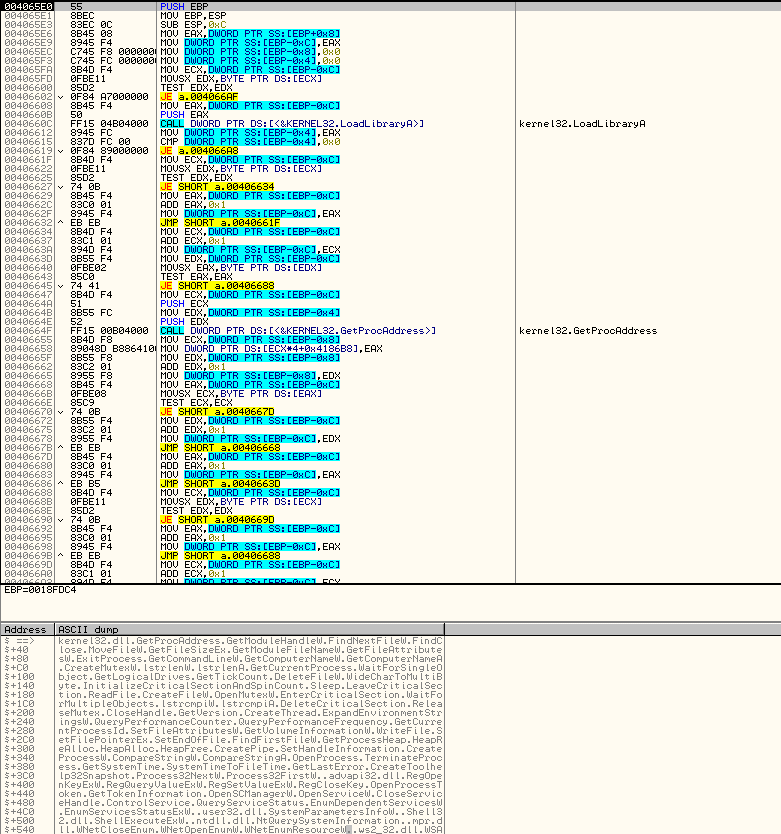
 The above screenshot shows Dharma’s decryption process on potential victim’s system.

  • Initiates own made PRNG (using different counters and sha1)
  • Initiates inter process sync objects (Global\syncronize_BV6JP8A + Global\syncronize_BV6JP8U – Global\syncronize_ + BV6JP8(unique hardcoded sample id) + A/U(internal mutex type))
  • Initiates target extensions dictionary (string bellow)
  • Initiates a dictionary of services to stop and a dictionary of processes to close and act on them
  • Sets autorun methods: – Copy the file to %windir%system32 or %appdata% and set ‘LOCAL_MACHINE/LOCAL_USER Software\Microsoft\Windows\CurrentVersion\Run’ – Copy file to ‘Startup’ folder – Copy file to ‘Common Startup’ folder
  • Runs CMD with the following commands: “mode con cp select=1251\nvssadmin delete shadows /all /quiet\nExit” (The neat thing here is that it pipes the command to the CMD instead of giving it as a command line argument.)
  • Start a process and service watchdog thread, whose sole purpose is to constantly stop and close a set of defined services and processes.
  • Starts a thread which on certain conditions executes itself again with the ‘-a’ argument, which does nothing, probably a kind of ‘keep alive’ mechanism.
  • Creates a thread responsible for network shares’ file encryption (WNetOpenEnumW and family API) and for new drive detection and encryption.
  • Runs encryption routine: – For each logical drive, start two EncryptionWorker threads, one for encryption and the other for a different purpose as it is the same thread but using different parameters.
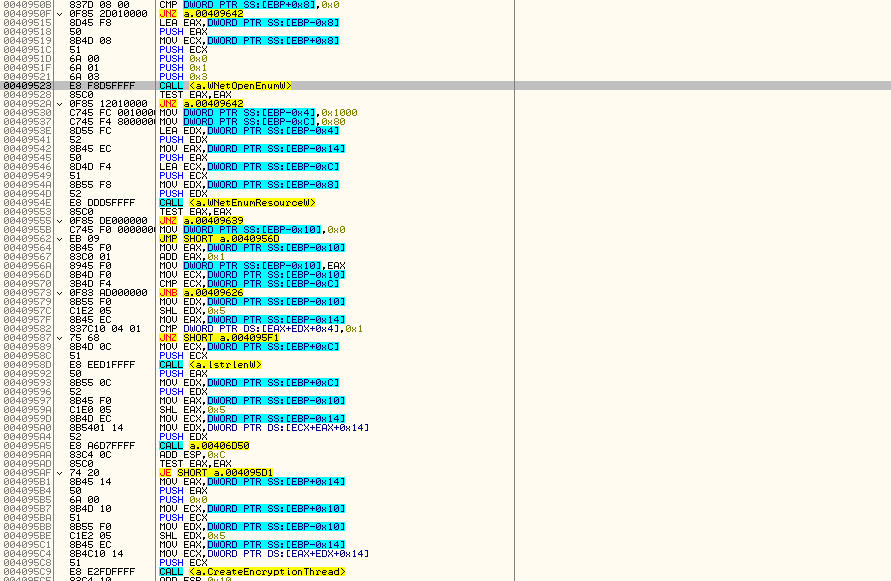
The above screenshot shows Dharma’s listing of logical drives and their encryption.

  • Runs CMD commands again
  • Drops ransom notes in various forms.
  • ExitProcess

EncryptionWorker actions:

  • Creates 4 encryption threads, which are responsible of encrypting files which are catalogued in a different thread (encryption is using aes-128 for data and rsa-1024 for encryption key).
  • Creates a catalog thread, which is responsible of going through all the folders and sub folders and list matching files.
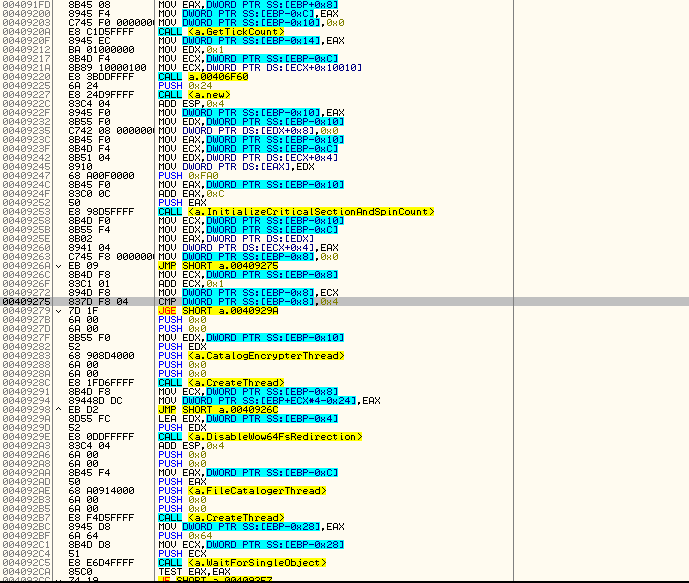
The above screenshot shows Dharma’s encryption flow, including the file extensions targeted for encryption.

Dictionaries used:
Full extensions target: “.1cd;.3ds;.3fr;.3g2;.3gp;.7z;.accda;.accdb;.accdc;.accde;.accdt;.accdw;.adb;.adp;.ai;.ai3;.ai4;.ai5;.ai6;.ai7;.ai8;.anim;.arw;.as;.asa;.asc;.ascx;.asm;.asmx;.asp;.aspx;.asr;.asx;.avi;.avs;.backup;.bak;.bay;.bd;.bin;.bmp;.bz2;.c;.cdr;.cer;.cf;.cfc;.cfm;.cfml;.cfu;.chm;.cin;.class;.clx;.config;.cpp;.cr2;.crt;.crw;.cs;.css;.csv;.cub;.dae;.dat;.db;.dbf;.dbx;.dc3;.dcm;.dcr;.der;.dib;.dic;.dif;.divx;.djvu;.dng;.doc;.docm;.docx;.dot;.dotm;.dotx;.dpx;.dqy;.dsn;.dt;.dtd;.dwg;.dwt;.dx;.dxf;.edml;.efd;.elf;.emf;.emz;.epf;.eps;.epsf;.epsp;.erf;.exr;.f4v;.fido;.flm;.flv;.frm;.fxg;.geo;.gif;.grs;.gz;.h;.hdr;.hpp;.hta;.htc;.htm;.html;.icb;.ics;.iff;.inc;.indd;.ini;.iqy;.j2c;.j2k;.java;.jp2;.jpc;.jpe;.jpeg;.jpf;.jpg;.jpx;.js;.jsf;.json;.jsp;.kdc;.kmz;.kwm;.lasso;.lbi;.lgf;.lgp;.log;.m1v;.m4a;.m4v;.max;.md;.mda;.mdb;.mde;.mdf;.mdw;.mef;.mft;.mfw;.mht;.mhtml;.mka;.mkidx;.mkv;.mos;.mov;.mp3;.mp4;.mpeg;.mpg;.mpv;.mrw;.msg;.mxl;.myd;.myi;.nef;.nrw;.obj;.odb;.odc;.odm;.odp;.ods;.oft;.one;.onepkg;.onetoc2;.opt;.oqy;.orf;.p12;.p7b;.p7c;.pam;.pbm;.pct;.pcx;.pdd;.pdf;.pdp;.pef;.pem;.pff;.pfm;.pfx;.pgm;.php;.php3;.php4;.php5;.phtml;.pict;.pl;.pls;.pm;.png;.pnm;.pot;.potm;.potx;.ppa;.ppam;.ppm;.pps;.ppsm;.ppt;.pptm;.pptx;.prn;.ps;.psb;.psd;.pst;.ptx;.pub;.pwm;.pxr;.py;.qt;.r3d;.raf;.rar;.raw;.rdf;.rgbe;.rle;.rqy;.rss;.rtf;.rw2;.rwl;.safe;.sct;.sdpx;.shtm;.shtml;.slk;.sln;.sql;.sr2;.srf;.srw;.ssi;.st;.stm;.svg;.svgz;.swf;.tab;.tar;.tbb;.tbi;.tbk;.tdi;.tga;.thmx;.tif;.tiff;.tld;.torrent;.tpl;.txt;.u3d;.udl;.uxdc;.vb;.vbs;.vcs;.vda;.vdr;.vdw;.vdx;.vrp;.vsd;.vss;.vst;.vsw;.vsx;.vtm;.vtml;.vtx;.wb2;.wav;.wbm;.wbmp;.wim;.wmf;.wml;.wmv;.wpd;.wps;.x3f;.xl;.xla;.xlam;.xlk;.xlm;.xls;.xlsb;.xlsm;.xlsx;.xlt;.xltm;.xltx;.xlw;.xml;.xps;.xsd;.xsf;.xsl;.xslt;.xsn;.xtp;.xtp2;.xyze;.xz;.zip;”
Noted as ‘Valuable’ extensions target by Dharma author: Documents: .doc, .docx, .pdf, .xls, .xlsx, .ppt Archives: .zip, .rar, .bz2, .7z Dbf: .dbf 1c8: .1cd Jpg: .jpg
Skip targets: “boot.ini”, “bootfont.bin”, “ntldr”, “ntdetect.com”, “io.sys”
Skip folder: expanded “%windir%”
Services to stop: “FirebirdGuardianDefaultInstance”, “FirebirdServerDefaultInstance”, “sqlwriter”, “mssqlserver”, “sqlserveradhelper”
Processes to close: “1c8.exe”, “1cv77.exe”, “outlook.exe”, “postgres.exe”, mysqld-nt.exe”, “mysqld.exe”, “sqlservr.exe”
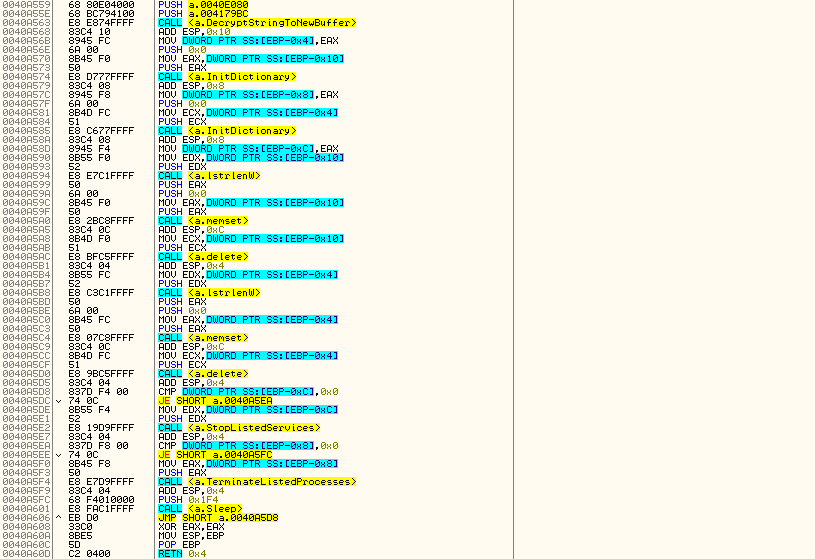
The above screenshot shows where Dharma stops services and closes processes.

Mitigation and Countermeasures

  1. Make sure you have a business back-up strategy in place, including offline backups, as local restore points are ineffectual since Dharma first removes them prior to encryption.
  2. Make sure you have a well-configured and up-to-date AV, EDR, and Email gateway solutions in place to defend against known threats and behaviors.
  3. Make sure you provide employees security awareness training – whether completed with a product or by your security expert.

Indicators of Compromise

Monitor the following indicators of compromise (IOCs) on your SIEM system and make sure they are blocked in all relevant security controls (AV, EDR, Email Gateway, etc.):

  • 9b96be6c2ac05decb4b8d41469cb864e
  • 9a77e8be9dd41d0e9b8a77e9a2abf4de
  • 0e54c3ae592f46def82c6b153bb642c8

To know if your organization is vulnerable to Dharma, and the very latest Immediate Threats circulating in the wild, including ransomware, worms, Trojans and cryptominers and more, get started with Cymulate’s Breach and Attack Simulation.

Cymulate Exposure Validation makes advanced security testing fast and easy. When it comes to building custom attack chains, it's all right in front of you in one place.
Mike Humbert, Cybersecurity Engineer
DARLING INGREDIENTS INC.
Learn More
Book a Demo