

Understanding and Detecting Security Misconfigurations

Security misconfigurations are one of the leading causes of data breaches and compliance violations today. Despite investment in advanced tools, many organizations still have critical gaps often due to human error, default settings or lack of continuous validation. Attacks scan for weaknesses and thus make misconfiguration defense a critical priority for modern enterprises.
Key highlights
- Security misconfiguration is a top Open Worldwide Application Security Project (OWASP) vulnerability and frequent entry point for attacks.
- Common security misconfiguration examples include unpatched systems, weak access controls and exposed cloud services.
- Impacts of security misconfiguration can range from data breaches and regulatory fines to reputational loss.
- The Cymulate Exposure Management Platform continuously validates configurations, detects risks and prioritizes remediation.
What is security misconfiguration?
Security misconfiguration is the incorrect implementation or management of security settings that exposes systems, applications or cloud services to risk. This may happen when security controls are left in a default state, applied inconsistently or disabled entirely. This can create exploitable vulnerability for attackers or other types of security breaches.
According to OWASP, A05: Security Misconfiguration is among the top web application risks, reflecting its widespread impact across enterprises.
9 types of security misconfigurations
Misconfigurations can occur at every level of an environment, including application, infrastructure, cloud, identity and access as well as data protection. The following describes some of the most common, high-risk types of misconfigurations organizations must know.
1. Unpatched or outdated systems
Happening at the infrastructure level primarily, this constitutes the failure to apply patches or updates the leaves exploitable vulnerabilities. Attackers can avail themselves or automated scanning and known exploits to compromise unpatched our outdated systems.
2. Weak or default security settings
Default admin accounts or unchanged factory credentials remain active in this scenario. This can occur at both the application and infrastructure levels. Here, attackers exploit these settings to gain initial access without much heavy lifting.
3. Inadequate access controls
Users and services are granted excessive privileges, most likely by accident. Such misconfigurations can happen at the identity and access level. Attackers can escalate privileges through this exploit and then move laterally through an environment.
4. Unencrypted files
In this scenario, sensitive data is stored or transmitted without encryption, leaving that data susceptible to risk of leakage. This takes place at the data protection level. Attackers can steal and exfiltrate unprotected files when encryption is compromised or missing.
5. Misconfigured cloud services
When publicly exposed cloud storage, databases or APIs exist in an environment, they can open your organization up to attacks. The cloud infrastructure layer is where this misconfiguration takes place. Like with unpatched systems, attackers use scanners to find exposed buckets they can exploit.
6. Disabled or improperly configured security tools
Here, organizations have turned off logging, antivirus or intrusion prevention tools. This can happen at the infrastructure and endpoint layers of an IT environment. Attackers are able to bypass defenses and hide their activity.
7. Poor coding practices
When there are hardcoded credentials or missing input validation within the application layer that can be a very risky proposition for organizations. These insecure code paths can be exploited by attackers easily.
8. Unsecured devices
IoT or mobile devices that are deployed without hardening are a major misconfiguration threat to an organization. This is an issue at the endpoint layer. Attackers are able to use them as backdoors into a network.
9. Insufficient firewall protection
If there are open ports or overly permissive firewall rules, attackers can take advantage. This is an area where the network level is at risk. Attackers scan and directly connect to exposed services through these misconfigurations.
3 security misconfiguration examples
It’s important to consider real-world examples of the types of misconfigurations that can very easily happen as well as their resulting impacts. Here are three such examples:
- Publicly exposed cloud storage. An Amazon S3 bucket with millions of customer records is left world-readable. Attackers then harvested personally identifiable information (PII) and financial data. The resulting impact is a mass data breach, fines under GDPR and brand and reputational damage.
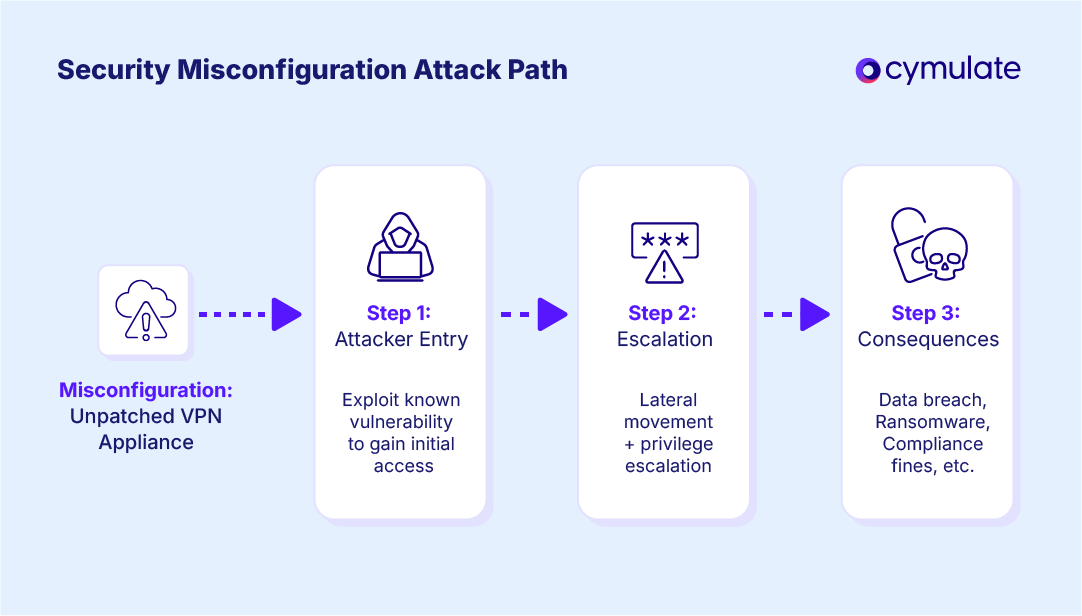
- Unpatched VPN appliance exploited in ransomware attack. A VPN appliance vulnerability has remained unpatched for months. A ransomware group gains remote access, systems become encrypted, operations are halted and a multi-million dollar ransom demand is made.
- Excessive permissions in Microsoft 365. Over-permissive OneDrive sharing exposes confidential files. Client contracts are accessed by external parties. This results in data leakage, compliance violations and reputational loss.
What are the typical impacts of security misconfiguration?
Leaving your organization open to even the possibility of risk is bad enough. The possibility of what can happen when a security misconfiguration is exploited is even worse. Here are some examples of what could happen because of these misconfigurations:
Data breaches and sensitive information exposure
Misconfigurations are the second most common cause of breaches after phishing. IBM reports the average cost of a breach in 2024 reached $4.88M.
Compliance violations and regulatory fines
GDPR, HIPAA and PCI DSS impose heavy fines for unprotected data. Misconfigured systems commonly fail audits to meet these compliance requirements.
Financial loss from downtime and recovery
The exploitation of misconfigurations by ransomware groups can cripple organizational operations. The average cost of downtime has reached as high as $9,000 a minute according to Forbes.
Facilitation of further attacks
One weak point (such as a misconfigured firewall) can become the foothold for a full network compromise that brings your entire business to a screeching halt.
Reputational damage and loss of customer trust
If your organization gains even a modest reputation for mishandling customer data, you can expect customers to leave in droves, leading to a longterm negative business impact.
What are some causes of security misconfigurations?
At this point you might be thinking to yourself that only sloppy, immature IT shops would allow these types of poor cybersecurity practices to happen in their organizations. But these are common, systemic issues that can happen in any environment.
Misconfigurations don’t happen just because of negligence. Here are some of the other potential causes:
- Human error in configuration changes. Manual adjustments in firewalls, IAM policies or cloud settings often introduce mistakes that remain unnoticed until exploited.
- Complexity of hybrid IT environments. Hybrid infrastructures, multi-cloud adoption and interconnected applications make maintaining secure baselines increasingly difficult.
- Insecure default settings left active. Systems and software often ship with permissive defaults that emphasize usability instead of security, leaving openings if left unaltered.
- Lack of automated enforcement mechanisms. Without automation, security teams cannot scale enforcement across dynamic environments. This is where security testing methods and continuous validation become critical parts of your strategy.
- Improper use of security tools. Security technologies misconfigured or disabled by accident create blind spots that are very easy for attackers to exploit.
- Poor change management and documentation. Rapid changes without rigorous review introduce drift that leads to vulnerability.
- Limited cyber risk assessment. Failure to consistently measure and prioritize risks across systems increases the likelihood that misconfigurations slip through unchecked and undiscovered.
How to find security misconfiguration vulnerability
Tracking down misconfigurations before an adversary can is one of the key components of exposure management solutions. This requires security teams to combine manual processes, automation and continuous validation for total visibility.
Step 1: Conduct baseline configuration reviews
Establish and document secure configuration baselines to measure deviations against.
Step 2: Perform scheduled vulnerability and configuration scans
Regular scanning aids in the identification of unpatched systems, weak access controls and other misconfigurations across different layers of your tech stack.
Step 3: Enable real-time configuration change alerts
Allowing immediate notifications will enable your teams to catch and correct missteps before attackers can do damage.
Step 4: Review logs for misconfiguration indicators
Centralized log analysis can help uncover anomalies that might indicate an exposure.
Step 5: Integrate checks into CI/CD pipelines
Embedding configuration reviews into development workflows prevents insecure code and infrastructure from reaching production.
Advanced organizations can go further by adding cloud security validation and automated pen testing to replicate real-world attacks. But there is an additional layer you can add with threat exposure validation from Cymulate. You’ll continuously test environments to confirm whether detected misconfigurations are truly exploitable.
4 Steps to Remediate Security Misconfigurations
Addressing misconfigurations requires not just fixing issues but validating effectiveness and preventing recurrence. These remediation steps address both current risks and enable prevention to make sure your environment maintains sustainable security.
Step 1: Prioritize remediation by risk level
Not all misconfigurations carry equal weight. Use a cyber risk assessment framework to measure exploitability and potential business impact. Prioritization ensures limited resources are applied to the highest-risk issues.
Step 2: Apply targeted fixes to vulnerable systems
Implement corrective changes where necessary. This means patching outdated systems, enforcing least privilege access, encrypting sensitive data and hardening cloud storage. Align with compliance frameworks (GDPR, PCI, HIPAA, etc.) where relevant.
Step 3: Validate applied changes
Fixes are only effective if they withstand real-world attack simulation. Validation through security testing methods and continuous testing ensures misconfigurations are truly closed. Platforms like Cymulate provide threat exposure validation benefits, confirming that remediation efforts reduce measurable risk.
Step 4: Document configuration changes
Maintain records of changes for audits, compliance and accountability. Documentation supports operational efficiency and compliance, preventing regressions and enabling lessons learned.
How to Mitigate Security Misconfiguration
Sometimes remediation is delayed for reasons out of your control. This can include vendor patch timelines, change windows or business dependencies. During these gaps, applying a mitigation strategy for security misconfiguration can help reduce exposure.
- Limit external exposure by isolating vulnerable systems.
- Reduce privileges for accounts and services linked to misconfigured assets.
- Disable unnecessary features, services or endpoints temporarily.
- Apply network segmentation to contain potential lateral movement.
- Communicate internally to raise awareness and enforce compensating controls.
Mitigation buys critical time. Leverage an exposure management solution so your organization can validate whether these temporary measures hold up against real attack techniques, ensuring protection until permanent fixes can be deployed.
How to prevent security misconfiguration
The most cost-effective strategy for security misconfigurations is preventing them from happening in the first place. The goal is to reduce attack surface while increasing resilience.
- Adopt a security-by-design approach. Build security into infrastructure, applications and workflows from day one.
- Standardize and document configuration baselines. Clear, enforceable standards help prevent drift.
- Automate configuration management. Automation eliminates human error and enforces consistency at scale.
- Integrate security into DevOps workflows. Embedding checks into pipelines ensures issues are caught before production.
- Foster cross-team accountability. IT, DevOps and security teams must share responsibility to ensure misconfigurations don’t happen.
- Provide ongoing training and awareness. Reduce human error by teaching secure configuration practices.
- Continuously validate your environment. Through continuous security validation and automated processes, you can keep your controls up to date.
- Leverage exposure management solutions. Cymulate ensures prevention isn’t theoretical, but instead validated in real-world conditions.
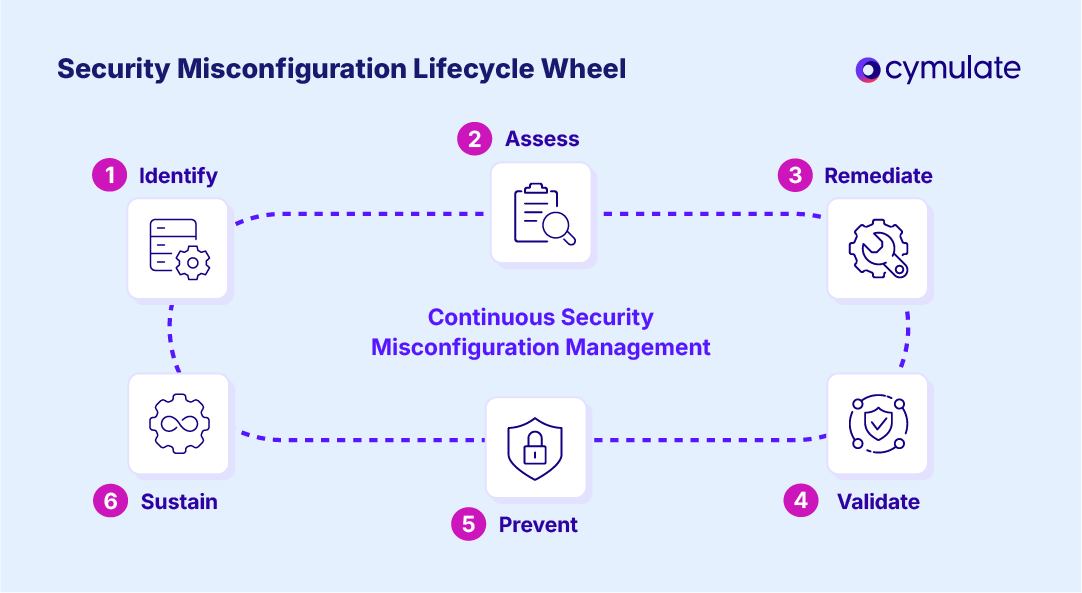
Full lifecycle of security misconfiguration management
| Stage | Objective | Example Actions | Outcome |
| Identify | Detect misconfigurations before attackers do | Reviews, scans, alerts, log analysis | Prioritized list of weaknesses |
| Assess | Evaluate business impact of each misconfiguration | Risk scoring, threat modeling | Clear remediation priorities |
| Remediate | Apply fixes and patches. | Targeted reconfiguration, patch deployment | Reduced attack surface |
| Validate | Ensure remediation was effective. | Continuous validation with Cymulate | Closed gaps, confirmed fixes |
| Prevent | Stop issues from recurring. | Automation, governance, training | Sustainable protection |
| Sustain | Monitor continuously. | Real-time exposure management | Ongoing resilience |
Reduce your exposure to security misconfigurations with Cymulate
If you’re looking to eliminate the unnecessary risk of security misconfigurations, the Cymulate Exposure Management Platform can help. Cymulate helps you:
- Identify misconfigurations across cloud, network, application and identity layers
- Prioritize fixes based on exploitability and business impact
- Validate remediation effectiveness with continuous testing
- Sustain a secure posture with ongoing monitoring
Cymulate integrates with assessment tools and continuously tests defenses against the full kill chain of attack techniques providing cybersecurity teams with the automation and insights to prove and optimize threat resilience; accelerate detection engineering; drive continuous threat exposure management; and measure and baseline security posture.
Reduce your risk from every security misconfiguration with Cymulate. Request a demo to see the platform in action.
Frequently asked questions
In the OWASP Top 10, A05:2021 Security Misconfiguration is a category of vulnerabilities caused by incorrect or incomplete security settings across different layers including applications, servers and cloud environments. It includes default credentials, overly permissive permissions, unpatched systems and disabled security controls. Because these issues are so common, OWASP urges continuous validation and secure configuration management as key defenses.
A security misconfiguration vulnerability occurs when an organization leaves systems in a state deviating from recommended security baselines, leaving them open to exploitation. Examples include public-facing storage buckets, weak encryption settings or unrestricted firewall rules. Attackers actively scan for such vulnerabilities because they often require little effort to exploit.
Yes. Misconfigurations affect nearly every environment. This includes on-premises infrastructure, cloud services, applications, identity systems and even Internet of Things (IoT) devices. For instance, a cloud security misconfiguration could expose sensitive data, while a firewall misconfiguration could open a path for lateral movement. Organizations therefore must use consistent security testing methods across all system types.
It’s unlikely they can be eliminated entirely. IT environments are constantly changing and human error cannot be avoided. However, organizations can dramatically reduce these misconfigurations through automation, standardized baselines and continuous threat exposure management (CTEM). While perfection is impossible, measurable risk reduction and ongoing monitoring are possible.
Organizations typically use a combination of vulnerability scanners, configuration tools and automated pen testing to detect misconfigurations. More advanced teams should consider exposure management solutions like Cymulate, which provide validation not just for the presence of misconfigurations but their real-world exploitability. This ensures teams focus resources on the most impactful issues.
Checking should be a continuous, automated process, not an occasional one. Traditional quarterly or annual audits leave long windows of exposure where misconfigurations can be exploited. Continuous validation through platforms like Cymulate deliver real-time visibility, aligning with modern cyber risk assessment practices and improving operational efficiency and compliance.
Preventing Microsoft 365 misconfigurations requires enforcing least privilege, enabling multi-factor authentication and regularly OneDrive and SharePoint permissions. Organizations should also validate M365 security controls with security validation measures to ensure configurations are correctly implemented. Combining policy enforcement with continuous testing minimizes the risk of sensitive data exposure.

Featured Resources
View More Resources
Vulnerability Management Requires Exposure Validation
Cut through vulnerability noise by validating, prioritizing, and focusing on real exploitable risks.

Cymulate CTEM
Automate threat validation with Cymulate Exposure Management and identify which risks are truly exploitable.

Continuous Security Testing and Automated Cyber Risk Assessment Scores
Continuous security validation uncovers gaps, tests defenses, and delivers insights to strengthen resilience against threats.