

Automated Vulnerability Remediation: A Step-by-Step Guide

The volume and pace of vulnerability disclosures outstrip the ability of cybersecurity teams to react to them manually. Automated remediation is no longer a nice-to-have because manual remediation is too slow, too error-prone and too resource-intensive while adversaries move faster than ever. That’s why automated vulnerability remediation is the key to closing the gap between detection and defense.
Key highlights:
- The processes by which systems handle vulnerability remediation automation involves detecting, prioritizing and resolving weaknesses with minimal manual work.
- Using a clear five-step path for how to automate vulnerability management in a real enterprise environment, your organization can deliver automation and reduce the burden on your teams.
- Discover a breakdown of automated vulnerability remediation tools and how to evaluate them.
- Cymulate supports vulnerability management with automated remediation workflows to handle top cybersecurity exposures.
What is vulnerability remediation automation?
Vulnerability remediation automation is defined as the use of tools and orchestration with detection, prioritization and remediation of vulnerabilities with little manual intervention.
In effect, it embeds intelligence into your vulnerability workflows so you can identify and prioritize threats automatically and act with speed. It brings together scanning, risk modeling, workflow automation, patching and validation in a closed loop.
In practical terms, the presence of automation enables prioritization and remediation systems to triage findings of real-time security risks continuously, reduce noise and trigger corrective actions at scale. This includes patches, configuration changes and compensating controls. The result is a more resilient and responsive security posture.
Here is a comparison of traditional manual remediation vs. automated remediation:
| Key differences | Manual vulnerability remediation | Automated vulnerability remediation |
| Time to remediate | Days, weeks or longer | Minutes or hours, depending on scale |
| Effort required | High: analysts, ticketing, human coordination | Low to moderate: automation handles orchestration |
| Risk of error | High: manual mistakes, misconfigurations | Lower: Repeatable, consistent processes |
How to automate vulnerability management in 5 steps
Automation isn’t just patching. It must incorporate scanning, triage, workflow integration, execution and validation. Below is a five-step roadmap for organizations aspiring to mature vulnerability remediation automation.
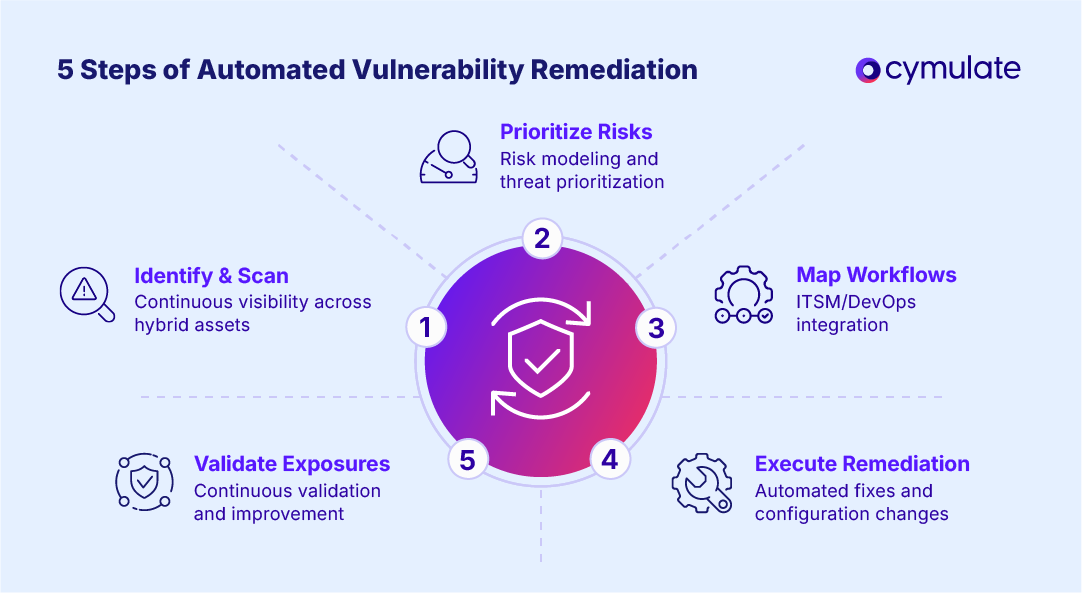
1. Identify and scan for vulnerabilities
The first step in automated vulnerability management is maintaining constant visibility across all assets. This includes on-premises, cloud and hybrid assets. Automated scanners and discovery tools should operate continuously, feeding a central repository of asset and vulnerability data.
- Integrate multiple scanner types (network, application, container)
- Normalize scan feeds into a unified database
- Tag assets with contextual metadata (business criticality, exposure)
Automated asset discovery ensures that transient resources such as containers or ephemeral cloud workloads are included in the remediation scope. This real-time mapping forms the foundation for accurate prioritization of immediate threat validation before attackers can exploit new weaknesses.
2. Prioritize risks based on impact
Next, apply risk modeling to score discovered vulnerabilities beyond raw severity. Automation helps with threat prioritization by weighing factors such as exploitability, asset criticality, threat intelligence and exposure.
- Use predictive models (e.g. EPSS) and real-world threat data
- Align with business risk and compliance requirements
- Filter and rank issues so only the highest-impact ones move forward
By automatically updating risk scores, organizations can keep their remediation aligned with real-time security risks, ensuring that resources are spent on issues most likely to be exploited in the wild.
3. Map to remediation workflows
Once you know what matters most, connect prioritized items to your operational systems. Automation delivers value only when it integrates seamlessly into IT and DevOps workflows. This is where automation meets the real world.
- Auto-generate tickets or tasks in ITSM/DevOps tools
- Assign to the right teams (OS patching, configuration, dev fixes)
- Establish SLAs, escalation paths and exception handling
A well-integrated vulnerability remediation process ensures that no critical issue is missed or delayed due to manual coordination and creates traceable accountability across teams.
4. Execute automated remediation actions
Now the system acts. The core of automated vulnerability remediation kicks in here, applying patches, configuration changes or runtime remediation without manual execution.
- Push patches or fixes based on approved playbooks
- For configurations, enforce hardening policies or drift correction
- Use compensating controls when full remediation isn’t viable
Automating these workflows dramatically reduces time-to-fix while ensuring consistency. Over time, this creates a self-healing infrastructure capable of addressing exposures autonomously through prioritization and remediation logic.
5. Validate exposures and track progress
Finally, continuous validation ensures remediation works and monitors residual risk. Immediate threat validation and ongoing tracking close the loop.
- Re-scan remediated assets to confirm vulnerability closure
- Generate dashboards, SLAs, metrics (MTTR, patch coverage)
- Use exception handling or rollback if intelligence suggests regression
Validation feeds into analytics that refine automation logic. This cycle of detection, remediation and exposure validation continuously improves posture and resilience.
Benefits of automated vulnerability management
Adopting automated vulnerability remediation transforms the efficiency and effectiveness of enterprise security programs. The primary advantage is speed. Automation compresses time-to-remediate from weeks to hours. But beyond velocity, automation improves consistency, reduces manual labor and enhances risk-based visibility.
- Accelerate remediation timelines: Automation can reduce mean time to remediation (MTTR) by up to 80% or more (a study from Expel cited an 87.5% drop vs. manual remediation), during days into hours or even minutes.
- Reduce manual effort: Teams can offload repetitive scanning, ticketing and patching tasks and focus on higher-value security work. Moreover, threat exposure automation helps maintain up-to-date posture for your security environment.
- Enhance accuracy and consistency: Standardized workflows avoid human error, misconfigurations or missed steps. Through this process, a robust approach to exposure validation ensures the corrections applied actually mitigated the risk.
- Ensure compliance readiness: Automated logging, audit trails and reporting make it easier to satisfy regulatory requirements. These reports map remediation status to compliance frameworks.
- Improve scalability: Threat exposure automation allows processes to adapt dynamically and scale with your infrastructure, whether on-premises, hybrid or cloud, without adding proportional staff.
Tools that automate compliance-driven vulnerability remediation processes
To automate effectively, security teams must rely on a mix of tool types. Endpoint security platforms, patching systems and other solutions each play a role. At the top should be an exposure management platform that orchestrates across all tooling.
| Categories of automated remediation tools | Key strengths |
| Patch management | Broad OS and application support, scheduling rollback |
| Configuration management | Drift detection, policy enforcement, baseline controls |
| Threat remediation | Runtime fixes, compensating controls, runtime shielding |
| Compliance and reporting | Rule engines, audit logs, regulatory mapping |
| Exposure management platforms | Central orchestration, cross-domain remediation workflows |
How to select the best automated vulnerability remediation tools
Choosing the right automated vulnerability remediation tools depends on how well they integrate with your ecosystem, scale across environments and support intelligent decision-making. CISOs should evaluate solutions not just for feature checklists but for operational compatibility and risk alignment.
Integration with existing security stack
Automation only works when it plays nicely with what you already have. Integration determines whether automation will streamline or complicate operations. Look for tools with deep connectors into scanning engines, SIEM/SOAR, ITSM and DevOps pipelines.
- Out-of-the-box connectors or APIs
- Bi-directional data flow and ticket synchronization
- Minimal configuration overhead
Support for hybrid and multi-cloud environments
Modern infrastructures are hybrid by default. Your infrastructure is likely distributed across on-premises, cloud, containers and serverless. The tool must support all of them consistently.
- Native visibility into cloud assets and workloads
- Support for ephemeral, transient infrastructure
- Agentless or lightweight agents for coverage
Risk-based prioritization and remediation workflows
The most effective tools combine risk-based prioritization and remediation with automated response. They should dynamically adapt workflows to business impact. You don’t want to remediate everything. The tool should bring intelligence to help focus your efforts.
- Ability to define policies and risk thresholds
- Customizable workflows tied to business context
- Support for automation with guardrails
Compliance reporting and audit support
Automation must also simplify compliance. You’ll need to show progress to auditors and stakeholders.
Look for robust reporting features that map remediation results to governance frameworks. The tool you choose should make that easy.
- Pre-built compliance templates (e.g. PCI, HIPAA, ISO)
- Exportable audit logs, change records, status reports
- Evidence collection tied to remediation steps
Validation of exposures after remediation
Remediation is worthless if it doesn't actually fix issues. Validation ensures that efforts at fixes are real and persistent.
- Re-scanning or live checks post-remediation
- Drift detection to catch regressions
- Alerting on failed fixes or reopened issues
Best Practices for Implementing Automatic Remediation of Vulnerabilities
Effective automation requires thoughtful implementation, governance and iterative improvement. The process of selecting the right tool will all be for naught without successful implementation. The following best practices help enterprises scale automatic remediation safely and strategically across their environments.
1. Align automation with risk-based prioritization
Automation should not necessarily be universal. Begin by automating low- and medium-risk fixes, while maintaining human review for critical systems. The idea is to minimize low-level tasks for your team so they can focus on more mission-critical endeavors.
- Define automation thresholds for vulnerability severity.
- Continuously adjust based on attack trends and asset criticality.
- Use risk-based data to tune automation policies dynamically.
This approach minimizes disruption while ensuring automation aligns with your risk appetite and compliance posture.
2. Standardize workflows across teams and tools
To maximize impact, ensure all stakeholders operate from a unified set of playbooks. Standardized processes prevent confusion and enable faster adoption.
- Define clear escalation and exception-handling paths.
- Use version-controlled runbooks to enforce uniformity.
- Conduct regular cross-team reviews to refine automation rules.
3. Integrate remediation with compliance reporting
Automation and compliance go hand in hand. Integrating compliance checks into automation workflows ensures continuous audit readiness.
- Map remediation events to compliance frameworks automatically.
- Use reporting modules to track evidence collection.
- Schedule routine audit exports for governance teams.
This integration helps satisfy regulatory expectations while proving security progress in measurable terms.
4. Continuously validate exposures post-remediation
Automation should include verification loops. Exposure validation ensures that applied fixes are effective and persistent.
- Implement automated post-remediation scanning.
- Trigger alerts if vulnerabilities reappear or patches fail.
- Include validation data in compliance and risk dashboards.
This feedback loop strengthens trust in your automation systems and improves long-term accuracy.
5. Scale automation to cover hybrid and multi-cloud
Finally, extend automation beyond traditional environments. Use vulnerability remediation tools that support multi-cloud, SaaS and edge infrastructures.
- Integrate CSP-native tools for cloud-specific fixes.
- Automate onboarding of new resources via APIs.
- Maintain policy parity across environments for consistent protection.
Scaling automation in this structured way enables your organization to achieve broad, consistent and risk-aligned vulnerability remediation automation across the enterprise.
Streamline your workflows with vulnerability remediation tools from Cymulate
Exposure management is more than finding gaps. It’s about building resilience to real threats. The Cymulate Exposure Management Platform integrates with security controls to push updates for immediate threat prevention.
Optimize your threat prevention and detection with efficiency, scale and speed. Build threat resilience and mitigate top cybersecurity exposures with automation that eliminates the manual processes of updating security controls for identified security gaps.
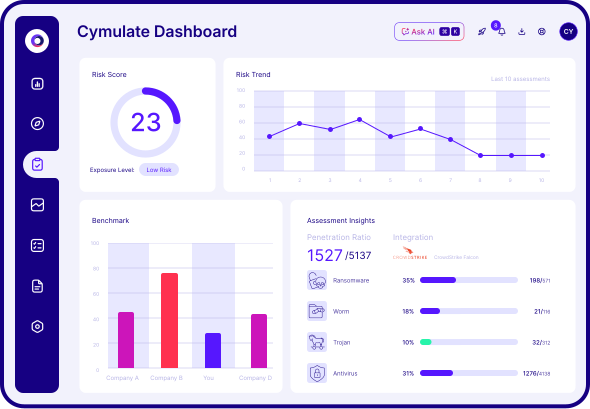
- Mitigate faster. Reduce manual tasks with automation that converts exposure validation to immediate threat resilience.
- Optimize prevention. Push new IOCs directly to security controls to block known threats proven to bypass your security controls.
- Operationalize CTEM. Drive continuous threat exposure management with automation to mitigate validated threat exposure.
- Reduce dwell time. Create self-improving defenses that evolve with threat landscapes.
On average, Cymulate customers see a 30% improvement in threat prevention and 40 times faster threat validation using the platform. One IT solutions customer found a 70% drop in pen test findings thanks to Cymulate.
Book a demo today to discover how the Cymulate platform can help your organization automate vulnerability remediation to strengthen security posture.
Frequently asked questions
Automating vulnerability management is essential for enterprises because the pace and volume of vulnerabilities today make manual processes unsustainable. Automation enables faster detection, triage and remediation across sprawling environments, dramatically reducing the window of exposure.
Moreover, automation reduces human error, enables scaling without parallel increases in staffing, and ensures consistent, auditable controls across the enterprise. With a mature automated vulnerability remediation approach, security teams can shift focus from firefighting to strategic defense.
The most effective vulnerability remediation methods for cloud environments combine auto remediation workflows, real-time scanning and drift correction. A cloud-focused approach emphasizes configuration enforcement, IAM policy remediation and runtime hardening in addition to traditional patching.
Additionally, you should use continuous validation (re-scanning after fixes), policy-as-code enforcement and integration into cloud-native security tools. These ensure that remediations persist across autoscaling, container redeployments and infrastructure drift. This approach enables a resilient, agile cloud posture.
Several modern tools combine scanning with automated remediation workflows, enabling end-to-end orchestration of detection and fix actions. These platforms act as solutions with automated remediation workflows, blending scanning, risk modeling and remediation automation.
Typically such tools ingest findings from vulnerability scanners, apply prioritization logic, create actionable tickers and execute patches or configuration fixes. They also validate results and maintain audit trails, a unified solution for managing exposure efficiently.
First, improve cloud security vulnerability remediation by implementing continuous scanning, risk-based prioritization and automation of low risk fixes. Use steps to improve cloud security vulnerability remediation like configuration scanning, drift detection and policy enforcement aligned to cloud best practices.
Second, connect those scans to remediation workflows: auto-create tickets, schedule fixes and validate outcomes. Finally, monitor metrics (MTTR, patch coverage, recurrence) and iterate your automation logic to refine accuracy and minimize interventions.

Resources on Vulnerability Remediation
View More Resources
Cyber Risk Remediation Starts with Validation
Effective cyber risk remediation starts with validating and prioritizing exploitable risks for faster, measurable reduction.

Cymulate CTEM
Automate threat validation with Cymulate Exposure Management and identify which risks are truly exploitable.

Auto Mitigation
Build threat resilience and eliminate threat exposure with automated security control updates.