Frequently Asked Questions

Product Information & Features

What is Cymulate?

Cymulate is an Exposure Management Platform designed to help organizations proactively improve their resilience against cyber threats. It provides end-to-end visibility, simulates real-world threats, automates remediation, and quantifies risk reduction. For more details, visit Cymulate's Platform page.

What does the Cymulate-Splunk integration do?

The Cymulate-Splunk integration enables SIEM administrators and SOC analysts to validate detection rules, increase efficiency, build new rules based on the latest threat actor behaviors, and train teams for incident detection and response. It allows safe simulation of real attacks targeting production security controls, helping teams understand and enhance their detection and incident handling capabilities. Learn more.

What features does Cymulate offer?

Cymulate offers continuous threat validation, exposure validation, threat resilience optimization, cloud security validation, vulnerability management, automated remediation, and a MITRE ATT&CK heatmap. The platform also provides customizable dashboards, comprehensive assessments, and integration with leading security tools. For a full list, visit Cymulate's Platform page.

How does Cymulate help tune Splunk?

Cymulate helps tune Splunk by validating detection rules and alerts, ensuring logs are ingested correctly, reducing alert fatigue, and providing mitigation recommendations. It enables teams to test new rules using simulated attacks or IOCs, and generates Sigma rules to accelerate rule creation in Splunk. Read more.

What are the benefits of integrating Cymulate with Splunk?

Benefits include enhanced visibility into security posture, streamlined detection and response, reduced vulnerability management workload, optimized change management through integrated ticketing, and modular dashboards for in-depth analysis. The integration is available for Immediate Threats, Endpoint Detection and Response (EDR), and Advanced Scenarios. Details here.

How do I integrate Cymulate with Splunk?

To integrate Cymulate with Splunk:

  1. Sign in to Cymulate and go to 'Integrations'.
  2. Select the Splunk integration and click 'Edit'.
  3. Provide your Splunk instance credentials and configuration details.
  4. Click 'Submit' and Cymulate will validate the connection.
Once set up, you can run assessments and verify Splunk's detection of simulated events. For more, see the integration guide.

What integrations does Cymulate support?

Cymulate integrates with a wide range of security tools, including SIEM platforms (e.g., Splunk, Microsoft Sentinel, Google Chronicle), SOAR solutions (Palo Alto Cortex XSOAR, IBM Resilient SOAR), EDR solutions (CrowdStrike Falcon, SentinelOne), vulnerability management tools (Tenable, Qualys), cloud security solutions (Wiz, CloudGuard), IAM (Microsoft AD), and ticketing systems (Jira, ServiceNow). For the full list, visit Cymulate's Partnerships and Integrations page.

Does Cymulate have an API?

Yes, Cymulate provides an API with a rate limit of 10 requests per second per IP address. Documentation is available at Cymulate API Documentation.

Use Cases & Benefits

Who can benefit from Cymulate?

Cymulate is designed for blue teams (SOC analysts, managers), red teams (offensive security professionals), CISOs, CIOs, executives, and organizations across industries such as finance, healthcare, retail, technology, manufacturing, utilities, and more. It is suitable for any business seeking to improve cybersecurity posture, validate threats, and optimize resilience. Learn more about roles.

What business impact can customers expect from using Cymulate?

Customers typically see a 30% improvement in threat prevention, a 52% reduction in critical exposures, and a 60% increase in operational efficiency. The platform also helps reduce recovery time post-attack and provides quantifiable risk reduction metrics for executives. See more.

What problems does Cymulate solve?

Cymulate addresses challenges such as quantifying cybersecurity efforts, prioritizing remediation, reducing manual security operations, improving visibility into security posture, validating cloud security, simulating real-time threats, streamlining vulnerability management, and accelerating post-breach recovery. Platform details.

Can you share specific case studies or success stories?

Yes. For example, Hertz Israel reduced cyber risk by 81% within four months, and a retail organization became 12x faster at assessing security controls. More case studies are available at Cymulate's customer stories page.

What industries are represented in Cymulate's case studies?

Industries include critical infrastructure, education, engineering, finance, healthcare, insurance, IT services, law enforcement, manufacturing, non-profit, retail, technology, transportation, and utilities. See all case studies.

Technical Requirements & Implementation

How easy is it to implement Cymulate and its integrations?

Cymulate is designed for easy and quick implementation. The platform is intuitive and user-friendly, requiring minimal configuration. Customers report that setup involves just a few clicks to start receiving actionable insights. Read customer feedback.

What technical documentation and resources are available?

Cymulate provides solution briefs, data sheets, e-books, and guides covering detection engineering, threat resilience, exposure prioritization, automated mitigation, and more. Resources are available at Cymulate's Resources Page.

Security & Compliance

What security and compliance certifications does Cymulate have?

Cymulate holds SOC2 Type II, ISO 27001:2013, ISO 27701, ISO 27017, and CSA STAR Level 1 certifications. The platform also complies with GDPR and implements advanced security features such as role-based access controls, two-factor authentication, and robust encryption. More on security.

How does Cymulate ensure product security?

Cymulate follows a secure development life cycle, maintains employee security awareness programs, and uses advanced security controls to protect user data. For more, visit Security at Cymulate.

Support & Customer Experience

What customer support is available after purchasing Cymulate?

Cymulate offers first-class customer support via email ([email protected]) and chat (chat support). Customers also have access to webinars, solution briefs, and e-books for ongoing education. Support details.

What training and technical support is available to help customers get started?

Cymulate provides onboarding support, educational resources, and an intuitive platform design. Customer testimonials highlight the ease of use and helpfulness of the support team. See testimonials.

How does Cymulate handle maintenance, upgrades, and troubleshooting?

Cymulate ensures continuous accessibility except during scheduled maintenance, as outlined in the Service Level Agreement. The support team assists with troubleshooting, upgrades, and maintenance. Customers can contact support via email or chat for help. Learn more.

Competition & Differentiation

How does Cymulate compare to other security validation platforms?

Cymulate differentiates itself with a unified exposure management platform, continuous threat validation, automated remediation, and quantifiable risk metrics. It is recognized as a Market Leader for Automated Security Validation by Frost & Sullivan and as a Customers' Choice by Gartner Peer Insights. For detailed comparisons, visit Cymulate vs Competitors.

Who are Cymulate's main competitors and how does Cymulate differ?

Main competitors include Pentera, Picus Security, Scythe, AttackIQ, and NetSPI. Cymulate stands out by offering continuous validation, actionable remediation, and measurable impact (30% improvement in threat prevention, 52% reduction in exposures, 60% increase in efficiency). See the full comparison at Cymulate vs Competitors.

Customer Proof & Recognition

What feedback have customers given about Cymulate's ease of use?

Customers consistently praise Cymulate for its intuitive design and ease of use. For example, Ariel Kashir, CISO, says, "It’s easy to use, intuitive, and the customer support is unparalleled." Raphael Ferreira, Cybersecurity Manager, notes, "Cymulate is easy to implement and use—all you need to do is click a few buttons, and you receive a lot of practical insights into how you can improve your security posture." Read more testimonials.

Who are some of Cymulate's customers?

Cymulate serves over 1,000 customers in 50 countries. Notable examples include Hertz Israel, Saffron Building Society, and a retail organization that became 12x faster at security assessments. See more at Cymulate's customer stories page.

Cymulate named a Customers' Choice in 2025 Gartner® Peer Insights™
Learn More
New Case Study: Credit Union Boosts Threat Prevention & Detection with Cymulate
Learn More
New Research: Cymulate Research Labs Discovers Token Validation Flaw
Learn More
An Inside Look at the Technology Behind Cymulate
Learn More

How Cymulate - Splunk Integration Makes Validating SIEM a Snap

By: Cymulate

Last Updated: July 3, 2025

The Cymulate Exposure Management and Security Validation platform supports integration with Splunk. When using the Cymulate platform with Splunk, SIEM administrators and SOC analysts can:  

  • Validate their detection rules 
  • Increase their efficiency 
  • Build new rules based on the latest threat actor behaviors and techniques  
  • Train and prepare their colleagues for actual incident detection and response 

Cymulate provides the ability to safely simulate real attacks targeting production security controls, to understand and enhance how your security team detects and handles incidents. Cymulate’s ease of use, customizable dashboards and reports, and comprehensive set of out-of-the-box and custom assessments enable security organizations to supercharge their detection and reporting capabilities. 

How Cymulate Helps Tune Splunk 

Adapting security to constantly changing technology and infrastructure is a complex task. Without tuning rules and alerts, a team might miss important information that helps them detect and respond to emerging threats.  

In addition, the threat landscape is constantly changing. Security teams are expected to generate new and innovative detection capabilities to identify new attack techniques. Unfortunately, even the most highly resourced and capable teams struggle to keep pace with new threat actors, campaigns, and groundbreaking attacker techniques. 

Given the above, it is no surprise that detection rules configuration lags. Outdated or inadequate configurations can jeopardize your organization’s infrastructure in two ways: 

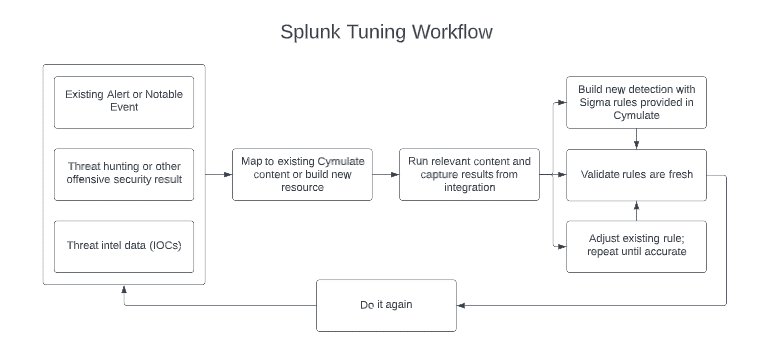
  1. An unnecessarily high number of alerts and false positives leading to alert fatigue – Alerts that were once vital might have lost their relevancy, tools with redundant capabilities might raise alerts twice for the same event, and evolution in the organization’s risk appetite might not have been reflected in the configuration of trigger levels. As alerts increase, they should be checked for their value and risk-rated based on the monitoring of their behaviors and actions.  
  2. Recently added devices, tools, infrastructure modifications, or other changes might not be considered. In the era of rapid infrastructure evolution and increased reliance on the supply chain, a delay in adequately configuring security controls in time may open hidden security gaps. 

This simultaneous combination of factors makes it hard for SOC teams to keep up.  Considering that this needs to be done continuously to ensure security technology detects suspicious activities and alerts are firing as intended, it is easy to see how a team can be overwhelmed managing SIEM solutions. 

How does Cymulate - Splunk Integration Make Life Easier?

1. Ensure logs are being ingested

No matter how strong your team and your use cases are, if logs are not being sent to and ingested by Splunk correctly, nobody will ever see them.  As a result, configurations inevitably break or are broken by changes. Cymulate helps identify issues with receiving logs. When integrated with Splunk, Cymulate queries to see if an event was detected within Splunk after each assessment; there might be a log delivery issue if no event was detected where events should be easily identified. Setting up a scheduled routine assessment in Cymulate makes this an easy check.  

 

image

2. Validate detection rules and alerts

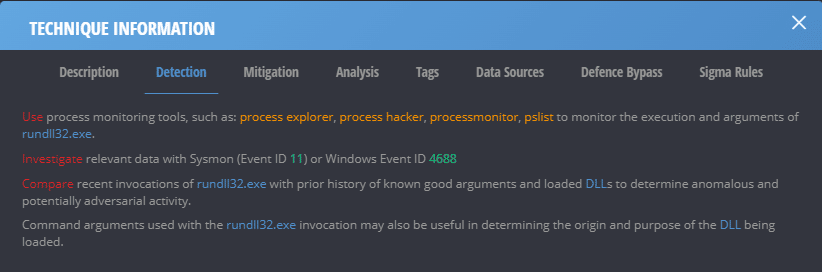
Detection rules and new alerts should be created regularly by the SOC team. Old rules should be retired, and new ones should be developed, tested, and implemented based on emerging threats. What better way to test a new rule than executing an attack or using IOCs that should trigger it? Cymulate allows you to use pre-built attack templates or customize your own to ensure your detection and alerting mechanisms are working as intended. Taking this a step further, Cymulate provides built-in detection and mitigation recommendations for each assessment to make life even easier. 
 

image

3. Reduce the team’s level of effort

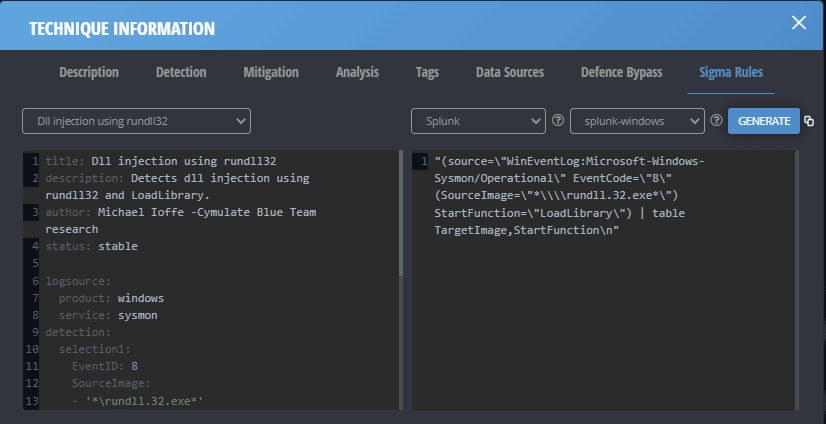
Cymulate simplifies and accelerates the SIEM detection use case development process. Many modules within Cymulate provide mitigation recommendations within the assessment reports. In addition, Cymulate delivers a mechanism to generate Sigma rules based on the specific attack techniques used in an assessment. This functionality accelerates analysts' ability to create meaningful rules or alerts within Splunk or other products. 
 

cymulate and splunk

cymulate and splunk

4. Train and measure the security team

Cymulate enhances a SOC team’s skills and readiness. An organization can use Cymulate to conduct tabletop exercises, test new or senior staff's response time, and to ensure that processes are working within pre-defined timelines or Service Level Agreements (SLAs). An assessment can be started to see how quickly an event is detected in Splunk. After detection, the downstream processes can be evaluated to determine if the response time is within acceptable bounds. Where deficiencies exist, processes could be changed, or teams could be educated to identify better and triage the attack behaviors. 

Integrating Splunk with Cymulate allows your team to safely simulate malicious behaviors, home in on activities that bypass your security controls and fine-tune your SIEM for optimal results. Moving from a reactive detection and response approach toward a proactive, continuous enhancement approach results in more effective and efficient people, processes, and technology. 

Benefits 

Cymulate equips security teams with greatly enhanced visibility into an organization’s security posture, streamlines the ability to detect and respond, and enables SOC teams to be more efficient and effective. Running simulated attacks on the production network with the Splunk integration: 

  • Gives richer context to findings  
  • Enables security controls fine-tuning  
  • Reduces workload related to vulnerability management 
  • optimizes change management through integrated ticketing 
  • Provides a modular, customizable dynamic dashboard for instantaneous in-depth analysis  

Cymulate’s integration with Splunk is available for Immediate Threats, Endpoint Detection and Response (EDR), and Advanced Scenarios. 

How to Integrate Cymulate with Splunk 

Setting up the integration between Splunk and Cymulate is easy.  

  1. Sign in to the Cymulate platform. 
    a. Click on the user button.
    b. Click ‘Integrations’. 
  2. Scroll to the Splunk integration and select ‘Edit’. 
  3. Provide the username, password, and URL for your Splunk instance. Select the time zone for the Splunk deployment and enter any desired delay for Cymulate to wait before querying for events after executing simulated attacks.
    Note: This requires setting up an integration user within Splunk. For more information on how to do this, please read the following Splunk article. 
  4. Click ‘Submit’.
  5. Cymulate will validate the connection.

Once the integration is established, it is available directly from any supported modules within the platform. You can safely run attacks and see if the resulting logs that Splunk is ingesting contain relevant identifiers associated with Cymulate actions. Cymulate will display the query sent to Splunk and the detailed Splunk response, verifying if Splunk detected relevant events and triggered alerts.  

We encourage you to book a demo to understand better the power of Cymulate and the benefits it brings to your security team. 

Cymulate Exposure Validation makes advanced security testing fast and easy. When it comes to building custom attack chains, it's all right in front of you in one place.
Mike Humbert, Cybersecurity Engineer
DARLING INGREDIENTS INC.
Learn More
Book a Demo