Frequently Asked Questions

Technical Insights: Syscalls & Suspended Processes

What are syscalls and why are they important in security research?

Syscalls, or system calls, are low-level functions that allow programs to interact directly with the operating system kernel. In security research, analyzing syscalls is crucial because advanced persistent threat (APT) groups and malware developers often use them to bypass hooks implemented by security tools like EDRs (Endpoint Detection and Response). Understanding and extracting syscalls helps researchers detect and defend against sophisticated evasion techniques.

How do attackers use syscalls to evade EDR detection?

Attackers use direct or indirect syscalls to avoid detection by EDRs. Direct syscalls involve hardcoding syscall numbers, but these can vary across Windows versions. Indirect syscalls involve loading ntdll.dll at runtime and extracting syscall functions, but this behavior can also be flagged by EDRs. Both methods aim to bypass hooks that EDRs place in user-mode DLLs to monitor suspicious activity.

What is the significance of extracting syscalls from a suspended process?

Extracting syscalls from a suspended process allows researchers to obtain a clean, unhooked copy of ntdll.dll before EDR hooks are applied. When a process is created in a suspended state, only ntdll.dll is loaded, and EDR DLLs are not yet injected. This enables the extraction of original syscall implementations, which can be used to bypass user-mode hooks and evade detection.

How does the attack path for extracting syscalls from a suspended process work?

The attack path involves creating a new process (e.g., explorer.exe) in a suspended state, reading its memory to locate the loaded ntdll.dll, and copying its contents to the attacker's process. Since EDR hooks are not present in the suspended process, this method provides a clean version of ntdll.dll for use in evasion techniques.

Why is only ntdll.dll loaded in a suspended process?

When a process is created in a suspended state, only ntdll.dll is initially mapped into memory. Other DLLs, including EDRs, are loaded later when the process resumes and executes its initialization routines. This behavior is documented in Microsoft and StackOverflow resources, and it enables researchers to extract unhooked ntdll.dll from suspended processes.

What are the practical steps to extract syscalls from a suspended process?

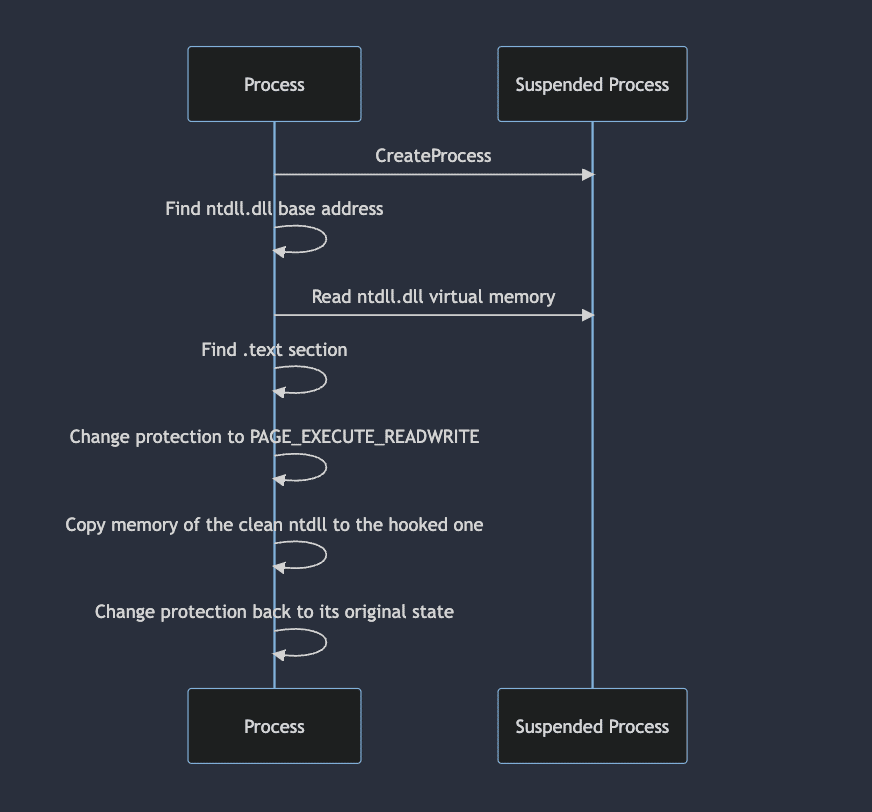
The practical steps include: 1) Creating a new process in suspended mode, 2) Locating the ntdll base address in the suspended process, 3) Reading the ntdll memory into a buffer, 4) Terminating the suspended process, and 5) Overwriting the hooked .text section of ntdll in the attacker's process with the clean copy. This sequence ensures the hooks are removed and original syscalls are restored.

What challenges might arise when extracting ntdll from a suspended process?

Some EDRs may hook the Process Environment Block (PEB), causing the base addresses stored there to be altered. This can lead to reading memory regions controlled by the EDR instead of the original ntdll. Advanced techniques, such as using the EPROCESS kernel structure, may be required to overcome these obstacles, though this is outside the scope of the referenced article.

How effective is this technique against modern EDRs?

Testing has shown that extracting syscalls from a suspended process can effectively bypass detection, unhook ntdll, and allow shellcode execution. However, some EDRs may still flag this technique, so results can vary depending on the specific security solution in place.

What additional resources are available for learning about DLL unhooking and syscall extraction?

Recommended resources include the Sektor7 blog post on DLL unhooking (link) and the ired.team guide on unhooking DLLs using C++ (link), as well as Microsoft and StackOverflow documentation on process initialization and module loading.

Who authored the research on extracting syscalls from a suspended process?

The research was authored by Ilan Kalendarov, a security researcher at Cymulate with a background in Windows research and red teaming for the Israel Defense Forces. Ilan specializes in defense evasion tactics and Windows internals.

How does this research relate to Cymulate's Exposure Validation platform?

Cymulate's Exposure Validation platform enables advanced security testing, including the simulation of real-world attack chains and evasion techniques like those described in the research. The platform provides a unified interface for building and validating custom attack scenarios, helping organizations assess their resilience against sophisticated threats.

What is the main takeaway from the research on extracting syscalls from a suspended process?

The main takeaway is that creating a process in a suspended state and extracting its ntdll.dll allows for bypassing EDR hooks and executing shellcode undetected in some cases. However, security tools are evolving, and this technique may not be universally effective.

How does Cymulate help organizations validate their defenses against advanced evasion techniques?

Cymulate provides automated attack simulations and exposure validation tools that allow organizations to test their defenses against advanced evasion techniques, such as those involving syscall extraction and DLL unhooking. This helps security teams identify gaps and improve their resilience to modern threats. Learn more.

What is Cymulate's Exposure Validation solution?

Cymulate Exposure Validation is a platform that enables organizations to run automated, real-world attack simulations to validate their security controls. It helps teams quickly identify exploitable vulnerabilities and optimize their defenses. Learn more.

How does Cymulate integrate with other security tools?

Cymulate integrates with a wide range of security technologies, including Akamai Guardicore, AWS GuardDuty, BlackBerry Cylance OPTICS, Carbon Black EDR, Check Point CloudGuard, Cisco Secure Endpoint, CrowdStrike Falcon, Wiz, and SentinelOne. These integrations enhance security validation across network, cloud, endpoint, and vulnerability management domains. For a full list, visit our Partnerships and Integrations page.

What certifications does Cymulate hold for security and compliance?

Cymulate holds several industry-leading certifications, including SOC2 Type II, ISO 27001:2013, ISO 27701, ISO 27017, and CSA STAR Level 1. These certifications demonstrate Cymulate's commitment to robust security, privacy, and compliance standards. Learn more.

What is Cymulate's pricing model?

Cymulate operates on a subscription-based pricing model tailored to each organization's requirements. Pricing depends on the chosen package, number of assets, and scenarios selected for testing. For a detailed quote, you can schedule a demo with the Cymulate team.

Who can benefit from using Cymulate?

Cymulate is designed for CISOs, security leaders, SecOps teams, red teams, and vulnerability management teams in organizations of all sizes and industries, including finance, healthcare, retail, media, transportation, and manufacturing. The platform provides tailored solutions for each role to improve threat resilience and operational efficiency. Learn more.

How easy is it to implement Cymulate?

Cymulate is designed for quick and easy implementation, operating in agentless mode with no need for additional hardware or complex configurations. Customers can start running simulations almost immediately after deployment, with comprehensive support and educational resources available. Schedule a demo to learn more.

What feedback have customers given about Cymulate's ease of use?

Customers consistently praise Cymulate for its intuitive interface and ease of use. Testimonials highlight the platform's user-friendly dashboard, quick implementation, and accessible support. For example, Raphael Ferreira, Cybersecurity Manager, stated, "Cymulate is easy to implement and use—all you need to do is click a few buttons, and you receive a lot of practical insights into how you can improve your security posture." Read more testimonials.

What are the key features and benefits of Cymulate?

Cymulate offers continuous threat validation, unified BAS and CART, attack path discovery, automated mitigation, AI-powered optimization, complete kill chain coverage, and an extensive threat library. Benefits include up to 52% reduction in critical exposures, 60% increase in team efficiency, and 81% reduction in cyber risk within four months. Learn more.

How does Cymulate compare to other security validation platforms?

Cymulate stands out with its unified platform combining BAS, CART, and Exposure Analytics, continuous 24/7 threat validation, AI-powered remediation prioritization, and ease of use. It offers measurable outcomes and frequent updates, making it suitable for organizations seeking comprehensive, automated security validation. See comparisons.

What pain points does Cymulate address for security teams?

Cymulate addresses fragmented security tools, resource constraints, unclear risk prioritization, cloud complexity, communication barriers, inadequate threat simulation, operational inefficiencies in vulnerability management, and post-breach recovery challenges. See case studies.

Are there case studies showing Cymulate's impact?

Yes, for example, Hertz Israel reduced cyber risk by 81% in four months, and a sustainable energy company scaled penetration testing cost-effectively with Cymulate. More case studies are available at Cymulate Customers.

How does Cymulate support different security personas?

Cymulate tailors its solutions for CISOs (metrics and risk prioritization), SecOps (automation and efficiency), red teams (offensive testing), and vulnerability management teams (validation and prioritization). Each persona benefits from features designed to address their unique challenges. Learn more.

What is Cymulate's mission and vision?

Cymulate's mission is to transform cybersecurity practices by enabling organizations to proactively validate defenses, identify vulnerabilities, and optimize their security posture. The vision is to create a collaborative environment for lasting improvements in cybersecurity strategies. About Cymulate.

Where can I find Cymulate's blog, newsroom, and resource hub?

You can find the latest research, news, and resources at Cymulate Blog, Newsroom, and Resource Hub.

How can I contact Cymulate for support or a demo?

You can contact Cymulate for support via email at [email protected], use the chat support on the website, or schedule a personalized demo to see the platform in action.

Cymulate named a Customers' Choice in 2025 Gartner® Peer Insights™
Learn More
New Case Study: Credit Union Boosts Threat Prevention & Detection with Cymulate
Learn More
New Research: Cymulate Research Labs Discovers Token Validation Flaw
Learn More
An Inside Look at the Technology Behind Cymulate
Learn More

Extracting Syscalls from a Suspended Process

By: Ilan Kalendarov

Last Updated: November 27, 2025

cymulate blog article cover image

APT groups and malware developers routinely use system calls (AKA syscalls) to avoid hooks implemented by modern security tools like EDRs. Syscall analysis for behavioral malware detection is already a popular detection technique, but, despite numerous available techniques for syscall extraction, some of them still fly under the radar. 

As red teamers or security researchers, we often use syscalls when developing attack paths.   

For example, we can use direct syscalls in the malicious program we develop but it has problems. You see, syscall numbers differ across windows OS versions and service builds, forcing us to write a different syscall for each version. While there are tools to automate this process, EDRs are starting to flag this technique. 

We can also use indirect syscalls. For those, we get a handle to ntdll.dll from the disk during run-time. To do that, we have to read the ntdll file bytes, parse the .rdata and .text sections, and extract the syscall functions we want to use. Even if we avoid writing the syscalls in a hard-coded way to our program, our behavior is suspicious as we get a handle to ntdll on disk and map its content and EDRs are starting to flag this technique. 

Let’s try to explore a different technique that will enable us to extract syscalls from a suspended process. We will first look at the attack path, then detail how to develop the attack, and – bonus - see how we can take it one step further. 

Attack path

We need somehow to get a fresh copy of ntdll and copy it to our process memory and bypass the EDR hooks. As we can see in the example below, when opening explorer.exe in its active process state, suspicious functions will be hooked. 
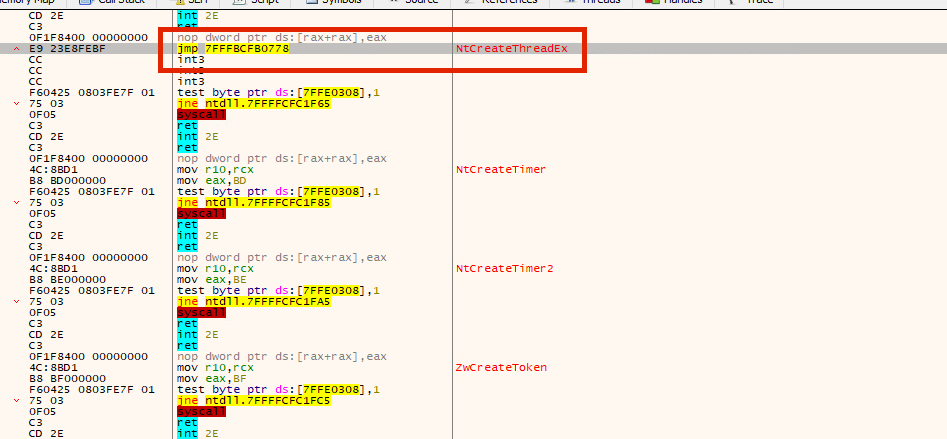
screenshot of when opening explorer.exe in its active process state, suspicious functions will be hooked.

The jmp instruction leads to the EDR’s DLL for inspection. If the thread we create is malicious, the EDR will flag it.  

But what would happen if explorer.exe was in a suspended state? 

In the sample displayed below, we tried just that. We opened explorer.exe in a suspended state, and, as we can see, the only DLL that was loaded into it is ntdll. 
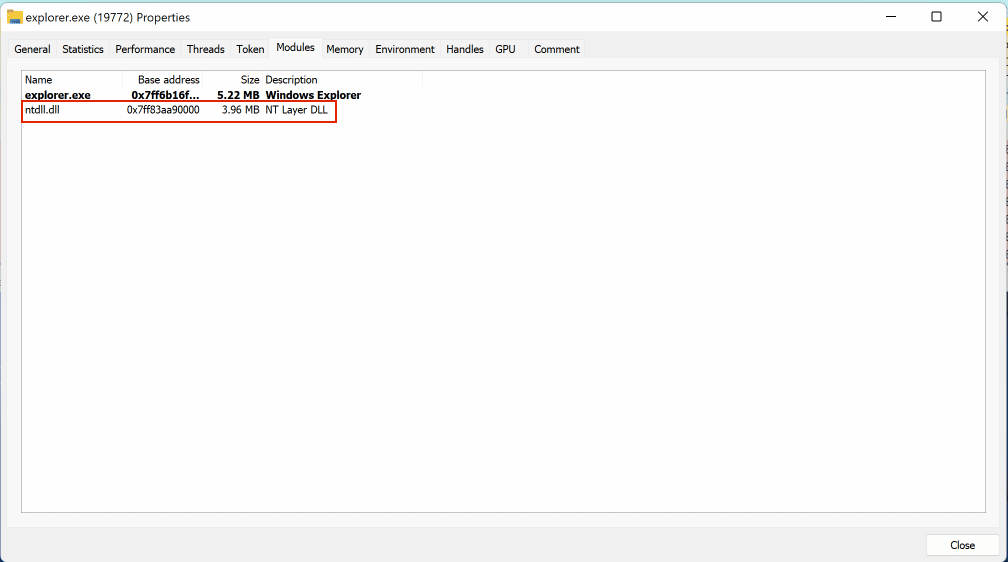
screenshot of  DLL that was loaded into it is ntdll.

Why it is that the ntdll was the only one loaded? Why none of the other DLLs, including the EDR’s? According to this StackOverflow thread, only ntdll.dll is initially mapped, and an APC is queued to run when the thread resumes.  

This calls ntdll!LdrpInitializeProcess, which initializes the execution environment (e.g. language support, the heap, thread-local storage, the KnownDlls directory), loads kernel32.dll, gets the address of BaseThreadInitThunk. and performs static DLL imports. 

Let’s check if NtCteateThreadEx was hooked this time. 
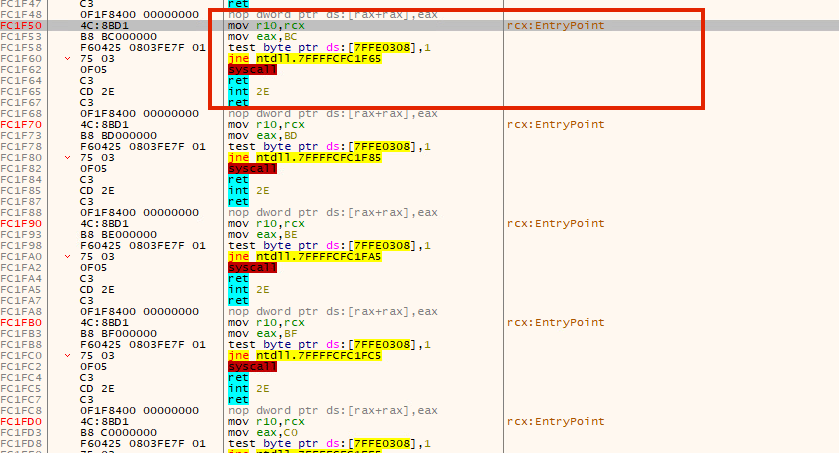
screenshot of NtCteateThreadEx

No it wasn’t! This is simply because the EDR’s DLL was not loaded when in suspended process, which produced a clean copy of ntdll without any hooks. 

So, theoretically, we could create a new process in a suspended state, read its memory, find the loaded ntdll, map its memory to our hooked ntdll, and get a fresh copy without any hooks.
flochart illustration

Developing the attack

Now that we have the theory, let’s see how it works in practice. 

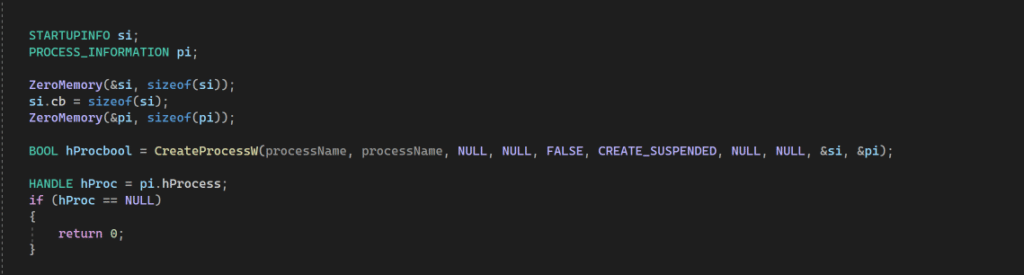
First, we create a new process in suspended mode: 
suspended mode screenshot

Now we find our ntdll base address. This is necessary because the process we create will be our child process. It will have the same ntdll base address, enabling us to use the same address to read from the suspended process. 

To get the ntdll address, we use a simple function that will iterate through our PEB until it finds the ntdll module. 
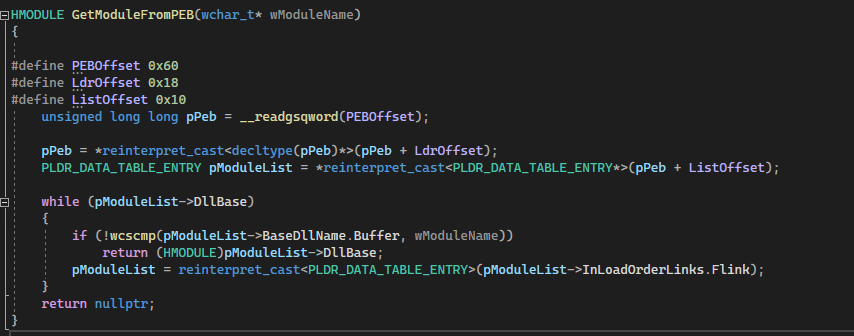
After getting a handle to ntdll, we cast it and get its base address. 

Note: Some EDRs will hook the PEB. When this happens, the base addresses stored in this location is different. As a consequence, trying to read from the PEB would land us in a region controlled by the EDR.

To retrieve the original ntdll, we could theoretically use the EPROCESS kernel structure as it stores valuable information that could lead us to the original ntdll. According to Microsoft, “The EPROCESS structure is an opaque structure that serves as the process object for a process.”

Further research showed that when used NtQuerySystemInformation with the following classes: 

SystemExtendedHandleInformation and SystemModuleInformation could leak the EPROCESS memory address. As EPROCESS is outside the scope of this post, I will not dig any deeper into that topic,  though there would be a lot to say.  

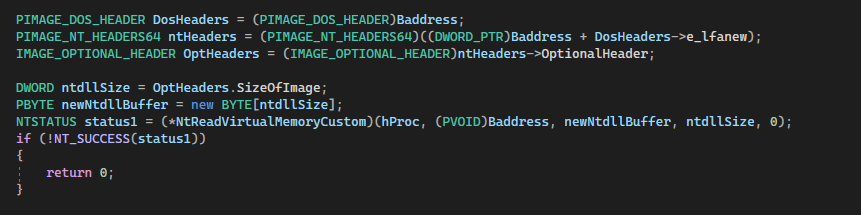
After getting the ntdll base address , we read the not-hooked ntdll memory of the suspended process and copy its data into a buffer. 

But first, we need to declare the dos header, nt headers, and optional headers to get the size of ntdll. 

After copying the content to the buffer, we terminate the suspended process as we no longer need it. 

Now, the only thing left to do is to iterate through all sections to find the virtual address of the .text section, change the protection to PAGE_EXECUTE_READWRITE, and copy the .text section of the new mapped buffer (newNtdllBuffer) to the original hooked version of ntdll. This will overwrite the hooks. The last step to conclude this part of the attack is to restore the original protection. 
Taking the attack one step further

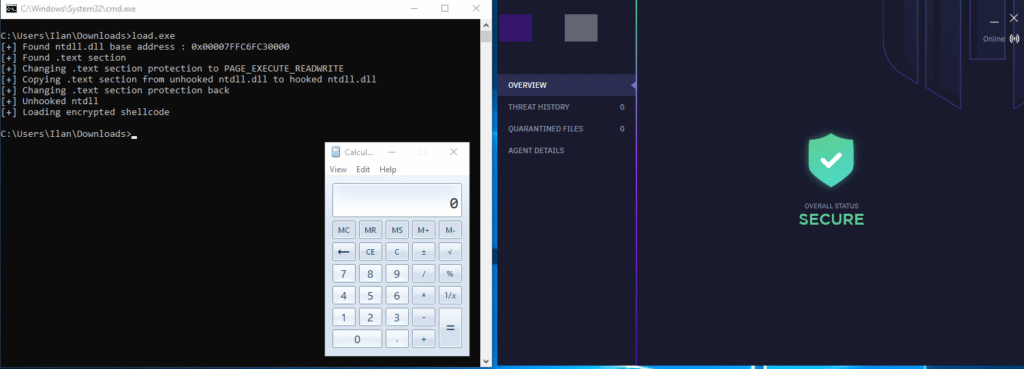
The goal here is to combine what we created above and successfully run it against an EDR. 

I’m going to combine an encrypted msfvenom calc shellcode. I’ll modify the GetModuleFromPEB and GetAPIFromPEBModule functions to accept a hash instead of the DLL name. It will then iterate through all DLLs, calculate their hash, and compare it with ours. The shellcode would decrypt itself at run-time and load to the current process. 
Conclusion

Though this technique is nothing new,  researching this topic led me to discover some POCs online, and  I wanted to share my take on it.

While testing the technique against some EDRs, it effectively bypassed detection, unhooked ntdll, and loaded the shellcode successfully, but it is worth mentioning that some EDRs could flag this technique. 

References

Cymulate Exposure Validation makes advanced security testing fast and easy. When it comes to building custom attack chains, it's all right in front of you in one place.
Mike Humbert, Cybersecurity Engineer
DARLING INGREDIENTS INC.
Learn More
Book a Demo