Frequently Asked Questions

Understanding Angler Phishing & Phishing Threats

What is angler phishing and how does it work?

Angler phishing is a social media-based phishing attack where scammers impersonate a company's customer support account on platforms like Twitter/X, Facebook, or Instagram. Attackers create fake profiles using the company's branding and respond to public customer complaints or queries, tricking users into revealing credentials or clicking malicious links. The goal is typically credential theft or malware delivery.

How do angler phishers manipulate social trust?

Angler phishers exploit the trust users place in official support channels by monitoring social feeds for frustrated customers. They quickly respond to complaints, posing as legitimate support, and provide malicious links or requests for sensitive information. Their tactics include impersonating official accounts, targeting public complaints, and using persuasive messages to lure victims.

How does angler phishing differ from other types of phishing attacks?

Angler phishing primarily uses social media channels, targeting consumers or customers who reach out for support. In contrast, clone phishing and spear phishing use email, vishing uses voice calls, smishing uses SMS, and business email compromise targets business email users. Angler phishing stands out by leveraging fake support accounts to interact with victims in public or direct messages on social platforms.

What are common tactics used in angler phishing attacks?

Common tactics include impersonating official support accounts with similar names and avatars, targeting users who publicly complain or seek help, and sending messages with malicious links or requests for account details. Attackers often use urgency and friendly language to appear helpful and trustworthy.

Can you provide a real-world scenario of an angler phishing attack?

Yes. For example, a user tweets about an internet service issue. A fake support account, such as @FastNetSupport, quickly responds with a link to "verify your account." The link leads to a spoofed login page, and when the user enters their credentials, the attacker captures them for malicious use.

What are the main differences between angler phishing and clone phishing?

Angler phishing uses social media to impersonate support accounts and targets users seeking help, while clone phishing uses email to send altered copies of legitimate messages, tricking recipients into clicking malicious links or attachments. The key difference is the attack channel and the context in which victims are targeted.

How can users recognize and block angler phishing attempts?

Users should verify that social media responses come from legitimate, verified company profiles, be cautious with unsolicited links, use multi-factor authentication (MFA), block and report suspicious accounts, and participate in phishing awareness training such as the SLAM method. Regular simulations and training help maintain vigilance.

What is the SLAM method in phishing awareness training?

The SLAM method is a phishing awareness training approach that teaches users to examine the Sender, Links, Attachments, and Message of any communication for red flags. It helps users identify suspicious elements in emails or social messages before interacting with them. Learn more on our SLAM Method page.

Why are social media users particularly vulnerable to angler phishing?

Social media users are vulnerable because they often seek quick support and may trust responses that appear to come from official accounts. Attackers exploit this urgency and trust, using realistic profiles and persuasive messages to trick users into sharing sensitive information or clicking malicious links.

What steps should organizations take to defend against angler phishing?

Organizations should educate users about social media phishing risks, enforce verification of official accounts, require MFA for important accounts, encourage reporting of suspicious profiles, and provide regular phishing awareness training. Implementing continuous validation and simulation tools, like those from Cymulate, can further strengthen defenses.

How does Cymulate help organizations defend against angler phishing?

Cymulate offers Phishing Awareness Assessments that simulate real phishing scenarios, including social media lures, to measure employee awareness and highlight weaknesses. The platform also provides Breach and Attack Simulation to test defenses against a wide range of phishing threats, helping organizations proactively identify and address vulnerabilities. Learn more at Cymulate's Breach and Attack Simulation.

What is the role of multi-factor authentication (MFA) in preventing angler phishing attacks?

MFA adds an extra layer of security by requiring a second form of verification beyond a password. Even if credentials are phished, MFA can prevent attackers from accessing accounts. Phishing-resistant methods like hardware tokens or authenticator apps are recommended for stronger protection.

How can users verify if a support account on social media is legitimate?

Users should look for verified badges, check the account's creation date, review the username for misspellings, and compare it to official company profiles. When in doubt, initiate support requests through the company's official website or known channels rather than responding to unsolicited messages.

What should you do if you suspect you've interacted with an angler phishing account?

If you suspect you've interacted with an angler phishing account, immediately stop communication, avoid clicking any links, change your passwords, enable MFA, and report the account to the social media platform. Notify your organization's IT or security team if work accounts are involved.

Where can I find more information about phishing and cybersecurity terms?

You can find a comprehensive glossary of cybersecurity terms, including phishing-related topics, on Cymulate's Glossary page. This resource is continuously updated to help users stay informed.

What resources does Cymulate offer for phishing awareness and defense?

Cymulate provides a variety of resources, including a Resource Hub, blog, webinars, e-books, and case studies. These resources cover phishing awareness, defense strategies, and the latest threat intelligence. Visit Cymulate's Resource Hub for more information.

How does Cymulate's Breach and Attack Simulation help with phishing defense?

Cymulate's Breach and Attack Simulation tests email gateways, web filters, and endpoint defenses against a wide range of phishing threats. By simulating real-world attacks, organizations can identify weaknesses and improve their security posture before actual attacks occur. Learn more at Cymulate's Breach and Attack Simulation.

What is the difference between spear phishing and angler phishing?

Spear phishing targets specific individuals or groups with highly personalized email messages, often using personal information to appear legitimate. Angler phishing, on the other hand, targets users on social media by impersonating support accounts and responding to public complaints or queries. The main difference is the attack channel and the level of personalization.

How does Cymulate's Phishing Awareness Assessment work?

Cymulate's Phishing Awareness Assessment simulates real phishing scenarios, including social media-based attacks, to measure employees' security awareness. The results guide targeted training and help organizations identify and address weaknesses in user behavior. Learn more at Cymulate's CTEM Portal.

What is Cymulate's approach to continuous threat exposure validation?

Cymulate's continuous threat exposure validation involves simulating real-world threats across all IT environments to proactively identify vulnerabilities and optimize security posture. This approach helps organizations stay ahead of emerging threats and improve resilience. Learn more at Cymulate's CTEM Portal.

How does Cymulate support organizations in training employees against phishing threats?

Cymulate supports organizations by providing phishing awareness simulations, targeted training based on assessment results, and resources like webinars and e-books. These tools help employees recognize and respond to phishing threats, including angler phishing, more effectively. Visit Cymulate's Resource Hub for more information.

What are the key benefits of using Cymulate for phishing defense?

Key benefits include continuous validation of defenses, actionable insights for improving security posture, measurable reductions in risk, and enhanced employee awareness. Cymulate's platform automates simulations and provides quantifiable metrics to help organizations stay ahead of phishing threats. Customers have reported up to an 81% reduction in cyber risk within four months. Read the case study.

How does Cymulate's platform integrate with existing security tools?

Cymulate integrates with a wide range of security technologies, including EDR, SIEM, cloud security, and vulnerability management tools. This integration enhances the security ecosystem and enables automated validation and mitigation. For a complete list of integrations, visit our Partnerships and Integrations page.

What certifications and compliance standards does Cymulate meet?

Cymulate holds several key certifications, including SOC2 Type II, ISO 27001:2013, ISO 27701, ISO 27017, and CSA STAR Level 1. These certifications demonstrate Cymulate's commitment to robust security and compliance standards. Learn more at Security at Cymulate.

Who can benefit from using Cymulate's phishing defense solutions?

Cymulate's solutions are designed for CISOs, security leaders, SecOps teams, red teams, vulnerability management teams, and organizations of all sizes across industries such as finance, healthcare, retail, and more. The platform provides tailored solutions to address the unique needs of each role. Learn more at our page for CISOs and CIOs.

What is Cymulate's pricing model?

Cymulate operates on a subscription-based pricing model tailored to each organization's requirements. Pricing depends on the chosen package, number of assets, and scenarios selected for testing and validation. For a detailed quote, schedule a demo with the Cymulate team.

How easy is it to implement Cymulate's platform?

Cymulate is designed for quick and easy implementation, operating in agentless mode without the need for additional hardware or complex configurations. Customers can start running simulations almost immediately after deployment, with comprehensive support and educational resources available. Learn more at Book a Demo.

What feedback have customers given about Cymulate's ease of use?

Customers consistently praise Cymulate for its intuitive interface and ease of use. For example, Raphael Ferreira, Cybersecurity Manager, stated, "Cymulate is easy to implement and use—all you need to do is click a few buttons, and you receive a lot of practical insights into how you can improve your security posture." Read more testimonials on our Case Studies page.

What are the core problems Cymulate solves for organizations?

Cymulate addresses challenges such as overwhelming threat volumes, lack of visibility, unclear risk prioritization, resource constraints, and fragmented security tools. The platform provides continuous threat validation, exposure prioritization, improved resilience, operational efficiency, and collaboration across security teams. Learn more at About Us.

How does Cymulate compare to other security validation platforms?

Cymulate stands out with its unified platform that integrates Breach and Attack Simulation, Continuous Automated Red Teaming, and Exposure Analytics. It offers continuous, automated attack simulations, AI-powered optimization, complete kill chain coverage, and an extensive threat library. Customers report measurable outcomes such as a 52% reduction in critical exposures and an 81% reduction in cyber risk within four months. Learn more at Cymulate vs Competitors.

What educational resources does Cymulate provide for cybersecurity professionals?

Cymulate offers a Resource Hub, blog, webinars, e-books, case studies, and a continuously updated glossary of cybersecurity terms. These resources help professionals stay informed about the latest threats, best practices, and Cymulate's platform capabilities. Visit Cymulate's Resource Hub and Glossary.

New: 2026 Gartner® Market Guide for Adversarial Exposure Validation
Learn More
Cymulate named a Customers' Choice in 2025 Gartner® Peer Insights™
Learn More
New Research: The Security Tradeoffs Behind AI Tooling
Learn More
An Inside Look at the Technology Behind Cymulate
Learn More

Angler Phishing

Phishing remains a leading cyber threat in 2025, responsible for a vast number of data breaches. Phishers now exploit newer channels beyond email – including social media – to trick victims.  

Social platforms like Twitter/X, Facebook and Instagram are home to an emerging phishing scheme called angler phishing.  

In an angler phishing attack, the criminal impersonates a company’s customer service account on social media and lures unsuspecting users into scams. By hijacking brand identities and replying to public complaints or queries, angler phishers trick people into revealing credentials or clicking malicious links. 

What Is Angler Phishing?

Angler phishing is a social media-based phishing attack in which scammers pose as customer support agents. The attacker creates a fake profile (often using a company’s name, logo, and branding) on a platform like Twitter/X, Facebook or Instagram.  

When a real customer publicly complains or asks for help, the phisher “fishes” by responding from the bogus account. They present themselves as helpful support, but their real goal is credential theft or malware delivery. 

As Experian notes: “Angler phishing is a type of social engineering attack in which a scammer poses as a customer service representative on social media.” These attacks can be sophisticated: some use nearly perfect copies of official support pages and personalized, friendly messages to fool victims. 

How Angler Phishers Manipulate Social Trust

Angler phishers exploit the trust people have in official support channels. They often monitor social feeds for frustrated customers. For example, when someone tweets: “my online order never arrived,” the attacker swoops in pretending to be the brand’s support team. 
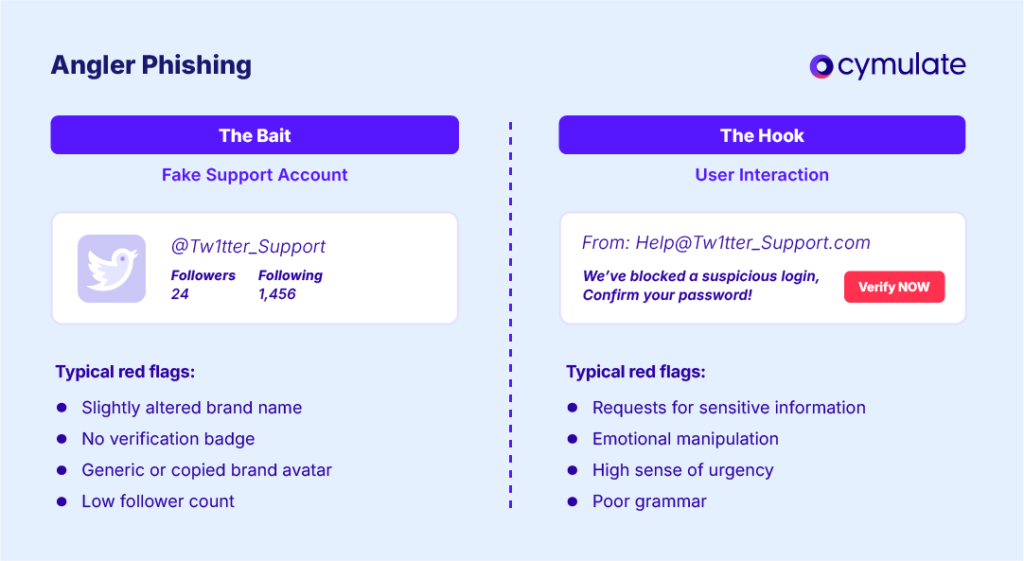
Angler Phishing

The fake response might say: “We’re sorry for the trouble! Please click here so we can verify your account and fix the issue.”  

The link leads to a malicious site or download. If the user clicks, the site may install malware or prompt for login details. The attacker then harvests this sensitive data to hijack accounts or commit fraud. 

Key tactics in angler phishing include: 

  • Impersonation of Official Accounts: Attackers create accounts with names and avatars mimicking legitimate support channels. They may add words like “support,” “help,” or slight misspellings (e.g. “@Facebokhelp” instead of “@FacebookHelp”). 
  • Targeting Public Complaints: They focus on users who are already upset or looking for help. Angry or worried customers are more likely to trust a quick reply. 
  • Malicious Links and Requests: The fake support message typically includes a link or asks for account details. Clicking the link may download malware or open a spoofed login page. Victims might be asked to “confirm” their password or enter a security code – which the attacker then uses to take over accounts. 

Unlike email phishing, these scams appear in public or direct messages where people assume official help is nearby. The attacks are insidious and persuasive: victims may genuinely think they’re getting help, when in fact they’re giving attackers the keys to their accounts. 

A Realistic Angler Phishing Scenario: How It Unfolds

A typical angler phishing incident might play out like this: Jane posts on Twitter that her internet service has been unexpectedly cut off. Within minutes, a message appears from a handle like @FastNetSupport (note the company name spelled correctly, but the account is newly created).  

The message says: “Sorry about your connection issue! Click here to verify your account.” The link points to a web page that looks like the internet provider’s login portal. Jane, grateful for quick help, enters her username and password.  

Unbeknownst to her, this is a trap: the fake site captures her credentials, giving the attacker full access to her account. Meanwhile, Jane thinks the issue is resolved – until her account is drained or hijacked. 

This scenario illustrates how angler phishing works: by masquerading as official support and leveraging urgency, attackers dupe users into trusting malicious links and divulging sensitive information

Angler Phishing vs Other Phishing Attacks: Channel of Delivery

Phishing comes in many forms. The table below compares angler phishing with other common phishing types to show their channels, targets, tactics, and examples: 

Type Channel Target Tactics Example 
Clone Phishing Email General recipients (email users) The attacker clones a genuine email (e.g. invoice, notification) the victim received, altering links or attachments to malicious ones. Uses familiarity to build trust. A user receives a copy of a legitimate invoice email from a vendor. The email looks identical, but the “Pay Now” link goes to a fake site that installs malware. 
Spear Phishing Email Specific individuals or groups Highly personalized messages crafted for a particular person or small group. Uses personal info (name, role, project details) to appear legitimate and urgent. An employee gets an email with the company logo addressed personally (“Hi [Name], please review this financial report”). The attachment is malware. 
Whaling Email (or other) High-level executives (CEO, CFO, etc.) Targets “big fish” by impersonating trusted executives or business partners. Messages often involve urgent financial requests or sensitive data. A CFO receives an email appearing to be from the CEO, requesting an immediate wire transfer of company funds to a “trusted vendor.” 
Vishing Voice Call (Phone) Telephone users (usually employees) “Voice phishing” calls. Scammer pretends to be from a bank, IT department, or helpdesk, asking for codes or account info. Often uses urgency or threats. A scammer calls an employee claiming to be IT support: “We detected a breach. Tell me your system password and the code sent to your phone to secure your account.” 
Smishing SMS/Text Message Mobile phone users “SMS phishing.” Fraudulent text messages impersonate banks, delivery companies, etc., with links or callbacks. Aims to get credentials or install mobile malware. A user receives a text: “Your bank detected unusual activity. Visit bank-verify.app to confirm your identity.” The link leads to a fake banking site that steals login details. 
Business Email Compromise (BEC) Email (Business) Employees managing money (Finance) Scammer spoofs a trusted corporate email (CEO, lawyer, vendor) to trick employees into wire transfers or revealing sensitive data. Usually involves social engineering over time. An employee in accounts payable gets an email from “Vendor X” saying payment details changed. The new bank account is owned by the attacker, not the real vendor. 
Angler Phishing Social Media (Twitter, Facebook, Instagram, etc.) Consumers or customers reaching out on social platforms Fake support accounts mimic real ones and reply to customer complaints. Messages contain malicious links or requests (e.g. “verify account details here”). Victims trust the social proof of support. A customer tweets about a bank login issue. A fake account “@BankSupportTeam” responds with a link to “secure your account.” The link leads to a phishing page that steals login credentials. 

Recognize and Block Angler Phishing Attempts

Defending against angler phishing requires both technology and awareness. Organizations should educate users and enforce security measures: 

1. Verify Official Accounts 

Always double-check that social media responses are from legitimate company profiles. Look for verified badges or compare URLs and usernames carefully before interacting. If in doubt, initiate a new support request via the company’s official website or known channels. 

Never click links or open attachments from unsolicited social media messages. Instead of clicking, independently navigate to the official website or support portal. Hover over links (if possible) to see the actual URL and ensure it matches the real domain. 

3. Use Multi-Factor Authentication (MFA) 

Require MFA for all important accounts. Even if credentials are phished, MFA can prevent attackers from using stolen passwords alone to log in. (Phishing-resistant methods like hardware tokens or authenticator apps provide stronger protection than SMS codes.) 

4. Block and Report Fake Accounts 

When users spot suspicious support accounts, they should block and report them immediately to the social platform. Reporting helps the platform take down malicious profiles and protect other users. 

5. Train with the SLAM Method 

Incorporate phishing awareness training focused on social media threats. For example, the SLAM method teaches users to examine the Sender, Links, Attachments and Message of any communication for red flags.  

Encourage employees to stop and analyze any unexpected support request before responding. Regular simulations and refreshers (see Cymulate’s blog on phishing awareness training for tips) will keep vigilance high. 

Cymulate’s Phishing Awareness and Continuous Validation 

Cymulate helps organizations stay ahead of threats like angler phishing through continuous threat exposure validation. The Cymulate Phishing Awareness Assessment simulates real phishing scenarios (including social media lures) to measure employees' security awareness

Cymulate Phishing Awareness


Insight from these simulations guides targeted training and highlights weaknesses in user behavior. In addition, Cymulate’s broader Breach and Attack Simulation offering can test email gateways, web filters and endpoint defenses against the full spectrum of phishing threats. 

With awareness programs, verification practices and Cymulate’s continuous testing, security teams can protect their organizations and customers from angler phishing and other evolving phishing attack types. 

Book a Demo