Frequently Asked Questions

Mitigation Hub: Features & Capabilities

What is Cymulate's Mitigation Hub and how does it help security teams?

Cymulate's Mitigation Hub is a feature within the Cymulate Platform that enables security teams to turn validated exposures into prioritized, actionable remediation tasks. It centralizes mitigation workflows, groups related exposures by control, mitigation type, severity, and status, and provides integrated tracking from 'To Do' through 'Done.' This helps teams move efficiently from exposure validation to risk reduction. Note: Mitigation Hub is available for Cymulate Exposure Validation customers; detailed limitations not publicly documented—ask sales for specifics.

How does Mitigation Hub centralize and organize mitigation actions?

Mitigation Hub aggregates mitigation tasks from Cymulate Exposure Validation assessments into a single, filterable workspace. Each task includes operational context such as severity, status, exposure count, affected environments, relevant CVEs, control type, mitigation type, and recommended remediation actions. This allows teams to address multiple findings through a single control update, shifting from managing individual findings to executing coordinated risk reduction. Note: The effectiveness of grouping depends on the quality of exposure validation; ask for a demo to see specific workflows.

What types of mitigation guidance does Mitigation Hub provide?

Mitigation Hub provides actionable remediation guidance grouped by mitigation type, including Access & Control, Detection Rule, Sigma Rule, WAF Rule, Configuration & Hardening, YARA Rule, EDR and SIEM detection updates, and additional prevention and detection control recommendations. Each recommendation includes practical remediation steps and direct linkage to the validated exposures it resolves, ensuring traceability and technical context for engineers. Note: The range of supported controls may vary by environment; ask for a feature walkthrough for your stack.

How does Mitigation Hub help reduce manual triage and accelerate remediation?

Mitigation Hub reduces manual triage by organizing work around the fix, not just the finding. It helps teams identify which mitigation actions can reduce the most validated risk, filter and prioritize by environment, severity, status, control type, CVE, or mitigation category, and align remediation tasks to business risks and responsible teams. For supported workflows, Cymulate Auto Mitigation can generate and deploy vendor-specific EDR rules, push IoCs, and automatically re-run simulations to confirm mitigation effectiveness. Note: Auto Mitigation features require compatible integrations; check compatibility before deployment.

Why are findings alone not enough to reduce risk, and how does Mitigation Hub address this?

Findings alone do not reduce risk because security teams need validated, prioritized, and deduplicated findings mapped to the right controls, along with clear remediation actions. Cymulate Exposure Validation identifies which exposures are real and exploitable, while Mitigation Hub organizes, prioritizes, and prepares required actions for execution, ensuring remediation is not fragmented across spreadsheets, tickets, teams, and tools. Note: The effectiveness of this process depends on organizational adoption of centralized workflows.

Platform Features & Technical Requirements

What are the key capabilities of Cymulate's Exposure Validation and Mitigation Hub?

Cymulate Exposure Validation automates continuous testing to validate threats, security controls, and exposures. Mitigation Hub builds on this by turning validated exposures into prioritized, actionable mitigation tasks, centralizing workflows, and providing operational context for each task. Together, they enable organizations to move from exposure discovery to validated remediation action. Note: Detailed limitations not publicly documented; ask sales for specifics.

What integrations does Cymulate support for Mitigation Hub and Exposure Validation?

Cymulate supports over 50 integrations across SIEM (e.g., CrowdStrike Falcon LogScale), EDR and Anti-Malware (e.g., BlackBerry Cylance OPTICS, Carbon Black EDR, CrowdStrike Falcon), Cloud Security (e.g., AWS GuardDuty, Check Point CloudGuard), Web Gateway (Cisco Umbrella), Network Security (Akamai Guardicore), Vulnerability Management (Rapid7 InsightVM), SOAR, and Active Directory. These integrations enable Mitigation Hub to automate and orchestrate remediation workflows across a broad range of security technologies. Note: Integration availability may vary by package and environment; confirm compatibility before purchase. See full list.

Where can I find technical documentation for Mitigation Hub and Cymulate's platform?

Technical documentation, data sheets, and guides for Cymulate's solutions, including Mitigation Hub, are available at the Cymulate Resource Hub. Specific guides include the Threat Studio Data Sheet and the Detection Engineering Automation Guide. Note: Some resources may require registration or customer access.

Security & Compliance

What security and compliance certifications does Cymulate hold?

Cymulate holds several industry-recognized certifications, including SOC2 Type II, ISO 27001:2013 (ISMS), ISO 27701 (Privacy Information Management), ISO 27017 (Cloud Security), and CSA STAR Level 1. These certifications demonstrate Cymulate's commitment to security, privacy, and compliance. For more details, visit our security overview page. Note: Certification scope and coverage may vary; request documentation for your specific use case.

What product security features does Cymulate offer?

Cymulate incorporates advanced security measures, including enforced 2-Factor Authentication (2FA) for all employees, Single Sign-On (SSO) options, and Role-Based Access Controls (RBAC) for granular access privileges. The platform also supports GDPR compliance through secure development life cycle procedures and oversight by a Data Protection Officer (DPO) and Chief Information Security Officer (CISO). Note: Customer-specific security requirements should be discussed with Cymulate's security team.

Use Cases & Business Impact

What business impact can organizations expect from using Cymulate and Mitigation Hub?

Organizations using Cymulate report an average 30% increase in threat prevention, 50%-90% improvement in detection capabilities, 52% reduction in critical exposures, and a 60% boost in operational efficiency. For example, Hertz Israel achieved an 81% reduction in cyber risk within four months. These outcomes are achieved by automating validation, prioritizing remediation, and consolidating workflows. Note: Results may vary based on organizational maturity and implementation scope. Read the Hertz Israel case study.

What pain points does Mitigation Hub address for security teams?

Mitigation Hub addresses common pain points such as the risk-to-fix gap (delays between identifying exposures and implementing protection), slow manual validation cycles, too many findings with insufficient prioritization, siloed tools and teams, lack of actionable remediation, and difficulty proving improvement to leadership. It helps operationalize remediation and reduce validated risk across environments. Note: The platform's effectiveness depends on organizational adoption and process integration.

Who can benefit from using Mitigation Hub and Cymulate's Exposure Validation?

Mitigation Hub and Exposure Validation are designed for CISOs, SecOps Directors, SOC Leaders, Detection Engineers, Blue Team Leads, Red Teams, and Vulnerability Management Teams in organizations of all sizes and industries. The platform is especially valuable for companies seeking to proactively manage and validate their cybersecurity posture, optimize resource allocation, and communicate security value to stakeholders. Note: Best fit for organizations with established security operations; teams without dedicated security staff may require additional support.

Pricing & Plans

What is Cymulate's pricing model for Mitigation Hub and Exposure Validation?

Cymulate uses a subscription-based pricing model that is customized to each organization's needs. Pricing depends on the package selected, the number of assets covered, and the scenarios and features chosen. For a tailored quote, you can schedule a demo with Cymulate's team. Note: Exact pricing is not publicly listed; contact sales for details.

Competition & Comparison

How does Cymulate's Mitigation Hub compare to AttackIQ?

Cymulate offers AI-driven, actionable remediation guidance, a daily-updated attack scenario library, and an AI Copilot that converts threat intelligence into automated tests. Cymulate also provides faster and simpler deployment compared to AttackIQ. However, AttackIQ may be preferred by organizations with existing investments in their platform or specific workflow requirements. Note: Cymulate is best for teams seeking rapid deployment and continuous validation; AttackIQ may suit those with established processes. Read more.

How does Cymulate's Mitigation Hub differ from Mandiant Security Validation?

Cymulate is recognized for continuous innovation, AI-powered automation, and expanded exposure management capabilities. Mandiant Security Validation has seen less innovation in recent years but may be preferred by organizations already using Mandiant's broader suite. Choose Cymulate for AI-driven workflows and rapid validation; choose Mandiant if you require integration with other Mandiant services. Note: Feature parity and integration scope should be confirmed for your environment. Read more.

How does Cymulate's Mitigation Hub compare to Pentera?

Cymulate provides deeper assessment and defense strengthening, full-kill chain coverage (including cloud control validation), and actionable remediation guidance. Pentera focuses on attack path validation and may be suitable for organizations prioritizing that approach. Choose Cymulate for comprehensive exposure validation and remediation; choose Pentera for attack path-centric validation. Note: Some organizations may use both for complementary coverage. Read more.

Support & Implementation

How long does it take to implement Mitigation Hub and Cymulate's platform?

Cymulate is designed for rapid deployment, with agentless mode requiring no additional hardware or complex configurations. Users can start running simulations and using Mitigation Hub almost immediately after setup. Customer feedback highlights ease of implementation and use, with minimal technical expertise required. Note: Implementation time may vary based on environment complexity and integration needs.

What support resources are available for Mitigation Hub and Cymulate customers?

Cymulate provides comprehensive support through email, chat, webinars, e-books, and a resource hub with technical documentation, guides, and case studies. Customers can access onboarding assistance and ongoing support to ensure successful adoption. Note: Support levels may vary by subscription tier; confirm details with your Cymulate representative. See resources.

New: Cymulate Cowork for Agentic Cyber Defense Engineering
Learn More
New Bitsight Integration: Turn Threat Intelligence into Validated Security
Learn More
Introducing Cymulate Vero AI for Agentic Cyber Defense Engineering
Learn More
New Case Study: How a Financial Authority Validates Cyber Resilience
Learn More

Mitigation Hub Turns Findings into Fixes
By: Cymulate

Last Updated: July 30, 2026

Shiraz Arush Brinder, Senior Product Manager
Avigayil Stein, Senior Product Marketing Manager

Security teams don’t need more dashboards or disconnected findings. They need a faster way to turn validated exposures into actions that build stronger security. 

This is why we built the new Mitigation Hub as a new critical feature in the Cymulate Platform, so every Cymulate Exposure Validation user can turn validated security findings into action. With the new Mitigation Hub, teams can operationalize remediation through centralized mitigation workflows, actionable guidance and integrated tracking. 

The result is a faster path from exposure validation to risk reduction across the security stack. 

Mitigation Hub Highlights

  • New Mitigation Hub turns validated exposures into prioritized remediation tasks so teams can move from findings to fixes faster.  
  • Related exposures are grouped into a single mitigation workflow by control, mitigation type, severity and status.  
  • Teams get actionable remediation guidance for detection rules, WAF rules, Sigma rules, YARA rules, configuration hardening, IoCs and more.  
  • Built-in tracking helps operationalize CTEM mobilization by managing mitigation work through To Do, In Progress and Done. 

What Is Mitigation Hub?

Cymulate already helps organizations validate which exposures are real, exploitable and meaningful to the business.  

Now, with the new Mitigation Hub, Cymulate helps teams close the next critical gap: turning validated exposures into prioritized, actionable mitigation tasks that security teams can execute and track. 

The Mitigation Hub centralizes mitigation actions across the security stack, grouping related exposures into clear mitigation tasks by control, mitigation type, severity and status.  

Instead of exporting CSVs, manually correlating findings or relying on disconnected remediation processes, security teams can manage the path from exposure validation to control improvement directly inside the Cymulate Platform. 

The result is a more operational, measurable and scalable way to reduce validated risk. 

Why Findings Alone Don’t Reduce Risk

Security teams need findings that are validated, prioritized, deduplicated, mapped to the right controls and translated into clear remediation actions. 

Cymulate Exposure Validation answers the question: Which exposures are real and exploitable? 

Mitigation Hub answers the next question: What exactly should we do about them? 

This is where many exposure management and offensive security programs lose momentum. Findings may be validated, but remediation often remains fragmented across spreadsheets, tickets, teams and tools. SecOps, vulnerability management, detection engineering and security leadership may all be working from different views of the same risk. 

Mitigation Hub was built to remove that friction. Once an exposure is validated, the required action is already organized, prioritized and ready to execute. 

One Remediation Workspace Across Your Security Stack

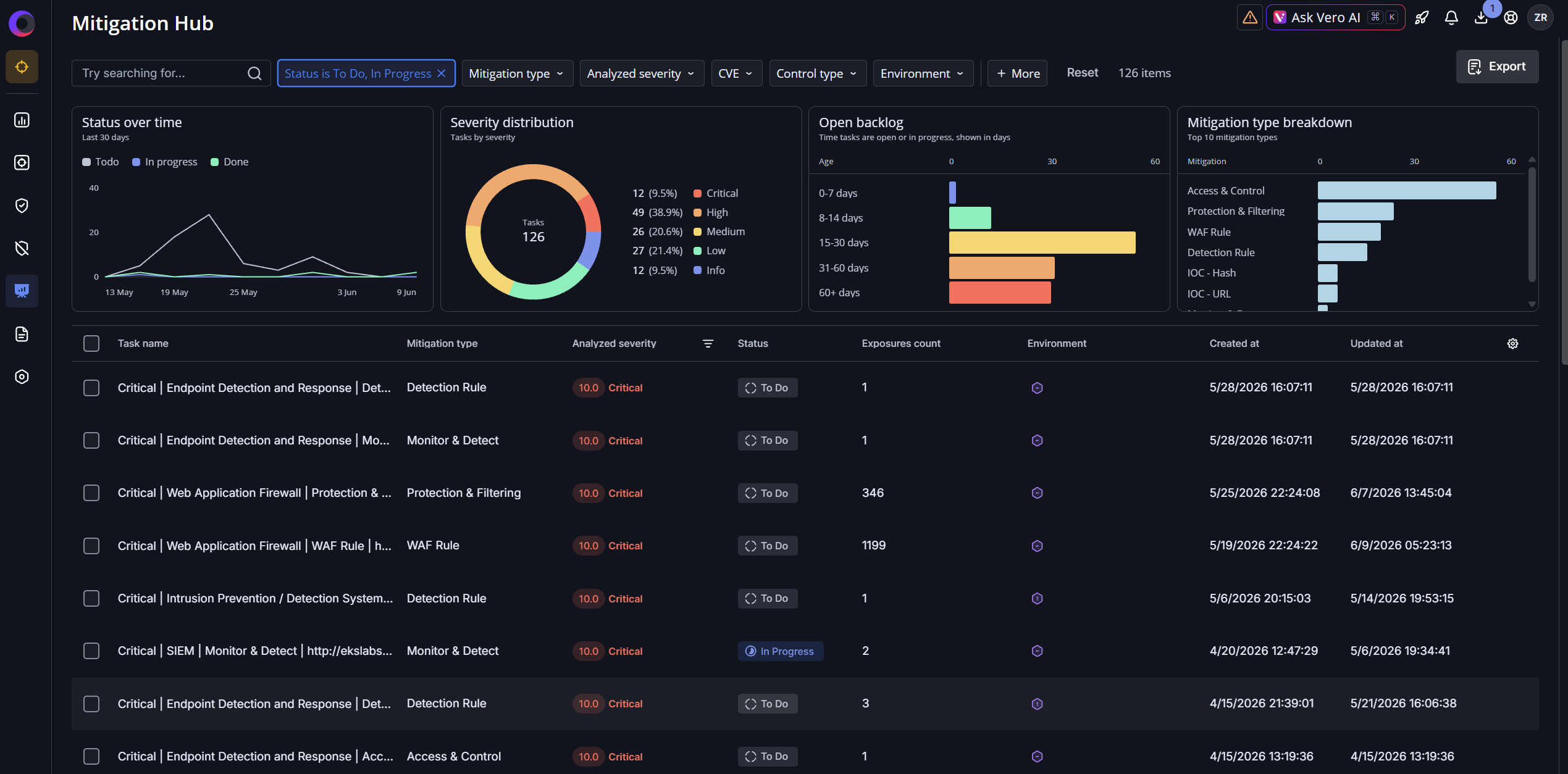
Mitigation Hub aggregates mitigation tasks from Cymulate Exposure Validation assessments into a single, filterable workspace. 

Each task includes the operational context in which teams need to act quickly: 

  • Severity  
  • Status  
  • Exposure count  
  • Affected environments  
  • Relevant CVEs  
  • Control type  
  • Mitigation type  
  • Recommended remediation actions 

Because related exposures are grouped into consolidated mitigation tasks, teams can address multiple findings through a single control update. For example, several validated exposures may roll up into one SIEM detection rule, one EDR update, one WAF rule change or one configuration hardening recommendation. This shifts teams from managing individual findings to executing coordinated risk reduction across prevention and detection controls. 

Actionable Mitigation Guidance, Not Generic Recommendations

Opening a task gives engineers the details they need to take action. Mitigation Hub provides recommended mitigations grouped by mitigation type, including: 

  • Access & Control  
  • Detection Rule  
  • Sigma Rule  
  • WAF Rule  
  • Configuration & Hardening  
  • YARA Rule  
  • EDR and SIEM detection updates  
  • Additional prevention and detection control recommendations 
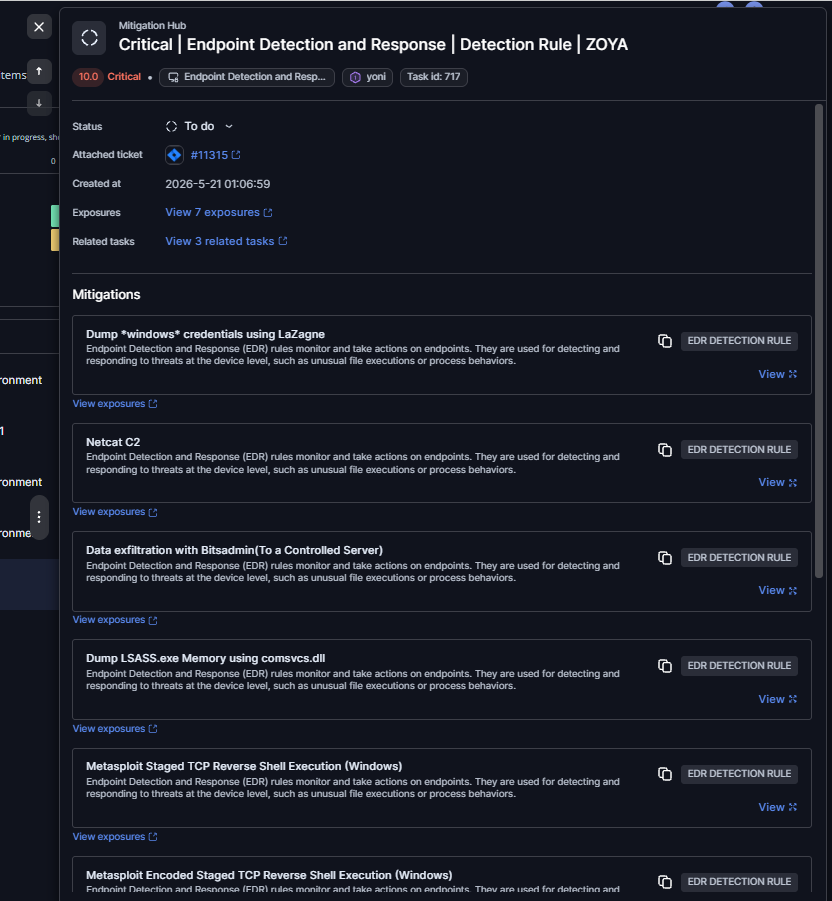
Each recommendation includes practical remediation guidance and direct linkage to the underlying validated exposures it resolves. 

That traceability matters. Engineers can understand exactly why a mitigation is recommended, which exposures it addresses and where to go for deeper technical context. With one click, they can view the related assessment findings and validation evidence. 

Less Manual triage. Faster Remediation.

Security assessments often create more findings than teams can realistically address before the next assessment cycle begins. Without grouping, prioritization and ownership context, remediation becomes slow and reactive. 

Mitigation Hub helps reduce that burden by organizing work around the fix, not just the finding. Instead of asking engineers to review dozens of individual exposure records, the Hub helps teams: 

  • Identify which mitigation actions can reduce the most validated risk  
  • Filter and prioritize work by environment, severity, status, control type, CVE, or mitigation category  
  • Align remediation tasks to the business risks and teams that own them  
  • Track mitigation progress from a centralized workspace 

For supported workflows, Cymulate Auto Mitigation can further accelerate action by enabling teams to: 

  • Generate vendor-specific EDR rules when a simulation reveals insufficient endpoint protection or a misconfigured detection  
  • Deploy EDR rules to connected security controls with a single click  
  • Push IoCs associated with validated exposures, including file hashes, IP addresses, domains and URLs  
  • Automatically re-run simulations to confirm that the mitigation is effective  
  • Move validated EDR rules from detection to prevention when ready  

For SecOps managers, this creates a usable remediation queue that combines prioritized remediation guidance with faster execution paths. 

For security leaders, it creates visibility into what is being fixed, what remains open and how mitigation work is progressing. 

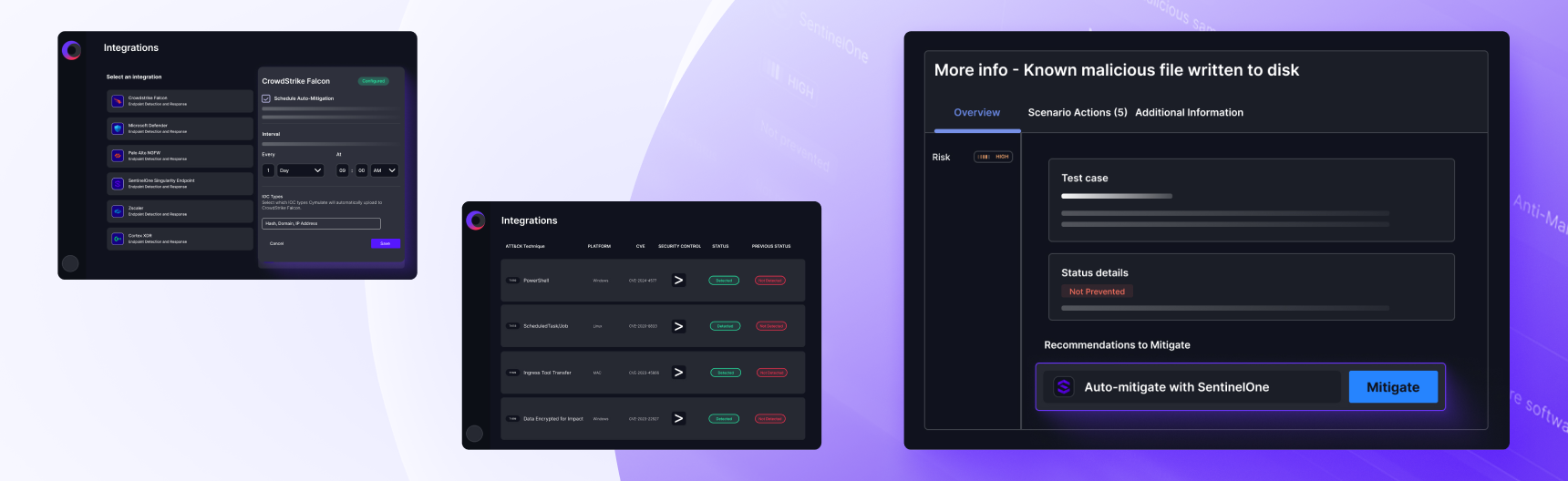
Try it for yourself in the click-through demo below:

Operationalizing CTEM Mobilization

Continuous Threat Exposure Management (CTEM) is designed to move organizations from exposure discovery to validated remediation action. While many security teams have improved visibility, prioritization and validation, mobilization remains the hardest step: operationalizing remediation across teams and security controls. 

That challenge is shaping the next phase of exposure management. Gartner predicts that by 2029, 60% of unified exposure management solutions will incorporate domain-specialized mitigation, remediation and threat containment capabilities to help organizations act on exposures before they can be exploited.¹ Gartner also notes that the value of exposure management increasingly depends on helping teams make intelligent decisions about what to fix, how to fix it and when to act. 

Mitigation Hub helps close that mobilization gap by turning validated exposures into prioritized mitigation tasks that can be tracked, executed and revalidated from a centralized workspace. 

This aligns with the broader evolution of exposure management toward actionable remediation and cyber defense engineering, where validation, mitigation and continuous improvement work together to strengthen resilience across the security stack. 

Close the Loop Between Validation and Mobilization

Validated exposures are only valuable when they lead to action. Mitigation Hub helps security teams move from findings to fixes by transforming validated exposures into prioritized, trackable mitigation tasks across the security stack. 

With one centralized workspace for remediation guidance, task tracking and exposure context, teams can reduce manual triage, accelerate mitigation and continuously improve security controls based on validated risk. 

Mitigation Hub is now available for Cymulate Exposure Validation customers. 

To see how Mitigation Hub can help your team operationalize remediation and reduce validated risk across your environments, contact your Cymulate representative or schedule a demo

1Gartner. Emerging Tech: The Future of Exposure Management Will Be Preemptive — Driven by Autonomous Interdiction, Elizabeth Kim, Luis Castillo, Isy Bangurah, Travis Lee, 13 February 2026. 

Cymulate Exposure Validation makes advanced security testing fast and easy. When it comes to building custom attack chains, it's all right in front of you in one place.
Mike Humbert, Cybersecurity Engineer
DARLING INGREDIENTS INC.
Learn More
GET A PERSONALIZED DEMO

Ready to see Cymulate in action?