Frequently Asked Questions

Vulnerability Research & CVE-2025-64669

What is CVE-2025-64669 and how was it discovered?

CVE-2025-64669 is a local privilege escalation vulnerability in Microsoft’s Windows Admin Center (WAC) version 2.4.2.1, discovered by Cymulate Research Labs. The vulnerability is caused by insecure directory permissions, where the C:\ProgramData\WindowsAdminCenter folder is writable by all standard users. This allows attackers to escalate privileges by exploiting the folder's permissions. Microsoft confirmed the issue, assigned the CVE, and awarded Cymulate a ,000 bounty. (Source, Dec 17, 2025)

What environments are affected by CVE-2025-64669?

All environments running Windows Admin Center (WAC) up to version 2411 are affected. This includes any organization using WAC for server or infrastructure management, as the vulnerability impacts the technology layer rather than specific sectors. (Source)

What exploitation techniques are possible with this vulnerability?

Cymulate identified two main exploitation paths: (1) Extension Uninstall Mechanism Abuse, where attackers hijack the uninstall process to run signed PowerShell scripts with elevated privileges, and (2) Updater DLL Hijacking, where a malicious DLL is dropped into the updater folder and loaded by a privileged WAC updater process. Both methods enable escalation from a low-privileged user to SYSTEM. (Source)

How can organizations validate their defenses against CVE-2025-64669?

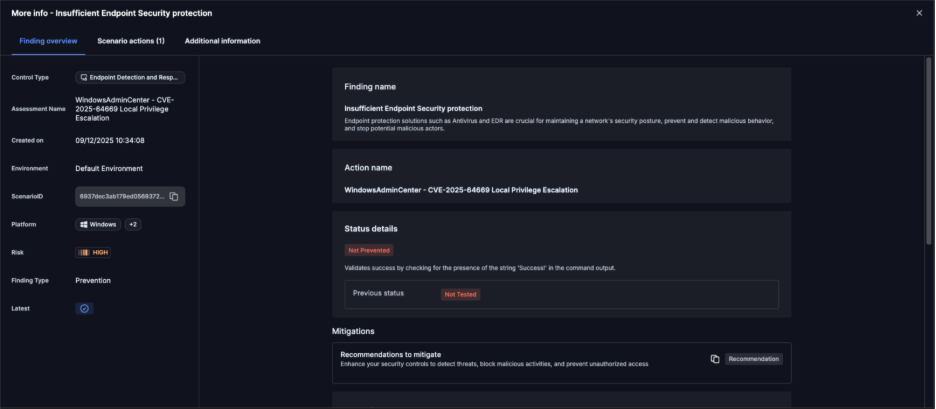
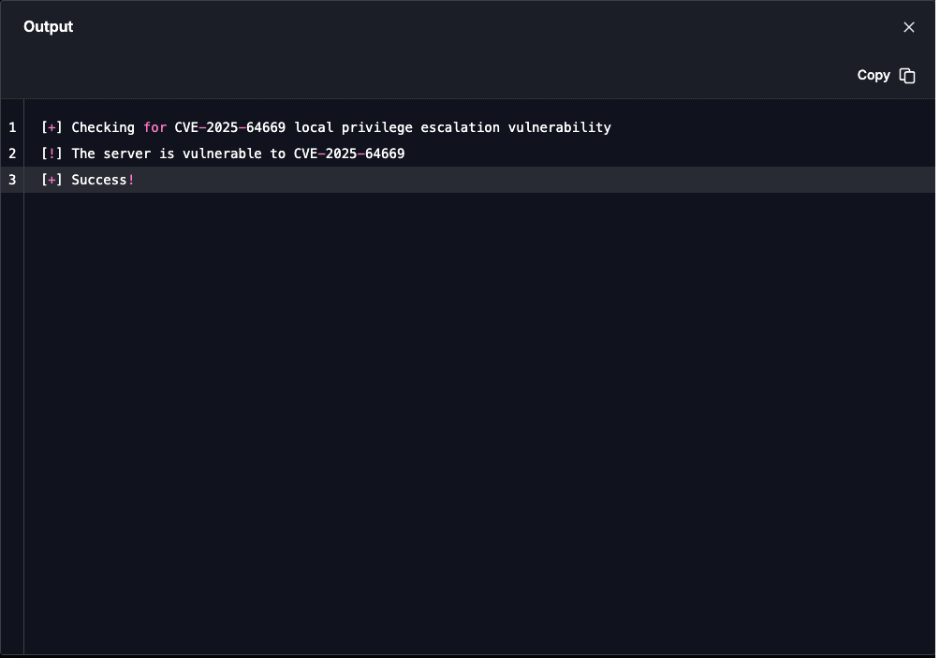
Organizations can use the latest Cymulate Exposure Validation attack scenario, "WindowsAdminCenter - CVE-2025-64669 Local Privilege Escalation," to test and validate threat detection in SIEM and endpoint security. Cymulate customers can run this scenario against their Windows Admin Center gateway to assess exposure. (Source)

What is the impact of this vulnerability on enterprises using Windows Admin Center?

Because Windows Admin Center is widely adopted for managing servers and endpoints, any vulnerability in WAC can have a massive impact across enterprises of all sizes. The CVE-2025-64669 vulnerability allows standard users to escalate privileges, potentially compromising critical infrastructure. (Source)

How did Cymulate Research Labs responsibly disclose CVE-2025-64669?

Cymulate Research Labs reported the vulnerability to Microsoft via MSRC on August 5, 2025. Microsoft acknowledged the issue on August 29, 2025, awarded a ,000 bounty on September 3, 2025, and assigned a CVE with Important severity, releasing a fix in the December 10, 2025 Patch Tuesday. (Source)

What is the role of Cymulate Exposure Validation in security testing?

Cymulate Exposure Validation enables organizations to quickly and easily test their defenses against real-world attack scenarios, including newly discovered vulnerabilities like CVE-2025-64669. It provides a unified platform for building custom attack chains and validating detection and response capabilities. (Learn more)

How does Cymulate keep its attack scenarios up to date?

Cymulate updates its SaaS platform every two weeks with new features and attack scenarios, including daily updates to its advanced threat library. This ensures customers can test against the latest threats and vulnerabilities. (Source)

Where can I read the full technical analysis of CVE-2025-64669?

The full technical analysis, including exploitation paths and proof-of-concept code, is available on the Cymulate blog: Uncovering CVE-2025-64669 in Windows Admin Center.

How can I request a demo of Cymulate Exposure Validation?

You can request a personalized demo of Cymulate Exposure Validation by visiting the demo page and filling out the form to connect with Cymulate’s team.

Features & Capabilities

What are the key features of Cymulate’s Exposure Validation platform?

Cymulate Exposure Validation offers continuous threat validation, automated attack simulations, a unified platform for Breach and Attack Simulation (BAS), Continuous Automated Red Teaming (CART), and Exposure Analytics. It includes an extensive threat library with over 100,000 attack actions, daily updates, and integration with SIEM and endpoint security tools. (Source)

Does Cymulate integrate with other security tools?

Yes, Cymulate integrates with a wide range of security technologies, including Akamai Guardicore, AWS GuardDuty, BlackBerry Cylance OPTICS, Carbon Black EDR, Check Point CloudGuard, Cisco Secure Endpoint, CrowdStrike Falcon, Wiz, SentinelOne, and more. For a complete list, visit the Partnerships and Integrations page.

How easy is it to implement Cymulate Exposure Validation?

Cymulate is designed for quick and easy implementation. It operates in agentless mode, requiring no additional hardware or complex configurations. Customers can start running simulations almost immediately after deployment, with comprehensive support and educational resources available. (Source)

What security and compliance certifications does Cymulate hold?

Cymulate holds several key certifications, including SOC2 Type II, ISO 27001:2013, ISO 27701, ISO 27017, and CSA STAR Level 1. These certifications demonstrate Cymulate’s commitment to robust security and compliance standards. (Source)

How does Cymulate ensure data security and privacy?

Cymulate ensures data security through encryption for data in transit (TLS 1.2+) and at rest (AES-256), secure AWS-hosted data centers, a tested disaster recovery plan, and compliance with GDPR. The platform also includes mandatory 2FA, RBAC, IP address restrictions, and a dedicated privacy and security team. (Source)

What feedback have customers given about Cymulate’s ease of use?

Customers consistently praise Cymulate for its intuitive interface and ease of use. For example, Raphael Ferreira, Cybersecurity Manager, said, “Cymulate is easy to implement and use—all you need to do is click a few buttons, and you receive a lot of practical insights into how you can improve your security posture.” (Source)

How does Cymulate support continuous threat validation?

Cymulate provides 24/7 automated attack simulations to validate security posture in real-time, ensuring organizations stay ahead of emerging threats. The platform’s continuous validation helps identify and address vulnerabilities promptly. (Source)

What is the Cymulate Resource Hub?

The Cymulate Resource Hub is a central location for insights, thought leadership, and product information. It includes technical articles, webinars, e-books, and more to help users optimize their security validation practices. (Resource Hub)

Use Cases & Benefits

Who can benefit from using Cymulate Exposure Validation?

Cymulate Exposure Validation is designed for CISOs, security leaders, SecOps teams, red teams, and vulnerability management teams in organizations of all sizes and industries, including finance, healthcare, retail, media, transportation, and manufacturing. (Source)

What business impact can customers expect from Cymulate?

Customers can expect up to a 52% reduction in critical exposures, a 60% increase in team efficiency, and an 81% reduction in cyber risk within four months. Cymulate also helps automate processes, improve operational efficiency, and provide actionable insights for better decision-making. (Source)

What are common pain points Cymulate helps address?

Cymulate addresses fragmented security tools, resource constraints, unclear risk prioritization, cloud complexity, communication barriers, inadequate threat simulation capabilities, operational inefficiencies in vulnerability management, and post-breach recovery challenges. (Source)

Are there case studies showing Cymulate’s effectiveness?

Yes, for example, Hertz Israel reduced cyber risk by 81% in four months using Cymulate. Other case studies include a sustainable energy company scaling penetration testing, and Nemours Children’s Health improving detection in hybrid environments. (Case Studies)

How does Cymulate tailor solutions for different security roles?

Cymulate provides quantifiable metrics for CISOs, automates processes for SecOps teams, offers automated offensive testing for red teams, and enables efficient vulnerability prioritization for vulnerability management teams. (Source)

What is Cymulate’s approach to continuous threat exposure management (CTEM)?

Cymulate’s platform enables organizations to continuously validate security controls, prioritize and address vulnerabilities, enhance operational efficiency, and foster collaboration across teams, supporting a successful CTEM program. (Source)

How does Cymulate help with regulatory compliance?

Cymulate automates compliance and regulatory testing for hybrid and cloud infrastructures, helping organizations meet industry standards and prove compliance to regulators. (Source)

Where can I find Cymulate’s blog, newsroom, and events?

You can find the latest research, news, and events on Cymulate’s blog, newsroom, and events page.

Pricing & Plans

What is Cymulate’s pricing model?

Cymulate operates on a subscription-based pricing model tailored to each organization’s requirements. Pricing depends on the chosen package, number of assets, and scenarios selected. For a detailed quote, you can schedule a demo with the Cymulate team.

Competition & Differentiation

How does Cymulate differ from other security validation platforms?

Cymulate stands out with its unified platform combining BAS, CART, and Exposure Analytics, continuous threat validation, AI-powered optimization, complete kill chain coverage, ease of use, and proven customer outcomes. It also offers the most advanced attack simulation library with daily updates. (Source)

What are Cymulate’s advantages for different user segments?

CISOs benefit from quantifiable metrics, SecOps teams from automation and efficiency, red teams from automated offensive testing, and vulnerability management teams from efficient validation and prioritization. (Source)

Support & Implementation

What support options are available for Cymulate customers?

Cymulate offers email support, real-time chat support, a knowledge base with technical articles and videos, webinars, e-books, and an AI chatbot for quick answers and guidance. (Source)

How quickly can Cymulate be deployed?

Cymulate can be deployed rapidly, with most customers able to start running simulations almost immediately after setup, thanks to its agentless architecture and minimal resource requirements. (Source)

Company & Vision

What is Cymulate’s mission and vision?

Cymulate’s mission is to transform cybersecurity practices by enabling organizations to proactively validate their defenses, identify vulnerabilities, and optimize their security posture. The vision is to create a collaborative environment for lasting improvements in cybersecurity strategies. (Source)

What is Cymulate’s track record for innovation and customer success?

Cymulate is recognized as a market leader in automated security validation, with continuous innovation and a proven track record of delivering measurable outcomes, such as an 81% reduction in cyber risk for Hertz Israel within four months. (Case Study)

New: 2026 Gartner® Market Guide for Adversarial Exposure Validation
Learn More
Cymulate named a Customers' Choice in 2025 Gartner® Peer Insights™
Learn More
New Research: The Security Tradeoffs Behind AI Tooling
Learn More
An Inside Look at the Technology Behind Cymulate
Learn More

CVE-2025-64669: Uncovering Local Privilege Escalation Vulnerability in Windows Admin Center 

By: Cymulate Research Lab

Last Updated: May 6, 2026

cover image Uncovering Local Privilege Escalation Vulnerability in Windows Admin Center

Ilan Kalendarov, Security Research Team Lead
Ben Zamir, Security Researcher
Elad Beber, Security Researcher

Executive Summary 

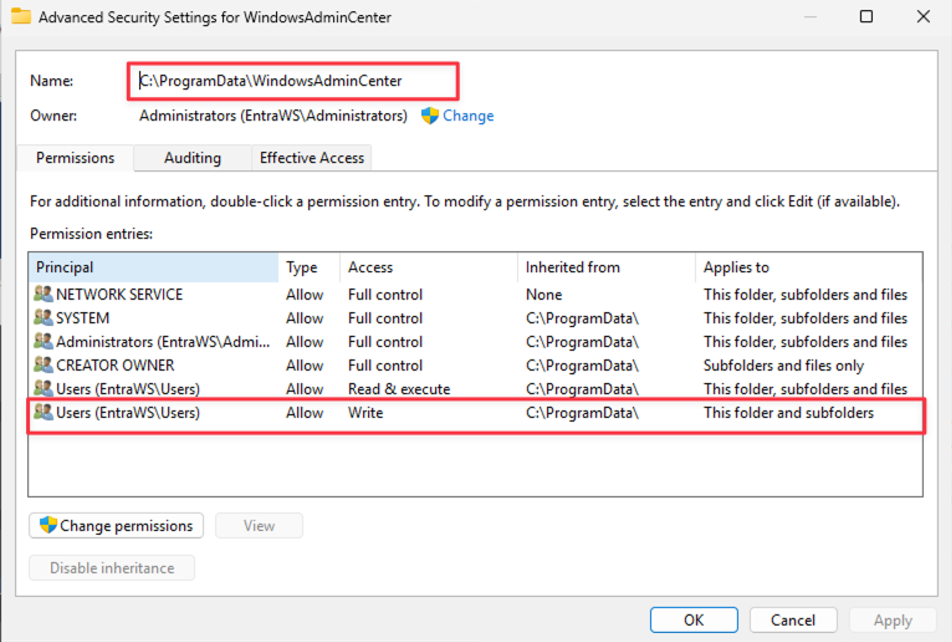
Cymulate Research Labs has uncovered a local privilege escalation vulnerability in Microsoft’s Windows Admin Center (WAC) version 2.4.2.1. The root cause lies in insecure directory permissions where the  C:\ProgramData\WindowsAdminCenter folder is writable by all standard users. This affects all environments running WAC up to version 2411 and applies broadly across any organization using WAC for server or infrastructure management. 

The exposure impacts the technology layer rather than specific sectors. Any deployment that relies on the WAC gateway, integrated extensions, privileged administrative workflows or Windows Server hosts where WAC is installed inherits the risk. Standard users with access to the underlying filesystem can leverage this misconfiguration to escalate privileges. 

This misconfiguration allowed us to chain multiple techniques into working exploits: 

  1. Extension Uninstall Mechanism Abuse – Hijacking the uninstall process to run signed PowerShell scripts with elevated privileges. 
  2. Updater DLL Hijacking – Dropping a malicious DLL into the updater folder, which is then loaded automatically by a privileged WAC updater process. 

Both vectors enable escalation from a low-privileged user to SYSTEM, effectively breaking the Windows security boundary. Microsoft confirmed the issue, assigned it CVE-2025-64669 and awarded us a $5,000 bounty. 

On Dec. 15, 2025, we updated Cymulate Exposure Validation with the new attack scenario WindowsAdminCenter - CVE-2025-64669 Local Privilege Escalation to test and validate threat detection in SIEM and endpoint security. Cymulate customers who wish to validate whether they are affected by this CVE can run the scenario against their Windows Admin Center gateway to assess exposure. 

Background: Windows Admin Center 

Windows Admin Center (WAC) is Microsoft’s web-based management tool for Windows Server and client machines. It provides a modern replacement for legacy MMC consoles and enables administrators to manage servers, clusters, hyper-converged infrastructure and Windows 10/11 endpoints from a browser. 

Windows Admin Center is a widely adopted product, heavily relied upon by IT administrators around the world to manage servers and endpoints at scale. Its popularity means that any vulnerability discovered in WAC has the potential for massive impact across enterprises of all sizes. From small businesses running a handful of servers, to global enterprises managing hybrid cloud environments, WAC is positioned as a central tool. 

The Cymulate Research Team knew that if we were able to find a serious security weakness in such a core piece of infrastructure, it wouldn’t just be a theoretical bug it would have real-world consequences for thousands of IT teams. This understanding motivated us to dive deep, focusing on how developers implemented sensitive actions like installation, updates and uninstallations.  

Given the complexity and trust WAC commands in enterprise environments, our intuition was that even a single misstep in these areas could be leveraged to create a significant exploit opportunity. 

The Finding: Writable WAC Directory 

Our starting point was noticing that the folder C:\ProgramData\WindowsAdminCenter was writable by all users. At first glance this looked like a low-severity misconfiguration, because we didn’t initially realize that inside this folder there was also an executable running as a service under SYSTEM privileges. That completely changed the game. Suddenly this wasn’t just a writeable directory, it was a direct gateway into a highly privileged process.  

We wanted to see if we could abuse that trust and after digging into how WAC manages updates and extensions, we confirmed several privileged processes load content straight from this folder. 

This opened two distinct exploitation paths: 

  1. Extension Uninstall Mechanism Abuse 
  2. Updater DLL Hijacking 

Exploitation Path #1 – Extension Uninstall Mechanism Abuse 

We began by asking ourselves: “What kind of actions are guaranteed to run with elevated privileges but also touch user-accessible content?” Logic for Installation and uninstallation  are usually a goldmine in this regard. By design, these are active actions developers expect administrators to run, and if not properly secured they can be abused. 

So, we turned to dnSpy and decompiled the Windows Admin Center binaries being a .NET process (thanks Microsoft). This made reverse engineering far easier and more transparent for us. After exploring the namespaces, we quickly identified code responsible for uninstalling extensions.  

The relevant section was crystal clear. It built a path to an uninstall folder, enumerated any .ps1 files there and executed them using PowerShell with the AllSigned execution policy. 

string uninstallPath = Path.Join(uiDir, "uninstall"); 

if (Directory.Exists(uninstallPath)) 


    foreach (string script in Directory.EnumerateFiles(uninstallPath, "*.ps1")) 

    { 

        ProcessStartInfo psi = new ProcessStartInfo 

        { 

            FileName = "cmd.exe"

            Arguments = "/c PowerShell -ExecutionPolicy AllSigned -File \"" + script + "\""

            UseShellExecute = false

            WindowStyle = ProcessWindowStyle.Hidden 

        }; 

        Process.Start(psi); 

    } 

}

This code snippet shows exactly how WAC trusted whatever PowerShell scripts existed in the uninstall folder. Since the parent folder is writable by everyone, it opened a dangerous opportunity. That said, it isn’t completely trivial to just drop in a signed PowerShell payload you need to either find an existing signed script that can be abused, or craft and sign one yourself.  

Signing your own script is of course a high-privileged activity, but we did this purely for demonstration purposes. While it is possible to locate various signed PowerShell scripts online that could be leveraged, for the sake of our demo we created and signed our own simple script. This script executed 'whoami' and dropped the output into C:\Users\Public, clearly showing the elevated execution context. 

How we leveraged it: 

  • We created a custom uninstall folder under. C:\ProgramData\WindowsAdminCenter\Extensions\<ExtensionName>. 
  • Placed a malicious signed script inside. 
  • Triggered the uninstall process via WAC’s UI/API. 
  • Our payload ran as NETWORK SERVICE or even SYSTEM. 

POC Demo: 

Exploitation Path #2 – Updater DLL Hijacking 

Next, we turned our focus to the updater mechanism. Updates are another active process, which usually means files are copied, verified, or loaded dynamically. Again, dnSpy was invaluable. We looked at the update component (WindowsAdminCenterUpdater.exe) and traced its DLL loading behavior. 

We found that the updater explicitly loaded DLLs from path C:\ProgramData\WindowsAdminCenter\Updater 

Since this folder was writable by all users, we immediately saw the classic attack surface – DLL hijacking. We went to the decompiled code to understand exactly how updates were triggered and found an API endpoint: /api/update. At first, when we tested, our DLL was indeed loaded for a split second but did not execute. Checking the Event Viewer revealed that DLL was rejected because it was unsigned there was a validation step checking signatures. 

We almost gave up but then noticed something interesting. The validation process happens inside the WindowsAdminCenter process itself, and after it finishes, it calls and opens WindowsAdminCenterUpdater.exe. That gave us the idea to leverage a classic Time-of-Check Time-of-Use (TOCTOU). We wrote a simple PowerShell script that listens for WindowsAdminCenterUpdater.exe to start, then immediately copies our malicious user32.dll into the updater folder so it gets loaded without validation. 

Register-WmiEvent -Query "SELECT * FROM __InstanceCreationEvent WITHIN 0.1  

WHERE TargetInstance ISA 'Win32_Process' AND TargetInstance.Name = 'WindowsAdminCenterUpdater.exe'" -Action { 

    Copy-Item "C:\Users\Public\user32.dll" "C:\ProgramData\WindowsAdminCenter\Updater\user32.dll" -Force 

}

This worked flawlessly. The DLL executed with SYSTEM privileges, and importantly, this script can be run completely as a regular user without any elevated permissions. 

This showed us that the updater trusted DLLs located in its working directory instead of enforcing system paths. 

Proof-of-Concept approach: 

  • We created a custom user32.dll that simply wrote to C:\Users\Public\test.txt for PoC purposes. 
  • Used a low-privileged account to monitor for updater activity via Register-WmiEvent. 
  • Dropped the DLL into C:\ProgramData\WindowsAdminCenter\Updater. 
  • Triggered an update using the /api/update endpoint. 
  • Our DLL executed as SYSTEM. 

POC Demo: 

Disclosure Timeline 

  • Vulnerability reported to Microsoft via MSRC on Aug. 5, 2025. 
  • Microsoft acknowledged that there is a security issue on Aug. 29, 2025. 
  • Microsoft awarded us a $5,000 bounty on Sept. 3, 2025. 
  • On. Nov 12, 2025, Microsoft stated that a CVE would be assigned with Important severity, and a fix would be issued in the Dec. 10 Patch Tuesday. 

Validate Your Defenses Against Real Exploitation 

Start testing your Windows Admin Center instances against CVE-2025-64669 using the latest Cymulate attack scenario. 

Request a demo to learn more >> 

Cymulate Exposure Validation makes advanced security testing fast and easy. When it comes to building custom attack chains, it's all right in front of you in one place.
Mike Humbert, Cybersecurity Engineer
DARLING INGREDIENTS INC.
Learn More
Book a Demo