

CVE-2026-20965: Cymulate Research Labs Discovers Token Validation Flaw that Leads to Tenant-Wide RCE in Azure Windows Admin Center

Ilan Kalendarov, Security Research Team Lead
Ben Zamir, Security Researcher
Elad Beber, Security Researcher
When Azure identity tokens are improperly validated, the boundary between one virtual machine and an entire tenant can collapse. Cymulate Research Labs discovered this exact failure in Windows Admin Center, and Microsoft has now patched it.
Cymulate Research Labs identified a high-severity vulnerability in the Azure AD Single Sign-On (SSO) implementation of Windows Admin Center (WAC) that allows an attacker with local administrator access on just one machine to escalate privileges, execute remote code, and move laterally across Azure virtual machines and Arc-connected systems within the same tenant, without valid Azure credentials.
Cymulate first reported the issue to Microsoft in August 2025. CVE-2026-20965 exposes how subtle failures in token validation and access scoping can undermine cloud isolation guarantees. To provide a fix for the issue, Microsoft released Windows Admin Center Azure Extension version 0.70.00 January 13, 2026. Cymulate encourages all cloud deployments of Windows Admin Center Azure to apply the update as soon as possible.
On the same day as the Microsoft disclosure, Cymulate Exposure Validation was updated with attack scenario Azure - Scan For Azure WindowsAdminCenter Improper Token Validation Vulnerability CVE-2026-20965 to test this vulnerability in your environment.
Executive summary
A vulnerability in the Microsoft Azure AD Single Sign On implementation of Windows Admin Center (WAC) allowed an attacker with local administrator access on a Windows machine to bypass critical authentication and authorization mechanisms.
This resulted in breaking out gaining unauthorized access to any other machines within the same tenant that also had WAC installed, including Azure Virtual Machines (VMs) and Azure Arc-connected machines, without requiring valid Azure credentials.
Who is affected
Every Azure VM and ARC-joined machine having an unpatched Windows Admin Center Azure Extension installed ( below version 0.70.00 ) is vulnerable to the attack.
In addition, this blog also covers detection guidance to identify possible past incidents and ongoing identity-based, cross-boundary Windows Admin Center access. While exploitation in the wild is not currently known, it is still recommended to improve WAC detection strategies and rule concepts to retrospectively uncover abuse and strengthen monitoring unauthorized activity across tenants and trust boundaries.
Preconditions
- The attacker has local administrator access on an Azure VM or an Azure Arc-connected machine with WAC installed.
- Wait for a privileged user to initiate a connection to that machine via Windows Admin Center from the Azure Portal.
Impact
Successful exploitation enables the attacker to escalate privileges, move laterally and run remote commands on every machine with WAC installed within the tenant, thereby violating authorization boundaries and potentially leading to full administrative compromise across the environment.
Key concepts needed before diving into the findings
Following our previous discoveries of related to local privilege escalation and the improper attestation validation, we noticed that Windows admin center can be implemented in two main methods:
1. On-Premises WAC Gateway server
- The WAC Gateway is managed by the user and installed over an On-Prem server / cloud VM. Only the gateway server needs to install the WAC software.
2. Azure SSO based implementation
- The WAC Gateway is based on a SaaS web application. Each managed device needs to install the WAC software.
When setting up a VM in Azure or joining an existing windows server machine using the Azure ARC service, the Azure portal page of the machine offers few different administrative connection methods. One of them is Windows Admin Center. When visiting that page for the first time, the user gets an option to automatically install the management software directly from the portal:
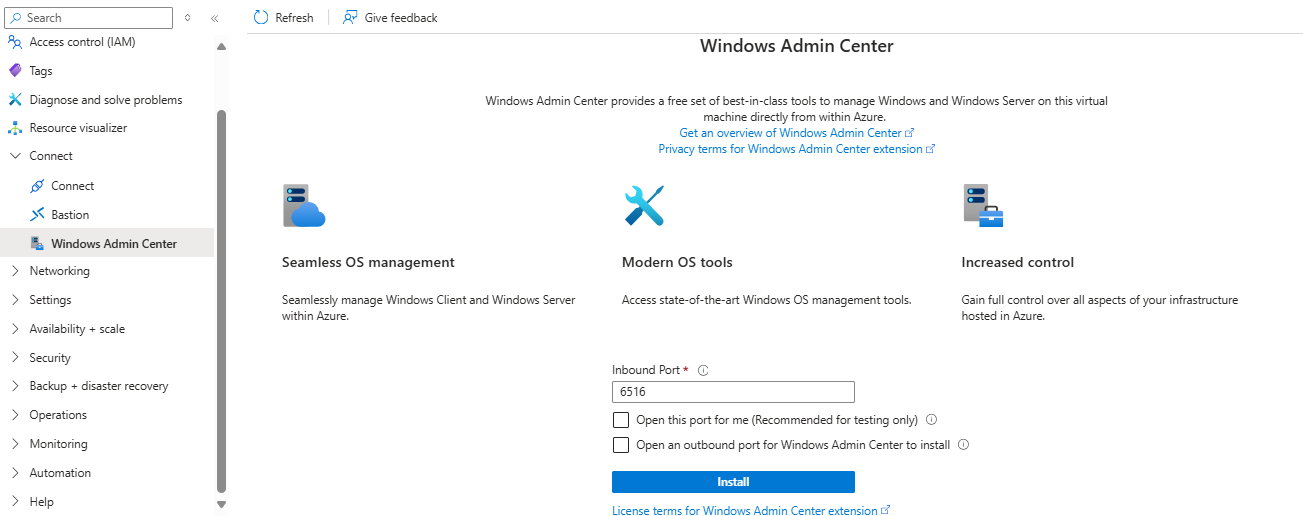
Upon pressing the install button, Azure automatically downloads and deploys the WAC software in the machine allowing for direct connection through the portal:
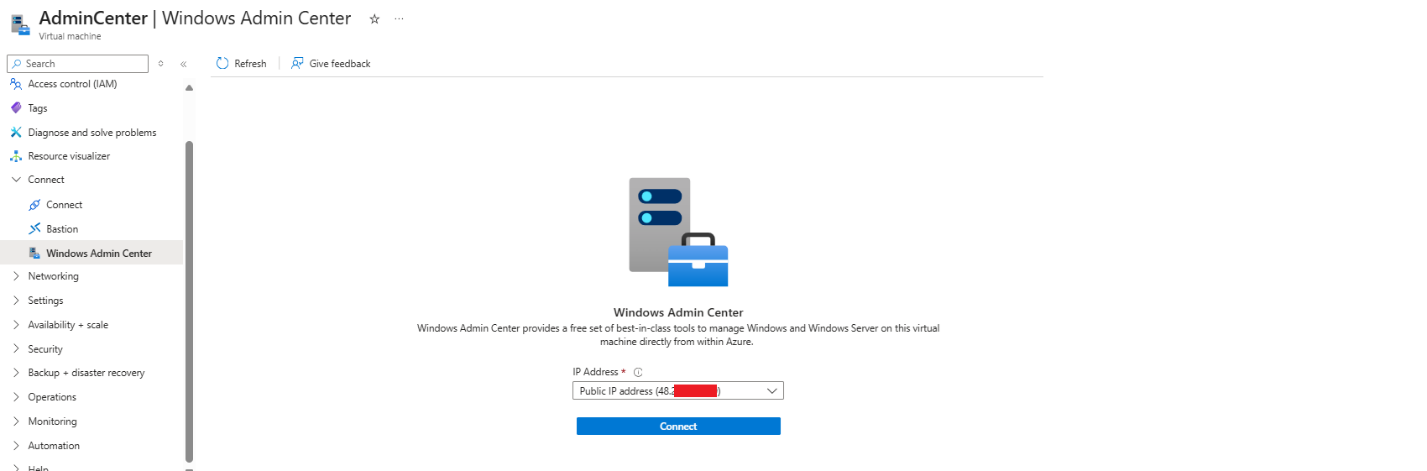
The Connect tab has a pre-requirements check. Azure verify that the user has the Windows Admin Center Administrator Login Azure role, opens the WAC API port (6516) via Just In Time mechanism and allows access through a gateway URL <Unique DNS>.<location>.waconazure.com:6516 but, to our surprise, during the JIT access, the port is exposed directly through both VNet IP and External IP (if configured) addresses.
In addition, the Azure portal communicates directly with the gateway URL and that the URL is exposed to the internet.
Given those observations, Ben dug into the SSO mechanism used by the WAC service on each managed host with one twist: what if an attacker already has local-admin on a WAC-managed machine? Could Azure SSO be abused from a local non-cloud user to escape the VM and enable lateral movement or privilege escalation across the tenant?
Understanding how Windows Admin Center Azure SSO works (and where it breaks)
Upon connecting to the Windows Admin Center (WAC) API with Azure SSO authentication enabled, the application API software (which is installed directly on the VM / ARC-Joined machine) requires two distinct access tokens to authorize a user and grant access:
- Access Token for https://pas.portal.waconazure.com
This token includes the WAC.CheckAccess scope and is issued for the connecting user's UPN (User Principal Name). It is used by the WAC service application to validate that the connecting admin user has permissions to access and manage the target machine (Windows Admin Center Administrator Login Azure role). - Proof of Possession (PoP) Bound Access Token
This is a PoP token cryptographically bound to a Key ID (KID) associated with a key pair generated in the user's browser. The token ensures that only the holder of the corresponding private key (the browser session) can use it, adding an additional layer of security to the request authentication.
Proof-of-Possession (PoP) tokens are a Microsoft technology designed to mitigate access-token theft and replay attacks. The client browser generates an asymmetric key pair and requests an access token of type PoP, supplying the identifier (KID) of the generated public key. The issued access token embeds this KID, binding it to the key pair.
The browser then wraps the access token in a new JWT, inserts the PoP token, and signs it with the private key. To further prevent replay, the signed payload includes request-specific details such as the URL, HTTP method, timestamp, nonce, and other properties.
Note: Microsoft has announced a forthcoming implementation called TLS PoP, which is built on the “Proof of Possession model.” Unlike standard PoP, which relies on signing the token data, TLS PoP is designed to also encrypt it. This approach conceals the token contents, prevents tampering, and retains the replay-attack protections of PoP, while adding the additional security guarantees provided by encryption.
When connecting to a WAC managed device through the Azure portal, the client’s browser constructs a token that wraps the bound PoP type access token and includes the following key components:
- The PoP bound access token being presented for authorization.
- A URL field specifying the generated gateway address for the WAC API.
- The HTTP method field was found that to be always set to POST (Even when other methods like GET are used).
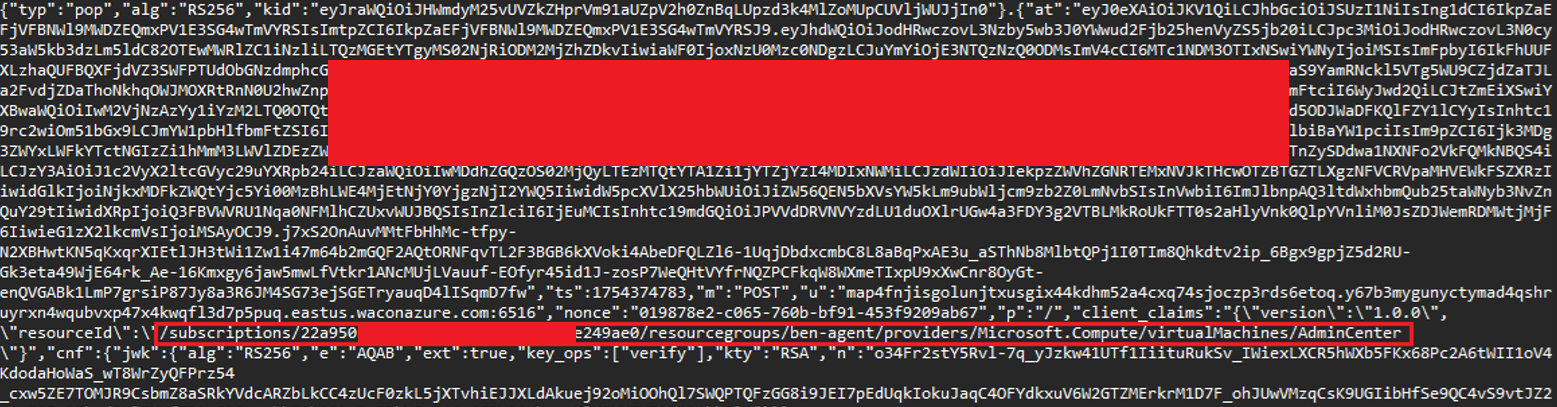
- The resource id field, containing the full Azure Resource Manager (ARM) path to the target virtual machine (e.g.,
/subscriptions/<Subscription ID>/resourceGroups/<RG-Name>/providers/Microsoft.Compute/virtualMachines/<Machine Name>). - A CNF field, containing the public key parameters used to validate the signing key bound to the token.
- Signature of the token it with its browser-generated private key (proving integrity).
Each HTTP request sent to the WAC API includes both the access token and the PoP bound token serving as authentication and authorization mechanisms.
Notably, in the WAC implementation both tokens remain constant throughout the session until they expire and are reused across all requests, regardless of the HTTP method (GET, POST, etc.), API endpoint being accessed, nonce and timestamp value.
This behavior implies that the tokens are not dynamically scoped or regenerated by request or per resource, reducing the effectiveness of the Proof of Possession mechanism:
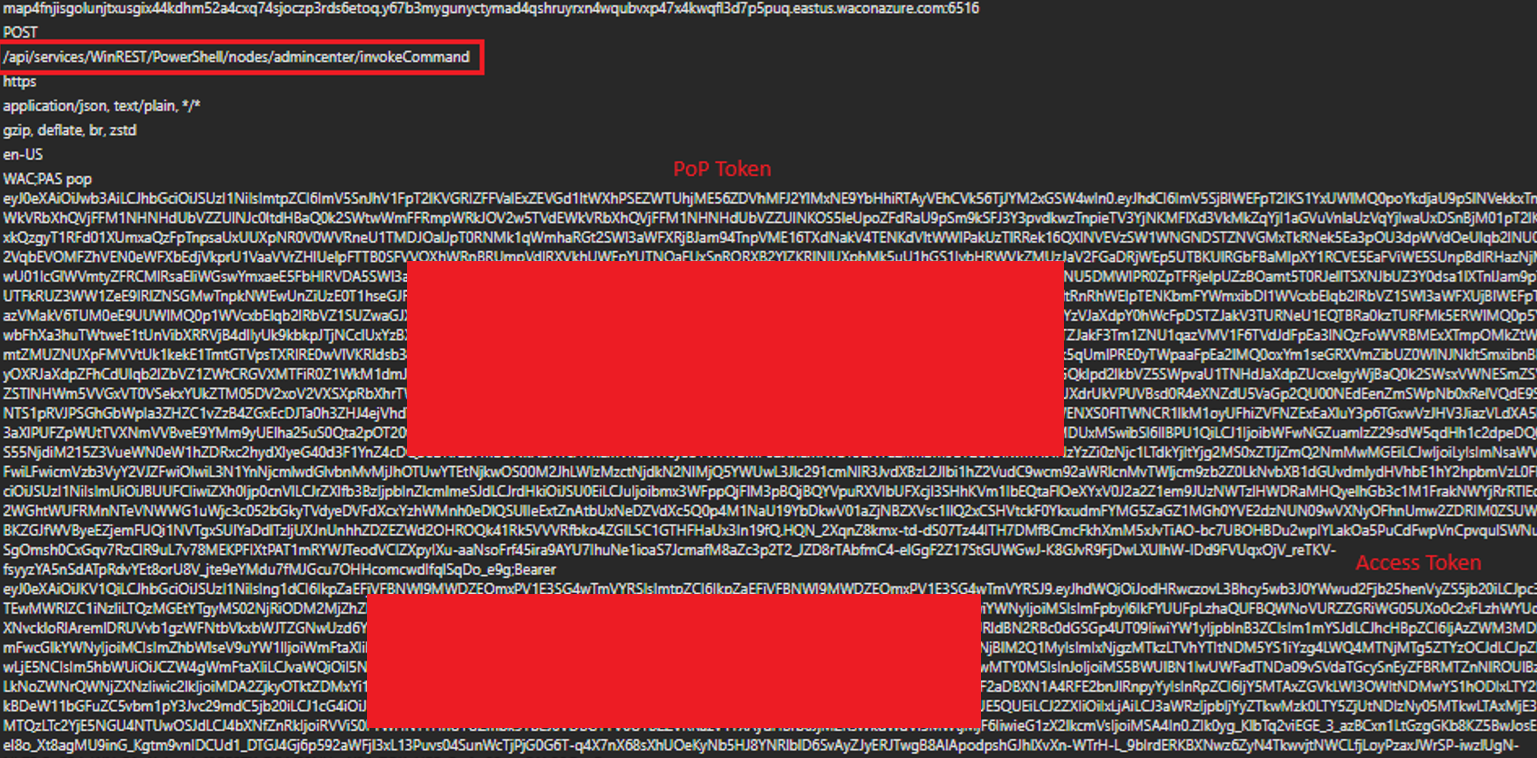
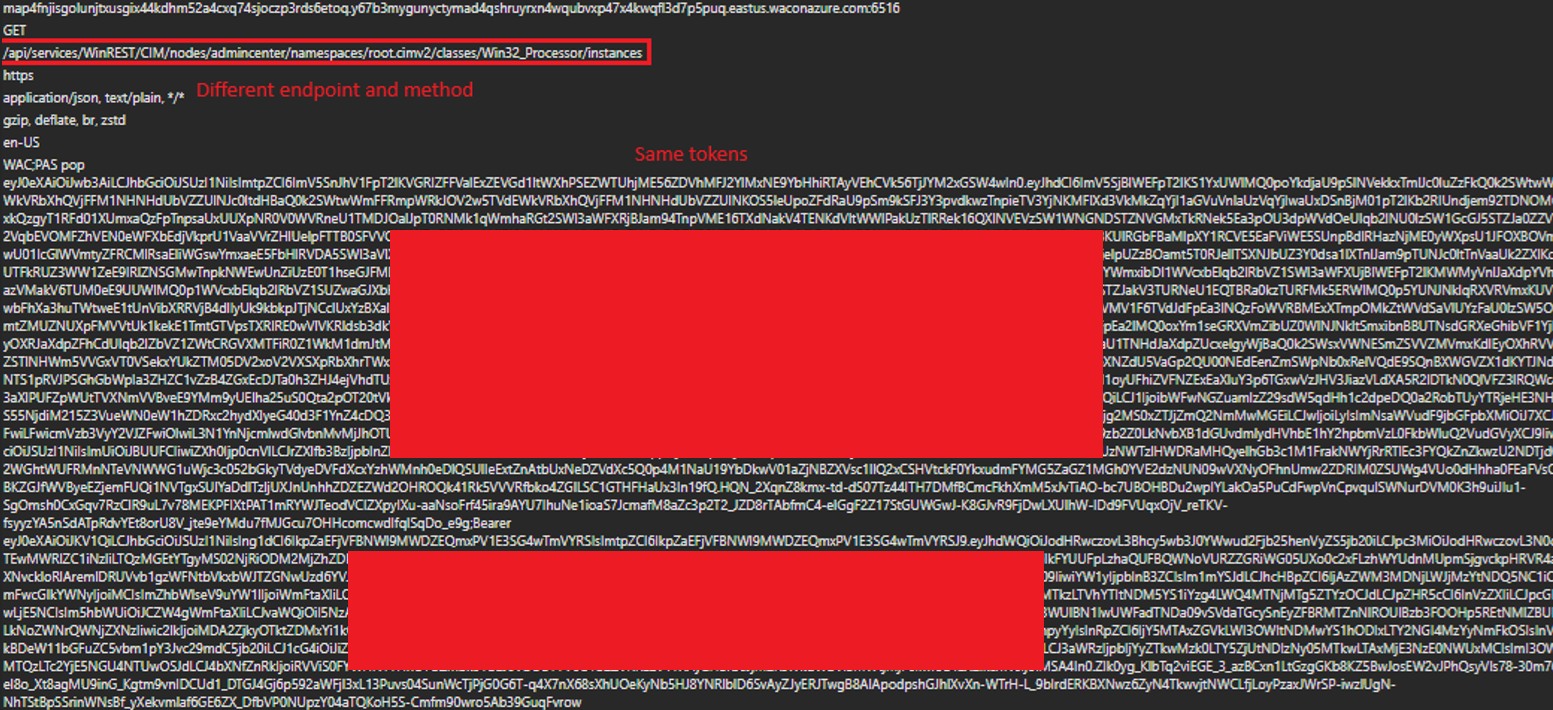
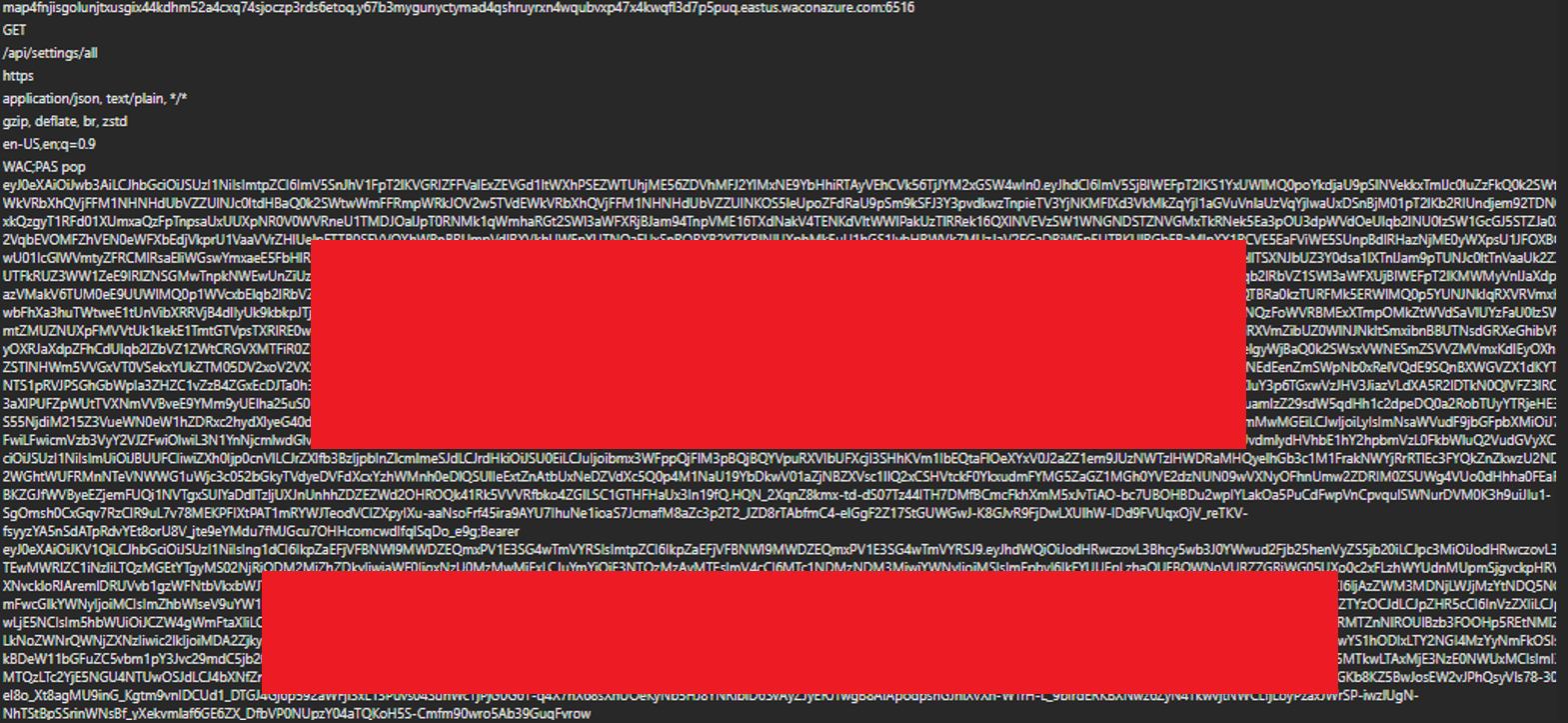
- The WAC.CheckAccess token is used by the API server to verify the user's permission to access the resource. If the user does not have access to the machine, access will be denied.
- The WAC.CheckAccdess token isn’t scoped to a specific VM/Machine. It grants access to any WAC managed machine within the tenant that the connecting user has access to.
- The PoP token is used to bind the request to a specific resource, likely based on the resource id property. Almost any other property is being ignored.
- The WAC-SESSION cookie appears to have no impact on authorization. Omitting it from the request does not prevent access as long as the two access tokens are present and valid.
Most critically, the Windows Admin Center server does not validate that the User Principal Name (UPN) in both tokens is the same. This allows an attacker to mix tokens from different users. For example, a stolen WAC.CheckAccess token from a privileged user can be combined with the attacker’s own PoP token, resulting in unauthorized access and privilege escalation.
Even a different tenant’s PoP token will be accepted. The only validated field, Machine ID, is controlled by the client’s browser and can be modified and validly signed (using the generated private key matching the PoP token’s KID):
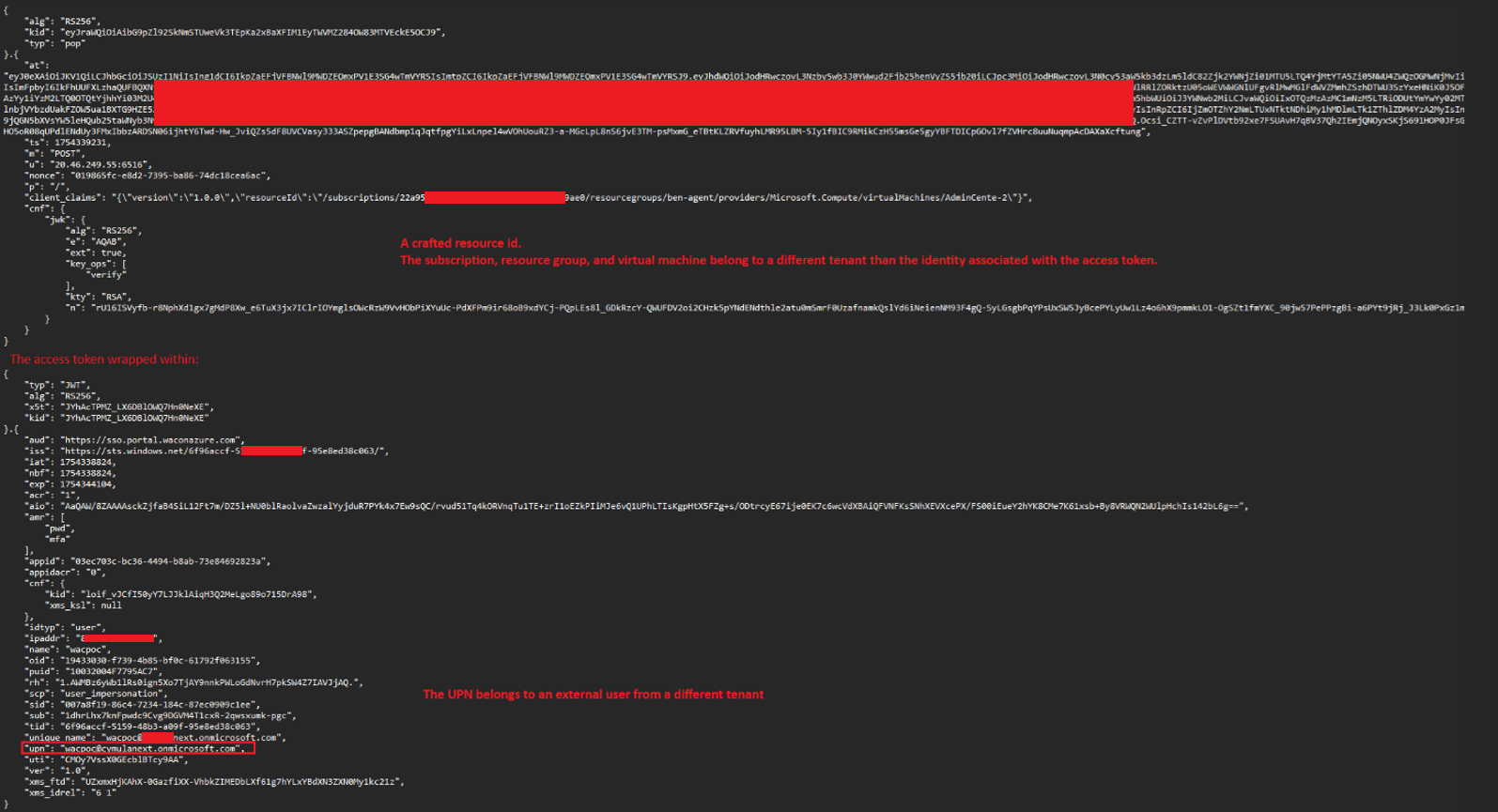
Windows Admin Center server application on the VM only verifies the following properties before granting full access to all API endpoint and actions, including local administrator-level remote command execution:
- The resource id path in the request matches the VM’s actual object identifier.
- The PoP token is correctly signed using the private key corresponding to the key ID that is bound to the access token.
- The URL field inside the PoP token matches the Host header of the HTTP request.
- The WAC.CheckAccess token is valid and belongs to an identity that has access to the Windows Admin Center on the VM.
The application verifies that the URL field in the wrapping token matches the request’s Host header. As mentioned earlier, when WAC is enabled, the port is accessible though LAN and external IP (if configured). This allows an attacker to forge a valid wrapping PoP token using the server’s IP address in the URL field and access the service directly, bypassing the expected gateway DNS.
If the machine have an external IP address, the JIT mechanism enables external connection directly to the IP address of the machine:
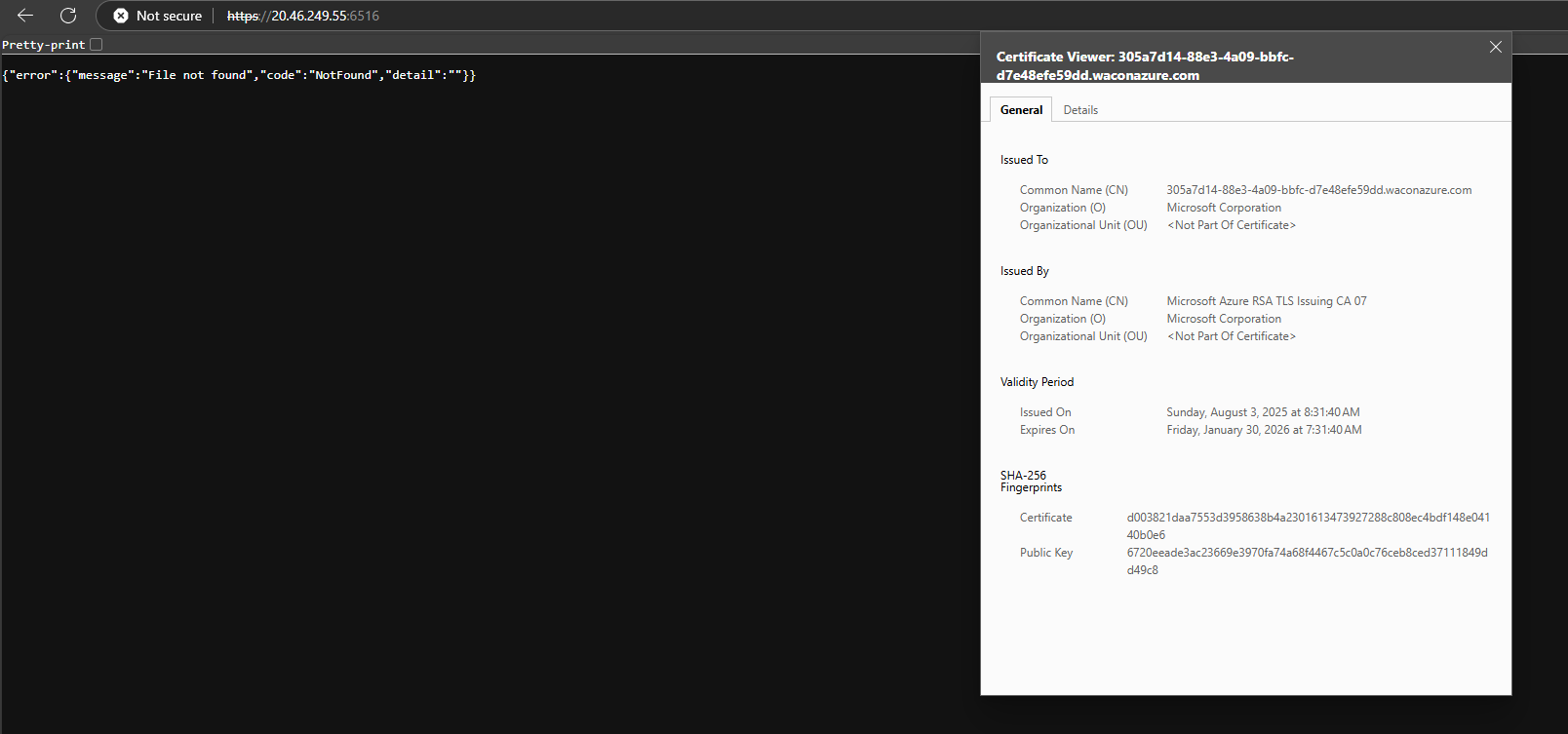
The direct access to the machine using the WAC API port, combined with the fact that the URL property in the PoP token is not enforcing the gateway DNS, enables the attacker to forge a valid PoP token wrapper without needing to discover the DNS address.
In conclusion, this vulnerability stems from two key implementation flaws:
- The Windows Admin Center server does not properly validate the tokens provided. It fails to enforce binding between the PoP token and the WAC.CheckAccess token’s user identity (UPN), allows the use of non-gateway DNS values in the URL field, and accepts reused nonces and arbitrary HTTP methods. This enables an attacker to combine a stolen valid WAC.CheckAccess token with a forged PoP token of a completely different user, effectively bypassing identity checks and escalating privileges.
- The Just In Time (JIT) access configuration opens the WAC API port (6516) to all source IPs via a temporary NSG rule, not just to the Azure portal generated gateway DNS. This enables direct access to the WAC instance, making token forgery and reuse feasible without knowledge of the gateway DNS.
Together, these flaws allow an attacker with local administrator access on a WAC-managed machine to impersonate the WAC service, hijack a connecting administrator’s valid WAC.CheckAccess token and use it to impersonate the connecting user, effectively escalating privileges and moving laterally across the tenant gaining remote code execution over any other WAC enabled machines that the connecting user has access to.
Exploitation example
Preconditions
- The attacker has local administrator privileges within a virtual machine (or an Arc-connected machine) with WAC installed (e.g. by using the previous chapter LPE vulnerability or any other method).
- An administrative user connects to the machine using the Windows Admin Center feature in the Azure Portal.
Step 1: As preparation and for effectively impersonating the service, the attacker dumps the WAC API server’s certificate from the machine store:
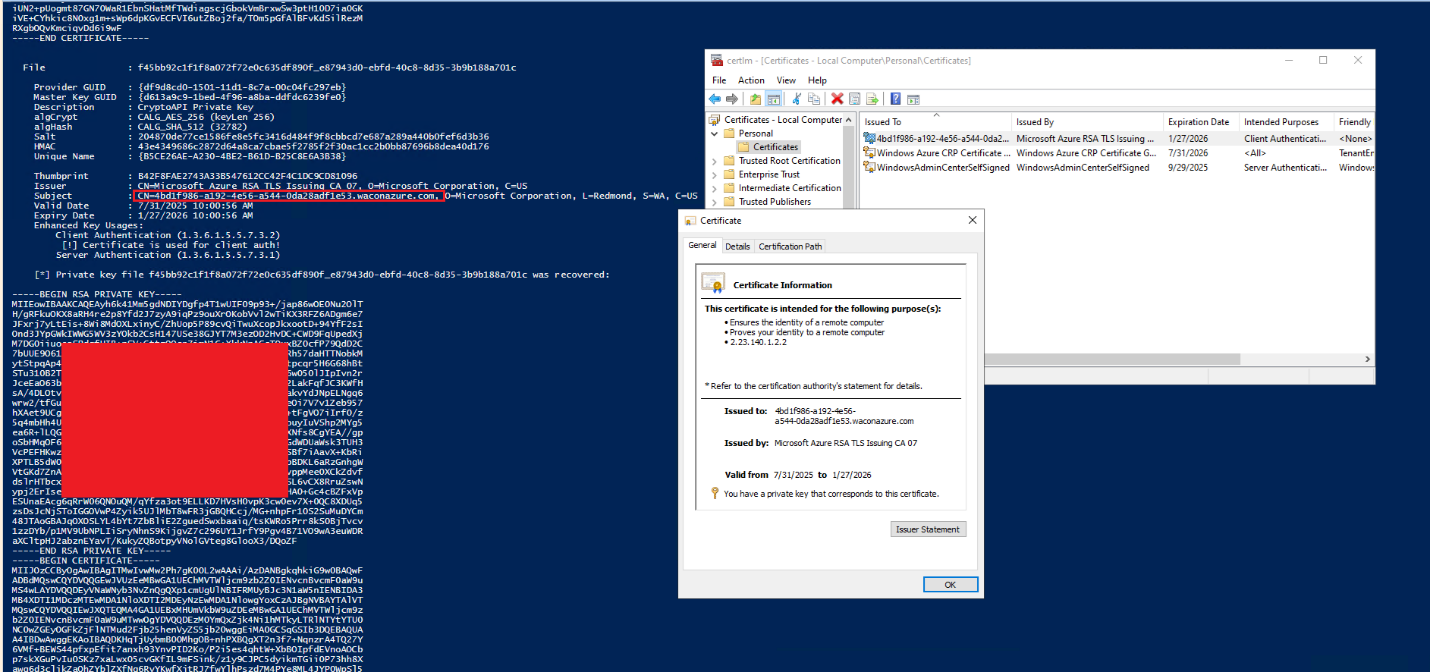
Step 2: The attacker stops the windows admin center service and runs a rogue application server impersonating the legitimate API using the dumped certificate.
Step 3: When a privileged user accesses the machine via Windows Admin Center through the Azure Portal, the compromised (rogue) server can mimic a legitimate connection flow from the server side, ultimately receiving an authenticated request as part of the Azure SSO process.
The connecting user’s WAC.CheckAccess token (which is not PoP bound) can then be stolen:
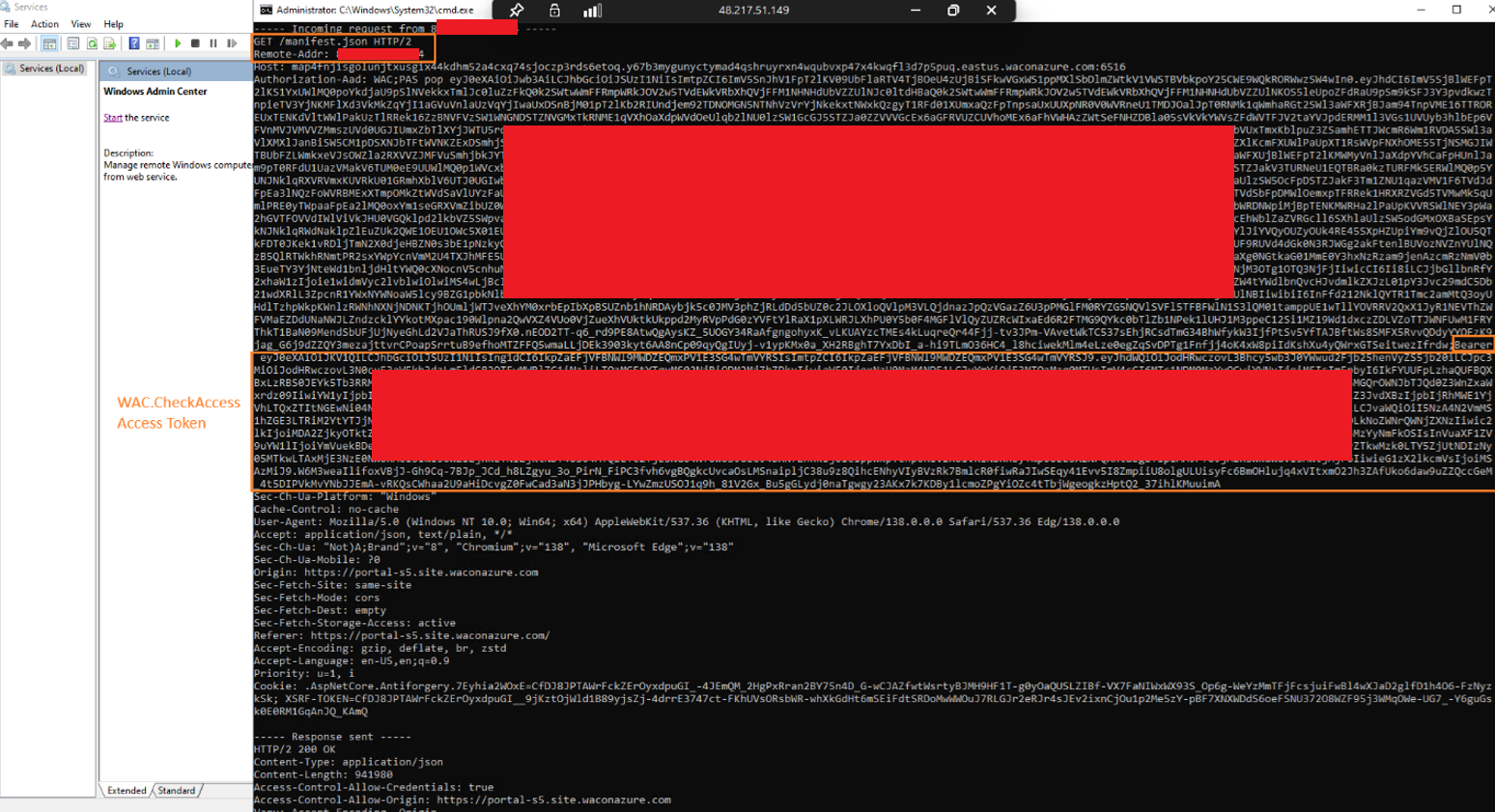
The token has the WAC.CheckAccess scope with an administrative user’s UPN:

The other token received in the flow (PoP token), or the instance metadata accessible from the machine, can disclose additional contextual information, such as the subscription ID and resource group associated with the target virtual machine:
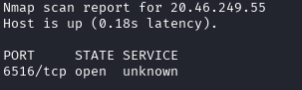
The attacker can now target another WAC-managed machine within the tenant by leveraging network or cloud-based enumeration techniques. In the example scenario, the attacker identified an additional WAC-controlled virtual machine and successfully enumerated its hostname, enabling the next stage of the attack (this step may vary depending on the organization’s infrastructure):

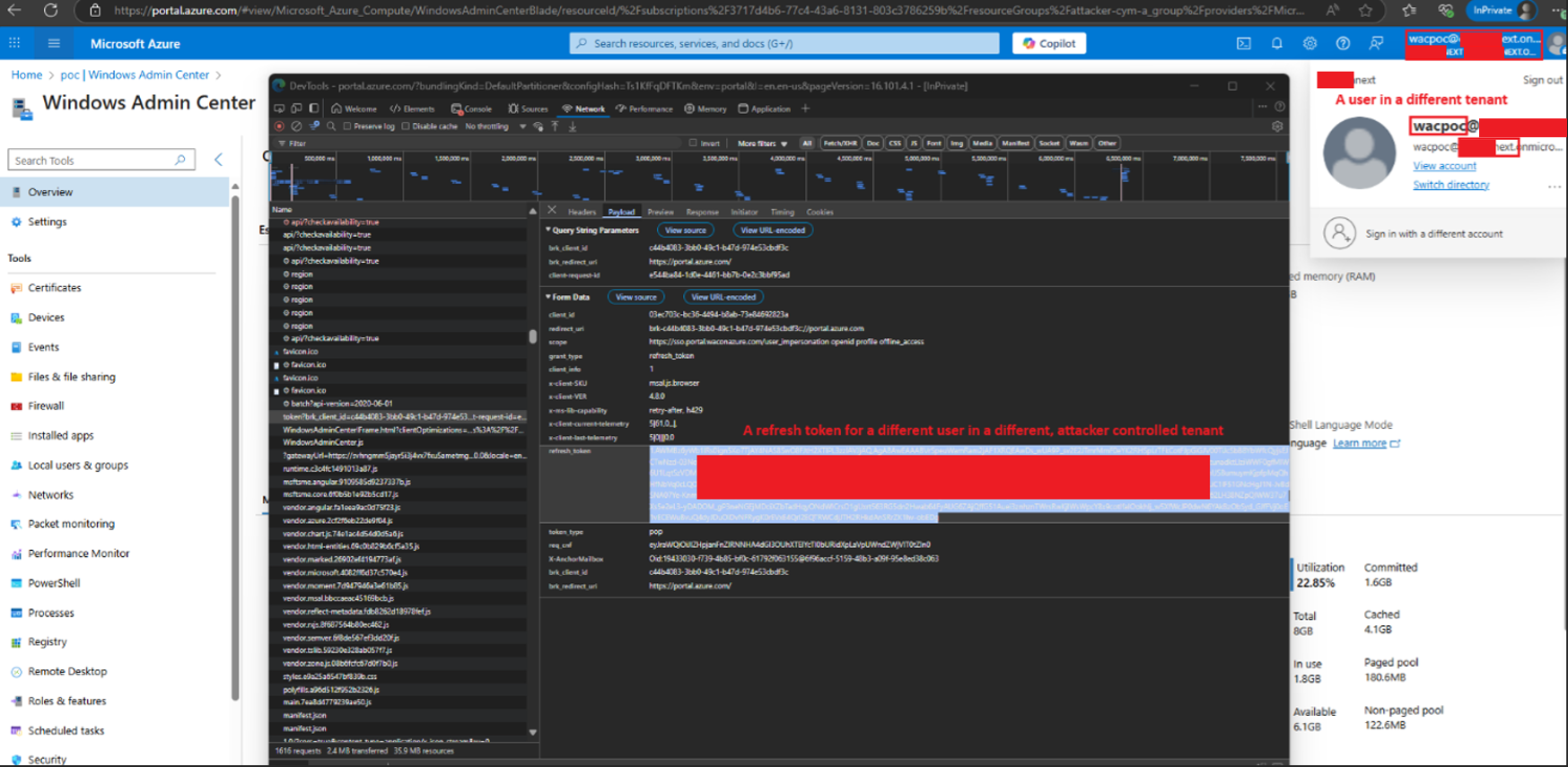
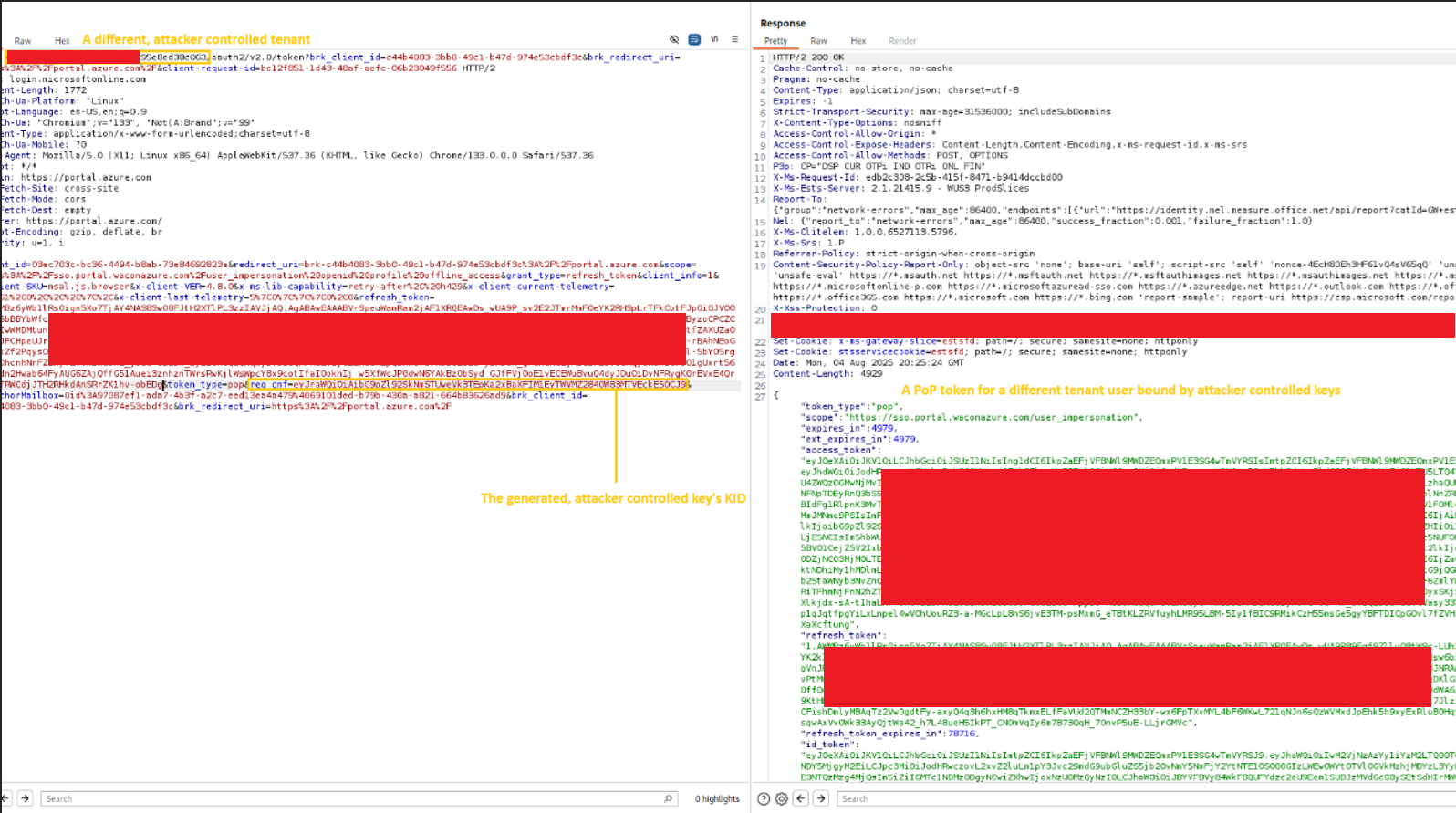
Step 4: The attacker proceeds to forge a PoP token. This can be achieved by leveraging an attacker-controlled tenant: the attacker creates a user within that tenant and extracts a refresh token, which can then be used to obtain an access token for the sso.portal.waconazure.com audience, since many fields within the PoP token are not validated (including the PoP access token itself), it will be accepted even though the token originates from a different tenant. This token is later used as part of the unauthorized request chain:
Step 5: The attacker then generates a key pair, replicating the behavior of a legitimate browser session:
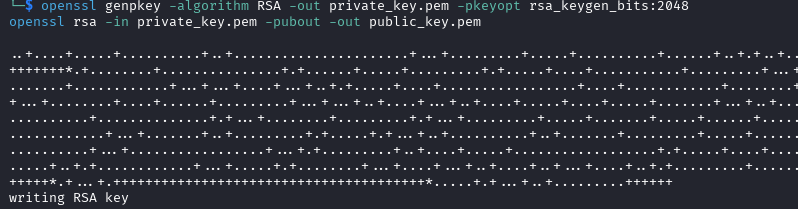
Next, the attacker calculates the corresponding Key ID (KID) and uses the previously obtained refresh token from the attacker-controlled tenant to request an access token bound to the generated key. This results in a PoP-bound token that is cryptographically tied to the attacker’s own Key ID, enabling forged requests in the next stage of the attack:
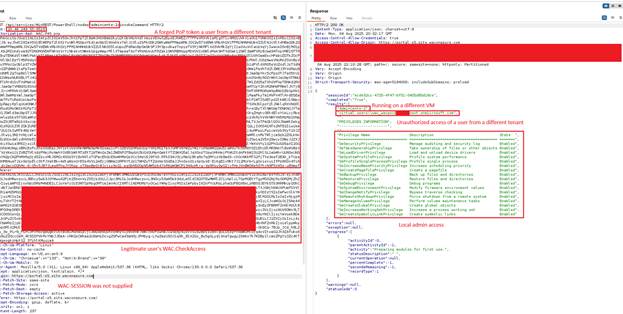
Step 6: The attacker forges a fake PoP token that has the following properties inserted:
- The received access token of a fake user (that does not exist in the victim tenant) and originates from the attacker-controlled tenant.
- A current timestamp.
- The new target machine’s resource id (any machine in the tenant that the stolen access token’s user has access to manage it using WAC will work).
- The URL property should be the same as the host header (in this case: 20.46.269.55)

Step 7: The attacker combines the forged PoP and the legitimate stolen WAC.CheckAccess access token and send an InvokeCommand API request, enabling a remote command execution with a local admin privilege on the target machine:
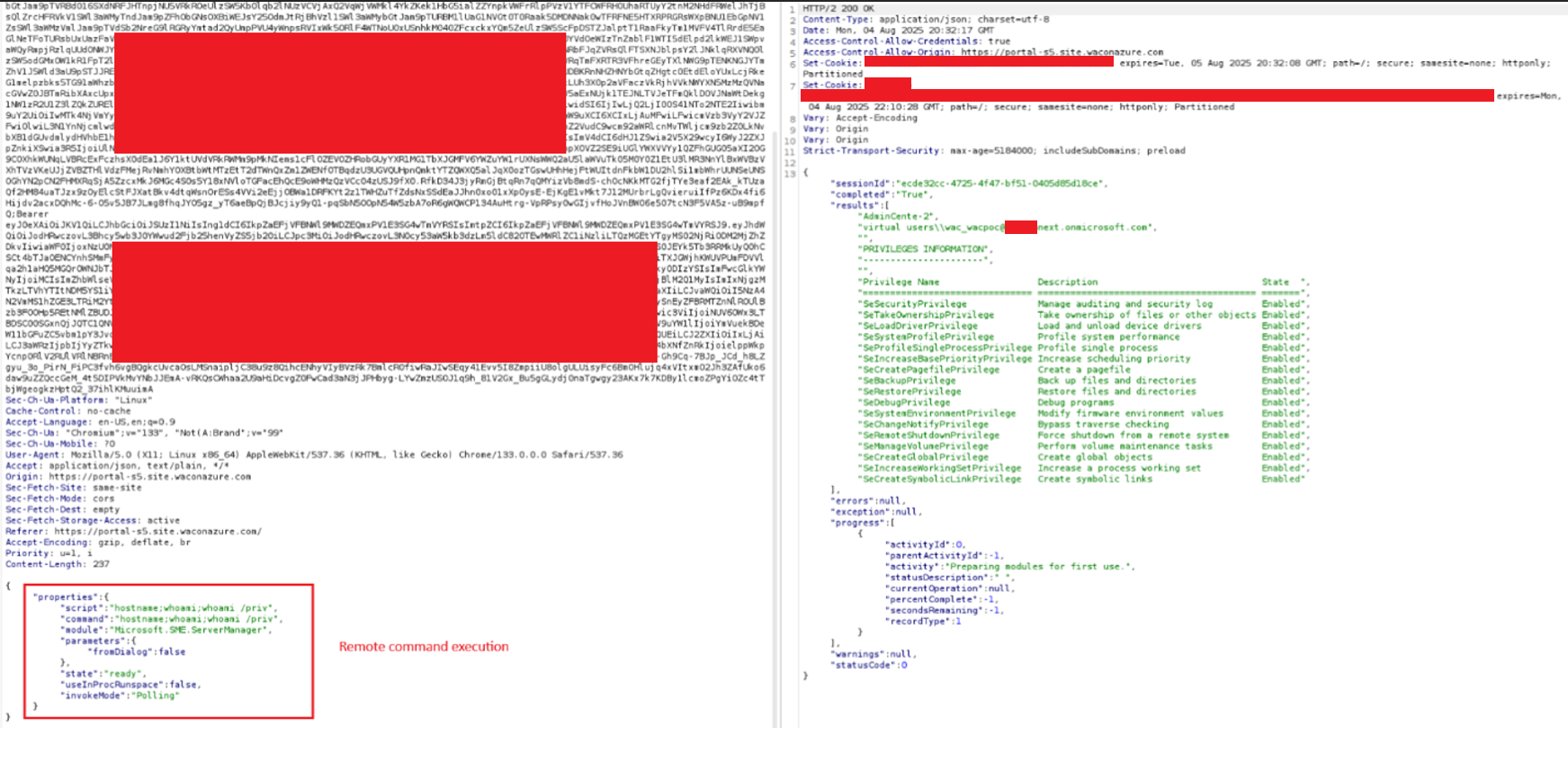
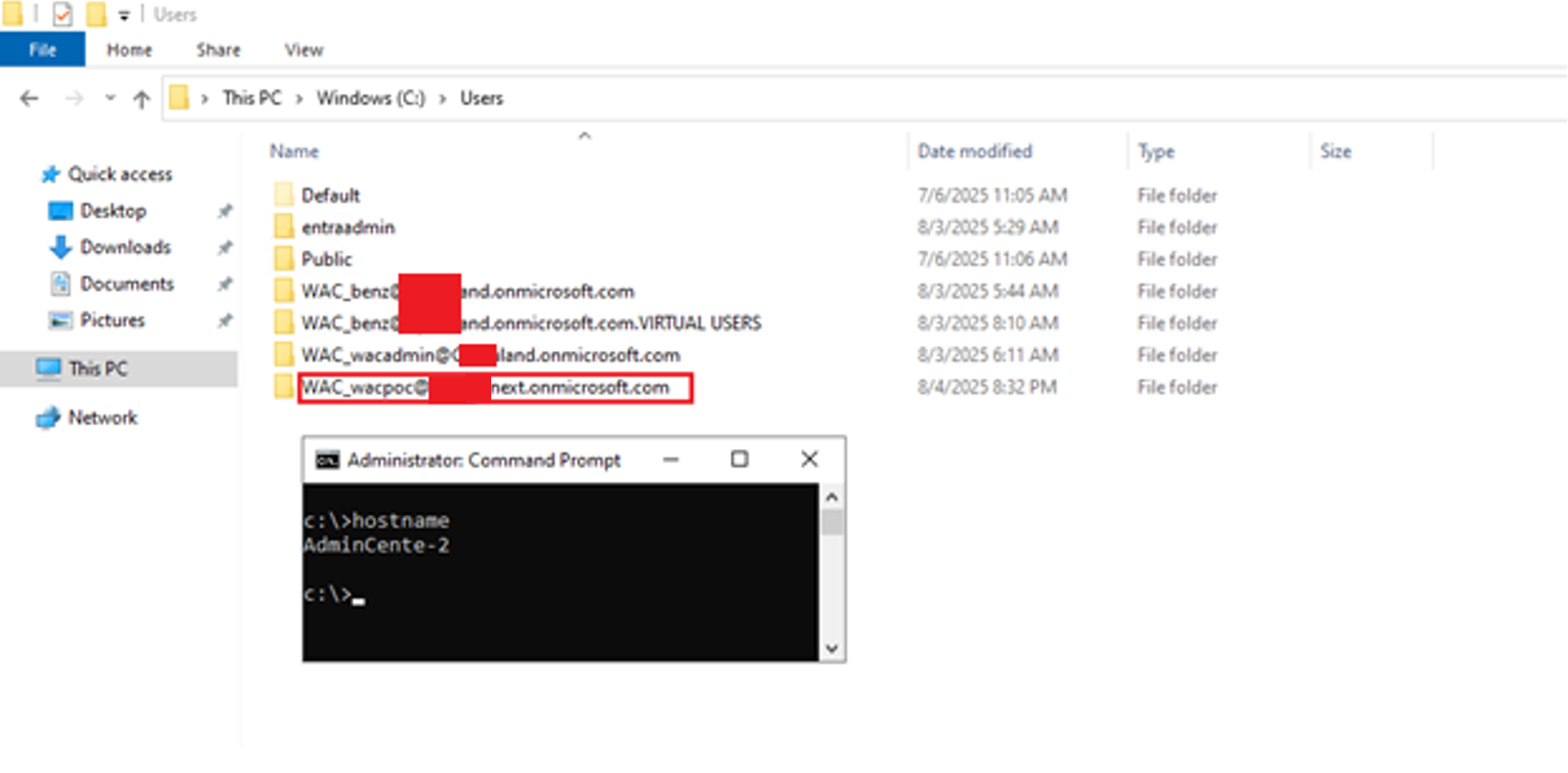
The attacker can now abuse the stolen access token’s privilege to gain access to any machine where that user has WAC permissions. From each newly compromised machine, the attacker can repeat the attack, continuing to abuse the privileges of additional administrative users, expanding the access across the environment.
Furthermore, because the forged requests originate from an access token tied to a non-existent user in the victim tenant, it may significantly reduce traceability and complicates detection efforts, allowing the attacker to operate with a lower risk of being identified.
This enables:
- Lateral movement across WAC-managed machines
- Privilege escalation through impersonation of administrative users
- Exfiltration of attached managed identity credentials from compromised machines
- Access to sensitive systems and services, including those protected by identity-based controls
- Cross-boundary compromise, allowing the attacker to break out of isolated scopes such as individual VMs, resource groups, and even subscriptions by chaining impersonated privileged user access
- Hinder detection capabilities
Windows Admin Center Identity-Based Attacks Discovery
To strengthen protection against WAC-targeted attacks, defenders should be aware that malicious activity may go unnoticed. Actions performed through Windows Admin Center often resemble legitimate administrative behavior: frequent script execution, heavy use of the InvokeCommand API and trusted execution context (The Windows Admin Center Application) can reduce scrutiny by security controls.
1. Detecting Indicators of CVE-2026-20965 Vulnerability Exploitation
A key indicator of compromise is the creation of a virtual account and corresponding user profile directory using the UPN format of the authenticating identity in addition to WAC_ prefix, e.g.: WAC_benzamir@<tenant>.onmicrosoft.com. The presence of a virtual account associated with an unknown or external tenant domain may indicate unauthorized access and command execution via WAC.
KQL: Detect suspicious virtual account usage
DeviceLogonEvents
| where Timestamp > ago(30d)
| where AccountName has "@"
| where not(AccountName has "<your tenant address>")
| project Timestamp, DeviceName, AccountName, ActionType, LogonType
| order by Timestamp desc 2. Detecting Unauthorized or Anomalous WAC Activity
Because WAC generates the identity artifacts described above, monitoring virtual account activity can also surface anomalous administrative behavior relative to normal organizational workflows. Examples include:
- Identities authenticating to systems they do not normally manage
- Administrative actions occurring by identities that have never accessed the target systems before or do not hold the required administrative privileges.
These detections should be treated as identity-based anomalies and correlated with administrative intent, scope, and historical usage to reduce false positives and highlight potential abuse.
Impact of improper token validation in WAC
This research demonstrates how improper token validation enables a local user to pivot into a cloud identity, resulting in cloud-level privilege escalation and a breakdown of Azure isolation guarantees. By abusing this weakness, an attacker can cross logical cloud boundaries by accessing Azure WAC-enabled virtual machines or ARC-joined devices across separate resource groups effectively bypassing organizational segmentation controls. In practice, this allows lateral movement between environments, such as escalating from test to production.
Cymulate supports clients by continually investigating emerging risks and newly uncovered weaknesses, then transforming that knowledge into clear validation and realistic simulations. This allows security teams to understand their present posture, strengthen it where needed and confirm that their environment remains protected.
In the next chapter, we will examine a weakness that allowed a completely unauthenticated adversary to gain remote code execution by exploiting a chain of vulnerabilities. Earlier findings have already demonstrated how far an attacker can go with local administrator access, low-privileged user and even impersonate VMs cross tenant. We’ll take it one step further and present a full attack chain.
How Cymulate Exposure Validation tests exploitability of CVE-2026-20965
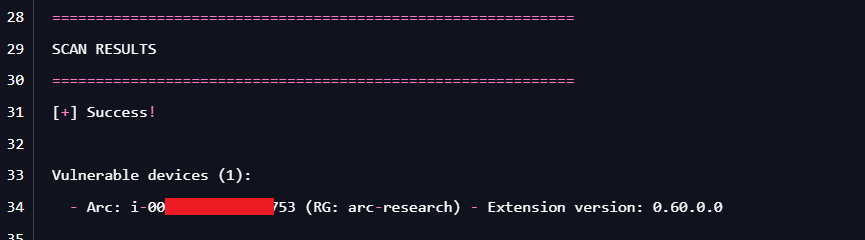
On January 14, 2026, we introduced a new attack scenario in Cymulate Exposure Validation that performs a subscription-wide scan to rapidly identify running machines that are actually vulnerable.
While the scan runs across the entire Azure subscription, exposure is determined on a per-VM basis, since only machines with the affected Windows Admin Center extension installed are impacted.
Cymulate customers can validate their exposure to this CVE by running the scenario “Azure – Scan for Azure Windows Admin Center Improper Token Validation Vulnerability (CVE-2026-20965)”. The scenario quickly distinguishes vulnerable versus non-vulnerable devices, allowing teams to prioritize remediation where it truly matters.

Ready to put this research to the test?
Discover how leading organizations use Cymulate to operationalize threat research and continuously validate their security posture. Request a demo >>

More from the Cymulate Research Lab
View More Resources
Uncovering Local Privilege Escalation Vulnerability in Windows Admin Center
Cymulate Research Labs uncovered local privilege escalation in Windows Admin Center, tracked as CVE-2025-64669.

Improper Attestation Signature Validation in Windows Admin Center
A flaw in WAC’s attestation flow let attackers impersonate services, steal credentials, and gain admin control of Azure VMs.

Critical RCE in React Server Components CVE-2025-55182 and CVE-2025-66478
Dive into critical React/Next.js RSC remote code exec flaws and how attackers exploit CVE-2025-55182/66478 to compromise servers.