

Uncovered: Improper Attestation Signature Validation in Windows Admin Center

Ilan Kalendarov, Security Research Team Lead
Ben Zamir, Security Researcher
Elad Beber, Security Researcher
Cymulate Research Labs has discovered a high-severity security flaw in Azure, which allowed remote code execution over any WAC-enabled device. The issue was reported to Microsoft in August 2025, and Microsoft implemented a security fix Dec. 16, 2025.
This research presents the discovery, potential exploitation paths and relevant threat-hunting considerations associated with the issue. It reflects a continued focus from Cymulate on closely examining cloud platform behaviors and trust boundaries to identify conditions that may be abused in practice and on developing realistic, sophisticated attack simulations that more accurately challenge defensive systems.
Executive Summary
The certificate retrieval endpoint hosted at waconazure.com failed to validate the attestation signature, which serves as the endpoint’s authentication and authorization mechanism. This flaw allowed an unauthenticated attacker to manipulate attestation data and impersonate any Windows Admin Center API server of any WAC-managed device in any tenant.
By exploiting this weakness, an attacker could obtain any target VM’s Windows Admin Center (WAC) API certificate, including its private key, and thereby compromise the chain of trust. Possession of this certificate enables impersonation and deployment of a rogue WAC API server, which, when combined with man-in-the-middle techniques, allows capturing legitimate administrator credentials. These stolen credentials can then be replayed to the legitimate server, leading to remote code execution with local administrator privileges on the Azure VM.
In addition, a low-privileged user within the tenant can exploit the current attestation authentication flow to retrieve the VM’s Windows Admin Center API private key. When combined with man-in-the-middle techniques, this could enable local privilege escalation on the VM.
Preconditions
- The attacker must obtain the VM ID of a target virtual machine in the victim tenant that has Windows Admin Center (WAC) installed.
- The attacker must gain a man-in-the-middle (on-path) position relative to a machine used by a WAC administrator and wait for the administrator to access an Azure VM through Windows Admin Center.
Impact
Successful exploitation enables an attacker with an on-path position to escalate privileges, gain a foothold and run local administrator-level remote commands on any machine with WAC installed within the tenant, completely violating authorization and authentication boundaries and gaining a foothold over Azure VMs within the target tenant.
The Cymulate Research Labs team is consistently engaged in cloud platforms and their inner workings to continuously investigate new attack surfaces, uncovering weaknesses that shape our most up-to-date simulation work.
Recap and deeper dive into the underlying mechanics
Building on the earlier LPE discovery, attention was turned to Azure’s WAC deployment. The analysis focused on the certificate assignment workflow, specifically looking for chain-of-trust flaws that could let an attacker sidestep the need for direct access to a managed VM. Because the Azure Portal enforces certificate validation when connecting to the WAC API service, untrusted servers are rejected, making this trust boundary a critical point.
Valid impersonation of a legitimate server would make it possible to intercept valid credentials without requiring a foothold on the machine itself, shifting the attack surface to a network-based vector.
The research began by tracing the legitimate path of certificate issuance. When WAC is installed via the Azure Portal, Azure generates and signs a certificate for the service and stores it in an Azure-managed Key Vault. WAC on Azure exposes an API endpoint that allows the managed device to retrieve this certificate after proving its identity.
The device obtains an attested document from the instance metadata service and uses it to request a valid certificate from waconazure. I initially assumed impersonation would be difficult due to expected validation checks but to my surprise, the attestation wasn’t being signature-verified at all.
Biggest lesson
Always verify assumption - even when something seems obviously secure.
Additionally, on Azure VMs, low-privileged users can query the instance metadata service to obtain a valid attestation, which can then be leveraged to request the machine’s certificate as the attestation serves as the sole authentication material. While this issue is less severe than the improper validation flaw, it still enables sensitive service impersonation and the hijacking of legitimate authentication flows and credentials.
Technical details
Let’s dive deeper into the certificate retrieval process. When Windows Admin Center is installed, its setup process executes a PowerShell script to configure the service.
One of the key actions performed by this script is assigning a TLS certificate to the WAC service.
To accomplish this, the script requests an attestation from the VM’s metadata service.
An attestation is essentially a signed JWT that proves the identity of a virtual machine. The instance metadata service (IMDS) on an Azure VM (or HIMDS on an Azure Arc-joined device) exposes an endpoint that allows retrieval of the attestation document. This document can only be accessed from within the VM itself and is intended to serve as proof of the device’s identity when interacting with external services.
This attestation is then used as the authentication mechanism in a POST request to the certificate endpoint at:
https://<location>.service.waconazure.com/api/Certificate/Location/<location>
When first installed, the endpoint responds by generating and signing a new TLS certificate and corresponding private key for the service.
After initiating certificate generation, the script repeatedly polls the same endpoint using GET requests to check for completion. These requests appear to retrieve the generated certificate from an Azure Key Vault on the backend once it becomes available:
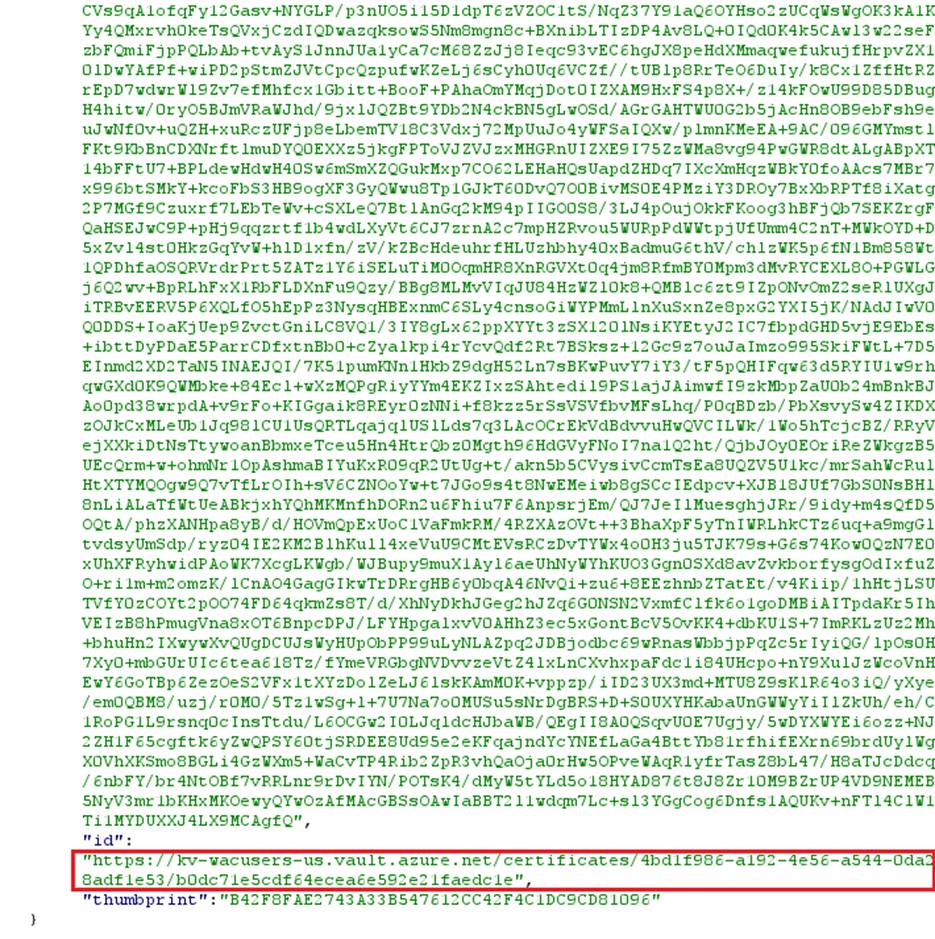
The vault appears to store certificates for all WAC-enabled machines within the location, organized and labeled by their corresponding VM IDs.
As mentioned, during the research I discovered that the endpoint does not validate the digital signature on the attestation object. When attestation parameters are altered (as demonstrated in the exploitation walkthrough), the signature becomes invalid. In such cases, the server should reject the request.
However, this verification step is missing.
The observed behavior suggests that the server only validates the VM ID field. If a VM with the specified ID exists and has WAC installed, its certificate is retrieved from the vault. If the VM exists but does not have WAC installed, the server will generate and sign a new certificate when it receives a replayed or mimicked installer's POST request for certificate generation.
As an example, when reading a valid attestation, the content’s signature is valid:

But, when reading a tampered attestation, the signature is broken (as expected):

Also, the attestation’s timestamp and the subscription ID are not validated. Even a non-existent subscription ID will be accepted if the VM ID is valid.
What about non-administrative users?
The instance metadata is also accessible to regular users. The certificate generation and retrieval process can be initiated directly from the Azure VM by a non-administrative (low-privileged) local user. This capability enables such a user to obtain the private key associated with the service’s certificate.
As a result, even now after being fixed, a low-privileged user could still leverage the legitimate certificate issuance process to acquire the certificate and impersonate the service.
So, an attacker could impersonate any WAC service, then what? How might that open the door to privilege escalation and full access to the machine?
Exploitation walkthrough
Preconditions
- The attacker must obtain the VM ID of any virtual machine in the target tenant that has Windows Admin Center (WAC) installed.
- The attacker must be in a man-in-the-middle (on-path) position relative to a machine used by a WAC administrator and wait for the administrator to access an Azure VM through Windows Admin Center. Such position could be achieved by different methods of network manipulation such as:
- DNS Poisoning
- ARP Poisoning
- DHCPv4 / DHCPv6 Poisoning
- Any other MITM method that enables interception or manipulation of traffic or DNS resolution.
Step 1
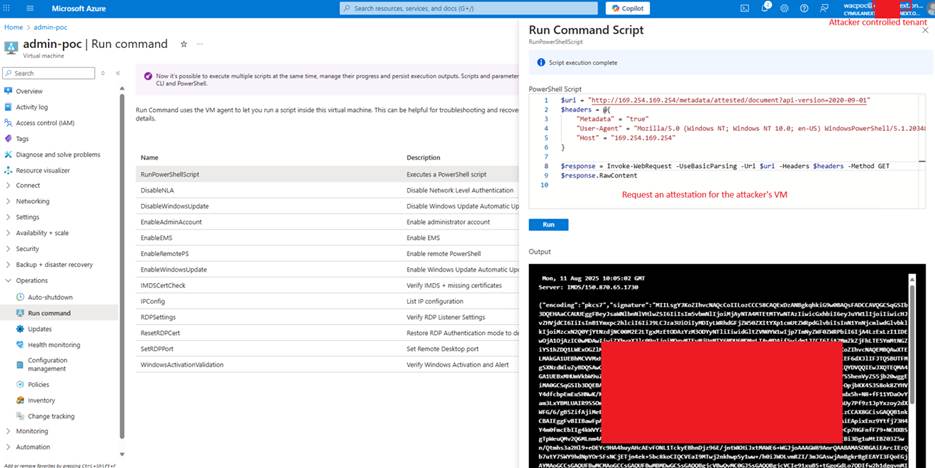
The attacker obtains an Azure VM attestation by querying the VM metadata service from a virtual machine within an attacker-controlled tenant:
Step 2
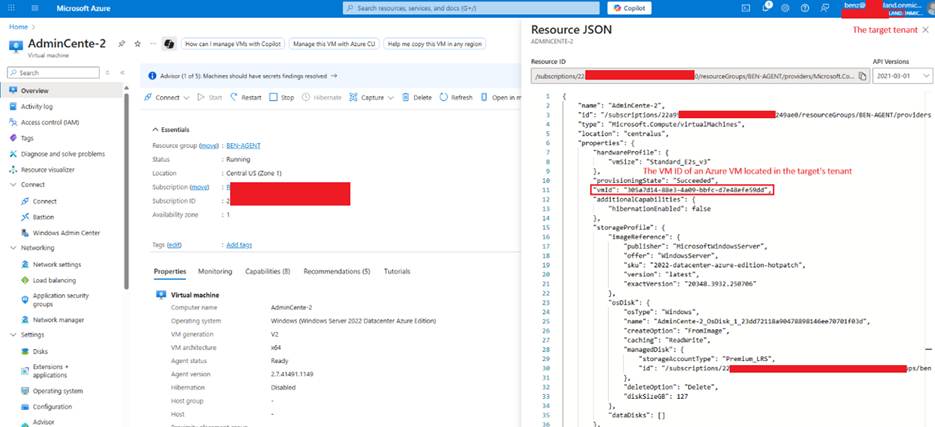
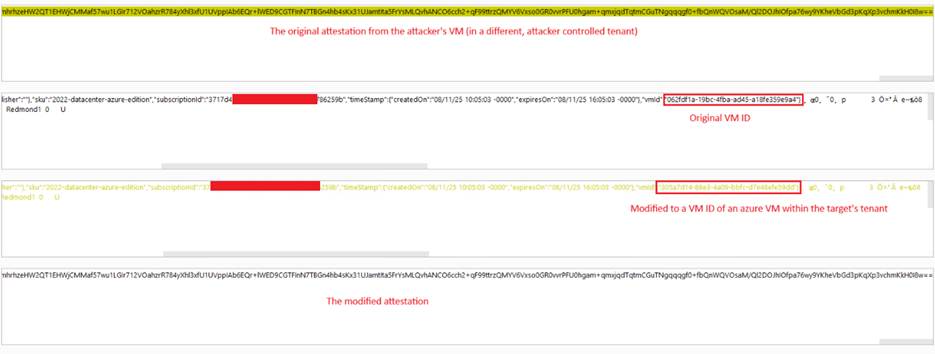
The attacker modifies the attestation data, replacing the VM ID field with the identifier of a virtual machine in the target tenant (which belongs to a different tenant).
A VM ID of an Azure VM within the target’s tenant:
Modifying the attestation:
Step 3
The attacker sends the new attestation to the WAC on the Azure application’s certificate request endpoint and gets a valid signed certificate along with its private key.
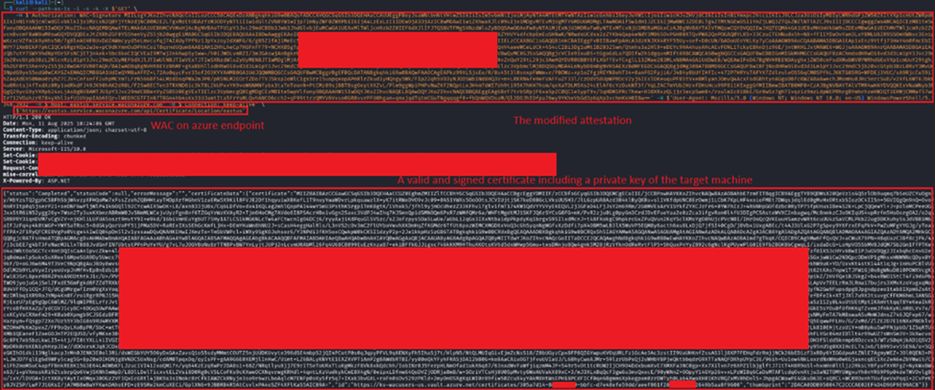
Decoding and inspecting the certificate shows it contains a private key, CA signature and the WAC API’s certificate:
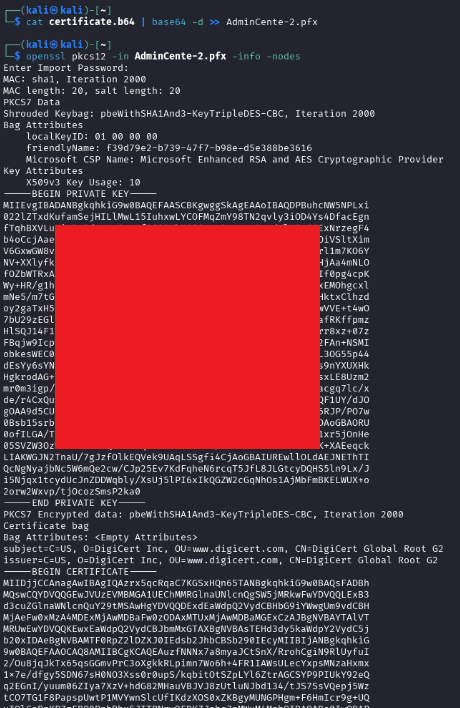
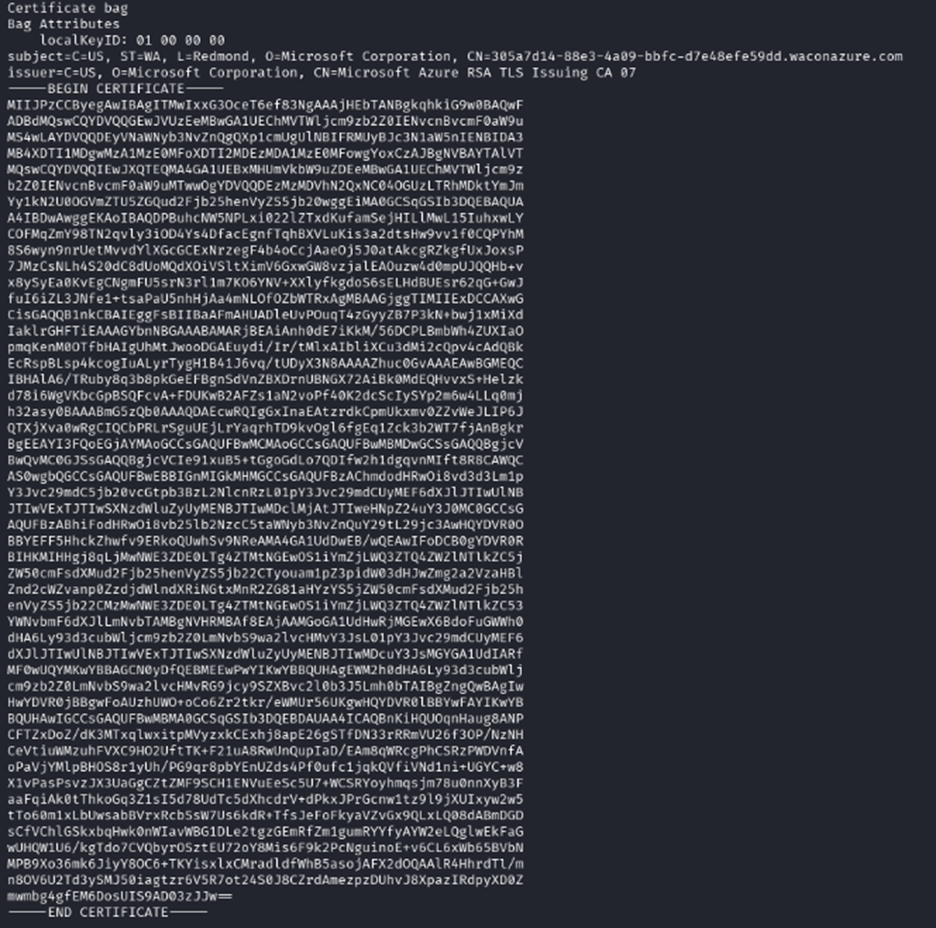
The certificate is used by the legitimate service to prove its authenticity to the client. Without a valid certificate, the client will automatically reject the server’s connection attempt, thereby terminating the session and effectively protecting the end user from man-in-the-middle attacks and credentials exposure.
Note: as mentioned, the API endpoint at
https://<location>.service.waconazure.com/api/Certificate/Location/<location>
is used to generate a valid Azure-signed certificate for the service during Windows Admin Center installation (via a POST request) and subsequently serves as the endpoint to retrieve the current certificate (via a GET request).
Note: If WAC is not installed on the target machine, a GET request will return no certificate. However, sending a POST request will trigger the generation of a new certificate, have it signed by Azure, and store it in the Azure Key Vault.
Step 4
The attacker uses the legitimate certificate to set up a rogue server that impersonates the VM’s Windows Admin Center API service.
Extracting the private key and certificate chain:
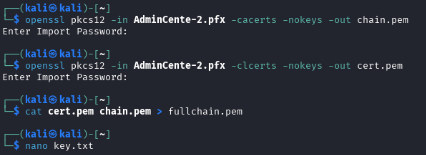
Setting a web service that impersonates the legitimate WAC API endpoints, mimicking valid responses from the original service:

Step 5:
The attacker performs a MITM attack targeting the machines of administrative users.
Note: Any MITM position allowing the attacker to redirect legitimate traffic or DNS requests should work. In the demonstration, a simple ARP spoof attack was used as an example.
The attacker uses an ARP spoof attack to redirect traffic to WAC API endpoints only while normally routing any other traffic:

To keep OPSEC by reducing the likelihood of detection and prevent alerting the victim, which could disrupt the operation, a tool was crafted that briefly redirects traffic whenever a connection is made to an Azure VM via WAC (from the Azure Portal). This redirection lasts only a short moment, introducing only a slight delay that is unlikely to arouse suspicion.
Watching for a WAC based DNS to redirect (multiple VMs can be targeted at once):

Step 6:
Once an administrative user connects to an Azure VM / ARC machine using WAC from the Azure portal, the attacker automatically redirects WAC API traffic for a very short duration, impersonates as the legitimate service and steals the user’s credentials (Azure tokens).
A legitimate administrative user connects one of the monitored VMs:
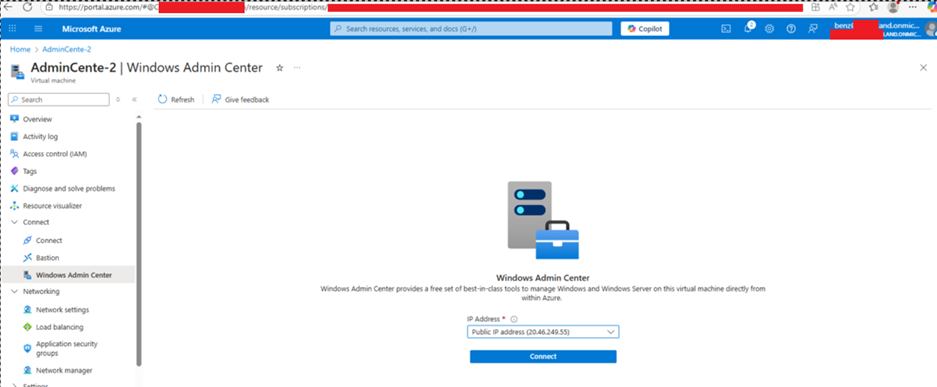
The attacker automatically redirects his traffic to the rogue server:

The tool absorbs WAC API requests to the server for a very short duration while routing the rest to the intended destination.
Without realizing it, the victim hands over their credentials automatically and directly to the attacker:

The attacker can now use the stolen tokens to impersonate the legitimate user and run commands remotely over the Azure VM:
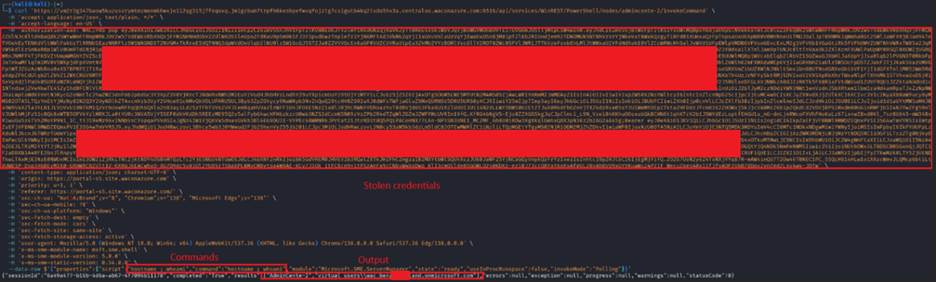
This capability enabled:
- Impersonation of the WAC service for any Azure VM or Azure Arc–connected machine across any tenant.
- Privilege escalation locally and across all Azure’s WAC-managed machines.
- Access to sensitive systems and services, including those protected by identity-based access controls.
- Cross-boundary compromise, allowing the attacker to escape isolated scopes such as individual VMs, resource groups, and subscriptions.
Threat hunting and detection considerations
Although Microsoft has remediated the improper attestation signature validation issue, certificates issued prior to the fix may remain valid until expiration, and the legitimate attestation-based certificate flow is still in use by Windows Admin Center.
At the time of writing, there is no public evidence of in-the-wild exploitation. However, given the impact of certificate and private key exposure, organizations should proactively hunt for activity that resembles the described abuse patterns. This is especially relevant because local privilege escalation via legitimate attestation access from non-administrative users remains possible by design, making behavioral detection important.
From a hunting perspective, defenders could focus on who is accessing sensitive endpoints. Under normal conditions, access to the Windows Admin Center certificate service (*.service.waconazure.com/api/Certificate/*) should originate from the SYSTEM account, typically via Windows Admin Center related processes or PowerShell process spawned by it, during installation and routine certificate operations.
Similarly, requests to the Azure Instance Metadata Service (IMDS), including the attested document endpoint, are supposed to be initiated by SYSTEM level processes. While non SYSTEM IMDS access can be legitimate, it meaningfully reduces noise and highlights potential abuse paths when used as a hunting filter.
Example hunting queries (Defender for Endpoint / Sentinel)
Non-SYSTEM access to the Windows Admin Center certificate service
DeviceNetworkEvents
| where RemoteUrl endswith ".service.waconazure.com"
| where InitiatingProcessAccountSid !startswith "S-1-5-18"   // not SYSTEM
| project TimeGenerated, DeviceName,
          InitiatingProcessFileName, InitiatingProcessAccountName,
RemoteUrl, RemoteIPAccess to the Windows Admin Center certificate service is highly specific and tightly scoped. Under normal conditions, requests to this endpoint are performed exclusively by the Windows Admin Center installation or service components (such as spawned PowerShell) running as SYSTEM. As such, any non-SYSTEM process communicating with this endpoint should be treated as a strong indicator of abuse or misconfiguration and warrants immediate investigation.
Non-SYSTEM access to the Azure Instance Metadata Service (IMDS)
DeviceNetworkEvents
| where RemoteIP == "169.254.169.254"
| where RemotePort == 80
| where InitiatingProcessAccountSid !startswith "S-1-5-18"
| project TimeGenerated, DeviceName,
InitiatingProcessFileName, InitiatingProcessAccountNameNote: Should be chained with endpoint inspection. Non-system processes requesting the attested document are suspicious and may require further inspection.
Access to IMDS from non-SYSTEM contexts can be legitimate. However, filtering non-SYSTEM callers is an effective way to reduce noise and surface suspicious activity, particularly when combined with subsequent access to the Windows Admin Center certificate service or the creation of certificate material on disk.
This discovery highlights how essential it is to understand cloud platforms at a deep level and to continuously investigate how attackers might exploit hidden weaknesses. Cymulate helps organizations stay ahead of these risks by delivering ongoing validation that reflects the most current techniques and real-world attack paths across on-premises, hybrid and cloud environments.
With research driven insights like the one presented here, our platform incorporates emerging findings as soon as they surface so security teams can measure and strengthen their resilience with confidence.
To see how Cymulate can help you proactively validate and enhance your security posture, request a demo today.
Disclosure Timeline
Vulnerability reported to Microsoft via MSRC on Aug. 13, 2025.
Microsoft acknowledged that there is a security issue on Aug. 19, 2025.
On. Dec. 16, 2025, Microsoft stated that a fix was rolled and the issue is resolved.

More from the Cymulate Research Lab
View More Resources
CVE-2025-64669: Uncovering Local Privilege Escalation Vulnerability in Windows Admin Center
Cymulate Research Labs uncovered local privilege escalation in Windows Admin Center, tracked as CVE-2025-64669.

Shai-Hulud 2.0: NPM Supply Chain Attack Exposes the SDLC's Weakest Link
Shai-Hulud 2.0 is an advanced npm supply chain attack that compromises packages and exploits CI/CD and SCM credentials.

Simulating EtherHiding: Blockchain as a Malware
Simulate EtherHiding attacks that hide malware via blockchain payloads, exposing Web3 threats and defensive strategies.