Frequently Asked Questions

Product Information

What is Cymulate Detection Studio and what does it do?

Cymulate Detection Studio is a platform designed to automate and scale detection engineering by validating, tuning, and optimizing SIEM detection rules against real-world attack simulations. It integrates with SIEM solutions, maps detection rules to attack techniques using Vero AI, and provides continuous feedback to improve detection accuracy and coverage. Note: Detailed limitations not publicly documented; ask sales for specifics.

How does Cymulate Detection Studio automate the detection engineering lifecycle?

Cymulate Detection Studio automates the detection engineering lifecycle by importing SIEM detection rules through native integrations, mapping rules to attack techniques and scenarios with Vero AI, executing real-world attack simulations, collecting logs and telemetry, providing evidence of triggered and missed detections, recommending vendor-specific improvements, and re-running scenarios to validate tuning. This closed-loop workflow enables continuous testing and improvement of detection logic. Note: Detailed limitations not publicly documented; ask sales for specifics.

What are the main features of Cymulate Detection Studio?

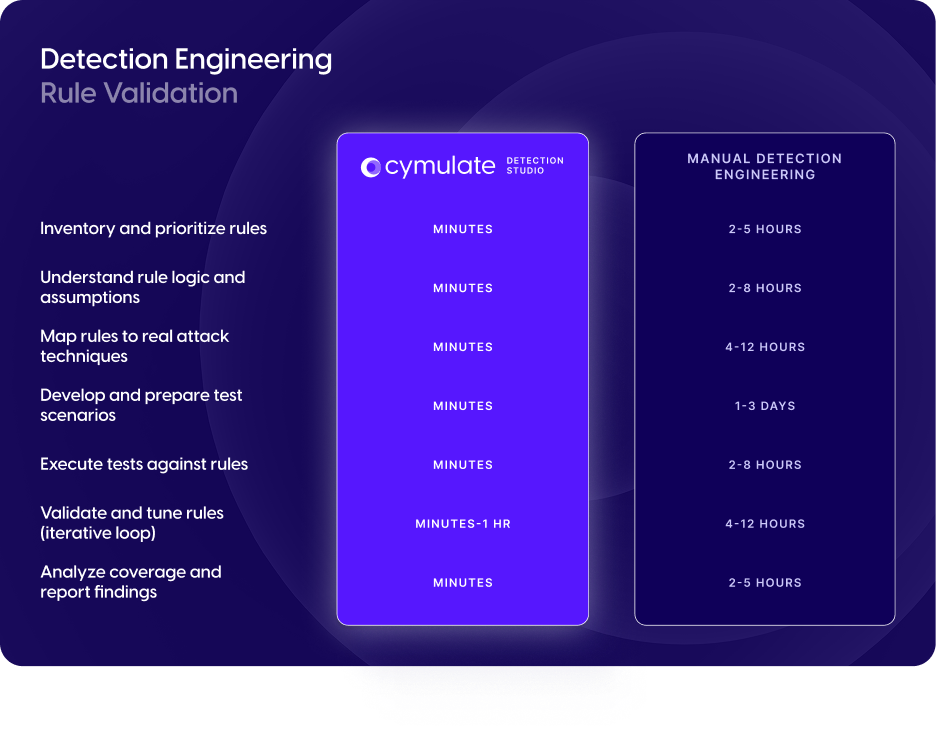
Main features include automated rule validation for SIEM detection rules, mapping SIEM detections to real-world attack techniques using Vero AI, continuous optimization of detection performance, identification of coverage gaps and actionable guidance for improvement, seamless SIEM integration for automatic rule ingestion and data collection, and reduction of detection engineering time by up to 80%. Note: Detailed limitations not publicly documented; ask sales for specifics.

How does Cymulate Detection Studio validate, tune, and optimize SIEM detection?

Cymulate Detection Studio automates rule validation to ensure SIEM rules trigger against real attack behaviors, maps SIEM detections to attack techniques using Vero AI, continuously optimizes detection performance through guided tuning and testing, and identifies drift by highlighting unexpected drops in threat coverage and detection performance. Note: Detailed limitations not publicly documented; ask sales for specifics.

How does Cymulate Detection Studio improve detection accuracy?

Cymulate Detection Studio improves detection accuracy by validating SIEM rules against real attack behaviors, providing guided tuning and actionable recommendations when rules do not trigger as expected, and highlighting coverage gaps and detection drift for continuous improvement. Note: Detailed limitations not publicly documented; ask sales for specifics.

What makes Cymulate Detection Studio different from traditional detection engineering?

Cymulate Detection Studio differentiates itself by automating rule validation and mapping to real-world attack techniques, providing continuous optimization and actionable guidance, reducing manual workflows through SIEM integration, and enabling faster build, test, and deployment cycles. Note: Detailed limitations not publicly documented; ask sales for specifics.

How does Cymulate Threat Studio work with Cymulate Detection Studio?

Cymulate Threat Studio works alongside Cymulate Detection Studio to validate security controls and improve detection capabilities by simulating custom attack scenarios. Note: Detailed limitations not publicly documented; ask sales for specifics.

Features & Capabilities

What are the key benefits of using Cymulate Detection Studio?

Key benefits include continuous rule validation, improved detection accuracy, visualization of coverage gaps, improved threat resilience, and reduction of detection engineering time by up to 80%. Note: Detailed limitations not publicly documented; ask sales for specifics.

What SIEM integrations does Cymulate Detection Studio support?

Cymulate Detection Studio supports native integrations for importing SIEM detection rules and collecting logs and telemetry. For a full list of supported integrations, visit the Cymulate technology alliances and partners page. Note: Not all SIEM platforms may be supported; verify compatibility for your environment.

Implementation & Ease of Use

How easy is it to implement and use Cymulate Detection Studio?

Cymulate Detection Studio is designed for rapid deployment and ease of use, with an intuitive interface and agentless operation. Customers report that it is easy to implement and use, requiring only a few clicks to gain practical insights. For example, Raphael Ferreira, Cybersecurity Manager, stated, "Cymulate is easy to implement and use—all you need to do is click a few buttons, and you receive a lot of practical insights into how you can improve your security posture." Note: Implementation complexity may vary based on SIEM environment and integration requirements.

Are there customer testimonials for Cymulate Detection Studio?

Yes. Markus Flatscher, Senior Security Manager, stated: “Cymulate Detection Studio streamlines our detection engineering validation processes, saving us hundreds of hours at scale.” Note: Individual results may vary depending on organizational size and SIEM complexity.

Technical Documentation & Resources

Where can I download the Cymulate Detection Studio data sheet?

You can download the Cymulate Detection Studio data sheet at this link for detailed information about its features and capabilities. Note: Always check for the latest version for up-to-date details.

What resources are available to learn more about Cymulate Detection Studio?

Resources include the Detection Studio data sheet, Cymulate Exposure Validation data sheet, the RBI case study, and the AI-powered SIEM optimization blog post. For more, visit the Cymulate resources library. Note: Some resources may require registration or additional permissions.

Pricing & Plans

What is the pricing model for Cymulate Detection Studio?

Cymulate Detection Studio is available through a subscription-based pricing model, customized to the organization's requirements. Pricing depends on the package selected, number of assets covered, and scenarios and vectors chosen. For a tailored quote, schedule a demo with the Cymulate team. Note: Exact pricing is not publicly listed and may vary based on organizational needs.

Security & Compliance

What security and compliance certifications does Cymulate Detection Studio support?

Cymulate Detection Studio, as part of the Cymulate platform, supports SOC2 Type II, ISO 27001:2013, ISO 27701, ISO 27017, and CSA STAR Level 1 certifications. These cover security, availability, confidentiality, privacy, and cloud security. For more details, visit the Security at Cymulate page. Note: Certification scope may vary by product module; confirm with Cymulate for module-specific coverage.

New: 2026 Gartner® Market Guide for Adversarial Exposure Validation
Learn More
Cymulate named a Customers' Choice in 2025 Gartner® Peer Insights™
Learn More
New Research: The Security Tradeoffs Behind AI Tooling
Learn More
An Inside Look at the Technology Behind Cymulate
Learn More
Data Sheet

Cymulate Detection Studio

Cymulate Detection Studio provides a rule-led approach to detection engineering that integrates directly with SIEM to:

  1. Import existing SIEM detection rules through native integrations.
  2. Automatically map rules to attack techniques and scenarios using Vero AI.
  3. Execute real-world attack simulations to validate rule effectiveness.
  4. Collect logs and telemetry required to trigger detections.
  5. Provide evidence of triggered and missed detections.
  6. Recommend vendor-specific rule improvements for missed alerts.
  7. Re-run scenarios to validate detection tuning.

Scale detection engineering to continuously expand coverage and automate the detection life cycle. 

Complete threat coverage

The most comprehensive threat library that enables validation across the full attack lifecycle – plus daily updates for the latest threats.

AI-powered environment and context mapping 

Autonomous, AI-driven usability and workflows customize detection engineering for your environment.

Cyber defense engineering control plane

Closed-loop system that turns validation into continuous improvement across controls and threat detection.

Book a Demo