Frequently Asked Questions

SLAM Method & Phishing Prevention

What is the SLAM method in cybersecurity?

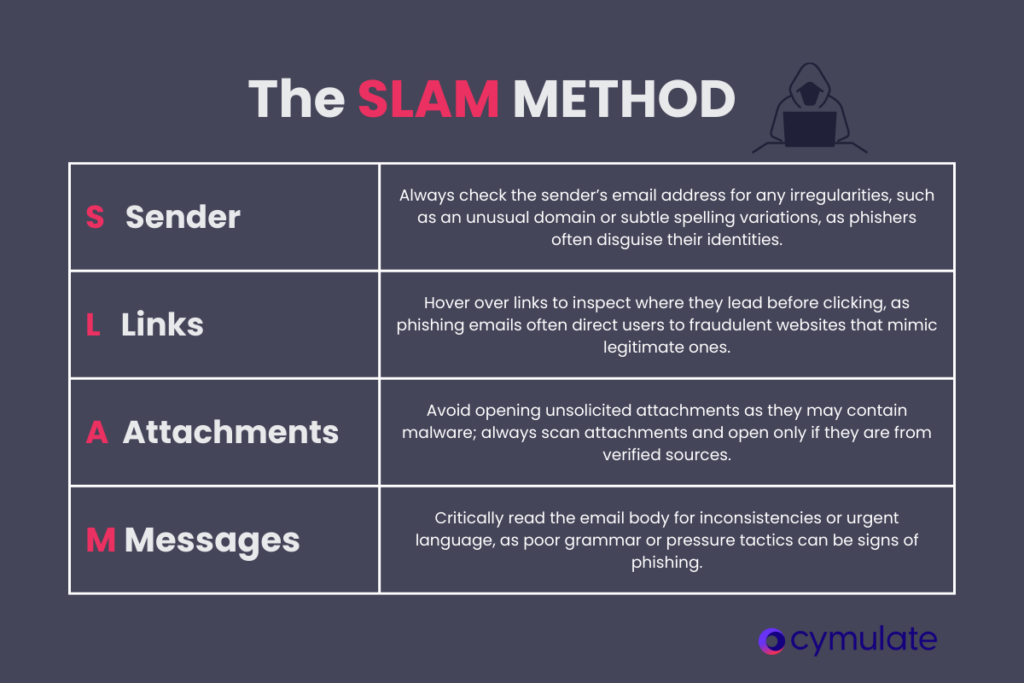
The SLAM method is a simple, memorable approach to identifying phishing emails before they cause harm. SLAM stands for Sender, Links, Attachments, and Message—the four critical aspects of an email that should be examined to determine if it could be a phishing attempt. This method helps individuals and organizations systematically evaluate emails for common phishing indicators and reduce the risk of falling victim to attacks.

What does SLAM stand for in the context of phishing prevention?

SLAM stands for Sender, Links, Attachments, and Message. Each letter represents a key element to check in an email: verify the sender's address, hover over links to check their destination, treat unexpected attachments with suspicion, and scrutinize the message for inconsistencies or urgency cues.

How does the SLAM method help prevent phishing attacks?

The SLAM method provides a practical checklist for evaluating emails. By training yourself or your team to use SLAM whenever an email seems suspicious, you can prevent phishing attacks before they begin. It encourages users to pause and thoughtfully evaluate emails, making smarter decisions when confronted with suspicious communications.

What are common signs of a phishing email beyond the SLAM method?

Phishing emails often contain poor grammar and spelling, urgent requests to act immediately, and strange-looking URLs that mimic legitimate domains. These signs, in addition to the SLAM checklist, can help users spot suspicious emails more effectively.

What steps should I take if I detect a phishing attack?

If you suspect a phishing email, do not engage with it—avoid clicking links, downloading attachments, or replying. Report the email to your IT or security team, flag it as spam or phishing in your email client, and involve your cybersecurity point of contact for further action.

How can organizations integrate the SLAM method into employee awareness training?

The SLAM method can be incorporated into security awareness training sessions as a simple, memorable framework. By teaching employees to use SLAM, organizations empower them to quickly and effectively identify phishing attempts, increasing the likelihood of adoption in daily routines and reducing overall risk.

Why is checking the sender's address important in phishing prevention?

Phishers often manipulate email addresses to appear legitimate, using spoofed domains or slight variations. Verifying the sender's address for irregularities helps users spot potential phishing attempts before engaging with the email.

How should I handle links in suspicious emails?

Hover over any links in an email before clicking to see their actual destination. If the link does not match the sender's known web address or appears suspicious, do not click it. This practice helps prevent being redirected to fraudulent websites designed to steal sensitive information.

What risks do attachments in phishing emails pose?

Attachments in phishing emails can contain malware or ransomware that infects your system when opened. Treat all unexpected attachments with suspicion, especially from unknown senders, and scan them with antivirus software before opening.

How can I spot suspicious messages in phishing emails?

Look for poor grammar, spelling mistakes, awkward phrasing, or a sense of urgency in the message. These are common tactics used by phishers to pressure recipients into acting quickly without proper scrutiny.

How does Cymulate help organizations prevent breaches from phishing attacks?

Cymulate's platform, particularly its Red Teaming solution, enables organizations to simulate realistic phishing attacks and enhance employee readiness. These simulations help identify weaknesses, reinforce SLAM principles, and provide actionable insights into risky behaviors, strengthening overall resilience against phishing threats. Learn more about Cymulate Red Teaming.

Can the SLAM method be used in any organization’s security awareness program?

Yes, the SLAM method is straightforward and easy to remember, making it suitable for integration into any organization's security awareness program. It encourages users to evaluate emails thoughtfully and consistently, reducing the risk of successful phishing attacks.

What are the key takeaways for using the SLAM method?

The SLAM method offers a simple yet effective strategy for combating phishing by encouraging users to scrutinize emails for sender, links, attachments, and message content. Combining SLAM with phishing simulations and employee training significantly reduces an organization’s exposure to phishing threats.

How does Cymulate’s drag-and-drop interface support phishing simulations?

Cymulate’s intuitive drag-and-drop interface allows security teams to design phishing campaigns that mirror real-world attack tactics. This helps employees practice identifying phishing emails and reinforces SLAM principles, while providing security teams with insights into risky behaviors.

What related glossary pages can help me understand phishing threats?

Cymulate provides related glossary pages such as Angler Phishing, Spear Phishing, and Clone Phishing for deeper understanding of phishing threats and defense strategies.

How does Cymulate support ongoing employee cybersecurity awareness?

Cymulate supports ongoing employee cybersecurity awareness through continuous phishing simulations, integration of SLAM principles in training, and providing actionable feedback to both employees and security teams. This approach helps build a more cyber-aware workforce and reduces risk from phishing attacks.

What should I do if I accidentally clicked a link in a phishing email?

If you accidentally clicked a link in a phishing email, immediately disconnect from the internet, inform your IT or security team, and follow your organization's incident response procedures. Do not provide any information on suspicious websites and monitor your accounts for unusual activity.

How does Cymulate’s Red Teaming solution differ from traditional phishing training?

Cymulate’s Red Teaming solution automates and scales phishing simulations, providing continuous, realistic testing rather than one-off training sessions. This approach helps organizations proactively identify weaknesses and improve resilience against evolving phishing tactics. Learn more.

Where can I find a glossary of cybersecurity terms?

You can find a comprehensive glossary of cybersecurity terms, acronyms, and jargon on Cymulate’s glossary page, which is continuously updated.

Does Cymulate provide educational resources like a blog or resource hub?

Yes, Cymulate offers a variety of educational resources, including a Resource Hub, blog, and glossary to keep you informed about the latest in cybersecurity and platform updates.

What are Cymulate’s key security and compliance certifications?

Cymulate holds several industry-leading certifications, including SOC2 Type II, ISO 27001:2013, ISO 27701, ISO 27017, and CSA STAR Level 1. These certifications demonstrate Cymulate’s commitment to robust security and compliance standards. Learn more.

How does Cymulate ensure data security and privacy?

Cymulate ensures data security through encryption for data in transit (TLS 1.2+) and at rest (AES-256), secure AWS-hosted data centers, and a tested disaster recovery plan. The platform also incorporates GDPR compliance and has a dedicated privacy and security team. Read more.

What types of organizations benefit most from Cymulate’s platform?

Cymulate’s solutions are designed for CISOs, security leaders, SecOps teams, red teams, and vulnerability management teams in organizations of all sizes and industries, including finance, healthcare, retail, media, transportation, and manufacturing. Learn more.

What are the main pain points Cymulate helps solve?

Cymulate addresses fragmented security tools, resource constraints, unclear risk prioritization, cloud complexity, communication barriers, inadequate threat simulation, operational inefficiencies in vulnerability management, and post-breach recovery challenges. See case studies.

How does Cymulate compare to other security validation platforms?

Cymulate stands out with its unified platform combining Breach and Attack Simulation (BAS), Continuous Automated Red Teaming (CART), and Exposure Analytics. It offers continuous threat validation, AI-powered optimization, ease of use, and measurable outcomes such as a 52% reduction in critical exposures and an 81% reduction in cyber risk within four months. Compare here.

What integrations does Cymulate offer?

Cymulate integrates with a wide range of security technologies, including Akamai Guardicore, AWS GuardDuty, BlackBerry Cylance OPTICS, Carbon Black EDR, Check Point CloudGuard, Cisco Secure Endpoint, CrowdStrike Falcon, Wiz, SentinelOne, and more. See full list.

How easy is it to implement Cymulate and start using it?

Cymulate is designed for quick and easy implementation, operating in agentless mode with no need for additional hardware or complex configurations. Customers can start running simulations almost immediately after deployment, with comprehensive support and educational resources available. Book a demo.

What is Cymulate’s pricing model?

Cymulate operates on a subscription-based pricing model tailored to each organization's requirements. Pricing depends on the chosen package, number of assets, and scenarios selected. For a detailed quote, schedule a demo with the Cymulate team.

What customer feedback has Cymulate received regarding ease of use?

Cymulate is consistently praised for its intuitive, user-friendly platform. Customers highlight its ease of implementation, actionable insights, and accessible support. For example, Raphael Ferreira, Cybersecurity Manager, noted, “Cymulate is easy to implement and use—all you need to do is click a few buttons, and you receive a lot of practical insights.” Read more testimonials.

What are some real-world outcomes achieved with Cymulate?

Organizations using Cymulate have reported measurable outcomes, such as a 52% reduction in critical exposures, a 60% increase in team efficiency, and an 81% reduction in cyber risk within four months. See Hertz Israel case study.

What is Cymulate’s overarching vision and mission?

Cymulate’s vision is to create an environment where everyone collaborates to make a lasting impact on cybersecurity. The mission is to transform cybersecurity practices by enabling organizations to proactively validate defenses, identify vulnerabilities, and optimize their security posture. Learn more.

Where can I find Cymulate’s thought leadership content?

You can access Cymulate’s thought leadership and informational content through the Resource Hub, blog, and Threat Exposure Validation Impact Report 2025.

Cymulate named a Customers' Choice in 2026 Gartner® Peer Insights™
Learn More
New: Cymulate Cowork for Agentic Cyber Defense Engineering
Learn More
New Bitsight Integration: Turn Threat Intelligence into Validated Security
Learn More
Introducing Cymulate Vero AI for Agentic Cyber Defense Engineering
Learn More

What is the SLAM Method in Cybersecurity? A Guide to Phishing Prevention

Phishing is one of the most prevalent cybersecurity threats today. It’s a key entry point for many cyberattacks, including ransomware, credential theft and data breaches. Despite continuous technological advancements, phishing remains highly effective because it exploits the human factor. Organizations have poured resources into developing training programs and technology defenses, but phishing attacks continue to evolve, and individuals remain vulnerable.

One practical and efficient way to help individuals and organizations combat phishing is the SLAM method—a simple, memorable approach to identifying suspicious emails before they cause harm.

What Does the SLAM Method Stand For?

SLAM is an acronym that highlights four critical aspects of an email that must be examined to determine whether it could be a phishing attempt. It stands for:

  • Sender
  • Links
  • Attachments
  • Message
SLAM Method Cybersecurity

S – Sender: why checking the sender’s address is the first step

One of the first things anyone should do when receiving an email is to check the sender’s address. Phishers often manipulate email addresses to look like they come from legitimate sources, such as your bank or a trusted company. They might spoof the email domain or use slight variations of known addresses to trick recipients. For example, instead of an official domain like @bankofamerica.com, a phishing email might use @emcom.bankofamerica.com or another variation designed to deceive the reader.

Verifying the sender’s email address for irregularities, like an unfamiliar domain or unusual spelling, is critical. Any suspicious details here should prompt cautious engagement with the email.

Phishing emails frequently use malicious links to direct recipients to fraudulent websites where they might be asked to enter sensitive information, such as usernames, passwords, or payment details. These sites often look almost identical to legitimate ones but are controlled by attackers.

The SLAM method encourages users to hover over any links in an email before clicking them to see where they lead. If the link doesn’t match the sender’s known web address or appears suspicious, avoid clicking it. For example, a link labeled as “MyBank Login” might lead to phishy.com/login instead of a known domain.

A – Attachments: the danger of unsolicited attachments

Phishing emails often contain malicious attachments that, once opened, can install malware or ransomware onto a user’s system. These attachments may look harmless—a Word document, PDF, or spreadsheet—but can hide harmful scripts.

The SLAM method reminds individuals to treat all unexpected attachments with suspicion, especially from unknown senders. Avoid opening attachments unless they are expected and verified. Even when attachments seem safe, scanning them with antivirus software before opening them is a good practice.

M – Messages: spotting inconsistencies or suspicious messages

The body of a phishing email often contains subtle signs that something is off. These could include poor grammar, spelling mistakes, or awkward phrasing. Another common trick phishers use is creating a sense of urgency, pushing the recipient to act quickly—such as “Your account will be suspended unless you act now.”

Critically reading the message for inconsistencies or suspicious language is essential. Signs of urgency or pressure are often red flags that warrant further scrutiny.

Using the SLAM Method to Help Prevent Phishing Attacks

The SLAM method is a quick and practical checklist to guide individuals through evaluating email security. By training yourself or your team to use SLAM every time an email seems suspicious, you can prevent phishing attacks before they even begin. The method is straightforward, easy to remember, and ensures that each potential phishing email is scrutinized based on its most common elements—sender, links, attachments, and message.

Moreover, the SLAM method can be integrated seamlessly into any organization’s security awareness program. It encourages users to pause and evaluate emails thoughtfully, helping them make smarter decisions when confronted with suspicious communications.

Recognizing a Phishing Email

While the SLAM method offers a targeted approach, phishing emails often exhibit other telltale signs that extend beyond the SLAM acronym. These signs include:

  • Poor grammar and spelling: Many phishing emails contain grammatical errors or awkward wording. This could be because non-native speakers or automated bots conduct many phishing attacks.
  • Urgent requests: Phishing emails often attempt to create a sense of urgency, urging recipients to act immediately, threatening consequences such as account suspension or financial loss.
  • Strange-looking URLs: Even if you hover over a link, it’s worth paying attention to the structure of the URL. Phishers often create URLs that appear legitimate at first glance but include slight variations to deceive users.

What to Do When You Detect a Phishing Attack

If you suspect that you’ve received a phishing email, it’s essential to follow a clear set of steps to mitigate the risk:

  1. Do not engage with the email: Avoid clicking on links, downloading attachments, or replying.
  2. Report the email: Most organizations have procedures for reporting suspected phishing emails. Alerting your IT or security team is essential to prevent the attack from spreading.
  3. Flag the email: Mark the email as spam or phishing in your email client to help prevent future similar attacks.
  4. Involve your cybersecurity point of contact (IT/CISCO): IT and security teams should be informed as quickly as possible if you suspect a phishing attempt. They may need to take additional steps to protect the organization’s systems.

Employee Awareness Training: Integrating SLAM into Organizational Cybersecurity

Cybersecurity awareness training is crucial in preventing phishing attacks. While organizations invest in advanced email filtering solutions, no technology is perfect, and phishing emails will inevitably slip through the cracks. This is where human intervention becomes critical.

The SLAM method can be a powerful tool for teaching employees during security awareness training sessions. By providing them with a simple, memorable framework, employees are better equipped to identify phishing attempts quickly and effectively. The more intuitive the process, the more likely employees will adopt it in their daily routines.

How Cymulate Helps Validate Defenses Against Initial Access Attacks

Initial access techniques, including phishing, stolen credentials, and exploitation of exposed services, are among the most common ways attackers compromise organizations. The Cymulate Exposure Validation Platform enables security teams to continuously validate whether their security controls can detect and prevent these attack techniques before they lead to a breach.

Using safe, automated attack emulation aligned with the MITRE ATT&CK® framework, Cymulate validates the effectiveness of preventive and detective controls across email, endpoint, identity, network, cloud, and web environments. Security teams gain actionable insights into security gaps and receive prioritized recommendations to strengthen their defenses.
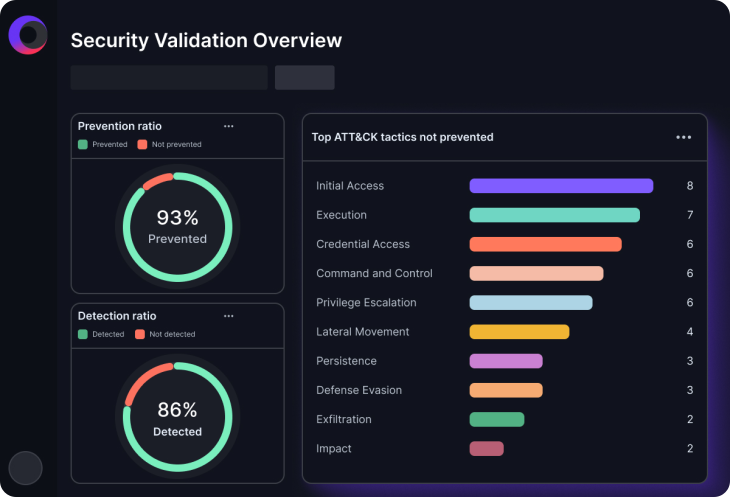
Cymulate helps security teams to:

  • Validate security controls against common initial access techniques used by real-world adversaries.
  • Identify gaps in prevention, detection, and response before attackers can exploit them.
  • Prioritize remediation based on validated exposures and business risk.
  • Continuously assess security effectiveness as threats and environments evolve.

Why it matters: Continuous validation helps organizations reduce the likelihood of successful initial compromise by ensuring security controls perform as expected against the techniques attackers use most often.

Key Takeaways

Phishing continues to be one of the most significant threats facing organizations today. Threat actors constantly refine their techniques, making suspicious emails harder to identify. The SLAM method offers a simple yet effective strategy for combating phishing by encouraging users to scrutinize emails for common red flags—sender, links, attachments, and messages.

While no single approach can eliminate the risk of phishing attacks, combining strong security awareness practices with continuous security validation significantly reduces organizational risk. The Cymulate Exposure Validation Platform enables security teams to validate the effectiveness of their security controls against real-world initial access techniques, helping security teams identify gaps, prioritize remediation, and strengthen their defenses before attackers can exploit them.

GET A PERSONALIZED DEMO

Ready to see Cymulate in action?