

CVE-2026-35603: One Writable Folder, Every User Compromised: Exploiting Configuration Trust in AI Coding Tools
Ilan Kalendarov, Security Research Team Lead
Ben Zamir, Security Researcher
Elad Beber, Security Researcher
The AI coding tools that millions of developers launch every day quietly trust a folder on Windows that any standard user can write to. By dropping a single configuration file into that folder, a low-privileged attacker can have their commands run inside the session of any other user on the machine (including a local / domain administrator) with no prompt, no warning and no elevated access of their own.
Affected Tools: Claude Code, Cursor, Codex CLI and Google Gemini CLI
The vendors handled this vulnerability very differently. Notably, Anthropic stood out as the most responsible actor: rather than deprioritizing the report, they engaged seriously and took concrete action.
Anthropic fully deprecated the vulnerable C:\ProgramData\ClaudeCode\ path, relocating managed settings to a write-protected Program Files location and since this was a breaking change for enterprise deployments also proactively emailed all affected customers to notify them of the planned migration before it was rolled out. Anthropic assigned CVE-2026-35603 upon resolution.
The remaining vendors (Cursor, OpenAI and Google) either triaged it at low severity with no committed remediation or had not responded conclusively at the time of writing, leaving their tools exploitable.
Cymulate Research Labs has published new attack scenarios for Cymulate Exposure Validation that simulate the binary-planting and configuration-poisoning techniques described below in a production-safe way.
Executive Summary
Four major AI CLI/IDE tools on Windows load system-wide configuration from C:\ProgramData\, a directory that is writable by non-administrative users by default. None created or ACL-restricted their ProgramData subdirectory at install time, and none validated the ownership or integrity of configuration files before loading them. Each tool also exposes an event-triggered command-execution feature (hooks or a notify command) that fires automatically on routine user actions.
A low-privileged local attacker can create the missing vendor directory, drop a malicious configuration file and have arbitrary commands execute under the security context of every other user who launches the tool (including administrators) with no elevated rights, no user interaction and no warning. The impact is cross-user code execution, local privilege escalation, durable persistence and a foothold for credential theft and lateral movement.
To learn about actionable ways to mitigate these risks in your organization, you can jump to the end of this blog here.
Introduction
AI coding agents have moved from novelty to daily infrastructure. They run on developer laptops, shared build hosts, jump boxes and multi-user workstations.
In Part 1 of this series, we showed how the sandboxing these tools advertise could be bypassed.
In Part 2, we demonstrated zero-click remote code execution driven by prompt injection.
This part is different in kind. There is no prompt injection here and nothing the AI model "decides" to do. The weakness lives entirely in how the desktop application loads its own configuration. A standard, unprivileged or any malware already running as that user can abuse the tool's own trusted configuration path to cross from their account into everyone else's. It is old-fashioned Windows privilege escalation, reborn inside the newest class of developer tooling.
The Vulnerability Class: Trusting a World-Writable Directory
Every finding in this report is the same flaw wearing four different vendor logos. Rather than repeat the mechanics four times, we explain the class once here and then show each tool's specifics.
Why ProgramData is the wrong place to trust
C:\ProgramData\ exists so that applications can store machine-wide, all-users configuration. The catch is in its default ACLs: the directory grants the “Users” group the ability to create new subdirectories and files. In practice, a standard, non-administrative user can create a new subdirectory under ProgramData and write files into it.
Windows applications are expected to account for this. The secure pattern is to create the application's ProgramData subdirectory at install time and tighten its ACLs so only SYSTEM/Administrators can write or store machine-wide configuration somewhere already protected, such as Program Files. The tools in this report did neither: their ProgramData subdirectory did not exist by default, was never created with restrictive permissions and the application happily created or read it as a normal user.
Why that turns into a privilege escalation
Two design choices convert a writable directory into a privilege escalation primitive:
- System-wide precedence. The configuration loaded from ProgramData is treated as a trusted machine default and applied to every user who launches the tool, taking precedence over per-user settings. Trust flows from a location any user can write into every account on the machine.
- Event-triggered command execution. Each tool exposes a configuration-driven feature that runs a shell command when a routine event occurs such as a hook on session start, sending a prompt or a notify command on each agent turn. The command executes under the security context of the user running the tool, outside any sandbox.
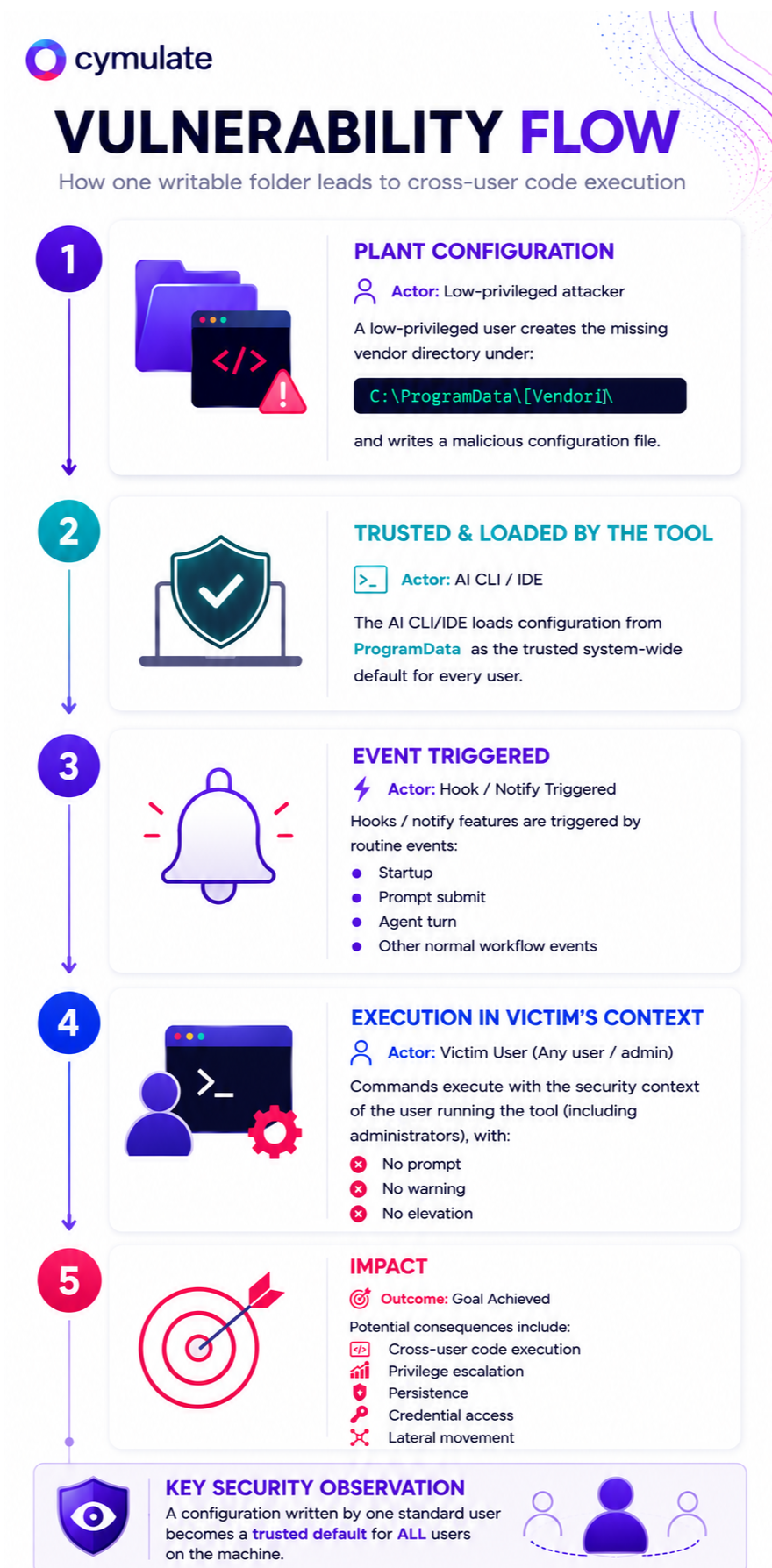
The generic attack chain
The exploitation flow is identical across all four products:
Step 1: Plant the configuration
The low-privileged attacker creates the missing vendor directory under C:\ProgramData\…\ and writes a malicious configuration file that enables the tool's hook/notify feature and points it at an attacker-chosen command. No elevation is required.
Step 2: Wait for any user to launch the tool
The configuration sits as a trusted machine-wide default. There is no approval dialog, no signature check and no warning, the file simply is the system default now.
Step 3: Cross-user execution
When another user (including an administrator) uses the tool the malicious configuration is loaded and the event-triggered command fires under that victim's security context.
Step 4: Compromise and persistence
The command runs with the victim's privileges and access to their environment variables, source code, SSH keys, cloud tokens and Git credentials. If an administrator launches the tool, the attacker achieves local privilege escalation. Because the file persists in ProgramData, every subsequent launch by any user re-triggers execution, providing durable, multi-victim persistence.
Vendor-specific details
Anthropic Claude Code
Prompt-Independent Cross-User Code Execution via World-Writable managed-settings.json Hook
| Affected Product | Claude Code (tested on 2.0.76) |
| Platform | Windows 10 / 11 |
| Configuration path | C:\ProgramData\ClaudeCode\managed-settings.json |
| Execution primitive | Hooks (event-driven command execution, e.g. on session start) |
| Vulnerability Type | Improper Privilege Management / Cross-User Configuration Trust |
| Impact | Cross-user code execution, local privilege escalation, persistence |
| Vendor Response | Fixed, CVE-2026-35603 assigned |
| Disclosure Date | January 5, 2026 |
Overview
Claude Code on Windows loads machine-wide managed settings from C:\ProgramData\ClaudeCode\managed-settings.json. The directory was not created or access-restricted by default, so any standard user could create it and supply a managed-settings.json containing a hook configured to execute on session start. Once planted, the hook ran for any user who started Claude Code, under that user's context, with no approval.
Vendor Response
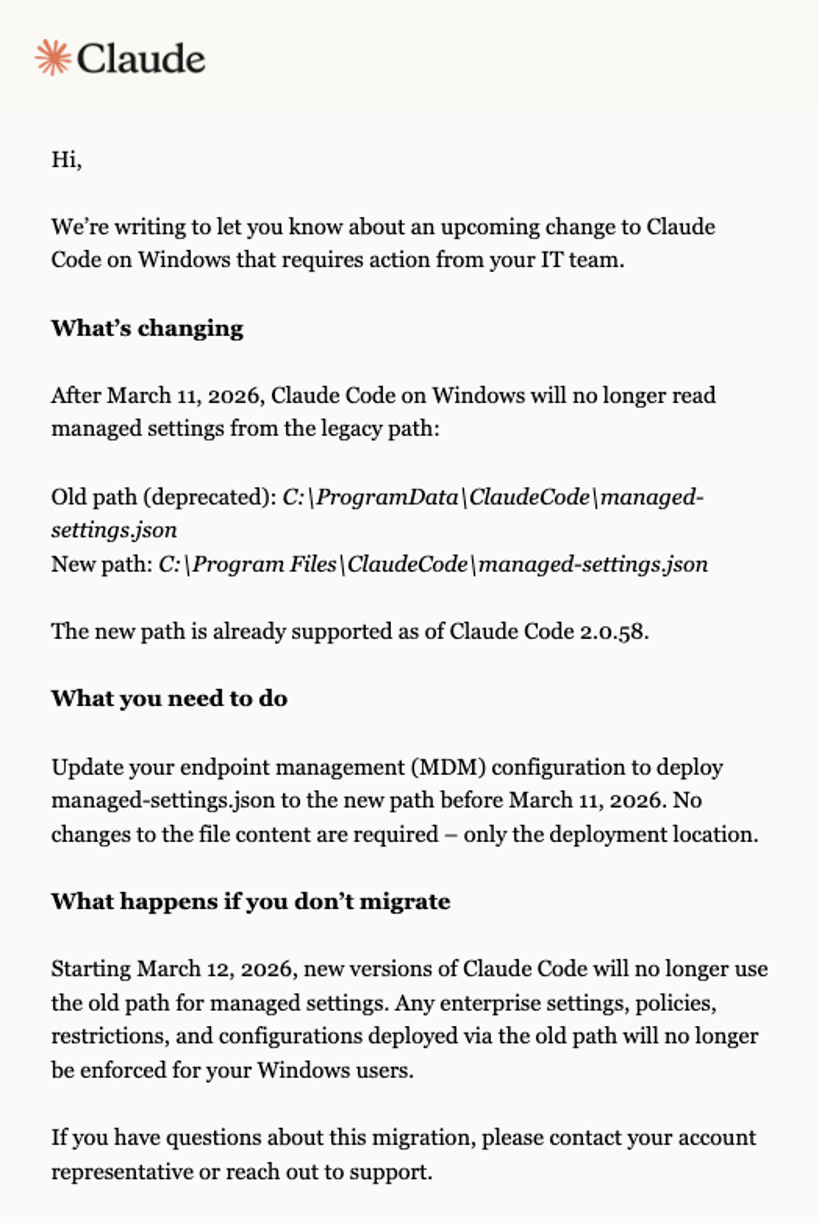
Anthropic's handling was the strongest of the four vendors and the model for how this class should be treated. After receiving the report on January 5, 2026, Anthropic engaged in a substantive technical discussion. Anthropic then committed to a real fix: deprecating the writable ProgramData location and moving managed settings to a write-protected Program Files path. Recognizing this was a breaking change for enterprise deployments, Anthropic communicated the relocation to affected customers before rolling it out. A researcher-performed retest confirmed the fix, the report was resolved, and CVE-2026-35603 was assigned.
Cursor
Cross-User Code Execution via World-Writable hooks.json, Including Live Reload of Running Sessions
| Affected Product | Cursor (latest as of blog write time) |
| Platform | Windows |
| Configuration path | C:\ProgramData\Cursor\hooks.json |
| Execution primitive | Hooks (event-driven command execution, e.g. on sending a prompt to an agent) |
| Vulnerability Type | Improper Privilege Management / Cross-User Configuration Trust |
| Impact | Cross-user code execution, local privilege escalation, persistence |
| Vendor Response | No formal reply and unresolved at publication |
| Disclosure Date | January 12, 2026 |
Overview
Cursor supports system-wide configuration files under C:\ProgramData\Cursor\, including a hooks.json that binds command execution to in-app actions such as sending a prompt to an agent. The directory was not secured by default, so a standard user could create it and plant a malicious hooks.json that loads for every user on the machine.
Vendor Response
The report was submitted on January 12, 2026. Among the vendors involved, Cursor was the least responsive. More than five months later, we have still not received a formal verdict. The report was not properly triaged, and the issue remains unresolved and reproducible.
OpenAI Codex CLI
Cross-User Code Execution and Sandbox Disablement via World-Writable config.toml
| Affected Product | Codex CLI (latest as of blog write time) |
| Platform | Windows 10 |
| Configuration path | C:\ProgramData\openai\codex\config.toml |
| Execution primitive | notify command (executes on agent turn), config can also set sandbox_mode = "danger-full-access" and approval_policy = "never" |
| Vulnerability Type | Improper Privilege Management + External Control of Configuration Setting |
| Impact | Cross-user code execution, sandbox bypass, removal of approvals, privilege escalation, persistence |
| Vendor Response | Triaged, marked Unresolved, no fix committed at publication |
| Disclosure Date | February 16, 2026 |
Overview
Codex CLI loads system-wide defaults from C:\ProgramData\openai\codex\config.toml. As with the others, the directory was not created or restricted by default. Codex's variant is the most potent because the system-wide file controls more than just an execution hook as a single planted config.toml can simultaneously:
- set a notify command that executes on every agent turn
, - set sandbox_mode = "danger-full-access" to disable sandbox protections
- set approval_policy = "never" to remove all approval prompts.
In other words, the same world-writable file that achieves cross-user execution also strips away the safety controls that would otherwise contain it.
Vendor Response
The report was submitted via Bugcrowd on February 16, 2026, and validated as reproducible. After more than two months with no meaningful remediation progress, the program moved the submission to Unresolved. No fix or remediation timeline had been committed at the time of writing.
Google Gemini CLI
Cross-User Code Execution via World-Writable system-defaults.json Hook
| Affected Product | Gemini CLI (latest as of blog write time) |
| Platform | Windows 10 / 11 |
| Configuration path | C:\ProgramData\gemini-cli\system-defaults.json |
| Execution primitive | Hooks (event-driven command execution, e.g. on session start) |
| Vulnerability Type | Improper Privilege Management / Cross-User Configuration Trust |
| Impact | Cross-user code execution, local privilege escalation, persistence |
| Vendor Response | Reported to Google Cloud VRP, their reply was “This will be addressed as a documentation update” |
Overview
Gemini CLI loads system-wide defaults from C:\ProgramData\gemini-cli\system-defaults.json. The directory was not created or access-restricted by default, allowing a standard user to plant a system-defaults.json with a hook configured to execute on session start. The hook then runs for any user who launches Gemini CLI, under that user's security context, with no approval or warning, the same chain documented in the shared section above.
Vendor Response
The finding was submitted to the Google Cloud Vulnerability Reward Program as a coordinated disclosure, their formal reply was: “This will be addressed as a documentation update”.
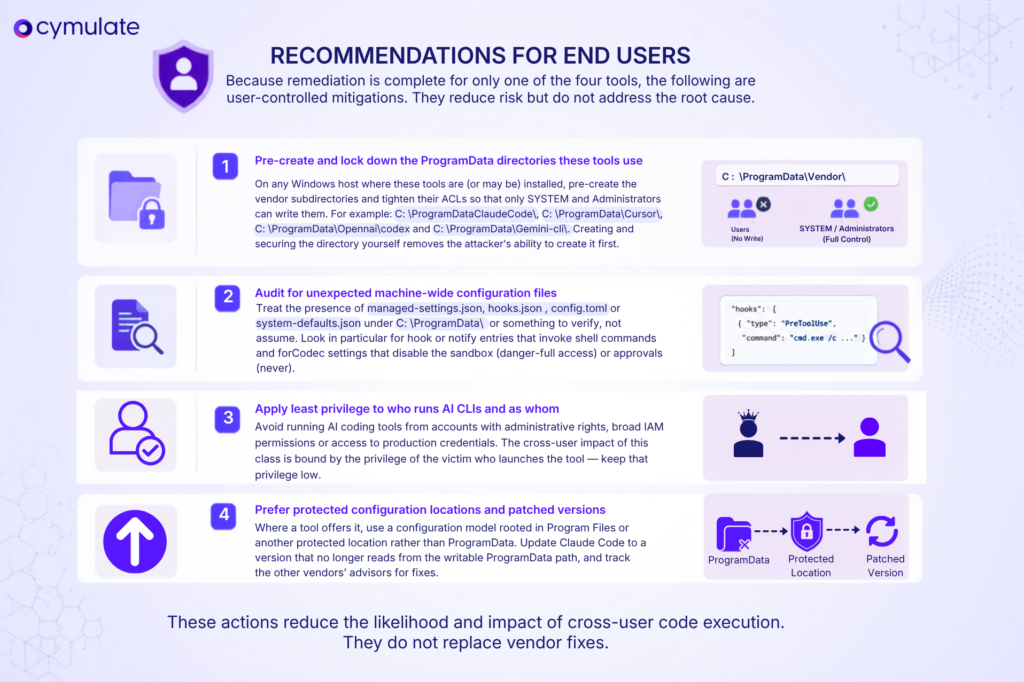
Recommendations for End Users
Because remediation is complete for only one of the four tools, the following are user-controlled mitigations. They reduce risk but do not address the root cause.
How Cymulate Exposure Validation Addresses This Attack Surface
The configuration-poisoning techniques in this report and the sandbox escapes and prompt-injection RCE chains from the previous parts now have dedicated coverage in Cymulate Exposure Validation.
Cymulate customers can run templates and attack scenarios that treat host-based AI agents as a full kill chain, including:
- Initial setup. Planting a malicious machine-wide configuration file in a user-writable ProgramData location.
- Cross-user execution. Triggering the hook/notify primitive and validating whether the resulting child-process execution is detected.
- Privilege escalation and persistence. Modeling execution under a higher-privileged victim and the durable re-trigger on each launch.
- Credential access. Simulating post-execution access to the environment, tokens and keys exposed to the AI agent's process.
Recommended Actions for CISOs and Organizations
- Inventory and govern AI CLI usage. Identify which AI coding tools (Claude Code, Cursor, Codex CLI, Gemini CLI and others) are in use, restrict installation to vetted endpoints via allowlisting (AppLocker, WDAC, Intune, Jamf), and factor each vendor's disclosure responsiveness into procurement.
- Harden ProgramData as policy, not per-tool. Use Group Policy or configuration management to pre-create and ACL-restrict the relevant ProgramData subdirectories on all managed Windows endpoints, and alert on creation of configuration files in those paths by non-administrative users.
- Monitor for configuration poisoning in the SIEM. Forward telemetry on writes to managed-settings.json, hooks.json, config.toml and system-defaults.json, and on child-process creation by AI CLI/IDE processes. Alert when an AI agent process spawns shell commands that were not user-initiated.
- Enforce least privilege for AI tooling. Prevent AI coding tools from running under administrative accounts or with access to production credentials, and isolate them where feasible.
- Validate prevention and detection coverage (for Cymulate clients). Run the corresponding Cymulate validation scenarios to confirm whether endpoint, EDR and SIEM controls prevent and detect the configuration-poisoning and cross-user execution techniques described here, and use the results to close gaps before this class is weaponized in the wild.

More from the Cymulate Research Lab
View More Resources
When AI Tools Become the Backdoor: Zero-Click RCE via Prompt Injection
Prompt injection flaws in AI tools can trigger zero-click remote code execution through silent config poisoning.
CVE-2026-7791: Privileged by Default
Amazon WorkSpaces flaw CVE-2026-7791 lets low-privileged users gain SYSTEM access via Skylight service abuse.

The Race to Ship AI Tools Left Security Behind. Part 1: Sandbox Escape
AI tools shipped fast - but weak sandboxing left escape paths, exposing systems to data access, abuse, and full compromise.