

CVE-2026-7791: Privileged by Default

Local Privilege Escalation in Amazon WorkSpaces via TOCTOU and Arbitrary File Write
During our ongoing research at Cymulate Research Labs, I discovered a new high-severity vulnerability in Amazon WorkSpaces that allows any low-privileged user to escalate to full SYSTEM privileges, completely bypassing the access isolation model the service is designed to enforce. The vulnerability resides in the Skylight Workspace Config Service, a background component that runs as NT AUTHORITY\SYSTEM on every WorkSpaces Windows instance.
Following responsible disclosure, AWS acknowledged the issue, deployed a fix and published AWS Security Bulletin 2026-025-AWS (CVE-2026-7791). Organizations running Amazon WorkSpaces are encouraged to apply the fix immediately to mitigate the risk.
Executive Summary
A local privilege escalation vulnerability in the Amazon Skylight Workspace Config Service allows any low privileged authenticated WorkSpaces user to escalate to NT AUTHORITY\SYSTEM without any user interaction or a system reboot.
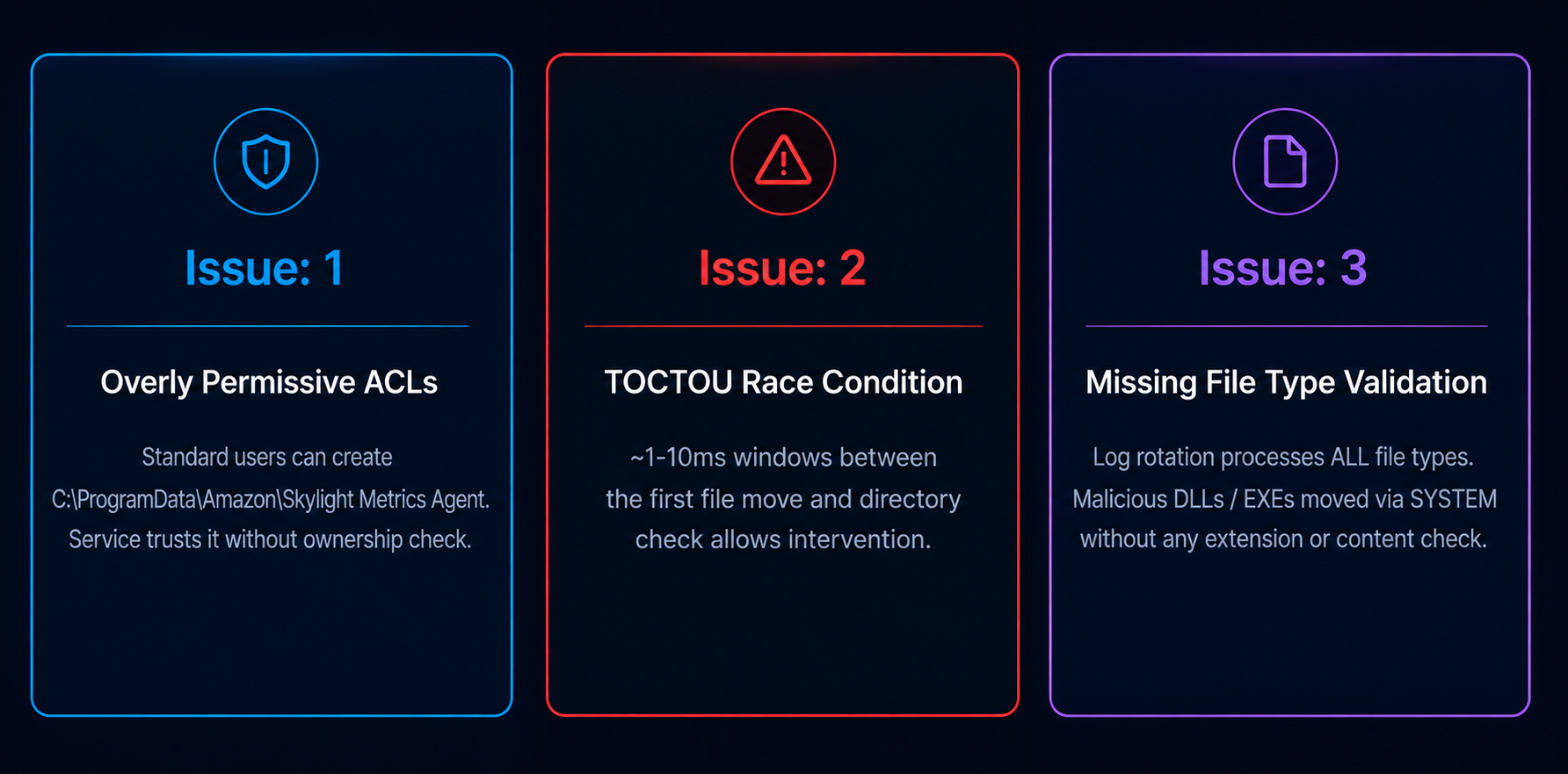
The attack exploits three compounding weaknesses: overly permissive directory ACLs, a race condition in log rotation and a missing file type validation. Combined, they enable an attacker-controlled file to be written with SYSTEM privileges to any path on the machine resulting in local privilege escalation.
The vulnerability was fixed in Skylight version 2.6.2034.0.
Technical details below, followed by what CISOs and security teams should do now that the fix is out.
Direct Impact
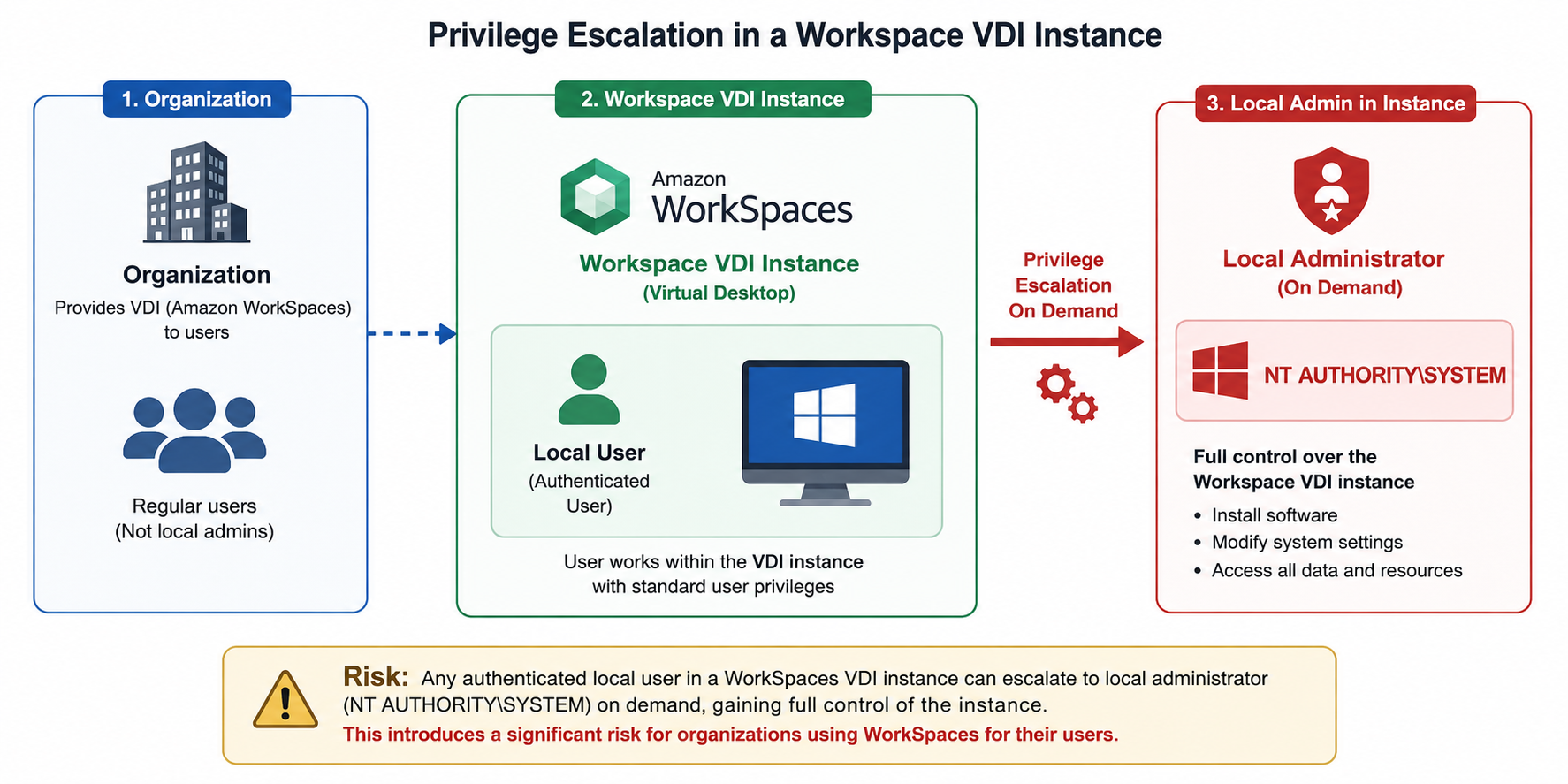
Any authenticated local user on an Amazon WorkSpaces instance can escalate privileges to NT AUTHORITY\SYSTEM on demand, gaining full control over the virtual desktop. Since WorkSpaces is commonly used as a VDI service for standard organizational users who are not expected to have local administrative privileges, this behavior introduces a significant privilege-escalation risk for organizations using the service.
Background: Amazon WorkSpaces and the Skylight Service
Amazon WorkSpaces provides managed Windows desktop environments hosted on AWS infrastructure and integrated into the organization’s identity and security model, such as Active Directory domain-joined, Microsoft Entra joined or hybrid-joined endpoints. From a security perspective, WorkSpaces are designed to behave like standard corporate workstations: users operate with regular, non-privileged accounts, such as Domain User, and are restricted according to the organization’s endpoint security standards.
The Amazon Skylight Workspace Config Service is a background Windows service that runs as NT AUTHORITY\SYSTEM. It manages configuration, health monitoring and component updates. As part of its operation, it exposes a log pull API endpoint queried by the AWS management plane approximately every 20 minutes. This log pull initiates a log rotation flow that moves files through three stages: Current -> ROTATE -> TRANSMITTED.
The service trusts the directory structure at “C:\ProgramData\Amazon\Skylight Metrics Agent” and performs all file operations using SYSTEM-level privileges without verifying directory ownership, without checking for junction points and without validating file types.
Note: Windows Junction Points
A junction point is a Windows filesystem feature that makes a directory appear on one path while actually pointing to another. When a SYSTEM-level process follows an attacker-controlled junction while writing a file, the file lands in the attacker-specified target and not the intended location. By design, standard users can create junction points without any elevated permissions.
Weaknesses Identified
Deep Dive: The Weaknesses
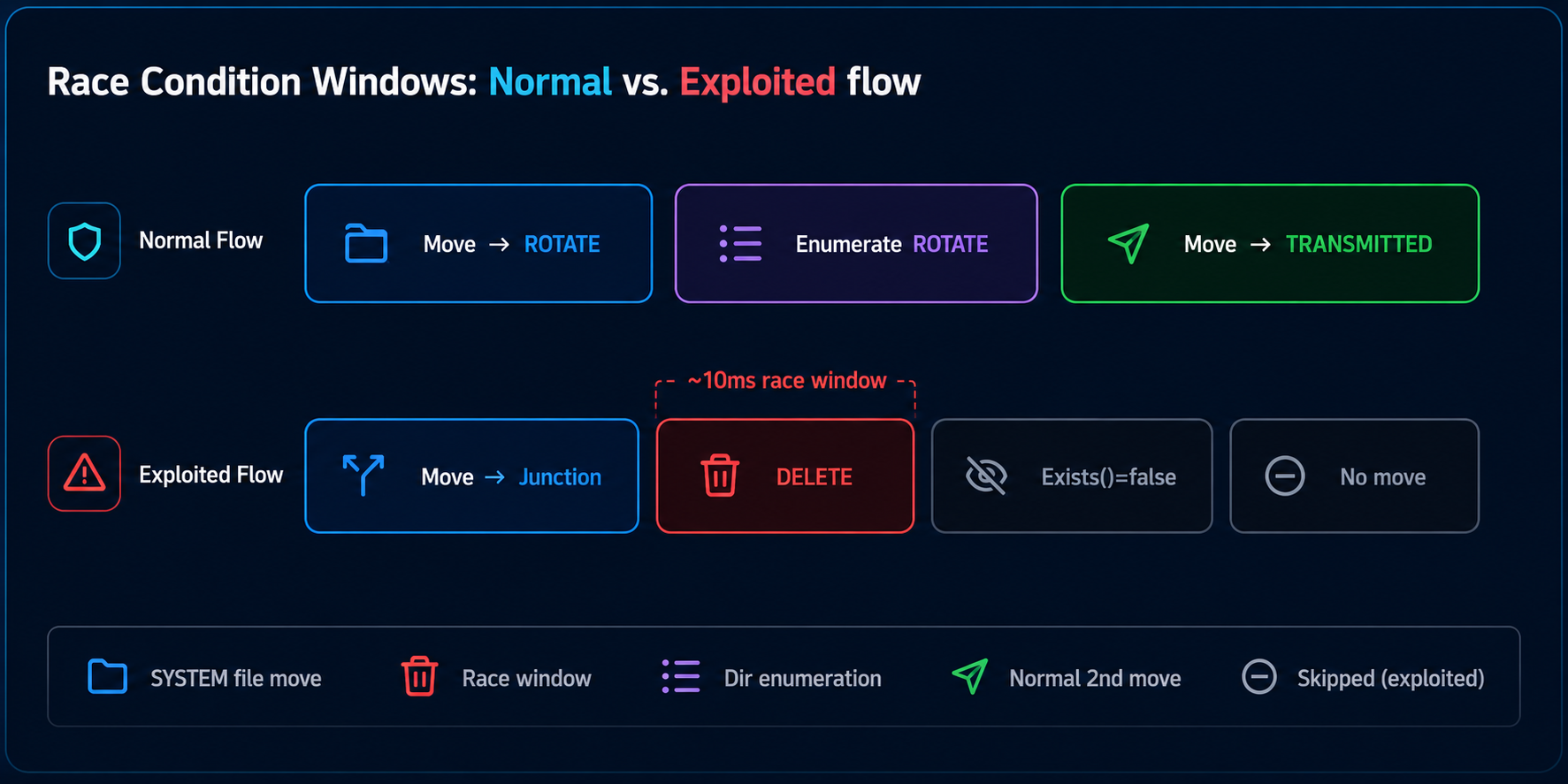
The Skylight service exposes a log pull API endpoint that is accessed by the AWS management system via a dedicated network adapter. The management system queries this endpoint at predefined intervals (approximately every 20 minutes), initiating a log rotation flow designed to archive and transmit log files.
The log rotation flow operates as follows:
1. API Call. The log puller API endpoint is invoked by the management system
2. Directory Check. The Skylight service checks for the existence of the C:\ProgramData\Amazon\Skylight Metrics Agent folder. If it exists, the service initiates the log pull routine
3. Directory Structure. The service uses three directories within the Skylight Metrics Agent folder:
- Current. The Skylight Metrics Agent folder itself (where log files are initially placed)
- ROTATE. A subdirectory used for archiving files
- TRANSMITTED. A subdirectory used for files ready to be transmitted
4. First Move Operation. The service enumerates files in the Current folder and moves them to the ROTATE folder, preserving their original filenames
5. Second Move Operation. The service enumerates the ROTATE folder and moves all files to the TRANSMITTED folder, adding a time prefix in the format <time>_<filename>
6. Transmission. The service performs the remaining log pull operations to transmit the files
Location 1: Directory Initialization
ServiceLogsRepository constructor
Issue: The service does not validate that the base directory exists or was created by a trusted source before using it.
public ServiceLogsRepository(string logPath, string rotateLogBasePath, bool createArchivedDirectory)

{

    // ...

    if (!Directory.Exists(this.transmittedLogsDirectory))

    {

        ServiceLogsRepository.LOG.Info("Transmitted directory " + this.transmittedLogsDirectory + " does not exists, creating it");

        Directory.CreateDirectory(this.transmittedLogsDirectory);  // Creates directory if missing

    }

    if (createArchivedDirectory && !Directory.Exists(this.archivedLogsDirectory))

    {

        ServiceLogsRepository.LOG.Info("Rotate directory " + this.archivedLogsDirectory + " does not exists, creating it");

        Directory.CreateDirectory(this.archivedLogsDirectory);  // Creates directory if missing

    }

}Location 2: File Archiving
ServiceLogsRepository.ArchiveLogFilesExceptFor() and ArchiveLogFile() methods
Issue: Files are moved from Current directory to archivedLogsDirectory (ROTATE) without validating file type, extension, or that the destination is not a junction point. The filename remains unchanged during the move operation.
// ArchiveLogFilesExceptFor() enumerates files in Current directory

internal void ArchiveLogFilesExceptFor(string currentLogFile)

{

    IEnumerable<FileInfo> enumerable = from f in new DirectoryInfo(this.serviceLogsDirectory).GetFiles()

    orderby f.CreationTime

    select f;


    foreach (FileInfo fileInfo in enumerable)

    {

        string fullName = fileInfo.FullName;

        // No file type validation - processes ALL files regardless of extension

        if (!currentLogFile.Equals(Path.GetFileName(fullName)))

        {

            this.ArchiveLogFile(fullName);  // Moves file to ROTATE

        }

    }

}


// ArchiveLogFile() moves file without name change or validation

private void ArchiveLogFile(string file)

{

    string text = Path.Combine(this.archivedLogsDirectory, Path.GetFileName(file));

    // [!] Path.GetFileName(file) preserves original filename - no prefix added

    // [!] No file type/extension validation

    // [!] No junction point validation

    try

    {

        File.Move(file, text);  // Moves file with original name to ROTATE (which is made junction by attacker)

    }

    catch (Exception exception)

    {

        ServiceLogsRepository.LOG.Error("Exception while archiving log file", exception);

    }

} Location 3: File Transmission (second file move action)
ServiceLogsRepository.MoveArchiveToTransmit() method
Issue: Moves files to transmittedLogsDirectory without validating file type or that it's not a junction point. This is where the date prefix is added.
internal List<string> MoveArchiveToTransmit(List<string> archivedLogFiles, string transmittedFilePrefix)
{

    List<string> list = new List<string>();

    foreach (string text in archivedLogFiles)

    {

        if (Path.GetDirectoryName(text).Contains(this.archivedLogsDirectory))

        {

            string fileName = Path.GetFileName(text);

            string path = transmittedFilePrefix + fileName;  // Date prefix added here

            string text2 = Path.Combine(this.transmittedLogsDirectory, path);

            try

            {

                File.Move(text, text2);  // No file type validation

                list.Add(text2);

            }

            catch (Exception exception)

            {

                ServiceLogsRepository.LOG.Error("Exception while moving file", exception);

            }

        }

    }

    return list;

} - No Directory Ownership Validation. Service trusts directories in C:\ProgramData\Amazon\Skylight Metrics Agent without verifying they were created by the service itself
- No Junction Point Detection. Code does not check if directories are junction points before using them
- Race Condition Window. There is a ~1-10ms window between File.Move() to ROTATE and GetArchivedFiles() enumeration, which can be exploited
- SYSTEM Context. The service runs as SYSTEM, so File.Move() operations execute with SYSTEM privileges
- Overly Permissive ACLs. C:\ProgramData\Amazon allows low-privileged users to create subdirectories thus taking over the Skylight Metrics Agent and placing a junction
Proof of Concept
A proof-of-concept demonstrating the vulnerability chain is available on GitHub:
https://github.com/BenZamir/CVE-2026-7791
Overview
The exploit consists of two stages:
- Setup. Exploit the sensitive path file write vulnerability by creating the exploit directory structure, junction point to the target location where the attacker wishes to plant the file, and placing a malicious file (e.g., DLL) in the Skylight Metrics Agent folder (considered "Current" in the Skylight app)
- Race Condition Exploit. Win the race condition to prevent date prefix addition, causing the file to be written using its original name to the target folder
The exploit tool automates the entire exploitation process:
- Place your malicious file (e.g., AutoPilot.dll) in the same directory as the exploit tool
- Run with filename and target path e.g: lpe-poc.exe AutoPilot.dll "C:\Program Files\Amazon\cfn-bootstrap"
Note: The path C:\Program Files\Amazon\cfn-bootstrap was selected because the WorkSpace instance includes a service that loads DLL files from this location which can be restart from a low-privileged user context. However, this path is not unique to the vulnerability and any writable system-level path that is trusted or used by a privileged process could potentially be abused. The core issue is a SYSTEM-level arbitrary write primitive, which can be leveraged through DLL hijacking or similar privileged file-placement techniques to achieve local privilege escalation.
The PoC automatically:
- Creates C:\ProgramData\Amazon\Skylight Metrics Agent if it doesn't exist
- Creates ROTATE junction pointing to the target directory
- Copies the malicious file from program directory to Current folder
- Sets process priority to HIGH for better race condition success
- Monitors using multiple detection methods
- Deletes ROTATE junction immediately when file appears in target
- Waits for log rotation trigger (automatic, ~20 minutes)
After completion, the attacker can simply restart the service (any service that low privileged user can restart is a valid target) and elevate privileges.
Impact Assessment
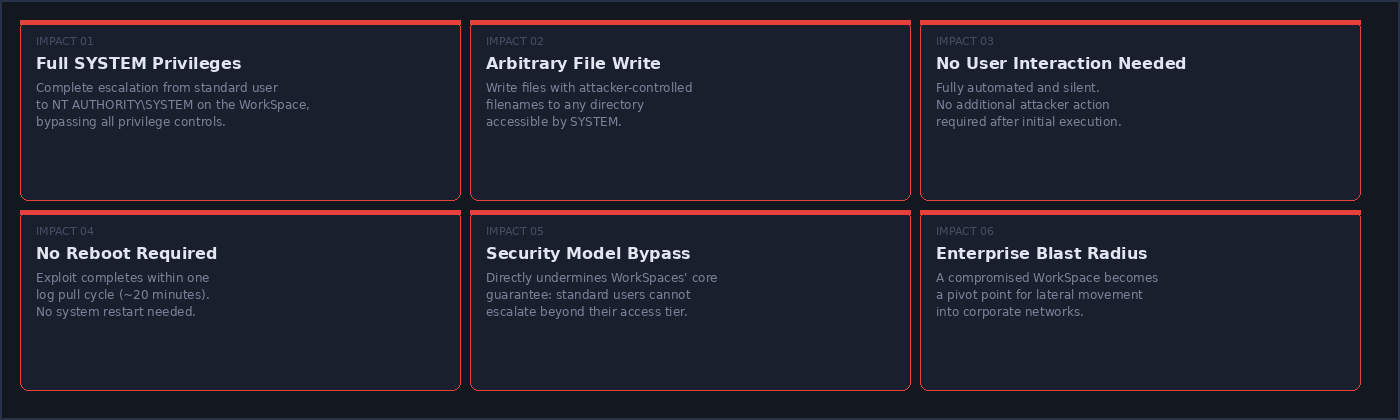
Successful exploitation provides the following capabilities to any authenticated WorkSpaces user:
Responsible Disclosure Timeline
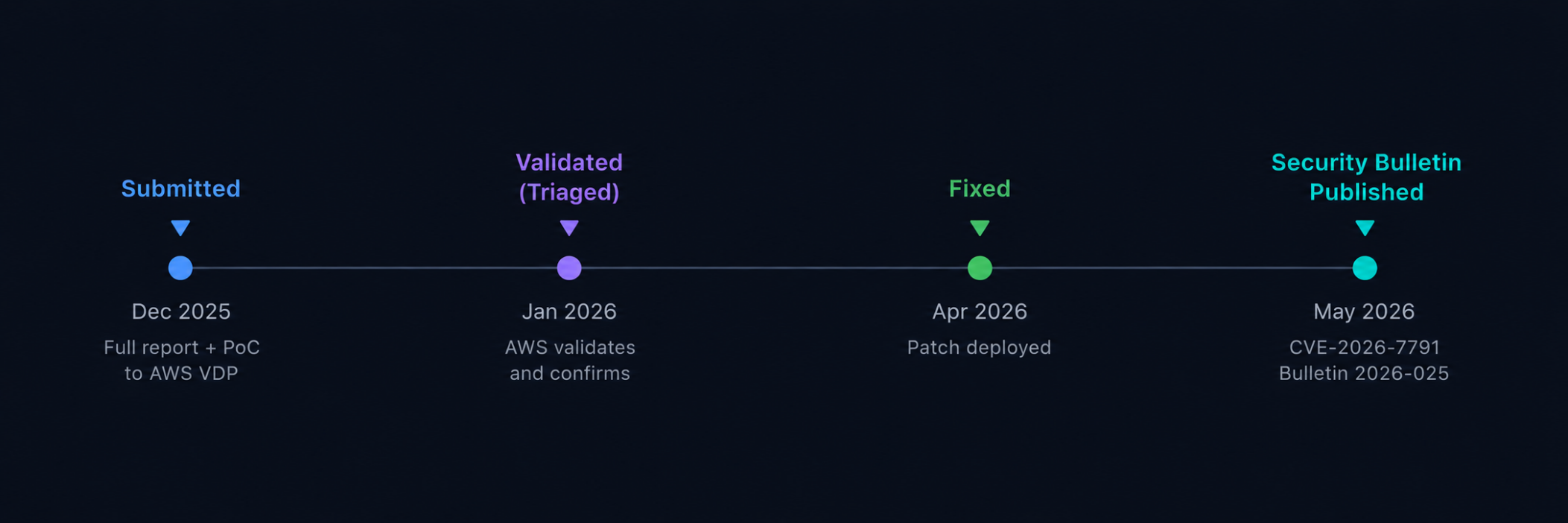
Status: Patch Available
This vulnerability is fully remediated in Amazon WorkSpaces Skylight version 2.6.2034.0. Affected installations should ensure their WorkSpaces instances have been updated. See AWS Security Bulletin 2026-025-AWS for full details.
What should CISOs and organizations do
AWS has deployed the fix in Skylight 2.6.2034.0 and the agent is delivered through the managed WorkSpaces image, so most fleets will pick it up automatically rather than through a customer-driven patch cycle.
Security organizations are advised to ensure roll-out, ensure detections for similar threats are in place and hunt for past incidents. Cymulate users can validate end-to-end that their environment is resilient.
Recommended actions include:
- Inventory WorkSpaces pools and confirm Skylight is at 2.6.2034.0 or later on every running instance.
- Threat-hunt for prior exploitation of this chain. Look for reparse points created in the Skylight working directory by non-SYSTEM accounts, and Skylight process writes to Program Files, service binaries, scheduled-task XMLs or Startup folders.
- Validate the end-to-end detection chain with Cymulate. Run a scenario exercising the exploitation pattern on a representative WorkSpace and confirm your EDR, SIEM rules and SOC playbook to detect and respond to attacks targeting identity and user privileges.
How Cymulate Exposure Validation tests exploitability identity attacks
Because identity is the new perimeter, identity and access management demands security validation just like other security controls.
Cymulate Exposure Validation includes identity security validation with real-world attack simulations across on-prem Active Directory, Microsoft Entra ID and cloud environments. These assessments emulate the techniques attackers use to exploit privilege escalation, token abuse and hybrid trust weaknesses, enabling teams to validate not just configuration posture but whether identity controls and cloud detection mechanisms actually stop or surface abuse.
By researching threats, platforms and vulnerabilities like this CVE in Amazon WorkSpaces Skylight Agent, Cymulate Research Labs creates the intelligent attack scenarios for the Cymulate Platform to continuously prove, prioritize and adapt security.

More from the Cymulate Research Lab
View More Resources
Simulate Real-World Identity and Privilege Attacks in AD and Entra ID
Test AD and Entra ID defenses with real-world identity attack simulations that expose exploitable gaps.
One-Click RCE via Windows Admin Center Control Flow Hijacking
One click on a tampered WAC URL can trigger unauthenticated RCE across Windows Admin Center environments.
Remote Code Execution in Codex CLI via Prompt Injection and Binary Hijacking on Windows
Cymulate Research Labs uncovered a Codex CLI flaw enabling silent host-level command execution outside the sandbox.