Dynamic Dashboards are a flexible, customizable feature in the Cymulate platform that allow users and MSSPs to create, manage, and visualize security data using configurable widgets. These dashboards enable quick access to relevant information, support multiple visualization formats, and can be tailored to display specific data points for better decision-making. (Source: Cymulate Blog, Dec 12, 2024)
How do Dynamic Dashboards help MSSPs manage customer environments?
Dynamic Dashboards provide MSSPs with the ability to quickly design and deploy custom dashboards for each customer, allowing them to visualize any data within the Cymulate platform and their managed tenancies. This flexibility ensures that both MSSP staff and their customers can access up-to-date, relevant security information in an easily digestible format. (Source: Cymulate Blog)
What is the Drift Detection Dashboard in Cymulate?
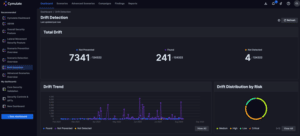
The Drift Detection Dashboard is a ready-to-use dashboard in Cymulate that shows trends in security compliance and efficacy over time. It helps users and MSSPs monitor changes and maintain consistent security standards. (Source: Cymulate Blog)
How customizable are Dynamic Dashboards in Cymulate?
Dynamic Dashboards are highly customizable. Users can mix and match widgets, apply filters and dimensions (scopes), and create dashboards that automatically update with the latest assessment data. This allows for nearly infinite configuration to meet specific reporting and visualization needs. (Source: Cymulate Blog)
What is Dynamic Reporting in Cymulate?
Dynamic Reporting is a feature that allows MSSPs and users to build fully branded, custom reports for offline use. Reports can be tailored to combine results from multiple assessments, include text, images, and widgets, and are exportable as PDFs for easy sharing with customers and stakeholders. (Source: Cymulate Blog)
Can I combine multiple assessment results into a single report?
Yes, Dynamic Reporting enables users to combine the results of multiple assessments into a single, readable report. This is especially useful for MSSPs who need to provide executive-level summaries or technical details to customers on a regular basis. (Source: Cymulate Blog)
What formats are available for exporting reports in Cymulate?
Reports created with Dynamic Reporting in Cymulate can be exported as PDFs, ensuring maximum compatibility for sharing with customers and stakeholders. (Source: Cymulate Blog)
How does the Dynamic Report Builder work?
The Dynamic Report Builder is an editor interface within the Cymulate platform that allows users to create reusable report templates. Users can add text, images, and widgets, scope and filter data, and generate reports tailored to specific audiences or requirements. (Source: Cymulate Blog)
Can reports be customized for different audiences?
Yes, reports can be customized for different audiences, such as executive-level summaries or highly detailed technical reports. The Dynamic Reporting feature allows users to adjust the level of detail and focus as needed. (Source: Cymulate Blog)
Does Cymulate offer an API for reporting and data extraction?
Yes, Cymulate provides a robust API as a native component of the platform. MSSPs and users can use the API to extract data and manage reporting through their own proprietary systems if preferred. (Source: Cymulate Blog)
How do Dynamic Dashboards and Reporting improve operational efficiency for MSSPs?
These features allow MSSPs to manage Cymulate across hundreds of customers efficiently, freeing up resources for manual testing, customer support, and other critical tasks by simplifying visualization and reporting processes. (Source: Cymulate Blog)
What types of widgets can be added to Dynamic Dashboards?
Users can add a variety of widgets to Dynamic Dashboards, including those for visualizing trends, compliance, assessment results, and other key security metrics. Widgets can be customized to display specific data points in multiple formats. (Source: Cymulate Blog)
Are there ready-to-use dashboards available in Cymulate?
Yes, Cymulate provides several ready-to-use dashboards, such as the Drift Detection Dashboard, to help users quickly access important security information without needing to customize dashboards from scratch. (Source: Cymulate Blog)
How does Cymulate support co-managed security operations?
Cymulate's Dynamic Dashboards and Reporting features enable MSSPs and their co-managed customers to access and visualize critical security information in real time, supporting collaborative security operations and decision-making. (Source: Cymulate Blog)
Can I use Dynamic Dashboards to monitor compliance trends?
Yes, dashboards like the Drift Detection Dashboard are specifically designed to help users monitor trends in security compliance and efficacy over time. (Source: Cymulate Blog)
How does Cymulate ensure data is always up to date in dashboards?
Dynamic Dashboards automatically update with the latest information produced by Cymulate assessments, ensuring users always have access to current data. (Source: Cymulate Blog)
What is the benefit of using Dynamic Reports for executive-level reporting?
Dynamic Reports allow MSSPs and organizations to create executive-level summaries that combine multiple assessment results into a single, easy-to-read document, making it easier for business decision-makers to understand security posture and trends. (Source: Cymulate Blog)
Can I automate the delivery of reports to customers?
While reports can be exported as PDFs and emailed or delivered through standard communication channels, automation can be further enhanced using Cymulate's API for integration with proprietary systems. (Source: Cymulate Blog)
How does Cymulate's reporting compare to other BAS platforms?
Cymulate provides dynamic dashboards and reports that include vendor-specific remediation (like EDR Rules), Sigma rules, and automated remediation. In contrast, other BAS platforms typically offer generic recommendations and static reporting. (Source: Cymulate vs. Competitors)
Platform Features & Capabilities
What are the key capabilities of the Cymulate platform?
Cymulate offers continuous threat validation, a unified platform combining BAS, CART, and Exposure Analytics, attack path discovery, automated mitigation, AI-powered optimization, complete kill chain coverage, ease of use, and an extensive threat library with over 100,000 attack actions updated daily. (Source: Cymulate Platform)
How does Cymulate help organizations improve their security posture?
Cymulate enables organizations to proactively validate defenses, identify vulnerabilities, and optimize their security posture. Customers have reported up to a 52% reduction in critical exposures, a 60% increase in team efficiency, and an 81% reduction in cyber risk within four months. (Source: Hertz Israel Case Study)
Does Cymulate support integration with other security tools?
Yes, Cymulate integrates with a wide range of security technologies, including Akamai Guardicore, AWS GuardDuty, BlackBerry Cylance OPTICS, Carbon Black EDR, Check Point CloudGuard, Cisco Secure Endpoint, CrowdStrike Falcon, Wiz, SentinelOne, and more. For a complete list, visit the Partnerships and Integrations page.
How easy is it to implement Cymulate?
Cymulate is designed for quick and easy implementation, operating in agentless mode with no need for additional hardware or complex configurations. Customers can start running simulations almost immediately after deployment. (Source: Customer Testimonials, Schedule a Demo)
What feedback have customers given about Cymulate's ease of use?
Customers consistently praise Cymulate for its intuitive interface and ease of use. For example, Raphael Ferreira, Cybersecurity Manager, stated, "Cymulate is easy to implement and use—all you need to do is click a few buttons, and you receive a lot of practical insights into how you can improve your security posture." (Source: Customer Quotes)
Use Cases & Benefits
Who can benefit from using Cymulate?
Cymulate is designed for CISOs, security leaders, SecOps teams, Red Teams, and Vulnerability Management teams in organizations of all sizes and industries, including finance, healthcare, retail, media, transportation, and manufacturing. (Source: CISO/CIO Roles)
What problems does Cymulate solve for security teams?
Cymulate addresses fragmented security tools, resource constraints, unclear risk prioritization, cloud complexity, communication barriers, inadequate threat simulation, operational inefficiencies in vulnerability management, and post-breach recovery challenges. (Source: Customer Case Studies)
Are there case studies showing Cymulate's impact?
Yes, for example, Hertz Israel reduced cyber risk by 81% in four months using Cymulate. Other case studies include organizations in finance, energy, healthcare, and engineering. (Source: Cymulate Customers)
How does Cymulate tailor solutions for different roles?
Cymulate provides quantifiable metrics for CISOs, automates processes for SecOps, offers automated offensive testing for Red Teams, and streamlines vulnerability management for dedicated teams. (Source: CISO/CIO Roles, SecOps Roles)
Security, Compliance & Trust
What security and compliance certifications does Cymulate hold?
Cymulate holds SOC2 Type II, ISO 27001:2013, ISO 27701, ISO 27017, and CSA STAR Level 1 certifications, demonstrating adherence to industry-leading security and privacy standards. (Source: Security at Cymulate)
How does Cymulate protect customer data?
Cymulate uses encryption for data in transit (TLS 1.2+) and at rest (AES-256), hosts data in secure AWS data centers, and follows a strict Secure Development Lifecycle (SDLC) with continuous vulnerability scanning and annual third-party penetration tests. (Source: Security at Cymulate)
Is Cymulate GDPR compliant?
Yes, Cymulate incorporates data protection by design and has a dedicated privacy and security team, including a Data Protection Officer (DPO) and Chief Information Security Officer (CISO), ensuring GDPR compliance. (Source: Security at Cymulate)
What security features are built into the Cymulate platform?
The platform includes mandatory 2-Factor Authentication (2FA), Role-Based Access Controls (RBAC), IP address restrictions, and TLS encryption for its Help Center. (Source: Security at Cymulate)
Pricing & Plans
What is Cymulate's pricing model?
Cymulate uses a subscription-based pricing model tailored to each organization's requirements. Pricing depends on the chosen package, number of assets, and scenarios selected. For a detailed quote, you can schedule a demo with the Cymulate team. (Source: Internal Manual)
Support & Resources
What support options are available for Cymulate customers?
Cymulate offers email support, real-time chat support, a knowledge base with technical articles and videos, webinars, e-books, and an AI chatbot for quick answers and guidance. (Source: Internal Manual)
Where can I find Cymulate's blog, newsroom, and resource hub?
Does Cymulate provide educational resources like a glossary?
Yes, Cymulate offers a glossary of cybersecurity terms, acronyms, and jargon, available at the Cybersecurity Glossary.
Where can I find demos of Cymulate's features?
Demos such as "From Vulnerability to Validation," "Threat Validation Demo," and "From Control Validation to Exposure Validation" are available on the Cymulate website under the Featured Resources section. (Source: Cymulate Blog)
New: 2026 Gartner® Market Guide for Adversarial Exposure Validation
Generally, readers on this blog see me writing posts around plain English definitions of cybersecurity terms. As an employee of Cymulate, however, occasionally, I get to speak on topics that can bring new terms and ideas to life for our customers and partners as well.
The debut of Dynamic Reports and the expansion of Dynamic Dashboards feature definitely qualify, as it makes co-managing/fully managing Cymulate for customers as an MSSP significantly easier. Let's have a look at these two feature sets and dive a bit deeper into the world of making results easier to find and increasing the impact on your MSSP teams and your customers.
Dynamic Dashboards
Starting at the beginning, let's talk about visualizing the results across the Cymulate platform in a way that you and your customers can quickly and easily grasp for better decision-making.
A relatively new feature in the Cymulate platform, Dynamic Dashboards debuted earlier this year. Cymulate's default dashboard is very well known by customers and partners and has evolved to be easier to use and provide comprehensive information at-a-glance. As Cymulate popularity with MSSPs increased, it became apparent that flexibility in selecting relevant data for the reports was an essential requirement for their day-to-day operations. Providing users and MSSPs with the ability to create and manage multiple custom dashboards quickly became a target feature request, leading to the unveiling of Dynamic Dashboards in spring 2022. Today, Dynamic Dashboards' flexible, customizable system permits users to populate new dashboards with "widgets" – custom objects that can be modified as needed to display specific data points in multiple visualization formats.
For those lacking time to customize dashboards, Cymulate created several ready-to-use dashboards, including the popular Drift Detection Dashboard (Fig 1.) that shows trends in security compliance and efficacy over time.
Figure 1 - Drift Detection Dashboard
While the native dashboards added to the platform were very well-received, Cymulate knew that just creating more pre-built dashboards wouldn't be enough, so it rapidly built the necessary controls and objects to enable anyone to quickly and easily design new dashboards. For an MSSP, this was a vital platform extension that allowed them to quickly and accurately present the data their employees and customers needed to see.
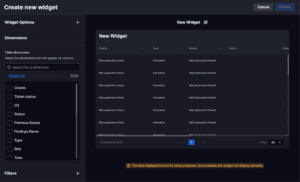
Using the New Dashboard and Edit Dashboard feature sets (Fig 2.), the platform allows for nearly infinite configuration of Dynamic Dashboards. Now customers and staffers can visualize any data within the Cymulate platform and their own controlled tenancies, with few limits.
Figure 2 - Dynamic Dashboard New Widget System
Mixing and matching different widgets and components with filters and dimensions (scopes) allows for creating highly customized dashboards that automatically update with the latest information produced by Cymulate assessments. This means that a co-managed customer of an MSSP can see critical information in a format that is easy to digest and always up to date.
Dynamic Reporting
Once MSSPs had access to custom Dynamic Dashboards so that customers who have access to the Cymulate platform could see data as needed, the next logical step was to create the ability for MSSPs to build custom reports for offline use. This is critical to the work of many MSSPs because when MSSPs fully manage all aspects of security controls and efficacy testing on behalf of their customers, they typically opt to
regularly update their customers through reports.
While Cymulate has always offered robust offline reporting in multiple formats and at multiple levels of technical detail, MSSPs often requested the ability to custom-tailor such reports for their specific needs. Dynamic Reporting provides this exact functionality, giving MSSPs the ability to produce fully branded, fully customized reporting on demand.
For example, Cymulate provides out-of-the-box Executive Reports for every assessment run, but an MSSP may wish to combine the results of multiple assessments into a single report – readable and at the right level of detail for a business decision maker to ingest and understand quickly and easily.
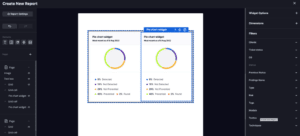
For example, let's postulate an MSSP that needs to provide a customer with a weekly report outlining the high-level details of assessments run within that customer's end-user environment. You begin with a blank report template, onto which you can place text, images, and widgets – similar to Dynamic Dashboards – through a straightforward editor interface built directly into the Reports area of the Cymulate Platform (Fig 3).
Figure 3 Dynamic Report Builder
Figure 3 Dynamic Report Builder
This system permits an MSSP to create reusable reports that show exactly what they want to each customer, with the ability to scope, filter, and remix data as necessary. Reports can then be emailed or exported as a PDF for delivery through the same communications channels that the MSSP would typically use to keep customers updated.
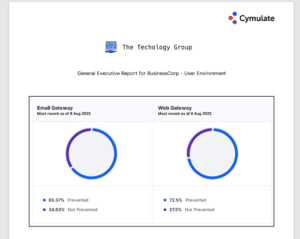
The results are easy to read and in PDF format for maximum compatibility (Fig 4).
Figure 4 Sample Report
Executive-level reporting is just one of the multiple potential uses of the Dynamic Reports feature-set. Highly detailed technical reports, target reports on specific areas, and many other options are easily configured as needed.
Not just reporting
Of course, Dynamic Dashboards and Reports are – while critical – not the only way an MSSP can get information out of the Cymulate system for their own use and customer use. With a robust API as a native component of the Cymulate platform, MSSPs that prefer to use their proprietary systems to manage and report on assessments are free to do so as they see fit.
Dynamic Dashboards, Dynamic Reports, and the Cymulate API allow MSSPs to manage Cymulate across hundreds of customers simply and easily. This frees up resources to perform more manual forms of testing (such as human-driven Penetration Testing), assist customers with questions and configurations, and get on with the business of cybersecurity without getting bogged down in managing visualizations and reporting.
Cymulate Exposure Validation makes advanced security testing fast and easy. When it comes to building custom attack chains, it's all right in front of you in one place.