

Red Team Scenarios: 10 Real-World Attacks to Test Your Defenses
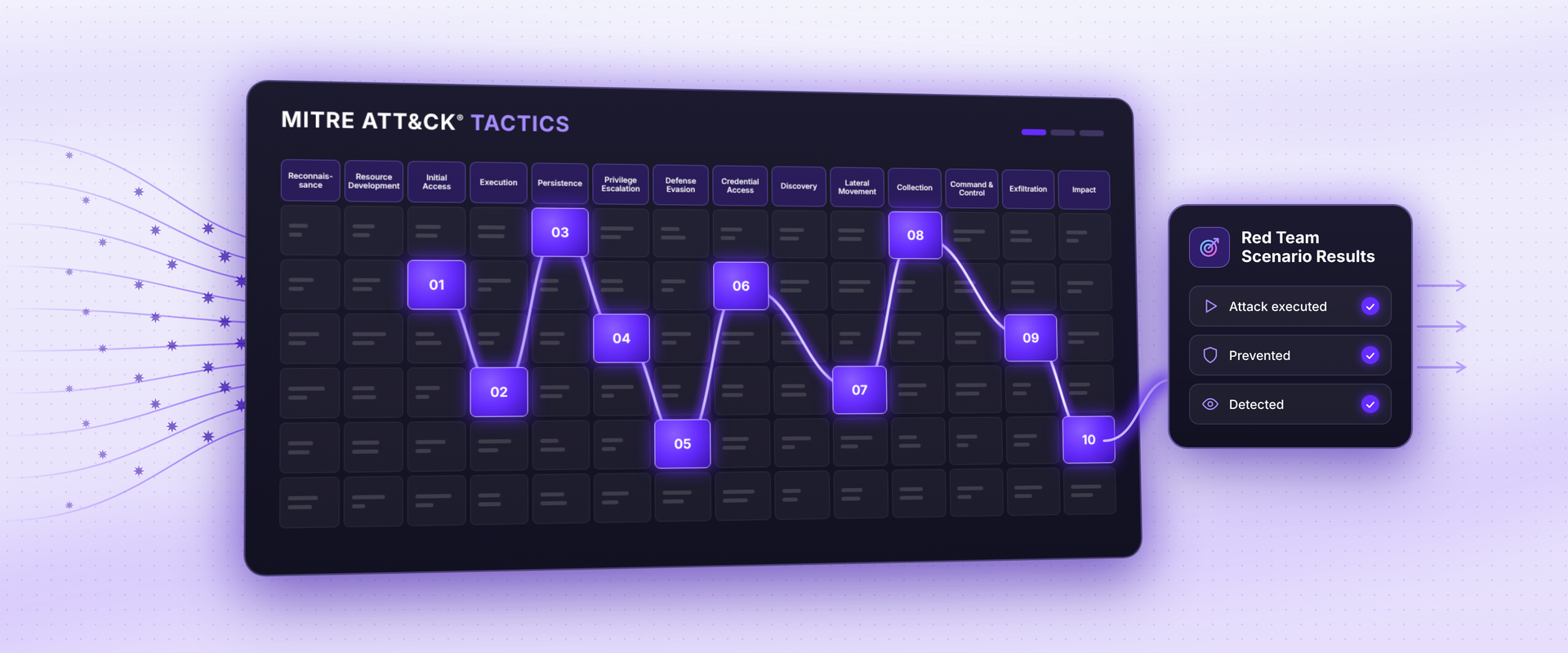
Red team scenarios are realistic attack storylines, built from known adversary behavior, that security teams or automated platforms use to test whether defenses prevent, detect and respond to specific threats. A red team exercise links several of these scenarios into a larger engagement. Many organizations use the MITRE ATT&CK® framework as a common language for describing adversary tactics and techniques across the attack lifecycle.
During my time in the federal government, I took part in large-scale, enterprise-wide tabletop exercises that brought together red teams, blue teams and white cells. The white cell ran the exercise: it observed all activity, enforced the rules of engagement and judged the results as the scenario played out.
These exercises were valuable because they also helped teams prepare for real incidents, but they required significant resources. Planning alone typically took months, and the exercise itself ran for about two weeks. That kind of commitment means most organizations can only test their defenses a few times a year, while attackers and environments change every day.
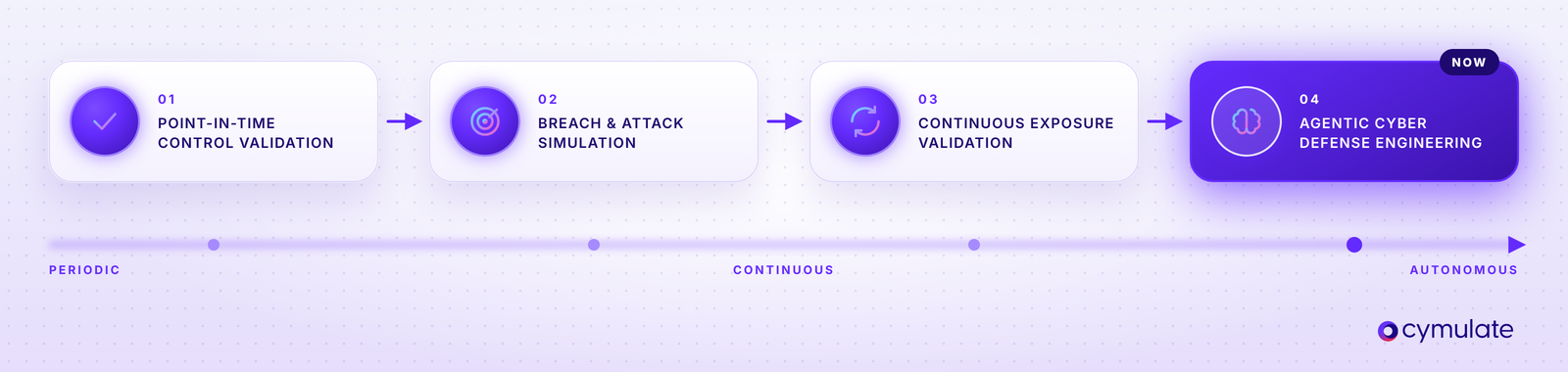
This is why the market has moved from point-in-time security control validation to breach and attack simulation to continuous, automated adversarial exposure validation, and now to agentic cyber defense engineering.
This blog provides an overview of red team scenarios and exercises, how to choose which attack scenarios to include and 10 examples that span endpoint compromise, identity abuse, data theft and AI application attacks. Each includes technique mappings, controls tested and expected results so teams can turn attack examples into repeatable validation.
What is a red team scenario vs. an exercise?
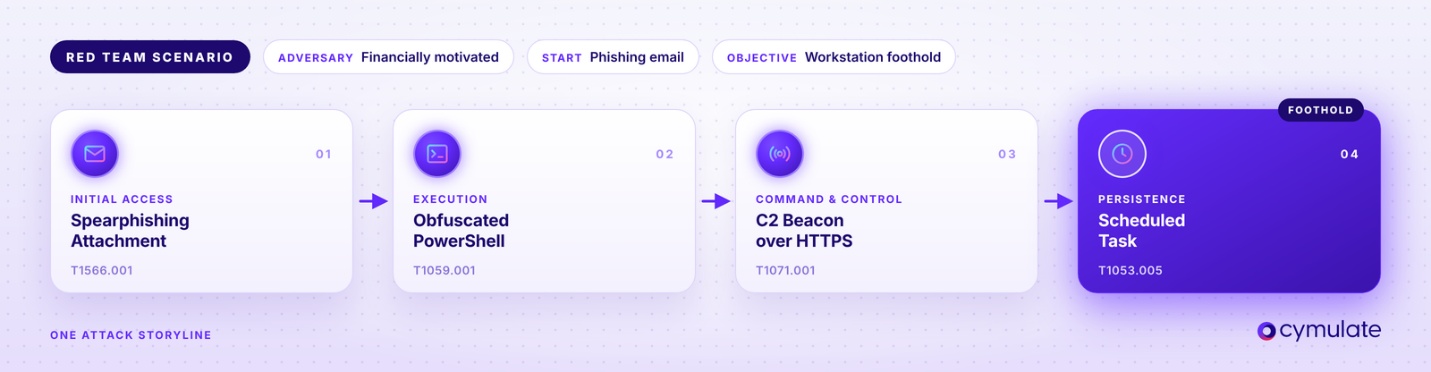
A red team scenario defines an adversary, an objective, a starting point and a connected chain of techniques that leads from that starting point to the objective.
For example, a financially motivated attacker sends a spearphishing email with a malicious attachment (T1566.001). When the user opens it, it launches an obfuscated PowerShell command (T1059.001) that downloads a payload and connects to the attacker’s command-and-control server over HTTPS (T1071.001). The attacker then creates a scheduled task (T1053.005) so the foothold survives a reboot. The scenario answers one focused question: can your security controls prevent, detect or contain this initial compromise of a Windows workstation?
A red team exercise chains several scenarios into an end-to-end threat assessment campaign toward a business objective. It starts with the workstation compromise above, then continues from that foothold:
- Credential access and privilege escalation. The attacker harvests credentials from LSASS memory (T1003.001) or abuses misconfigured service accounts to gain domain-level privileges.
- Discovery and lateral movement. The attacker maps Active Directory and the network, then uses the stolen credentials to move between systems over SMB or WinRM (T1021).
- Reaching the crown jewel. The attacker gains access to a high-value asset, such as a payment server or cardholder data environment.
- Exfiltration. The attacker stages sensitive data and tries to send it out over the existing command and control channel (T1041) or to cloud storage (T1567.002).
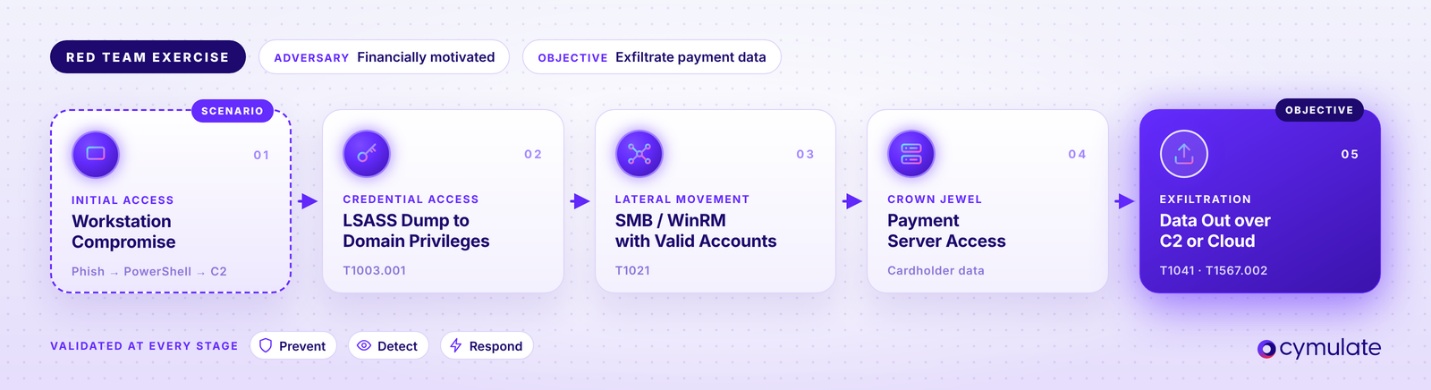
At each stage, the exercise measures whether the configured security controls block the technique, whether the SOC detects it and how quickly the team responds.
In short, a red team scenario is a single attack storyline. A red team exercise is the broader engagement that links several scenarios to show whether an attacker can get from initial access all the way to business impact. The end goal is to gather evidence to prove your security controls interrupt the attack paths that matter most to your business.
How do you choose which red team scenarios to run?
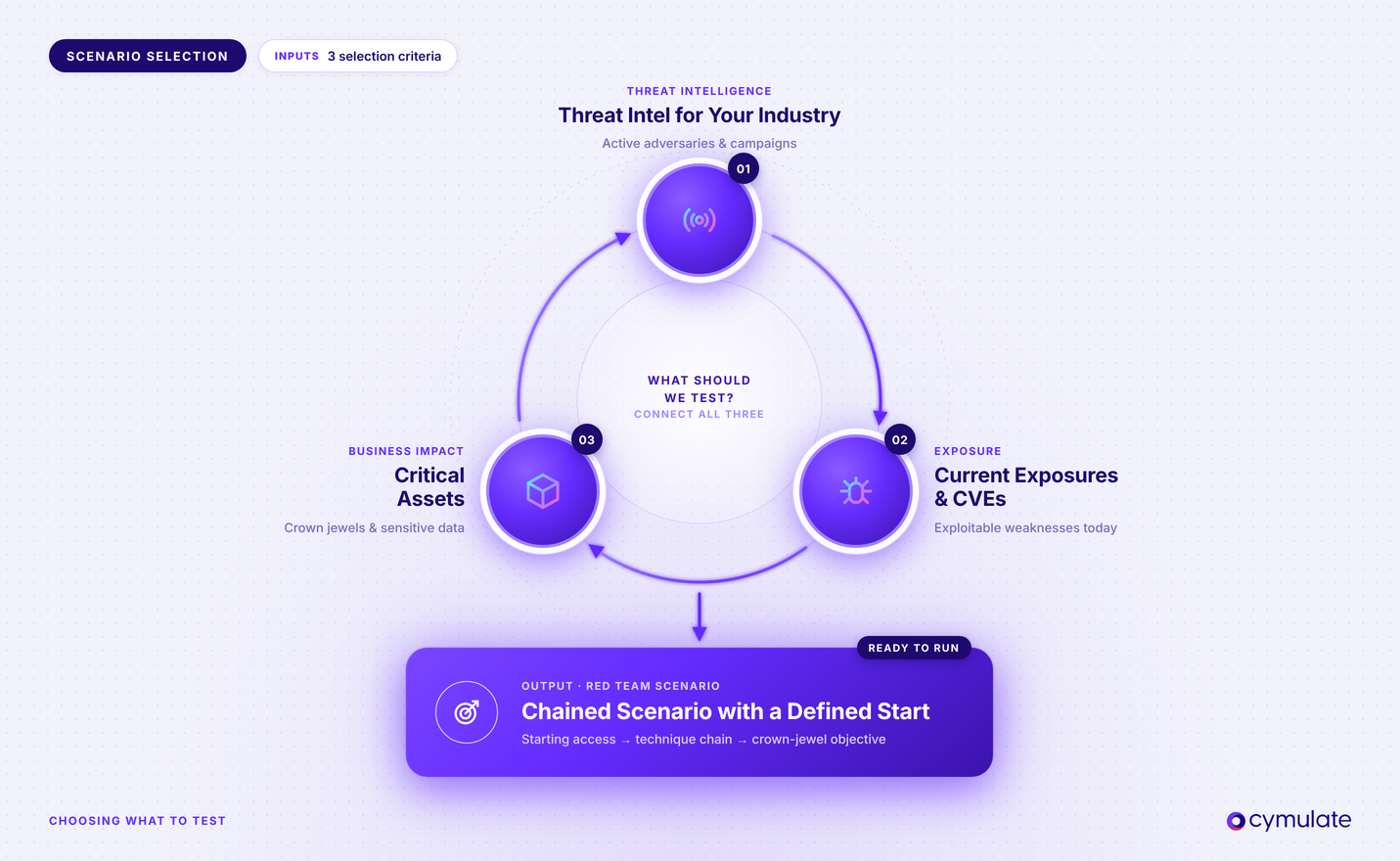
Many organizations ask how to choose the right attack scenarios for an exercise, or even how often to re-run attacks with an automated platform, like Cymulate. Start with threat intelligence for your industry, recent campaigns, current exposures and relevant Common Vulnerabilities and Exposures (CVEs). Connect these to your critical assets. Build multi-stage attack chains where appropriate.
Testing credential theft followed by unauthorized server access reveals whether several defenses work together. Record prerequisites, such as existing privileges, so results reflect a realistic starting point.
10 red team scenarios to test your defenses
These red team attack scenarios describe behavior and validation outcomes. When validating, use controlled accounts, synthetic data and designated assets to ensure no business impact. These scenarios are mapped to the MITRE ATT&CK Enterprise Framework technique IDs and MITRE Adversarial Threat Landscape for Artificial-Intelligence Systems (ATLAS) identifiers for the AI-specific scenario.
| Scenario | ATT&CK tactic(s) | Key technique IDs | Primary controls tested |
| 1. Spearphishing for initial access | Initial Access, Execution | T1566.001, T1566.002, T1204, T1078 | Email gateway, web gateway and URL filtering, MFA, EDR |
| 2. Ransomware with double extortion | Exfiltration, Impact | T1567.002, T1490, T1486 | EDR, DLP, egress filtering, immutable backups |
| 3. Active Directory credential theft and Kerberoasting | Credential Access, Privilege Escalation | T1558.003, T1078.002, T1003.001 | EDR credential protection, identity threat detection, PAM, SIEM |
| 4. Lateral movement from an assumed-breach foothold | Lateral Movement, Defense Evasion | T1550.002, T1021.002, T1021.001 | Network segmentation, EDR, PAM, local admin password management |
| 5. Living-off-the-land and fileless execution | Execution, Defense Evasion | T1059.001, T1218 | EDR behavioral detection, application control, PowerShell logging |
| 6. Command-and-control beaconing and tunneling | Command and Control | T1071.001, T1071.004, T1572 | NGFW, secure web gateway, DNS security, NDR |
| 7. Data exfiltration over web and alternative protocols | Exfiltration | T1567.002, T1048 | DLP, secure web gateway, firewall egress rules, CASB |
| 8. Cloud identity takeover through help desk social engineering | Initial Access, Credential Access, Persistence | T1566.004, T1621, T1078.004, T1098 | Help desk verification, conditional access, phishing-resistant MFA |
| 9. Web application exploitation | Initial Access, Persistence | T1190, T1505.003 | WAF, API security, application logging |
| 10. Prompt injection against AI applications and agents | MITRE ATLAS (AI-specific) | AML.T0051 | AI guardrails, input and output filtering, agent tool restrictions |
1. Spearphishing for initial access
Phishing was the initial access vector in about one in six breaches (16%) in the 2026 Verizon DBIR.
Attacker goal: Run code on an endpoint or capture credentials.
How it unfolds: A malicious attachment (T1566.001) or link (T1566.002) leads user executing (T1204). A credential harvesting variant sends the user to a fake sign-in page to steal credentials or session tokens to obtain a valid account (T1078).
Controls tested: Email gateway, web gateway, URL filtering, MFA and EDR.
What good looks like: The gateway blocks delivery or the click, EDR prevents execution, phishing-resistant MFA stops account takeover, the SIEM raises actionable alerts and, ideally, the user reports the malicious email.
2. Ransomware with double extortion
Ransomware appeared in 48% of breaches in the 2026 Verizon DBIR.
Attacker goal: Steal data, encrypt systems and block recovery to pressure the victim into paying.
How it unfolds: Starting from an established foothold, the attacker exfiltrates data to cloud storage (T1567.002), deletes shadow copies and backups ( T1490), then encrypts files (T1486). Run destructive steps only against disposable assets and test files.
Controls tested: EDR, DLP, egress filtering, immutable backups and recovery processes.
What good looks like: Controls flag the data theft before encryption starts, EDR blocks shadow copy deletion and mass encryption, responders isolate the host and a restore test confirms backups are intact.
3. Active Directory credential theft and Kerberoasting
Credential abuse appears in 39% of breaches, according to the 2026 Verizon DBIR.
Attacker goal: Obtain credentials that grant broader access in Active Directory.
How it unfolds: Any authenticated domain user can request service tickets for kerberoasting (T1558.003), crack them offline and sign in as the service account ( T1078.002). Then, attempts to dump credentials utilizing LSASS (T1003.001).
Controls tested: EDR credential protection, identity and privileged access management policies, identity threat detection, service account configuration and SIEM correlation and alerting.
What good looks like: EDR blocks LSASS access, identity tools enforce conditional access policies and alert on unusual service ticket requests, strong and rotating managed service account passwords resist cracking and least privilege limits what a cracked account can reach.
4. Lateral movement from an assumed-breach foothold
The average eCrime breakout time fell to 29 minutes in the CrowdStrike 2026 Global Threat Report.
Attacker goal: Move from a compromised workstation to high-value servers.
How it unfolds: The attacker authenticates with stolen NTLM hashes using pash the hash (T1550.002), then interacts with a remote network share using SMB (T1021.002) or connects to a remote system over Remote Desktop Protocol (T1021.001) to expand access and move laterally.
Controls tested: Network segmentation, EDR, SIEM, privileged access management and local administrator password management.
What good looks like: Segmentation blocks unauthorized connections, and unique, rotating local admin passwords prevent credential reuse. Alerts tie together the source workstation, account and destination so responders can contain the foothold before it reaches the target server.
5. Living-off-the-land and fileless execution
82% of detections in 2025 were malware-free, according to the CrowdStrike 2026 Global Threat Report.
Attacker goal: Abuse trusted, built-in tools to run commands while avoiding file based detection.
How it unfolds: The attacker runs code in memory through PowerShell (T1059.001), then launches payloads through signed, trusted Windows binaries (T1218) to bypass application control and signature-based defenses.
Controls tested: EDR behavioral detection, application control, PowerShell script block logging and SIEM detection rules and alerts.
What good looks like: Endpoint controls detect suspicious parent-child processes, encoded scripts and proxy execution without a malware file. Analysts get the full command line to tell attacks apart from admin activity.
6. Command-and-control beaconing and tunneling
Attackers went undetected for a median of 14 days in 2025, according to Mandiant M-Trends 2026.
Attacker goal: Maintain a covert command-and-control (C2) channel to a compromised host.
How it unfolds: The attacker establishes command-and-control over HTTPS (T1071.001) or DNS (T1071.004) and uses protocol tunneling (T1572) to hide that traffic within protocols the network already allows.
Controls tested: Next-generation firewall, secure web gateway, DNS security and network detection and response.
What good looks like: Controls block known bad and newly registered destinations, detect periodic beacons and DNS tunneling and alert the name of the source endpoint and process. Responders cut the channel while preserving evidence.
7. Data exfiltration over web and alternative protocols
97% of incidents involve data exfiltration, according to the BlackFog Q2 2026 report.
Attacker goal: Move sensitive data outside the organization.
How it unfolds: The attacker uploads stolen data to cloud storage ( T1567.002) or moves it out over non-web protocols such as DNS, FTP or SMTP (T1048).
Controls tested: DLP, secure web gateway, firewall egress rules and cloud access security broker (CASB).
What good looks like: Controls block and/or alert on synthetic sensitive data across every tested channel, and analysts can see the source, destination and policy to stop further transfers.
8. Cloud identity takeover through help desk social engineering
Voice phishing caused 23% of cloud-related intrusions, according to Mandiant M-Trends 2026.
Attacker goal: Take over a cloud administrator identity using tactics associated with groups such as Scattered Spider.
How it unfolds: The attacker calls the help desk posing as an employee to reset the password and MFA (T1566.004), then bombards users with MFA push notifications (T1621). Once user accepts, the attacker then signs in via the valid account (T1078.004) and adds credentials or roles to maintain access (T1098).
Controls tested: Help desk identity verification, identity provider policies, conditional access, phishing-resistant MFA and cloud detection rules.
What good looks like: Verification policies prevent the fraudulent reset, number matching or phishing-resistant MFA defeats push fatigue, behavioral analytics flag risky sign-ins, alerts fire on MFA changes and new privileges and responders revoke active sessions.
9. Web application exploitation
Vulnerability exploitation was the top initial access vector at 31% in the 2026 Verizon DBIR.
Attacker goal: Compromise an internet-facing application and establish a foothold.
How it unfolds: The attacker exploits an injection flaw or other weakness on a public-facing application (T1190), then plants a web shell on the server (T1505.003) to keep persistent access.
Controls tested: Web application firewall (WAF), API security, application logging and server monitoring.
What good looks like: Malicious requests fail and produce correlated WAF and application evidence. An HTTP error alone does not prove the WAF blocked the request or that exploitation failed.
10. Prompt injection against AI applications and agents
Prompt injection ranks first in the OWASP Top 10 for LLM Applications (LLM01:2025).
Attacker goal: Make an AI application reveal protected data or take an unauthorized action.
How it unfolds: The attacker injects malicious prompts into the LLM Prompt Injection (AML.T0051) either directly or by hiding instructions in documents, emails or web pages the application retrieves, to make the model leak data or misuse its connected tools.
Controls tested: AI guardrails, input and output filtering, retrieval permissions, agent tool restrictions and application monitoring.
What good looks like: The application flags or rejects injection attempts, retrieval respects user permissions and tool permissions are enforced outside the model, so a manipulated response cannot trigger unauthorized actions.
How to validate prevention, detection and response for each scenario
Use a four-step loop to turn attack behavior into evidence:
- Run the scenario. Record the tested assets, accounts, actions and timestamps.
- Record each result. Note which actions were prevented, detected, only logged or missed, and whether alerts and automated response playbooks fired. Confirm that alerts reach the intended queue.
- Tune the defenses. Correct missing telemetry, detection rules, permissions or control settings, and review response playbooks.
- Re-run the scenario. Repeat the relevant actions and confirm that the change closes the gap. Then decide how often to retest this attack.
How Cymulate automates red teaming
Cymulate allows security teams to run automated red team attack scenarios against the latest threats with an agentic cyber defense engineering closed loop: Prove, Prioritize and Adapt.
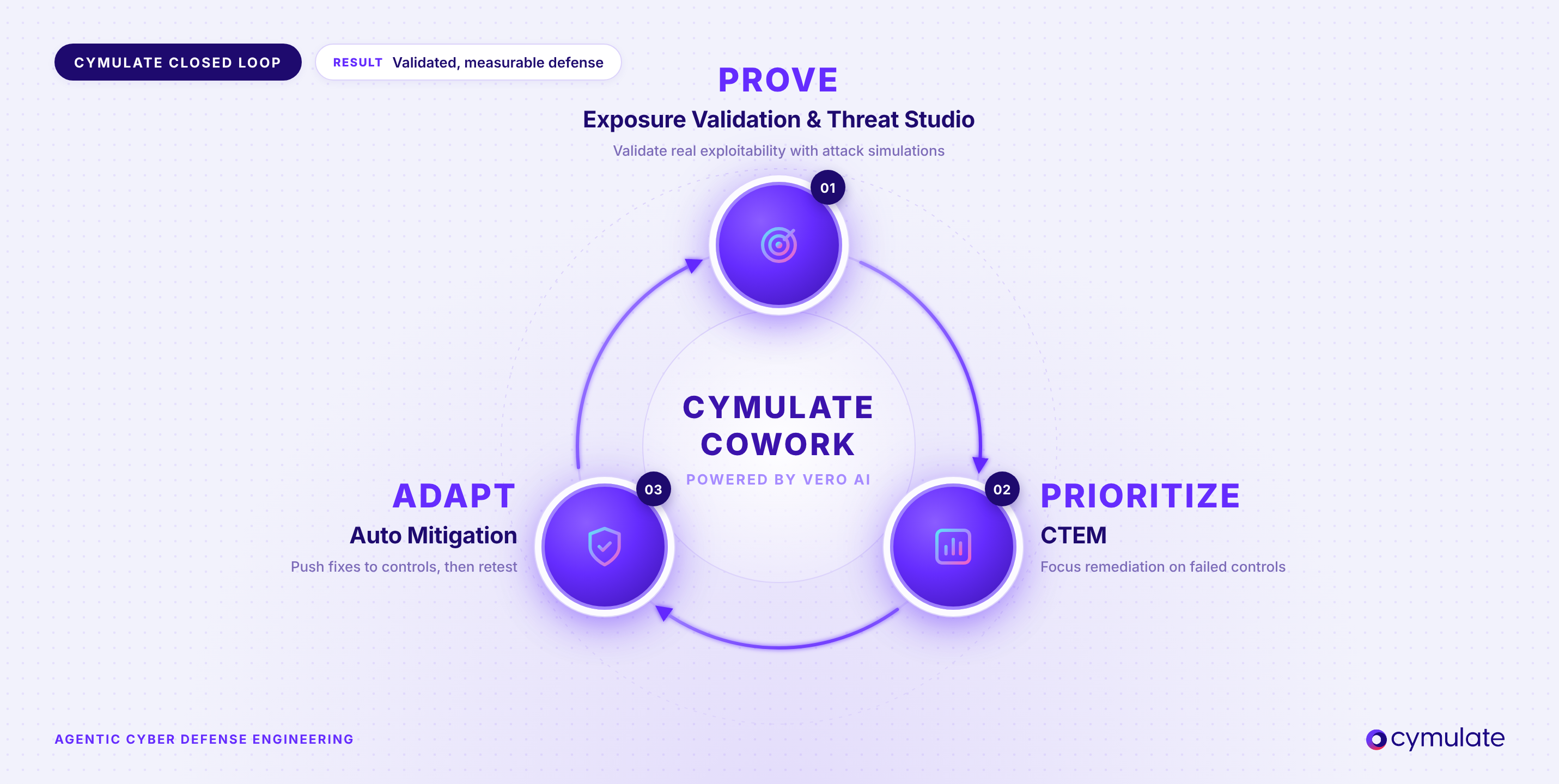
Prove. Cymulate Exposure Validation has the largest attack scenario library, with more than 100,000 threat assessments and new simulations added within 24 hours of major Cybersecurity and Infrastructure Security Agency (CISA) advisories. It makes automated exposure validation practical for security teams of any size. For advanced red teaming scenarios and exercises, Cymulate Threat Studio provides a workbench to upload and modify files, URLs, payloads and scripts, chain actions into multi-stage attacks and save reusable templates.
Prioritize. With Cymulate CTEM, the platform integrates with vulnerability management tools to go beyond exposure discovery to prove exploitability, prioritize based on impact and adapt security to mitigate the exposure. The prevention and detection results automatically map to MITRE ATT&CK heatmap, enabling security teams to quickly identify exploitable paths and focus remediation on the controls that failed
Adapt. The Cymulate Platform delivers vendor-specific mitigations for identified security gaps, including detection rules (such as Sigma and YARA) and indicators of compromise (IoCs). With more than 80 out-of-the-box security control integrations, Cymulate Auto Mitigation can push supported updates to connected controls. Re-testing the attacks verifies each fix, closes the risk-to-fix gap and gives you the confidence and evidence you need.
As noted at the start of this blog, the latest model is agentic cyber defense engineering. Cymulate delivers it with Cymulate Cowork, powered by Vero AI, which uses AI agents to adapt to new threats, automate repeatable exposure validation workflows and coordinate action across the security ecosystem. This saves security teams hours of manual work and helps them defend at machine speed.
Ready to see how Cymulate can elevate your red team program?
Agentic cyber defense engineering automates and advances red team activities. For security teams, the result is not simply more automation. It is a continuous, evidence-driven way to improve defense while reducing the manual effort required to coordinate every step. To explore the complete operating model, download the Agentic Cyber Defense Engineering e-book. To see how Cymulate Cowork operationalizes exposure validation and mitigation use cases across your security program, schedule a demo.
Frequently asked questions
A red team scenario is a defined attack storyline used to test security defenses. It specifies an attacker objective, starting conditions, techniques and expected defensive outcomes. Teams use the results to determine whether controls block the behavior, capture the relevant logs, generate useful alerts and support an effective response.
Examples include spearphishing, ransomware with double extortion, Kerberoasting, lateral movement, living-off-the-land execution and data exfiltration. Modern scenarios also cover cloud identity takeover and prompt injection against AI applications. Choose examples that match your environment, relevant adversaries and the assets you need to protect.
Start with the asset an attacker would want, such as a domain controller, customer database or payment system, and define the attacker’s goal against it. Next, set the starting point: what access does the attacker already have: none, a standard user account or admin rights? Then link real adversary techniques into an attack chain that is plausible for your environment. Map each step to the security controls that should prevent or detect it, and define the evidence you expect each control to produce. Finally, save the scenario so your team can run it again after changes and compare results.
Example: The attacker’s goal is to steal data from a file server. A phishing email delivers a malicious link. The user clicks it and gives up their credentials. The attacker logs in with those credentials, then moves laterally toward the file server and stages data for exfiltration. At each step, you check whether the email gateway, web proxy, identity controls, EDR and SIEM blocked the activity, detected it or missed it.
Map each observable attacker action to the most specific applicable ATT&CK technique or sub-technique. For example, PowerShell execution maps to T1059.001 and Kerberoasting maps to T1558.003. Record the framework version alongside the mapping, since tactics change between releases (see our ATT&CK v19 breakdown). Use MITRE ATLAS for AI-specific behavior such as LLM prompt injection.
A scenario describes one attack storyline with a defined objective and technique chain. A red team exercise is the broader engagement that can run several scenarios to assess organizational defenses. Scenario findings provide evidence about particular attack paths and the controls expected to interrupt them.
Yes. Teams can automate supported actions, collect control telemetry and repeat scenarios after changes. Automation makes established tests easier to reproduce and compare. Practitioners still select relevant threats, assess prerequisites and interpret results, especially when scenarios involve social engineering, application-specific behavior or complex business logic. Cymulate Exposure Validation and Cymulate Threat Studio automate scenario execution and re-testing, while your team keeps control of scope and approvals.

Featured Resources
View More Resources
Cymulate for Red and Purple Teams
Automate security validation to map attack paths and execute custom attack chains, scaling offensive testing for advanced threats.

Cymulate Threat Studio
Cymulate Threat Studio enables teams to build and customize attack simulations to validate defenses.

Red Team vs Blue Team vs Purple Team in Cybersecurity
Unify Red, Blue, and Purple Teams with Breach and Attack Simulation to close security gaps and improve collaboration