

Shift Left Security
Shift Left Security Explained: A Guide for DevOps and AppSec Teams
The term “shift left” originated in software development to denote moving tasks earlier in the Software Development Lifecycle (SDLC). In testing, it meant running quality and validation checks during development rather than at the end.
By the 2000s (coined by Larry Smith in 2001), organizations began applying the idea to security: shifting security left means integrating security earlier and continuously in development.
In practice this arms developers with security tools (like SAST, DAST, dependency scanners) and knowledge so they can catch and fix vulnerabilities “as code is being written” instead of as a bolt-on later.
Shift Left Security Testing
Shift-left security testing brings automated scans and checks into the build pipeline and development process. Instead of waiting for a QA phase or pre-release audit, security tests run as part of coding, code review and continuous integration. Common testing methods include static and dynamic analysis as well as specialized scans for dependencies, configurations and secrets.
For example, Static Application Security Testing (SAST) tools analyze source code at rest to find coding flaws and vulnerable libraries.
By integrating SAST into pull requests or CI builds, developers get immediate feedback on security issues as they write code. Software Composition Analysis (SCA) tools similarly examine open-source components and their licenses, flagging known vulnerabilities early in development.
At the same time, Dynamic Application Security Testing (DAST) scans running applications for issues like SQL injection or misconfigurations. In a shift-left context, DAST can be automated against staging or test environments to catch flaws before release.
The table below summarizes popular shift-left testing methods, their typical use cases, and limitations:
| Testing Method | Best Use Case | Limitations |
| Static Analysis (SAST) | Early code review; detects code-level flaws and insecure patterns in source code. | Can produce false positives; lacks runtime context; needs access to source. |
| Dynamic Analysis (DAST) | Testing running applications (web apps, APIs) for runtime vulnerabilities such as injection, auth issues. | Requires a running environment; cannot see code logic; slower test cycles. |
| Interactive Analysis (IAST) | QA-phase testing with instrumented apps; combines static and dynamic to pinpoint real issues. | Requires integrated testing environment; limited by test coverage; can impact performance. |
| Dependency Scanning (SCA) | Checking open-source libraries and packages for known CVEs and license issues early. | Only finds known vulnerabilities in dependencies; may miss new or custom issues. |
| IaC/Container Scanning | Validating infrastructure code and container images before deployment for misconfigurations and image vulnerabilities. | Must support specific IaC formats; environment drift possible after scanning. |
| Manual Penetration Testing | In-depth security review by experts, usually late-stage or in production environments. | Time-consuming, costly, and infrequent; not practical for constant use. |
Each method plays a role in a shift-left strategy. Automated scans (SAST, SCA, IaC) catch many routine issues quickly, while DAST and IAST cover runtime behavior before launch. Importantly, shift-left testing is not all or nothing: it complements traditional measures by handling what can be automated early on.
Shift Left Security Best Practices
Implementing shift-left security effectively requires more than just tools — it demands a change in culture, clear processes and constant collaboration between development, security, and operations teams.
1. Define Security Policies from the Start
The first step is to establish clear security policies and requirements at the beginning of every project. Formal guidelines at project kickoff ensure all stakeholders understand the security objectives. For example, policies might mandate compliance with specific frameworks (like OWASP or NIST) or require the use of certain secure coding practices.
As Snyk emphasizes, “Security policies are a good first step.” They establish boundaries before development even begins. Once defined, these policies allow teams to model secure behavior early and customize security scans to match expectations.
2. Embed Security Tools into Development Workflows
To truly shift security left, tools must be integrated seamlessly into everyday development tasks. That means:
- Implementing security scans directly in IDEs.
- Running automated checks on each commit or pull request.
- Incorporating tools into CI/CD pipelines for continuous feedback.
Developers should receive immediate, actionable alerts when issues arise. If a vulnerability is flagged during a pull request, it should be resolved before merging. CI tools can even block builds automatically when critical issues are found, maintaining both momentum and quality.
This proactive automation, as Fortinet notes, helps avoid bottlenecks by allowing security and development to move forward in parallel.
3. Prioritize Developer Experience and Collaboration
Effective shift-left security isn't about overwhelming developers with raw scan data — it's about empowering them. Tools must be developer-friendly, integrate smoothly (e.g., IDE linters, GitHub alerts) and reduce false positives to avoid alert fatigue.
Equally important is collaboration. Security and QA teams should work closely with developers. For example, having security professionals participate in design reviews can help catch logical flaws before they become costly bugs.
Cymulate highlights that an “impediment-free” mindset is essential. Developers need the right tools and guidance, not a heavier burden. Shared responsibility and clear communication foster a stronger, security-focused culture.
4. Ensure Continuous Visibility and Feedback
Visibility is key to maintaining secure development practices. All teams — developers, security engineers and operations — should have access to dashboards and reports that track relevant metrics, such as:
- Number of vulnerabilities found and fixed.
- Time to resolution.
- Percentage of code scanned.
- Risk severity trends over time.
With transparent data, teams can respond quickly to threats and measure their progress toward more secure software delivery.
5. Measure, Improve, Repeat
Shift-left security isn’t a one-time initiative — it’s an ongoing, iterative process. Like other DevOps practices, it should be data-driven and continuously refined. Track your KPIs and adjust your approach over time to improve efficiency and security outcomes.
Metrics to monitor include:
- Coverage rates (e.g., what percent of code is scanned?).
- Time-to-fix vulnerabilities.
- Number of critical issues per release.
- Developer adoption of secure coding practices.
With regular feedback and iteration, your organization can build a truly resilient, security-first development process.
Shift Left Security Tools and Technologies
A robust shift-left strategy relies on the right tools. There is a broad ecosystem of DevSecOps tools designed for early-stage security testing. Key categories include:
- Static Code Analysis (SAST) tools: SAST tools include Checkmarx, SonarQube and GitHub CodeQL. These scan source code or binaries during development or build to catch vulnerabilities and coding errors. They enforce secure coding standards automatically.
- Software Composition Analysis (SCA) tools: SCA tools include Snyk, Black Duck and OWASP Dependency-Check. These inspect software dependencies (open-source libraries, modules) for known vulnerabilities and outdated components. They often integrate with package managers to block risky libraries.
- Dependency/Package Scanners: Many container and application build tools (like npm audit and Maven OWASP plugin) provide similar functionality to flag CVEs in dependencies at build time.
- Container Image Scanners: These tools such as Trivy, Clair and Anchore, scan Docker/OCI images before deployment to identify embedded vulnerabilities or secrets. Used in CI to ensure only patched images are promoted.
- Infrastructure as Code (IaC) Scanners: Scanners such as Terraform Validate, Checkov and tfsec analyze IaC templates (Terraform, CloudFormation, Kubernetes manifests) in the repo, finding misconfigurations or compliance issues before provisioning.
- Secrets Detection tools: GitGuardian and GitLeaks monitor repositories and CI runs for hardcoded credentials, API keys and other secrets, preventing accidental exposures.
- Fuzzing and Mutation Testing: Tools like AFL or proprietary fuzzers can be integrated into pipelines to uncover unusual flaws in code (though often used later in QA).
- Interactive Testing (IAST) and Runtime Application Security (RASP) tools: These tools include Contrast Security and Seeker. These can run alongside functional tests to detect vulnerabilities in executed code paths.
Many of these tools offer APIs and CI plugins to hook into GitHub Actions, GitLab CI, Jenkins, Azure DevOps, etc., enabling automated scans on each code change. The goal is “security testing as code” – versioning security rules and using code to enforce security, much like unit tests.
Below is a table summarizing common categories of shift-left security tools:
| Tool Category | Key Features | Example Tools |
| Static Analysis (SAST) | Examines source code or compiled code for vulnerabilities and weak patterns. Integration at commit or build time. | Checkmarx, SonarQube, CodeQL |
| Dependency Scanning (SCA) | Identifies known CVEs and license issues in software components and libraries. Suggests patches or updates. | Snyk, OWASP Dependency-Check, WhiteSource |
| Container Image Scanning | Scans container images for embedded vulnerabilities and config issues before deployment. | Trivy, Clair, Anchore |
| IaC Security Scanning | Validates IaC templates (Terraform, CloudFormation, YAML) against security best practices. | Checkov, tfsec, KICS |
| Secrets Detection | Detects hardcoded credentials (API keys, passwords) in code and config. | GitGuardian, GitLeaks |
| Interactive/Runtime Testing | Monitors applications in test environments, combining static and dynamic methods. Reduces false positives. | Contrast Security, Seeker |
| Manual/Pen Testing (ASTaaS) | External teams perform deep security audits including pen tests and API testing. | Red Team services, ASTaaS providers |
Each technology plays a role. For instance, a codebase might have SAST and SCA scans triggered on each pull request, IaC scans on every infrastructure commit and DAST runs nightly on a staging server. Together, they form a security mesh throughout the SDLC.
Key Considerations for Implementing a Shift-Left Approach
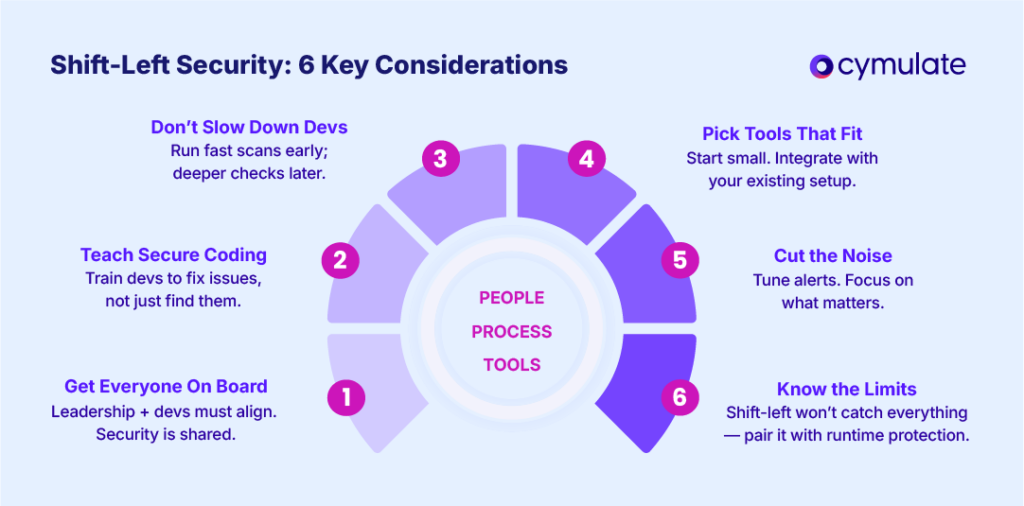
Shifting security left is as much about culture and collaboration as it is about tooling. To succeed, organizations must align people, processes and technology thoughtfully.
1. Cultural and Organizational Alignment
Leadership support is essential. Without buy-in from both executives and developers, shift-left efforts often fail.
Security should be viewed as a shared responsibility, not a blocker. Development and security teams must define common goals and integrate their workflows to reduce friction and ensure accountability.
2. Upskill Developers with Security Knowledge
Automated tools can detect issues, but developers need the skills to understand and resolve them. Basic security training, coding standards and documented best practices empower engineers to write secure code from the start.
The more developers understand secure design principles, the more effective shift-left becomes.
3. Balance Speed and Thoroughness
Security checks can slow down pipelines if not tuned properly. Prioritize fast, essential scans early in the CI process and push heavier analyses (like full static or dynamic scans) to nightly runs or release gates. This balance ensures quick feedback without compromising coverage or velocity.
4. Choose and Integrate Tools Strategically
Integrating security tools into CI/CD and source control isn’t trivial. Start small — with one or two tools — and grow from there. Ensure tools work well with existing platforms like GitHub or Jira to reduce context switching and keep teams efficient. Maintenance and rule tuning are ongoing responsibilities.
5. Reduce Alert Fatigue
Default scanner settings often overwhelm developers with low-priority issues. Tune rules and severity thresholds so only meaningful alerts surface.
Establish triage processes (e.g., false positive tagging or ticketing integration) to make alerts actionable and avoid burnout.
6. Acknowledge Limitations and Augment Accordingly
Shift-left practices catch many issues early — especially known coding errors and misconfigurations — but they won’t catch everything. Issues that emerge only in runtime or novel attack vectors require complementary shift-right strategies like monitoring and incident response.
A shift-left approach requires thoughtful implementation. It’s not about installing a toolset and forgetting it; rather, it involves iterating on processes, measuring results and continuously improving.
Limitations of Shift-Left Security
Shift-left security is a critical strategy for catching vulnerabilities early in the software development lifecycle. However, it's not a silver bullet. Understanding its limitations is key to designing a balanced and resilient security posture.
Runtime Blind Spots
While shift-left excels at detecting known vulnerabilities and coding errors, it doesn't inherently prevent insecure designs or human errors. As one expert puts it, shift-left is “fantastic at catching issues early,” but still depends on developers writing secure code in the first place.
Misses Runtime and Environmental Issues
Many vulnerabilities only emerge under real-world conditions: production configurations, user data flows, or specific load scenarios. Static analysis and pre-deployment testing can’t always simulate these complexities. Threats like supply-chain attacks or race conditions often go undetected until runtime.
This is where shift-right security becomes critical. Runtime monitoring, intrusion detection, and post-deployment validation are essential to catch what shift-left cannot. The need for a holistic approach that includes post-production testing remains.
No Tool Covers Everything
Each category of shift-left tooling has its blind spots. For instance:
- SAST (Static Application Security Testing) can miss issues that only manifest with specific input data.
- DAST (Dynamic Application Security Testing) might not reach deeply embedded logic flaws or complex edge cases.
Moreover, tools often struggle with advanced scenarios like cryptographic implementation errors or nuanced business logic bugs. A layered toolset — chosen and prioritized based on risk — is necessary to approach comprehensive coverage.
Alert Fatigue from False Positives
Shift-left tools, especially when used with default settings, frequently produce false positives. Developers may end up chasing non-issues, which leads to frustration and reduced trust in the security process.
To avoid this, rule sets must be curated carefully and tools must be fine-tuned for your specific codebase and context. Supporting technologies such as machine-learning-based triage can help reduce noise, but human oversight remains important.
Potential Workflow Disruptions
When shift-left tools are enforced rigidly, they can unintentionally slow down development. For example, if every minor warning blocks a build, teams might seek ways to bypass the checks altogether — undermining the entire purpose of early testing.
Cymulate’s Role in a Shift-Left Strategy
Cymulate strengthens shift-left security by adding continuous, real-world validation throughout the software development lifecycle and into production.
Unlike traditional one-time scans, Cymulate simulates actual attacker behavior to test whether security controls are functioning as intended.
Through automated Breach & Attack Simulations (BAS) and threat assessments, it mimics adversary tactics across applications, cloud workloads, containers, and networks - helping teams verify that defenses like WAFs, EDR and CSPM rules are truly effective.
Key capabilities include:
- Continuous validation of security controls pre- and post-deployment
- Real-world simulations based on MITRE ATT&CK, OWASP Top 10, ransomware and more
- Coverage across environments including web apps, cloud, and containers
Cymulate’s exposure management platform consolidates vulnerability data, scan results, and control coverage to deliver clear, prioritized insights. Rather than overwhelming teams with low-priority alerts, it highlights exploitable risks and quantifies overall resilience. This helps developers and SecOps teams focus on the most critical issues first.
- Reduces alert fatigue by filtering out noise
- Prioritizes fixes based on real-world exploitability
- Aligns findings with threat intelligence to guide remediation
Cymulate also focuses on cloud-native security with its Cloud Security Validation modules. These tools automatically test infrastructure like VMs, IAM policies, network controls and Kubernetes by simulating real attack scenarios. This ensures cloud environments remain secure as organizations scale their operations.
Featured Resources
View More Resources
Proactive, AI-Powered SIEM Rule Validation and Detection Engineering
Save time and resources by automating the most critical tasks in modern SecOps
How Continuous Security Validation Prevents Undetected Security Drift
American visionary computer scientist, Alan Curtis Kay, once said, "The best way to predict the future is to invent it."

Bank Stays Ahead of Attackers with Cymulate Security Validation
This team uses Cymulate to assess emerging threats, streamline response and justify investments