

Cloud Security Assessment Tools: How to Find the Right Fit

Too many cloud tools, not enough clarity. Sound familiar?
Between CSPM, CNAPP, CIEM, BAS and a dozen more acronyms, security teams end up with overlap, blind spots and mounting costs. However, all this does not mean cloud risk goes away.
It’s important to understand cloud security assessment tools and whether they can reduce your risk (and not just add dashboards).
In this guide, you’ll get plain-language definitions, a breakdown of how cloud security assessment tools work, the different categories to consider, a practical selection checklist and an at-a-glance FAQ.
Key highlights:
- Cloud security assessment is the process of identifying misconfigurations, vulnerabilities and risky permissions across multi-cloud environments, with fixes mapped to frameworks like CIS and NIST.
- Cloud security assessment tools include CSPM, CIEM, CWPP, CNAPP, SaaS posture, provider-native suites and advisory services, chosen based on coverage, IAM depth, validation and compliance needs.
- The Cymulate Exposure Management Platform goes further by continuously validating defenses, mapping attack paths and enabling evidence-based remediation aligned to CTEM.
What is cloud security assessment?
Cloud security assessment is a systematic evaluation of your cloud accounts, services, identities, data paths and controls to identify misconfigurations, exploitable vulnerabilities and policy gaps and to prioritize fixes by business risk. It spans IaaS, PaaS and often SaaS. It also accounts for shared responsibility models across AWS, Azure and Google Cloud.
Cloud security assessment is different from simple configuration scanning. It correlates findings across identity (IAM/CIEM), network exposure, encryption and key management, data access and workload hardening. A cloud security assessment also maps issues to frameworks like CIS Benchmarks and NIST to produce clear remediation paths and track posture improvement over time.
Benefits of automated cloud security validation
Unlike manual spot checks or static config scans, automated cloud security validation runs continuously, integrates with your CI/CD and ticketing stack and produces evidence instead of assumptions. Here are the key benefits of automated cloud security validation:
- Reduce detection time: Automation runs targeted tests in minutes, revealing exploitable paths (not just theoretical misconfigurations). That accelerates mean time to resolution (MTTR) and reduces “analysis paralysis.” IBM’s Cost of Data Breach report notes breach identification/containment mean time is 241 days on average; shortening this window directly cuts costs.
- Minimize manual effort: Pre-built test suites aligned to ATT&CK map to cloud-native services (IAM, KMS, S3/Blob/GCS, serverless, containers) so engineers spend time fixing, not crafting tests.
- Maintain continuous assurance of cloud security: Nightly/weekly runs become a guardrail for drift, IaC changes and new services. This is essential in a multi-cloud environment, where 89% of enterprises operate. (Flexera)
- Cut false positives and alert fatigue: Validated findings slash false positives. Instead of hundreds of “might be risky” alerts, teams get a short list of confirmed exploitable paths with step-by-step remediation.
- Support CTEM programs: Validation underpins Continuous threat exposure management (CTEM), closing the loop from discovery → validation → prioritized remediation → verification.
- Improve incident readiness: Running “controlled rehearsals” exposes detection gaps in your cloud security monitoring solutions before attackers do.
How does a cloud security assessment tool work?
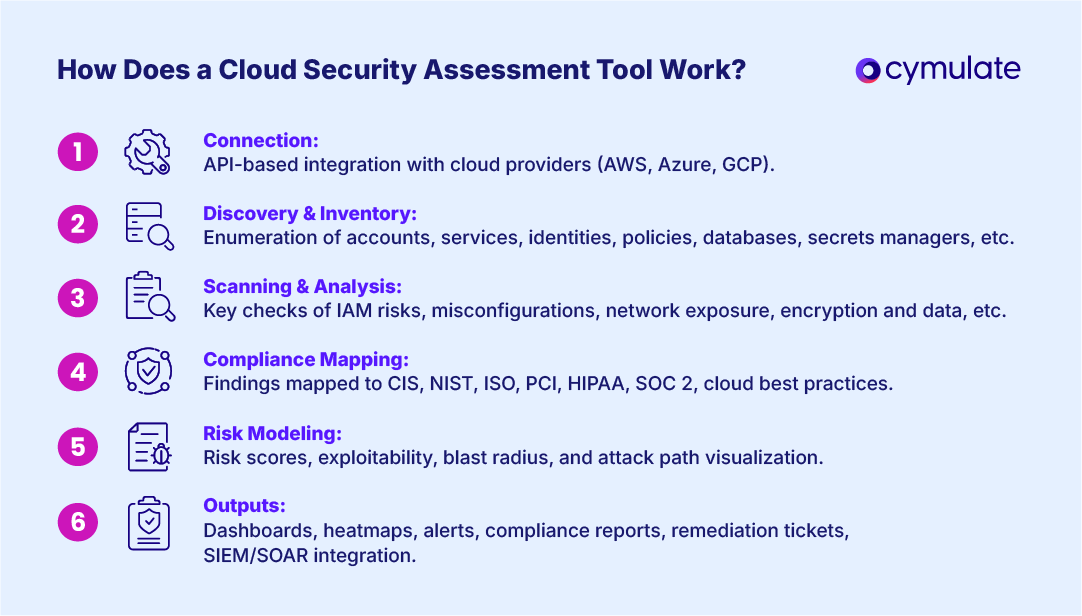
From connection to reporting, here’s the common flow of a cloud security assessment:
Step 1: API-based connections. Tools use read-only API integration (and sometimes lightweight agents) to connect to AWS organizations, Azure subscriptions and GCP projects/folders.
Step 2: Discovery and inventory. Enumerate accounts, services, identities, roles, policies, storage, databases, network egress, serverless, containers and secrets managers.
Step 3: Vulnerability scanning and analysis. These tools scan for areas that could pose cyber risk for an organization, including these areas:
- Misconfigurations: Public buckets, wide-open security groups, unmanaged keys, weak TLS, overly permissive roles.
- IAM risk: Toxic permission combos, dormant high-privilege roles, cross-account trust abuse (CIEM).
- Network exposure: Routable paths from the internet to crown-jewel assets; egress risks.
- Encryption and data: Unencrypted storage, exposed secrets, data residency violations.
- Workload posture: Container/image vulnerabilities, runtime drifts, serverless permissions.
Step 4: Compliance mapping. Map findings to CIS Benchmarks, NIST 800-53/CSF, ISO 27001, PCI DSS, HIPAA, SOC 2 and cloud provider best practices.
Step 5: Risk modeling. Adopt a risk-based vulnerability management approach and assign risk scores by exploitability and blast radius; visualize attack paths across identities, networks and data stores.
Step 6: Outputs. Dynamic dashboards, risk heatmaps, policy drift alerts, compliance reports and ticket-ready remediation steps. Many integrate with SIEM/SOAR to enrich detections from your cloud security monitoring solutions.
Types of cloud security assessment tools
If you’re considering a tool for cloud security assessments, there is no shortage of options. Here are options you can consider and what they might be able to provide your organization:
- CSPM (Cloud Security Posture Management): Continuous config/compliance monitoring for IaaS/PaaS services.
- CIEM (Cloud Infrastructure Entitlement Management): Deep IAM/permissions analysis to reduce over-privilege and lateral-movement risk.
- CWPP (Cloud Workload Protection Platform): Image scanning, runtime protection for VMs/containers/serverless.
- CNAPP (Cloud-Native Application Protection Platform): Unified platform combining CSPM + CIEM + CWPP + IaC scanning and more.
- CASB / SSPM (SaaS posture): Assess and enforce security for SaaS apps and their data sharing.
- Cloud provider–native suites: AWS Security Hub, Microsoft Defender for Cloud and Google Security Command Center. These are foundation controls that third-party tools often enrich.
- Cloud assessment and advisory services: Outside experts to run a cloud security review or program-level cloud security risk assessment, which is useful for baselines.
| Cloud security assessment category | Primary focus | Typical outcomes | Common integrations |
| CSPM | Config and compliance | Misconfig fix lists, compliance reports | Ticketing, SIEM, IaC |
| CIEM | Identity and permissions | Least-privilege plans, toxic combo reduction | IAM, SSO, PAM |
| CWPP | Workload/runtime | Vulnerability and runtime hardening | Container registries, EDR/XDR |
| CNAPP | Unified cloud app protection | Cross-layer risk views, dev-to-prod guardrails | CI/CD, IaC, SIEM |
| Provider-native | Baseline guardrails | Quick wins, account hygiene | Native logging/monitoring |
| Advisory services | Security strategy and audits | Roadmaps, program design | Exec reporting, GRC tools |
How to conduct a cloud security assessment
The key to conducting these assessments is consistency; keep it lean and repeatable. Here is what you need to know:
- Define scope: Accounts/subscriptions, regions, data classifications and critical apps (include cloud application security assessment needs).
- Connect via API: Read-only access for discovery; decide where agents add value.
- Run baseline scans: Misconfigs, IAM, network, encryption, secrets, workload posture.
- Map to frameworks: CIS, NIST, ISO, PCI/HIPAA as needed.
- Prioritize by exploitability and blast radius: Not by alert volume.
- Validate cloud security controls: Use safe simulations to prove detections/blocks across key attack paths.
- Remediate and verify: Automate fixes where safe; re-run to confirm.
- Operationalize: Integrate with SIEM/SOAR/ticketing; schedule continuous runs for cloud security automation.
How to choose the right cloud security assessment tool
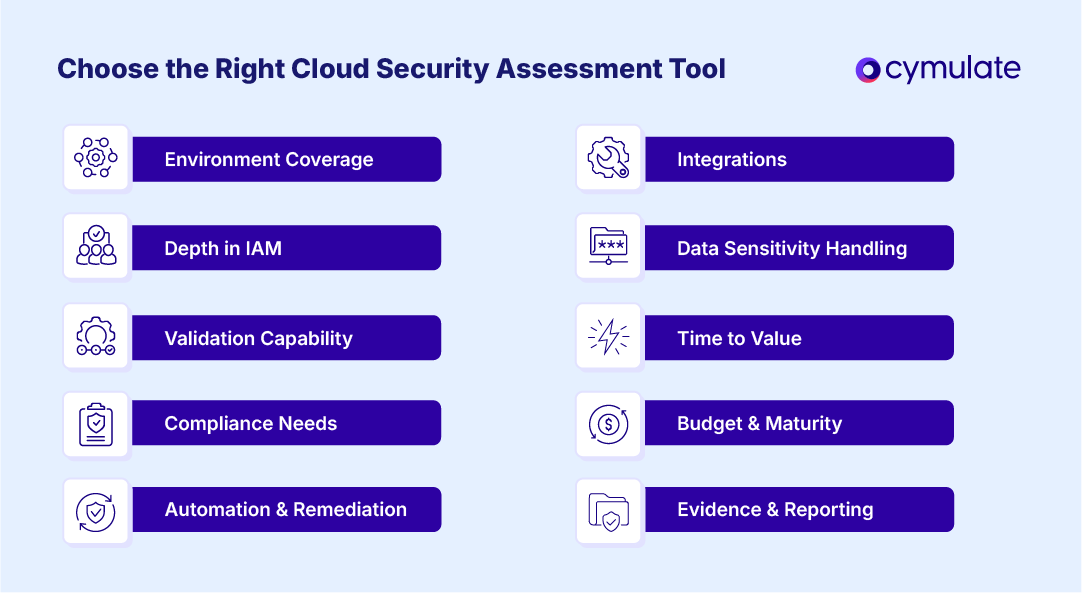
There’s no single winner. The fit for a cloud security assessment tool depends on your stack, team and goals. Use this checklist:
- Environment coverage: Single cloud vs multi/hybrid; support for your PaaS/services and Kubernetes flavor.
- Depth in IAM: Rich experience for CIEM analytics, toxic combo detection, cross-account trust analysis.
- Validation capability: Built-in cloud security validation to prove detections; support for attack path discovery and safe simulations.
- Compliance needs: HIPAA, PCI DSS, ISO 27001, SOC 2; evidence exports for auditors. This is a clear focus for Cloud Security Posture Management (CSPM).
- Automation and remediation: Auto-fixes or guided wizards; drift prevention; robust APIs.
- Integrations: SIEM/SOAR, EDR/XDR, ITSM, CSP-native logs and findings.
- Data sensitivity handling: Evidence redaction, data residency and least-privilege connectors.
- Time to value: Agentless start; quick baselines; clear ROI reporting.
- Budget and maturity: Start with CSPM if you’re early; add validation/CNAPP as you scale.
- Evidence and reporting: Risk scoring, business impact mapping, exec-ready views.
For context on identity-driven risk, the Cloud Security Alliance found most cloud breaches tie back to insecure identities, making CIEM depth and validation especially critical.
Cymulate: Exposure management beyond cloud security assessment
Choosing the right cloud security assessment solution comes down to two realities: multi-cloud complexity is here to stay, and security posture alone isn't enough. Security teams need to continuously discover, validate, prioritize, and remediate exposures to demonstrate measurable risk reduction.
The Cymulate Exposure Validation Platform goes beyond posture assessments by continuously validating security controls against real-world attack techniques and providing actionable insights to reduce cyber risk.
The platform includes:
- Cloud security validation to continuously test cloud security controls using safe, production-ready attack emulation.
- Exposure Management (CTEM) to identify, validate, prioritize, and remediate security exposures based on exploitability and business impact.
- Threat Validation to continuously assess preventive and detective controls against emerging threats and adversary techniques.
- Actionable remediation guidance to help security teams optimize controls, strengthen detections, and verify remediation through continuous validation.
By combining continuous exposure validation, threat validation, and exposure management across cloud, identity, endpoint, network, and web environments, Cymulate helps security teams align with Continuous Threat Exposure Management (CTEM), reduce alert fatigue, and demonstrate measurable improvements in security posture.
With Cymulate, security teams can:
Prove the Threat
Safely emulate the latest attacker techniques to validate how security controls prevent, detect, and respond across cloud, on-premises, hybrid, and application environments.
Prioritize What Matters Most
Validate which exposures are truly exploitable and prioritize remediation based on exploitability, business context, security control effectiveness, and threat intelligence.
Strengthen Security Controls
Improve cyber resilience with actionable recommendations, security control optimization, custom detection content, and continuous validation that verifies remediation efforts.
Enable Cross-Team Collaboration
Provide security operations, vulnerability management, engineering, and security leadership with a common view of validated exposures and prioritized remediation, supporting an effective Continuous Threat Exposure Management (CTEM) program.
Request a demo to see how Cymulate can help you beyond cloud security validation.
Frequently asked questions
The differences between cloud security assessments and traditional penetration tests come down to scope, frequency, and outcomes. Cloud security assessments emphasize continuous posture, identity, and control validation across cloud services, while penetration tests focus on point-in-time exploitation within a defined scope.
- Scope
- Cloud security assessment: Broad coverage across cloud accounts, services, IAM, data paths, and workloads.
- Traditional penetration test: Narrow focus on predefined targets, applications, or environments.
- Frequency
- Cloud security assessment: Performed continuously or on a regular schedule (such as monthly or quarterly).
- Traditional penetration test: Conducted at a specific point in time, typically annually or for a particular project or event.
- Methods
- Cloud security assessment: Uses API discovery, configuration and IAM analysis, and safe security validation or attack simulations.
- Traditional penetration test: Relies on manual exploitation techniques and custom attack paths to identify vulnerabilities.
- Output
- Cloud security assessment: Produces risk scores, compliance mapping, validated security controls, and remediation recommendations or tickets.
- Traditional penetration test: Delivers proof-of-concept exploits and prioritized vulnerability findings.
- Goal
- Cloud security assessment: Reduce exploitable attack paths and continuously validate that security controls are working.
- Traditional penetration test: Demonstrate exploitable vulnerabilities under controlled testing conditions.
- Best fit
- Cloud security assessment: Organizations with ongoing cloud security programs and Continuous Threat Exposure Management (CTEM) initiatives.
- Traditional penetration test: Compliance-driven security assessments or targeted testing of specific systems or applications.
To maximize the benefits of cloud security assessment:
- Scope your critical data and business processes
- Align tool outputs to measurable outcomes (blocked attack paths, reduced mean time to remediate, fewer critical misconfigs)
- Automate evidence capture, push fixes directly to owners via ticketing and rerun validation after every change
- Treat assessments as a continuous guardrail for IaC and DevOps, not an annual event to do occasionally
- Tie KPIs to breach likelihood and impact (for example, reducing public exposure of sensitive storage)
Cloud security vulnerabilities demand a deliberate, step-by-step approach to assess:
- Asset discovery and inventory: Enumerate accounts, services, identities, storage, and internet-exposed endpoints
- Scan smart: Use a cloud security assessment tool to detect misconfigurations, exposed services, weak encryption and IAM risks across AWS/Azure/GCP.
- Prioritize by exploitability and impact: Weigh reachable data paths, privilege escalation potential and blast radius as opposed to not raw alert counts.
- Validate exposures: Use safe, simulate exploitation (exfil from a misconfigured bucket, assume-role abuse) with Cymulate to verify that detections fire and controls block.
- Assign owners and remediate: Route tickets with clear “how-to-fix” steps; enable auto-remediation where low risk.
- Re-check and document: Re-run scans and validation post-fix to confirm closure and update compliance evidence.
- Monitor continuously: Feed validated signals into your cloud security monitoring solutions and SOAR playbooks to prevent regressions.

Featured Resources
View More Resources
Why You Need Cloud Security Validation
Discover the top four reasons why cloud security validation is essential to protect your business.

The Future of Cloud Security: 7 Key Trends
Protect multi-cloud and serverless workloads with smarter, adaptive defenses.