How to Optimize SIEM Logging for Actionable Threat Detection
A modern Security Operations Center (SOC) relies on a Security Information and Event Management (SIEM) system as a central component. This system gathers telemetry data from the entire organization to identify potential threats and inform incident response efforts.
Effective SIEM logging is the foundation of threat detection. It ensures that alerts are based on rich, relevant data – not just sheer volume. Simply dumping every log into a SIEM can overwhelm analysts and hide real threats. As one expert puts it, “less is more. The more data you have, the worse the SIEM performs…”.
Instead, security teams should focus on high-value logs: start with core use cases and gradually expand. For example, one guide recommends ingesting only 5–15% of total log volume initially, then adding sources as needed.
What Is SIEM Logging?
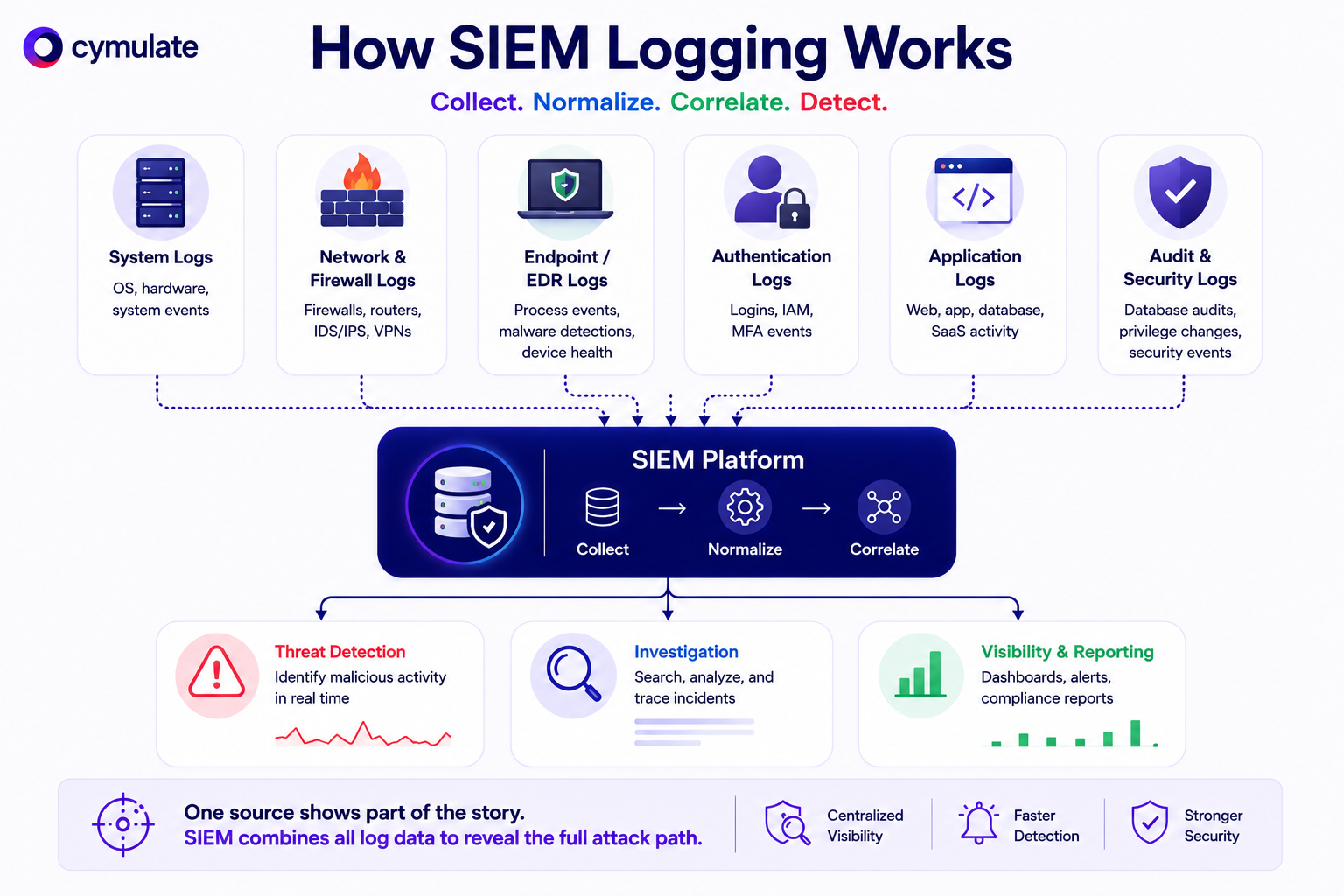
SIEM logging is the process of collecting, normalizing, and correlating log data from across the IT environment into a centralized platform.
Think of a SIEM as a giant aggregator: it ingests logs from host systems, applications, network and security devices (firewalls, IDS/IPS, VPNs, etc.) and normalizes them into a consistent schema. Normalization (e.g. converting timestamps, event types, and fields to a standard format) is crucial for comparing events from different sources and correlating related activities.
Common log types include:
System logs: Operating system and hardware events (e.g. Windows Event Logs, Linux syslog). These record startups, crashes, system errors, and kernel activity.
Firewall and network device logs: Traffic and access records from firewalls, routers, switches, VPN gateways, IDS/IPS, etc. These logs track allowed/blocked connections and network flows.
Endpoint/EDR logs: Data from endpoint protection or EDR tools (e.g. CrowdStrike, Microsoft Defender), including process launches, malware detections,and device health.
Authentication and IAM logs: User login events from directories and identity providers (e.g. Active Directory, Okta, Azure AD) and multi-factor auth systems. These reveal who is accessing what, when.
Application logs: Custom app or server logs (web servers, databases, SaaS apps, etc.) containing user activity, errors, transactions, and user-generated events.
Audit/security logs: Specialized logs like database audits, privilege escalation logs, or security software (antivirus, web gateway) events.
Each log type contributes different context. A firewall log shows incoming traffic patterns, while an AD log shows user credential activity. Together, the SIEM can paint a complete picture of an incident.
Key Log Sources Every SIEM Needs
A mature SIEM relies on broad coverage across the environment. Key sources include:
Endpoint Detection and Response (EDR)
EDR tools like generate alerts and logs for malware, exploit attempts or suspicious process activity. EDR logs (and alerts) help catch threats on endpoints that might not generate traditional network logs.
Identity/IAM Systems
Active Directory and IAM platforms log all user authentications and privilege changes. These are critical for tracking credential abuse, lateral movement and insider threats.
Network/Security Devices
Firewalls, VPN concentrators, switches, routers, IDS/IPS and proxy servers produce high-fidelity logs of network traffic and configurations. These logs reveal port scans, unusual protocol use, or misconfigurations. (For example, firewall logs detail allowed and blocked connections, helping detect malicious traffic).
Cloud Services
Modern infrastructures run in AWS, Azure, GCP or hybrid clouds. Ingest logs like AWS CloudTrail, VPC Flow Logs, Azure Activity Logs, or Kubernetes audit logs to monitor cloud resource changes, API calls, and container activity. These are often high priority for detecting cloud-native attacks.
Threat Intelligence Feeds
While not traditional “system logs,” integrating threat intel (malicious IPs/domains, file hashes, MITRE ATT&CK catalogs) into the SIEM enriches logs with context. For example, labeling an IP from a firewall log as a known C2 server adds immediate severity.
Third-Party Applications
Logs from email gateways (Office 365, Gmail), collaboration tools (Slack, Teams), and other enterprise SaaS platforms should also be ingested, as these often contain phishing or data exfiltration clues.
Each organization’s exact list depends on use cases, but a general rule is to prioritize sources that feed your key detection scenarios. (This is known as log source prioritization or log ingestion planning.)
If ransomware is a concern, make sure EDR, file server and backup logs are in the SIEM first. As Cymulate’s Splunk integration blog explains, verifying that critical logs (EDR alerts, network data, etc.) are properly ingested by the SIEM is step one in tuning detections.
Common SIEM Logging Challenges
Real-world SIEM deployments often struggle with log management. Common pitfalls include:
Overlogging (Data Overload)
Feeding every possible log (all firewall traffic, verbose system logs, detailed DNS or DHCP logs, etc.) can overwhelm the SIEM.
Too much noise makes it hard to spot real threats. Data overload also spikes storage and processing costs. Solution: Prioritize and filter. Focus on logs that support defined use cases. As one practitioner notes, SIEMs should augment analysis, not hinder it – “put simply: less is more”.
Coverage Gaps
Missing key log sources leaves blind spots. For example, if Active Directory or cloud logs aren’t collected, you can’t detect credential misuse or cloud attacks.
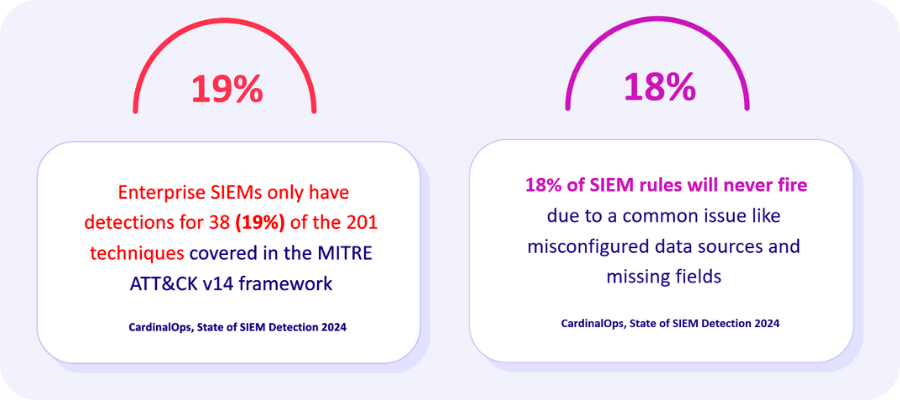
It’s essential to review the environment and ask: “What am I not seeing?” Use frameworks like MITRE ATT&CK to verify coverage of common tactics and ensure no critical systems are ignored.
Lack of Context
Raw logs often lack the context analysts need. A plain DNS query or IP hit is ambiguous without who made it, what device it came from, or reputation info.
Many SIEM implementations focus on pure collection and fail to “enrich” logs with context. Modern SIEMs or integrations should add context (user info, geolocation, threat scores) so alerts are meaningful.
Cost and Performance Tradeoffs
High-volume logs are expensive to store and slow to analyze. Indexing every event can degrade SIEM performance. Organizations must balance log granularity with resource use. For example, one survey advises logging only security-critical fields at 100% while sampling or aggregating very high-volume events.
Alert Fatigue
When too many low-fidelity alerts fire, analysts tune out. Excess false positives can come from unrefined correlation rules or unfiltered logs. Continuous tuning and applying threat intelligence can help filter out routine noise.
Prioritize the most critical gaps (e.g. missing endpoint logs or a rule that hasn’t fired) and plan systematic improvements. For example, implementing log pipeline monitoring and automated alerts for ingestion failures can catch issues early.
Best Practices for Effective SIEM Logging
To turn SIEM logging from a firehose into a fine-tuned security control, follow these best practices:
Define Clear Use Cases: Before collecting logs, determine what threats or behaviors you need to detect. Map each use case (e.g. “suspicious logins from new geolocations”) to the log sources and events that would reveal it. This use-case-driven approach ensures you prioritize the right data.
Prioritize High-Value Sources: Focus first on sources that yield the most actionable signals. Critical servers, domain controllers, EDR alerts, and firewalls might be top of the list. As one SIEM best-practice guide notes, “carefully select which data sources to monitor… focusing on those most relevant to your organization’s security needs”.
Selective Log Collection: Don’t default to “collect everything.” Use filters and exclusions. For example, drop noisy but low-value events (routine system audits, high-volume debug logs) unless specifically needed. Always log high-risk events at 100% (e.g. failed admin logins), but sample or throttle trivial ones.
Normalize Data for Correlation: Use a standard schema (e.g. CEF, syslog with structured fields, or the SIEM’s own normalization engine) so that events from different sources can be easily correlated. Consistent formatting (timestamps, IP addresses, user IDs) is crucial for reliable detection rules.
Validate Ingestion and Parsing: Implement monitoring (or use a tool) to ensure logs are actually arriving and parsed correctly. For example, the Cymulate Splunk integration can query the SIEM after each attack simulation to verify that the test events were ingested. Any gaps (e.g. expected event not found) flag a misconfiguration or broken log feed.
Monitor SIEM Health: Keep an eye on storage usage, indexing delays, and agent deployment. Automated health checks (disk space alarms, agent heartbeat alerts) ensure your SIEM doesn’t silently fall behind.
Your SIEM will ingest and process the right logs, in a way that turns raw data into timely, manageable alerts. A logging strategy built on intent and tuning is far more effective than a shotgun approach.
The Role of SIEM Logging in Threat Detection
Logs are the raw material for detection. Every rule, alert, or analytic job depends on having the right data at the right time. In a well-tuned SIEM, log events are immediately visible to the detection engine. When an alert fires, it’s because multiple log entries matched a pattern or threshold. For example, a SIEM may detect lateral movement by correlating a Windows login log with an EDR process spawn.
Importantly, complete and timely ingestion of logs is critical. Missing logs mean blind spots. If an endpoint detection event never reached the SIEM, any rule based on it can never fire. As a result, most SIEM best practices emphasize log ingestion monitoring – ensuring data pipelines are healthy so that no incident goes unrecorded.
Once logs are in the SIEM, the system applies analytics and correlation algorithms to identify incidents. For example, event correlation might link multiple low-level alerts (e.g. a port scan alert and a weak-password login) into a single high-level incident. Modern SIEMs often use logic and context from logs (user IDs, device names, geolocation) to enrich alerts.
Validating SIEM Logs and Detection Rules
Collecting logs is only the first step. Security teams must regularly validate that their SIEM is actually detecting the threats it should.
This is where SIEM validation comes in. Modern platforms (sometimes called Breach & Attack Simulation, or BAS) simulate attacks against the environment and verify SIEM detection. This approach provides continuous coverage assessment: it answers questions like “Are our controls catching this MITRE technique?” or “Is this new rule working?”
The Cymulate SIEM validation solution illustrates this. It uses automated attack simulations mapped to MITRE ATT&CK tactics, ensuring every detection scenario is tested. Its AI-powered validation agent guides teams through creating impactful tests – from industry best-practice attacks to custom, complex chains. After each simulation, Cymulate correlates the simulated activity with SIEM alerts via API integration, instantly showing any missed detections.
Key aspects of an effective SIEM validation process include:
Attack Coverage: Pre-built templates and custom scenarios cover a wide range of threats (ransomware, cloud exploits, privilege escalation, etc.). MITRE ATT&CK heatmaps highlight exactly which techniques have been tested and which still have gaps.
Log Visibility Checks: Validation ensures not only that attacks are detected, but that the logs are being collected. Cymulate can flag when expected events never appear in the SIEM logs – indicating a collection or parsing issue.
Detection Rule Testing: New or existing SIEM rules can be exercised against live scenarios. For example, RBI Bank’s team uses Cymulate to generate real attack events and immediately verify that their SIEM rules fire correctly. This live feedback loop helps detection engineers fine-tune rules on the spot.
Sigma/Rule Generation: When gaps are found, Cymulate suggests or auto-generates Sigma rules (a SIEM-neutral detection rule language) for the missing behaviors. These rules can be applied to the SIEM to cover new IOCs or techniques.
How Cymulate Helps Optimize SIEM Performance
Modern SIEM platforms are only as effective as the quality of the data they receive and the detections they generate. Cymulate helps security teams continuously validate SIEM effectiveness by testing real-world attack scenarios against their security controls, detections, and response workflows.
Detection Validation
Cymulate integrates with leading SIEM and security analytics platforms to validate that attack activity is properly logged, correlated, and detected. By executing safe attack simulations, security teams can verify that critical telemetry reaches the SIEM and generates the expected alerts.
Detection Engineering
Cymulate helps security teams identify detection gaps by validating existing use cases against real-world attack techniques. Detailed findings provide visibility into missed detections, control weaknesses, and opportunities to strengthen detection coverage.
The platform also supports detection engineering efforts through actionable recommendations and detection content that help teams improve security monitoring and alert quality.
Exposure Validation
Cymulate continuously validates security controls against current attack techniques to ensure that detection and response capabilities remain effective as threats evolve. This enables organizations to move beyond assumptions and measure actual security effectiveness.
Automated Mitigation
When exposures are validated, Cymulate can help accelerate remediation efforts by providing actionable mitigation guidance and supporting workflows that strengthen security controls and reduce risk.
Continuous Security Validation for the SOC
Security teams can continuously test, validate, remediate, and retest their security controls and detections to ensure that SIEM investments deliver measurable security outcomes.
By continuously validating detections against real-world attack scenarios, organizations can improve detection coverage, reduce alert blind spots, and increase confidence in their security operations.
Using the Cymulate integrations, we launch assessments to see if our tools detect them. If they don’t, Cymulate provides mitigation guidance and Sigma rules, and we easily rerun the assessments to validate remediation.
– Karl Ward, Head of Cybersecurity, LV=
Final Thoughts
Effective SIEM programs require more than collecting logs. Organizations must continuously validate that critical events are captured, detections are firing as expected, and security teams can respond effectively.
Cymulate helps organizations continuously validate their SIEM, detections, and security controls, ensuring that logging and monitoring investments translate into measurable security outcomes.